
It's 2 a.m. A customer has a harness in the cart, but checkout stops at one question: “Will this fit my 60 lb golden retriever?” Another shopper is comparing kibble for a puppy with a chicken allergy. A third wants to change food tonight without upsetting the dog's stomach. If your Shopify store answers with a contact form, those purchases may wait until morning, or disappear entirely.
A useful pet store chatbot template handles these high-intent questions with clear wording, sensible follow-ups, and an immediate human handoff when the risk is too high. The scripts below give you copyable starting points for sizing, allergies, food transitions, order support, recommendations, and recovery. They also show where a static flow stops being reliable and a catalog-aware assistant needs to read the actual product page.
Why Pet Stores Need a Chatbot Template That Actually Sells
Pet shoppers rarely need a long sales pitch. They need confidence that the product is safe, suitable, and likely to work for their animal. A vague answer about harness sizing can create a return. A careless answer about ingredients can create a much more serious problem. A delayed response can lose the sale to a store that answers first.
That makes a chatbot more than a support bubble. It can act as a digital sales associate that asks for the missing context, recommends a relevant SKU, and knows when not to guess. Industry roundups for 2026 place ecommerce chatbot adoption at around 80% or higher, with about 83% of ecommerce companies reporting bot use somewhere in the customer journey, as summarized by ecommerce chatbot adoption and conversion data. The same summary reports typical conversion lifts of roughly 15% to 30% and cart-recovery improvements in the 15% to 35% range, compared with 3% to 5% for email recovery, so the commercial case extends beyond answering FAQs.
Practical rule: Build the first flow around the question that can prevent a return, not the question that's easiest to automate.
The three strongest starting points for a pet store are fit by breed and measurement, dietary or allergy screening, and food-transition guidance. They carry purchase intent because the customer is already evaluating a product, but uncertainty is blocking checkout. A greeting that asks, “Are you shopping for a dog or cat?” can then collect the context needed for those deeper branches.
Static scripts work well for greetings, shipping policies, return windows, and basic order-status instructions. They break when the answer depends on an exact coat, harness, bed, or food formula. A scripted widget can't safely infer a chest girth from a breed name or decide whether a recipe contains a relevant ingredient unless its data is current and complete.
For broader chatbot planning, teams can also use a guide for marketing teams to think through intent mapping, escalation, and content governance. The important operating model is simple: templates provide the conversation shape, while catalog-aware retrieval provides the product truth.
Installing and Connecting Your Template on Shopify
Start with the connection, not the copy. A beautifully written script is still dangerous if the assistant can't access current product titles, variants, ingredients, size charts, shipping rules, and return policies.
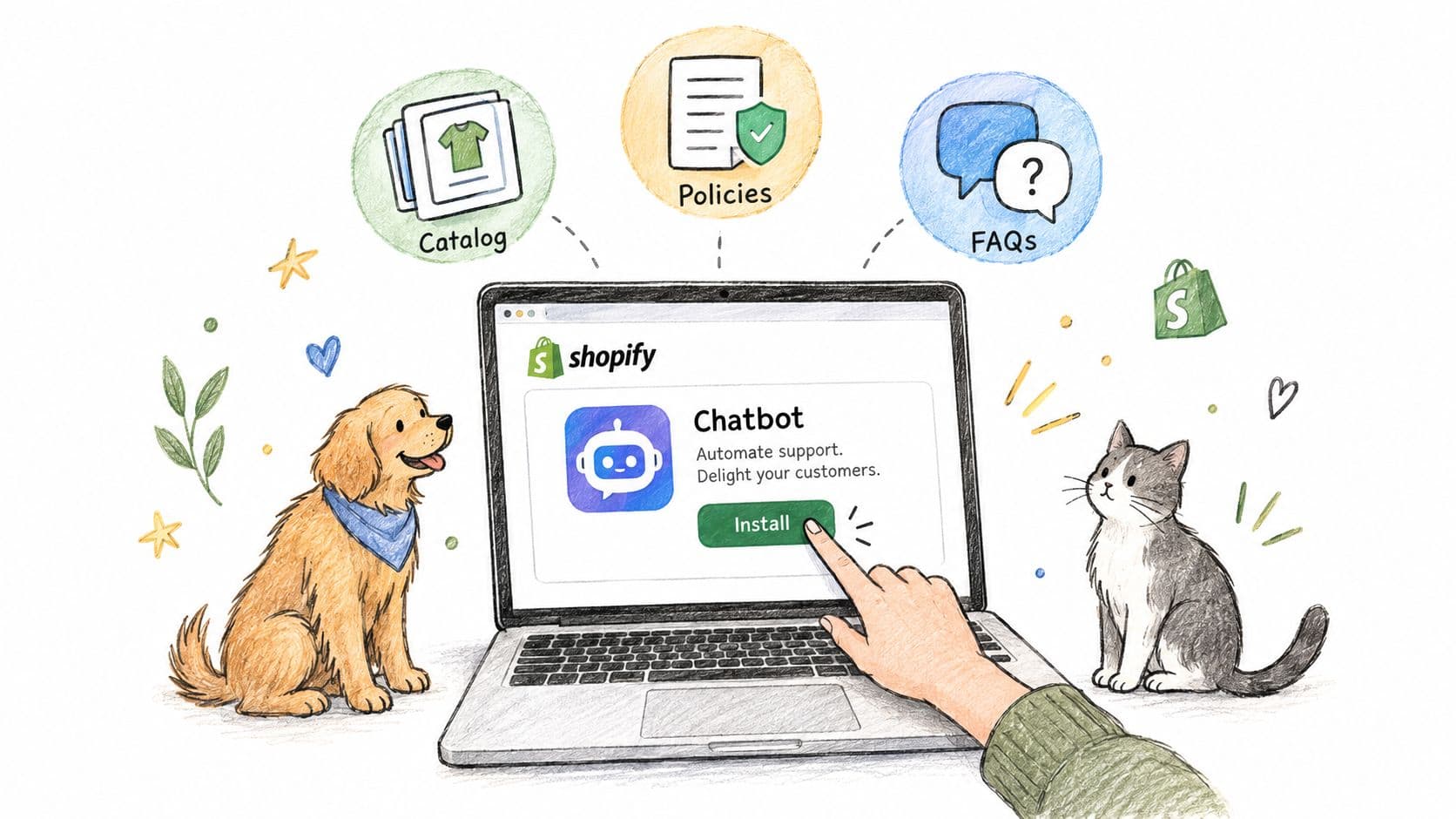
Connect the store before editing responses
Use this setup sequence:
-
Install a Shopify chatbot app. Choose the app from your Shopify admin, approve the requested permissions, and add the chat widget to the storefront theme.
-
Connect the product catalog. Confirm that the assistant can see product names, descriptions, variants, inventory status, prices, ingredient lists, feeding information, and links to the relevant product pages.
-
Add store policies and FAQs. Include delivery coverage, order tracking instructions, returns, exchanges, subscription rules, refund exceptions, and contact options. These sources should be the approved answer set for routine support.
-
Let the assistant learn the connected content. Carti describes a five-minute, no-code setup, automatic learning from catalog, policy, and FAQ content, and support in 92 languages without additional configuration. Treat that learning step as an ingestion check, not as permission to skip review.
-
Set the placement and opening message. Put the widget where mobile shoppers can reach it without covering product details. A useful greeting asks for the pet type and shopping goal instead of announcing generic assistance.
-
Enable proactive triggers selectively. Trigger help on product pages with complex sizing, food pages with ingredient questions, and checkout recovery situations. Don't interrupt every visitor with the same message.
Before customization, test the connection with exact product questions. Ask for the size range of a specific harness, the main protein in a specific food, and the return rule for a specific order type. If the answers are generic, stop and repair the data connection before adding more flows.
Shopify operators also need a feedback loop for customer-facing quality. Tools that review features for brands can complement chatbot monitoring by helping teams inspect how the wider storefront experience supports trust and conversion. For the installation mechanics, keep this Shopify chatbot setup walkthrough available while you configure the app.
Set the handoff before launch
Create a visible route to a human for medical concerns, toxic ingredients, severe allergy reactions, emotionally sensitive situations, refund exceptions, and high-value replacements. The assistant should collect the order number or product name, summarize the question, and explain that a person will review it.
The widget is ready for copy customization only after it can answer from the actual store content. At that point, scripts control tone and flow, while product-specific replies come from the connected catalog.
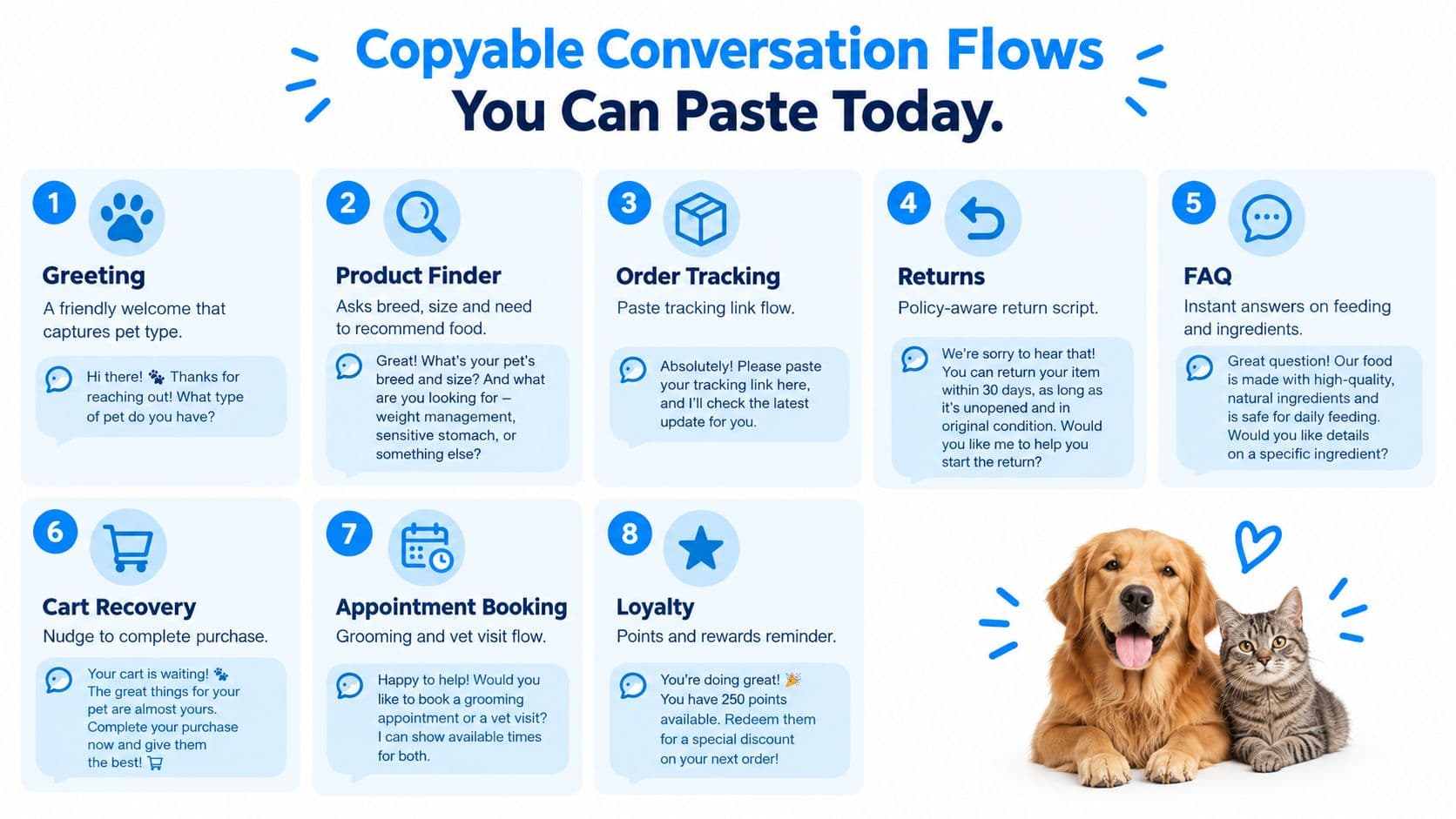
Copyable Conversation Flows You Can Paste Today
These scripts are written for direct adaptation. Replace bracketed fields with your Shopify data, and keep the escalation language intact for health-related questions.
Greeting and intent capture
Flow 1, welcome
Customer: Hi, I need help choosing something for my pet.
Bot: Happy to help. Are you shopping for a dog, cat, or another pet? What are you looking for today, food, treats, toys, walking gear, bedding, or something else?
Next step: Save pet type and shopping intent, then route to the relevant product branch.
Flow 2, product finder
Customer: I need food for my puppy.
Bot: I can narrow that down. What's your puppy's breed or expected adult size, life stage, current food, and any ingredients you're avoiding?
Next step: Show only products whose catalog data supports the stated life stage and dietary needs.
The three high-intent questions
Flow 3, harness sizing by breed and weight
Customer: Will this harness fit a 60 lb golden retriever?
Bot: Weight and breed are useful starting points, but I can't confirm fit from those details alone. Please measure your dog's chest girth at the widest point and neck circumference, then compare those measurements with the size chart for [product name]. What are the chest and neck measurements?
Customer: The chest is [measurement] and the neck is [measurement].
Bot: Based on the [product name] chart, [size] covers those measurements. Please check that the chart applies to the exact variant you selected. If you share the product link or variant, I can help compare it.
Next step: Read the exact product size chart. If the measurements fall between sizes or outside the chart, hand off to a person.
Flow 4, puppy food and chicken allergy
Customer: Is this food okay for a puppy with a chicken allergy?
Bot: I can check the listed ingredients, but I can't diagnose or manage an allergy. Does your puppy currently eat chicken, chicken fat, chicken meal, treats containing chicken, supplements, or flavored medication?
Customer: [Answer.]
Bot: The product listing shows [ingredient details]. Because allergy trials require strict exposure control, please confirm this choice with your veterinarian, especially if your puppy has reacted before. I can also connect you with our team to review the ingredient list.
Next step: Escalate medical, allergy-reaction, or uncertain ingredient questions to a human. For an elimination diet, use the strict branch described by veterinary guidance, not a casual recommendation.
Flow 5, switching to new kibble
Customer: How do I switch my dog to this kibble?
Bot: A gradual change can help. Use this 7-day transition: days 1 and 2, give 25% new food and 75% old food; days 3 and 4, use 50% new and 50% old; days 5 and 6, use 75% new and 25% old; on day 7, feed 100% new food, following the product's feeding guidance. If your dog is prone to stomach upset, Purina Institute's guidance supports replacing one-quarter of the current food with one-quarter of the new food every second day and extending the change to 10 days. The Tufts Petfoodology food-transition guidance provides the veterinary context for this approach.
Next step: Ask whether the dog has had digestive problems during previous food changes. Escalate persistent or severe symptoms rather than diagnosing.
Support, recommendations, and recovery
Flow 6, order tracking
Customer: Where is my order?
Bot: Please enter your order number or the email used at checkout. I'll look for the tracking status.
Next step: Return the live tracking link. If the shipment is delayed, missing, or marked delivered but not received, offer human support.
Flow 7, return request
Customer: I need to return this bed.
Bot: I can help check the return policy. What's your order number, and is the bed unused, opened, or damaged?
Next step: Apply the actual Shopify store policy. Don't promise a refund until eligibility is confirmed.
Flow 8, safe chew add-on
Customer: Is this chew toy safe for an aggressive chewer?
Bot: The product details describe this toy as [toughness rating or approved product detail]. Is he more of a fetcher or a tugger?
Customer: He's a tugger.
Bot: Then [matching rope toy] may fit how he plays. Would you like me to add it to your cart with the chew toy? Please supervise chewing and remove any toy that becomes damaged.
Next step: Recommend the add-on from the pet's behavior, not from a generic “customers also bought” block.
Flow 9, abandoned cart
Customer: I left a few items in my cart.
Bot: I saved your cart with [product names]. Do you want help checking fit, ingredients, delivery, or another question before you complete checkout?
Next step: Branch to the unanswered concern, then return the shopper to checkout with the original items intact.
Flow 10, human escalation
Customer: My dog ate something toxic. What should I do?
Bot: This could be urgent. I can't diagnose or provide emergency veterinary care. Please contact your veterinarian or an emergency animal clinic immediately. I'll connect you with our team for store-related help, but don't wait for a chat reply if your pet may be in danger.
Next step: Escalate immediately. Never use a product recommendation flow for toxic-ingredient, emergency, or diagnosis requests.
For more reusable support wording, compare these scripts with sample chat support conversations. The strongest flows stay short, ask one useful question at a time, and make the next action obvious.
Personalizing for Breed Size and Pet Needs Without Breaking the Script
Personalization starts with data fields, not warmer adjectives. For each product, structure information around pet type, life stage, flavor, ingredient highlights, package size, weight ranges, and usage conditions. For wearable products, store the exact size chart and the measurements it requires. Harnesses and collars commonly depend on chest girth and neck circumference, while weight is only a rough starting point, as explained in this pet sizing guidance from Purina Institute.
A golden retriever, dachshund, and French bulldog can weigh similar amounts while needing very different shapes and product proportions. “Will this fit my dachshund?” is therefore a catalog question. The assistant needs the exact coat, harness, carrier, or bed listing, plus the corresponding chart, before it can answer responsibly.
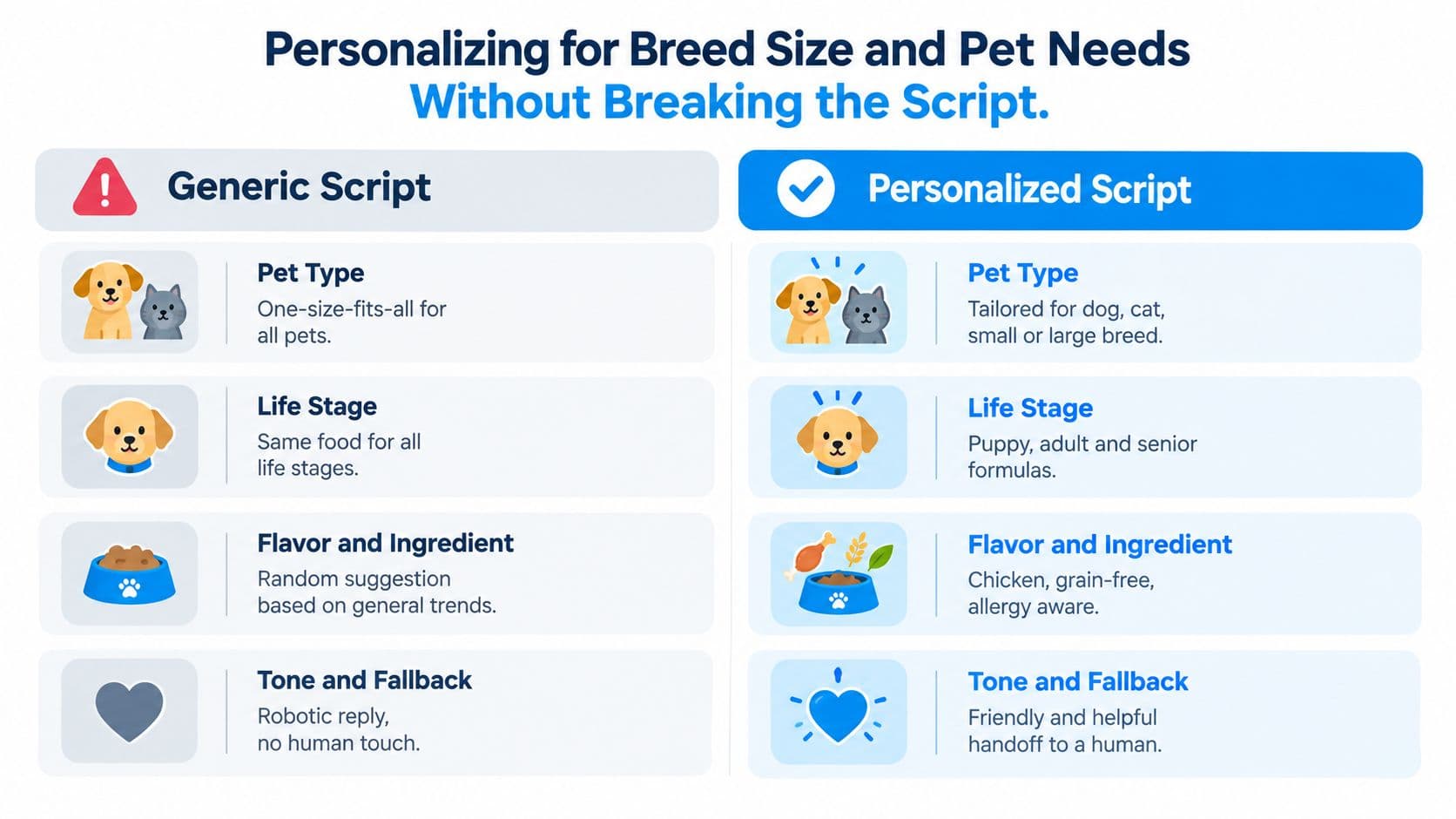
Ask about the pet, not the merchandise
The add-on flow works because it asks, “Is he more of a fetcher or a tugger?” rather than displaying “Customers also bought.” That answer supplies a real reason to recommend a rope toy, treat, or enrichment product. Owners feel understood when the assistant connects the product to the animal's behavior.
Allergy screening needs the same discipline. Ask what the pet currently eats and whether chicken, treats, supplements, table scraps, or flavored medications have been given. A strict elimination-diet trial commonly lasts 8 to 12 weeks with no other foods, treats, or flavored medications, according to this dog food allergy reference. The assistant should gather exposure details and escalate, not declare a diagnosis.
| Question Type | Use Scripted Flow | Use Catalog Aware Answer |
|---|---|---|
| Greeting or pet type | Yes, the wording is stable | Not usually needed |
| Shipping and return policy | Yes, if the policy is current | Only when the answer depends on a product or order |
| Harness, collar, coat, bed, or carrier fit | Ask for measurements and explain the process | Yes, read the exact size chart |
| Food ingredient question | Ask about allergies and current exposure | Yes, read the exact ingredient list |
| Food transition | Use the approved transition sequence | Add product-specific feeding guidance |
| Toy recommendation | Ask about play style and chewing behavior | Yes, match relevant catalog products |
| Medical, toxic, or emergency issue | Use the escalation script | No, route to a human or veterinary resource |
When the answer changes by SKU, a static script has reached its limit. That's where tools such as personalization at scale for Shopify become relevant, because the assistant can move from fixed wording toward responses grounded in the store's own product data.
Testing A/B Tweaks and KPIs That Prove Revenue Impact
A chatbot launch isn't finished when the bubble appears on the storefront. Test whether shoppers get a useful answer, whether the answer leads to a product action, and whether the bot knows when to stop.
Start with three controlled variations:
- Greeting: Compare a generic “How can I help?” with a pet-focused question that captures animal type and shopping goal.
- Recommendation prompt: Compare “Would you like a related product?” with a behavior question such as “Is your dog a fetcher or a tugger?”
- Cart recovery: Compare a broad reminder with a message that names the unresolved issue, such as fit, ingredients, or delivery.
Change one element at a time, record the audience and time window, and keep the winning wording only after checking resolution quality. An A/B testing platform such as Otter A/B for ecommerce can help organize storefront experiments, but the chatbot team still needs to inspect the conversations behind the result.
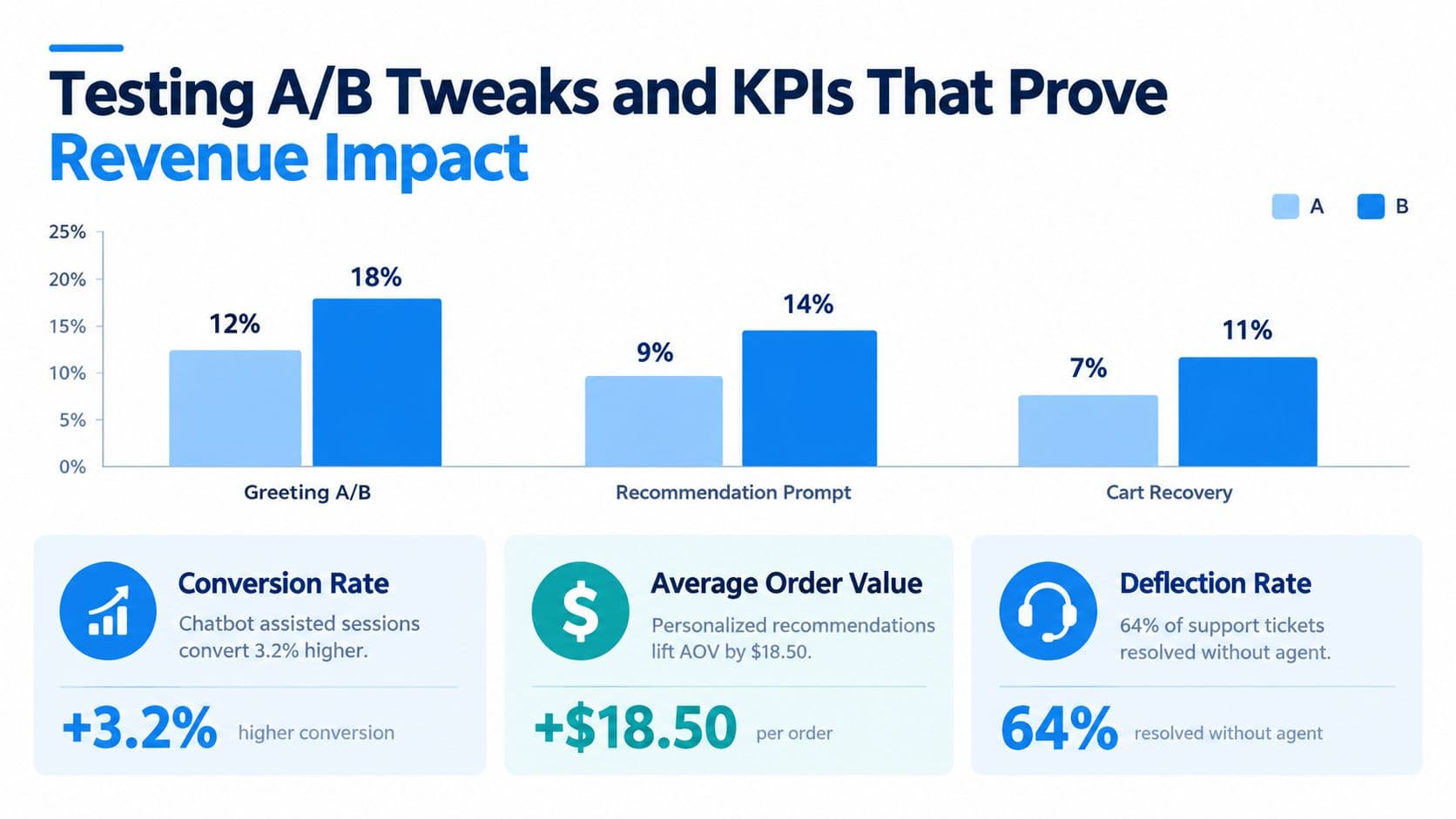
Track quality before volume
Message count is a weak success metric. Use a dashboard that separates:
- Containment: The share of eligible transactional or tier-one conversations completed without a human.
- Resolution rate: Whether the customer received a usable answer or completed the intended task.
- Human takeover: Keep mature deployments below 25%, using the benchmark guidance in chatbot KPI reporting.
- Cart recovery: Measure recovered checkouts and inspect whether the bot addressed the reason for abandonment.
- Revenue per visitor: Connect assisted sessions to orders rather than crediting every sale that touched the widget.
For well-tuned transactional and tier-one use cases, realistic containment is 70% to 85%. Broader conversational support often lands around 50% to 65%, while comparable live-chat benchmark reporting shows AI agents handling 75.3% of chats, all cited in the same KPI guidance. These figures are benchmarks, not promises. A pet store with incomplete size charts or weak escalation rules should expect poorer performance.
The publisher reports that shoppers who engage with Carti convert at roughly 3.5 times the store baseline, while Carti stores see about 20% higher revenue per visitor overall. Those figures come from the publisher's stated product context, so treat them as directional claims to validate against your own Shopify attribution. The most practical revenue signal is often smaller and easier to inspect: a transition food added to a kibble order, a rope toy added after a chew question, or a recovered checkout that needed one clear answer.
Review the Insights Dashboard for recurring questions. If shoppers repeatedly ask about the same ingredient, measurement, or delivery condition, improve the product page and feed the corrected information back into the assistant.
From Template to Catalog Aware Assistant and Next Steps
A static pet store chatbot template is the fastest way to launch a consistent greeting, policy response, order lookup, and escalation path. It gives a scripted tool something useful to say instead of leaving customers with a blank contact form.
The boundary appears when shoppers ask about a particular breed, body shape, ingredient, or variant. Those answers require the actual product's size chart, weight range, feeding information, or ingredient list. A script can ask for chest girth. It can't confirm a fit unless it can read the relevant chart.
Use the templates as your operating foundation, then graduate when your catalog creates too many branches to maintain manually. The upgrade path is straightforward:
- Connect product and policy data.
- Add strict escalation for veterinary, allergy, toxic-ingredient, emergency, and emotionally sensitive cases.
- Review unanswered questions and failed handoffs.
- Test recommendation and recovery prompts against revenue per visitor.
- Keep product pages accurate so the assistant has reliable material to retrieve.
The best pet commerce assistant isn't the one that answers everything. It answers routine questions instantly, recommends from real inventory, asks for the measurement or ingredient detail that matters, and hands off before a guess creates risk.
Carti offers a no-code Shopify chatbot that learns a store's catalog, policies, and FAQs, then supports instant answers, product suggestions, and cart-recovery conversations in 92 languages. Visit Carti to connect your pet catalog and turn these starting scripts into answers grounded in your actual size charts and ingredient lists.

Written by
Daniel AndersonFounder of Carti. 10+ years building ecommerce brands in apparel and supplements. Still runs a Shopify store and built Carti to help merchants convert more browsers into buyers.
Ready to boost your store's sales?
Install Carti in 5 minutes and let AI handle customer questions, recommend products, and close sales 24/7.
Start Free Trial14-day free trial