
Why do so many Tidio vs Shopify Inbox comparisons act like the only question is which widget has more buttons? That's the wrong frame. Shopify owners are usually choosing between a storefront sales assistant and a multichannel support inbox, and those are not the same job.
| Capability | Tidio | Shopify Inbox |
|---|---|---|
| Core role | Broader support and automation workspace | Native Shopify conversation tool |
| Channels | Chat, email, Instagram, WhatsApp, Facebook Messenger | Storefront and Shopify-native conversations |
| AI handling | AI-assisted responses and automation | AI sales associate with catalog-aware replies |
| Automation | Flows, routing, assignment, and support workflows | Simpler native workflow, with saved replies and AI options |
| Order and product context | Shopify actions, cart and order-history checks | Native Shopify data and merchant workflows |
| Best fit | Brands that need a shared inbox across channels | Stores that want a simple native starting point |
If the store needs one clean place to handle messages from different channels, Tidio belongs on the shortlist. If the store wants a native tool inside Shopify and doesn't need a broader support stack, Shopify Inbox is the simpler move.
What This Comparison Is Really About
Most merchants start by asking which app has the better feature list. That's the wrong question because the decision is about operating model, not screenshots. Shopify Inbox is a Shopify-owned communication layer built around native store data and merchant workflows, while Tidio is a broader customer-service platform that connects Shopify with other channels and website systems. Shopify's own history for Inbox also matters here, since it launched in 2019 and grew out of Shopify Ping, which began as a mobile messaging tool before evolving into storefront chat with automation and analytics features Shopify Inbox history.
The choice that actually matters
A Shopify-only brand answering sizing, shipping, and return questions on its storefront is solving a different problem from a brand that needs Instagram, Messenger, WhatsApp, and email in one queue. Inbox fits the first case because it stays close to the storefront and uses Shopify context well. Tidio fits the second because it treats customer conversations as a broader support operation.
Practical rule: if the main job is helping shoppers buy from the storefront, start with the native tool. If the main job is managing support across multiple channels, use the platform built for that.
The trap is assuming a wider feature set always wins. It doesn't. A broader system can add cost, training time, and process overhead that a smaller Shopify-only store never needed in the first place. That is why some merchants are happy with Inbox for a long time, while others outgrow it as soon as customer messages stop living only on the product page.
For a deeper look at the sales-assistant side of the market, the most relevant next read is this ecommerce AI chatbot guide.
Side-by-Side Snapshot of Both Tools
| Capability | Tidio | Shopify Inbox |
|---|---|---|
| Setup style | More configuration, more control | Native to Shopify, lighter setup |
| Conversation scope | Support-first inbox across channels | Storefront-first Shopify conversations |
| AI scope | AI responses plus automation | AI sales associate with store catalog awareness |
| Support workflow | Ticketing, assignment, and inbox management | Simple merchant workflow inside Shopify |
| Product context | Shopify product cards and order checks | Shopify catalog and merchant context |
| Best fit | Multi-channel support teams | Shopify-only stores wanting a native chat layer |
Read this table as an operating snapshot, not a feature trophy case. Tidio is stronger when the store needs a shared support workspace. Shopify Inbox is stronger when the store wants a native chat path that stays close to Shopify data and the merchant's daily workflow.
What the table leaves out on purpose
Not every capability deserves a checkmark comparison. A tool can look strong on paper and still be the wrong fit if the store's conversation volume, staffing model, or channel mix doesn't match the product. That is especially true for merchants who only want pre-purchase help on a storefront.
A native tool can be the right answer even if it looks less ambitious. Simplicity is valuable when the team is small and the questions are basic.
Tidio's Shopify integration goes beyond storefront chat into unified multi-channel handling and automation. Shopify Inbox, by contrast, is best understood as an online-store connection layer. That difference shows up later when merchants ask whether they need one inbox for every channel or just a better way to answer shoppers where they already are.
For a closer product-level review of the Tidio stack, the most relevant companion page is this Tidio Lyro review.
Feature Deep Dive Across Chat, AI, and Automation
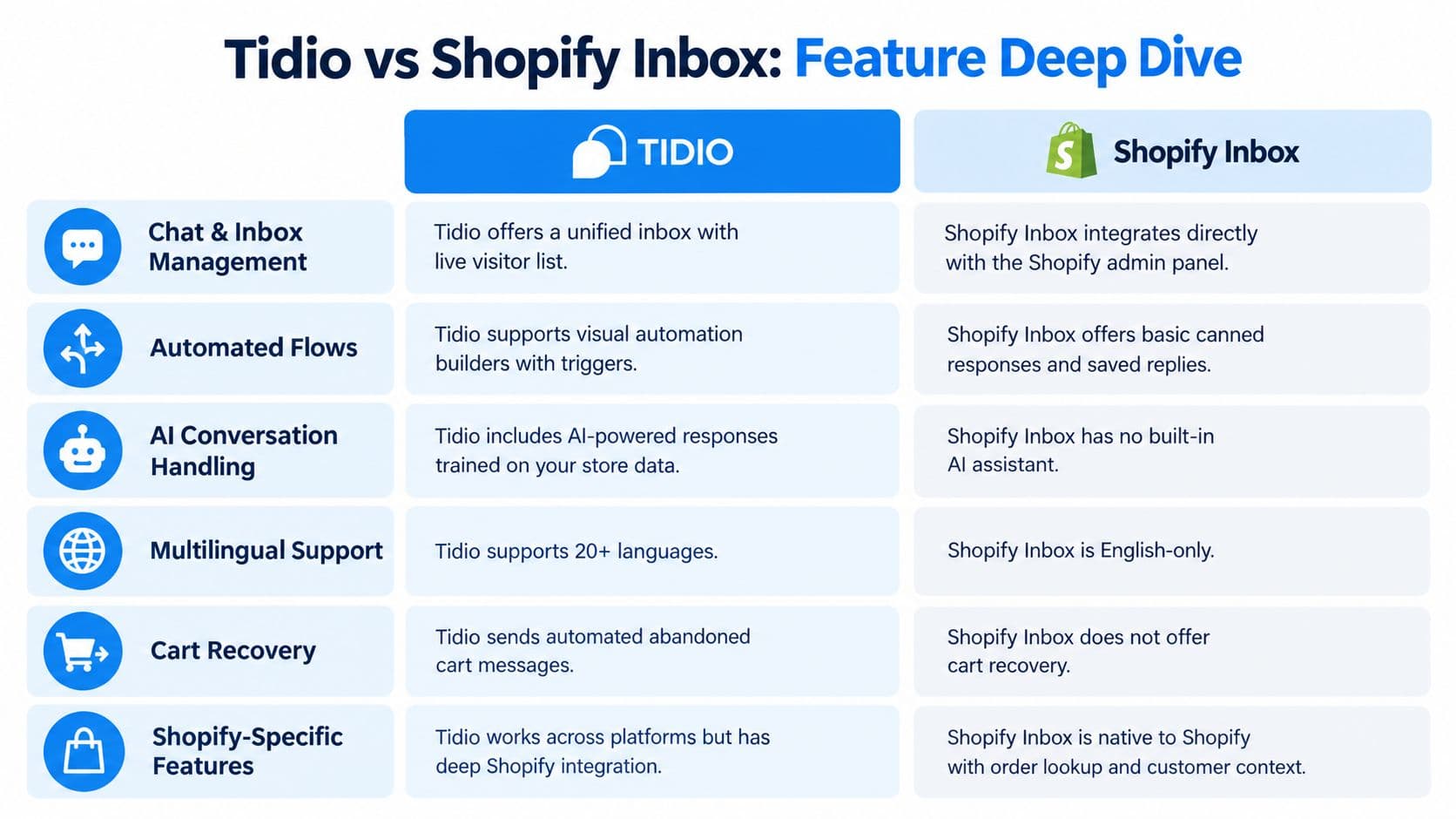
Chat and inbox management
Tidio works better for teams that need a unified inbox for live chat, email, and other customer channels in one place. It is built for support operations that rely on queues, routing, and coordination between agents. Shopify Inbox is the lighter option. It stays inside Shopify and gives merchants a native way to handle store conversations without moving customer service into a separate system.
That simplicity helps until the store needs more control over who sees what and how work gets assigned. At that point, Inbox feels like a storefront chat tool, while Tidio is set up for ongoing support work.
AI conversation handling
Shopify Inbox includes an AI sales assistant that answers product questions from the catalog, and merchants can adjust its tone, style, and rules. It can run with or without the AI agent, which suits stores that want a basic chat tool first Shopify Inbox app listing. Tidio also uses AI for replies, but it does so inside a wider support stack that includes inbox handling and ticketing. For a closer look at that side of the product, see this Tidio Lyro review.
For product questions, Inbox pulls from Shopify data out of the box. Tidio handles AI as part of a larger queue, so the response process sits alongside other support work instead of standing on its own.
Automation, routing, and workflow control
Tidio has the stronger workflow setup. Its Shopify integration includes automatic assignment, automatic solving, canned responses, satisfaction surveys, agent performance analytics, and Shopify actions such as product cards plus cart or order-history checks Tidio Shopify integration. Shopify Inbox supports a more limited workflow, which is fine for a simple store, but it gives less control when the team needs layered automation.
Multilingual and channel coverage
Tidio is the clearer fit for stores that need conversations across email, Instagram, WhatsApp, and Facebook Messenger as well as chat Tidio development history. Shopify Inbox stays centered on Shopify's own environment. If sales and support traffic arrive in DMs and email as often as they do on the site, Tidio covers more of the job.
Cart recovery and storefront selling
The gap grows once the workflow moves beyond live replies. Tidio fits cart recovery workflows and broader support automation better, while Shopify Inbox stays closer to reactive chat. Inbox can answer shoppers well, but it is not built as a full recovery system. That matters for merchants who want the chat layer to do more than respond after a visitor asks a question.
What the operational trade-off looks like
One tool is built around storefront conversation. The other is built around a shared support desk. For product questions, Inbox answers from the catalog out of the box, while Tidio handles them as one queue item among tickets, emails, and DMs.
Pricing, Limits, and the Three Meters That Drive Cost
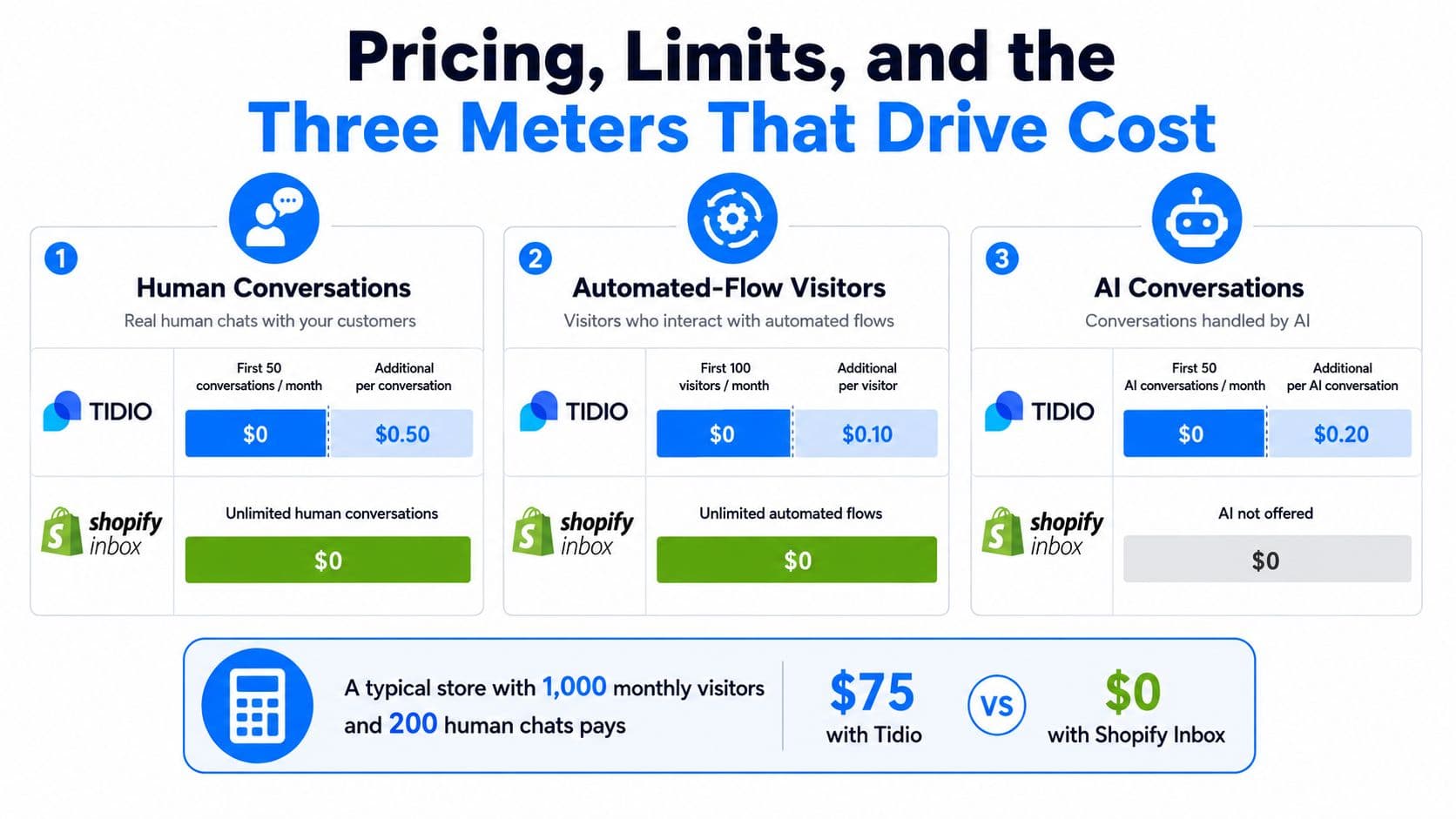
Human conversations are one meter
Tidio bills around conversations that include a human agent message. A live chat, ticket, email, or social thread becomes billable once a person replies, and one thread still counts as one conversation even if the exchange runs long Tidio pricing. Shopify Inbox is listed as a free app, so it does not create the same direct billing pressure for human chats Shopify Inbox app listing.
That difference matters because a store with lots of short questions can face a very different cost profile from a store with fewer, longer support threads. A single plan price hides that.
Automated-flow visitors are a separate meter
Tidio's free tier includes 100 Flow visitors per month and 50 agent seats, along with 50 billable conversations Tidio Shopify integration. Shopify Inbox does not show the same flow-visitor model in the material reviewed here. Merchants should not treat automation usage as if both apps measure it the same way.
If a store relies on automated flows, visitor volume through those flows can drive cost on its own. That is the meter merchants miss when they compare only the sticker price.
AI conversations are their own meter too
Tidio starts every account with 50 Lyro AI-agent conversations, and its paid AI plans extend that usage Tidio pricing. Shopify Inbox offers an AI sales associate, but the reviewed material does not show a separate AI-conversation billing meter because the app is listed as free Shopify Inbox app listing.
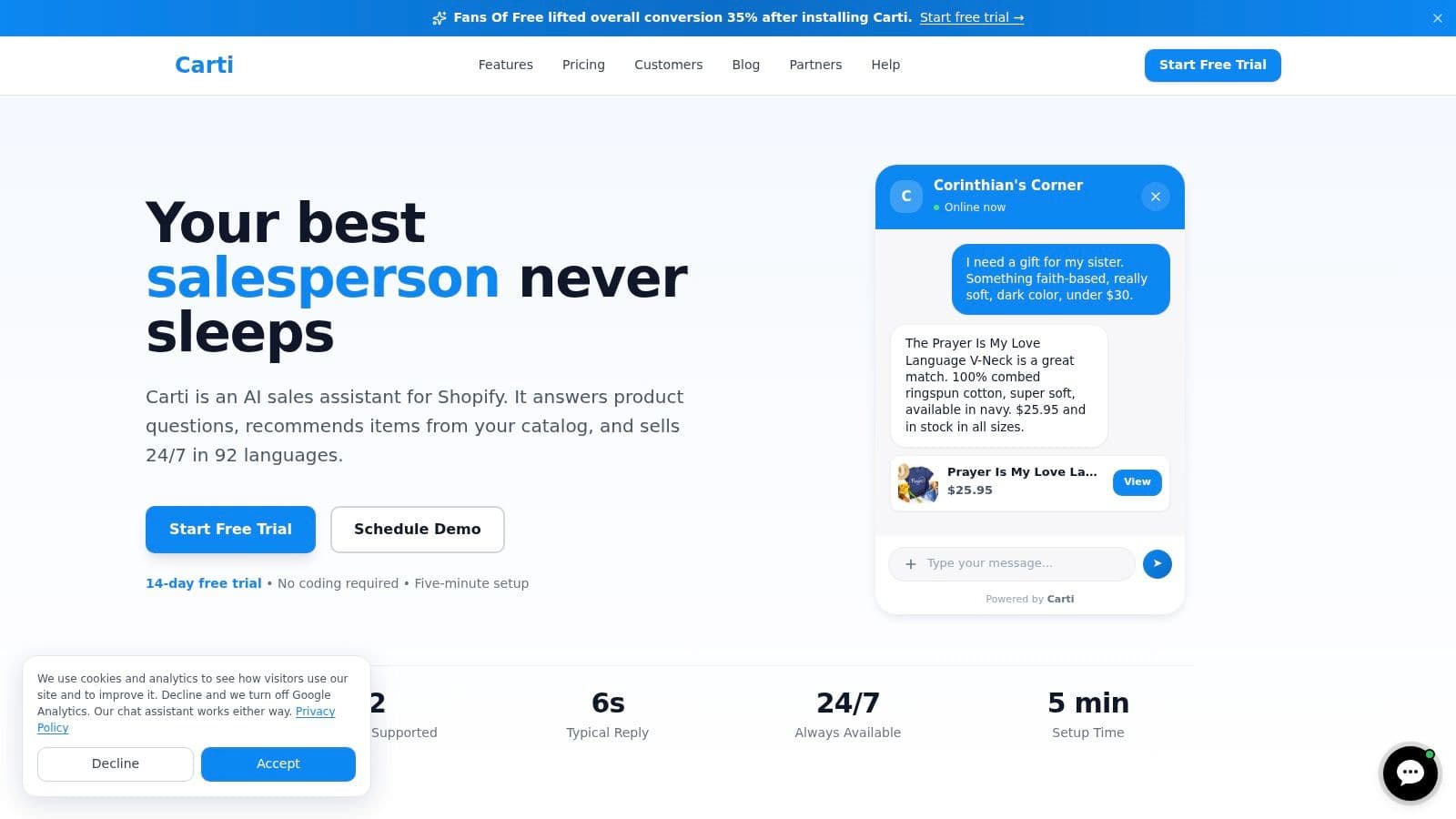
Carti is another option for Shopify merchants who want an AI shopping assistant rather than a general support inbox. It offers a Free plan with 50 AI conversations a month, plus Starter at $49 for 250, Growth at $99 for 600, and Scale at $249 for 1,750, with a 14-day free trial on paid plans. That gives merchants a direct storefront-sales model to compare against a support-first inbox.
Headline pricing still misses the picture. Two stores can choose the same app and pay very different amounts once human conversations, automated-flow visitors, and AI conversations start moving at different speeds.
What a merchant should model
Compare the tools on three separate meters.
- Human chats. How many conversations need an agent?
- Flow traffic. How many visitors enter automated journeys?
- AI usage. How often does AI answer instead of a person?
A published free plan can still turn into a real monthly expense as traffic grows.
Neither vendor publishes uptime or SLA commitments on the pages reviewed, so treat reliability claims from either side as unverified until you trial the app.
Setup, Support, Migration, and Day-Two Operations
What installation feels like on day one
Shopify Inbox is the lighter lift. It sits inside Shopify, so a merchant can start answering shoppers without bolting on a separate support system or changing the team's workflow much. For a store that wants speed and a clean start, that is the right call.
Tidio asks for more setup because it gives you more control. Merchants have to decide how the inbox is organized, how automation should behave, and which channels belong in the same workspace. That extra work is not a drawback. It is the trade-off for a more capable operating setup.
How support and documentation shape day two
Inbox fits teams that want a simple merchant experience inside Shopify admin. Tidio fits stores that expect agents to work from a broader inbox and need assignment, surveys, and performance analytics. The difference matters after launch, not just during setup.
Operational rule: if the team only answers storefront questions, keep the stack light. If the team triages support, routes tickets, and checks order data, use the more capable inbox.
Migration is where many merchants get impatient
Moving from Inbox to Tidio, or the other way around, is not a visual swap. The question is what conversations, workflows, and channel history need to come with the move. Merchants should validate channel coverage, proactive-trigger behavior, catalog-recommendation depth, language support, and any API or order-action needs before they assume one app can replace the other cleanly Tidio FAQ context.
A store that changes tools later should expect to rebuild some workflows. That is normal. What matters is whether the new app fits the way the team handles shoppers and support requests.
Where merchant actions matter most
Tidio's Shopify actions can surface product cards and order-history checks directly in the support flow. That helps agents answer faster because the context is already there. Inbox stays closer to the storefront conversation itself, which is enough for many merchants but not all of them.
Choose the setup that matches the workflow.
Which Tool Fits Which Type of Shopify Store
A small Shopify-only fashion or beauty store with mostly pre-purchase questions should start with Shopify Inbox. It keeps the setup native, uses Shopify context well, and avoids adding a heavier support stack the team does not need. If the conversations are mostly about sizing, shipping, and returns, Inbox is the cleaner choice.
A DTC brand with heavy Instagram and Messenger DM volume should choose Tidio. That store is not just handling onsite chat, it is running a support inbox across channels, and Tidio is built for that job. The extra setup pays off when messages come in from email, social, and site chat at the same time.
A Shopify agency or consultant setting up chat for multiple client stores should be blunt about the operating load. If the clients need a real support workspace, Tidio fits better. If they only need a native storefront assistant, Inbox is easier to standardize. For a third option, Carti covers the storefront-assistant role by pricing around AI conversation volume rather than agent seats, which matters when one person is handling pre-purchase questions.
The simple rule is this. Inbox is for merchants who want a native conversation layer. Tidio is for merchants who need a support operation.
Decision Framework and Common Questions
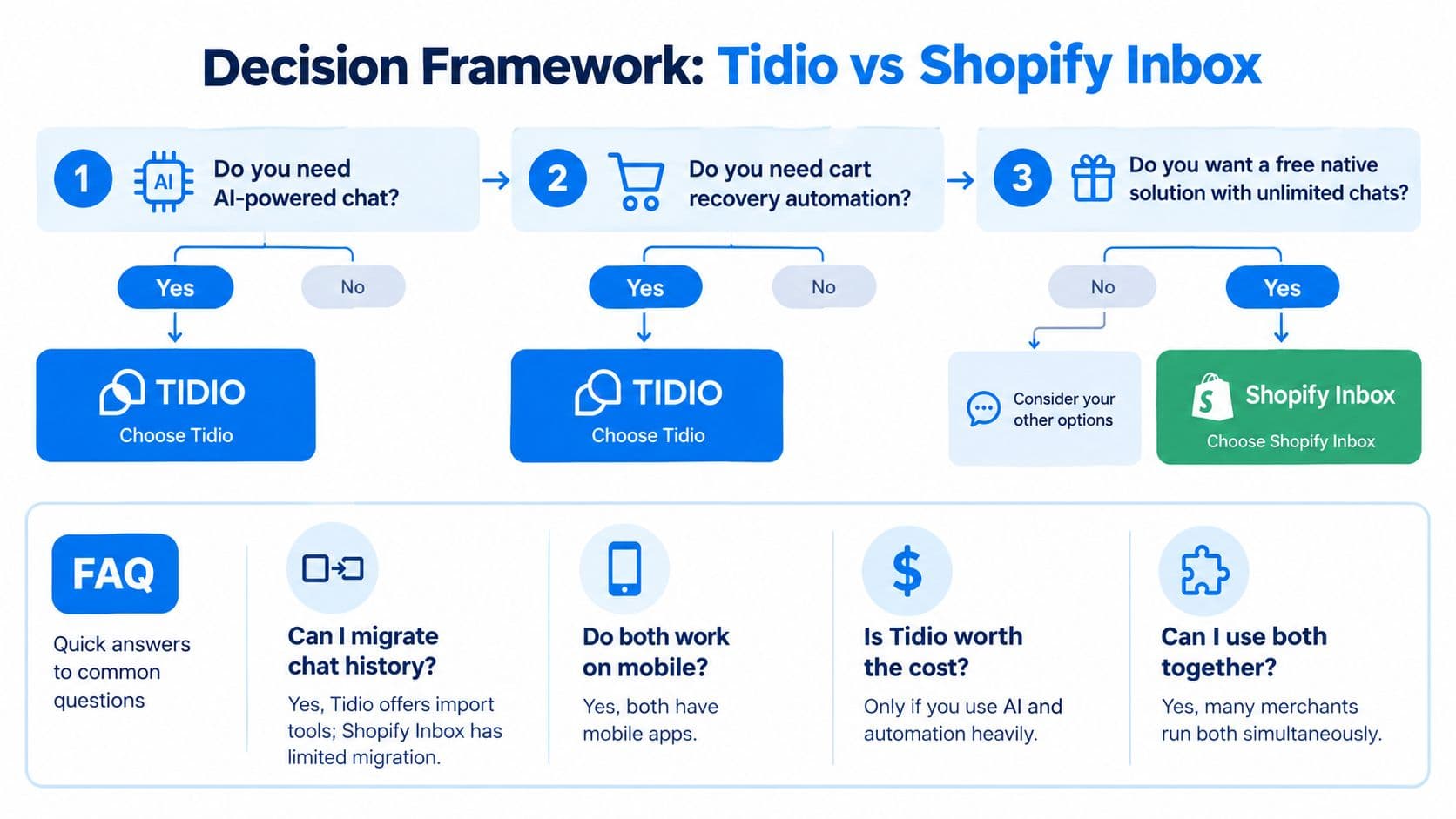
Fast decision check
- Need a native Shopify starting point? Choose Shopify Inbox.
- Need Instagram, Messenger, WhatsApp, or email in the same workspace? Choose Tidio.
- Need AI for storefront product questions without adding a big support stack? Choose Shopify Inbox.
- Need routing, assignment, surveys, and workflow controls? Choose Tidio.
Short answers to the usual edge cases
Can both run side by side? Yes, many merchants test that setup before making a hard switch. Should Inbox stay installed as a backup? Often yes, especially if the store wants a free native baseline. Does Tidio make sense if the store barely gets DMs? Usually not.
The best rule is blunt. If the store's problem is selling on the storefront, start with the native sales assistant. If the store's problem is managing support across channels, use the broader inbox. For a broader comparison of live-chat options, the most relevant companion read is this live chat software guide.
If the store needs a storefront-first AI assistant, Carti is the cleaner fit to evaluate next. It answers pre-purchase questions, recommends products, and keeps the focus on conversion rather than support queue management. Visit Carti to compare its plans and decide whether a sales assistant makes more sense than a support inbox.

Written by
Daniel AndersonFounder of Carti. 10+ years building ecommerce brands in apparel and supplements. Still runs a Shopify store and built Carti to help merchants convert more browsers into buyers.
Ready to boost your store's sales?
Install Carti in 5 minutes and let AI handle customer questions, recommend products, and close sales 24/7.
Start Free Trial14-day free trial