
Most advice on live chat software for ecommerce starts in the wrong place. It obsessively compares widgets, canned replies, and pretty inboxes, then ignores the two questions that decide whether the tool earns its keep: can it answer when you're asleep, and does it know your store well enough to be useful?
That's the true test on a Shopify store. A customer asking about shipping, fit, stock, or returns doesn't care whether the interface is “live.” They care whether they get a correct answer fast enough to keep buying, and whether the conversation feels like it came from your store, not a generic help desk.
The word live is doing a lot of heavy lifting. If support only works when someone on your team is staring at the inbox, it's not live for most shoppers. 35% of support messages arrive after business hours in one LiveChat benchmark, which is exactly why a staffed-only setup misses a huge part of demand (LiveChat benchmark summary).
A stronger definition is simple. Live chat software for ecommerce should answer from your catalog, policies, and order data in real time, then hand off cleanly when a human needs to step in. If it can't do that, it's a chat bubble, not a sales layer.
The Word Live Is Doing a Lot of Heavy Lifting
The problem with most comparison posts is that they treat “live” like a feature instead of a promise. On a Shopify store, the promise only matters if the shopper gets help during the hours you're not watching the inbox. That's when buying questions pile up, and that's when a delayed reply turns into a lost order.
A peer-reviewed study in Information Systems Research found that live chat increased tablet purchase probability by 15.99% after controlling for selection effects, which is strong proof that real-time chat can move revenue, not just satisfaction (study reference). The useful takeaway isn't the statistic alone. It's that chat matters at the decision point, where a shopper wants one last answer before they commit.
Practical rule: if the widget can't answer outside staffed hours, it's not reducing friction, it's creating another waiting room.
For ecommerce operators, that means the first question isn't “Does it have a chatbot?” It's “Does it keep working when nobody's online, and does it know what's in the store?” A chat tool that can't answer stock, shipping, or return questions from live data usually turns simple intent into a support ticket. That's a bad trade on a storefront, because the shopper is already close to purchase.
The other reason the word live gets overused is trust. 44% of online shoppers consider live chat essential, and 60% say they're more likely to revisit a website that offers it (Freshworks live chat statistics). Those numbers tell you that shoppers expect immediacy, but they also expect competence. A widget that appears fast but answers vaguely can do more harm than no widget at all.
What Ecommerce Live Chat Actually Is in 2026
In 2026, ecommerce live chat is not a staffed help center with a floating icon. It's a 24/7 storefront assistant that can answer routine questions, surface products, and keep the shopping session moving. The human team is still part of the system, but it's the backstop, not the default operating mode.
The three jobs it has to do
First, it has to answer from the live catalog. If a shopper asks about a variant, shipping window, or return rule, the assistant should pull that from store data at answer time. Shopify's ecosystem supports this kind of store-aware access through integrations and admin APIs, which is the technical basis for answering store-specific questions instead of generic FAQ boilerplate (Shopify ecosystem reference).
Second, it has to help recover carts and keep people from disappearing when they hesitate. Chat is strongest when it catches objections before checkout stalls. That's not the same thing as “support,” and merchants who still treat it as a pure service channel are leaving money on the table.
Third, it has to route messy cases to a human without losing context. A bot that says “I don't understand” has failed. A bot that passes along the full transcript, the contact, and the issue summary is doing its job.
A good ecommerce chat tool behaves like a sales associate with a memory, not a kiosk with canned replies.
That's why I'd define live chat software for ecommerce as a store-aware assistant with optional human escalation, not a static FAQ widget and not a staffed-only inbox. The right question is still brutally simple. Does the tool answer at 2 a.m., and does it know your store? If the answer is no on either count, keep looking.
Must-Have Features That Move Revenue
Most feature lists are cluttered with decorative items merchants don't need. Strip the noise away, and five capabilities matter more than the rest because they connect directly to sales or support load.
The features that earn their place
Instant answers from live catalog data matter because they cut the delay between question and checkout. When a shopper asks about an item, they want the answer while they're still looking at the product page, not after a ticket queue opens.
Smart product suggestions matter because chat can behave like a merchandiser inside the store. If the assistant knows the catalog well, it can point shoppers toward a better fit, a matching item, or a higher-intent alternative without feeling pushy.
Cart-recovery prompts matter because abandoned checkout is usually a timing problem, not a pricing problem. A nudge triggered by exit intent or stalled checkout keeps revenue in play that would otherwise leak out of the session.
Multilingual support matters because the store shouldn't depend on hiring a second support team just to serve more shoppers. If the assistant can answer in multiple languages, the merchant can widen reach without expanding the inbox in the same way.
Analytics and integrations matter because chat is only useful if you can tie it back to store outcomes. Shopify order data, customer records, and marketing tools like Klaviyo or GA4 should sit close enough to the conversation that you can trace what chat influenced.
| Feature | Primary Revenue or Support Outcome | Shopify Metric to Watch |
|---|---|---|
| Live catalog answers | Faster purchase decisions, fewer support tickets | Product-page conversion |
| Product suggestions | Higher basket value, better discovery | Items per order |
| Cart recovery prompts | More rescued checkouts | Recovered cart revenue |
| Multilingual support | Broader reach without extra staffing | Conversion by language segment |
| Analytics and integrations | Clear attribution and cleaner operations | Orders influenced by chat |
The practical point is blunt. If a tool only gives you a widget and a transcript, it's not a revenue layer. It's a message box.
Why Graceful Human Handoff Is the Feature You Cannot Skip
AI can handle the easy stuff, but the easy stuff isn't where trust is built. The test is what happens when the shopper's question is sensitive, specific, or tied to a live order. If the handoff breaks, the whole chat experience feels fake.
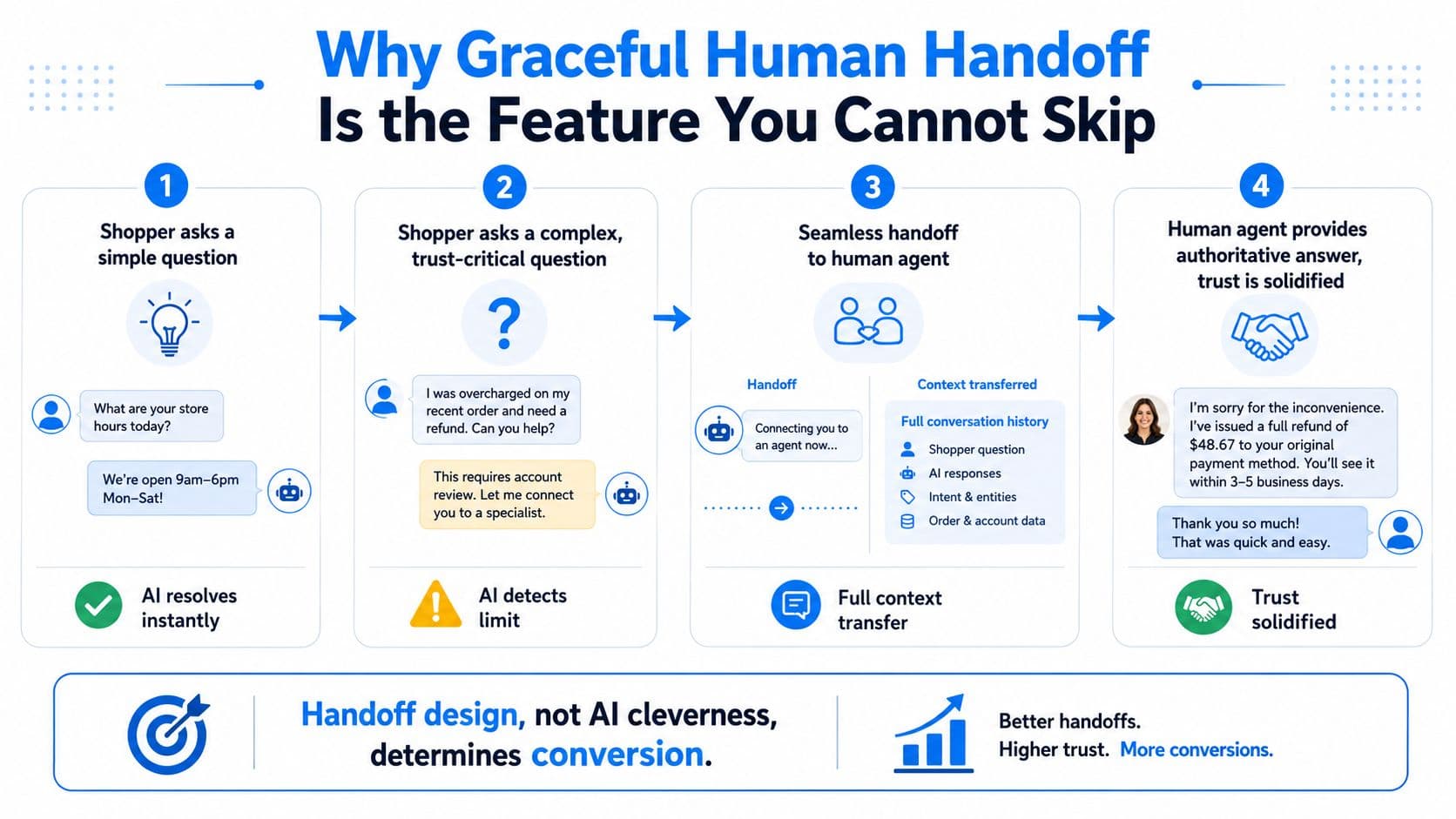
A graceful handoff means three things. The escalation trigger should be clear, the full conversation context should move with the case, and the shopper should never hit a dead end. If the assistant can't answer a damaged-shipment issue, it should pull in a human with the order ID and transcript already attached. That's how you keep the conversation alive instead of forcing the buyer to repeat themselves.
The strong argument for this approach is easy to find in support strategy thinking. If your support motion is designed well, you can make support profitable instead of treating it as a cost sink, and the handoff is the part that stops support from becoming a trust tax (Call Loop). On ecommerce stores, that's not abstract. The assistant protects the sale, and the human resolves the edge case without starting over.
The cleanest way to think about it is through the failure mode. A shopper asks about a damaged shipment mid-checkout. A bad bot loops. A good bot says the right thing once, transfers the case, and lets the merchant answer with context already in place. That's why I'd rather use a tool with a solid handoff than one that claims to “automate everything.”
If you're comparing approaches, the split between chatbot and live chat matters here, and you can see that distinction clearly in this comparison of chatbot vs live chat. The short version is simple. Automation gets the conversation started. Handoff decides whether the shopper keeps buying.
How to Read a Live Chat Price Tag Without Getting Burned
Live chat pricing usually lands in three buckets, and each one can trap a different merchant. Per-agent pricing looks harmless until you staff up for peak season. Per-conversation pricing feels efficient until traffic spikes. Flat pricing looks simple, but the fine print often hides limits on channels, AI usage, or overages.
LiveChat's pricing page shows a clear per-seat model, with the Essential plan at $19 per agent per month billed annually, then Growth at $79 per agent per month and custom Enterprise pricing (LiveChat pricing). That cost pattern matters because more team access means more recurring spend, even when message volume stays flat. Before you commit to any model, check the actual plan tiers on the Carti pricing page and see how limits map to your traffic.
What each model does in real life
A per-agent plan stays predictable in a slow month, then gets expensive when you add holiday coverage. A per-conversation plan can look cheap in a quiet quarter, then punish you the moment a post goes viral. A flat monthly plan is easiest to budget, but only if the included limits match your channel mix and traffic level.
The rule is simple. If a vendor's pricing changes because your store is doing well, it is not really flat. It is just delayed complexity.
Watch the fine print: WhatsApp, Instagram, AI add-ons, onboarding charges, and overage fees are where the real bill often hides.
| Model | Low Traffic Month | Traffic Spike, such as a viral post | Annual Cost Risk |
|---|---|---|---|
| Per-agent | Looks manageable | Jumps when you add staff | High as headcount grows |
| Per-conversation | Cheap at first | Rises with every spike | High during unpredictable demand |
| Flat monthly | Easy to budget | Safer if limits are generous | Medium if usage caps are tight |
Use store reality, not optimistic assumptions. A small Shopify brand can live with a simple seat fee. A fast-growing DTC store with social traffic and busy seasons needs pricing that will not turn success into a billing problem. I would rather pay for boring predictability than chase a plan that gets clever with volume.
A Practical Setup Path for Shopify Stores
The fastest setup path is the one that cuts decisions down to essentials. Start with the Shopify install, then decide where the widget should appear and where it should stay out of the way. Product pages and cart deserve it. Checkout and account pages usually need tighter control, because the last thing you want is a support prompt distracting someone who is already committed.
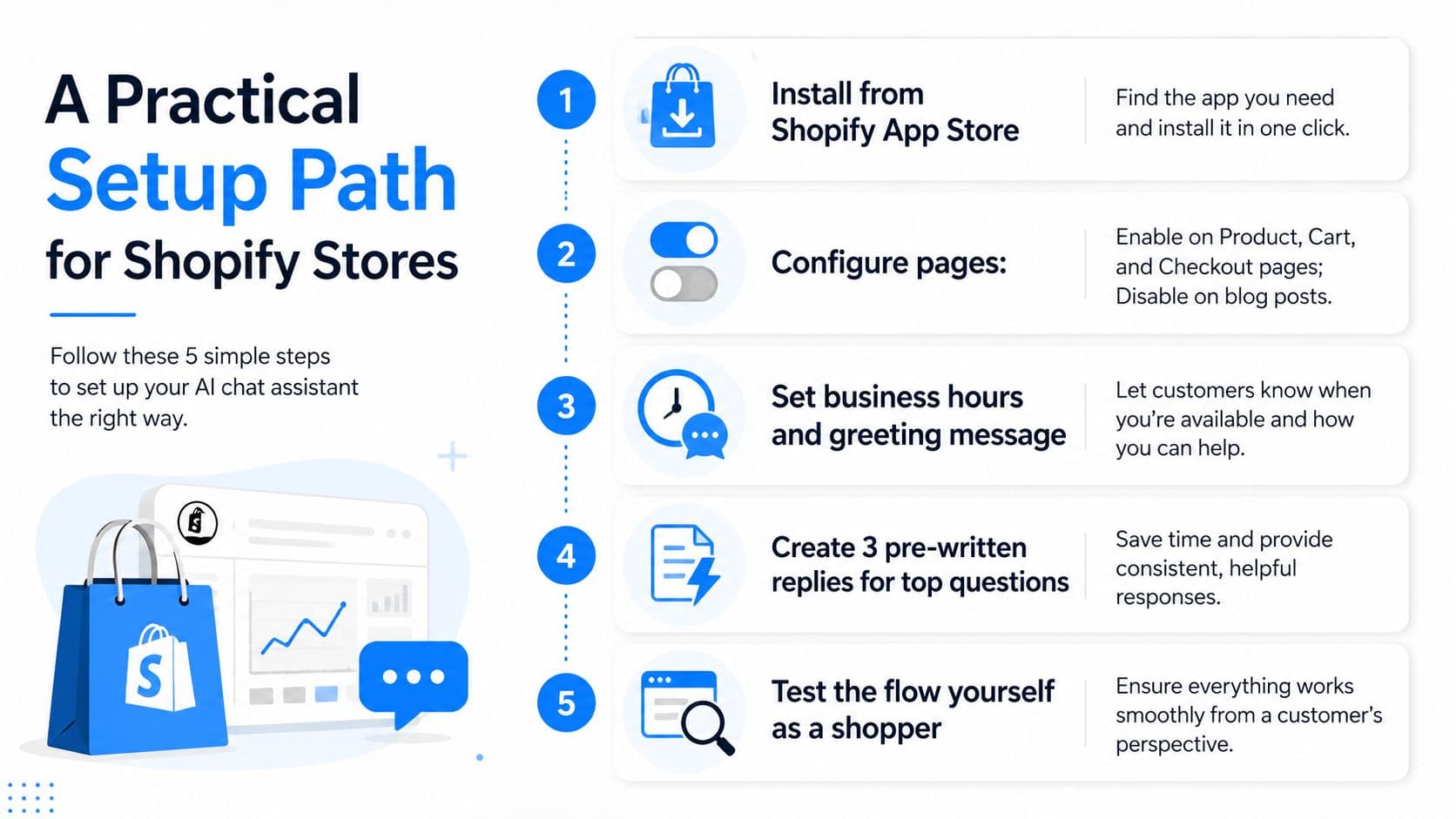
The next step is catalog connection. The assistant should read SKUs, variants, inventory, prices, and promotions at answer time, not from a stale copy. That single point removes the worst support drag, because shoppers ask about stock and fit constantly, and you shouldn't need a person to answer those questions if the store data is already there.
The setup checklist that actually matters
- Install the widget cleanly: Use the Shopify App Store, then test where the chat bubble appears before you touch the brand styling.
- Pull in policies and guides: Shipping windows, return rules, and size charts should be part of the knowledge base, not buried in a PDF.
- Set escalation rules early: Send order issues, damaged-item cases, and edge-case policy questions to a human, not a loop.
- Use a back-end action where it helps: Order lookup and refund initiation should happen through store-connected workflows when the platform supports it.
- Run a 7-day pre-launch test: Feed it real customer questions from past tickets and see where it breaks before shoppers do.
If you want a sanity check on the widget itself, this guide to a web chat widget is useful because it forces you to think about visibility and placement before you obsess over automation. That's the right order. First make the chat useful, then make it pretty.
Carti is one option in this category, and it's built as an AI chatbot for Shopify stores that learns catalog and policy content automatically, then supports instant replies and cart recovery. I wouldn't frame the decision around slogans. I'd frame it around whether the assistant can answer from live store data without dragging a human into every simple question.
Measuring Success Without Chasing Vanity Numbers
Don't judge chat by how active the widget looks. Judge it by whether it moves money or removes work. The four metrics that matter are response latency under load, real resolution rate, conversion lift against a clean comparison, and recovered cart revenue tied to actual sessions.
Read the numbers the right way
First-response latency tells you whether the tool is keeping pace with shopper intent. If it's fast during quiet periods but collapses when traffic rises, you don't have a support system, you have a demo.
Resolution rate tells you whether the tool closes the issue instead of deflecting it. A chat bot that pushes everything to email is just rearranging the queue.
Conversion lift only means something if you measure it against a clean holdout or a sensible before-and-after window. Otherwise you're just crediting chat for sales that would have happened anyway.
Recovered cart revenue should be attributed through the link or coupon flow that triggered the return visit. If you can't tie it back to a session, you can't trust the number.
One more thing matters in practice. Segment the data by new versus returning shoppers, mobile versus desktop, and product page versus checkout. Aggregate dashboards can flatter weak segments and hide the core problem.
| KPI | What it really tells you | Vanity trap | Cut that exposes the truth |
|---|---|---|---|
| First-response latency | How fast shoppers get help | Fast only during office hours | After-hours sessions |
| Resolution rate | Whether the question got solved | High deflection, low closure | Escalated cases |
| Conversion lift | Whether chat changes buying behavior | Counting every order as chat-influenced | Holdout or matched cohort |
| Recovered cart revenue | Whether chat rescued abandoned intent | Clicking every recovery as success | Coupon or link attribution |
The old benchmark about response speed still matters here. A cross-industry average near 1 minute 35 seconds is not good enough for ecommerce, where leaders typically answer in 12 to 30 seconds and under 30 seconds is the practical target for excellent performance (response-time benchmarks). That's the bar because shoppers are already close to buying.
Your Short List for Choosing the Right Tool
The best tool is the one that survives a real store, not a polished sales demo. I'd use five decision rules and nothing softer than that.
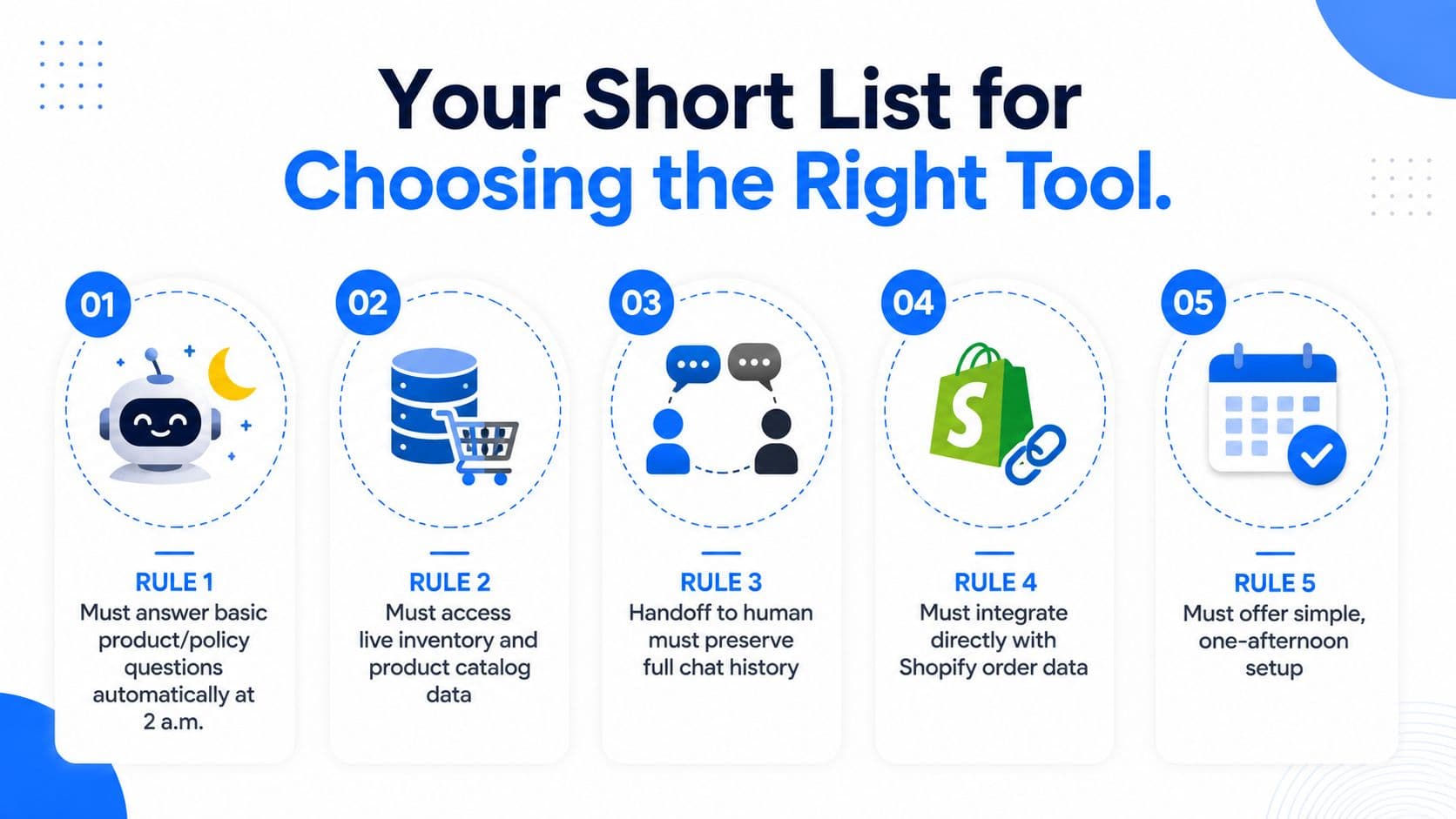
- It answers at 2 a.m.: Open a product or policy question after hours and see whether you get a real answer, not a promise to come back later.
- It knows the live catalog: Ask about an inventory-sensitive variant and check whether the answer reflects current data.
- It hands off cleanly: Trigger a complex or trust-sensitive case and make sure the human sees the full context.
- It prices predictably: Read the pricing page as if your store had a good month, then check whether the bill still feels boring.
- It measures revenue, not clicks: Ask how it attributes orders, recovered carts, and influenced conversions.
If you want a useful comparison point for retention and on-site engagement, strong loyalty program perks are worth reading alongside chat because both are about reducing friction and giving shoppers a reason to stay. The difference is that chat works in the moment of hesitation, which is exactly where ecommerce loses the most money.
The tiebreaker is simple. If a vendor can't show store-aware answers, graceful escalation, and conversion attribution in a 20-minute demo, keep looking. Live chat software for ecommerce should act like a 24/7 sales associate, not a decorative inbox.
If you want a Shopify chat setup that learns your catalog, answers shoppers around the clock, and keeps the handoff clean when a human needs to step in, take a look at Carti. It's built for the exact after-hours, store-aware use case that most “live chat” tools still miss.

Written by
Daniel AndersonFounder of Carti. 10+ years building ecommerce brands in apparel and supplements. Still runs a Shopify store and built Carti to help merchants convert more browsers into buyers.
Ready to boost your store's sales?
Install Carti in 5 minutes and let AI handle customer questions, recommend products, and close sales 24/7.
Start Free Trial14-day free trial