
You've got a shopper on your Shopify store late at night. They're interested, but one unanswered question is stopping the order: does the jacket run small, is the lipstick matte or satin, or will the throw pillow fit a standard insert? A basic chatbot can point them to a help article. A real conversational commerce platform should answer from your catalog, recommend the correct variant, and help put the product in the cart.
That distinction matters. The conversational commerce market is projected to reach USD 11.26 billion in 2025, grow to USD 12.64 billion in 2026, and reach USD 22.56 billion by 2031, representing a projected 12.28% CAGR from 2026 to 2031, according to Mordor Intelligence's conversational commerce market forecast. This is becoming an e-commerce infrastructure layer, not another support widget to install and forget.
For Shopify merchants, the buying question is simple: does the platform close orders, or does it only answer questions?
What a Conversational Commerce Platform Actually Does
A conversational commerce platform turns a shopper's natural-language question into a buying action. The shopper can ask about fit, ingredients, compatibility, delivery, stock, price, or product differences, and the system responds using the store's product and policy data. The useful version doesn't stop at an answer. It recommends a product, selects a variant, adds it to the cart, recovers a stalled checkout, or escalates with the conversation context intact.
That makes it different from generic live chat. Live chat connects a buyer with a person, which remains valuable for complex issues, but it doesn't automatically provide product discovery or transactional assistance. A rule-based chatbot follows preset paths and usually breaks when the shopper asks a question outside its decision tree. An AI search bar may find relevant products, yet it often leaves the buyer to interpret results and complete the journey alone.
The test merchants should use
Ask one question during every vendor demo:
Can this system move a shopper from uncertainty to checkout without losing product context?
If the answer is no, you're looking at a support product with a conversational interface.
A sales-focused platform needs access to live catalog information, including products, variants, prices, inventory, collections, and relevant policies. It should understand requests such as “find a gift under $50,” “show me a warmer jacket,” or “compare these two products,” then return a useful shortlist rather than a generic ranked list. The recommendation must remain within catalog and inventory constraints.
The commercial impact comes from removing the final obstacle. A shopper asking whether a jacket runs small doesn't need a cheerful greeting or a link to your FAQ. They need a reliable fit answer, a size recommendation, confirmation that the chosen color is available, and a direct path to the cart.
Messaging has already become a meaningful buying environment. One industry report says WhatsApp Commerce processes more than 1 billion transactions per week worldwide, while voice-commerce transactions more than quadrupled between 2021 and 2023, according to this overview of conversational commerce trends. Your on-site assistant doesn't need to imitate every channel. It needs to behave like a sales associate who knows what your store can sell.
The Technical Stack Behind Catalog-Grounded Answers
A serious conversational commerce platform runs on three connected layers: intent understanding, retrieval, and response generation. This architecture is described in Twistag's explanation of conversational commerce architecture, and it provides the clearest way to separate a useful shopping assistant from a polished hallucination engine.
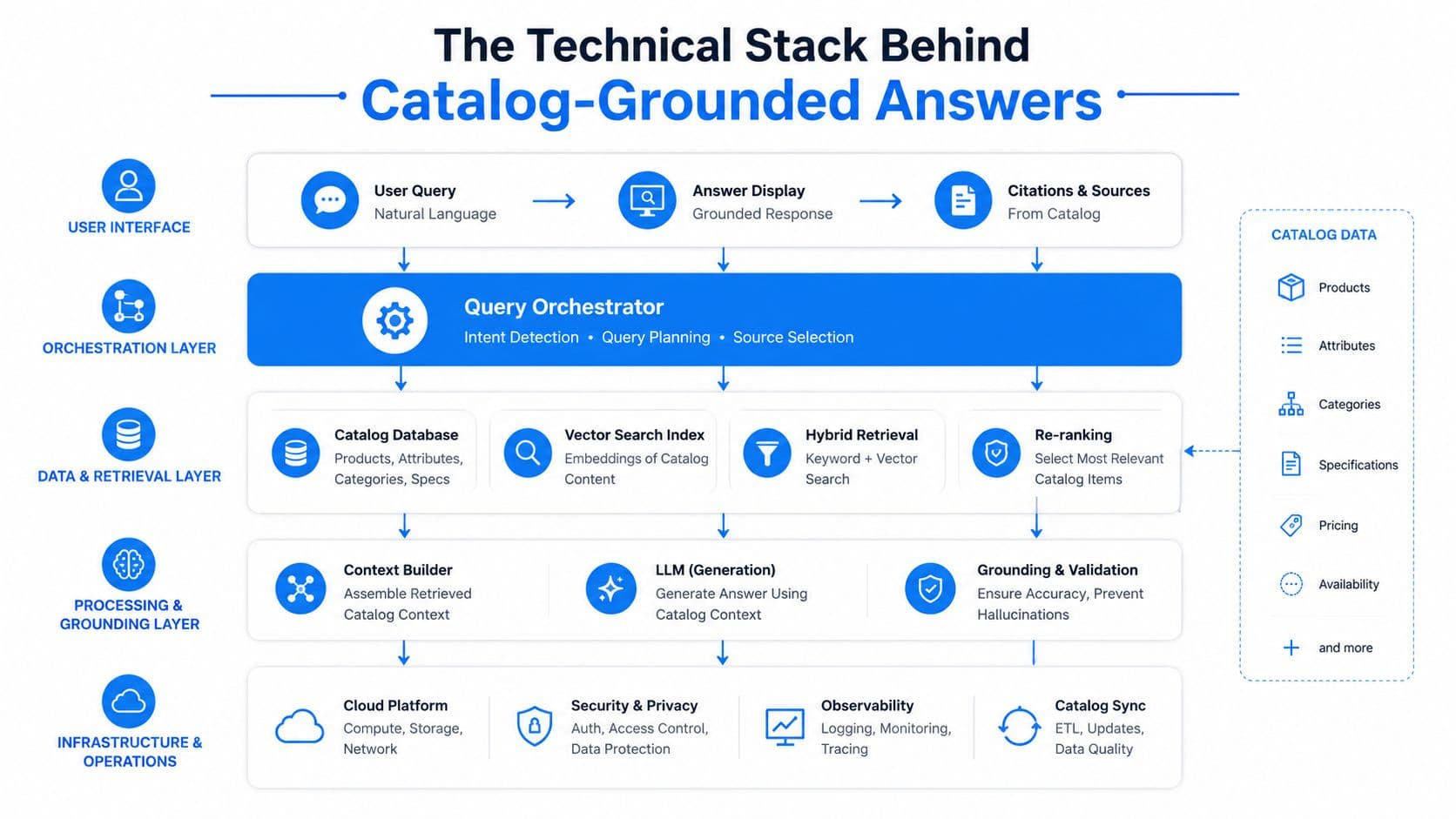
Intent understanding
The first layer translates human language into a shopping goal. “I need a gift for someone who likes minimal interiors” isn't a keyword query. The system has to identify the product category, preferences, occasion, and possibly constraints that the shopper hasn't stated directly.
Good intent handling understands retail language, including fit, finish, use case, compatibility, ingredients, bundles, and comparisons. It should also recognize when the buyer is asking for an action, such as adding a product to the cart, checking an order, or finding an alternative.
Skip this layer and retrieval becomes noisy. The system may match isolated words while missing what the shopper wants.
Retrieval from the live catalog
Retrieval finds the evidence needed to answer. It combines semantic search with keyword matching and structured filters, then checks product attributes, variants, pricing, inventory, collections, and policies.
Shopify implementation either earns trust or destroys it. A language model can write a fluent answer, but fluency doesn't tell you whether the medium is available, whether the price includes a promotion, or whether a particular region can receive the product. The catalog has to provide the facts at answer time.
For a deeper treatment of preventing unsupported answers, see how to prevent AI hallucinations in e-commerce.
Response generation and action
The final layer turns retrieved facts into a concise recommendation. It should name relevant products, show the correct price, explain the trade-off, and provide a path to the cart. More advanced systems can apply promotions, compare products, or initiate checkout within the conversation.
Each layer depends on the others. A strong language model without retrieval invents product details. Strong retrieval without intent understanding returns irrelevant matches. A slick response layer built on stale data confidently misstates stock or price.
Catalog grounding is the load-bearing wall. If the answer can't be traced back to the store's current data, it shouldn't guide a purchase.
Core Capabilities That Separate Sales Tools From Support Tools
Merchants often buy based on the longest feature list. That's backwards. Score features by whether they shorten the path from question to checkout.
The deal-sealers are operational, not decorative. Live catalog access matters more than a stylish chat window. Variant-aware recommendations matter more than generic greetings. Cart recovery matters more than post-purchase surveys when the objective is revenue.
| Capability | Impact on Revenue | Priority |
|---|---|---|
| Live catalog, price, and inventory access | Prevents recommendations that can't be purchased | Must have |
| Intent-aware recommendations | Matches products to the shopper's actual need | Must have |
| Variant selection and cart actions | Removes steps between decision and checkout | Must have |
| Abandoned-cart triggers | Reopens stalled purchase journeys | High |
| Proactive offers tied to margin rules | Creates urgency without giving away margin blindly | High |
| Multilingual replies | Makes product guidance usable across markets | High |
| Chat-to-order attribution | Shows whether conversations generate revenue | Must have |
| Emoji reactions and generic greetings | Adds polish without proving commercial value | Low |
| Knowledge-base search alone | Deflects questions but may not advance a sale | Low |
| Post-purchase surveys | Useful for feedback, not immediate conversion | Low |
Response speed is part of the product, not a technical footnote. Research summarized by Kya's analysis of chatbot response time cites a benchmark where responding within 5 minutes makes a lead 100x more likely to connect than waiting 30 minutes, with 21x higher qualification probability. The exact benchmark comes from lead-response research rather than Shopify-specific commerce, but the operating lesson is obvious: don't make a high-intent shopper wait for the first useful answer.
A multilingual layer can also remove a hard conversion barrier. One Shopify-focused chatbot claims support for more than 100 languages without manual setup, while another conversational AI product advertises 50+ languages with sub-700ms latency, as described by Flyweight's multilingual feature overview. Treat these as vendor capabilities to verify, not as proof that every system handles your store's terminology correctly.
The line item earns its place when it produces three outcomes:
- Higher conversion rate: More qualified shoppers complete orders.
- Faster first response: Buyers get the information blocking their decision immediately.
- Recovered carts: The assistant brings stalled shoppers back into a purchase flow.
Everything else should justify itself against those outcomes.
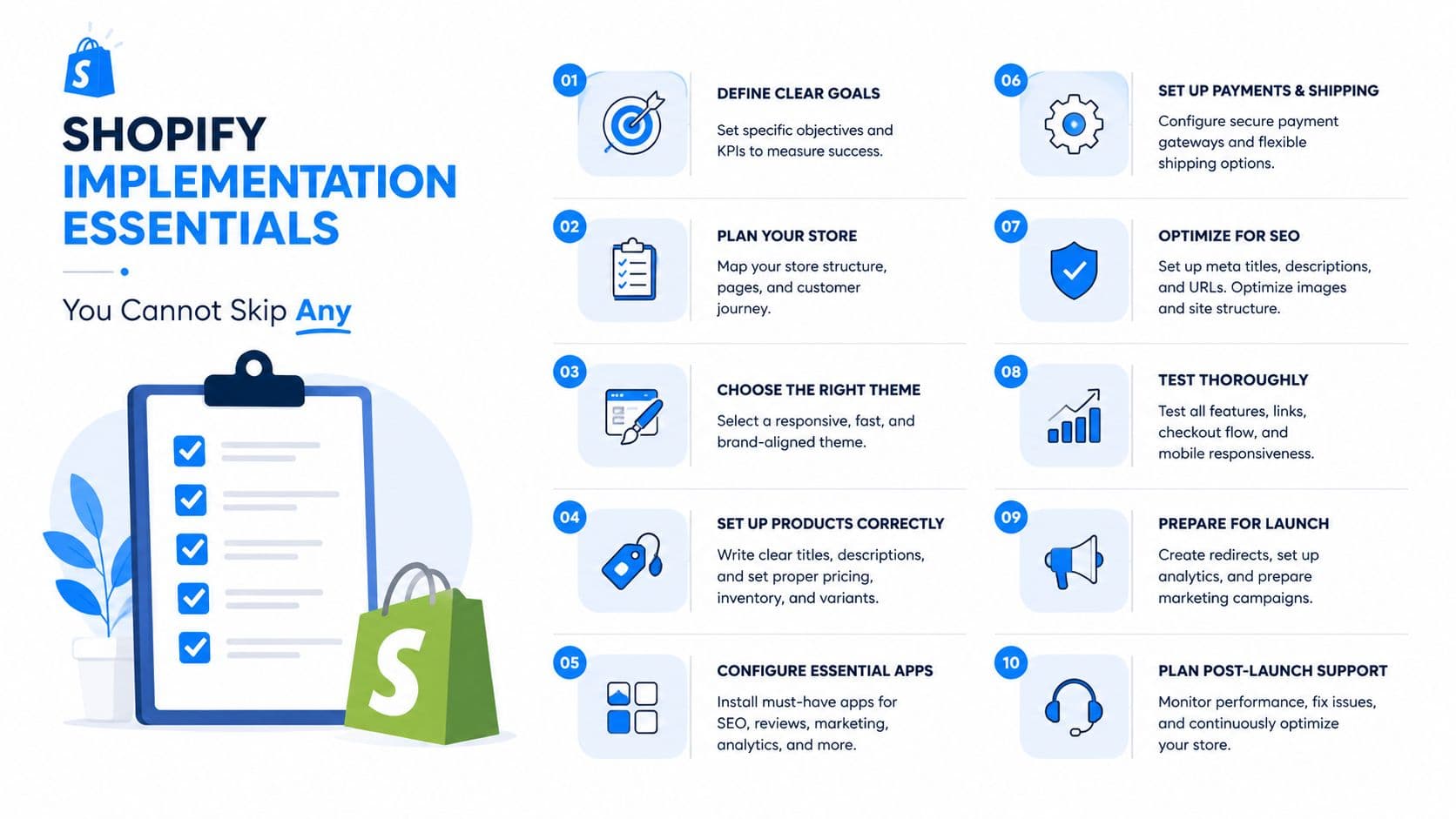
Shopify Implementation Essentials You Cannot Skip
Shopify makes installation easier than many commerce stacks, but easy installation doesn't guarantee accurate selling. Before you approve a conversational commerce platform, turn implementation into pass-or-fail questions.
Can it read live store truth?
Ask whether the system reads current product state when it answers. A stale feed can recommend a sold-out size, display a pre-discount price, or describe a promotion that ended earlier in the day.
Live catalog access also needs to cover variants and regional availability. A platform that knows the product exists but can't identify the purchasable size, color, or bundle is not ready to sell.
Does it handle language and currency correctly?
A German shopper shouldn't receive an English answer if your storefront serves German buyers. A customer browsing in euros shouldn't see a rough currency conversion when Shopify would charge a different localized price.
Test the actual journey, not just the welcome message. Ask product questions in the languages your customers use, inspect the recommendation, add the item to the cart, and confirm that the checkout language and currency remain consistent.
What can you launch without development help?
A no-code setup should let a merchant install the app, connect the store, import products and policies, customize the widget, and review sample conversations. A developer may still be needed for custom checkout behavior, unusual inventory logic, advanced event tracking, or complex integrations.
For the practical installation path, use this guide on how to add a chatbot to Shopify. Don't accept “five-minute setup” as a substitute for testing. Five minutes may cover installation. It won't validate sizing guidance, promotions, multilingual replies, or attribution.
Implementation rule: test the assistant against the questions your support team receives every week, then test the edge cases that cause refunds, cancellations, and abandoned carts.
A Practical Rollout Plan for Your First Week
Don't launch a conversational commerce platform across every page with every trigger enabled. Start with a controlled week that exposes data gaps before those gaps reach shoppers.
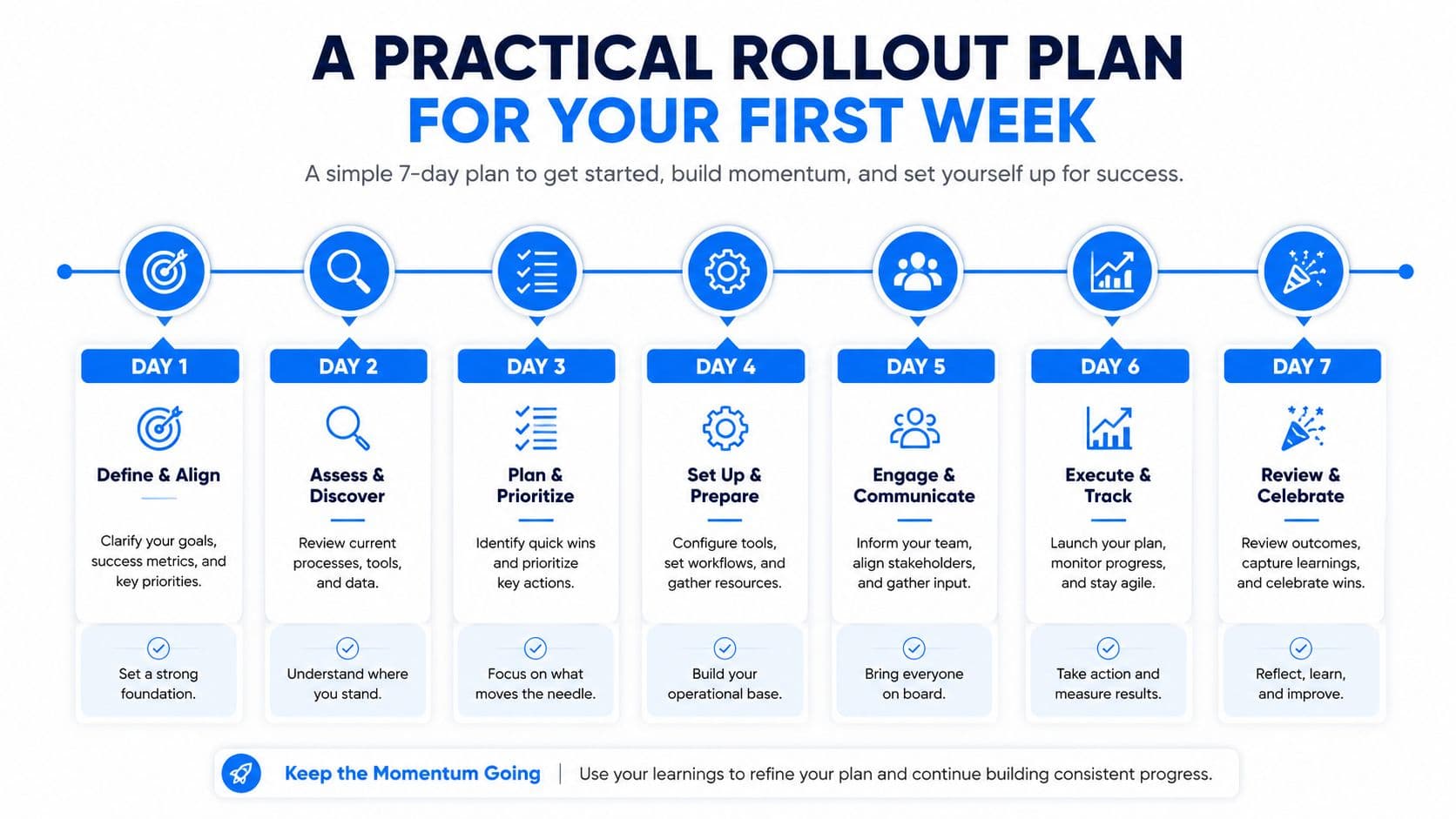
Days one and two
Day one is for connection. Install the app, connect the Shopify catalog, and let the system index products, collections, variants, policies, and relevant store content. Check that discontinued products and unavailable variants don't appear as active recommendations.
Day two is for interrogation. Ask the questions your buyers already ask: sizing, materials, delivery, returns, care, compatibility, and product comparisons. Correct the underlying catalog content when the assistant can't answer. Don't patch every response manually if the source information is missing from the store.
Days three and four
Day three is for proactive selling. Enable cart-abandonment nudges and exit-intent messages on a limited set of pages or audiences. Keep frequency controlled. A useful prompt at the right moment can recover intent, while repeated interruptions make the store feel desperate.
Day four is for attribution. Connect conversations to carts and completed orders in analytics. This step gets skipped constantly, then the team decides the tool “isn't working” because nobody can see which conversations influenced revenue.
Days five through seven
Day five is for log review. Read actual conversations and flag incorrect answers, irrelevant recommendations, missed variants, and weak handoffs. Fix catalog data, instructions, and routing rules in that order.
Days six and seven are for controlled expansion. Compare response accuracy, first-response speed, cart actions, and chat-attributed orders against the store's normal performance. A good first week doesn't require a dramatic dashboard. It should produce reliable answers and enough attributable activity to decide whether broader deployment makes sense.
The merchant feedback behind Carti follows this operational logic. A typical sale starts with a shopper asking whether a jacket runs small, continues with a size recommendation based on store guidance, confirms live color availability, and ends when the assistant adds the requested variant to the cart. The order is then joined to the conversation for attribution. That is the workflow to test.
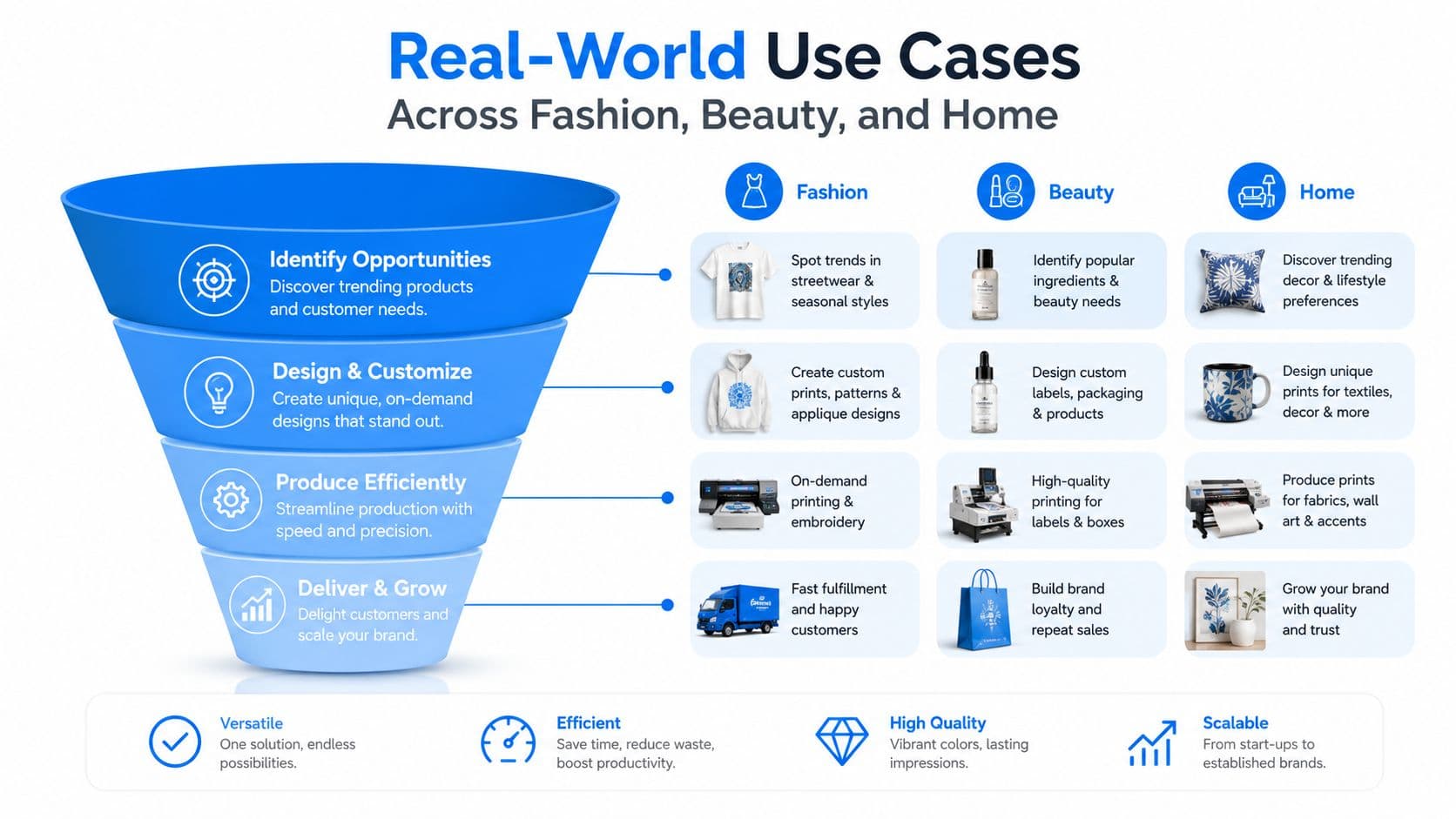
Real-World Use Cases Across Fashion, Beauty, and Home
The strongest use cases begin with a specific product objection. They don't begin with “How can I help?” and wait for the shopper to do all the work.
Fashion
A shopper opens a jacket product page late at night and asks whether it runs true to size. The platform retrieves the size chart and fit guidance, asks whether the shopper is between sizes, recommends sizing up, checks the selected color, and adds the correct variant to the cart.
The sale doesn't happen because the assistant sounds friendly. It happens because the response answers the one question blocking purchase and performs the next action.
Beauty
A customer with sensitive skin asks for a fragrance-free serum. The assistant filters the live catalog using ingredient attributes, explains why the matching products qualify, and recommends a compatible cleanser.
That flow needs more than semantic similarity. The system must retrieve the actual ingredient information and avoid making medical claims that the catalog doesn't support. If the product data doesn't distinguish fragrance-free formulas clearly, the merchant needs to fix the data before turning on recommendations.
Home
A buyer measuring for curtains asks whether custom lengths are available. The assistant checks the relevant variants, confirms availability, and provides the applicable shipping window. The buyer can then move from measurement uncertainty to a specific configuration without opening multiple product pages.
The same pattern works across categories:
- A concrete question reveals purchase intent.
- Catalog-grounded retrieval removes uncertainty.
- The assistant recommends a purchasable option.
- A cart or checkout action closes the loop.
Watch the video below for another visual perspective on how conversational workflows can guide shoppers from discovery to purchase.
A generic answer may reduce a ticket. A specific, live answer can recover revenue. That difference is the reason to evaluate the platform as a sales channel.
Vendor Evaluation Checklist and KPIs Worth Tracking
Run every candidate through the same stress test. Vendor demos are rehearsed. Your shoppers aren't.
Ask whether the platform pulls current catalog data, pricing, and inventory quickly enough for live shopping. Ask whether it answers in the shopper's language using your translated content, triggers messages based on browse and cart events, exposes conversations and orders in analytics, and keeps pricing from becoming punitive as order volume grows.
| Criterion | Pass Threshold | Why It Matters | KPI to Track | Target |
|---|---|---|---|---|
| Catalog and inventory access | Current store state at answer time | Prevents stale recommendations | Engaged-shopper conversion | Compare with store baseline |
| Language handling | Uses shopper and store language correctly | Preserves clarity and trust | First-response time | Under 10 seconds |
| Proactive triggers | Browse and cart events supported | Reaches shoppers before intent fades | Cart recovery rate | More than 10% of abandoned carts |
| Attribution | Conversation joined to real orders | Makes revenue visible | Incremental revenue per sessions | At least $3 per 1,000 sessions |
| Pricing model | Doesn't inflate with successful traffic | Protects margin as adoption grows | Conversion lift on qualified traffic | At least 1% |
The benchmarks in this scorecard come from the evaluation framework for this guide, not from an industry average. Treat them as operating thresholds for a pilot. If a platform lifts conversion on qualified traffic by 1%, answers in under 10 seconds, recovers more than 10% of abandoned carts, and generates at least $3 per 1,000 sessions, it has a commercial case. If it misses those lines, diagnose the failure before expanding.
Track four measures in a 30-day pilot:
- Deflection-adjusted conversion rate: Did engaged shoppers buy more often than comparable store traffic?
- Median time to first reply: Did the assistant respond before the shopper left?
- Assistant-attributed cart recovery: Did a conversation bring a stalled order back?
- Incremental revenue per 1,000 sessions: Did the channel create enough value to justify its cost?
Use a broader e-commerce KPI framework when building the reporting layer. If your team is also improving product discovery and organic acquisition, pair the conversation data with ecommerce SEO services so merchandising, search visibility, and onsite conversion are evaluated together.
Pricing deserves its own test. Published examples in the category include usage-based plans with a free allowance of 100 conversations per month, freemium tiers capped at 50 conversations per month, and visitor or session pricing that rises with usage, as shown in this AI chatbot pricing comparison. A low starting price can become an acquisition tax if your bill rises every time the channel works.
Why the Right Platform Should Act, Not Just Chat
Stop evaluating chatbots as if they were deflection widgets. A deflection widget absorbs support tickets so fewer humans need to reply. A conversational commerce platform must help the shopper decide and buy.
The difference appears in three behaviors. First, the assistant reads the live catalog instead of relying on a static FAQ. Second, it can initiate a helpful interaction when a buyer stalls, rather than waiting passively for a question. Third, it preserves intent through product selection, cart creation, and checkout instead of sending the shopper to a generic product page with the context stripped away.
Trust remains the hard part. A global survey reported that 71.5% of consumers would consider completing a full purchase inside an AI chat app, but 52.4% cited payment-security concerns and 43.9% cited privacy or data-use worries, according to Sinch's conversational commerce research. The same source says 42.8% would choose one brand over another if it offered an official AI agent, while 19.7% would switch brands or abandon a task when a brand lacked one in their preferred AI environment.
Those figures point to a blunt conclusion: adding AI isn't enough. The assistant must earn trust with accurate prices, transparent policies, secure checkout behavior, and answers that stay within the merchant's data.
What to reject
Reject any platform that only responds after the customer speaks, only links to product pages, or charges per seat as traffic grows. Those products may help support operations, but they aren't built around the commercial job.
Conversational commerce should have its own revenue line, owner, reporting, and iteration cycle, much like paid search or email. Measure completed decisions, not message volume or “engagement minutes.” A long conversation can signal confusion. A short conversation that ends with the right product in the cart is the outcome you want.
Carti is one Shopify-focused option built around this model. It answers from store data, recommends products, supports conversations in multiple languages, helps recover carts, and prices by a monthly conversation allowance, from a free tier to Starter at $49 per month, rather than charging per visitor. That pricing and capability claim comes from the product context for this guide, so verify the current offer and test the workflows against your own catalog before committing.
The wider shift toward autonomous, action-oriented marketing is also relevant beyond commerce chat. For a useful explanation of how AI agents can plan and execute campaign activity, see this guide to agentic marketing for meme campaigns. The principle is the same: automation earns its place when it performs a measurable business action, not when it merely produces more interaction.
Carti gives Shopify merchants a live-catalog sales assistant that answers product questions, recommends variants, supports multilingual conversations, and helps move shoppers into the cart. Visit Carti to test a conversational commerce workflow built to close orders rather than just deflect support tickets.

Written by
Daniel AndersonFounder of Carti. 10+ years building ecommerce brands in apparel and supplements. Still runs a Shopify store and built Carti to help merchants convert more browsers into buyers.
Ready to boost your store's sales?
Install Carti in 5 minutes and let AI handle customer questions, recommend products, and close sales 24/7.
Start Free Trial14-day free trial