
The strongest proof that conversational AI for sales is not just a support feature is the conversion gap itself. Shoppers who engage with AI-powered chat convert at 12.3% versus 3.1% for those who don't, which is roughly a 4x lift in purchase completion, according to the conversational commerce benchmark cited in the brief. That's why serious Shopify teams are treating chat less like a widget and more like a revenue layer.
In practice, conversational AI for sales means software that reads the shopper's question, grounds the answer in the store's catalog and policies, and takes the next useful action. It behaves like a sales associate who knows every SKU, never sleeps, and responds at the exact moment hesitation shows up. If you want a useful primer on the broader shopping side of this shift, the guide to ChatGPT in ecommerce is a helpful companion read.
Value isn't vague engagement. It's shorter time-to-answer, higher add-to-cart rate, and recovered revenue from abandoned carts, each of which a merchant can verify against Shopify analytics and conversation logs. That's the standard that matters, because clicks and chats only count if they move a shopper closer to checkout.
What Conversational AI for Sales Actually Means for a Store
A lot of stores still measure chat by volume, not outcome. That's a mistake, because message counts don't pay the bills unless they change a purchase decision. In retail, 78% of online retailers were using chatbots, up from 23% in 2020, and 67% of consumers prefer chatbots for quick questions, yet the point of the tool still isn't “more chat,” it's fewer stalled purchases. Those adoption numbers come from the retail chatbot summary in the brief, and they only matter because they explain why shoppers already expect this interaction pattern. attnagency's ecommerce conversion analysis frames the same shift clearly.
Conversational AI for sales is the version of chat that's tied to commerce decisions. It reads the question, checks the product catalog, respects policies, and pushes the session forward with the right answer or the right follow-up action. If you strip away the buzzwords, it's a store associate with perfect recall, immediate availability, and no need to guess.
Practical rule: if the conversation doesn't shorten hesitation, recover a cart, or improve product selection, it's entertainment, not sales infrastructure.
The operator's job is to map the tool to a business result. The cleanest framework is simple. First, reduce time-to-answer on product, shipping, and policy questions. Second, improve the add-to-cart rate on product pages where the shopper is undecided. Third, reclaim abandoned revenue with proactive messages that resolve objections before the session ends.
That's the difference between a generic chatbot and a sales system. One sits on the site and waits. The other uses catalog-grounded answers, timing, and context to move revenue.
How a Sales Chatbot Thinks Inside a Shopify Store
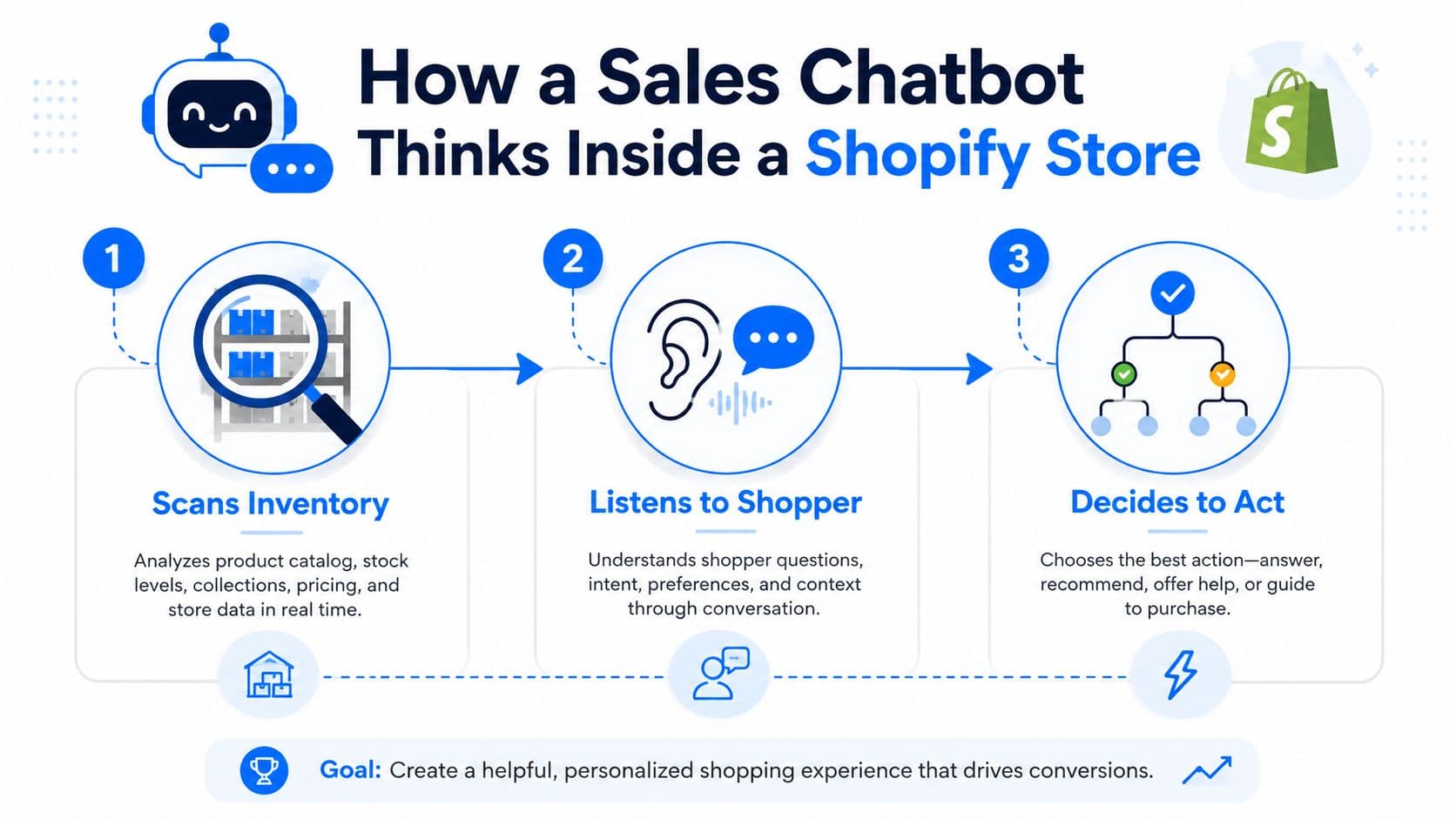
A useful way to think about the stack is a well-trained associate on a real sales floor. First, they scan the shelves to know what's available. Then they listen to the shopper carefully. Only after that do they decide whether to step in, answer, recommend, or stay quiet. The software should do the same thing.
The first layer is catalog grounding. That means the assistant pulls product titles, variants, prices, and inventory from Shopify so it doesn't invent a SKU or recommend an out-of-stock item. The second layer is intent detection, which classifies the question. Sizing, shipping, compatibility, restock, and returns are different problems, and they need different replies.
The third layer is retrieval. That's where the assistant selects the right product snippets, policy language, or help content. The language model then drafts a grounded response in natural language. If the shopper asks about fit, the reply should sound like a competent associate, not a policy bot reading from a manual. If the shopper asks about shipping, the answer should surface the exact business rule that applies.
A good assistant is not “creative” at the expense of accuracy. It should be boring where accuracy matters and helpful where context matters.
The last layer is proactive triggering. Behavior signals matter, such as time on a product page, scroll depth, or a cart that has gone still. A passive bot waits for the question. A proactive one steps in only when the session shows hesitation.
Merchants usually configure the grounding scope, escalation rules, greeting copy, and trigger logic. The reply generation, retrieval, and conversation flow can run automatically once the store data is connected. For a deeper technical breakdown, the internal NLP and chatbots guide is a useful reference, and for marketers comparing ad copy logic to conversational prompts, the chat GPT Google Ads playbook shows how intent framing changes response quality.
Where Chat Changes the Outcome in the Buyer Journey
The highest-value moment isn't top-of-funnel discovery. It's the middle, where a shopper is already looking at a product and one unanswered question is enough to stop the sale. On many Shopify stores, product-page visitors convert at roughly 2 to 4 percent on average, while visitors who add to cart convert near 35 percent. That gap says the loss is happening in hesitation, not in awareness.
At the top of the funnel, shoppers skim, compare, and bounce between tabs. They're not ready for a hard sell, and they often don't need one. Mid-funnel, the tone changes. The shopper is asking about fit, material, delivery timing, bundle math, or compatibility, and the decision stalls because the answer isn't immediate.
That's exactly where conversational AI helps. A shopper asking whether a bag fits a 15-inch laptop doesn't want a contact form. They want a precise answer while they're still on the page and still in the mood to buy. If the response takes too long, the session cools off, and the cart never happens.
This is why chat beats static FAQs and search bars in the consideration-to-cart gap. FAQs force the shopper to translate their question into your site structure. Search bars assume the shopper knows the right keywords. A grounded assistant accepts the question as written and answers it in the same language.
Operational shortcut: if a question can be answered faster than the shopper can open a second tab, chat is probably the right tool.
The useful test is simple. Does the assistant keep a product-page shopper moving when doubt appears? If yes, it belongs in the middle of the funnel. If not, it's just another surface that looks modern without changing revenue.
Three Shopify Use Cases Worth Running on Day One
The first use case is instant answers. A shopper asks, “Is the 60L backpack waterproof enough for a week in Patagonia?” The assistant should answer from the product description, care instructions, and review language already in the catalog, then state clearly what the product does and doesn't cover. The value isn't the novelty of the exchange, it's that the shopper gets confidence before abandoning the page.
The second use case is smart suggestions. A shopper looking at a $120 espresso machine often needs more than the machine itself. If the assistant sees the product taxonomy and co-purchase pattern, it can suggest the matching burr grinder and descaler bundle at the right moment, without defaulting to a generic “you may also like” block. The relevant principle is public and simple, a question about the shopper's situation outperforms a generic add-on pitch. The example in the brief, asking whether a plant will face full sun or shade, is the same logic applied to commerce.
The third use case is cart recovery. A shopper stalls on shipping or returns, then gets a proactive message that addresses the exact objection. If the concern is delivery timing, the assistant should answer that. If it's returns policy, the assistant should make the rule easy to understand and keep the shopper in session long enough to finish checkout.
The pattern is consistent across all three:
- Instant answers: remove doubt before it turns into a bounce.
- Smart suggestions: make the next item feel relevant, not random.
- Cart recovery: intervene before the abandoned cart becomes lost revenue.
A tool like Carti fits this model because it's built for Shopify catalog grounding, proactive sales chat, and cart recovery, but the core lesson applies even if you use a different stack. The assistant should behave like an informed associate, not a FAQ page with a personality layer.
Getting a Shopify AI Sales Assistant Live in Five Minutes
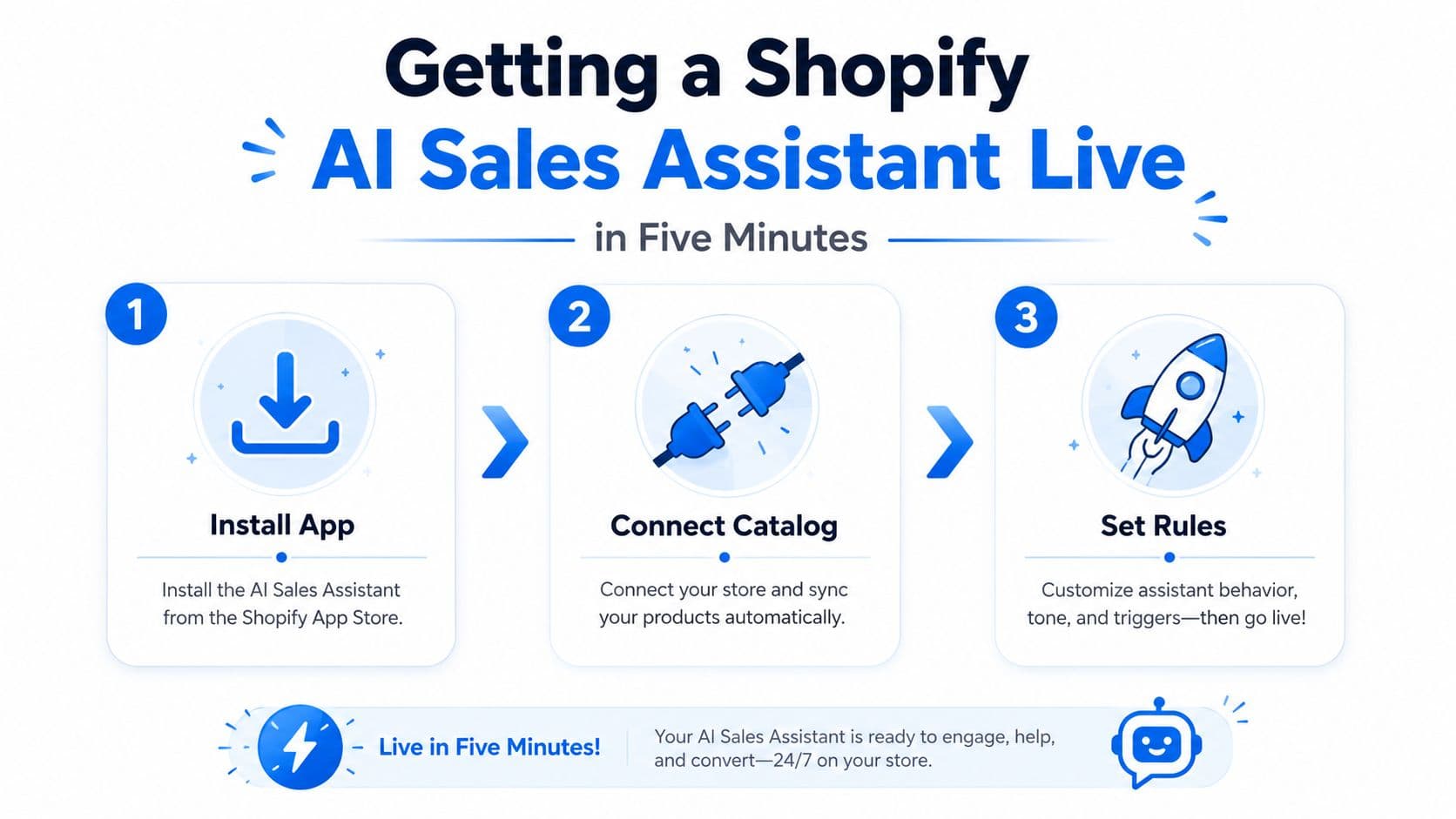
A five-minute launch should produce a testable sales assistant, not a finished brand experience. Install the Shopify app, connect the catalog, set narrow rules, then watch real conversations before spending time on colors, tone, or dashboard polish. The useful signal is whether chat helps shoppers move from product consideration to cart.
Start with the catalog connection. Pull in live SKUs, prices, and stock so answers reflect the current store rather than an old export. Then choose the grounding scope. A messy catalog calls for top sellers or one tightly defined collection. A clean catalog can support wider coverage, but broad access does not excuse unclear product data.
Set one proactive trigger on the cart page, aimed at hesitation rather than every visit. Pair it with one escalation rule for policy questions that require judgment or an exception. Too many triggers create noise, and shoppers learn to dismiss the assistant.
The greeting should give the shopper a reason to answer. “Need help finding the right size?” is more useful than a generic welcome because it starts a buying conversation. For a plain Shopify setup walkthrough, use the guide to adding a chatbot to Shopify.
A common launch mistake is testing only scripted questions. Ask about size, compatibility, delivery, and returns, then check whether the assistant cites the right product and hands off cleanly when it lacks an answer. One merchant can find more useful defects in a short live review than a polished demo reveals.
The video below shows the setup sequence.
Skip custom branding and dashboard perfection on day one. Put the grounded assistant on product and cart pages, observe buyer intent, and refine the rules from actual conversations.
The KPIs That Prove Conversational AI Is Working
The only way this channel earns its place is by tying conversation to revenue. I'd track three things from week one. Chat-influenced revenue shows whether conversations are creating orders. Deflection rate tells you how many support issues the assistant resolves without escalation. Time-to-first-answer shows whether the experience is faster than waiting for a human or hunting through the site.
Here's the basic math for chat-influenced revenue. Take chats that reach a product page after a recommendation, multiply by conversion rate and average order value, then add attributed cart recoveries. That gives you the business value that a finance lead can read without squinting. The earlier benchmark in the brief, where AI-referred visitors converted at 5.97% versus 0.72% for traditional traffic and produced $18.04 in revenue per visitor compared with $2.56, is a reminder that source matters when you're analyzing assisted journeys. Neil Patel's AI referral benchmark is the cleanest citation for that comparison.
A simple worked example makes the case easier to defend. If a store has 50,000 monthly visitors, a 1.8% baseline conversion rate, and an $85 AOV, even a modest lift from chat can change the month. Add a small conversion increase, then layer in a few recovered carts, and the incremental revenue becomes visible without heroic assumptions.
| Conversational AI KPI Benchmarks for Shopify | Formula | Worked Example |
|---|---|---|
| Chat-influenced revenue | Chats to product page after recommendation × conversion rate × AOV, plus attributed cart recoveries | If conversations recover a small share of stalled carts and improve conversion on assisted sessions, revenue rises measurably |
| Deflection rate | Resolved conversations without escalation ÷ total support conversations | Track how often the assistant closes common questions without a handoff |
| Time-to-first-answer | Seconds from shopper question to first reply | Measure in seconds and compare against the shopper's attention window |
The point isn't to decorate a dashboard. It's to prove the assistant is creating money, saving labor, or both. If you can't trace those outcomes, the chat layer is just another line item.
Personalization That Beats First-Name Tokens
A first-name token rarely changes an ecommerce decision. It can even feel automated when the product, page, and message do not match the shopper's situation. Useful personalization starts with session data and turns that data into a relevant product decision.
The implementation is straightforward. Pass the assistant the current URL, cart contents, recently viewed variant, referrer, and recent search terms. These fields give the model a working view of what the shopper is evaluating, rather than a profile label with little sales value.
Consider a shopper viewing a hiking boot who asks, “Is this waterproof enough for the Pacific Northwest?” The response should address the boot's intended rain protection, clarify any limits, and suggest one practical companion product, such as a waterproofer spray or suitable socks. That recommendation earns attention because it resolves a use-case concern already present in the conversation.
The upsell should stay narrow. One relevant option supports the purchase. A stack of unrelated recommendations turns help into a pitch.
Rule of thumb: connect every recommendation to the shopper's stated use case, product context, or immediate next step.
Four signals deserve early attention:
- Current URL: identifies the product or collection under consideration.
- Cart contents: shows what the shopper has already chosen and what may be missing.
- Referrer source: separates search intent from paid-social browsing.
- Recent search: reveals the problem the shopper was trying to solve before opening chat.
Language handling also affects trust. If a shopper writes in Spanish, French, or another supported language, answer in that language rather than forcing a switch. That change is more meaningful than inserting a first name into a generic script.
For a deeper dive into scaling this, see our guide on personalization at scale. The goal is not more personalization fields. It is better timing, clearer product guidance, and a measurable path from consideration to cart.
Pitfalls, Objections, and a 14-Day Rollout Plan
The three failure modes that hurt Shopify merchants most are easy to spot. First, a bot answers from generic web data instead of the catalog. Second, it triggers on every page and annoys shoppers. Third, nobody measures it, so the team can't tell whether the assistant helps or just adds noise.
- Answers from generic data: The symptom is vague or wrong product advice. The cause is weak grounding. The fix is to connect live catalog and policy sources before launch.
- Triggers on every page: The symptom is interruptive popups that feel aggressive. The cause is overbroad trigger logic. The fix is to limit proactive prompts to clear hesitation points like cart or product pages.
- Lacks context: The symptom is generic greetings and irrelevant offers. The cause is treating chat like a script instead of a session-aware assistant. The fix is to feed it URL, cart, and prior-message context.
The objections are predictable too. “Won't it sound robotic?” Not if the answers are grounded and the prompts are specific. “Won't it hurt SEO?” Not if it helps shoppers find answers faster and stay engaged on-page. “Is this just a chat widget?” Not if it changes product selection, cart recovery, and support load.
A simple rollout keeps the risk low and the learning fast.
- Day 1-2: define the three jobs the bot must do.
- Day 3-4: connect the catalog and policy content.
- Day 5: install it on product pages and cart.
- Day 6-7: launch one cart-recovery trigger.
- Day 8: review transcripts for bad answers and missed objections.
- Day 9-10: tune prompts and escalation rules.
- Day 11: add recommendations where the shopper's question creates a natural upsell.
- Day 12: wire the KPIs to revenue, deflection, and response time.
- Day 13-14: report the results and decide what to expand, cut, or retrain.
If you run conversational AI for sales this way, you'll know quickly whether it's doing real work. If it's helping shoppers decide faster, recovering carts, and freeing your team from repetitive questions, keep going. If not, the fix is in the configuration, not the concept.
If you want a Shopify AI sales assistant that's built to answer product questions, recover carts, and surface the conversations that matter, Carti is worth a look. It's built for grounded replies, proactive selling, and fast setup, so you can test the consideration-to-cart gap on your own store instead of guessing from dashboards.

Written by
Daniel AndersonFounder of Carti. 10+ years building ecommerce brands in apparel and supplements. Still runs a Shopify store and built Carti to help merchants convert more browsers into buyers.
Ready to boost your store's sales?
Install Carti in 5 minutes and let AI handle customer questions, recommend products, and close sales 24/7.
Start Free Trial14-day free trial