
More proactive messages don't automatically create more sales. In ecommerce, they often create more dismissals, more overlap, and less trust. The difference between useful proactive customer engagement and an intrusive popup usually comes down to two operating decisions: whether the shopper has shown a reason to need help, and whether your system knows when to stay quiet.
A well-timed question can remove uncertainty around sizing, shipping, product fit, or checkout. A generic welcome message that arrives while someone is still reading can feel like an interruption. The campaigns that perform consistently treat chat as a precision layer over the customer journey, not as a megaphone pointed at every visitor.
Why Most Proactive Chat Campaigns Fail Before They Start
The popular advice is to greet visitors immediately, add a discount popup, and launch a chatbot invitation before the shopper has had time to understand the page. That approach confuses visibility with relevance. A message can be seen and still damage the experience if it arrives before intent exists.
The first trigger I shipped was desktop exit intent. When the cursor moved out of the viewport toward the tab bar, the assistant opened with a question about what the shopper was viewing. We allowed the prompt only after the visitor had spent enough time on the page and only when they hadn't been prompted recently. Engagement was useful, but the immediate operational lesson was uncomfortable: early on, a third of fires doubled up with other prompts inside the first minute. After we added strict cooldowns and per-session caps, duplicate fires fell to under 2%.
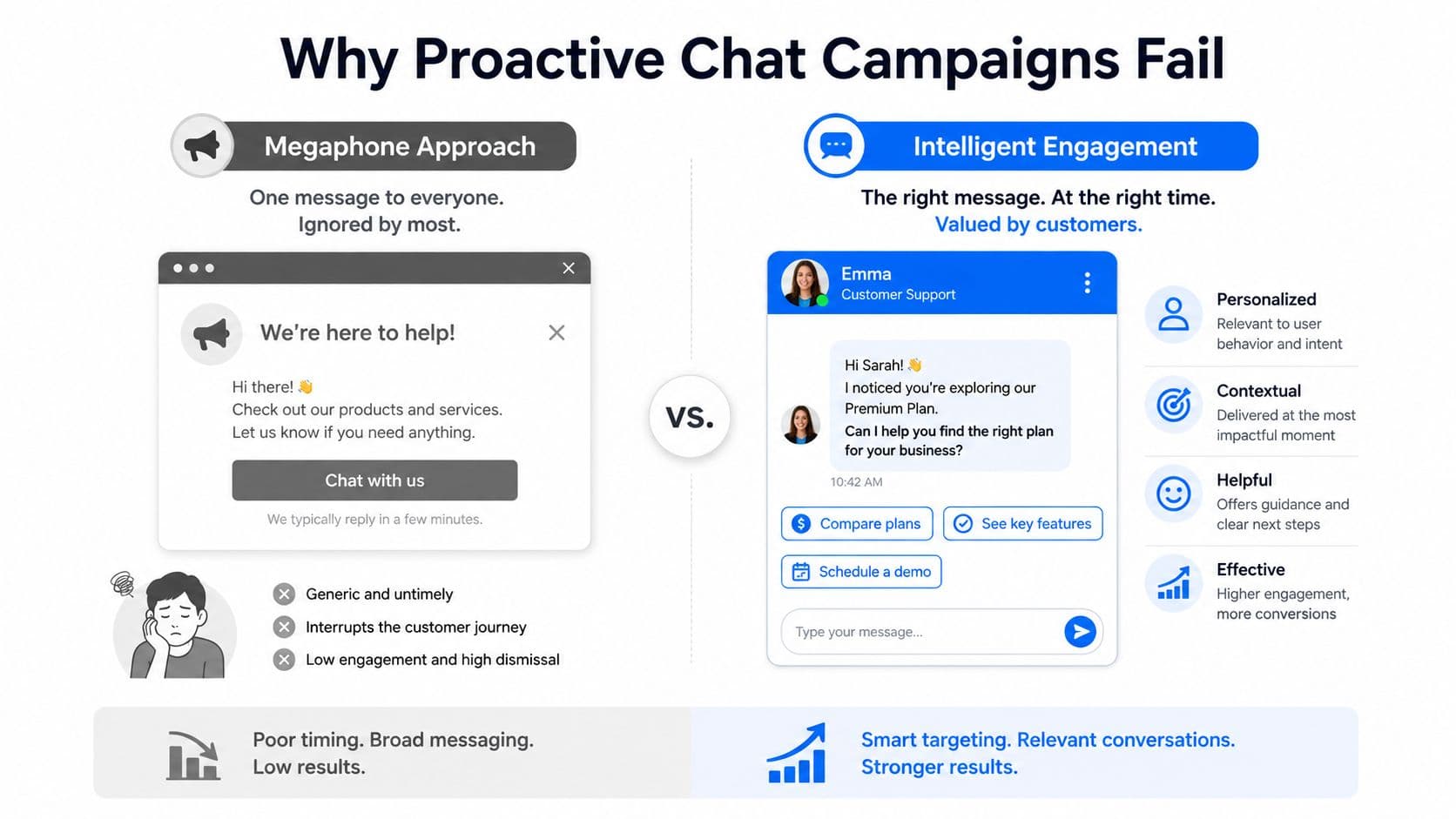
Three failure modes appear repeatedly:
- Premature triggers: A timer fires before the shopper has shown hesitation, interest, or a need for clarification.
- Missing cooldowns: The same visitor receives another invitation after dismissing the first, or several campaigns compete for the same moment.
- Generic copy: The message sounds like a banner ad, not a response to something the shopper is doing.
Practical rule: A trigger should explain why the message is appearing now. If the shopper can't infer that reason, the prompt probably isn't ready.
Frequency discipline protects more than the current session. A returning visitor who sees the same invitation on every visit learns to close it automatically. Set a session cap, suppress lower-priority prompts when a higher-intent event occurs, and apply a cooling-off period after dismissal. The exact limit should reflect your traffic and customer journey, but the principle is firm: one helpful intervention is better than a sequence of competing interruptions.
The message itself should also invite participation. “Can I help you pick the right size?” starts a conversation. “We offer free returns” merely announces a fact the shopper may not care about yet. Questions give visitors something to answer, while statements give them something to dismiss.
The Business Case for Proactive Customer Engagement
Reactive support waits for a shopper to raise a hand. Proactive engagement acts on a visible sign of uncertainty or intent, such as an abandoned cart, a product question, or a visitor returning to the same page. That difference matters because customers often leave before they decide whether to contact support.
Independent benchmarks support the commercial case, but they also show that proactive engagement affects more than immediate conversion. A benchmarking study summarized by NICE and based on Aberdeen data found 11.6% year-over-year customer retention growth for companies using proactive engagement, compared with 6.2% for all others, representing a 77% greater increase in retention. The same study reported 4.8% year-over-year revenue growth per contact for proactive users versus 3.2% for others, while service-cost reduction improved 5.9% versus 3.0%. These figures describe an association, not a guarantee, but they make the business case broader than cart recovery alone. (NICE's proactive outreach benchmark)
Gartner's 2022 survey adds an important qualification. Among more than 6,000 customers, only 13% said they'd received any form of proactive customer service. Yet after receiving proactive outreach, 66% of B2C customers and 82% of B2B customers contacted the company again. Gartner also found that proactive service increased customer value enhancement score by 9%. (Gartner survey coverage)
| Metric | Reactive model | Proactive model | Lift |
|---|---|---|---|
| Customer retention growth | 6.2% year over year | 11.6% year over year | 77% greater increase |
| Revenue growth per contact | 3.2% year over year | 4.8% year over year | Higher growth |
| Service-cost reduction improvement | 3.0% | 5.9% | Higher improvement |
| Customer value enhancement score | Baseline | 9% increase | Positive change |
The operational takeaway is simple. Proactive customer engagement earns its place when it reduces customer effort, protects a sale, or prevents a known issue from becoming a support interaction. It doesn't earn its place merely because a tool can open a chat window.
Timing is especially important for abandoned carts. One benchmark found that a first recovery email sent 1 hour after abandonment recovered 31.2% of carts, while waiting 24 hours reduced recovery to 16.8%. The same report recorded an overall 30.8% recovery rate for automated email and push recovery, alongside a 69.82% average abandonment rate across stores. (Cart recovery timing benchmark)
Core Triggers and Tone Rules That Drive Responses
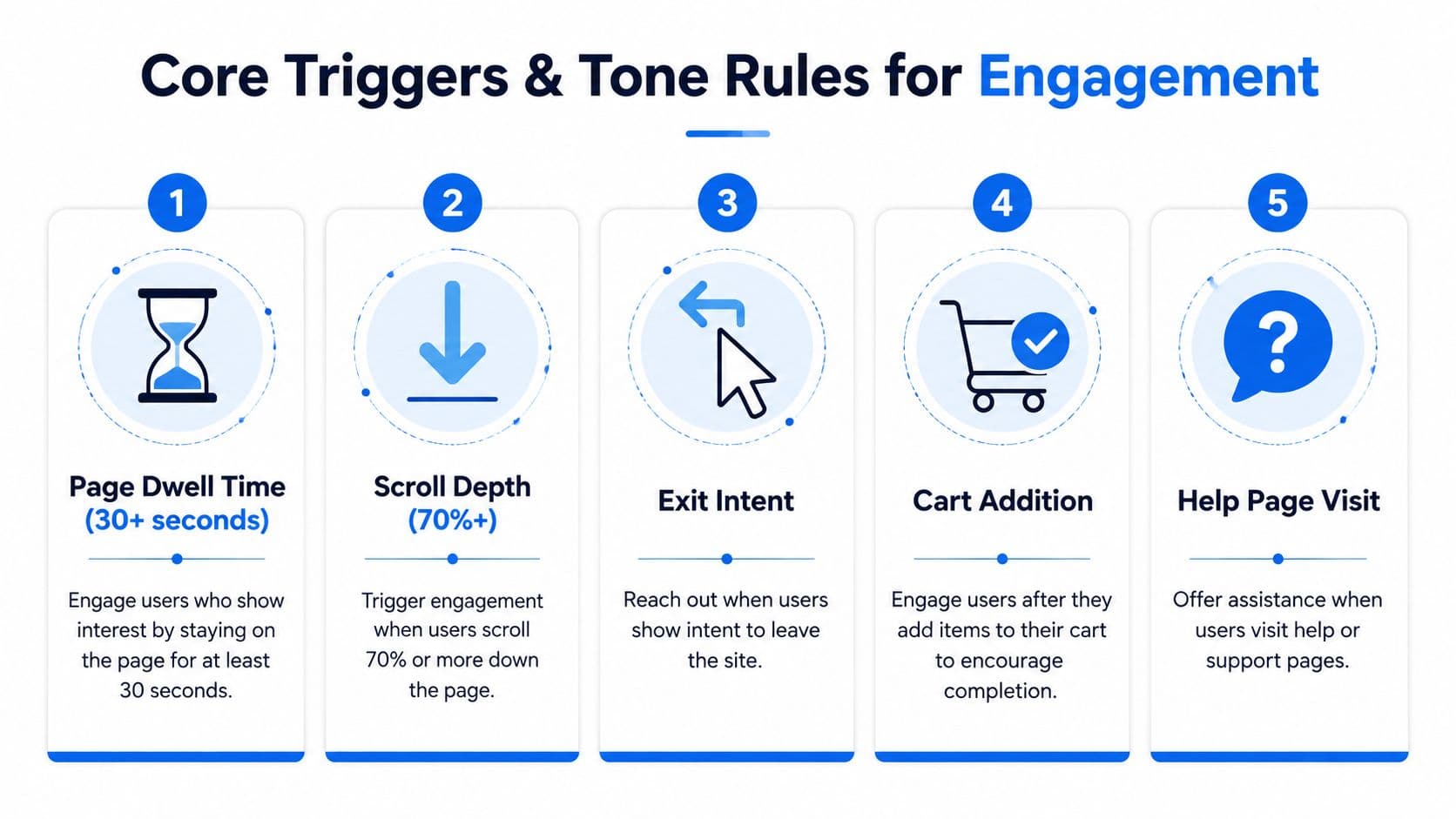
A trigger should be tied to behavior, not merely elapsed time. The most useful signals reveal that a shopper is evaluating, hesitating, returning, or preparing to leave.
Five signals worth prioritizing
Page dwell time works best when the visitor is reading a product detail page and may need clarification. Don't fire inside the first minute. On a product page, wait for meaningful engagement and use the prompt to address fit, compatibility, materials, or delivery rather than offering an unrelated promotion.
Scroll depth can distinguish a serious browser from a quick bounce. A visitor who reaches product details, reviews, or shipping information has given you a stronger reason to offer help than someone who has only seen the hero section. Ask about the information they're likely reviewing, such as, “Want help comparing the options on this page?”
Exit intent is a departure signal, not a universal invitation. Exit-intent systems commonly detect cursor movement toward the browser's close button, address bar, or outside the main viewport, a pattern Shopify merchants use to catch visitors who may leave the page. (Shopify exit-intent trigger guidance) Use a short question first. If you offer an incentive, make it secondary to the help request.
Cart addition is one of the clearest commercial signals. When a shopper adds an item and closes the cart drawer without progressing, ask about a relevant concern. For apparel, that might be sizing or completing an outfit. For home goods, it might be dimensions, delivery, or compatibility.
Return visits and help-page behavior deserve different treatment. A repeat product-page visitor may benefit from comparison help, while someone visiting returns or shipping pages may need reassurance. The message should match the page, not merely recognize that the visitor has returned.
Tone rules that keep invitations conversational
Lead with a question and keep the first message focused on one action. “Can I help you pick the right size?” is stronger than a statement about returns because it gives the shopper a clear response path. Use a first-person brand voice when it sounds natural, avoid stacking benefits into one bubble, and frame the assistant as a helpful clerk rather than a salesperson demanding attention.
A useful library of chat conversation examples can help teams adapt wording to product categories without copying generic scripts. Test question-led prompts against statement-led reminders, but judge more than clicks. Watch conversation quality, assisted orders, dismissals, and repeat exposure.
The winning exit-intent copy in one test was the question form. A question gives the shopper something to answer. A statement gives them something to dismiss. The second lesson mattered just as much: repeating the winning message on later visits burns out the audience quickly. Vary the prompt and know when to go quiet.
Proven Campaign Workflows With Measurable Outcomes
The strongest workflows don't begin with copy. They begin with a defined event, a suppression rule, and a measurement path.
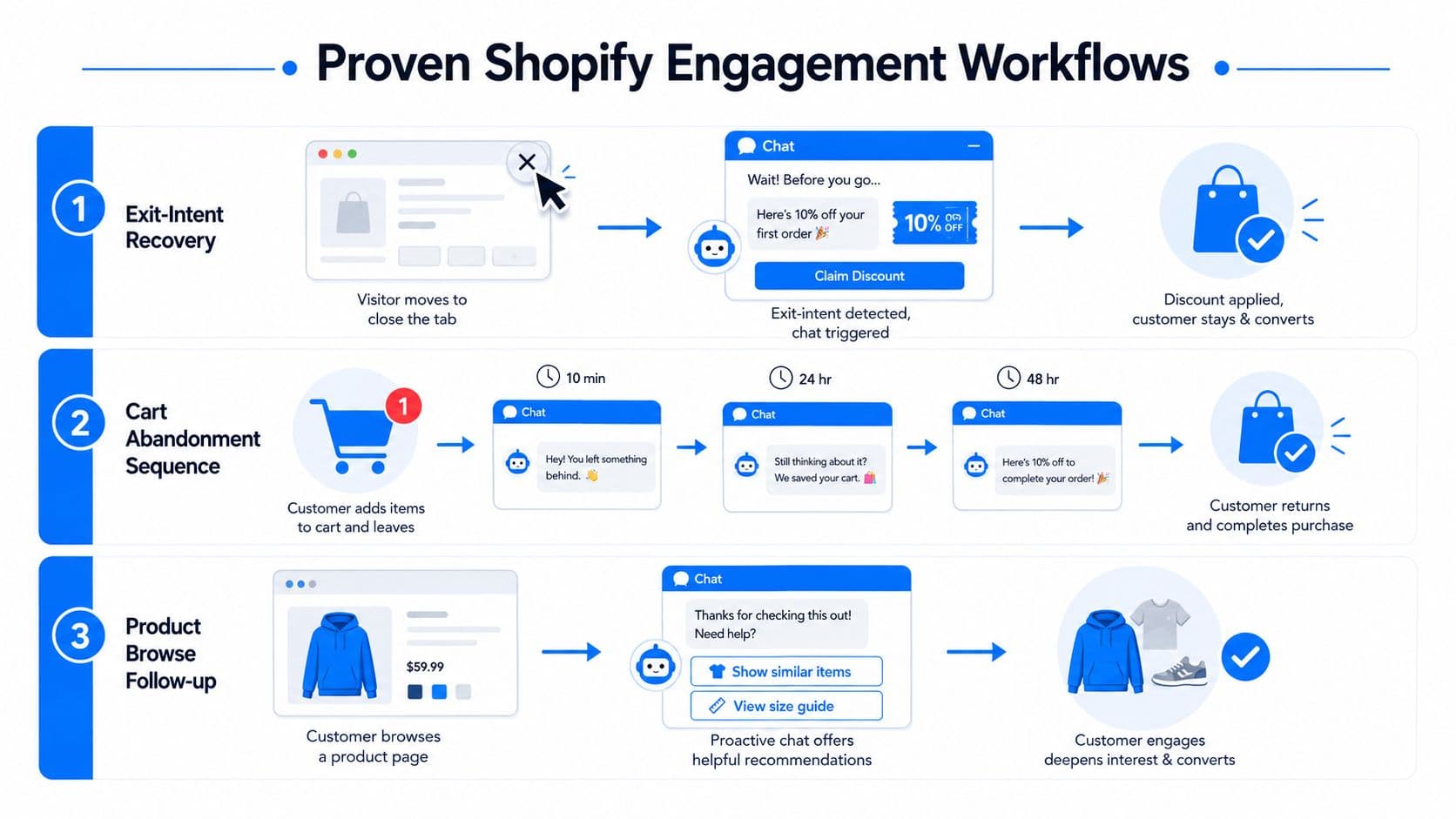
Exit-intent recovery
Use exit intent when the cursor moves toward leaving the viewport, but suppress the campaign if the visitor has just seen another prompt or has already completed an order. The first message should ask a useful question:
“Before you go, is there anything about this product you'd like me to clarify?”
If the shopper engages, answer the question before presenting an offer. If they don't, don't keep reopening the conversation. Capture an email only after the visitor shows interest, and make the opt-in purpose clear.
One early implementation taught us that an exit trigger can work well while still creating a poor experience if other campaigns fire at the same time. Cooldowns and per-session caps reduced duplicate prompts to under 2%, making frequency control a measurable operating metric rather than a vague preference.
Add-to-cart follow-up
The add-to-cart workflow is more useful when the shopper closes the cart drawer without starting checkout. Carti asks a short question about completing the look or covering a common concern for the product. Shoppers who engage with these prompts convert at roughly 3.5 times the store average, and one early store attributed $3,480 in conversation revenue during its first 30 days. Those figures come from the campaign's own attribution setup, where each prompt fire was paired with its click and any resulting order.
Keep the sequence focused:
- Event: An item is added and the cart drawer closes without checkout progression.
- Message: Ask about a product-specific concern, such as size, shipping, returns, or compatibility.
- Resolution: Provide a direct answer or route the shopper to a person.
- Suppression: Stop the sequence after engagement, dismissal, checkout start, or order completion.
Idle-cart re-engagement
An idle cart requires restraint. A visitor who returns with items still in the cart may appreciate a reminder, but a generic “You forgot something” message can sound accusatory. Use product context instead:
“Would you like help deciding whether this size is right for you?”
If the shopper returns to the product page, the assistant can offer a comparison or answer a policy question. If the visitor ignores the prompt, stop rather than escalating through multiple channels. When SMS enters the workflow, teams also need clear consent and opt-out handling. A practical resource on SMS marketing compliance for brands can help operators review those requirements before adding text messages to cart recovery.
Track prompt fires, clicks, conversations, assisted orders, revenue, dismissals, and suppression events. A campaign that generates clicks but no useful conversations or orders needs different targeting, not just more exposure.
Implementing Proactive Engagement on Shopify
Start with the event model, not the popup design. Choose a Shopify-compatible tool that can observe page views, cart additions, checkout starts, and orders, then pass those events into an attribution system. Native integration reduces implementation friction, but it shouldn't replace testing. Confirm that the tool can suppress campaigns, record prompt exposure, and distinguish an assisted order from a direct purchase.
Build the journey states
Map the states a shopper can occupy:
- Browsing: Product or collection page viewed without a stronger signal.
- Evaluating: Meaningful page engagement, deeper scrolling, or repeat visits.
- Hesitating: Cart addition followed by drawer closure or a return to product information.
- Leaving: Exit-intent movement after the visitor has had time to evaluate.
- Converting: Checkout started, order completed, or support conversation active.
Assign one eligible campaign to each state. Suppress proactive messages on thank-you pages, during active support tickets, and after a shopper has already received a recent invitation. Frequency discipline should be enforced centrally, not separately inside every popup tool.
Configure data and attribution
Install the tracking pixel or app script, then verify event listeners in a test session. Pass campaign identifiers into analytics, use UTM parameters for messages that leave the storefront, and connect prompt exposure to add-to-cart and order events. Salesforce documents an attribution pattern that links engagement events to downstream actions, allowing teams to count assisted revenue directly rather than estimate it. (Salesforce attribution settings)
For stores comparing implementation options, Shopify AI customer engagement is one example of a Shopify-focused integration to evaluate alongside other tools. The important criteria are event access, audience rules, response handling, and transparent reporting.
Use customer tags and purchase history carefully. A repeat buyer may need product support, while a first-time visitor may need sizing or shipping guidance. Don't use historical data to force a recommendation when the current page signal points somewhere else.
For setup instructions on rules, suppression, and message behavior, use the proactive messages setup guide.
Test before launch
Check mobile rendering, chat stacking, delayed events, and conflicts with discount bars or email capture popups. Confirm that a dismissed invitation stays dismissed for the configured cooling-off period. Review consent language, privacy disclosures, and regional requirements before collecting contact details. Then run an A/B test with one variable at a time, such as question wording or trigger timing, so the result remains interpretable.
Measuring Attribution and Closing the Execution Gap
A proactive campaign needs a measurement chain that begins with the trigger and ends with the order or support outcome. Track assisted conversions, revenue per chat session, response rate, conversation resolution, customer satisfaction, dismissals, and complaint or unsubscribe signals. Separate exposure from engagement. A shopper who saw a prompt but never interacted shouldn't be counted the same way as someone who used the conversation to choose a product.
A practical attribution record contains the prompt ID, trigger type, audience segment, timestamp, click, conversation outcome, add-to-cart event, checkout start, and order. The widely used analytics pattern of connecting prompt fires to clicks and downstream commerce events makes assisted revenue concrete instead of speculative. For a deeper implementation model, use this guide to revenue attribution for chat-assisted commerce.
Read the numbers by operating decision
Last-touch attribution is easy to explain, but it can over-credit the final chat interaction. Multi-touch attribution better reflects journeys where email, paid media, onsite browsing, and chat all contribute. Choose a primary model for reporting, then keep the underlying event data available for audits and comparison.
Review performance by trigger, device, audience, product category, and time of day. A dashboard should answer practical questions: which signals create useful conversations, which prompts attract dismissals, and where does the assistant fail to resolve uncertainty? If your system sends email or transactional messages, review delivery infrastructure separately. Teams evaluating sending workflows may find this overview of SMTP Relay useful when validating how messages move through their stack.
Close the handoff
Medallia's 2026 CX report exposes the organizational problem clearly: 66% of CX practitioners believed experiences had improved, while only 17% of consumers agreed, and 30% to 40% of departments took no action after receiving customer information. (Medallia's 2026 CX report) Data collection isn't the finish line. Someone must own the response, update the message, fix the policy gap, or escalate the issue.
Set a weekly review with ecommerce, CX, and merchandising owners. Assign responsibility for campaign changes, define escalation paths for unresolved questions, and document when a pilot becomes an always-on workflow. Without that handoff, the team will keep collecting signals while shoppers continue experiencing the same friction.
Your 30-Day Action Plan for Proactive Engagement
Commit to one trigger for the first test. Exit intent works for departure recovery, while an idle-cart signal works for visitors who've already demonstrated purchase intent. Choose the event that matches your biggest known friction point, add a clear opt-out path, and enforce cooldowns before launch.
During week one, validate the event, message, suppression rules, and attribution. Don't add another campaign until you know the first one fires correctly.
In week two, introduce one different behavioral signal, such as add-to-cart hesitation or repeat product-page viewing. Watch for overlapping prompts and confirm that the first campaign's cooldown still applies.
Use week three for copy testing. Compare question-led and statement-led messages, test the offer framing only if an offer is appropriate, and review conversation quality alongside click-through.
By week four, document the winning workflow, verify assisted-order reporting, and assign ongoing ownership to the team member closest to customer questions. Review performance weekly, then decide whether to expand based on useful conversations, attributed orders, customer feedback, and low fatigue signals.
The objective isn't to launch everything. It's to prove that one relevant intervention can help a shopper at the right moment, then scale only what earns continued attention.
Carti provides an AI-powered Shopify chatbot that answers catalog, policy, and FAQ questions, recommends products, supports cart recovery, and starts conversations with browsing shoppers showing hesitation signals. Visit Carti to set up proactive engagement without code and test a focused workflow before expanding across your store.

Written by
Daniel AndersonFounder of Carti. 10+ years building ecommerce brands in apparel and supplements. Still runs a Shopify store and built Carti to help merchants convert more browsers into buyers.
Ready to boost your store's sales?
Install Carti in 5 minutes and let AI handle customer questions, recommend products, and close sales 24/7.
Start Free Trial14-day free trial