
You've got a shopper on a phone, a product in the cart, and a checkout that's almost complete. Then the shipping total changes, the payment option they wanted isn't available, or the address form becomes too awkward to finish on a small screen. They tap the back button. Shopify records an abandoned checkout, but the sale isn't necessarily gone.
Choosing an abandoned cart app for Shopify isn't mainly about collecting features. The useful question is whether the app can identify the shopper's hesitation, respond while intent is still warm, and prove that the resulting order came from the recovery effort. The strongest setups treat cart recovery as both a revenue channel and a diagnostic tool for checkout friction.
Why Most Shopify Carts Disappear Before Checkout
Baymard Institute's meta-analysis, based on more than 48 studies, places average ecommerce cart abandonment at 70.19%, or roughly 7 in 10 carts left before checkout is completed. That benchmark is documented in Baymard's checkout usability research, and it explains why even a modest recovery improvement can matter to a Shopify merchant with meaningful cart volume.
The shopper who leaves isn't always uninterested. More often, something changed between product desire and purchase confidence. A shipping charge appeared late. The store required account creation. The checkout loaded slowly on mobile. The preferred payment method wasn't offered. A return or delivery question stayed unanswered.
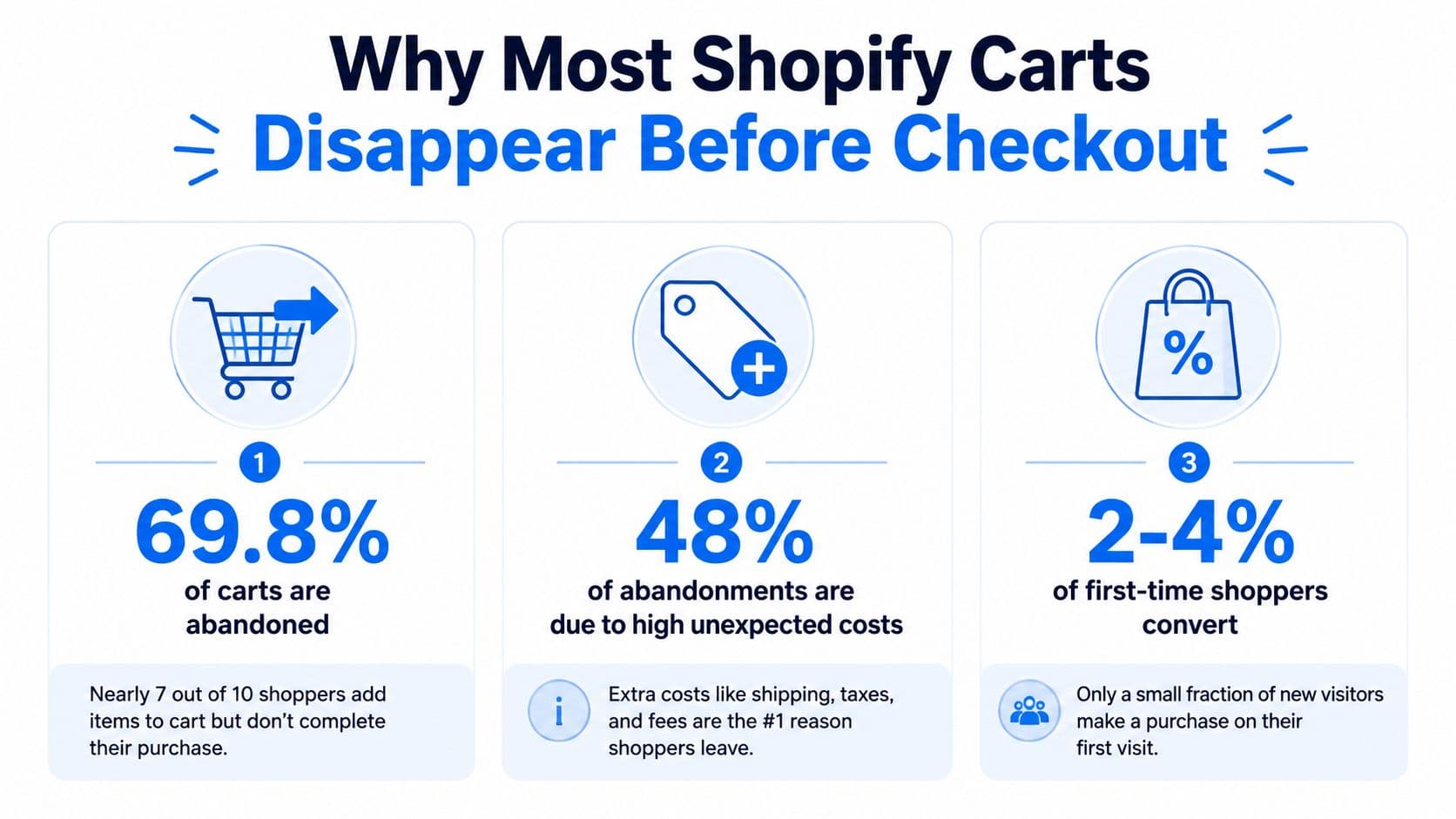
The five friction points operators should inspect
- Unexpected costs: Shipping, taxes, or fees that appear later can change the perceived value of the order.
- Forced account creation: A first-time buyer may not want to create a login before paying.
- Limited payment choice: Missing wallets, buy-now-pay-later options, or local payment methods can stop an otherwise ready buyer.
- Mobile checkout friction: Small fields, slow scripts, keyboard problems, and awkward cart drawers create more resistance on phones. Recent 2026 summaries report mobile abandonment at 76.98% versus 64.78% on desktop, a gap of 12.2 percentage points, as reported in Digital Applied's cart abandonment data.
- Unanswered product questions: Sizing, delivery timing, ingredients, compatibility, and returns can all create a pause long enough for comparison shopping.
That's why I treat abandonment as a checkout-health signal before treating it as a messaging problem. A recovery app can bring the shopper back, but it can't permanently compensate for a checkout that surprises buyers or makes them work too hard. Merchants investigating the root cause should start with checkout process optimization, then use recovery messages to address the hesitation that remains.
What an Abandoned Cart App Actually Does
Think of the purchase journey as a funnel with three intervention points. A capable app can act before the shopper leaves, while the cart is still active, and after the browser tab closes. A single reminder email only covers the last part.
Pre-cart and in-cart interventions
Before abandonment, an app may detect exit intent and show a prompt while the shopper still has the product in view. A cart-preview nudge can remind someone that an item is already selected, while an offer rule can reserve discounts for carts that meet a defined condition instead of giving every visitor the same incentive.
Inside the cart, useful tools reduce uncertainty rather than urging checkout. A persistent cart drawer keeps the selected products visible. A save-for-later control gives comparison shoppers a low-friction alternative to deleting items. A live shipping calculator can surface delivery costs before the payment stage, where surprises are more damaging.
Practical rule: Use an onsite prompt to answer hesitation, not merely to announce that a cart exists.
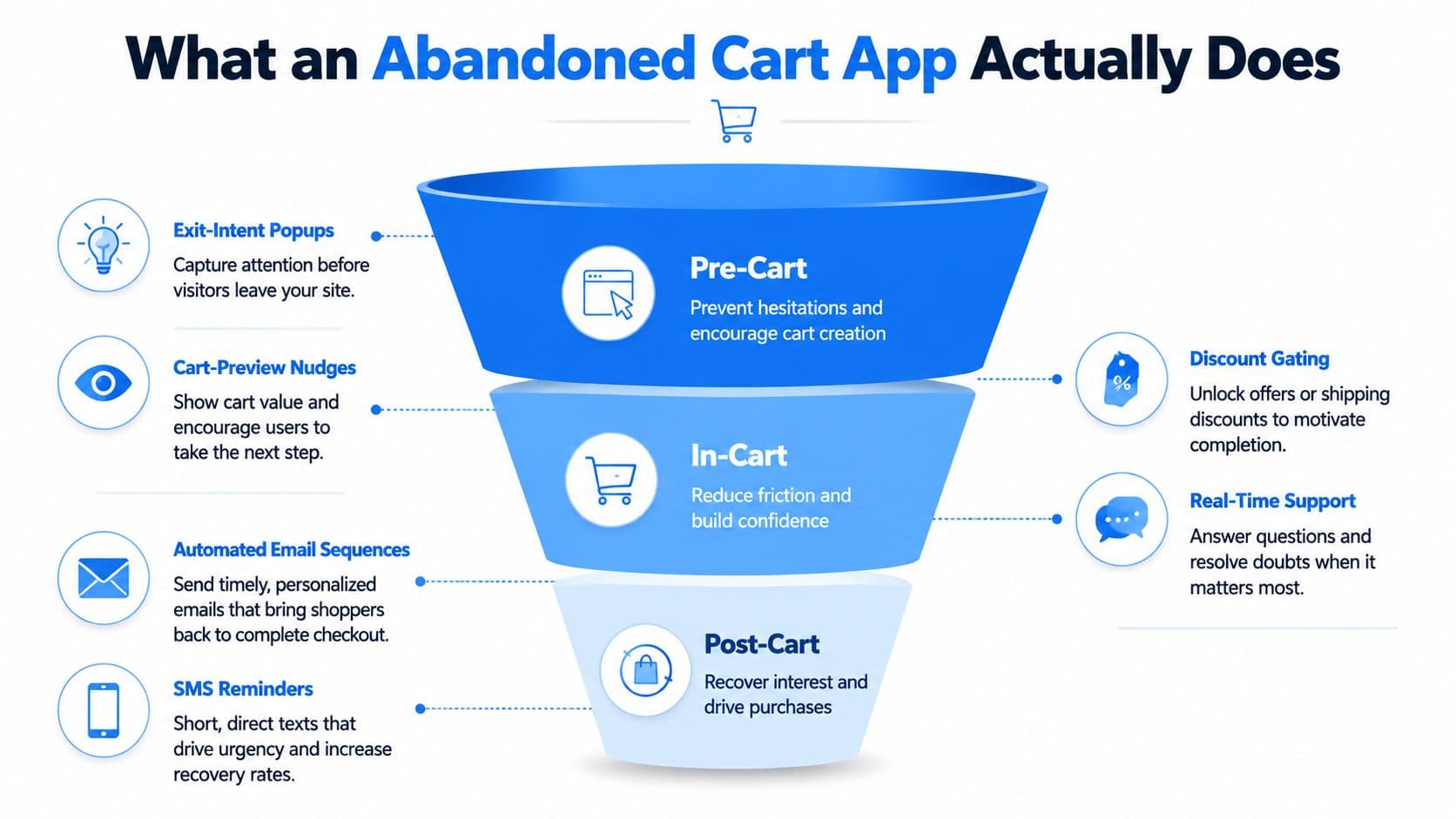
Post-cart recovery
After the shopper leaves, triggered email and SMS sequences can return them to the exact cart. On-site chat can continue the conversation when they revisit, while retargeting pixels can help coordinate paid reminders. The important distinction is whether each touchpoint knows what happened earlier.
Shopify already exposes abandoned checkout records in the admin and supports automation actions such as “Get abandoned checkout data,” confirming that abandoned checkouts are a first-class object in the platform. Shopify's native recovery is also tied to pre-purchase behavior, including shoppers who viewed a product or added items without buying, as described in the Shopify App Store abandoned checkout recovery listing.
A true abandoned cart app for Shopify should connect these stages to measurable attribution. An email-only tool may send a reminder, but a recovery system should show which nudge fired, which shopper clicked, whether the cart was revisited, and whether a matching order followed.
The Four Features That Drive Real Recovery
Recovered revenue per cart is the north-star metric I use because it prevents the team from celebrating activity that doesn't produce orders. Four capabilities determine whether a recovery app contributes to that number or just adds another dashboard.
Recovery messages
A weak message says, “You left something in your cart.” It treats every abandonment as forgetfulness. A stronger nudge asks whether the shopper is still deciding about sizing, shipping cost, or delivery timing, and links directly to the relevant cart or product context.
Question-based copy creates a path to resolving the actual blocker. This is closely related to using personalized product recommendations, where the message reflects the shopper's selected products rather than presenting a generic promotion.
Segmentation
Blasting every abandoner with identical copy creates unnecessary discount pressure and hides useful patterns. Segment by cart value, first-time versus returning status, product category, and device when the data supports it.
A high-value cart may need policy reassurance before an incentive. A returning customer may need a fast route back to checkout. A first-time mobile shopper may need clearer delivery and payment information.
Automation
A static three-email sequence fires the same messages regardless of behavior. A behavior-triggered flow branches when someone opens the first email, revisits the site, adds another item, or completes the order.
Automation should also suppress later messages after purchase. Otherwise, the customer sees recovery reminders for an order they've already placed, which makes the brand's systems look disconnected.
Analytics
A vanity recovery-rate number can be misleading if the app counts any later session as a recovery. I want to see attributed recovered revenue, time to recovery, channel-level results, and a no-flow baseline. The measurement should match a cart to an order, not merely place a message before a purchase.
| Feature | Weak Implementation | Strong Implementation |
|---|---|---|
| Recovery messages | Generic reminder sent to every abandoner | Question-based copy tied to cart contents and likely objections |
| Segmentation | One message for all customers and carts | Different logic for cart value, customer type, category, and device |
| Automation | Fixed sequence with no behavioral branches | Flows that react to opens, revisits, additions, and purchases |
| Analytics | Modeled recovery or session-based credit | Cart-matched orders, channel lift, time to recovery, and revenue |
The practical test is simple. If removing the app leaves you unable to explain which carts it recovered, it isn't giving you reliable optimization data.
Setting Up Recovery on Shopify From Native to Full Stack
Start with Shopify's native recovery before installing anything else. The current setup path in Shopify Messaging is to open Apps, choose Messaging, go to Automations, create Recover Abandoned Cart, customize the design, subject, and copy, set the timing, and turn the automation on. Shopify documents those six steps in its abandoned cart email setup guide.
Another admin path uses Settings, Checkout, and Abandoned checkouts, where you can enable automatic email, choose the recipient group, and set a delay. One Shopify guide notes a default delay of 10 hours and allows delivery to anyone who abandons checkout or only email subscribers, as explained in this Shopify recovery walkthrough.
Choose the smallest setup that answers your question
Native email is a useful baseline. It's fast, inexpensive, and gives a store coverage without adding another vendor. It won't provide the depth of SMS coordination, onsite conversation, advanced branching, or channel-level attribution that a larger operation may need.
A basic third-party install typically involves app permissions, catalog synchronization, theme placement, sender verification, and a test abandonment. A more connected stack may also pass events into Klaviyo, Gorgias, or another helpdesk. The complexity doesn't come only from the visible settings. Deliverability records, consent rules under GDPR, and suppression logic need attention before messages reach customers.
Operator's warning: Disable or suppress overlapping recovery flows. A native email and a third-party email can both fire on the same checkout, turning one hesitation into duplicate messaging.
Stores with multiple lifecycle tools should document ownership before launch. Decide which platform controls email, which platform controls SMS, where support conversations live, and which system owns the final revenue number. Shopify marketing automation can help coordinate those responsibilities, but Shopify marketing automation guidance is most useful when the event map is clear first.
What Good Recovery Numbers Look Like in Practice
A published Carti result provides a useful anchor, but it shouldn't become a universal promise. On one early store, Carti attributed $3,480 in chat-driven revenue during its first 30 days, and shoppers who engaged with the assistant converted at about 3.5 times the store average. The reported method paired every nudge fire with its click and any resulting order, rather than quoting a universal recovery rate.
Broader operator benchmarks place average Shopify recovery performance around 10.7%, with a wider 8% to 15% range depending on industry, average order value, and recovery sophistication, according to the Shopify abandoned cart recovery operator playbook. Independent guidance also describes email recovery as commonly returning 10% to 17% of abandoned carts, while a single email may recover 5% to 8%, as outlined in this Shopify cart abandonment benchmark guide.
Those ranges are directional, not a target you can copy across catalogs. Luxury and high-AOV products often require more research, trust, and policy reassurance than a low-consideration purchase. A store selling straightforward replenishment products may see a different response because the shopper already understands the product and the buying decision.
Read the funnel, not just the total
The first reminder usually carries the clearest intent. Later touches should add information, not repeat the same sentence with a different subject line. An app that reports revenue by send helps you decide whether the second message resolves a real objection or just creates more noise.
| Segment | Recovery Rate Range | Send 1 Share | Send 2 Share | Send 3 Share |
|---|---|---|---|---|
| General Shopify benchmark | 8% to 15% | Measure from your baseline | Measure from your baseline | Measure from your baseline |
| Email recovery guidance | 10% to 17% | Commonly strongest | Incremental | Incremental |
| Single-email setup | 5% to 8% | Entire sequence | Not applicable | Not applicable |
Attribution quality matters as much as the rate. If an app credits any session after a reminder, the dashboard can look healthy while the store's actual Shopify orders tell a different story. Reconcile the app's recovered orders with Shopify, exclude orders that don't match the abandoned cart, and account for cancellations or returns before judging the economics.
Fine Tuning Tips That Move the Recovery Rate
The highest-impact improvement is usually better information, not a more dramatic discount. Cart logs show what shoppers asked before they left, and those questions often reveal a missing product-page answer, unclear shipping policy, or an offer that wasn't explained early enough.
Carti's setup illustrates the low-friction version of this approach. After installing it from the Shopify App Store, the catalog, policies, and FAQs sync automatically during the first few minutes. Recovery is on by default through exit-intent detection, an add-to-cart nudge when the cart drawer closes, and idle-cart prompts, so the hands-on setup took about five minutes. The only optional longer task was writing a custom welcome line.
Ask about the blocker
The strongest nudge I've seen is not a statement-style “you left something behind” reminder. It asks about the specific cart contents, such as whether sizing, shipping cost, or delivery time is the open question. Rewriting nudges to ask rather than announce, then using a 7-day ladder so returning shoppers don't see the same message twice, gives the conversation a purpose.
Carti attributed the early store result through measurable nudge, click, and order events rather than a universal recovery-rate claim. That distinction matters because traffic mix changes the denominator.
Turn chat logs into merchandising work
Keep the assistant's shipping, returns, and product knowledge complete before adjusting timing. Leave proactive triggers on, respect frequency caps, and avoid stacking third-party popups that collide with the cart drawer. Review chat logs weekly, then add missing answers to the knowledge base and product pages.
For teams that need a broader framework for diagnosing conversion friction, the UK SME conversion advisor guide offers useful context on conversion-rate work beyond cart reminders. The central operating habit remains the same: turn real customer questions into clearer pages and more useful recovery messages.
How to Choose the Right App for Your Store
Choose the app after identifying where the leak occurs. If shoppers leave before adding products, you may need better product education or onsite assistance. If they leave after seeing shipping, checkout clarity is the priority. If they add products and compare elsewhere, post-cart sequencing and product reassurance may matter more.
The app tier should match the problem and the team's capacity.
| Criteria | Lightweight Email | Mid-Tier Suite | AI Conversational |
|---|---|---|---|
| Best fit | Stores needing basic recovery coverage | Stores coordinating email, SMS, and onsite nudges | Stores with recurring questions and limited content-maintenance capacity |
| Main strength | Fast launch and simple operation | Segmentation and channel orchestration | Real-time answers and conversational recovery |
| Main risk | Limited attribution and branching | More setup and possible tool overlap | Knowledge quality and governance require attention |
| Evaluate first | Deliverability and cart matching | Suppression rules and channel ownership | Answer accuracy, escalation, and event attribution |
A lightweight tool makes sense when the store only needs a dependable reminder and already has a simple catalog. A mid-tier suite is more suitable when email, SMS, segmentation, and onsite prompts need to work together. An AI-conversational app can earn consideration when shoppers repeatedly ask sizing, policy, compatibility, or delivery questions that the team can't answer manually at store speed.
Before paying for any app, run the native Shopify abandoned-checkout email as a baseline. Compare recovered orders, not just opens or clicks. Then score each shortlisted tool on four points:
- Attribution accuracy: Does reported recovered revenue match Shopify orders?
- Latency: How quickly does the first useful message or prompt appear?
- Segmentation depth: Can the app distinguish cart value, customer type, product, and device?
- Exit options: Can you export customer, event, and performance data if you change tools?
A cheaper app that over-credits revenue isn't cheaper. It hides the cost in bad decisions.
A Seven Day Plan to Start Recovering More Carts
Treat abandonment as a recurring checkout-health signal. The goal isn't to launch every channel in a week. It's to establish a baseline, find the largest objection, test one controlled intervention, and create a measurement habit.
The operating sequence
- Day 1, inspect the last 90 days: Segment abandoned checkout data by traffic source and device. Look for concentration around mobile, paid traffic, specific products, or shipping regions.
- Day 2, establish the native baseline: Turn on Shopify's abandoned checkout email and record its opens, clicks, and recovered orders.
- Day 3, test one shortlisted app: Use a development or controlled environment, recreate a real abandonment, and measure the time to the first send or onsite nudge.
- Day 4, write three openers: Separate first-time visitors, repeat buyers, and high-value carts. Ask a relevant question for each group.
- Day 5, add another channel only when consent supports it: SMS or web push should extend reach, not duplicate the email.
- Day 6, update the top product FAQs: Use the questions shoppers asked in chat and make the answers visible before checkout.
- Day 7, reconcile the numbers: Compare Shopify orders with the app's attributed revenue, investigate mismatches, and decide whether the tool earned another month.
The result should be a cleaner checkout and a more honest recovery system, not a crowded stack of reminders. If you want a five-minute Shopify installation that syncs catalog information, policies, and FAQs, then activates exit-intent, cart-drawer, and idle-cart recovery prompts without building sequences, visit Carti and test its event-level attribution against your native baseline. Use the first week to verify whether its answers and nudges resolve real shopper questions, then keep it only if the recovered orders justify the seat.

Written by
Daniel AndersonFounder of Carti. 10+ years building ecommerce brands in apparel and supplements. Still runs a Shopify store and built Carti to help merchants convert more browsers into buyers.
Ready to boost your store's sales?
Install Carti in 5 minutes and let AI handle customer questions, recommend products, and close sales 24/7.
Start Free Trial14-day free trial