
Around 70% of carts are abandoned, and Shopify's own automation model is built to catch that lost intent with triggered messages instead of manual sends, while abandoned-cart email guidance commonly targets the first follow-up at about 1 hour after abandonment (Shopify's marketing automation definition, abandoned-cart recovery timing and benchmarks). That's the right way to think about Shopify marketing automation in 2026. Not as a nice-to-have email feature, but as the system that recovers revenue your store already earned in attention.
Most stores still waste their best traffic. They rely on broad campaigns, then wonder why visitors leave, browse, and vanish. The winners build event-driven workflows that respond fast, stay measurable inside Shopify, and escalate into human or AI-assisted conversations before intent dies.
What Shopify Marketing Automation Means
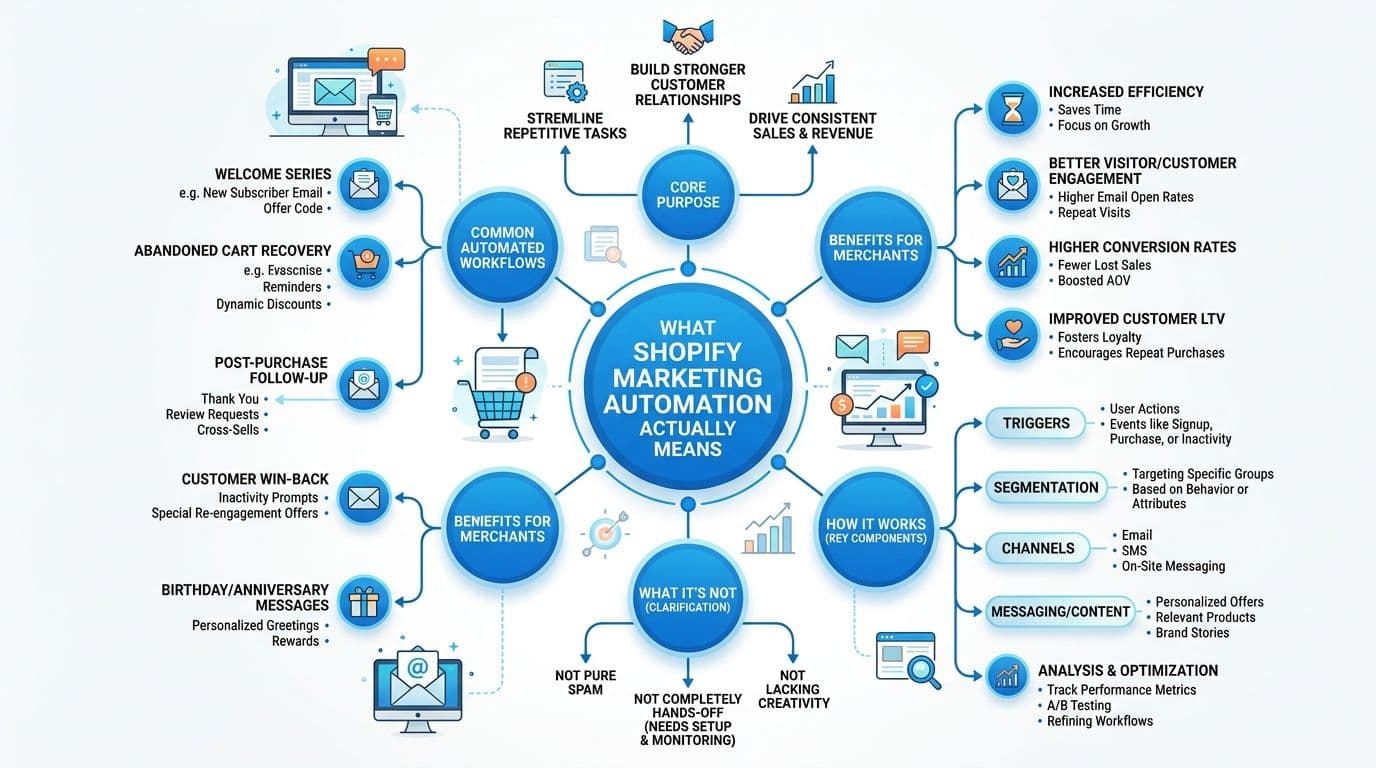
Shopify marketing automation is software that reacts to shopper behavior and sends the right message without a human pressing send. Shopify's own definition points to workflows that trigger personalized messages when people sign up, abandon a cart, or complete other defined actions (Shopify's marketing automation definition).
A store that gets this right is not just sending more messages. It is turning browsing behavior, checkout starts, and repeat visits into follow-up that can recover revenue.
Broadcast marketing versus event-driven automation
Broadcast marketing sends one message to many people at once. Event-driven automation sends one message because a specific shopper did something specific. That difference changes revenue because timing changes behavior. If a shopper leaves checkout and waits for your next campaign blast, the best recovery moment is gone.
Shopify treats automations as something you measure by workflow, not as a vague campaign bucket. Merchants can open reporting from Apps > Messaging > Automations and inspect performance for each workflow on its own (Shopify automation reporting in Messaging). That is the right operating model. You do not optimize “email” as a single channel. You optimize each trigger, each message, and each recovery path.
Practical rule: If a workflow cannot be tied to a shopper action, it is probably a campaign, not automation.
The useful mental model is straightforward. Every visitor starts with intent. Some of that intent converts immediately, and a lot of it falls out of the funnel. Shopify marketing automation exists to catch that lost intent, especially the shoppers who browse, hesitate, and leave before buying. If you want a clean primer on the email side of this, the SaaS founder's guide explains the automation-versus-broadcast split clearly.
Why latency is the core enemy
Automation wins because it cuts the gap between intent and response. A welcome email after signup feels natural. A cart reminder after abandonment feels timely. A post-purchase follow-up keeps the relationship moving while the order is still fresh in the customer's mind.
That is the frame for the rest of this guide. Shopify automation is a recovery system for lost intent, built around triggers, reporting, and fast response. For abandoned carts specifically, a cart recovery flow built to turn hesitation into revenue is the kind of workflow that matters because it converts near-miss traffic into money.
The Five Workflows That Drive Automated Revenue
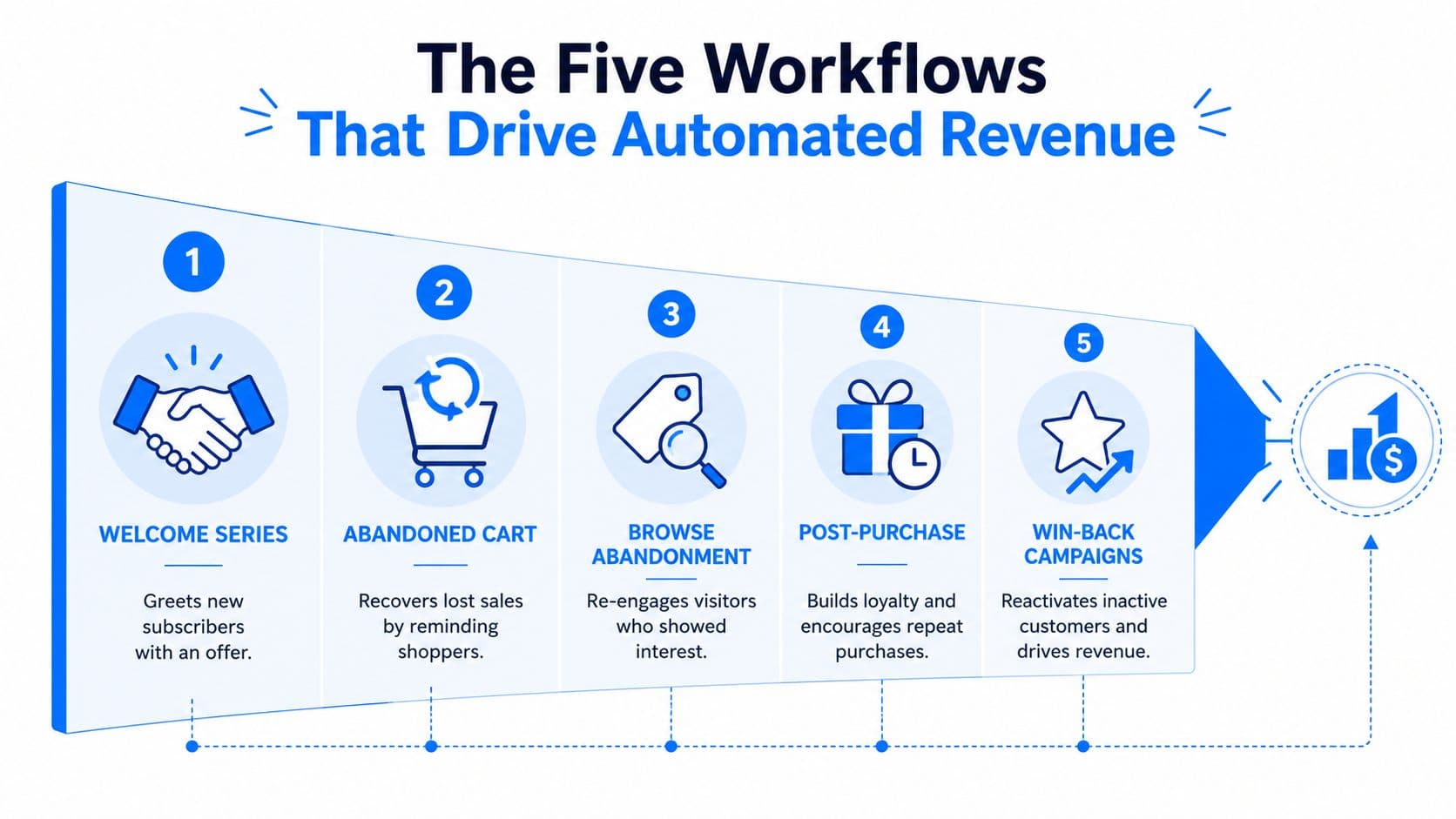
Stores that get serious revenue from automation do not start with a sprawling stack of flows. They start with five workflows, prove each one, then expand only after the reporting is clean and the money is visible.
Start with the workflows that match shopper intent
Welcome series. This is the first real conversation with a new subscriber. It should greet, orient, and make the next step obvious. If your list grows but your welcome flow is thin, you are wasting the highest-intent subscribers you will ever get.
Abandoned checkout. Shopify documents this as an event-triggered automation you can create, edit, test, and activate from the admin or mobile app (Shopify abandoned checkout automation setup). This is the highest-value recovery workflow because the shopper already moved far enough to enter checkout.
Abandoned cart. Use the standard three-step sequence, first message about 1 hour after abandonment, second at 24 hours with social proof or urgency, third at 48 to 72 hours with an incentive if needed (abandoned-cart timing and benchmarks). The logic is simple. Send the reminder early, reinforce the value, then give a reason to act. For a sharper breakdown of why cart recovery earns back revenue that would otherwise disappear, see this cart abandonment recovery guide.
Direct advice: Do not lead with a discount. Lead with a reminder. Discounts should close hesitation, not train buyers to wait.
Product browse recovery. Shopify's automation framework supports product-browse recovery, which is a cleaner way to re-engage shoppers who looked closely but never added to cart. This flow matters because it catches intent before checkout even starts.
Post-purchase follow-up. Retention starts here. Confirmation, education, cross-sell, review request, and support all belong here. A weak post-purchase flow leaves repeat revenue on the table and forces support to answer repetitive questions manually.
Add conversational capture before shoppers leave
Onsite chat automation is the connective layer. It intercepts questions that stop buying: policy confusion, sizing doubts, shipping uncertainty, and product comparisons before they turn into exits. If you want help choosing the stack around this layer, start with this compare e-commerce marketing tools resource from Quikly.
The priority order is straightforward. Ship welcome, abandoned checkout, and abandoned cart first. Then add browse recovery and post-purchase. Only after that should you layer in chat automation and recommendation logic, because the first three flows usually create the fastest clean revenue lift.
An Implementation Roadmap for Shopify Merchants
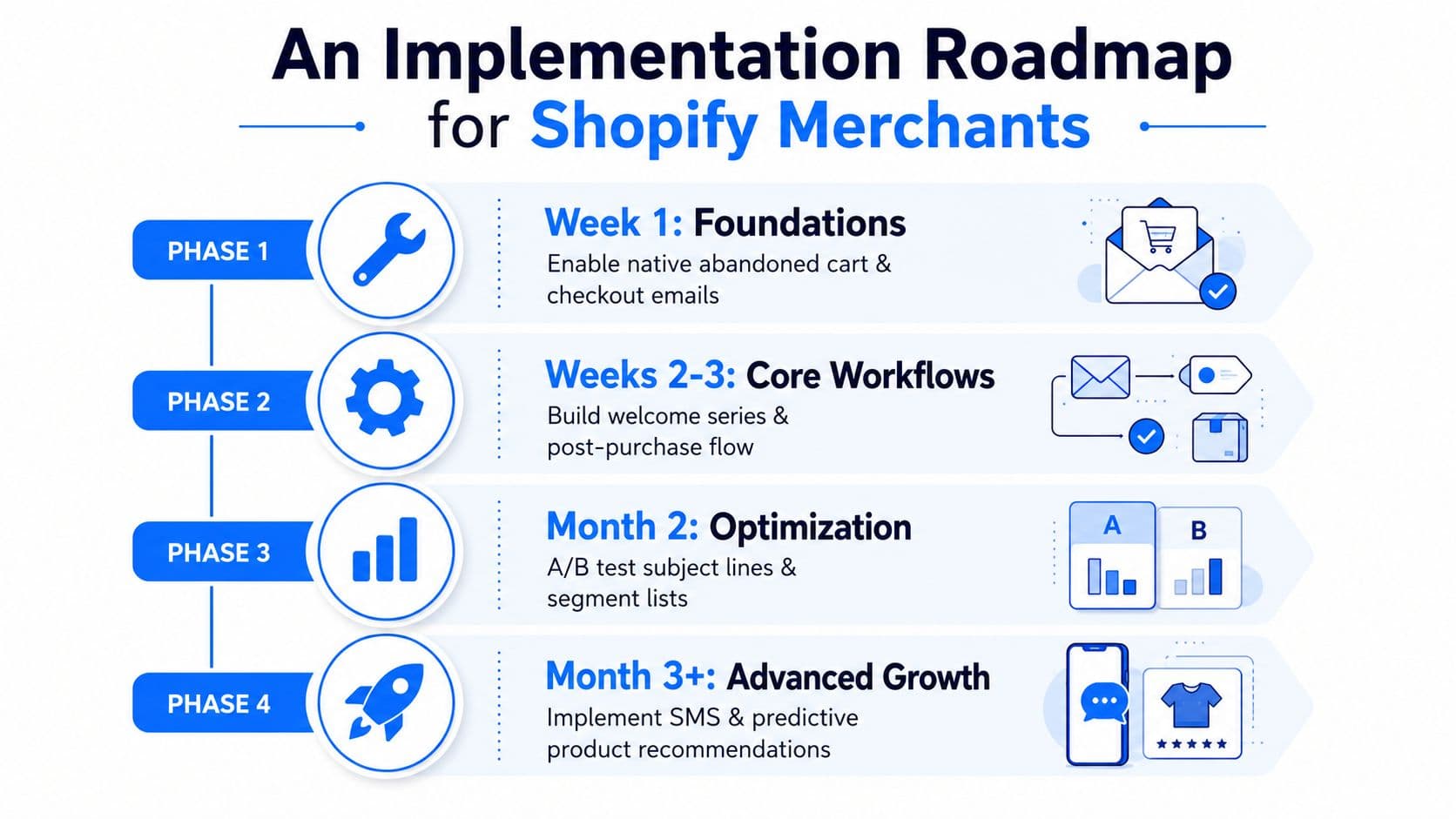
Most merchants overcomplicate rollout because they treat automation like a giant platform project. It isn't. Good implementation is phased, and each phase should prove revenue before you add more complexity.
Phase 1: Foundations
Turn on Shopify's native abandoned checkout and abandoned cart automations, then build a welcome series. Validate that each workflow appears as its own reporting object in the Messaging admin, because Shopify's reporting structure is part of the operating model, not an afterthought (Shopify automation reporting in Messaging). If you can't separate one automation from another, you can't manage it.
This first phase should also confirm that your messaging tone is consistent with the store experience. The goal isn't polish, it's reliable recovery. You want the shopper to recognize the brand, trust the message, and continue the path they already started.
Phase 2: Core workflows
Add product browse recovery, post-purchase flows, and segmentation rules. The store stops acting like a single audience and starts acting like a collection of buying contexts. Someone who bought once needs a different sequence than someone who only browsed.
Operational rule: Don't expand flow count until the current flows have clean attribution and obvious next actions.
For merchants who want a practical benchmark on abandoned-cart recovery sequencing and prioritization, the e-commerce automation tools overview is useful because it frames automation as an operating system rather than a pile of apps.
Phase 3: Chat and recommendation layers
Only after email and messaging are stable should you add onsite chat automation and AI-driven recommendations. This is the point where passive browsing becomes active conversation. The store starts asking questions back, surfacing the right products, and catching friction in real time.
Phase 4: Optimization and governance
At this stage, the job is continuous improvement. Test subject lines, refine segments, review message frequency, and prune flows that no longer earn their keep. Shopify's per-automation reporting should gate every change. If a workflow can't justify itself in its own report, it doesn't belong in your stack.
That's the sequence I'd use on any store, from small catalog to mature DTC brand. Ship the triggers, measure each one separately, then layer AI and conversational capture where shoppers still hesitate.
Metrics That Measure Automation Performance
Open rates are a vanity metric if they never connect to revenue. A flow can look healthy in the inbox and still do nothing for the business. The only numbers worth tracking are the ones tied to recovered intent.
The metrics worth putting on your dashboard
Revenue per recipient shows how much value each send creates. That is a better test than opens because it forces you to judge the message by cash, not curiosity.
Conversion rate per automation shows which workflow earns its keep. A welcome series and an abandoned-cart sequence should never be measured like identical assets, because they solve different problems and start from different levels of intent.
Time to recovery matters for cart and checkout flows. The shorter the gap between abandonment and message, the better the odds of winning the shopper back while the purchase is still top of mind.
Recovered revenue versus abandoned revenue shows whether the recovery system matters or just looks good on a report. If a flow recovers a lot of carts but only a small share of what was abandoned, it is probably too late, too weak, or too generic.
What to do with Shopify reporting
Shopify's Messaging admin lets you inspect automations one by one, which is exactly how you should judge them. Compare one automation against another. Do not blend welcome, cart, and post-purchase into a single campaign number, because that hides the truth and leads to lazy decisions (Shopify automation reporting in Messaging).
For onsite chat and AI-assisted recovery, use a different lens. Track how many messages are handled without human intervention, how often shoppers click recommended products, and how much incremental revenue can be tied to chat-influenced sessions. Those are operational metrics, not marketing decoration.
Keep one weekly rule. If a flow does not move revenue or reduce support friction, rewrite it or remove it.
Ignore the temptation to celebrate volume for its own sake. More sends, more replies, and more opens are not the point. The point is fewer lost shoppers and more completed orders.
Real Merchants Using Automation and AI Chat Together
A good automation stack doesn't replace the store team. It catches the moments the team can't reach in time, then hands off anything complex to a better conversation. That's where email automation and AI chat start reinforcing each other instead of competing.
A fashion brand that turns browsing into buying
A fashion merchant with new traffic but weak conversion usually has the same problem. Visitors browse several product pages, leave, and never return on their own. A welcome series introduces the brand, but the bigger lift comes when onsite AI chat answers fit, sizing, and shipping questions before the shopper bounces.
In that setup, the chat layer acts like a sales associate at the rack. It doesn't wait for a support ticket. It steps in while the shopper is still comparing options and nudges them toward the right product. That's especially useful for brands with complex assortments, because hesitation often comes from uncertainty, not lack of interest.
A wellness brand that fixes cart friction in real time
Wellness stores usually lose buyers for different reasons. Ingredients, usage, delivery timing, and policy questions create friction at the worst possible moment. Abandoned-cart email helps, but it's still reactive.
The smarter stack pairs cart recovery with proactive chat nudges that answer the blocking question before the visitor leaves. A chatbot that learns catalog, policies, and FAQs automatically, then responds in 92 languages, is a strong fit for global stores because it can handle a wide range of purchase objections without waiting on a human team. Carti fits that pattern as a 24/7 sales associate, not a help desk, which is why this combo is so effective for stores selling into multiple markets.
The important point is structural. Email brings the shopper back. Chat keeps the shopper moving while they're still on site. Used together, they cover both recovery windows, one after exit and one before exit.
Common Pitfalls That Kill Automation ROI
Most automation failures are execution problems. Merchants buy the right tools, then weaken them with poor setup and weak discipline.
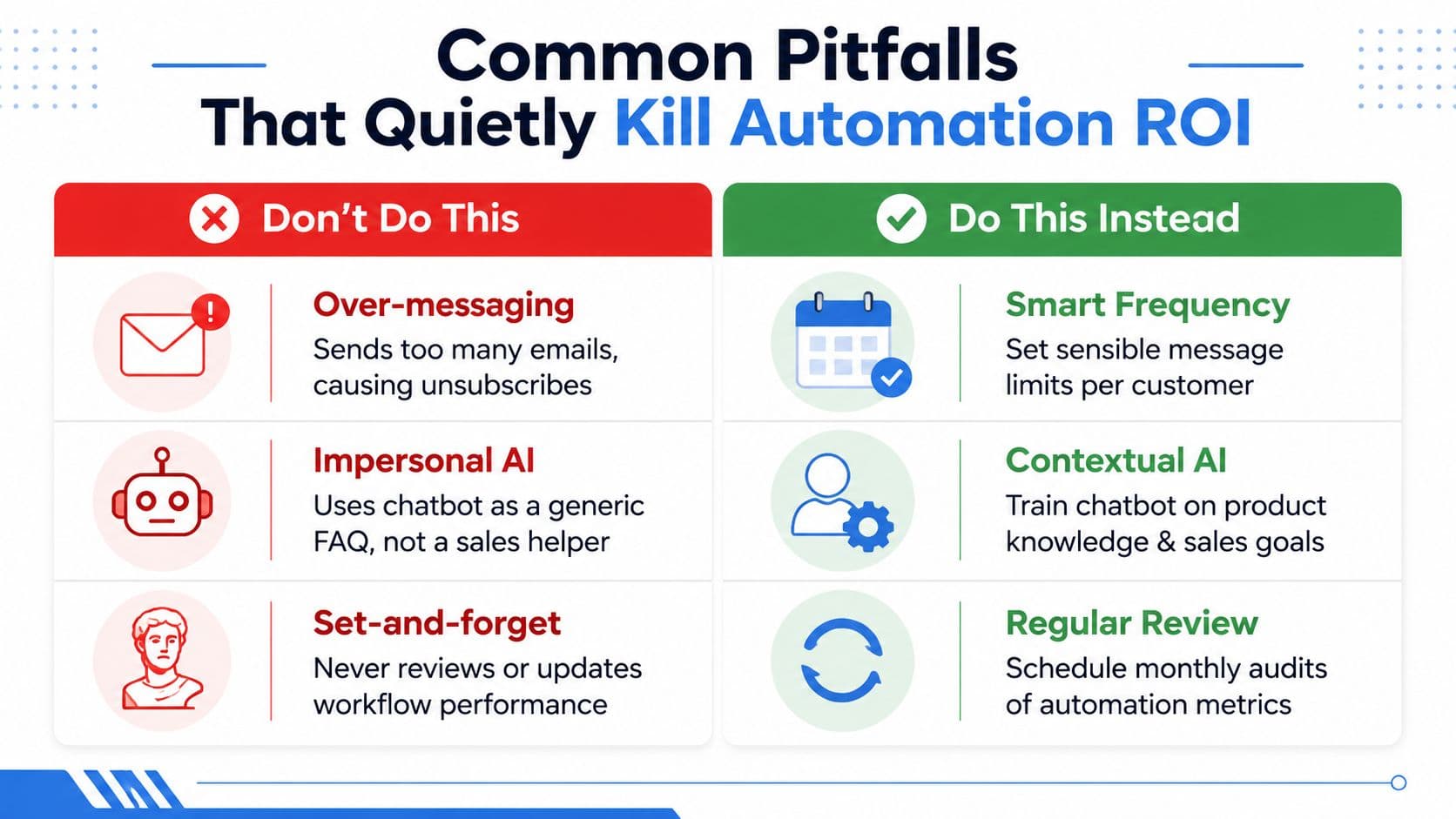
Five mistakes that destroy returns
Over-messaging shoppers. Too many emails or SMS messages drive unsubscribes and fatigue. Fix it with sensible frequency caps and by separating high-intent triggers from low-intent broadcasts.
Treating AI chat like a generic FAQ bot. This is the most common mistake I see. Merchants answer questions but never configure proactive selling, cart recovery, or product recommendations. Fix it by training the chatbot on product knowledge and revenue goals, not just support scripts.
Copying competitor flows without segmentation. Your store's audience, price point, and purchase cycle are not theirs. Fix it by segmenting first, then building the flow.
Ignoring consent rules for SMS. If you don't manage permission properly, you create legal and deliverability risk. Fix it by making consent explicit and auditing your capture points.
Stacking automation on a slow site. Automation can't rescue a broken storefront experience. If pages load slowly or checkout is clumsy, your recovery messages will just keep chasing leaks.
Weak stores automate noise. Strong stores automate intent. If a tool is configured well, it should feel like help arriving at the right moment, not marketing shouting louder than the site can support. For a closer look at how merchants should structure that work, see agentic AI for e-commerce.
How AI and Agentic Commerce Are Reshaping Shopify Automation
The 2026 automation stack is no longer just email and SMS. Discovery is moving into AI assistants, and that changes where shoppers enter the journey. If people compare products in ChatGPT or Google Gemini before they ever land on your storefront, your automation program has to account for a much messier path to purchase.
What changes when discovery starts inside an assistant
The old model assumed the merchant controlled the journey start. That assumption is fading. Product data has to be readable, merchandising needs to be structured, and human-in-the-loop guardrails matter because AI-mediated shopping can surface products before a shopper is even on site.
That's why the current gap is so important. Most guides still don't explain attribution, channel mix, or message timing when a purchase starts in an AI assistant and ends on Shopify. The playbook is still forming, so merchants who wait for a neat standard will trail the stores that start testing now.
Best move this quarter: audit how your products are described, make sure your automation stack can react to offsite discovery signals where available, and keep a human review layer on anything that feels too autonomous.
A practical internal reference on the topic is agentic AI for e-commerce. The key idea is simple, AI won't just assist support, it will increasingly influence discovery, comparison, and purchase timing.
For Shopify merchants, the takeaway is blunt. Build automations that still work when the first touchpoint isn't your homepage. That means better product data, tighter measurement, and a workflow design that can handle a buyer who arrives already informed.
Your Next Steps and the Questions Merchants Ask Most
The next 30 days should be boring and effective. Turn on native Shopify abandoned-cart and abandoned-checkout automations, build a welcome series, and set up per-automation reporting so every workflow can be judged on its own. Then evaluate an AI chat layer for onsite conversion and audit existing automations for over-messaging.
A few questions come up constantly before merchants buy tools.
How long does setup take? Basic Shopify automations can be live quickly if your catalog, policies, and brand assets are already organized. The main work is tuning the logic and messages.
Does automation work for small catalogs? Yes. Small catalogs often benefit faster because the product story is clearer and the conversation is easier to personalize.
How is Carti different from Shopify Inbox? Carti is built as a sales-focused AI chatbot with five-minute no-code setup, catalog learning, and proactive product guidance, while Shopify Inbox is primarily a conversation channel. If your goal is conversion, not just chat, that distinction matters.
What should I look for first in a chatbot? Instant answers, product recommendations, cart recovery, and clean reporting. If a chatbot can't support revenue, it's just another inbox.
Carti is built for this job, converting browsers into buyers with instant answers, Smart Suggestions, and cart recovery that fits the way Shopify shoppers behave. If you want a practical automation layer that learns your catalog, supports 92 languages, and helps turn passive traffic into recoverable intent, visit Carti and see how it fits your store.

Written by
Daniel AndersonFounder of Carti. 10+ years building ecommerce brands in apparel and supplements. Still runs a Shopify store and built Carti to help merchants convert more browsers into buyers.