
Your Shopify store already has traffic, product pages, and a checkout. What it often lacks is a good in-store salesperson. Shoppers click around, hesitate on sizing, compare two similar products, worry about shipping, and leave with unanswered questions. Those aren't random drop-offs. They're stalled conversations.
That's why strong chat conversation examples matter. Not the generic “Hi, how can I help?” scripts that every app ships with, but the ones tied to an actual buying moment, a clear trigger, and a next step inside your store. Live chat has grown 400% since 2015, and 44% of shoppers say it's a must-have feature on e-commerce sites, according to this live chat statistics review. For Shopify merchants, that's the signal. Chat isn't a side widget anymore. It's part of your conversion stack.
This guide is built like an operator's playbook. You'll get 10 practical chat conversation examples for common e-commerce scenarios, plus when to trigger them, how to phrase them, and where Carti fits in so the flow runs without constant manual work. If you're trying to transform your store with AI chatbots, start here.
1. Product Recommendation Chat
A shopper lands on a product page for a black linen blazer. They scroll, click two size options, then open another tab with matching trousers. That's the moment to start a recommendation chat, not when they first arrive on the homepage.
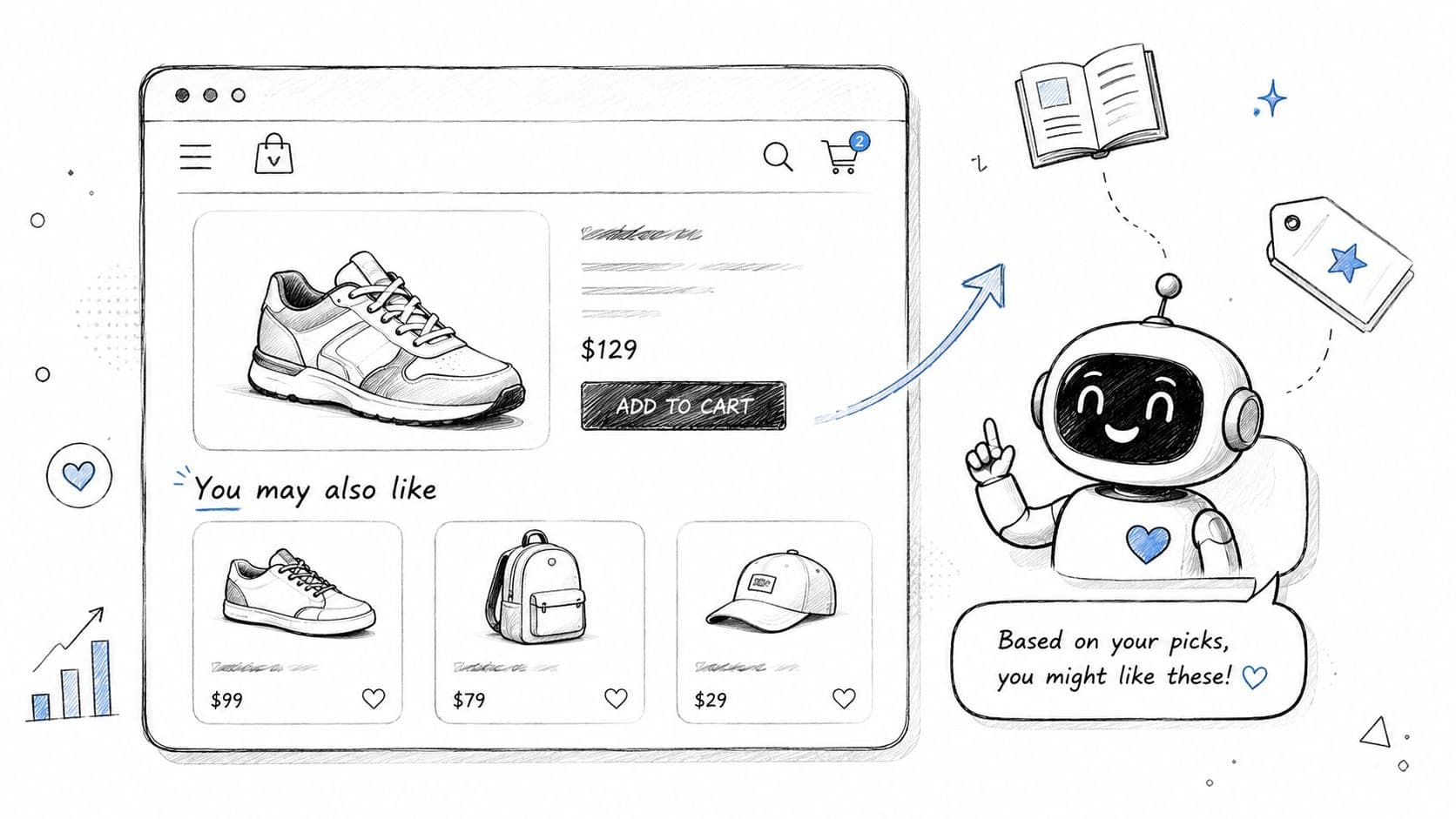
The strongest recommendation chats feel like a stylist or store associate paying attention. A fashion brand can suggest a matching trouser, loafers, or a lighter layer. A beauty brand can turn “I have dry, sensitive skin” into a routine with cleanser, serum, and moisturizer. A home store can pair a walnut coffee table with complementary shelving instead of flooding the shopper with unrelated “best sellers.”
Use real context, not random upsells
Use this structure:
- Trigger: Product page dwell time, repeat views in one category, or multiple related items viewed.
- Opening: “Looking for something that goes with this?”
- Bridge question: “Do you want the closest match, a lower-priced option, or a full set?”
- Next move: Show two or three relevant products with a reason for each.
A working script looks like this:
Practical rule: Recommendation chat should explain why each item is being suggested. Relevance beats volume.
“Want help narrowing this down? The black linen trouser is the closest match to this blazer. If you want a more casual look, the drawstring pant works better. If you're buying for an event, I can show a full outfit.”
What fails is vague language like “You may also like” repeated inside chat. That's not a conversation. That's a widget wearing chat clothes.
For Carti, the setup depends on clean product data. Titles, tags, collections, fit notes, materials, and use cases need to be accurate. If you want a deeper playbook for merchandising this flow, use AI product recommendations for Shopify as the reference point for how recommendation logic should connect to your catalog.
2. Abandoned Cart Recovery Chat
Cart recovery chat works best when it sounds helpful, not needy. The shopper already showed intent. Your job is to remove the final objection, not beg for the sale.
A beauty shopper leaves a cart with a cleanser and serum. A home goods shopper adds a lamp, pauses at shipping, and exits. A fashion buyer gets all the way to checkout after finding their size, then drops. Each case needs a different message. One may need reassurance, one may need urgency, and one may just need a direct path back.
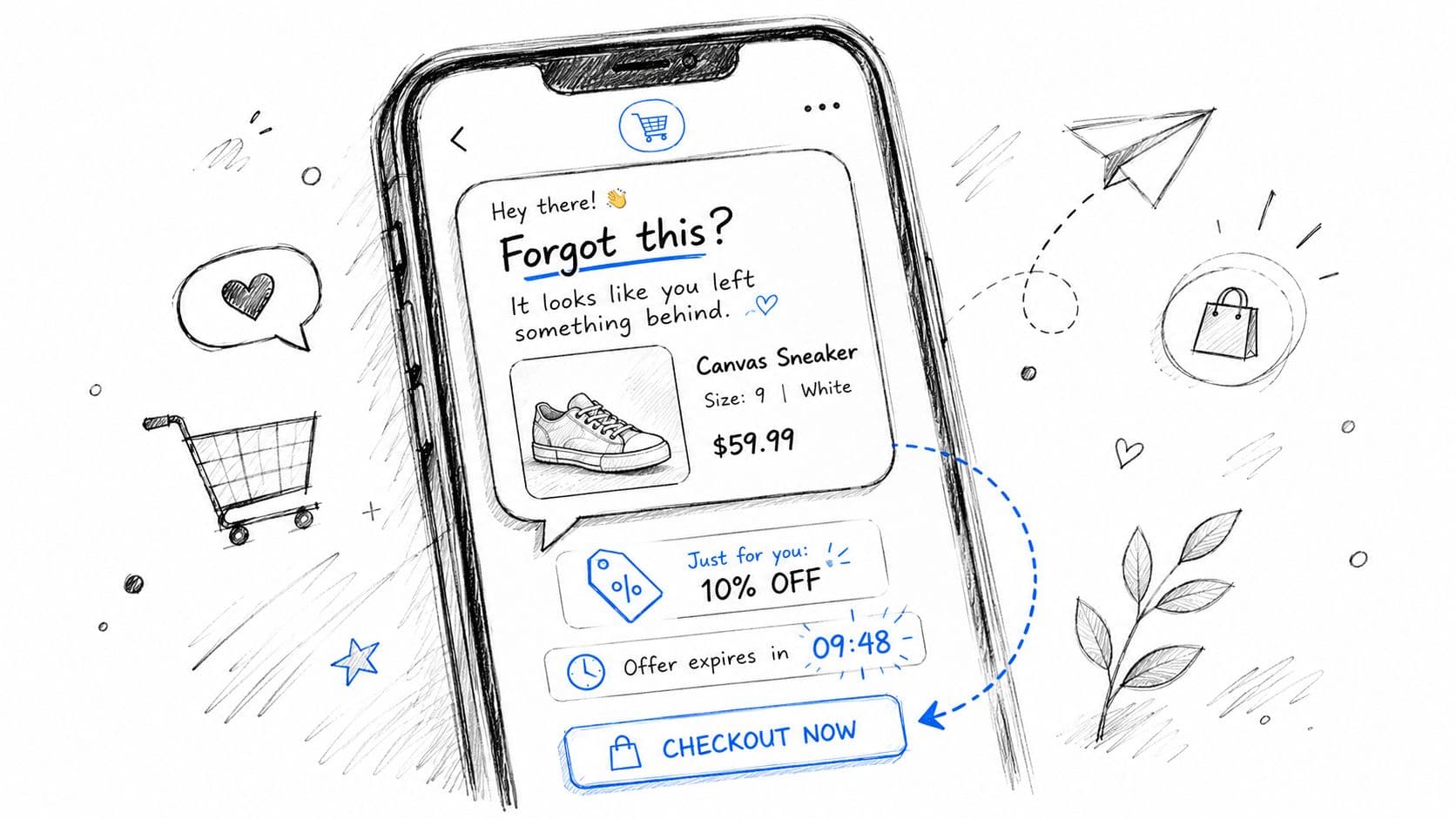
Write reminders that remove friction
A good abandoned-cart chat usually does one of three things:
- Restates the cart clearly: “Your Everyday Vitamin C Serum and Barrier Cream are still in your cart.”
- Answers the blocker: “Need help choosing the right size before you finish checkout?”
- Offers a reason to return: “The oak floor lamp you picked is still available if you want to complete your order.”
Use direct, low-drama copy: “Still thinking it over? I can pull up your cart and answer any last questions about shipping, sizing, or returns.”
That works better than fake urgency unless scarcity is real. If the item is low stock, say so only if your inventory supports it. If you're testing incentives, protect your margin. For some brands, support-first recovery outperforms discount-first recovery because the underlying issue was confusion, not price.
Carti is useful here because it can recover the conversation with item-specific prompts instead of generic reminders. For implementation ideas, see how recover abandoned carts with AI chat should map to your checkout flow.
3. Customer Support & FAQ Resolution Chat
Most support chats aren't complicated. They're repetitive. “When will this ship?” “How do returns work?” “Is this safe for sensitive skin?” “Do these run true to size?” If your team answers the same questions manually all day, your store is wasting selling time.
That's why FAQ chat should be built around intent, not just keyword matching. Conversation analytics systems commonly use NLP-based intent classification, sentiment analysis, and topic modelling to turn unstructured chats into operational signals, as explained in this customer conversation analytics overview. In practice, that means your store can recognize what the shopper is trying to solve and serve the right answer fast.
Build answers around intent
Start with the intents that affect conversion and support load first:
- Shipping intent: delivery windows, dispatch timing, tracking
- Return intent: refund window, exchange steps, item condition rules
- Product intent: ingredients, materials, compatibility, dimensions
- Fit intent: size chart, style fit, brand-specific guidance
A beauty example: “Is this retinol okay for beginners?” A weak bot answers with a policy article. A better bot says: “Yes, this formula is designed for gradual use. If your skin is sensitive, start with fewer applications and pair it with a barrier-support moisturizer. Want the full routine?”
A strong support flow also knows when to stop. If the shopper is angry, confused, or dealing with a damaged delivery, handoff matters more than automation. That's where tone discipline matters. The language should be direct, calm, and specific. For complaint-handling phrasing that keeps conversations from escalating, the Snappycrate e-commerce complaints guide is a useful benchmark.
4. Size & Fit Guidance Chat
Size chat is one of the most impactful chat conversation examples for apparel, footwear, and activewear brands because fit uncertainty kills checkout momentum. A shopper may love the product and still leave because they don't trust the size chart.
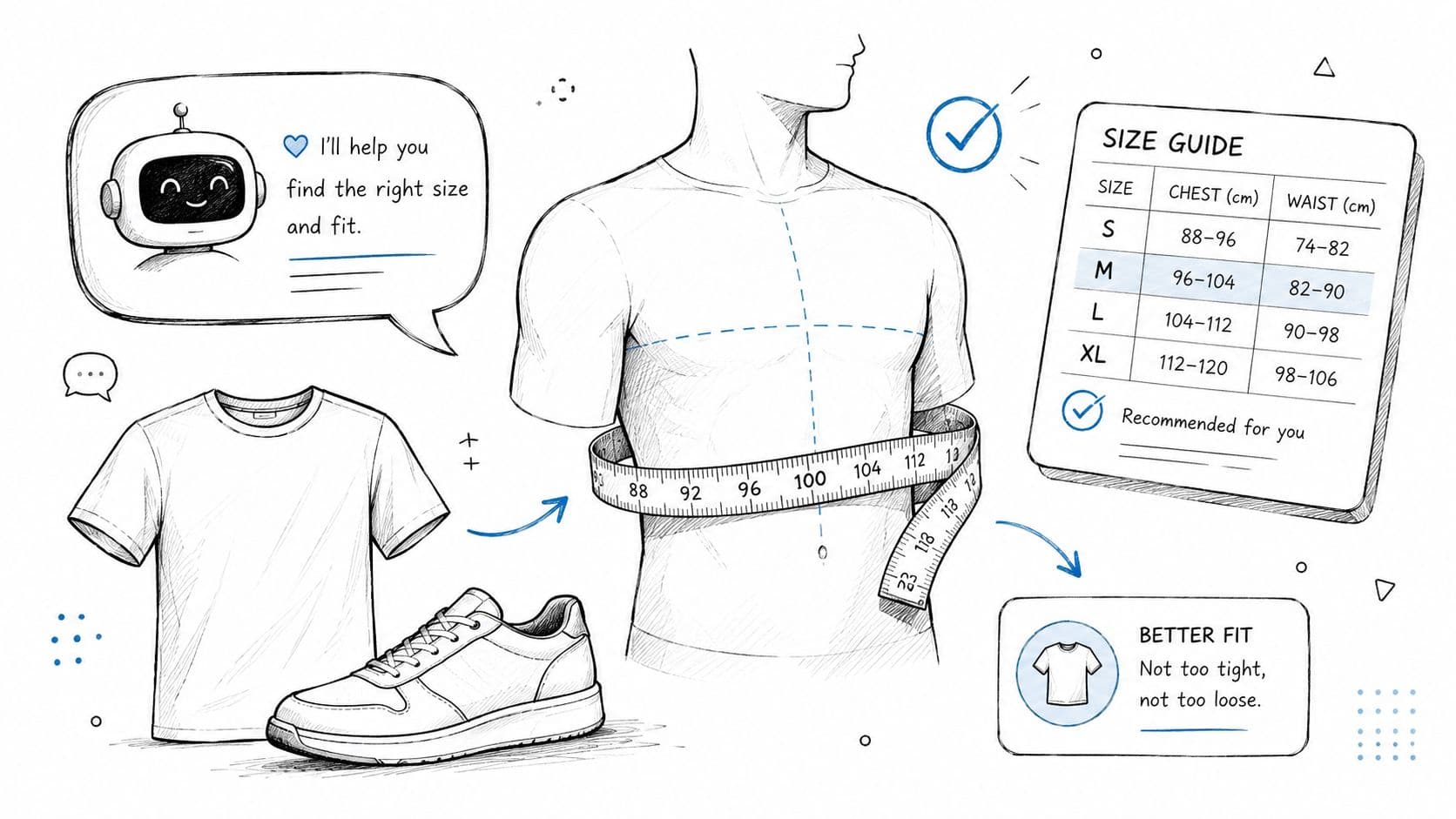
The mistake most stores make is asking for too much information too early. Nobody wants to complete a fitting-room survey in a chat bubble. Ask only what changes the recommendation.
Ask fewer, better questions
For jeans, start with current size, height range, and fit preference. For sneakers, ask what they usually wear in Nike, Adidas, or New Balance, then ask whether they want performance fit or casual comfort. For activewear, intended use matters. Yoga tights, lifting shorts, and running tops don't fit the same in practice.
Here's a cleaner script: “Happy to help with sizing. What size do you usually wear in similar brands, and do you prefer a closer fit or a little room?”
Then respond with a recommendation plus a confidence note: “If you wear a 28 in Levi's and want a relaxed fit, start with our 28. This style has a bit more room through the thigh.”
Better fit chats don't sound clever. They sound clear.
If your return notes keep showing “too small in shoulders” or “long in the sleeve,” feed that language back into the bot. That's where stores gain trust. The guidance starts sounding like it came from actual customer experience, not a spec sheet.
Show the advice visually
A short fit explainer can reduce hesitation before the shopper even asks.
Use video or fit graphics to support the chat, not replace it. The bot should still answer direct questions like “Will this shrink?” or “Is the waist high-rise on a shorter frame?”
5. Pre-Purchase Product Comparison Chat
Comparison chat closes the gap between browsing and buying. It's especially useful when your catalog has near-neighbor products that look similar to the shopper but solve different problems.
A skincare brand may need to compare two moisturizers by texture, skin type, and finish. A home appliance store may need to explain why one air purifier suits a bedroom and another suits an open-plan living room. A wellness brand may need to compare caffeine-free and energizing formulas without making the decision feel clinical.
Compare by decision criteria
Don't compare products by dumping specs. Compare them by the shopper's buying criteria.
Try this flow:
- Opening question: “What matters most here. Price, performance, ingredients, or how it feels day to day?”
- Comparison frame: “These are similar, but they're built for different priorities.”
- Recommendation: “Pick A if you want X. Pick B if you want Y.”
Example: “The Daily Barrier Cream is better if your skin runs dry or easily irritated. The Gel Moisturizer feels lighter and suits oilier skin or warmer climates. If you want one product for both morning wear and makeup prep, I'd choose the gel.”
Many bots often become too diplomatic. They refuse to choose. That hurts conversion. Shoppers ask for comparisons because they want help making a decision.
Operator note: If both products are viable, rank them anyway. Indecision in chat usually becomes indecision at checkout.
Inside Carti, this works best when product attributes are normalized. If one product page says “lightweight” and another says “featherweight gel cream,” but neither is tagged to a common texture attribute, the comparison will be weak. Standardize the language before you automate the guidance.
6. Post-Purchase Support & Order Tracking Chat
Post-purchase chat isn't just support. It protects trust after the money is already captured. That matters because silence between checkout and delivery creates avoidable anxiety.
A shopper orders a dress for an event and wants to know if it will arrive in time. Another customer receives a dispatch confirmation but can't find the tracking link later. A home décor buyer wants to know whether a large item is arriving by parcel or freight. Each question is simple if the chat has real order data. Each one becomes frustrating if the bot stalls.
Reduce anxiety before it becomes a ticket
Bitrix24 notes that conversation statistics in chat software can track reply times, customer ratings, channel usage, total sessions, and average reply time over time in its conversation statistics documentation. For merchants, that matters because post-purchase chat needs to be measured operationally, not just written politely.
The practical flow is straightforward:
- Authenticate lightly: order number and email, or logged-in identity
- State the order status plainly: confirmed, packed, shipped, delivered, return received
- Offer the next action: tracking link, carrier update, return start, human review
Example: “Your order has shipped and is currently with the carrier. I can pull up the latest tracking update or help with a return if the delivery date no longer works for you.”
What doesn't work is a bot that repeats “Please contact support” after the purchase. That feels like abandonment. If the issue is damaged goods or a missing item, acknowledge the problem and move fast: “I'm sorry this arrived that way. I can help start a replacement review now.”
7. Personalized Shopping Assistant Chat
This is the closest thing digital commerce has to a good store associate. The shopper doesn't always know the exact product they want. They know the outcome they want.
A customer shopping for a wedding guest outfit may care about dress code, season, and comfort more than a specific silhouette. A beauty customer may want “a routine that won't irritate my skin.” A home shopper may say “I want my living room to feel warmer” and not know whether that means lighting, textiles, or wood tones.
Guide like a good store associate
The strongest shopping assistant chats use bridge questions, not canned small talk. Good conversation guidance emphasizes direct, context-aware questions such as what surprised someone, what they're looking for, or what matters most in the moment, as discussed in this conversation advice talk. That maps perfectly to e-commerce.
Try prompts like these:
- Style-led: “What kind of look are you going for?”
- Problem-led: “What hasn't worked for you so far?”
- Budget-led: “Do you want the best-value option or the strongest performer?”
- Occasion-led: “Is this for everyday use, travel, gifting, or a specific event?”
A practical script: “I can help narrow it down. Are you shopping for everyday wear, something elevated, or an event-specific piece?”
This is also where memory helps. If the shopper previously bought fragrance-free skincare, don't recommend a heavily scented body cream first. If they told you last month they prefer oversized shirts, use that.
The trade-off is privacy. Personalization should feel useful, not invasive. Make preference capture optional, explain why you're asking, and keep the conversation moving even if the shopper skips the question.
8. Promotional & Limited-Time Offer Chat
Promotional chat can lift action, but it's easy to overdo. If every visitor gets interrupted with a countdown and a discount, the store starts to feel cheap and noisy.
Use promotional chat when there's a real reason to surface an offer. Maybe the shopper is browsing a sale collection, returning to a previously viewed product, or hesitating on a category where your store is running a genuine bundle. The chat should add clarity, not just urgency.
Use urgency carefully
A strong promo message sounds like this: “The linen collection is currently included in our seasonal offer. If you want, I can show the styles that qualify.”
That works because it's relevant. It doesn't hijack the session. It helps the shopper apply the offer to their actual intent.
A weaker version sounds like this: “Hurry. Massive deal ending soon.” No context, no product tie-in, no trust.
For brands in fashion, beauty, and home, the best promotional chats usually do one of these:
- Filter the offer: “Want me to show only items included in the promotion?”
- Clarify the rule: “This bundle applies when you add any cleanser and moisturizer together.”
- Protect margin: promote category-specific offers instead of defaulting to cart-wide discounts
If you coordinate chat with email and SMS, make sure the message logic doesn't overlap badly. A shopper who already got the offer by email doesn't need the same chat popup three times in one visit. Good onsite promotion feels timed. Bad promotion feels like pressure.
9. Multi-Language & Cultural Adaptation Chat
Global stores often treat translation as the whole job. It isn't. Language is only part of what makes chat feel usable. The other part is cultural fit.
A customer in Japan may expect more structured fit guidance and clearer sizing translation. A Middle Eastern beauty shopper may respond better to product framing that respects local norms and preferences. A European customer may want return and policy language presented more explicitly. If the bot translates every word correctly but keeps the wrong tone, trust still drops.
Local relevance beats literal translation
Research on conversations across difference emphasizes curiosity, charitable interpretation, constructive restatement, and explicit norms that keep interactions productive, especially in sensitive situations. The same principle applies to support and sales chat, and the Greater Good article on better conversations across difference is a useful lens for this.
That means your multilingual chat should do more than switch language. It should also:
- Use local product names: not just direct translations
- Adjust examples: seasonal and cultural references should fit the market
- Clarify policy language: especially around shipping, duties, returns, and timing
- Handle misreads gracefully: restate the message before escalating
A simple trust-building response looks like this: “I may have misunderstood your question. Are you asking about delivery timing, or whether this product is suitable for your needs?”
Carti is particularly useful for stores selling internationally because multilingual support needs to stay consistent across product answers, policy responses, and recommendation flows. For rollout guidance, use multilingual customer support for e-commerce as the implementation reference.
10. Intent-Based Customer Segmentation & Smart Routing Chat
Not every conversation should go down the same path. Some shoppers need a recommendation. Some need returns help. Some are high-intent buyers comparing alternatives. Some are frustrated and need a human quickly. Smart routing is what keeps chat from becoming a traffic jam.
One documented chatbot case study often cited in commerce conversations is Amtrak's Julie. Julie handled about 5 million questions per year, saw 50% year-over-year usage growth, and bookings made through Julie generated 30% more revenue on average than bookings from other channels, according to this chatbot case study roundup. The takeaway for Shopify isn't that every store needs a giant virtual agent. It's that routing and guided conversation can change commercial outcomes, not just deflect questions.
Route by need, not by queue
A smart first-message sequence often reveals enough to segment the conversation:
“Can I help you find the right product, check an order, or sort out a return?”
That one prompt already splits traffic by commercial need. From there, routing gets sharper:
- Comparison intent: send to product education or recommendation flow
- Return or issue intent: route to post-purchase support
- VIP or repeat-buyer intent: prioritize continuity and faster handoff
- Frustration signals: move to a human with transcript context intact
What doesn't work is routing by department labels shoppers don't use. Customers rarely think in internal org charts. They think in problems. Build the flow around what they're trying to do, then attach the right path behind the scenes.
When routing is done well, the customer feels understood in the first two messages.
Comparison of 10 Chat Conversation Examples
| Scenario | Implementation complexity | Resource requirements | Expected outcomes | Ideal use cases | Key advantages |
|---|---|---|---|---|---|
| Product Recommendation Chat | Medium, catalog integration & tuning | Product metadata, browsing & purchase data, real-time catalog API | Higher AOV, increased conversions, better inventory discovery | DTC stores with diverse catalogs and upsell opportunities | Scales personalized upselling, real-time relevance |
| Abandoned Cart Recovery Chat | Low, trigger-based flows and timing logic | Cart tracking, messaging channels, discount/incentive control | Recovers 10–30% abandoned carts, revenue uplift | Stores with high checkout drop-offs | High ROI, timely re-engagement, low operational cost |
| Customer Support & FAQ Resolution Chat | Medium, KB integration + escalation rules | Well-structured FAQs, policy docs, search/indexing, multilingual content | 30–50% fewer tickets, faster answers, improved CSAT | High support volume, many repetitive queries | 24/7 instant answers, reduces agent load |
| Size & Fit Guidance Chat | High, brand-specific fit models & flows | Detailed size data, measurement flows, return-reason analytics | Fewer fit-related returns, higher conversion confidence | Apparel/footwear retailers with return challenges | Reduces returns, increases purchase confidence |
| Pre-Purchase Product Comparison Chat | Medium–High, comparison logic & data completeness | Comprehensive specs, review synthesis, pricing and feature data | Reduces choice paralysis, better product fit, fewer returns | Categories with similar SKUs (electronics, appliances) | Helps informed choices, can nudge to higher-margin items |
| Post-Purchase Support & Order Tracking Chat | Medium, fulfillment & carrier integrations | Order system access, carrier APIs, notification channels | Lower tracking inquiries, improved trust and retention | High-shipping volume stores, international deliveries | Transparency, proactive updates, fewer support tickets |
| Personalized Shopping Assistant Chat | High, persistent profiles & personalization models | Customer profiles, preference data, session history, ML models | Higher LTV, increased AOV, stronger loyalty | Luxury, subscription, or repeat-customer focused brands | Luxury-like personalization at scale, stronger retention |
| Promotional & Limited-Time Offer Chat | Low–Medium, campaign sync & inventory checks | Promotion data, inventory sync, segmentation and timers | Short-term conversion spikes, faster inventory clearance | Flash sales, seasonal promotions, clearance events | Drives urgency and immediate purchases |
| Multi-Language & Cultural Adaptation Chat | Medium, localization + regulatory considerations | Localized product data, translations, regional pricing/currency | +25–40% non-English conversions, lower support burden | Global expansion, multi-region customer bases | Scales global reach with culturally relevant messaging |
| Intent-Based Segmentation & Smart Routing Chat | High, advanced intent detection & routing | Behavioral data, AI training, routing rules, handoff context | Faster resolutions, prioritized high-value customers, higher CSAT | High-volume/enterprise merchants with complex flows | Ensures right help quickly, improves agent efficiency |
From Scripts to Strategy Activating Your AI Sales Team
The best chat conversation examples don't read like scripts. They behave like systems. Each one starts with a real customer moment, uses a direct question to uncover intent, and leads the shopper toward a useful next step. That's the difference between adding a chatbot and building an AI sales layer into your Shopify store.
For most merchants, the highest-value place to start is simple. Pick one support-heavy flow and one revenue-heavy flow. FAQ resolution and abandoned cart recovery are usually strong first choices because they solve immediate problems. FAQ chat cuts repetitive support load. Cart recovery chat re-engages shoppers who were already close to buying. Once those flows are working, size guidance, comparison chat, and personalized shopping assistance become much easier to layer in.
The operational side matters just as much as the copy. Your product catalog needs clean tags, consistent attributes, and current policy content. Your return rules, shipping details, fit notes, and product metadata become training material for the bot. If that foundation is messy, the chat will sound messy too. If it's structured well, the bot can answer quickly, recommend confidently, and escalate only when a human is needed.
This is also where merchants often underestimate measurement. You should review common questions, points of confusion, and drop-off moments regularly. Those insights improve more than chat. They improve product pages, collection filters, policy wording, and merchandising. Chat becomes both a sales channel and a feedback engine.
There's also a tone lesson that applies across all 10 examples. The highest-performing chat usually isn't the most polished or playful. It's the clearest. Shoppers respond when the bot gets to the point, explains why it's asking, and offers a useful action. That's true whether the customer wants a serum for sensitive skin, help picking the right sofa size, or an update on a delayed order.
If you're deploying Carti, treat it like a team member with a narrow initial role, then expand it. Start with a few high-intent flows. Watch what shoppers ask. Tighten the replies. Improve the data behind the bot. Then give it more responsibility across recommendation, support, recovery, and routing. That's how a static storefront starts behaving like a store that can sell. If you're building a broader AI growth stack around your store, tools like the ShortGenius AI ad generator can complement onsite chat by strengthening the traffic and creative side as well.
Carti turns these chat conversation examples into live Shopify workflows. It can answer product and policy questions, recover carts, guide shoppers to the right item, and support customers after purchase without adding headcount. If you want a chatbot that acts more like a trained sales associate than a generic widget, explore Carti.

Written by
Daniel AndersonFounder of Carti. 10+ years building ecommerce brands in apparel and supplements. Still runs a Shopify store and built Carti to help merchants convert more browsers into buyers.
Ready to boost your store's sales?
Install Carti in 5 minutes and let AI handle customer questions, recommend products, and close sales 24/7.
Start Free Trial14-day free trial