
Adobe's data changes the conversation. Generative AI traffic to U.S. retail sites grew 4,700% year over year by July 2025, and shoppers who came from AI sources converted 31% higher than other traffic during the 2025 holiday season, which means this is no longer a novelty layer sitting outside your store stack, it's a real acquisition and conversion channel for ecommerce brands (Adobe Digital Insights).
That shift matters because the market is still early enough to shape your advantage. Precedence Research projects the global generative AI in ecommerce market at USD 962.24 million in 2025, USD 1,111.39 million in 2026, and USD 3,949.94 million by 2035 at a 15.17% CAGR from 2026 to 2035, while the U.S. market is projected at USD 294.04 million in 2025 and USD 1,265.90 million by 2035 (Precedence Research).
The practical takeaway is simple. Treat generative AI for ecommerce as infrastructure work, not a shiny assistant demo. Build the boring pieces first: catalog readiness, prompt control, KPI hygiene. Then use them to drive conversion, not just content output.
Why Generative AI Is Now a Shopify Channel, Not a Gadget
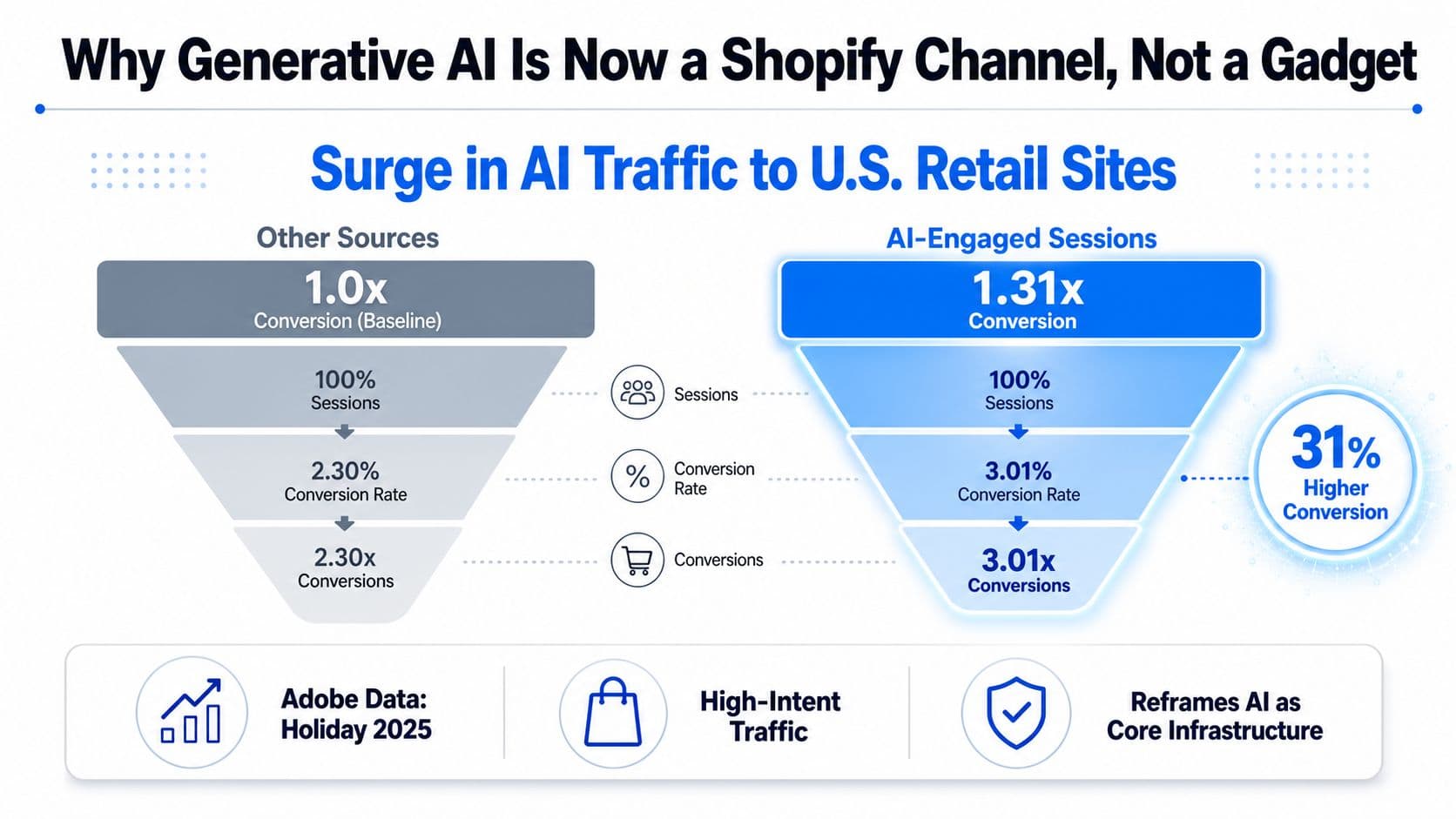
Adobe Digital Insights says generative AI traffic to U.S. retail sites surged sharply as shoppers started using AI tools inside the buying process, not just for curiosity. Their reporting shows AI-referred sessions rising across the 2024 holiday period and again through 2025, which is the kind of pattern you get when a behavior turns into a repeatable acquisition path, not a novelty (Adobe Digital Insights).
The bigger point is conversion quality. Adobe also found that AI-referred shoppers converted higher than other traffic sources during the 2025 holiday season, which means these visits are showing purchase intent, not casual browsing. For a Shopify brand, that changes the job completely. Generative AI now sits inside the conversion stack, where product discovery, objection handling, and cart recovery happen.
What that means for your store
Stop asking for more AI features. Ask which surface moves a shopper closer to purchase, and cut the rest. On Shopify, the highest-value uses are the ones that answer fit questions, reduce choice overload, and keep the session alive when a customer hesitates.
The market is also moving toward monetized AI discovery. The piece on ads are coming to ChatGPT makes the direction clear, attention inside AI surfaces will get priced, measured, and competed for. Brands that learn how AI-assisted discovery works now will have a cleaner path to efficient traffic later.
Practical rule: if an AI feature does not change discovery, objection handling, or checkout behavior, it is a cost center.
The market size projection points in the same direction. Precedence Research projects growth from USD 962.24 million in 2025 to USD 3,949.94 million by 2035 (Precedence Research). That is enough to tell you this is becoming infrastructure, not a side experiment.
For stores that want agent-style shopping workflows, our guide on agentic AI for ecommerce is the right next read. The stores that win here will not be the ones chasing the flashiest demo, they will be the ones cleaning catalog data, tightening prompt QA, and measuring the right KPIs before the channel gets crowded.
The Highest-Impact Use Cases for Shopify Stores
The first AI project should do one thing well, move a shopper closer to purchase. That usually means helping with fit questions, reducing choice overload, or keeping the session alive when hesitation starts. If it does not affect discovery, objection handling, or checkout behavior, it is a budget drain.
Start with the surfaces closest to revenue. On Shopify, that means live shopping help, product guidance, and catalog work before any flashy creative experiment.
Put conversational sales first
AI sales chat and proactive recommendations usually belong at the top because they touch active purchase intent. A useful version does not ramble about the brand story. It answers fit questions, suggests the right variant in the PDP context, and pushes the shopper to the next decision.
That is the standard worth holding every assistant to. It should read the question, identify the SKU context, and narrow the choice set instead of widening it. If you are evaluating vendors, browse our recent AI projects to see the kind of operational discipline needed when AI sits close to the cart.
Then clean up the catalog work
Product description and SEO copy generation comes next because it is repetitive, time-consuming, and easy to standardize. The right setup does not invent claims. It pulls from a cleaned vendor feed, approved attributes, and a style guide, then generates consistent copy at scale.
Use AI here as an enrichment layer, not a freeform author. That means title variants, metadata, bullets, and FAQ scaffolding, all anchored to structured input. If the source data is messy, the output will be messy too, and shoppers will notice.
Use merchandising and imagery only after the basics
Personalized merchandising, on-site search, and AI imagery can help, but they are higher-risk if the catalog foundation is weak. Use them once product taxonomy, variants, and merchandising rules are already stable. The same goes for email and SMS flows, especially abandoned cart and win-back, where AI can speed up copy production but should not invent policy or discount language.
A store with a clean catalog can also make recommendation logic far more effective, which is why AI product recommendations deserve attention after the basics are in order.
| Use Case | Implementation Effort | Typical Revenue Impact | Best For |
|---|---|---|---|
| AI sales chat and proactive recommendations | Medium | High | Stores with active support load and high-intent traffic |
| Product description and SEO copy generation | Low to Medium | Medium | Large catalogs with repetitive content gaps |
| Personalized merchandising and on-site search | High | High | Stores with strong data hygiene and broad assortment |
| AI imagery and lifestyle backgrounds | Medium to High | Medium | Brands with frequent creative refresh needs |
| Email and SMS copy for flows | Low | Medium | Lifecycle-heavy stores with recurring campaigns |
If you want a concrete example of catalog-heavy execution, browse our recent AI projects and look at the operational discipline it takes to make AI useful at scale.
Start with one surface close to revenue. Add the second only after the first has clean measurement.
Integration Workflows for Shopify Data, Prompts, and Privacy
The fastest way to waste time on generative AI for ecommerce is to treat model selection as the main decision. It isn't. The core work is wiring together Shopify data, prompt constraints, tooling choice, and privacy rules so the AI can operate without drifting off-brand or off-policy.
Build from the data layer up
Start with the data the assistant or generator needs to know. For Shopify, that usually means catalog fields, inventory, orders, policies, customer profiles, and support content surfaced through Shopify APIs, webhooks, and the GraphQL Admin API. If the assistant can't reliably access product variants, shipping rules, return windows, or stock status, it will guess, and guessing is where trust dies.
That's also why AI into logistics workflow is a useful adjacent read, because the same principle applies outside storefronts, data quality first, automation second.
Lock prompts to policy, not vibe
A prompt should not just sound like your brand. It should anchor the assistant to your brand voice, return policy, shipping rules, and escalation logic. I prefer a system prompt with explicit sections for tone, allowed actions, prohibited claims, and a merchant-controlled knowledge cutoff.
Practical rule: if your policy changes, the prompt should change the same day.
That keeps the assistant from promising discounts you don't honor or inventing eligibility details. It also makes review simpler for teams that don't have a developer on call every time merchandising updates a policy page.
Choose the right build path
You've got three practical choices. Native Shopify apps and platform tools are the fastest way to launch. Third-party SaaS can get you better support and product-specific features. Custom builds on OpenAI or Anthropic make sense when you need retrieval over a clean product feed and tighter control over ranking, routing, or brand safety.
Your build path should match the job. If your goal is answering common pre-purchase questions, a managed app is usually enough. If your goal is deep catalog retrieval across thousands of SKUs, you need retrieval, guardrails, and logging, not just a prompt wrapped in a widget.
Treat privacy as a product decision
The privacy question isn't optional. You need to decide what data crosses Shopify's boundary, how PII is redacted, how long transcripts are retained, and when customer consent is required for AI-driven conversation logs. That's especially important if AI transcripts are feeding support, email, or segmentation workflows.
For compliance-oriented teams, our guide on understanding GDPR compliance is the right companion piece. If you're handling sensitive categories or customer histories, keep retention windows short and access controls tight.
Budgeting is easier than many expect. You don't need to optimize token economics first, but you do need a per-conversation cost ceiling and a view of how that scales with traffic. Start small, measure usage, then expand only after the assistant earns its keep in conversion or support deflection.
Measuring What Actually Moves Revenue
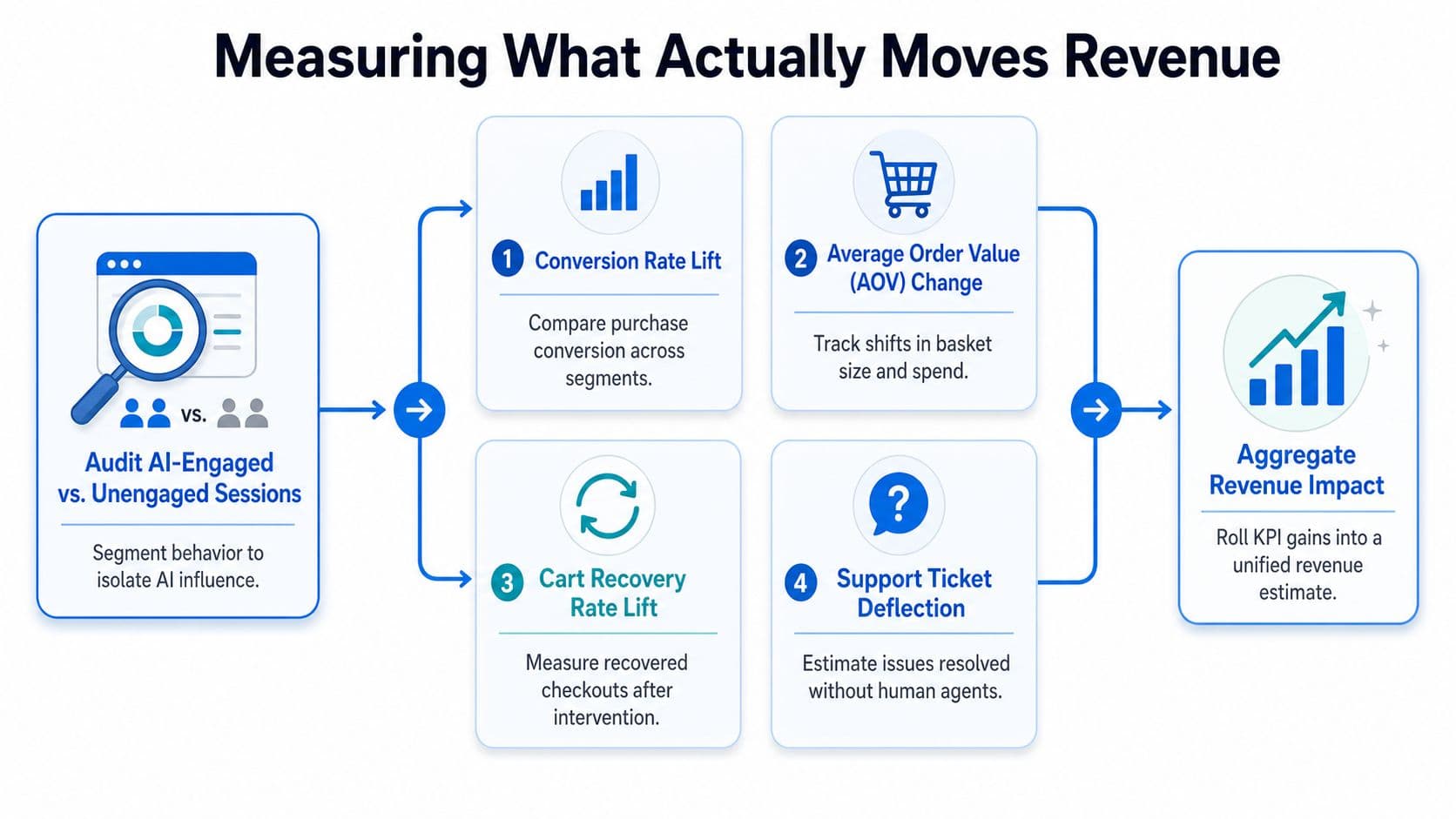
Most AI reporting is junk because it celebrates activity instead of lift. If a tool saves time but doesn't improve conversion, cart recovery, support efficiency, or customer satisfaction, it's not a growth lever. It's a workflow shortcut with a subscription fee.
Track the right KPIs
For storefront AI, I'd keep the scoreboard tight. Conversion rate lift is the main one, split between AI-engaged and unengaged sessions. Then watch average order value, cart recovery rate, support ticket deflection, CSAT, and time to first response.
The reason is simple. Some AI features help shoppers buy more confidently, while others just reduce support load. You need both views, but you shouldn't blur them. A chat assistant that cuts response time but doesn't improve revenue may still be worth it, but only if it saves enough service cost to justify itself.
Triple Whale's benchmark data gives you a realistic upper bound to test against. It reported AI-engaged shoppers converting at about 12.3% versus 3.1% without AI, roughly a 4x lift, and support automation resolving tickets 18% faster with a 71% success rate (Triple Whale). Those aren't promises, they're the kind of directional numbers that tell you whether your implementation is in the right zone.
Run tests like a merchant, not a hobbyist
Use a 50/50 traffic split for a feature like proactive chat suggestions, and run it for at least two weeks so you're not reading noise as signal. Keep one guardrail metric, refund rate works well, and only compare against a control group that sees the normal experience.
The right question isn't “Did the AI get used?” It's “Did the AI change buying behavior enough to matter?” That means you need clean attribution too. Mark AI-influenced orders in Shopify, then pass those tags into GA4, Triple Whale, or Northbeam so the conversation doesn't disappear between tools.
If you can't trace an AI touchpoint to an order, you don't have measurement. You have a screenshot.
This is also where research discipline matters. A recent review highlighted that many teams talk about AI in broad use-case terms but skip the measurement framework, which is why so many implementations stay vague instead of proving lift (Emerald article on generative AI in ecommerce).
A 90-Day Rollout Playbook From Pilot to Scale
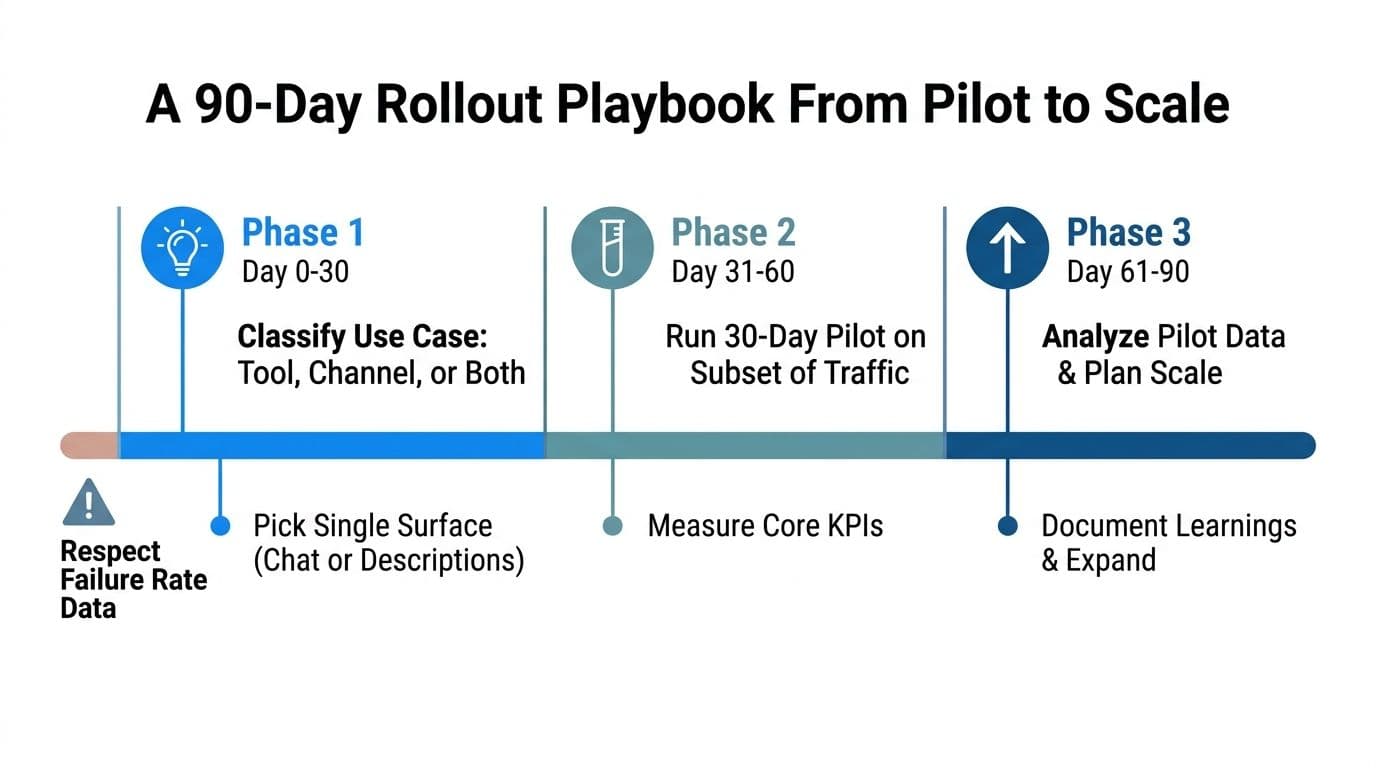
The stores that win with generative AI for ecommerce don't launch everything at once. They pick one surface, prove it, then expand. That discipline matters because implementation failure is common, with research cited by eLogic noting that 95% of generative AI pilot programs fail to deliver measurable business value, and McKinsey found that among more than 50 retail executives, only two said they had successfully implemented gen AI across their organizations (eLogic).
Weeks 1 to 4, clean the ground
Start with a data audit. Classify the use case as a tool, a channel, or both. Then pick one surface, chat or product descriptions, not both. In weeks 3 to 4, build the prompt set, content rules, and human review workflow, then get the merchant, CX lead, and marketer aligned on what the assistant can and cannot do.
Weeks 5 to 8, run the pilot
Keep the pilot controlled. Limit it to a subset of traffic or SKUs and measure against a single KPI plus a guardrail. If you're testing chat, use conversion rate or cart recovery as the lead metric. If you're testing content, use publish speed, traffic quality, or conversion on updated pages, not just copy volume.
The pilot needs a real owner. Someone has to review errors, watch transcript quality, and shut down bad behavior before it spreads. If no one owns the workflow, the model will look fine while the business result stays flat.
Weeks 9 to 12, make the scale call
Analyze the pilot data in weeks 9 to 10. In weeks 11 to 12, decide whether to expand to 100% of traffic and whether the first use case has earned the right to share budget with a second one. Don't let pilot success become fake proof of enterprise readiness. Repeatable lift is the bar.
Practical rule: scale only after one use case proves itself twice, once in testing and once under normal operating pressure.
A clean 90-day cadence keeps the team honest:
- Week 1 to 2, data audit. Clean product data, policy pages, and support content.
- Week 3 to 4, prompt and content build. Define voice, guardrails, and escalation.
- Week 5 to 8, controlled pilot. Run one surface on a subset.
- Week 9 to 10, evaluation. Check KPI lift, guardrails, and transcript quality.
- Week 11 to 12, scale decision. Expand only if the result is repeatable.
Common Pitfalls and How to Dodge Them
Dirty product feeds cause more AI damage than bad model choice ever will. If the catalog says one thing in the feed and another on the PDP, the assistant will invent or misstate product details. The fix is blunt, clean the feed before launch and force the assistant to answer only from approved attributes.
The failures I see most often
Over-broad prompts are next. If you let the assistant improvise, it may recommend a competitor, invent a refund promise, or answer a medical claim too confidently in beauty or wellness. The fix is a narrower prompt, explicit prohibition rules, and human review on sensitive categories.
Treating AI as a support replacement is another expensive mistake. AI should triage, route, and answer the simple stuff first, then hand off the edge cases to humans. If you try to eliminate your support team, you'll just create a worse customer experience with prettier branding.
Watch the rollout speed and the cost curve
Teams also kill pilots too early. Two weeks is often not enough to see signal, especially on lower-traffic stores. Give the test a real runway, then evaluate it against a control group instead of reacting to a bad day of traffic.
Cost creep is the last trap. A feature can look efficient at launch and become expensive as traffic scales or conversations get longer. Budget per conversation, watch token usage, and cap unnecessary chatter before it eats the margin you were trying to protect.
One-line fix: every AI workflow needs a rollback plan, a human escalation path, and a cost ceiling before it goes live.
Your Next 30 Days and What Comes After
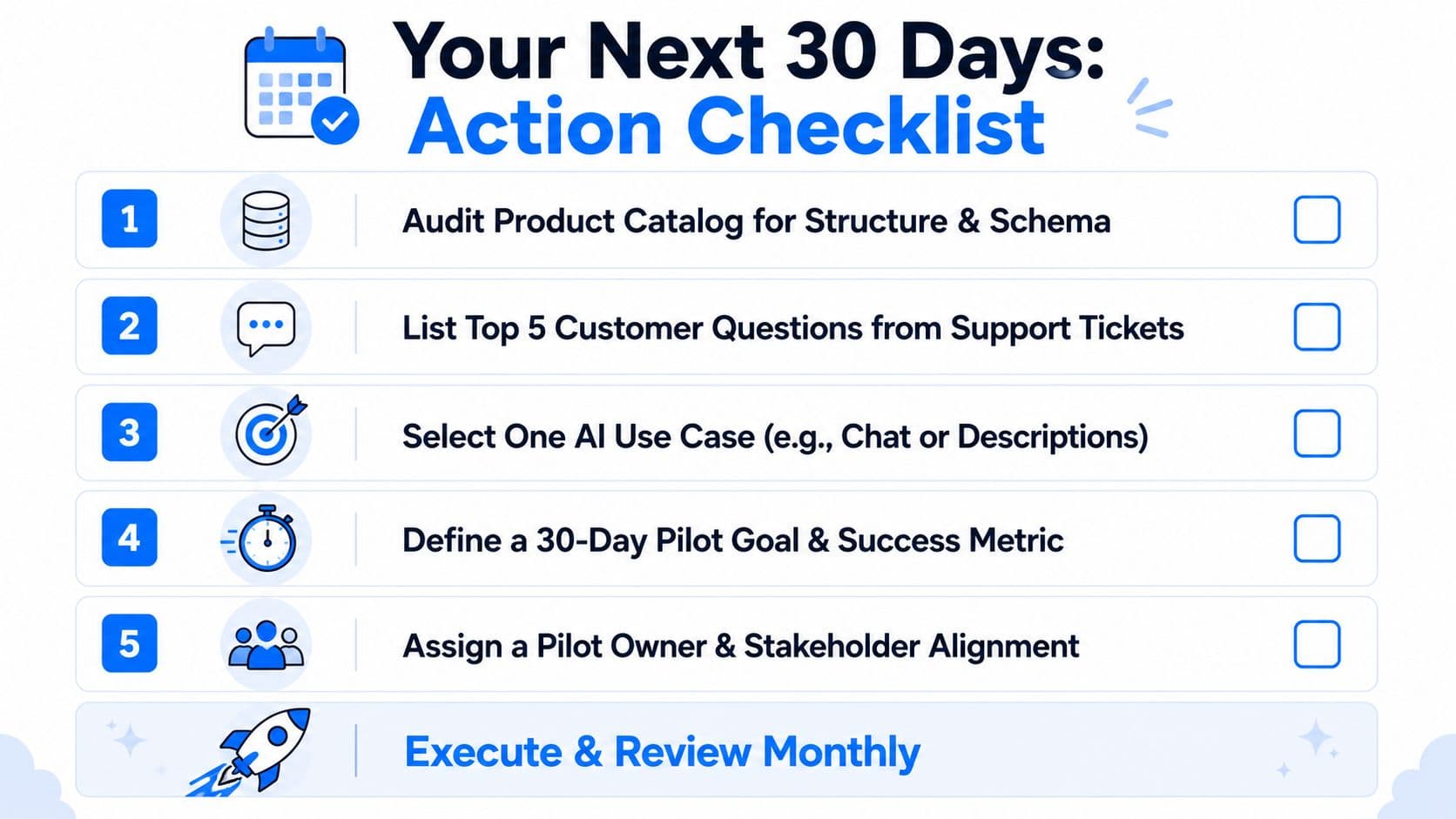
Start with the work that makes AI usable. Audit your catalog for structure and schema, list the top five customer questions from support tickets, pick one use case from the ranking above, define one primary KPI and one guardrail, then assign a pilot owner with a 30-day decision gate. That sequence keeps the project grounded in revenue instead of experimentation theater.
The next move is to make the boring work repeatable. Review summaries, content enrichment, support triage, and margin protection are where generative AI pays off fastest, because they reduce friction in the workflows that already drive sales. That's the core lesson here, flashy assistants don't win by themselves, operational reliability does.
Through 2026 and 2027, AI-referred traffic will likely keep compounding, and more shopping experiences will shift toward agents that browse, compare, and help complete purchase decisions. Merchants will also lean harder on AI copilots for merchandising and ad creative, which means the stores that already have clean data and clear prompts will move faster than the ones still debating whether AI is “real.”
If you want a chatbot that's built for Shopify commerce, Carti gives you a way to turn product questions, recommendations, and cart recovery into a live sales workflow instead of a generic support bot. Visit Carti if you want to compare that approach against your current stack and decide whether it's the right fit for your store.

Written by
Daniel AndersonFounder of Carti. 10+ years building ecommerce brands in apparel and supplements. Still runs a Shopify store and built Carti to help merchants convert more browsers into buyers.