
Conversion optimization is the systematic process of increasing the percentage of website visitors who make a purchase, signup, or other desired action. Since average website conversion rates are commonly cited at 2.35%, with broader averages around 2% to 5%, it's one of the strongest ways to grow a Shopify store's revenue without spending more on ads.
If you're running a Shopify store, you've probably felt this already. Traffic comes in, product pages get views, carts fill up, and then too many shoppers disappear before checkout. The usual reaction is to push harder on acquisition. Launch another campaign. Raise the budget. Add another channel.
That works until it doesn't.
A better move is to ask a simpler question: what's stopping the people already on your site from buying? That's what conversion optimization answers. At its core, it's not about clever tricks or button-color superstition. It's about finding friction in the buying journey and removing it in a way you can measure.
For a modern e-commerce brand, that friction isn't only visual. Some of it is informational. Shoppers hesitate because they can't find shipping details, don't trust the return policy, or want reassurance about fit, materials, timing, or compatibility. That's why the best CRO work today goes beyond page design and testing. It also improves how your store answers questions in the moment.
Why Conversion Optimization Is Your Most Profitable Marketing Activity
Most Shopify stores don't have a traffic problem first. They have a leakage problem.
Think of your store like a bucket. Paid ads, email, organic search, influencer traffic, and repeat visitors all pour water into it. If the site doesn't convert well, that bucket has holes. Buying more traffic just means you're pouring more water into the same leaky container.
That's why what is conversion optimization matters so much in practice. It's a data-driven discipline aimed at increasing the percentage of visitors who complete a desired action, and average website conversion rates are commonly cited at 2.35%, with broader averages around 2% to 5% depending on business model and traffic source, as noted in Matomo's CRO statistics overview. For Shopify merchants, even small improvements can compound into meaningful revenue gains because every existing traffic source starts working harder.
The leaky bucket problem
Store owners often treat CRO like cleanup work after “real marketing” is done. That's backwards.
If your Facebook ads, Google Shopping campaigns, Klaviyo flows, and creator partnerships are already sending visitors to the site, the expensive part has happened. You already paid to earn attention. CRO determines how much value you keep.
Practical rule: Don't increase acquisition spend until you understand where your current buyers get stuck.
This is why CRO is usually more durable than chasing one more traffic spike. Better product pages, cleaner checkout flows, stronger trust signals, and clearer answers improve the return on every channel at once.
Why it beats constant ad dependence
Ad costs change. Platform performance swings. Creative fatigue shows up fast. A better site is more stable.
Here's the trade-off most merchants face:
| Approach | What it does | Limitation |
|---|---|---|
| Buy more traffic | Increases visitors | Doesn't fix weak product pages or checkout friction |
| Optimize conversions | Increases value from current traffic | Requires disciplined measurement and testing |
| Do both in order | Improves efficiency before scaling | Takes more patience, but usually leads to healthier growth |
The strongest operators do both, but in the right sequence. They tighten the site, improve conversion paths, then scale acquisition into a funnel that wastes less money.
If you want another practical perspective on how merchants approach this work, Miles Marketing's CRO insights are useful because they frame optimization as a profit lever, not just a UX exercise.
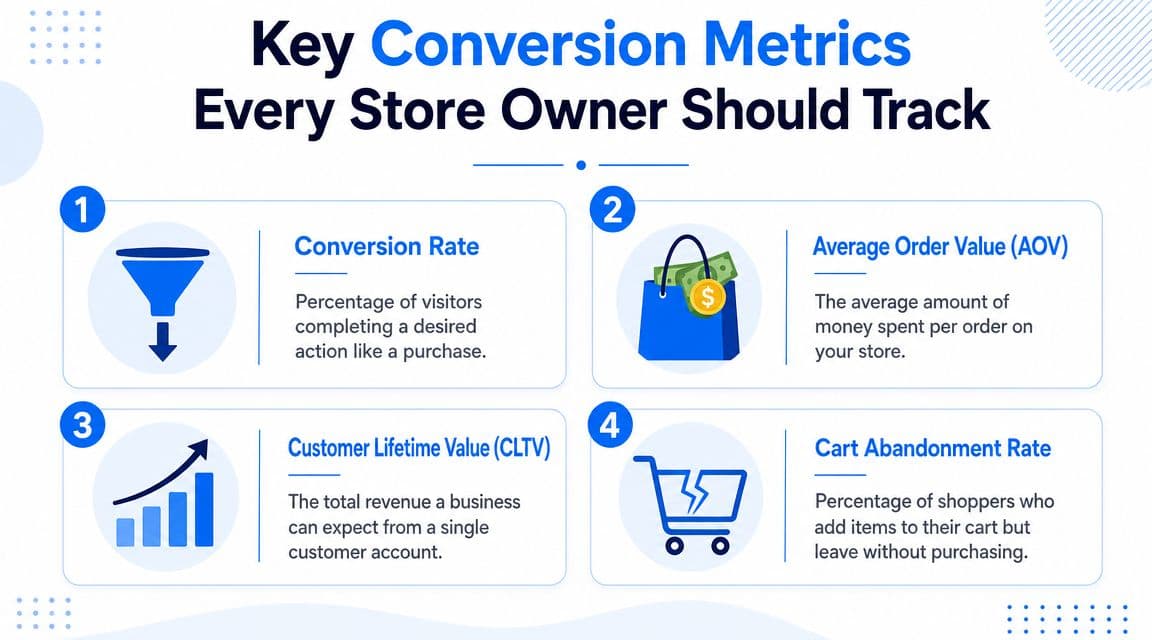
Key Conversion Metrics Every Store Owner Should Track
If you can't measure the buying journey, you can't improve it. Guessing is what burns time in CRO.
Start with the main conversion rate
The core KPI is conversion rate. The formula is simple: conversion rate = (conversions ÷ total visitors or sessions) × 100. But in real stores, that top-line number can hide where the actual problem lives.
As WP Rocket's CRO metrics guide explains, advanced teams also track micro-conversions like add-to-cart and checkout initiation to isolate where leakage occurs. That matters because a store can show a stable overall rate while one step in the funnel is subtly underperforming.
Look at your conversion rate by:
- Channel: Paid traffic often behaves differently from email or direct traffic.
- Device: Mobile friction shows up fast in product-page scrolling and checkout completion.
- Landing page: Some pages attract interest but fail to move shoppers deeper.
Your store doesn't have one conversion rate. It has several, and the blended average can hide the truth.
For a solid foundation, Shopify analytics and GA4 will cover most stores. If you want a broader measurement framework, this overview of e-commerce KPIs that matter is a good reference point.
Use supporting metrics to diagnose problems
Conversion rate tells you the outcome. Supporting metrics tell you why it happened.
Track these four consistently:
- Average Order Value (AOV): This shows how much customers spend per order. It matters because some CRO changes raise conversion rate but lower basket size. You want both metrics in view.
- Customer Lifetime Value (CLTV): This helps you judge whether a conversion source brings the right kind of customer, not just the fastest sale.
- Cart Abandonment Rate: This reveals whether interest collapses near checkout, where trust and policy clarity matter most.
- Revenue Per Visitor (RPV): This is one of the best executive metrics because it combines conversion efficiency with order value.
A simple way to work is to pair one top-line metric with one diagnostic metric. For example, monitor product-page conversion alongside add-to-cart rate, or checkout completion alongside cart abandonment.
If you're trying to benchmark your own store more realistically, this guide to boosting ecommerce sales gives useful context on how merchants compare performance without treating benchmarks like absolutes.
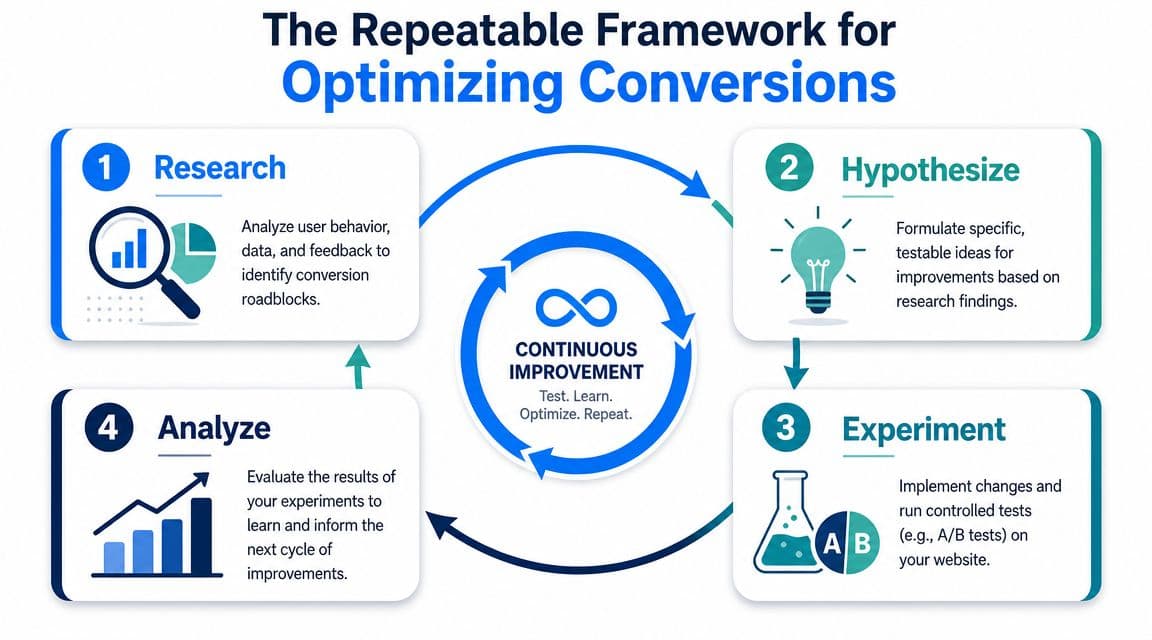
The Repeatable Framework for Optimizing Conversions
The stores that improve consistently don't rely on inspiration. They use a loop.
Research before you redesign
Start by finding where shoppers struggle. Use Shopify analytics, GA4 funnel reports, heatmaps, session recordings, customer support logs, and on-site search queries. All of them point to friction from a different angle.
Watch what people do on your highest-intent pages:
- Product pages where traffic lands but add-to-cart stays weak
- Cart pages where shoppers hesitate or loop backward
- Checkout entry points where drop-off suddenly spikes
- FAQ and policy pages that get visited right before abandonment
The mistake I see most often is redesigning before diagnosing. Merchants rewrite product pages, swap themes, or add apps without evidence. That usually creates more noise than progress.
If you want a Shopify-specific playbook for structuring this work, this guide to Shopify conversion rate optimization is worth reviewing.
Write a hypothesis you can test
Once you see a problem, turn it into a testable statement.
A good hypothesis has three parts:
- The change you want to make
- The expected outcome
- The reason you believe it will work
Examples:
- If we move shipping details higher on the product page, more shoppers will add to cart because they won't need to hunt for delivery info.
- If we reduce form friction in cart, more shoppers will start checkout because the next step feels easier.
- If we clarify returns next to the buy box, hesitation will drop because trust is addressed at the decision point.
This forces discipline. Instead of saying “let's improve the page,” you're saying what you're changing and why.
Run controlled experiments
CRO is not just changing pages and hoping. It's comparing a variation against a control.
A/B testing works because it answers the business question: did this specific change cause the lift, or did results shift for another reason? That's why serious teams use statistically significant comparisons instead of directional hunches.
A test without a clear hypothesis is just organized fiddling.
Keep early tests focused. Don't change headline, pricing layout, badges, imagery, CTA text, and FAQ placement all at once unless you're prepared to learn very little from the result.
Analyze, implement, and document
After the test, don't just ask who “won.” Ask what you learned.
Use a short review table like this:
| Question | What to check |
|---|---|
| Did the primary metric improve | Purchase rate, add-to-cart rate, checkout start, or another chosen KPI |
| Did any supporting metric worsen | AOV, drop-off at a later step, support contacts |
| What behavior changed | More clicks, fewer exits, smoother progression |
| Should it roll out fully | Yes, no, or needs refinement |
Then document the result. Over time, that log becomes one of your best assets. You'll see patterns in what your shoppers respond to, which objections keep coming up, and which “best practices” don't fit your category.
Proven CRO Tactics to Implement on Your Shopify Store
Most Shopify stores don't need more tactics. They need the right tactic for the right friction point.
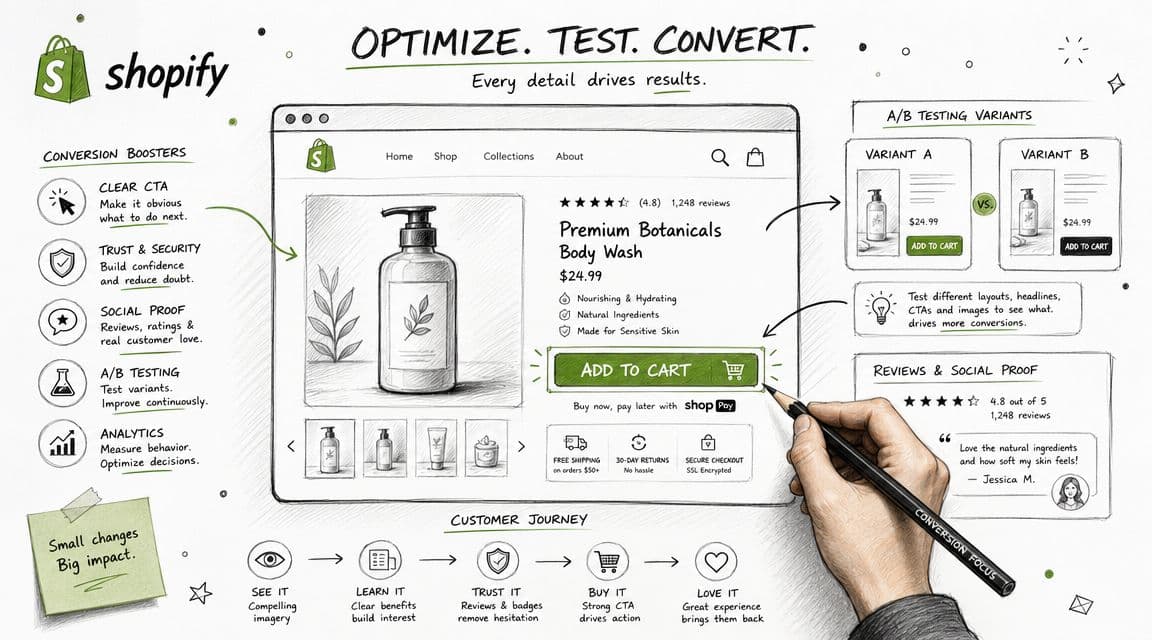
Fix the product page first
A typical product page loses sales in predictable ways. The photography is decent but doesn't answer practical questions. The copy talks about the brand, not the buyer. Shipping and returns are buried. Reviews exist, but they don't address the objections that block purchase.
That's where I'd start.
Strengthen the page by improving the decision layer, not just the visuals:
- Clarify the value proposition: Tell shoppers what the product does, who it's for, and why it's different within the first screen.
- Answer buying questions near the CTA: Shipping time, returns, sizing, compatibility, materials, or care instructions shouldn't live three tabs away.
- Use reviews as proof, not decoration: Put the most decision-relevant proof close to the buy button.
Remove friction from navigation and discovery
Some stores lose conversions before product evaluation even starts. Menus are bloated. Collection filtering is weak. Search returns poor results. Shoppers can't narrow quickly, so they bounce.
A cleaner structure usually helps more than another homepage section.
Good fixes include:
- Simplified collection paths: Make it easy to browse by need, not only by internal catalog logic.
- Better on-site search support: Synonyms, misspellings, and product-type matches matter.
- Stronger collection page cues: Buyers should understand what changes across options without opening every product card.
When shoppers can't find the right product fast, they don't think the catalog is large. They think the store is hard to use.
Treat checkout like a trust test
Many merchants still focus too narrowly on design. Layout matters, but information gaps often hurt more.
According to AmericanEagle's summary of Baymard cart-abandonment research, 48% of shoppers abandon carts because extra costs are too high, 26% because the site wanted them to create an account, and 25% because delivery was too slow. Those are not just design problems. They're often unanswered-question problems.
That translates into practical Shopify actions:
- Show costs early: Don't surprise people late with shipping or fees.
- Allow guest checkout: Forced account creation adds unnecessary resistance.
- Surface delivery information clearly: If timing matters to the purchase, don't hide it in a policy page.
- Reinforce trust at checkout: Return policy clarity, payment reassurance, and support availability all help.
If you sell across channels, some ideas from this guide to scaling Amazon profits are also useful because they highlight how buyer intent changes when trust is thin and decisions happen fast.
The Shift to Conversational Conversion Optimization
Traditional CRO treated the website like a static persuasion machine. Improve the headline. Tighten the CTA. Reduce page weight. Move trust badges. Test variations. That still matters, but it's not enough.
A lot of lost conversions come from conversational friction. The shopper has a question, can't get an answer quickly, and leaves.
The real blocker is unanswered intent
A visitor lands on a product page and likes what they see. They're interested. Then the hesitation starts.
Will this arrive in time?
Can I return it if it doesn't fit?
Does this work with what I already own?
What's the difference between these two options?
Is the discount real, or is the store trying too hard?
Those questions often show up right before purchase. If your site answers them clearly, the shopper moves forward. If not, they delay or abandon.
The broader CRO trend is moving this way. As Optimizely's CRO glossary notes, optimization is shifting from “persuade with static page elements” to “assist with accurate, contextual guidance in real time.” The same source also points to Google's AI Overviews and the FTC's 2024 ban on fake reviews as reasons trustworthy, on-demand information matters more now.
Static pages can't answer follow-up questions
Here's the trade-off. Static page content scales well, but it only answers the questions you anticipated when you built the page. Real shoppers don't always think in that sequence.
They compare variants oddly. They need reassurance at inconvenient moments. They ask policy questions from product pages and product questions from the cart. They want context, not just content.
That's why modern conversion optimization includes:
- Real-time support: Answer hesitation while the buyer is still active.
- Context-aware guidance: Tailor answers to the product, cart state, or stage of journey.
- Trustworthy information delivery: Policy clarity matters more than aggressive persuasion.
- Feedback loops: Repeated shopper questions should inform merchandising, content, and testing priorities.
A store converts better when it helps shoppers decide, not when it only pushes them to click.
This is the practical shift behind conversational CRO. You're not only optimizing pages. You're optimizing the dialogue that gets a shopper over the line.
How AI Chatbots Drive Your Conversion Strategy
An AI chatbot should be treated as part of your CRO system, not as a support widget bolted onto the corner of the screen.
Where chat affects revenue
The first job is simple. Remove waiting.
If shoppers hesitate because they can't find shipping terms, return rules, sizing guidance, or product comparisons, a good chatbot closes that gap immediately. That supports conversion because it resolves uncertainty at the moment of decision rather than after the visitor has already left.
The second job is commercial. A strong chatbot can guide product discovery, suggest relevant items, and keep shoppers moving when navigation or comparison gets messy. That turns chat into a sales assist, not just a help desk.
The third job is diagnostic. Chat logs show you what your site still fails to explain well. Repeated questions about shipping, ingredients, compatibility, or fit usually mean the page needs work.
For a deeper look at this model, this guide to using an AI chatbot for ecommerce explains how conversational support fits into the buying journey.
What to expect from a good implementation
Don't expect a chatbot to rescue a weak store by itself. If your pricing is unclear, your offer is weak, or your product pages create doubt, chat won't fix the fundamentals.
Use it where it will be most effective:
- High-intent pages: Product, cart, and checkout-adjacent moments
- Policy-heavy categories: Fashion, beauty, home, wellness, and products with fit or compatibility concerns
- After-hours demand: When support teams aren't online but purchase intent still exists
- Repeated objections: Areas where the same pre-purchase questions show up again and again
A short product walkthrough helps make that tangible:
Used well, conversational AI doesn't replace CRO discipline. It gives that discipline another lever. Your pages still need structure, your analytics still need clean tracking, and your tests still need rigor. But when your store can answer, guide, and reassure in real time, you remove a kind of friction that static optimization alone often misses.
If you want to turn more Shopify visitors into buyers without adding support headcount, Carti is built for that job. It gives shoppers instant answers, helps them discover the right products, and supports a more conversational conversion strategy that reduces friction where it matters most.

Written by
Daniel AndersonFounder of Carti. 10+ years building ecommerce brands in apparel and supplements. Still runs a Shopify store and built Carti to help merchants convert more browsers into buyers.
Ready to boost your store's sales?
Install Carti in 5 minutes and let AI handle customer questions, recommend products, and close sales 24/7.
Start Free Trial14-day free trial