
By 2026, 89% of businesses are expected to compete primarily on customer experience rather than on product or price alone, and 80% of customers say their experience with a company matters as much as its products or services according to Salesmate's customer service statistics roundup. For Shopify merchants, that changes the whole job. Support isn't a cost center sitting off to the side of growth. It shapes whether a visitor buys, abandons, comes back, or tells someone else not to bother.
That's why exceeding customer expectations matters now in a much more operational sense. It's no longer about sending a nice apology after something breaks. It's about building a storefront that answers questions instantly, removes friction before checkout, and keeps the post-purchase experience clean enough that buyers trust you with a second order.
Why Good Enough Support Loses Sales in 2026
Baymard Institute's checkout research continues to show that buyers abandon purchases for preventable reasons such as extra costs, forced account creation, and delivery uncertainty. On Shopify stores, support sits inside those moments. It is no longer a post-purchase function. It affects whether the order happens at all.
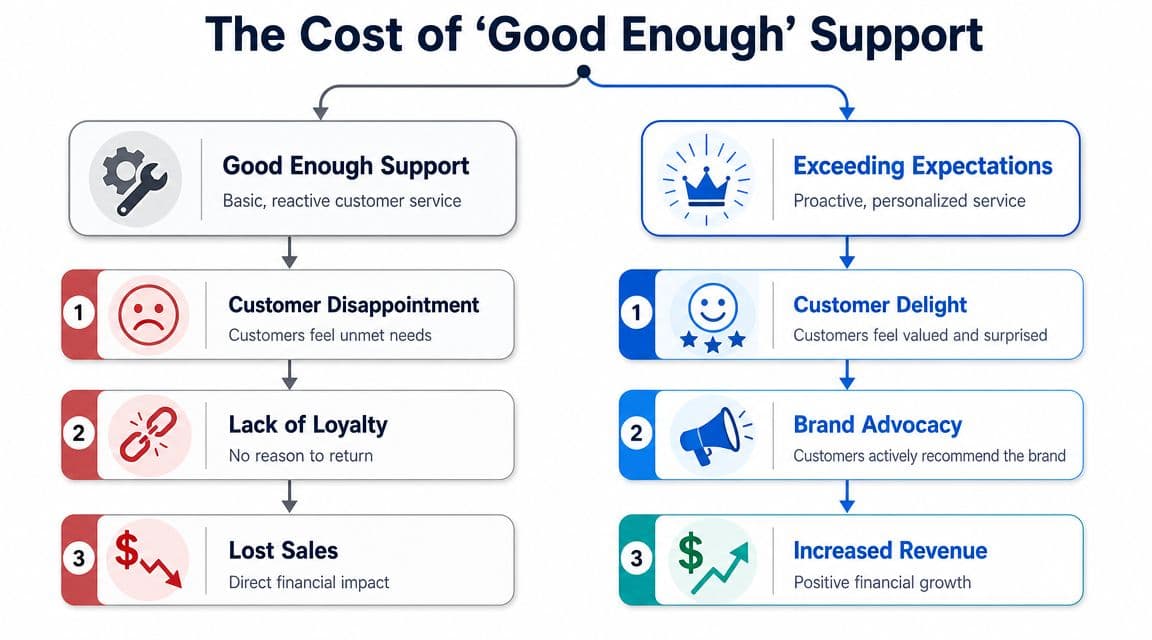
The baseline changed
Customers judge the store and the service as one experience. If a shopper has to leave the PDP to find shipping answers, wait six hours for a reply on compatibility, or open a ticket just to confirm return terms, the store feels risky. Risk kills conversion.
I have seen this pattern across Shopify brands in apparel, supplements, and home goods. The product is often good enough to win. The support system is what loses the sale. A shopper asks whether a medium fits a 32-inch waist, whether a bundle qualifies for free shipping, or whether a replacement can be sent before a return is processed. If the answer is slow or generic, they do not stay loyal to the process. They open another tab.
That is the shift many teams still miss. Support used to be measured by ticket closure and CSAT alone. In 2026, support also needs to protect conversion rate, checkout completion, reorder rate, and time to resolution for revenue-critical questions.
What merchants get wrong
The common failure is not rude agents or bad intentions. It is a reactive operating model built for inbox management instead of revenue protection.
On many Shopify stores, the setup looks mature on paper. There is Gorgias or Zendesk for tickets, Shopify Inbox for chat, Klaviyo for email and SMS, a help center, maybe a returns app, and a few macros. Yet the customer still gets a fragmented experience because each tool handles a slice of the journey instead of one connected flow.
| Support approach | What it feels like to shoppers | Revenue effect |
|---|---|---|
| Reactive and generic | “I have to figure this out myself” | More hesitation and weaker conversion |
| Fast but disconnected | “Why do I have to repeat myself?” | Friction between browse, cart, and support |
| Proactive and contextual | “This store anticipated my question” | Stronger conversion and repeat intent |
A fast first reply is not enough if the answer lacks cart context, product context, or order context.
That trade-off matters. Some teams optimize for lower ticket cost and push every question into a help center article or bot flow. Ticket volume drops. Conversion often drops with it. Other teams route every question to a human and create long queues during traffic spikes. Service quality rises for a few customers, then response times slip for everyone else. The better model uses automation for predictable questions and sends high-intent, high-risk conversations to a person with full context.
That is where tools like Carti stop being optional software and start acting like revenue infrastructure. If a shopper is stuck on a variant, shipping threshold, subscription detail, or order-status concern, the system should answer in context, capture intent, and escalate cleanly when confidence is low. That protects sales that a standard queue will miss.
If you are comparing support stacks, LicenseTrim's guide to Zendesk alternatives is useful because it shows where teams gain lower cost or easier setup, and where they give up flexibility, automation depth, or reporting.
The fix is operational. Build one logic layer across product questions, cart friction, checkout doubts, and order-status requests. Define which questions get instant automated answers, which trigger revenue-focused playbooks, and which need human takeover with order and session data attached. A documented customer service workflow for ecommerce teams usually exposes the gaps fast.
Winning Customers Before the Cart
The first battle isn't abandoned cart recovery. It's the moment a visitor starts comparing, hesitating, and questioning whether your store feels trustworthy enough to buy from.
Salesforce reports that 79% of customers expect consistent interactions across departments, yet 55% feel they are communicating with separate departments anyway in its overview of customer expectations for modern businesses. On a Shopify storefront, that gap often appears before checkout. Marketing promises one thing, product pages say another, support answers something else, and the customer senses the disconnect.
Treat product discovery like assisted selling
A strong pre-purchase experience works like a good retail associate. It doesn't flood the visitor with popups. It steps in when intent is visible.
That usually means triggering support based on behavior, not guesswork:
- Long dwell on a product page: Offer fit, size, ingredient, or compatibility help.
- Repeated viewing across similar SKUs: Compare variants side by side.
- Back-and-forth between product and policy pages: Surface shipping, returns, and delivery answers in-context.
- Collection-page browsing with no click depth: Ask a narrowing question such as use case, budget, or preference.
Stores in fashion, beauty, home, and wellness all have version of this. A skincare store should answer routine questions about regimen order, skin type, and ingredient sensitivity before someone bounces. A furniture store should answer dimensions, assembly, material feel, and delivery expectations before the shopper opens another tab.
Use proactive prompts sparingly and with intent
Most onsite prompts fail because they interrupt instead of assist. They fire too early, ask nothing specific, or dump the visitor into a generic “How can we help?” box.
Better prompts are narrow and tied to page context. For example:
- On apparel PDPs: “Need help choosing between sizes?”
- On supplement PDPs: “Want help finding the best option for your goal?”
- On shipping-policy exits: “Questions about delivery times or returns before you order?”
- On bundle pages: “Want help choosing the right set?”
A prompt should reduce one decision, not announce that support exists.
If traffic is arriving from social campaigns, this gets even more important. Visitors from paid Instagram, TikTok, or influencer content often land with partial context and high curiosity but low patience. Teams refining acquisition quality should also review top social media lead tools, because better lead intent upstream makes pre-purchase support far more effective onsite.
Pre-purchase scripts that work
What works best is guided selling language. Not support language.
Try patterns like these:
-
Question-first script
“I can help narrow this down. Are you shopping for everyday use, gifting, or a specific problem?” -
Comparison script
“These two are the most viewed options for what you're looking at. The main difference is material, fit, and use case. Want the quick version?” -
Confidence script
“If you're deciding whether this is right for you, I can answer sizing, shipping, or returns before you check out.” -
Policy reassurance script
“Need the shipping or return details before you buy? I can pull them up here.”
The key trade-off is simple. Push too hard and the store feels needy. Stay silent and shoppers leave with unanswered objections. Exceeding customer expectations before the cart means being present exactly when uncertainty appears.
Mastering Checkout and Cart Recovery
Checkout is where polite branding stops mattering. Buyers either move forward or they don't. At that point, small unanswered questions carry outsized weight.
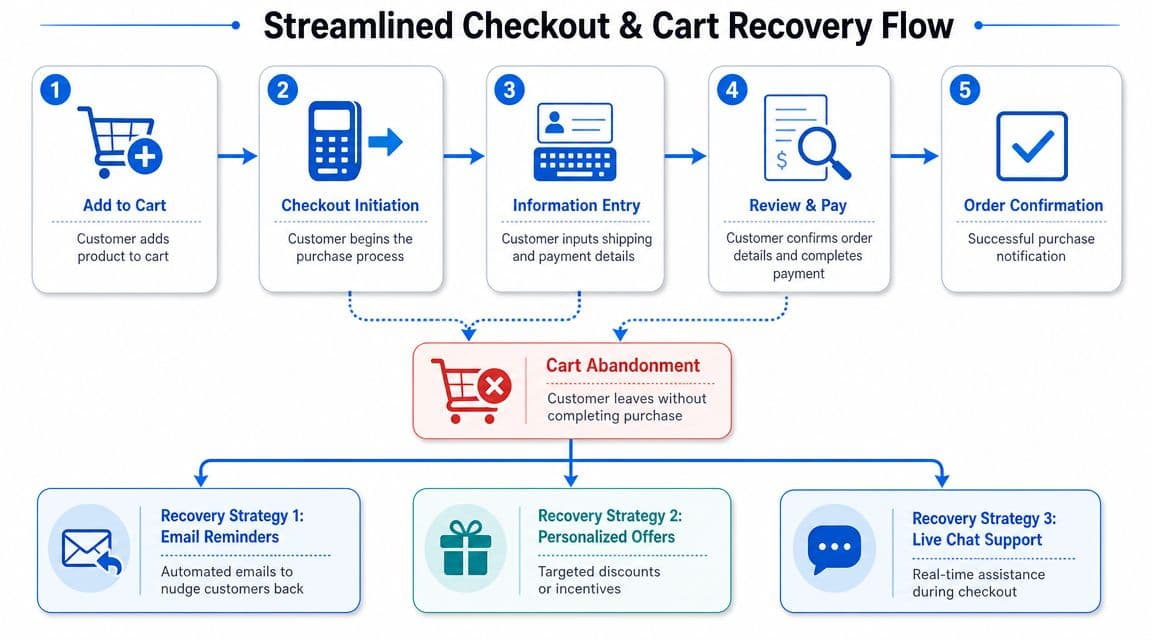
Proactive, low-friction assistance directly counters the primary drivers of cart abandonment. Customers who receive immediate answers and guided product suggestions are less likely to abandon due to uncertainty about product fit, policies, or checkout steps, as described in Primer's guide to cart abandonment recovery and revenue recovery tactics.
Fix blockers before recovery becomes necessary
Strong merchants don't treat recovery email as the whole strategy. They reduce the reasons people leave in the first place.
The most common blockers are familiar:
- Unexpected costs: Shipping, taxes, or fees appear too late.
- Policy uncertainty: Returns, exchanges, or delivery windows aren't clear enough.
- Product doubt: The buyer still isn't sure they picked the right item or variant.
- Checkout friction: Discount code confusion, payment hesitation, or mobile form fatigue.
The fastest way to remove these blockers is contextual assistance inside the cart and during checkout initiation. If a shopper pauses after seeing shipping options, show shipping clarity. If they edit quantities or swap variants, offer a concise comparison or reassurance. If they hover around discount code entry, explain active promos instead of making them hunt through email.
A lot of broad conversion optimization strategies point in the same direction. Remove uncertainty close to the decision point, not in a buried support article.
Build a recovery sequence instead of one reminder
A single abandoned cart email is better than nothing. It's rarely enough.
Benchmark data collected in these cart abandonment statistics shows that three-email abandoned-cart campaigns generate 69% more orders than single-email approaches, and recovery emails achieve 39.07% open rates. The same roundup also notes that abandonment sits at about 70.19% to 70.22% across large studies. That means recovery matters, but prevention still has to carry real weight.
Use a sequence with a clear job for each touch:
| Message | Job | What to include |
|---|---|---|
| First touch | Reconnect while intent is fresh | Cart contents, direct return link, concise CTA |
| Second touch | Remove friction | Shipping clarity, returns reassurance, product benefit summary |
| Third touch | Resolve remaining doubt | Social proof themes, FAQs, or a support route for complex questions |
Don't make every message sound the same. One reminder repeated three times isn't a sequence.
Here's a practical implementation guide if you're tightening this flow on Shopify: how to reduce cart abandonment.
What to automate and what to route to a human
Automation should handle the repetitive, high-frequency questions. Humans should step in when intent is high and the issue is nuanced.
Automate:
- Cart content reminders
- Shipping and return explanations
- Checkout step guidance
- Product variant clarification
- Direct cart restore links
Route to a human:
- Bulk or B2B purchase questions
- Edge-case shipping problems
- Complex fit or compatibility issues
- Payment failure troubleshooting when confidence is at risk
This walkthrough is worth watching because it maps the checkout journey visually and reinforces where friction tends to appear in real stores.
Winning Loyalty After the Purchase
Most brands relax after the order confirmation page. Buyers don't. Their attention shifts from “Should I buy?” to “Did I make the right choice?”

That's where loyalty gets won or lost. The order can be perfect, but if the post-purchase experience feels opaque, slow, or stressful, the customer remembers the anxiety more than the product.
Automate the questions buyers ask every day
As noted earlier, speed expectations are high. In the post-purchase phase, that matters most for routine support requests that shouldn't sit in a queue at all.
A clean setup automates answers for questions like:
- Where is my order
- When will it ship
- Can I change my address
- How do I start a return
- What happens if my package is delayed
These aren't glamorous flows, but they shape trust. If a buyer can get an immediate, accurate answer on order status or return steps, the store feels competent. If they have to submit a ticket and wait, the experience starts to fray.
Make returns feel controlled, not chaotic
Returns are usually treated as a margin problem. Customers experience them as a confidence problem.
The operational fix is to make the process obvious and self-serve where possible. Don't hide policy details in legal copy. Put the key answers where buyers naturally look: order confirmation, account area, support chat, and shipping updates.
A good returns experience has four traits:
-
Clear eligibility language
Customers shouldn't have to interpret policy wording. -
Straight path to action
The next step should be obvious from the first click. -
Status visibility
Buyers want to know whether the request is received, approved, and progressing. -
Escalation for exceptions
Damaged items, split shipments, and missing parcels need a human path.
Fast post-purchase service protects trust even when the answer isn't ideal.
The post-purchase experience buyers remember
The merchants that retain well usually do three things consistently. They reassure, update, and reduce effort.
That means sending useful notifications instead of generic broadcasts. It means anticipating anxiety points around shipping and delivery. It also means using support data to identify where the buying promise and fulfillment reality drift apart.
A helpful reference point here is this breakdown of post-purchase behavior in ecommerce. It's worth reviewing because it frames what happens after the sale as part of conversion quality, not just retention.
Exceeding customer expectations after purchase doesn't require surprise gifts or expensive gestures. Usually, it requires competence delivered quickly and clearly.
The CX Dashboard That Drives Revenue
Most CX reporting is too soft to influence budget. Teams track ticket volume, average handle time, and satisfaction in a vacuum, then struggle to explain why any of it matters to the P&L.
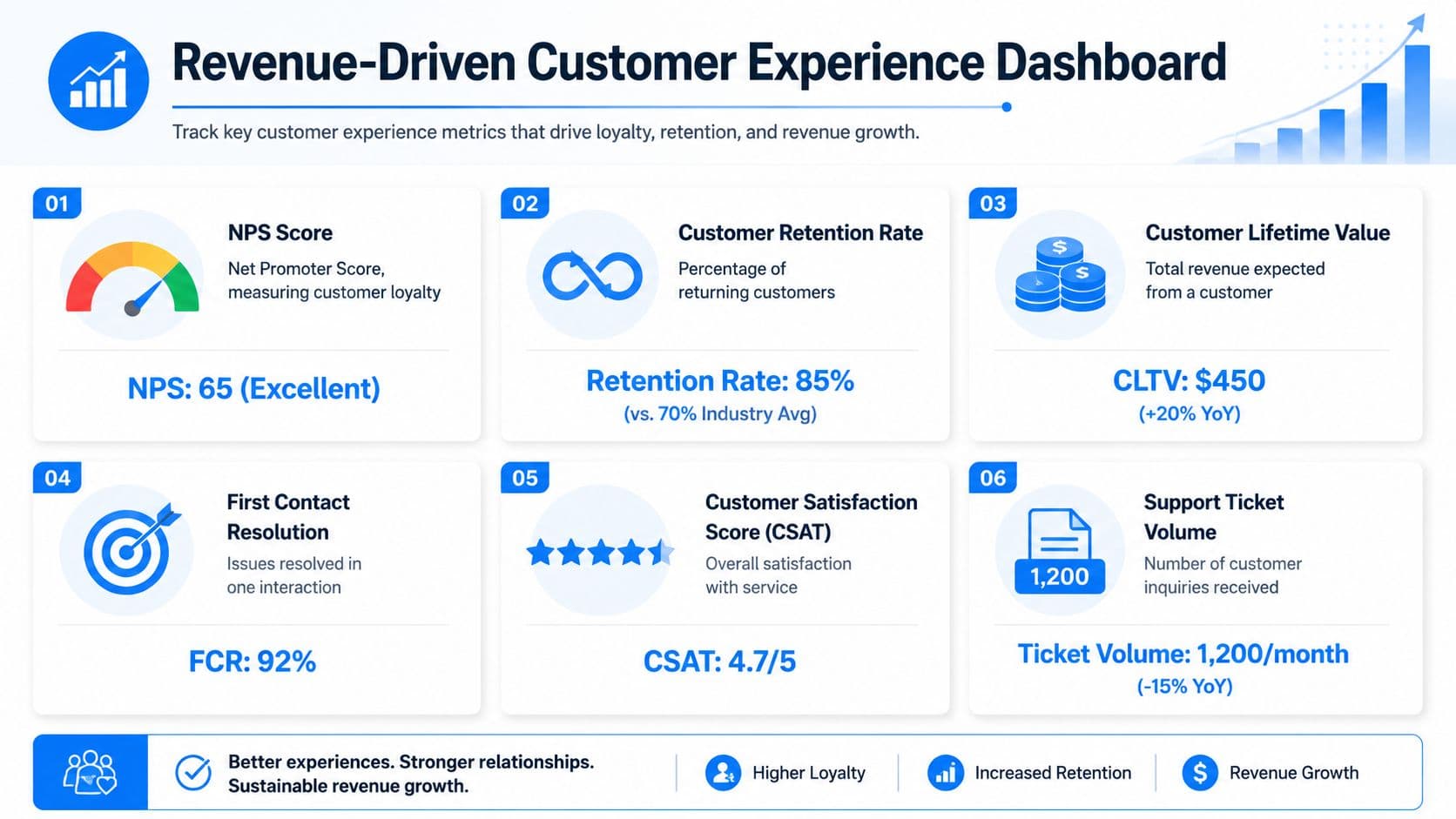
The better question is the one Aura raises in its guide to identifying gaps in the customer support journey: Which expectation gaps most directly affect checkout abandonment and purchase conversion? That framing changes the dashboard completely.
What belongs on the dashboard
A revenue-focused CX dashboard should connect three layers:
| Layer | What to track | Why it matters |
|---|---|---|
| Operational | Response time, resolution rate, escalation rate | Shows whether the service system is functioning |
| Behavioral | Conversion rate from chat users, cart recovery completions, repeat purchase behavior | Shows whether CX changes buying behavior |
| Voice of customer | CSAT, NPS, direct feedback themes, survey comments | Shows where expectations are being missed or exceeded |
One layer alone won't tell the story. Fast response time with weak conversion means your team is answering quickly but not removing friction. Strong CSAT with soft repeat behavior may mean customers liked the interaction but still didn't trust the offer enough to buy again.
A simple operating view for Shopify teams
For most Shopify operators, the useful dashboard isn't huge. It's focused.
Start with these views:
-
Pre-purchase view
Product-page questions by category, conversion rate for visitors who engaged support, top unanswered objections. -
Checkout view
Cart-stage questions, checkout exits after support interactions, restored carts, repeated friction themes such as shipping or code confusion. -
Post-purchase view
Order status demand, return-related contacts, delay-related sentiment, repeat-buyer support patterns.
Then add a weekly review habit. Look for themes that repeat across channels. If shoppers repeatedly ask about shipping cutoffs, fix the merchandising and checkout copy. If product comparison questions dominate one collection, improve collection filters and PDP content. Good CX teams don't just answer questions. They remove the need for those questions.
The best dashboard is not the one with the most widgets. It's the one that tells your merchandiser, lifecycle marketer, and support lead what to fix on Monday.
Tests that prove revenue impact
If you want budget for CX automation, run tests that a finance lead can understand.
Useful examples:
-
Proactive chat test
Show guided support on selected high-intent product pages and compare conversion behavior against a clean control. -
Shipping transparency test
Surface shipping and return answers earlier in the journey and watch for changes in checkout progression. -
Recovery sequence test
Compare a single cart reminder against a structured multi-touch sequence. -
Self-serve post-purchase test
Add instant order and return answers, then measure support mix and repeat friction themes.
The point isn't to make CX sound strategic. It is strategic when you can show where support reduced abandonment, protected purchase intent, or improved the quality of conversion.
Your Action Plan for Exceeding Expectations
Most Shopify teams don't need a giant transformation project. They need a tighter operating rhythm and a shorter path from question to answer.
Phase one automate the foundation
Start with the highest-frequency, lowest-complexity questions. Product basics, shipping, returns, order status, and common policy questions should never depend on manual replies if the information is stable.
Audit the journey by page type. Product pages need buying confidence. Cart and checkout need friction removal. Post-purchase needs reassurance. When those basics are automated cleanly, your human team gets time back for exceptions that require human judgment.
Phase two optimize for conversion
Once the foundation is stable, focus on moments of hesitation. Look at where shoppers stall, what they ask before buying, and what objections repeat. Build proactive prompts that answer those exact concerns in context.
Keep the prompts narrow. Keep the answers direct. Use product comparisons, fit guidance, shipping clarity, and direct cart-return paths where they matter most. Through these actions, exceeding customer expectations starts showing up as stronger conversion rather than just faster support.
Phase three scale for loyalty
The next layer is consistency after the order. Make sure buyers can get immediate updates, start returns without friction, and understand what happens next without opening a ticket.
Then close the loop. Feed support themes back into merchandising, PDP copy, policy presentation, lifecycle email, and retention campaigns. Stores improve fastest when support isn't isolated from growth.
Here's the simplest version of the playbook:
- Automate what repeats
- Assist before doubt becomes abandonment
- Measure CX against revenue behavior, not vanity metrics
- Use customer questions to improve the storefront itself
Exceeding customer expectations sounds like a soft idea until you run it like an operating system. Then it becomes a revenue lever.
If you want to put this into practice without stitching together multiple tools, Carti gives Shopify merchants a fast way to automate instant answers, proactive sales assistance, cart recovery, and post-purchase support in one place. It's built for stores that want support to drive conversion, not just close tickets.

Written by
Daniel AndersonFounder of Carti. 10+ years building ecommerce brands in apparel and supplements. Still runs a Shopify store and built Carti to help merchants convert more browsers into buyers.
Ready to boost your store's sales?
Install Carti in 5 minutes and let AI handle customer questions, recommend products, and close sales 24/7.
Start Free Trial14-day free trial