
Your Shopify chat is busy all day, but it still feels like a support queue, not a sales channel. Shoppers ask about shipping, returns, sizing, and order status. Your team answers fast, closes tickets, and moves on. Then you look at revenue and realize chat helped people leave less confused, but it didn't do much to help them buy.
That usually isn't a staffing problem. It's a script problem.
Most stores use chat scripts as defensive tools. They wait for the customer to ask a question, serve a canned reply, and hope the interaction ends cleanly. That approach keeps the inbox moving, but it misses the bigger opportunity. A strong customer service chat script should do two jobs at once: remove friction and move the shopper toward action.
For Shopify brands, the gap is biggest around cart recovery and upsells. Standard templates handle complaints and FAQs. They rarely help you catch a shopper who's hesitating at checkout, or turn a product question into a relevant recommendation before the session goes cold.
Why Most Chat Scripts Fail to Convert
Most chat scripts fail because they were written to end conversations, not influence decisions.
You see it in the usual flow. A shopper asks, "Do you ship to Canada?" The script says yes and links the policy. Another asks, "When will this restock?" The script says to join the waitlist. A third says, "I'm not sure which size to get." The script pastes a size chart with no follow-up. Every answer is technically correct. None of them helps the shopper move forward.
That reactive style turns live chat into a cost center. The team spends time handling volume, while the store gets little compounding value from the interaction. It also creates a robotic feel when agents lean too hard on canned replies instead of using the script as a guide.
A chat script should reduce effort for the team and reduce hesitation for the shopper. If it only does the first job, it won't convert.
The missed upside is large. Customers who engage in a live chat conversation before making a purchase can increase revenue by as much as 48% per chat hour, and 73% of consumers say live chat is the communication mode that produces the most satisfaction, according to LiveAgent's live chat statistics. The same source says the live chat software industry is projected to reach USD 1.72 billion by 2030.
Those numbers matter because they reframe what chat is for. If shoppers are already telling you they like the channel, the question isn't whether to have chat. It's whether your chat script is designed to answer and convert.
Reactive scripts create three predictable losses
- They answer the stated question only: The shopper asks about shipping. The script never asks whether delivery timing is blocking the purchase.
- They ignore intent shifts: Someone sits on the cart page, toggles between shipping and returns, and gets no proactive nudge.
- They separate support from sales: Agents treat recommendations as "selling" and support as "service," when in e-commerce the two usually happen in the same conversation.
A better approach is intent-driven. Instead of waiting for the perfect question, your script should recognize the buying moment and respond with the right next step. That's the difference between static support macros and a conversion-focused playbook. If you're reworking your flow, these chatbot best practices for ecommerce teams are a useful reference point for how behavior-based prompts outperform generic widget copy.
What ineffective advice gets wrong
A lot of script advice tells merchants to "sound human" and "be empathetic." That's fine, but it isn't enough. Human-sounding language doesn't rescue a weak flow. A friendly script that arrives late, asks vague questions, and never makes a recommendation still underperforms.
What works is sharper than that. Good scripts identify where friction appears, ask the shortest useful question, solve the immediate issue, and present a relevant next action while the buyer is engaged.
Anatomy of a High-Converting Chat Script
A high-converting customer service chat script isn't a paragraph. It's a sequence.
The strongest scripts follow a clear structure: warm greeting, secure verification, purpose statement, concise information gathering, explicit problem resolution, and a positive closing, according to Global Response's guide to customer service scripts. That same source warns that robotic delivery can reduce satisfaction scores by up to 15%, which is why the script should act as a guardrail, not a rigid script actors read word for word.
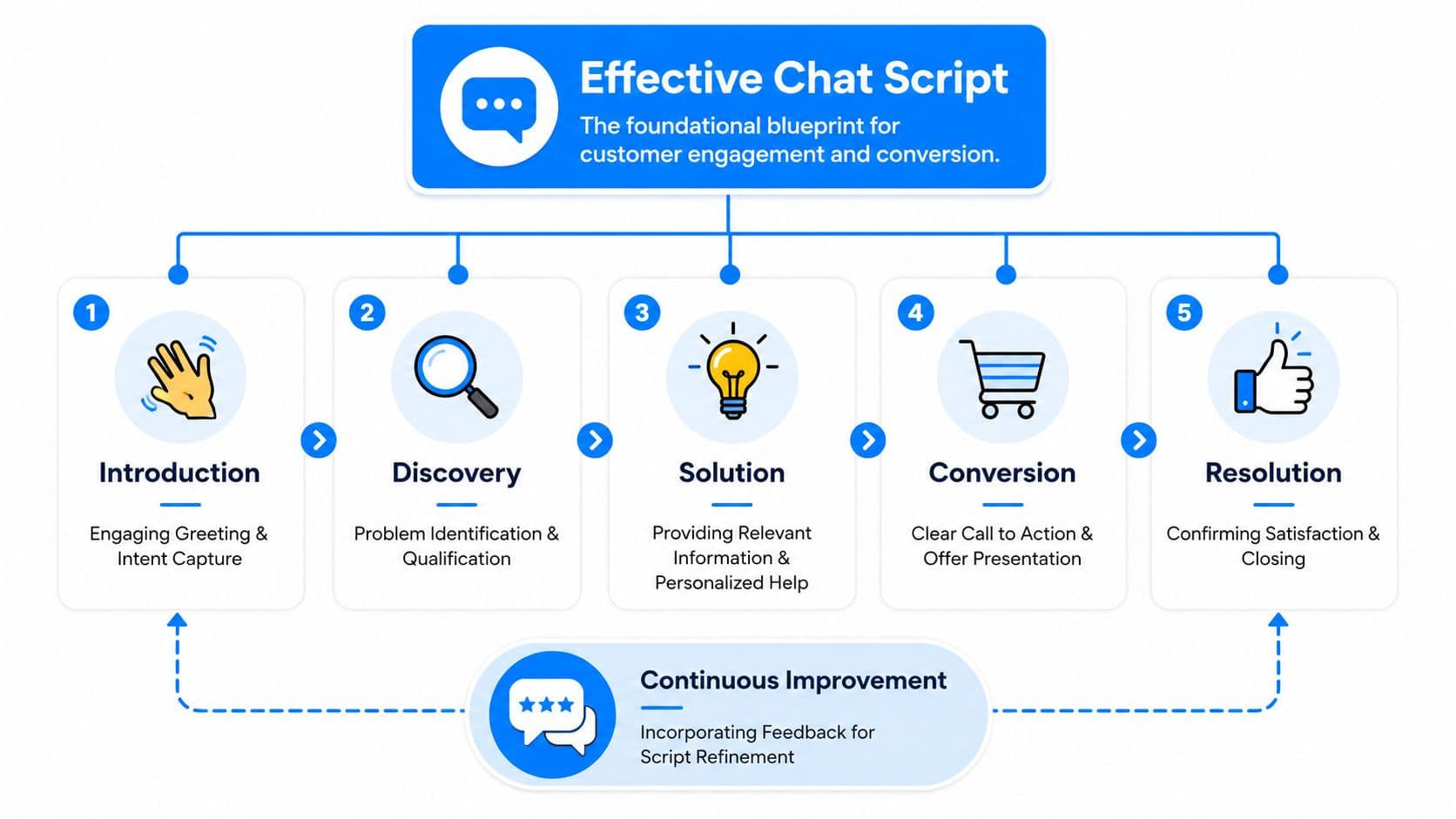
Start with control, not chatter
The first line should do more than say hello.
The greeting sets the tone and manages expectations.
Weak opening: "Hi, how can I help?"
Better opening: "Hi, welcome to the store. I can help with sizing, shipping, returns, or product recommendations. What are you shopping for today?"
The second version narrows the path. It tells the shopper what the channel is good at and makes it easier to reply. For returning customers, the opening should acknowledge context if you have it, such as an existing order or recent product view.
The purpose statement comes next, confirming the job to be done. In Shopify support, that usually means one of four things: buy, compare, fix, or track. If you don't label the purpose early, the conversation drifts.
Ask for the minimum that unlocks the answer
Verification matters, but friction kills momentum if you ask for too much too early.
For support issues, ask only for the information needed to resolve the problem. If the shopper needs an order update, request the order number or the email tied to the purchase. If they're browsing, don't start with personal details at all. Start with product need, usage, size, or concern.
The discovery phase should shorten the path to relevance.
Many scripts become bloated at this stage. They ask broad questions like "Can you tell me more?" instead of targeted ones such as:
- For sizing: "Which size do you usually wear in similar brands?"
- For shipping concerns: "Are you trying to receive this by a specific date?"
- For returns: "Has the item been opened or used?"
- For product matching: "Is this for daily use, gifting, or a specific problem you're trying to solve?"
Each question should lead to a decision. If a question doesn't change the answer, remove it.
Close the loop and open the next action
Resolution isn't just the answer. It's the answer plus the next step.
If the customer asked about returns, don't stop at policy. Explain what happens next and offer the shortest path forward. If they asked about product fit, don't stop at the recommendation. Link the item, mention the variant, and give a buying cue.
A strong close also confirms that the issue is resolved. That sounds basic, but many teams skip it and leave the shopper with an unspoken objection.
Use a closing pattern like this:
- Confirm the result: "That item is eligible for return."
- State the next action: "Use the returns portal with your order email."
- Check for remaining friction: "Do you want help choosing an exchange size before you submit it?"
- End positively: "Happy to stay with you if you want me to pull the best option."
That final move matters. It keeps the conversation open long enough to recover revenue from what would otherwise be a pure support cost.
Script Templates for Key Shopify Scenarios
Generic templates usually fail in Shopify because store traffic isn't generic. A first-time visitor, a repeat buyer, a shopper stuck on shipping costs, and a customer trying to return a beauty item all need different treatment. The script has to fit the moment.
During high-volume surges, rigid empathy language can inflate average handling time by 18 to 24%, while "speed-empathy hybrids" such as "I see this is urgent; let's fix it in 3 steps" can cut response time by 31% while maintaining 89% satisfaction, according to Call Centre Helper's guidance on customer support chat scripts.
Proactive greeting for a first-time visitor
Bad: "Hi. Let us know if you need anything."
That line puts all the work on the shopper.
Better: "Welcome in. I can help with sizing, shipping times, or finding the right product fast. What's the main thing you're looking for today?"
Why it works: it gives the visitor a menu and makes the first reply easy.
For a returning customer, shift the tone: "Welcome back. Need help with a recent order, or are you shopping for something new today?"
That split matters. It helps route support and sales intent immediately.
Return request script bad vs good
Returns are where scripts often sound most robotic. Agents copy policy language and forget the shopper is usually disappointed already.
| Element | Bad Script (Generic & Cold) | Good Script (Empathetic & Solution-Oriented) |
|---|---|---|
| Opening | "Please review our return policy." | "I'm sorry this didn't work out. I can help you check the fastest return or exchange option." |
| Verification | "Provide your order number." | "Please send your order number or the email used at checkout, and I'll pull up the options." |
| Policy explanation | "Items must meet return conditions." | "I'll confirm whether the item qualifies, then I'll walk you through the next step so you don't have to guess." |
| Resolution | "Submit the form online." | "This item is eligible. You can start the return now, and if you'd rather exchange, I can help you pick the right replacement first." |
| Close | "Anything else?" | "Before you go, do you want help finding an alternative size or product so this order still gets solved today?" |
The good version protects policy without sounding defensive.
If you want more script patterns that show this kind of contrast, these chat conversation examples for support and sales are worth reviewing.
Cart hesitation and checkout rescue
Most standard customer service chat script templates break down because they wait for the shopper to ask for help. Many won't.
A stronger script responds to behavioral hesitation. If someone stalls on the cart page, revisits shipping details, or loops between product and checkout, the prompt should acknowledge the likely blocker.
Bad: "Need help?"
Better: "Questions before checkout? I can help with shipping, delivery timing, returns, or product fit so you can finish with confidence."
Best when behavior signals friction: "Looks like you're close. If shipping cost, delivery timing, or fit is holding you up, I can clear that up right now."
That script works because it names the hidden objections.
Upsell and cross-sell without sounding pushy
The easiest upsell doesn't start as an upsell. It starts as problem solving.
If a shopper asks whether a skincare item works for sensitive skin, the script shouldn't just answer yes or no. It should resolve the concern and then pair the product with the most relevant complement.
Bad: "You may also like these products."
Better: "If you're choosing this for sensitive skin, most shoppers also ask whether they need a gentler cleanser with it. If you want, I can show the best match."
For apparel: "If you're buying the dress for an event, do you also want the most commonly paired layer in case the venue runs cold?"
For home goods: "If this is for a small room, I can also show the version people usually choose when they want the same look with a smaller footprint."
Keep the recommendation tied to the shopper's stated goal. Random add-ons feel like pop-ups. Relevant add-ons feel like help.
For urgent support moments, compress empathy and action: "I see this is urgent. Let's fix it in 3 steps. First, send your order number. Second, I'll confirm the issue. Third, I'll give you the fastest path to a replacement, refund, or update."
That format respects both time and tone.
Designing Your AI and Human Handoff Flow
A handoff flow fails when the shopper has to repeat the problem from scratch. That's what makes bot-first support feel cheap, even when the answers are accurate.
The better model is simple: let automation handle predictable requests, let humans handle judgment-heavy ones, and make the transfer invisible to the customer.
A big reason this matters in Shopify is that many drop-offs never become explicit support requests. 74% of abandoned carts come from unresolved micro-frustrations that never reach a chat agent, and proactive scripts that detect intent shifts can recover up to 35% more abandoned checkouts, while 88% of standard templates still lack these triggers, according to NiceReply's analysis of customer service scripts.
What the bot should own
Bots should handle high-frequency, low-judgment conversations all the way through.
That usually includes:
- Order status questions: tracking links, delivery windows, and fulfillment updates.
- Policy lookups: returns, exchanges, shipping, and warranty basics.
- Catalog guidance: product comparisons, variant availability, materials, and care instructions.
- Behavior-based nudges: cart reminders, shipping clarification, and product recommendation prompts.
When the script is written well, these conversations don't feel like deflection. They feel fast.
What should trigger a human handoff
You don't need a human for every unhappy customer. You do need one when the outcome requires discretion, negotiation, or trust repair.
Escalate when the conversation includes:
- Complex complaints: repeated failures, emotionally charged complaints, or unusual edge cases.
- High-value buying intent: large carts, bundle questions, wholesale-like inquiries, or gift coordination.
- Sensitive account issues: payment disputes, identity verification concerns, or account access problems.
- Repeated misunderstanding: the bot answered, the shopper rephrased, and the issue still isn't resolved.
If the bot has already asked two useful questions and still can't move the customer forward, the system should escalate.
The wording of the transfer matters too. Don't say, "I can't help with that." Say, "I've gathered the details so a specialist can jump in without making you repeat yourself."
Build context before transfer
The handoff should carry a compact summary: intent, customer identifiers if available, pages viewed, products discussed, objection detected, and the last answer shown. That context turns a transfer from interruption into continuation.
If your team uses AI to draft or adapt scripts, review the language carefully before deployment. A useful companion resource is how to get authentic, engaging content when automation starts sounding polished but flat. That's especially relevant in handoff messages, where canned phrasing can make the escalation feel colder than the original issue.
Later in the flow, video can help teams visualize what a clean automation-to-agent experience should feel like:
The practical rule is straightforward. Let AI gather, classify, and solve what it can. Let humans step in where judgment changes the outcome.
How to Measure and Optimize Your Chat Scripts
If your scripts aren't tied to outcomes, you'll end up optimizing for speed alone. That usually produces cleaner dashboards and weaker revenue.
The useful comparison isn't "Did chat volume go down?" It's "Did this script help more shoppers buy, resolve issues cleanly, and avoid escalation?" Teams that refine scripts by comparing quality scores between scripted and non-scripted conversations achieve 27% higher CSAT and 31% fewer escalations, while relying on canned messages for full interactions can lower trust by 20%, according to GlowTouch's chat support best practices.
Track conversations against business outcomes
The best chat metrics connect support quality to store performance.
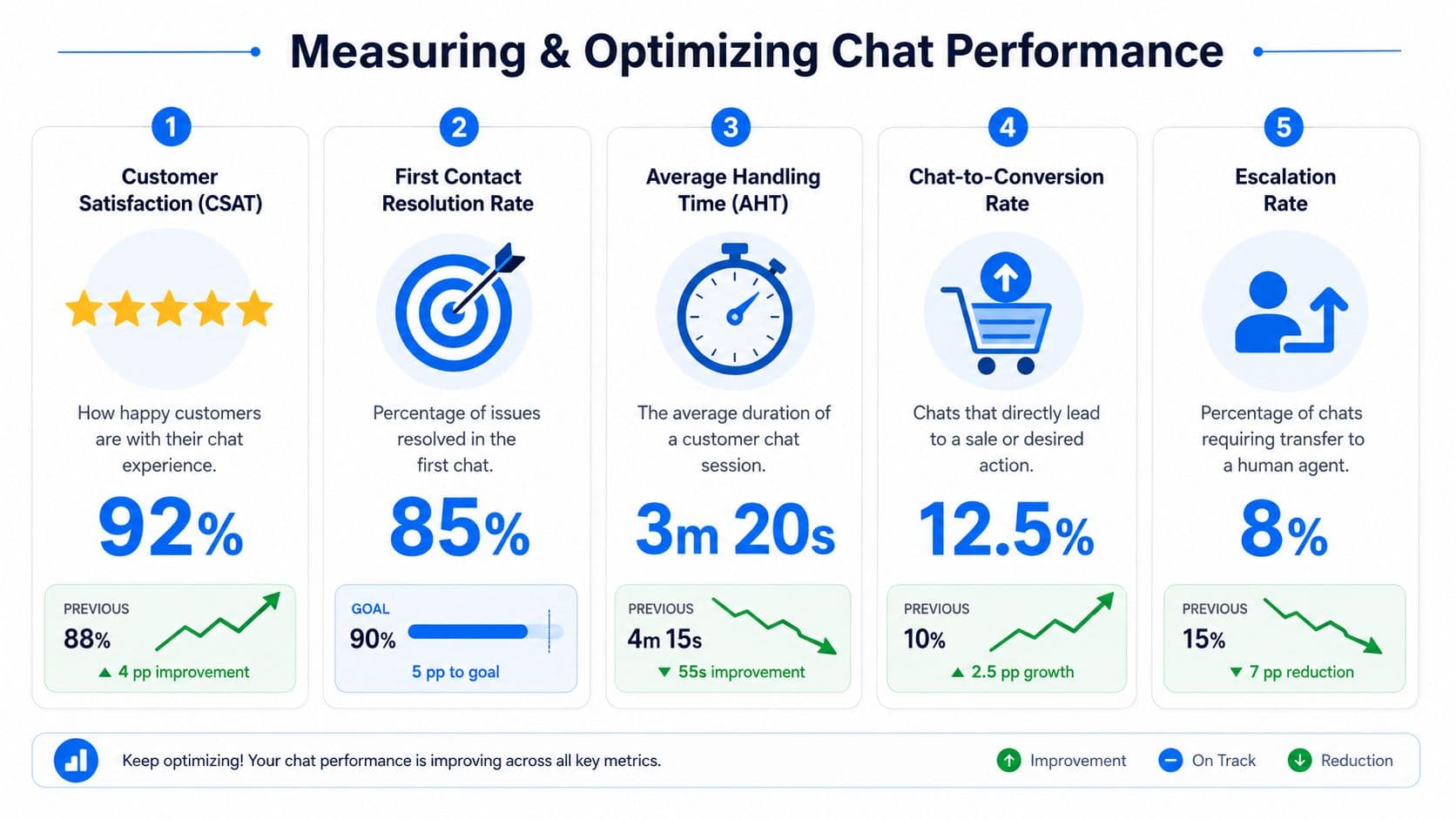
Watch these closely:
- Chat-to-conversion behavior: Which scripts appear most often in sessions that end in purchase?
- Support-to-recovery behavior: Which return, shipping, or sizing conversations later turn into exchanges or additional purchases?
- Escalation patterns: Which prompts create confusion and force human intervention?
- Resolution quality: Which script paths leave fewer repeat questions?
For Shopify teams, the fastest route to insight is tagging conversations by intent and script branch. Once you do that, weak spots show up fast. You can go deeper with these chat bot analytics methods for ecommerce teams, especially if you want to connect conversations to conversion outcomes instead of treating chat as a separate support system.
Test scripts the way you test landing pages
Most merchants A/B test product pages more rigorously than they test scripts. That's backwards when chat sits right next to the cart.
Useful tests include:
- Greeting against greeting: menu-based opening vs open-ended opening.
- Recovery prompt against recovery prompt: direct checkout help vs shipping-objection framing.
- Recommendation timing: product suggestion before resolution vs after resolution.
- Closing language: generic sign-off vs issue-confirming close with one next-step offer.
If your team needs a cleaner process for running those experiments, this guide to A/B testing best practices is a practical reference for setting up fair comparisons and avoiding noisy conclusions.
A script is not finished when it sounds good. It's finished when the data says shoppers move faster and buy with less hesitation.
What usually hurts performance
Three problems show up again and again.
First, teams over-script full conversations. The result is stiffness. Second, they measure response speed but not whether the answer changed behavior. Third, they leave successful scripts untouched for months, even after product mix, promotions, or customer objections change.
The fix is operational, not philosophical. Review transcripts weekly. Compare high-converting chats to clean but low-impact chats. Keep the structure. Rewrite the lines.
Turn Your Chat From a Cost Center to a Sales Engine
A customer service chat script should do more than reduce ticket load. It should help a shopper make progress. In Shopify, that means answering the obvious question and catching the unstated one behind it: Will this fit? Will it arrive on time? Is there a better option? Am I safe to buy now?
Stores get better results when they stop treating chat as a reactive FAQ layer. The stronger model is proactive and intent-driven. It notices hesitation, surfaces the right prompt, recommends the next product logically, and routes complex situations to a person without making the customer start over.
That shift also changes how you write scripts. You need fewer canned paragraphs and more decision logic. Shorter questions. Better timing. Clearer offers. Smarter handoffs. Stronger closes.
The payoff isn't abstract. Better scripts create cleaner support operations, but they also recover carts, lift product discovery, and turn routine conversations into revenue opportunities. That's the point most template libraries miss. The script isn't there to fill the chat box. It's there to move the session forward.
If your current setup mostly answers shipping and returns questions, that's a good starting point. It isn't the finish line. True upside comes when your chat starts acting like a sales associate who can spot friction early and respond while the buyer is still on the page.
If you're ready to turn onsite chat into a 24/7 conversion channel, Carti is built for exactly that. It helps Shopify stores answer questions instantly, detect buying intent, recover abandoned carts, and recommend relevant products without forcing shoppers to wait for a human reply.

Written by
Daniel AndersonFounder of Carti. 10+ years building ecommerce brands in apparel and supplements. Still runs a Shopify store and built Carti to help merchants convert more browsers into buyers.
Ready to boost your store's sales?
Install Carti in 5 minutes and let AI handle customer questions, recommend products, and close sales 24/7.
Start Free Trial14-day free trial