
AI-powered chat converts at 12.3% versus 3.1% for shoppers who don't engage with chat, a roughly 4x conversion gap that makes conversational commerce a revenue problem, not a support side quest. The market is already sized like infrastructure, too, with the global conversational commerce market at $7.6 billion in 2024 and projected to reach $34.4 billion by 2034 (Envive). If you run Shopify and still treat chat like a floating help widget, you're leaving money on the table.
What Conversational Commerce Actually Means
Conversational commerce is what happens when a shopper can discover, decide, and buy inside a conversation instead of jumping between search, product pages, and a support inbox. On Shopify, that means the chat layer sits on top of the storefront and helps with product discovery, objection handling, cart recovery, and checkout help. It is not a FAQ box dressed up as AI. It is a sales path.
The upside gets obvious once you look at the conversion gap. Shoppers who engage with AI chat convert at 12.3%, compared with 3.1% for shoppers who do not use chat, according to Envive. That same gap is why merchants are putting real budget behind this channel. It does not mean every store should plaster a chatbot everywhere. It means chat can materially change the economics of on-site conversion if it is attached to the right intent.
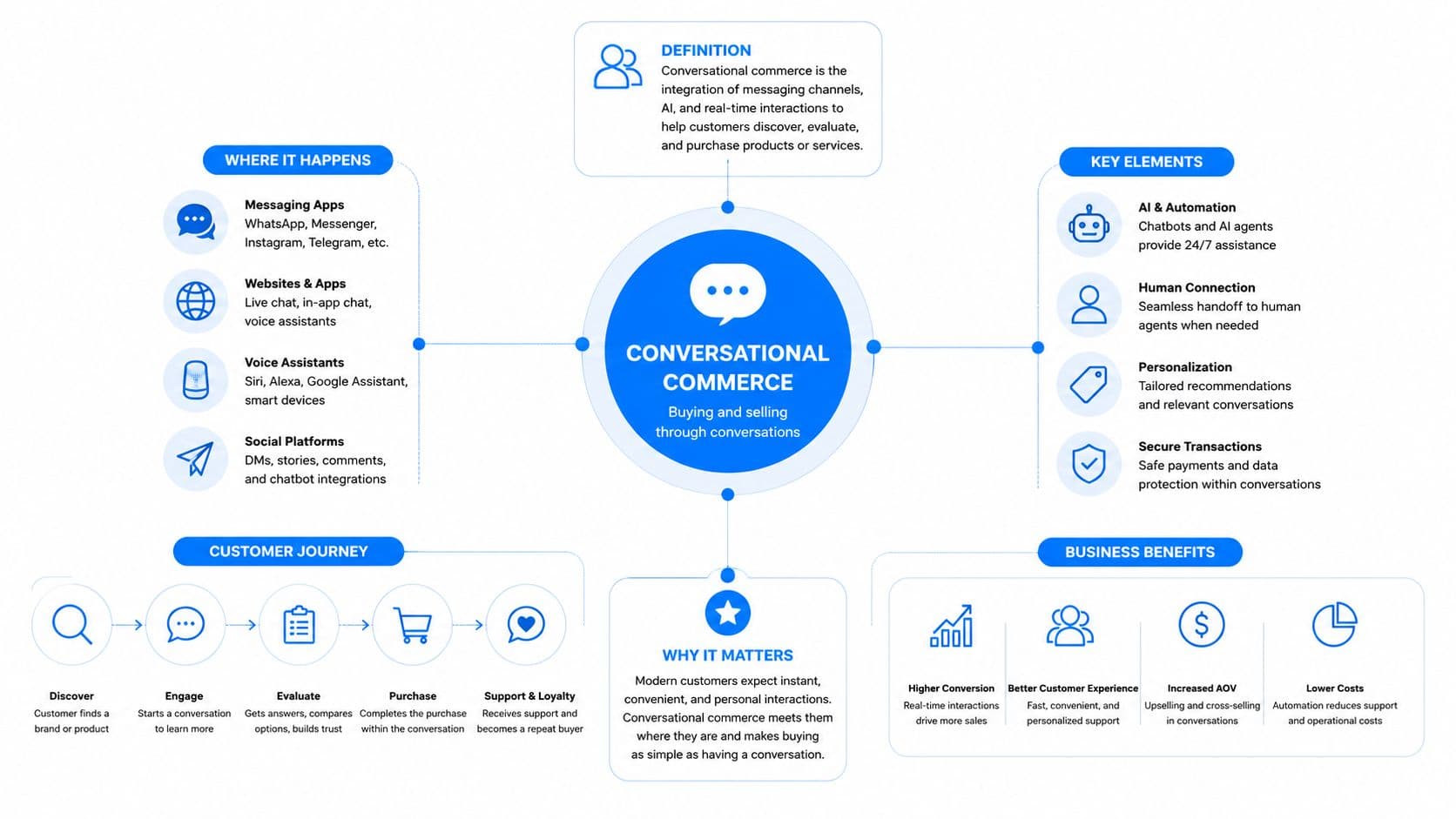
The right mental model
A lot of organizations still treat conversational commerce like customer service with a nicer UI. That framing keeps the channel trapped in a cost-center mindset. The better model is simpler. The assistant is a guided selling layer that reduces friction between intent and purchase.
A shopper asking, “Can I compare outfits with TryThisFit before I buy this?” is not asking for support. That shopper is signaling buying intent and asking for help making a decision. That is where conversational commerce earns its keep.
For a tighter conceptual frame, the internal guide on what conversational marketing means in practice is useful because it shows how the conversation sits inside the broader revenue motion. The point is not to add another channel. The point is to shorten the path from question to order.
Practical rule: If a conversation cannot end in a product recommendation, a cart action, or a purchase decision, it is not really conversational commerce. It is just chat.
The Metrics That Separate Real Chatbots from Widgets
Measuring conversational commerce like a widget produces widget results. Open rates, message counts, and “chat started” numbers look busy, but they do not show whether the conversation made money. The right unit of analysis is the event stream, not the session.
Every shopper interaction should carry a stable conversation_id, channel metadata, time_to_first_response, assistant_confidence, and outcome events such as cart_shared and payment_completed. That creates a clean chain from intent to outcome. Without that structure, revenue attribution gets smeared across chat, checkout, and support, and no one can tell what the assistant influenced (Brambles).
The four KPIs that matter
You do not need a dozen dashboards. You need four views that force honesty.
- Conversion rate by intent. A sizing question and a shipping question are not the same. Track which intent buckets lead to orders.
- Containment rate. This tells you how often the assistant resolves the issue without escalation, which is a good proxy for how much friction it removes.
- Median turns to outcome. If shoppers need too many back-and-forth messages before they buy, the bot is creating drag.
- P95 first-response time. The median can hide pain. The long tail is where bad experiences live.
Those metrics only matter if order_id joins back to conversation_id, because assisted revenue disappears otherwise. That join is the difference between proving value and guessing. Use a 72-hour conversation attribution window for cart recovery scenarios, then report last-click beside it so finance can compare the two views without pretending they answer the same question.
The internal analytics playbook on chat bot analytics is worth reviewing if your current dashboard still centers on vanity metrics. If it does not tie a conversation back to revenue, it is decoration.
Do not optimize for chat volume. Optimize for conversations that end with a product shared, a cart recovered, or a payment completed.
Where Conversational Commerce Earns Its Keep on Shopify
The channel works best in three moments, and they're the moments most stores already let leak revenue.
Product discovery before the shopper gets lost
A shopper lands from an Instagram ad and types something messy like “black midi dress under $120.” That's not a search query you want to force through filters alone. It's a request for curation. The assistant should ask one clarifying question, then return a small set of relevant choices, not the whole catalog.
That matters more in fashion than in categories where customers already know the SKU they want. The shopper is trying to narrow taste, fit, and price all at once. A good assistant behaves like a sharp associate, not a search bar with feelings.
For teams exploring how visual shopping support can work alongside chat, the ai model outfit e-commerce example shows why image-aware discovery is so effective for apparel. It's the same logic. Reduce the search space fast, then keep the shopper moving.
Cart recovery after the objection shows up
The abandoned cart is rarely a mystery. Someone hits shipping, sees a policy detail, gets uncertain about size or returns, and leaves. A generic reminder won't fix that. A contextual nudge that answers the likely objection might.
That's why the cart-recovery message should name the abandoned product and answer the reason the shopper stalled. If the objection is shipping, answer shipping. If it's returns, answer returns. If it's fit, answer fit. Anything more generic sounds automated and gets ignored.
Support to sale in one thread
Support questions are often sales questions wearing a different hat. A shopper asks about return policy, and under that question sits the hesitation, “What if this doesn't work for me?” If the assistant answers clearly, it should offer one relevant backup product in the same size or use case, then get out of the way.
That sequence matters because it respects the shopper's intent. It doesn't force a cross-sell. It uses the support moment to remove risk and keep the sale alive. That's the payoff of conversational commerce on Shopify, fewer dead ends.
The Hidden Risk Nobody Writes About
Most conversational commerce failures are not AI failures. They are data failures. The assistant is only as accurate as the catalog, policy, and order data behind it, and that is where a lot of stores break.
If the bot sees stale stock, missing variants, wrong shipping windows, or fuzzy return rules, it will answer with confidence and still be wrong. That is worse than no answer. A wrong answer creates distrust, extra support work, and often a refund. The customer does not care whether the model was elegant. They care that they were misled.
Governance beats clever prompts
The fix starts with clean plumbing. Connect real-time catalog and order feeds. Write explicit handling rules for returns, sizing, and order status. Set escalation thresholds so the assistant knows when to stop improvising. Then test edge cases before launch, not after the first angry ticket.
The most useful recent guidance on this point is blunt about connecting conversational commerce to websites, apps, payments, and service operations with clear accountability and governance (FIN). That is the part most product pages skip because it is not glamorous. It is also the part that keeps you from shipping nonsense.
The internal note on how to prevent AI hallucinations points in the same direction. Use it as the operating rule: the goal is not a charming bot, the goal is a bot that does not invent policy.
A confident wrong answer is expensive. It costs you the sale, the follow-up ticket, and the trust you need to win the next one.
Launching an AI Chatbot Without Burning a Weekend
You do not need a long implementation cycle to get value from conversational commerce on Shopify. You need a clean setup, a narrow scope, and messaging that sounds like a merchant, not a script.
The fastest path to live
Carti is a no-code AI-powered Shopify chatbot that learns your catalog, policies, and FAQs automatically, responds in 92 languages, and includes Instant Answers, Smart Suggestions, Cart Recovery, and an Insights Dashboard with five-minute setup. That is enough to ship a useful first version quickly if your catalog and policy pages are in decent shape.
Install the app, connect it to your catalog and policy sources, let it ingest the FAQ and product data, then switch on the features that map to revenue, not novelty. Start with Instant Answers for common objections, Smart Suggestions for discovery, and Cart Recovery for abandoned sessions. If the bot cannot answer the questions shoppers already ask in support, it is not ready for live traffic.
Rule of thumb: launch the assistant only after it can answer the questions shoppers already ask in support. If it cannot do that, it is too early.
Copy you can ship today
Use discovery copy that asks one clarifying question, not five. Something like, “Looking for something for work, weekends, or a specific occasion?” keeps the interaction moving without forcing a long form. The assistant should then show a small set of curated options and stop talking.
For cart recovery, lead with the specific product and the likely objection. “Still thinking about the black midi dress? If shipping is your concern, here is the current policy and the fastest option available.” That feels relevant because it addresses the actual friction point.
For support-to-sale, answer first, then recommend once. “Returns are accepted within your policy window. If you want a second option before you decide, this similar style comes in the same size range.” That is a handoff, not a pitch.
A lot of teams overcomplicate this part. Use the assistant to reduce uncertainty, not to write essays. The cleaner the copy, the easier it is to trust.
Optimizing the Channel After Launch
Once the assistant is live, the work starts. The stores that win with conversational commerce treat the Insights Dashboard like a merchandising input, not a vanity report. They look at the questions shoppers ask, then update product content, FAQ language, and trigger logic accordingly.
The two metrics that tell you whether the channel is compounding are P95 first-response time and assisted conversion rate by intent. If response time drifts, conversion usually follows it down. If one intent bucket keeps producing assisted revenue, that's where you double down.
A weekly operating rhythm that doesn't rot
Review top missed intents every week. If shoppers keep asking the same thing and the assistant keeps wavering, fix the answer or the source data. Prune underperforming templates, especially the ones that sound polite but say nothing. Audit every escalation and ask whether the issue was policy, content, or routing.
Then ship one proactive trigger each week. Not ten. One. A trigger tied to product views, cart steps, or policy hesitation is enough to teach the assistant where it can help without becoming intrusive. That cadence keeps the channel improving without turning your team into full-time bot babysitters.
For cart recovery, don't judge same-session performance and call it done. Use the 72-hour view so delayed conversions don't disappear from the record. If you test timing, compare a faster nudge against a slower one, because a prompt after a short delay behaves very differently from a message that arrives the next day.
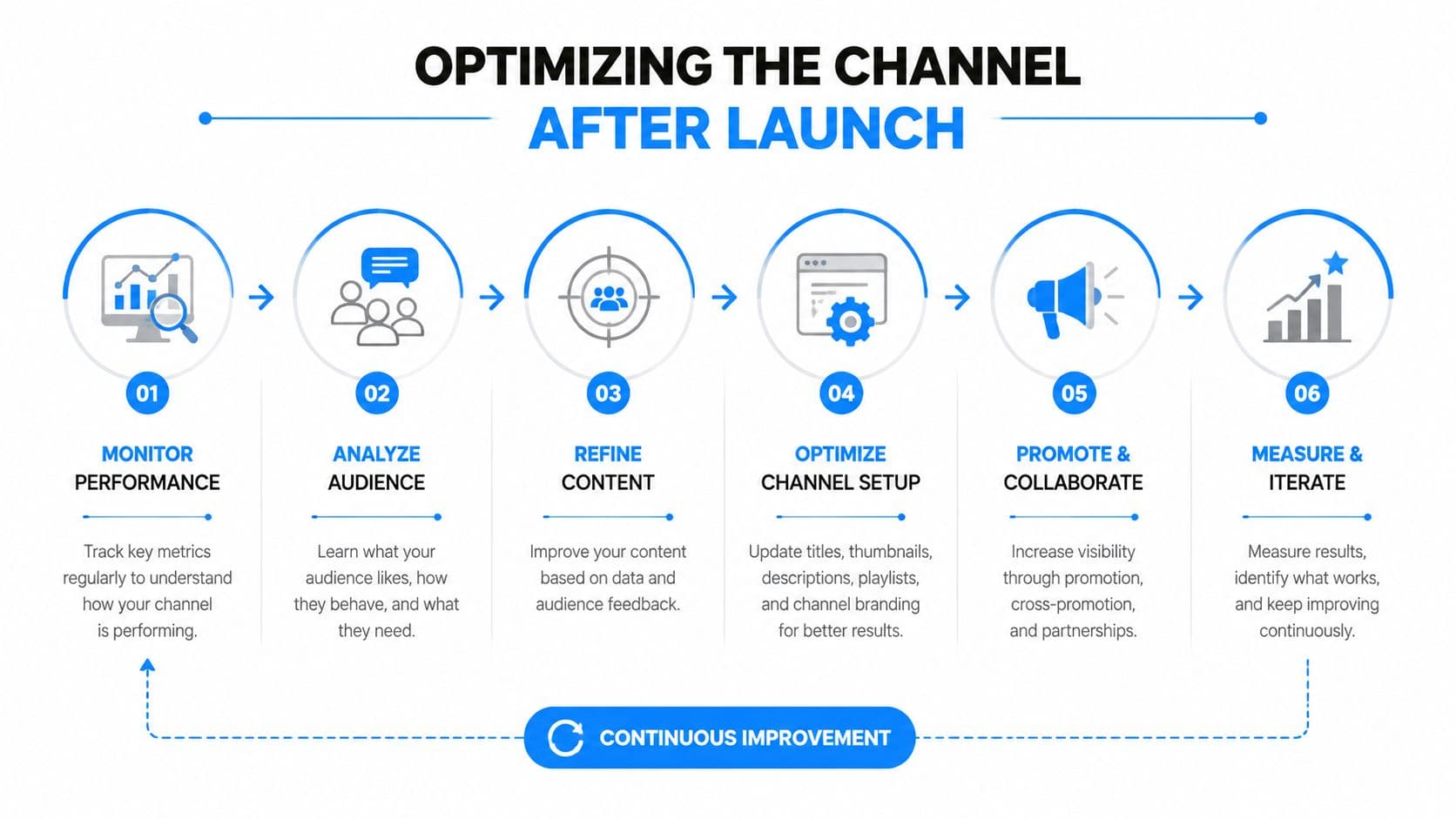
If you aren't shipping one improvement a week, the assistant will drift into polite irrelevance.
When to Ship Chat and When to Walk Away
Ship conversational commerce when the store is already run like a system, not a pile of requests. Your catalog needs to be clean, your shipping and return policies need to be written down, someone needs to own weekly optimization, and your response expectations need to match reality. If those pieces are missing, the assistant will expose the mess fast and make it louder.
Hold back if your catalog changes constantly, nobody can review escalations, or traffic is too thin to move revenue in a meaningful way. In that setup, chat will look active while the business sees almost nothing. Fix the operating basics first, then launch with discipline.
The first week usually answers the question quickly. Results depend on traffic quality and how tightly the assistant is tied to buying moments. Multilingual traffic is easier when the assistant already handles the languages your shoppers use, and Carti's language coverage can support that. Returns belong in chat only when the policy is explicit and easy to apply. Chat should also stay out of email's lane. Use it for immediate decision support, and keep email for follow-up.
If you want to run conversational commerce like a revenue channel instead of a support widget, Carti is a fast way to stand up catalog-aware chat, cart recovery, and an insight loop without a heavy implementation. Use it to answer faster, recover more carts, and stop guessing which conversations matter.

Written by
Daniel AndersonFounder of Carti. 10+ years building ecommerce brands in apparel and supplements. Still runs a Shopify store and built Carti to help merchants convert more browsers into buyers.
Ready to boost your store's sales?
Install Carti in 5 minutes and let AI handle customer questions, recommend products, and close sales 24/7.
Start Free Trial14-day free trial