
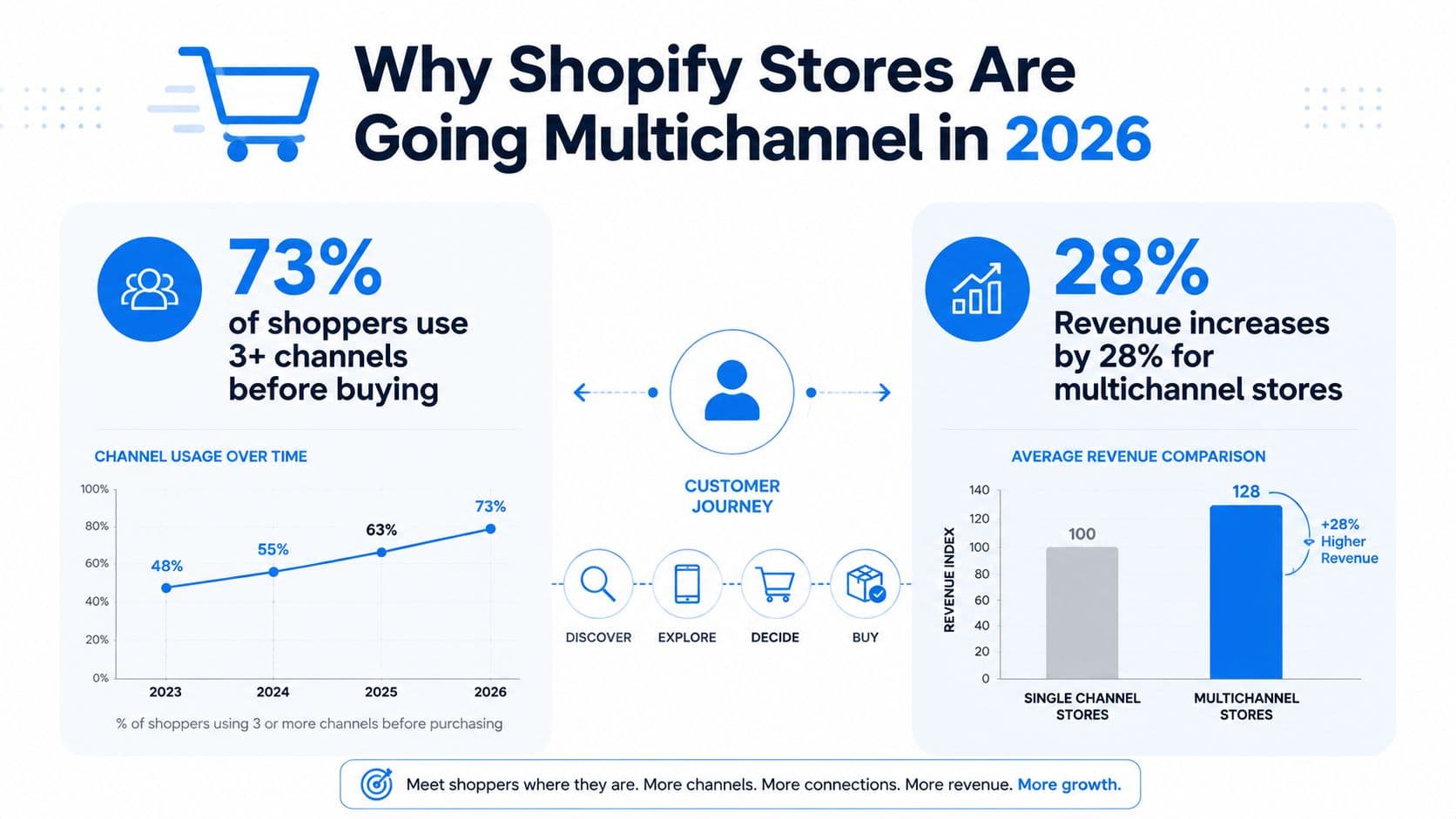
Your Shopify store is probably already multichannel, even if the team doesn't call it that. A shopper sees an Instagram post, asks a sizing question in DMs, checks the product page, opens live chat, and follows up by email when they're still unsure. If support can't carry that intent across channels, the brand ends up doing the same work twice, and the customer often leaves before buying.
Why Shopify Stores Are Going Multichannel in 2026
A customer pings your brand on Instagram about a hoodie, checks the size chart on mobile, opens chat while they are still worried about fit, then emails after they have put the item in cart. That is normal now. A single purchase intent stretches across social, site chat, and inboxes, and if each touchpoint acts like a separate support desk, the customer feels the fracture before you ever see the lost order.
That gap is why multichannel contact centers became the default for modern support instead of a nice extra. The old model, where one phone line handled everything, does not match how shoppers behave now. In ICMI's research, 72% of respondents said mobile was a necessary channel, but only 39% supported it, which shows how many teams were more multichannel in theory than in execution. Another industry review found that 55% of contact centers still operated in multichannel environments where history and context change when customers switch channels, while only 31% had reached omnichannel maturity. ICMI research on multichannel contact center adoption
For Shopify operators, the lesson is blunt. A brand cannot treat DMs, chat, email, and SMS as separate queues and still expect a coherent buying journey. The market has already moved toward integrated service models, and the omnichannel customer service market was valued at about USD 14.2 billion in 2023 and is projected to reach USD 35.6 billion by 2032 at a 10.8% CAGR. That growth reflects a structural shift, not a passing trend. It is also happening in a fragmented tool stack, where only 3% of contact centers operate on a single unified platform and the average organization uses 3.9 different contact center technologies. 2026 contact center fragmentation data
Practical rule: if a shopper can ask a question in one channel and buy in another, support has to preserve the thread, or sales leakage becomes part of the operating model.
A useful starting point is to think less about “adding channels” and more about building one support surface that can absorb demand where it starts. Carti's guide to omnichannel customer support is a useful internal reference for that mindset, especially if your team is trying to connect store conversations instead of multiplying inboxes. If you are comparing tools, the practical starting point is the basics covered in call centre software features and pricing.
What a Multichannel Contact Center Is
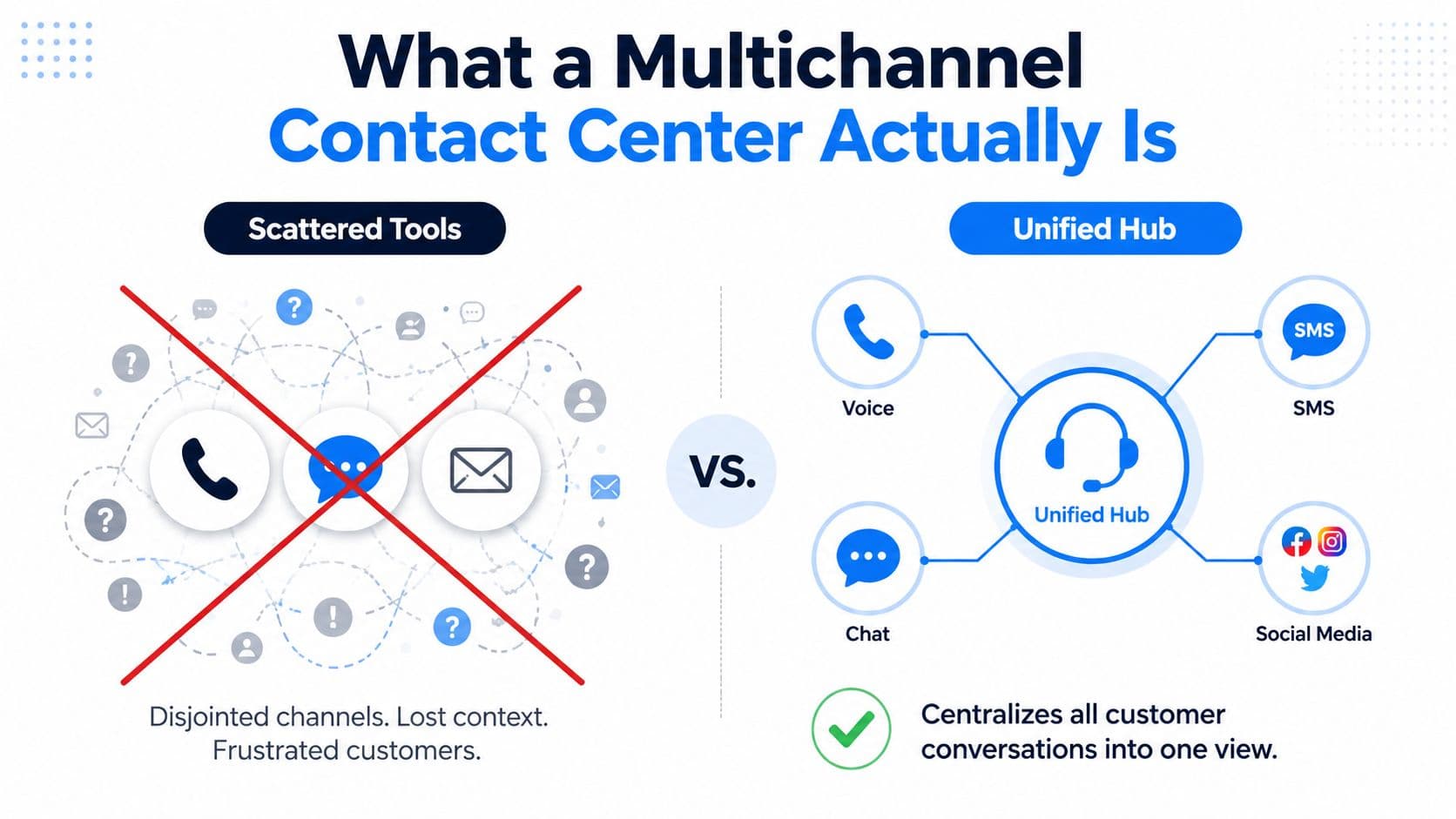
A multichannel contact center centralizes service across voice, chat, SMS, email, and social messaging, but each channel still runs as its own workflow. That distinction matters in practice. A Shopify team can see conversations in one place, yet the customer history does not automatically follow the shopper from live chat to email to social. Zoom's contact center overview describes this model as a single support environment with distinct channel workflows rather than one shared conversation state. Zoom's multichannel contact center overview
Multichannel and omnichannel are not the same thing
The easiest way to separate the two is by asking what happens when a shopper switches channels. In a multichannel setup, the agent may know the customer is the same person, but the context often gets rebuilt by hand. In an omnichannel setup, the platform carries the conversation forward so the customer does not have to repeat themselves.
That does not make multichannel a weaker version of omnichannel. For a Shopify brand, it is often a practical first move because it lets the team consolidate channels, tighten routing, and standardize responses before trying to unify every data source under the sun. The mistake is buying software that promises continuity without putting identity and conversation logic in place.
What has to be true technically
The load-bearing pieces are simple to describe and hard to fake. Expert guidance on modern contact-center architecture recommends a canonical customer record and a single conversation ID, because without them routing, analytics, and automation split into silos. That is the difference between a support team that feels coordinated and one that just has more tabs open. Contact-center architecture guidance on unified customer identity
A channel list is not an operating model. If the customer cannot move between channels without losing context, the stack is still fragmented even if the inbox looks unified.
The practical test is simple. If a shopper starts in live chat and ends in email, the agent should be able to answer without asking for the order number, item name, and prior issue all over again. If the team still has to reconstruct the story, the inbox is centralized, not the experience. For teams trying to reduce that gap, how to automate customer service is a useful next read because it shows where automation can remove repetitive handoffs without hiding the customer's history.
Prioritizing Revenue-Driving Channels on Shopify
A Shopify support stack should follow buying behavior, not a channel trend report. The question is which touchpoints cut resolution cost, protect conversion, and fit how the catalog sells. A DTC brand in apparel, beauty, home, or wellness does not need every inbox on day one. It needs the channels that match where shoppers already ask questions and where those questions block a purchase.
Start with behavior, not completeness
The economics are hard to ignore. Industry reporting from 2025 says self-service contacts can cost as little as USD 0.10 to USD 0.25 per resolution, while phone support can run USD 8 to USD 12. Phone still matters, but it should be reserved for cases where speed, trust, or complexity justify the spend. 2025 contact center economics summary
For most Shopify stores, live chat and email carry the most load first, with SMS and social messaging filling narrower jobs. Live chat catches buyers who are already on the site and deciding whether to buy. Email handles longer questions and post-purchase issues. SMS works well for short, timely follow-up. Instagram DMs matter when social discovery drives the sale. Phone makes sense when the issue is high stakes, emotionally charged, or too complex to handle through text.
A simple prioritization model
| Channel | Cost per resolution | Conversion impact | Best fit |
|---|---|---|---|
| Live chat | Lower than phone, usually closer to self-service or assisted digital support | Strong for pre-purchase conversion and rescue | Fashion, beauty, wellness |
| Lower cost than phone, slower by nature | Better for complex purchase confidence and post-purchase trust | Home, wellness, higher-consideration items | |
| SMS | Low operational overhead for short interactions | Strong for reminders and recovery | Repeat buyers, cart follow-up |
| Instagram DMs | Depends on workflow, but often efficient for social-first brands | Strong when discovery starts on social | Fashion, beauty, creator-led brands |
| Phone | USD 8 to USD 12 per resolution in the cited summary | Best for complex, high-friction cases | Premium or high-consideration catalog items |
A store selling skincare can usually get more return from live chat on the product page and email for order issues than from building out a full phone program. A creator-led apparel brand may get more value from Instagram DMs because the question comes up where the product first appears. A home goods store with a more considered purchase may need email first, then phone only for the escalations that really need a person.
What does not work is spreading thin across six channels because a deck says a brand should be everywhere. Most stores are better off owning two or three channels well and using them to move volume away from the phone queue. That keeps service quality higher where it matters and avoids building coverage gaps across every new inbox.
For teams that want to connect channel choice with automation, AI for customer service on Shopify is a useful next read because it shows how a chatbot can absorb repetitive questions before they hit a human queue.
If you want a practical read on where chat support is already changing small-store economics, the trends for small ecommerce retailers piece is a useful complement.
Core Features a Multichannel Contact Center Needs
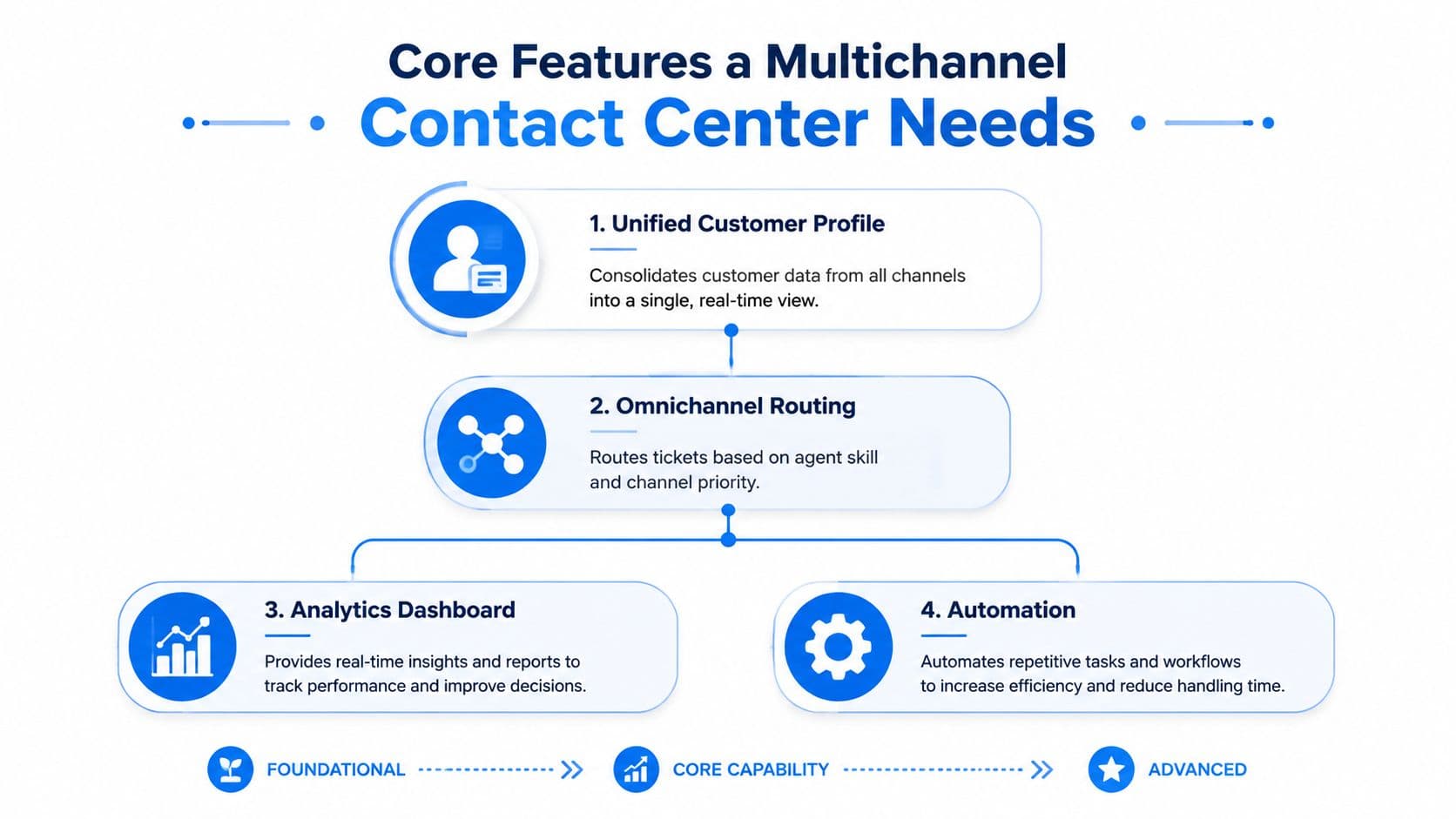
The feature list sounds broad until you strip it down to the parts that prevent chaos. For a Shopify team, the essentials are unified identity, persistent context, shared routing, and reporting that shows what each channel is doing to revenue and workload. If one of those is missing, the system starts to split into mini contact centers fast.
Non-negotiable architecture
A platform has to recognize the same shopper across touchpoints. That's why the canonical customer record and single conversation ID matter so much. Without them, support agents make routing decisions on partial data, automation can't preserve state, and reporting becomes a channel-by-channel spreadsheet instead of a view of the customer journey. That point is also where platform brochures often get vague, so it helps to compare software capabilities against concrete feature lists such as those in call centre software features and pricing.
The useful features are less glamorous than vendors make them sound:
- Unified customer identity: One shopper record tied to every conversation, order, and handoff.
- Persistent interaction context: Prior messages stay visible when the customer switches channels.
- Shared routing rules: Tickets move by skill, queue, and priority instead of channel luck.
- Consolidated reporting: Managers can see where volume, wait time, and drop-off are happening.
- Cross-channel escalation paths: A chat issue can move into email or a human review without restarting.
Why features alone are not enough
CMSWire gets the operating-model problem right. Omnichannel isn't built on platforms alone, and it requires integrating customer data, building cross-functional teams, and monitoring channel-level metrics. That's the gap a lot of multichannel rollouts miss, because they buy software before they decide how the workflow should behave. CMSWire on why omnichannel requires more than platforms
If routing, QA, and reporting still live in separate channel silos, you haven't solved the problem. You've just created a fancier version of it.
How to Set Up a Multichannel Contact Center on Shopify
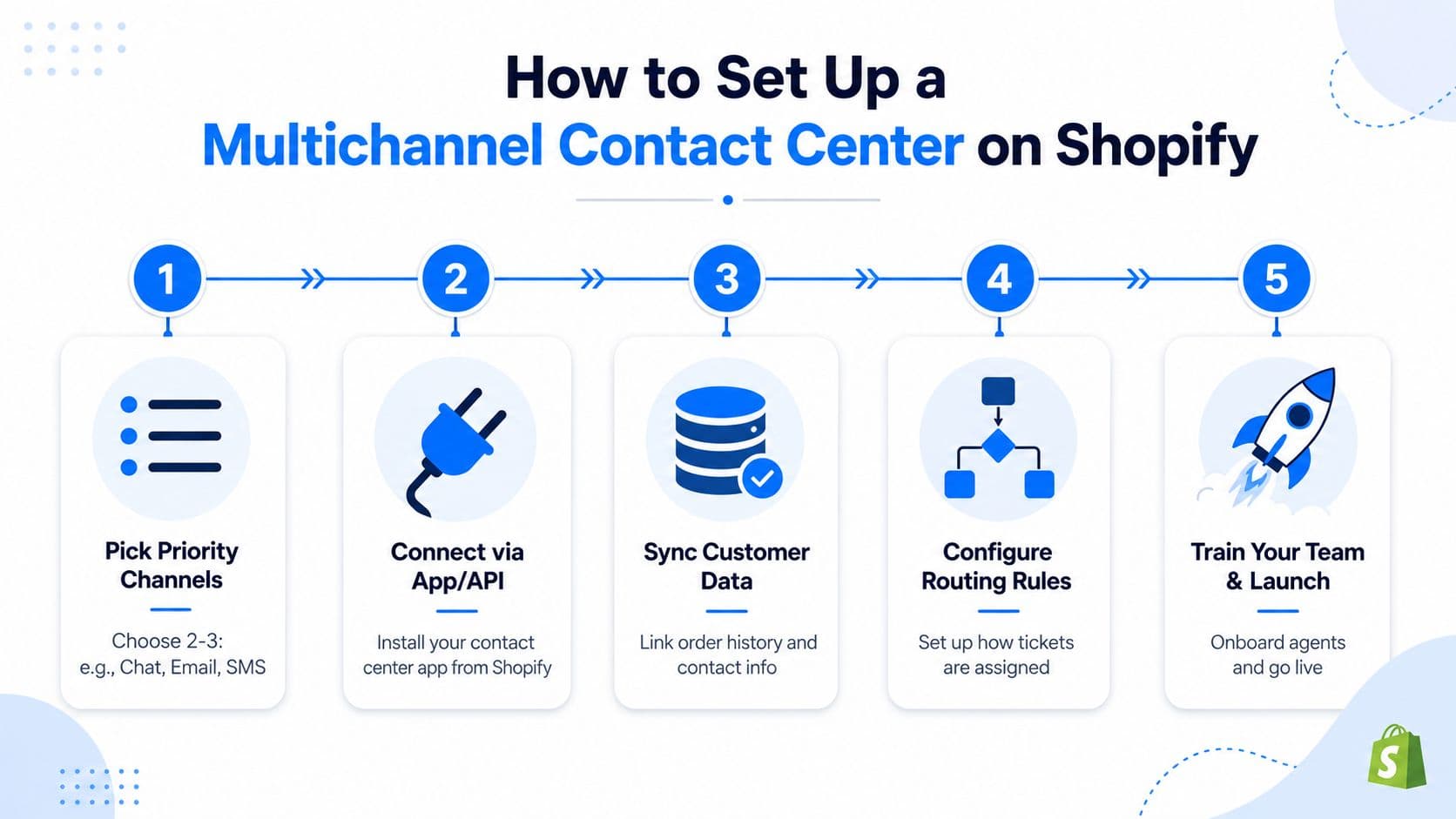
The cleanest rollout starts with restraint. Pick the channels your shoppers already use most, wire them into one working environment, and define what happens when a conversation leaves the happy path. The common failure mode isn't skipping a feature. It's skipping the rules that keep the operation from becoming five separate queues with the same logo.
Phase one, choose the channels and the handoffs
Begin with two or three channels that match actual demand. For a lot of Shopify stores, that means live chat, email, and one social or SMS channel. Then write down what counts as a completed handoff, what triggers escalation, and what information must follow the case across channels.
If the team can't describe a good handoff in one sentence, the platform won't fix it later.
Phase two, connect Shopify data and routing
Once the channels are chosen, connect order history, contact info, and customer tags so the support layer can see who's asking and what's in the cart. Then define routing rules based on issue type, language, and urgency. That's where most brands discover whether they really built one contact center or just three inboxes with shared access.
Phase three, QA and training before launch
Training has to cover more than keyboard shortcuts. Agents need to know when to keep a case in chat, when to move it to email, and how to avoid asking the same questions twice. QA should sample cross-channel cases, not just channel-by-channel reply quality, because a great email response can still fail if the shopper had to repeat the story after chat.
A practical rollout usually lives or dies on weekly review cadence. Carti's internal guide on how to automate customer service is worth reading alongside the setup plan if you're deciding which parts of the workflow should be human and which should be automated from the start.
Adding an AI Chatbot to Your Multichannel Contact Center
An AI chatbot only helps when it sits inside the contact model instead of beside it. In a Shopify environment, that means handling repetitive product questions, surfacing relevant items, and recovering carts before a human ever needs to intervene. Carti fits that lane because it's built to answer instantly, learn the catalog and FAQ automatically, and support 92 languages without extra configuration, which makes it useful for stores with global traffic and messy after-hours demand.
What changes in a real store
A beauty shopper asks at 11 p.m. whether two ingredients can be used together. Without a chatbot, that question waits until morning, and the customer may already have moved on. With Carti, the store can answer immediately, keep the shopper on-site, and hand off to a human only if the question needs judgment. The same logic applies to a fashion buyer comparing sizes across tabs and a wellness customer wavering at checkout. The bot can answer, recommend, and nudge the cart forward while the team sleeps.
The other advantage is operational. Every low-complexity question handled by the bot is one less interruption for the support team, which means agents spend more time on the conversations that need human care. For small ecommerce teams, that is the margin gain. Reddog Consulting Group's discussion of trends for small ecommerce retailers fits well here because it frames chatbots as an operational tool, not just a support add-on.
Where the chatbot belongs in the flow
Carti's job is best understood as a conversion layer inside the multichannel stack. It can answer product questions, make Smart Suggestions based on shopper behavior, and run Cart Recovery without forcing the buyer into a separate support lane. That's different from a generic FAQ bot, because the output isn't just fewer tickets. It's a shorter path from intent to purchase.
The chatbot should remove friction before humans need to absorb it. If it only deflects tickets and never helps the cart move, it's doing half the job.
For teams evaluating how AI fits into the stack, Carti's own guide on AI for customer service is a useful companion piece because it focuses on the support role, not just automation for automation's sake.
KPIs and Best Practices That Actually Predict Revenue
The wrong dashboard celebrates activity. The right one shows whether support is helping buyers move. For Shopify operators, that means watching a small set of metrics that tie directly to conversion, recovery, and channel quality instead of drowning in vanity numbers.
The numbers worth checking weekly
- First response time: This tells you whether shoppers are waiting long enough to cool off before they buy.
- Deflection rate: If the bot or self-service layer isn't reducing repetitive questions, the knowledge base or automation rules need work.
- Cart recovery rate: This is the clearest signal that support is helping rescue revenue, especially in chat and SMS.
- Revenue per conversation: Use this to separate channels that create buying momentum from those that only absorb time.
- Cross-channel handoff success: If shoppers repeat themselves after switching channels, the workflow still leaks context.
Carti's Insights Dashboard is useful because it exposes repeat questions and patterns you can act on, which is more valuable than staring at a generic ticket count. If deflection starts falling, the first move should be to inspect the top unanswered questions and the moments where shoppers abandon the conversation.
Best practices that hold up in day-to-day ops
Prioritize channels by customer behavior, not by completeness. Automate the top slice of repeat questions first, because that's where workload relief and response speed usually show up fastest. Review channel-level metrics weekly, not monthly, because support problems compound quickly once shoppers start bouncing between channels.
Keep one rule in mind.
A channel only earns its place if it improves the buying journey, lowers service load, or both.
That's why the most useful support stack is usually a narrow one that gets deep on a few channels, not a broad one that looks impressive in a vendor demo. If your team can't explain what changed after a new channel was added, the channel probably added complexity more than value.
Putting It All Together This Week
Pick two priority channels. Map the ten questions shoppers ask over and over. Add an AI layer like Carti for chat and cart recovery, then set a weekly review for response time, recovery, and handoff quality. That's enough to turn a scattered multichannel setup into a working conversion system without waiting for a perfect platform rebuild.
Multichannel is the foundation. Omnichannel is the destination. AI is what lets a small Shopify team operate like it has more hands than it really does.
If your support stack still feels like separate inboxes wearing the same brand colors, Carti can help turn chat, product guidance, and cart recovery into one cleaner buying journey. Visit Carti to see how an AI-powered Shopify chatbot can fit into your multichannel contact center and start converting more of the traffic you already have.

Written by
Daniel AndersonFounder of Carti. 10+ years building ecommerce brands in apparel and supplements. Still runs a Shopify store and built Carti to help merchants convert more browsers into buyers.
Ready to boost your store's sales?
Install Carti in 5 minutes and let AI handle customer questions, recommend products, and close sales 24/7.
Start Free Trial14-day free trial