
A shopper asks about sizing in an Instagram DM. Later, they land on your Shopify store, add a product to cart, and open live chat to ask if the item runs true to size after washing. Your support agent answers the question, but they can't see the DM thread. The shopper has to repeat the product, the concern, and the context.
That's the moment most stores lose the plot.
The problem usually isn't that your team is slow or careless. It's that your support stack treats every channel like a separate conversation. You might have email, live chat, social DMs, and an AI bot running at the same time, but if customer history doesn't move with the shopper, your store isn't delivering omnichannel customer support. It's just offering multiple disconnected doors into the same messy back room.
For Shopify merchants, that disconnect shows up in revenue first. Shoppers hesitate longer, abandon carts more often, and turn simple pre-purchase questions into expensive support work. Post-purchase, the same issue drives ticket volume because customers bounce between channels trying to get a straight answer.
Why Your Customer Support Feels Broken
Most support systems break at the handoff. A customer starts in one place, continues in another, and your team picks up the thread with only half the story. The result feels personal to the customer, but the cause is operational.
A lot of Shopify stores mistake channel coverage for support maturity. They add live chat, open Instagram DMs, connect a helpdesk inbox, and maybe install a chatbot. From the merchant side, it looks like progress. From the shopper side, it often feels like starting over every time they switch surfaces.
The system failure behind repeated questions
If your team keeps asking, “Can you share your order number again?” or “Can you explain what happened from the start?”, your support isn't broken because of agent quality. It's broken because the system doesn't carry context forward.
That matters more than many merchants realize. Generic omnichannel advice tends to focus on being present across channels, but the primary friction sits inside the transition from one touchpoint to the next, especially when AI automation hands a conversation to a human.
Practical rule: Every handoff should transfer three things automatically. What the customer asked, what your system already answered, and what the customer was doing in the store.
In e-commerce, these breaks happen in familiar places:
- Social to site: A shopper asks a pre-purchase question in a DM, then opens chat on the product page.
- Bot to agent: The bot handles policy questions but escalates a product-fit question without passing the transcript.
- Email to returns workflow: A customer replies to a shipping email, but the support platform doesn't tie that response to the original order context.
The issue gets worse as your catalog grows and your team splits responsibilities. Marketing owns social. Support owns inboxes. An app handles chat. Shopify holds customer and order data. Nobody sees the same full picture at the same time.
Why this hits revenue before it hits reporting
Shoppers rarely file a complaint that says, “Your context architecture is fragmented.” They just leave. They delay the purchase, buy from a competitor, or submit another contact request that raises your support cost.
That's why omnichannel customer support matters. Not because it sounds modern, but because it removes the friction between intent and purchase.
What Is True Omnichannel Support Not Just Multichannel
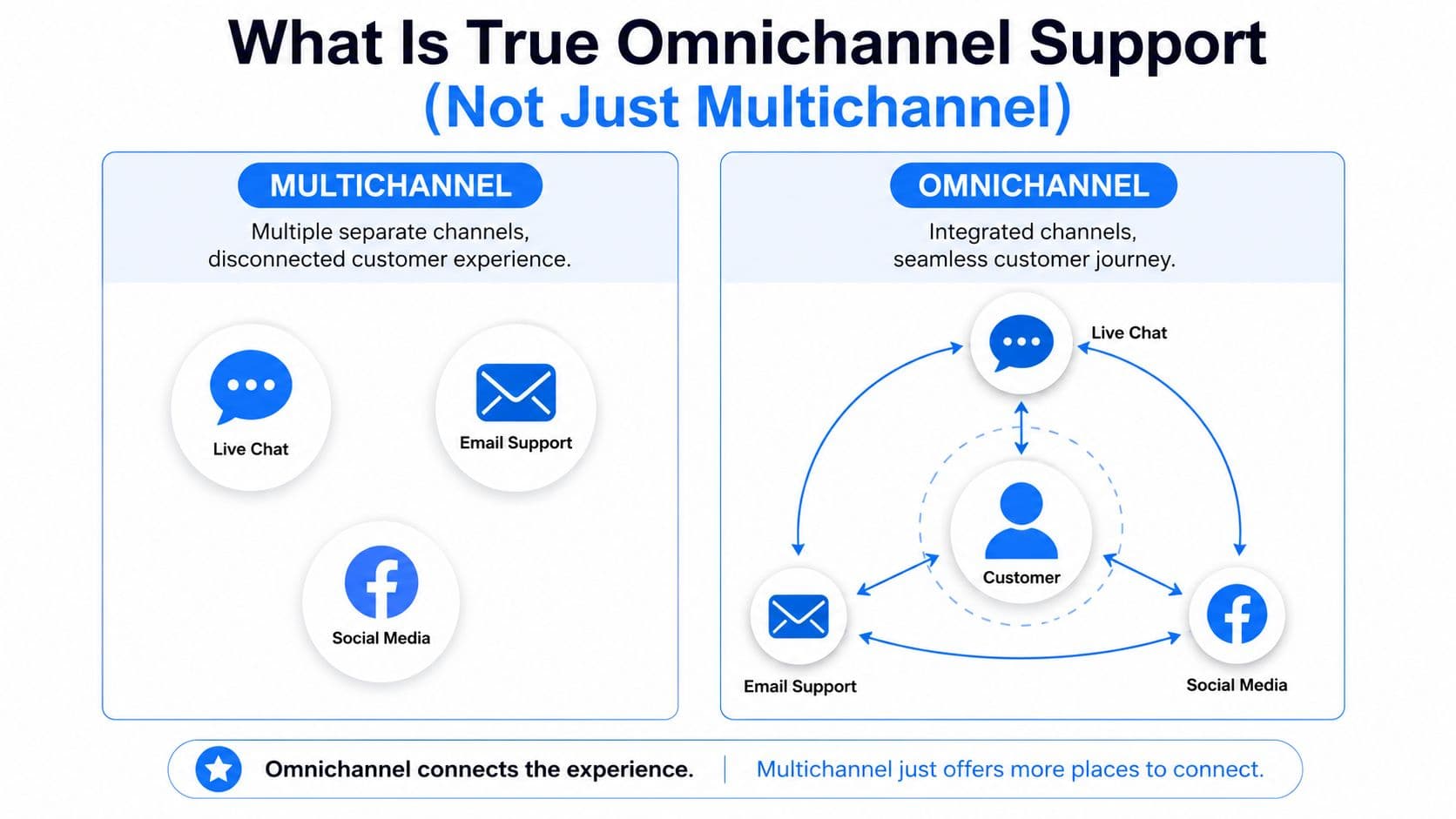
Multichannel means your store offers several ways to get in touch. Omnichannel means those conversations connect.
That distinction sounds small until you operate it. In a multichannel setup, email, live chat, social DMs, and SMS each work like separate roads leading into your business. The customer can arrive from any direction, but your team still has to ask where they came from and why they're here. In a true omnichannel setup, those roads feed one shared system. The customer changes channels, but the context stays intact.
The difference is shared memory
The simplest way to think about it is this. Multichannel gives customers options. Omnichannel gives your business memory.
If a shopper starts with a bot on your product page, then follows up by email, your agent should see the original question, the product involved, any recommendations already shown, and ideally the cart state or order context. If that data disappears, you haven't built continuity. You've built handoff friction.
That friction has a direct commercial cost. Recent studies highlight that 70% of customers abandon purchases if they feel they must repeat information across channels, according to IBM's overview of omnichannel customer service.
For Shopify merchants, that number maps to familiar moments. Pre-sale questions about size, shipping, ingredients, bundles, or returns often begin in one place and finish in another. If your support stack can't stitch those interactions together, the customer does the stitching for you. Most won't bother.
What continuity looks like in a Shopify store
True omnichannel customer support isn't about adding every possible touchpoint. It's about making the touchpoints you already have behave like one system.
A practical setup usually includes:
| Support element | Multichannel behavior | Omnichannel behavior |
|---|---|---|
| Live chat | Separate conversation window | Linked to customer profile and prior interactions |
| Email support | Managed in a standalone inbox | Attached to order, cart, and conversation history |
| Social DMs | Treated as a marketing channel | Routed into the same support record |
| AI chatbot | Answers common questions only | Resolves simple issues and passes context when escalating |
This is also where a lot of channel planning goes wrong. Merchants ask, “Which support channels should we add next?” before they ask, “Can our current channels share context?” If you're still deciding where your team should show up, this breakdown of customer service channels for e-commerce is a useful planning reference.
Omnichannel support should feel boring to the customer. They shouldn't notice the channel switch because nothing important resets.
A store with fewer connected channels will usually outperform a store with more disconnected ones. That's the trade-off worth making.
The Business Case and Key KPIs for Omnichannel Success
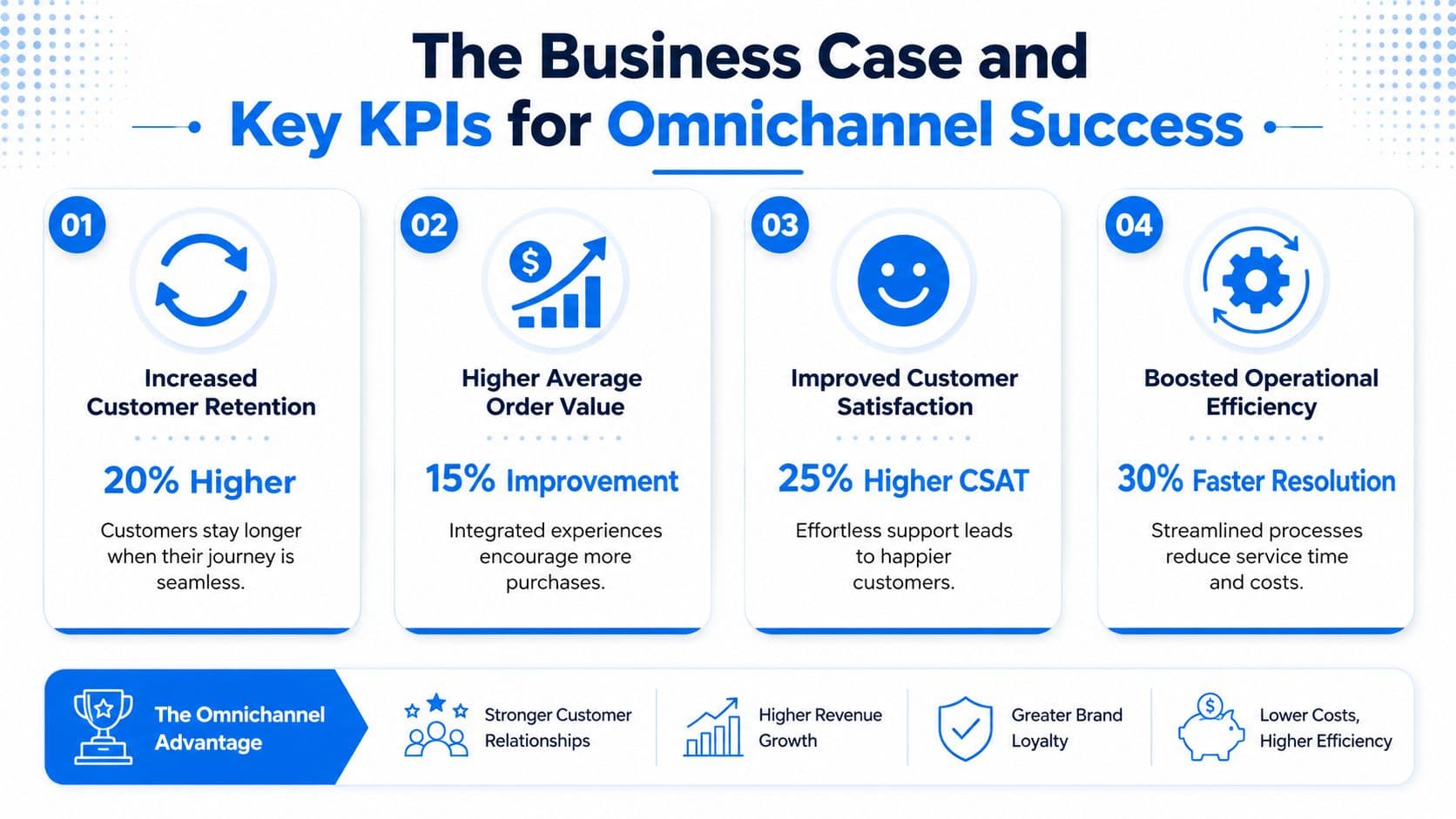
The business case for omnichannel customer support is straightforward. Lower friction during support interactions protects demand that already exists. People who are close to buying don't need a dazzling experience. They need a clear answer without extra work.
That's why channel-level stats can be misleading. You can have fast chat replies, decent email coverage, and active social support while still creating a high-effort customer journey overall. Each team thinks it's doing fine because each dashboard looks healthy in isolation.
Stop measuring channels in isolation
For most Shopify stores, the best anchor metric is Customer Effort Score, or CES. It asks a better question than channel metrics do. Not “How fast did we answer?” but “How hard was it for the customer to get help?”
That shift matters because omnichannel failures are usually cumulative. A shopper might get a prompt response in chat, then hit a dead end when they switch to email, then wait again when an agent needs order details already provided elsewhere. No single interaction looks catastrophic. The full journey does.
Balto notes that reducing customer effort by 10% can increase retention by up to 20% in its analysis of omnichannel communication for customer service. That's the strongest argument for prioritizing effort reduction over channel expansion.
A practical omnichannel scorecard
If you run support for a Shopify store, build your dashboard around journey quality, not just inbox activity. A useful scorecard includes:
- Customer Effort Score: Ask after resolved conversations whether it was easy to get help across the full interaction, not just the final channel.
- First Contact Resolution across the journey: Count a case as resolved only when the customer doesn't have to reopen it in another channel.
- Repeat contact rate: Watch for customers who ask the same question again through a different surface.
- Escalation quality: Review whether a human agent received full context or had to reconstruct it manually.
- Pre-purchase save rate: Track which support interactions prevent cart drop-off, especially for product, shipping, or policy objections.
If you already review store health using broader e-commerce KPI benchmarks and frameworks, add support effort into that mix. It belongs next to conversion, repeat purchase behavior, and operational efficiency because it affects all three.
A low-effort support journey does two jobs at once. It preserves revenue and lowers service workload.
The most common measurement mistake is rewarding team speed inside separate channels while ignoring the cost of handoffs between them. That's how stores end up “efficient” on paper and frustrating in practice.
Your 4 Step Omnichannel Roadmap for Shopify Stores
You don't build omnichannel customer support by turning on more apps. You build it by deciding how customer context should move, then making your tools follow that rule.
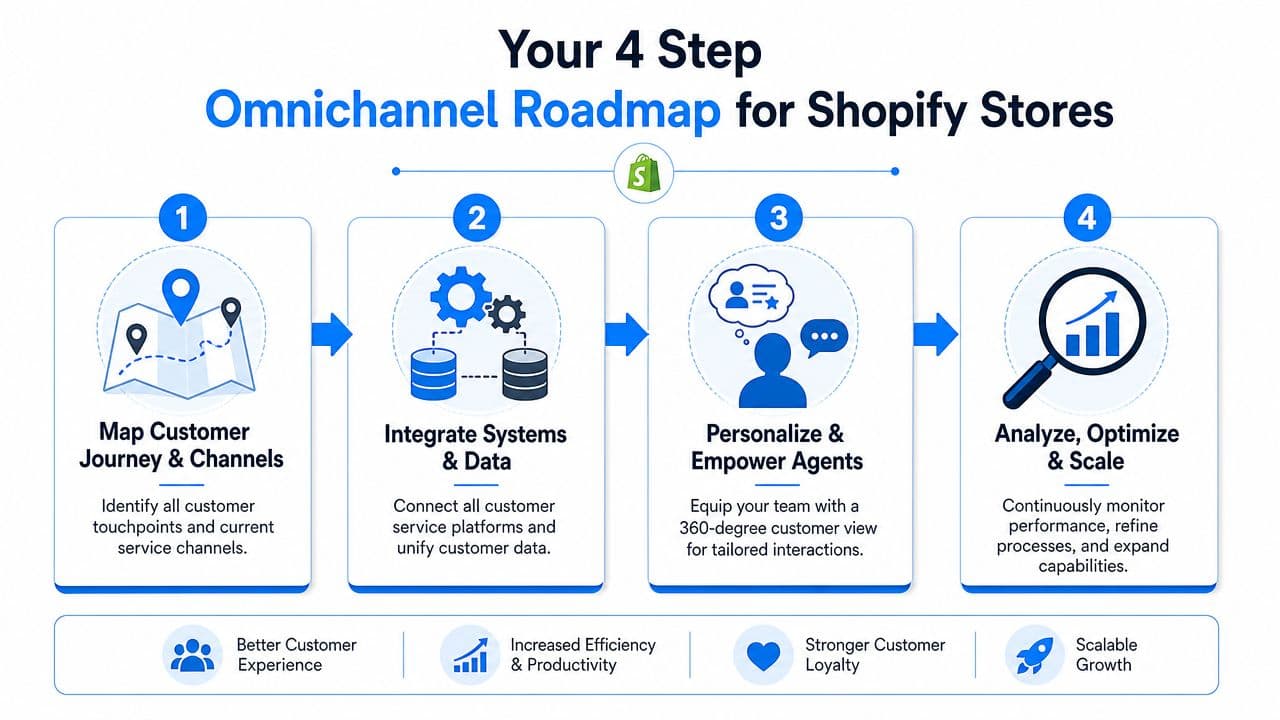
Step 1 map the real journey
Start with the paths customers already take, not the paths you wish they took.
Open your last few weeks of tickets, chats, and social messages. Look for repeated movement between channels. You'll usually find patterns fast. Instagram DM to product page chat. Shipping policy question to checkout hesitation. Return request that begins in email but ends in chat because the customer wants a faster answer.
Write those flows down in plain language. Include:
- Entry point: Where did the conversation begin?
- Intent: Was it pre-purchase, shipping, product fit, returns, or account help?
- Switch trigger: Why did the customer move channels?
- Outcome: Did they buy, churn, refund, or contact again?
This exercise reveals where support breaks. It also stops you from overbuilding for edge cases while obvious friction points stay untouched.
Step 2 connect data before adding channels
Most stores should pause channel expansion until core systems share data well enough to preserve context.
At minimum, your Shopify data, helpdesk, chatbot, and social inbox need a common record of the customer. That doesn't always mean one app does everything. It means whichever tools you use must let agents see the same essentials in one place: customer identity, recent conversations, order history, cart details, and unresolved issues.
A simple audit table helps:
| System | What it knows | What it should pass forward |
|---|---|---|
| Shopify | Orders, customer profile, cart activity | Order status, items viewed, items in cart |
| Helpdesk | Tickets, macros, tags | Full thread history, issue status, agent notes |
| Chatbot | Intent, questions asked, recommendations shown | Transcript, confidence level, escalation reason |
| Social inbox | DMs and comments | Message history tied to customer record |
If a tool can't share what it knows, it creates a silo even if it performs well on its own.
Step 3 design the handoff from AI to human
This is the operational core. Most failed omnichannel setups collapse right here.
When the bot escalates, the agent shouldn't receive a blank ticket with “customer needs help.” The handoff should include the full transcript, detected intent, products discussed, actions already attempted, and any purchase context available. If the bot suggested a product, the agent should know which one. If the shopper objected to shipping time, the agent should see that too.
Don't ask the agent to investigate what the system already knows.
Set explicit rules for escalation. For example:
- Product availability and policy questions can stay automated if confidence is high.
- Fit, compatibility, edge-case shipping, and damaged-order issues move to a human.
- High-intent shoppers with active carts should route faster than low-context inquiries.
- Every escalation must carry transcript plus order or cart context.
That's what turns automation into a support advantage instead of support debt.
Step 4 train for continuity not channel ownership
Tools matter, but habits decide whether continuity survives contact with the actual world.
If one rep “owns chat” and another “owns email,” customers still get siloed treatment unless both reps work from the same standard. Train agents to start from history, not from scratch. They should review prior context before replying, acknowledge what the customer already shared, and avoid asking for information that's visible in the record.
A short team checklist works better than a slide deck:
- Review before responding: Read prior touchpoints first.
- Acknowledge continuity: Refer to the earlier message or action so the customer knows you're caught up.
- Resolve across channels: Close the issue even if it started somewhere else.
- Tag breakpoints: Mark where context was missing so operations can fix the workflow.
The roadmap is less glamorous than “launching omnichannel,” but this is what makes it real on a Shopify store.
How AI Chatbots like Carti Accelerate Your Omnichannel Strategy
The fastest way to improve omnichannel performance is to strengthen the first interaction. That's where many support journeys either stay simple or become expensive.
An AI chatbot can help because it handles repetitive questions immediately, at any hour, and without forcing the customer to hunt through policy pages. For Shopify stores, that often means shipping timelines, return rules, product details, sizing basics, and order-status direction get resolved before the shopper ever needs to switch channels.
Why the first touchpoint matters most
A chatbot isn't valuable just because it answers quickly. It's valuable because it can standardize the intake layer of support. The system can collect intent, identify the product in question, surface the relevant policy, and capture the transcript in a way your team can use later.
That matters when the conversation needs a human. Without a strong first-touch system, every escalation starts cold. The customer has already done the work of explaining the problem once, but your human team still inherits a partial record.
A purpose-built tool also keeps the answer quality closer to your actual store reality. Generic AI tools often sound polished while giving vague or risky replies. A Shopify-focused chatbot does better when it's grounded in catalog data, store policies, and live storefront context.
If you want a deeper look at how that setup works in practice, this guide on an AI chatbot for ecommerce covers the operational side well.
What a useful escalation actually includes
Not every chatbot improves omnichannel customer support. Some just add another layer the customer has to get through.
A useful AI handoff should give the human agent enough information to continue naturally. In practice, that means the escalation packet should include:
- Conversation transcript: The exact customer question and prior bot replies.
- Detected intent: Product question, shipping concern, return issue, or order problem.
- Store context: Relevant item, collection, cart status, or order reference when available.
- Reason for escalation: Low confidence, policy exception, emotional issue, or high-value pre-sale question.
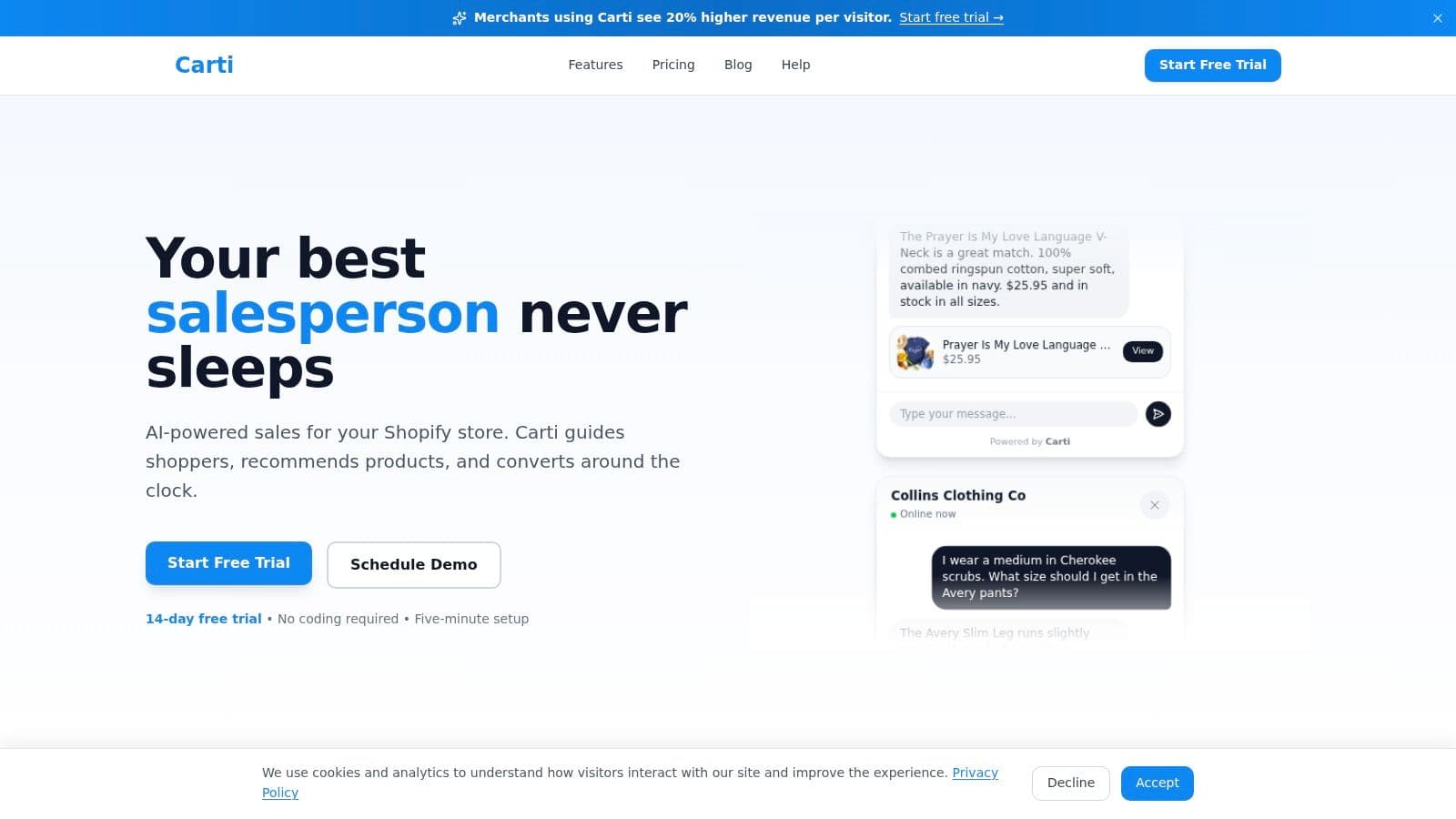
Here's a product walkthrough that shows the interface side of that experience:
The best chatbot doesn't replace your support team. It protects their time and gives them a better starting point.
That's why AI works best as an omnichannel accelerator, not as a standalone support channel. When it reduces repetitive work and preserves context for the next step, the whole system gets cleaner.
Omnichannel Best Practices and Common Pitfalls to Avoid
Stores usually fail at omnichannel customer support in predictable ways. They add channels faster than they add structure. They automate replies without defining handoffs. They measure speed but ignore effort. The fixes are less complicated than the software stack makes them seem.
Do this
- Prioritize continuity first: Before adding SMS, WhatsApp, or another inbox, make sure current channels can share customer history cleanly.
- Focus on actual customer behavior: Build around the channels your buyers already use, not the ones that look impressive in a vendor demo.
- Give agents one working view: Your team should see prior messages, orders, and context without switching tabs all day.
- Review handoffs weekly: Pull examples where a customer had to repeat themselves and trace exactly where the system dropped context.
Avoid this
- Don't treat AI as a separate lane: If your bot can't pass context to a human, it's creating more work.
- Don't reward siloed metrics: Teams that are judged only on chat speed or inbox closure will optimize for local performance, not customer outcomes.
- Don't overcomplicate escalation: If agents need to decode tags, copy transcripts manually, or chase order details in another tool, the workflow is too brittle.
- Don't assume this is only retail-specific: The same continuity problem shows up in service businesses too. This guide on AI chatbots for legal marketing is useful because it shows how structured intake and smoother handoffs matter even when the customer journey looks very different from e-commerce.
The best omnichannel systems become invisible. Customers don't think about channels, routing, or support architecture. They just feel that your store remembers them, answers quickly, and doesn't waste their time.
If you want to turn your Shopify store's chat experience into a real continuity layer instead of another silo, Carti is worth a close look. It's built for Shopify merchants who want faster answers, cleaner AI-to-human handoffs, and a support experience that helps convert shoppers instead of slowing them down.

Written by
Daniel AndersonFounder of Carti. 10+ years building ecommerce brands in apparel and supplements. Still runs a Shopify store and built Carti to help merchants convert more browsers into buyers.
Ready to boost your store's sales?
Install Carti in 5 minutes and let AI handle customer questions, recommend products, and close sales 24/7.
Start Free Trial14-day free trial