
Great service drives sales. McKinsey found that companies that grow faster generate more revenue from personalization than their peers, and that matters on Shopify, where a single unanswered question can stall a purchase right at the point of intent.
Support shapes conversion before and after the order. Product questions, delivery concerns, return policies, and compatibility issues all show up before checkout is complete. Merchants that treat support as a revenue function usually see the difference in higher conversion rates, fewer abandoned carts, and lower refund pressure.
AI changed the cost structure, but tools alone do not fix the problem. Many Shopify teams add chat, help desk apps, and automations without connecting them to channel coverage, escalation paths, or cart recovery workflows. The result is more software, the same gaps, and little revenue lift. A better approach starts with the right customer service channels for Shopify stores, then ties each one to response speed, order context, and handoff rules.
This article is a practical playbook, not a generic ideas list. Each best practice is written for Shopify merchants who want to put systems in place today, including AI tools like Carti that can answer common questions, route high-intent shoppers to a human, and recover revenue that would otherwise disappear. If email is part of that flow, it also helps to test email deliverability so cart recovery and support follow-ups reach the inbox.
The goal is straightforward. Build a support operation that responds fast, escalates cleanly, recovers carts, and makes customers feel understood.
1. 1. Master Omnichannel Support Integration
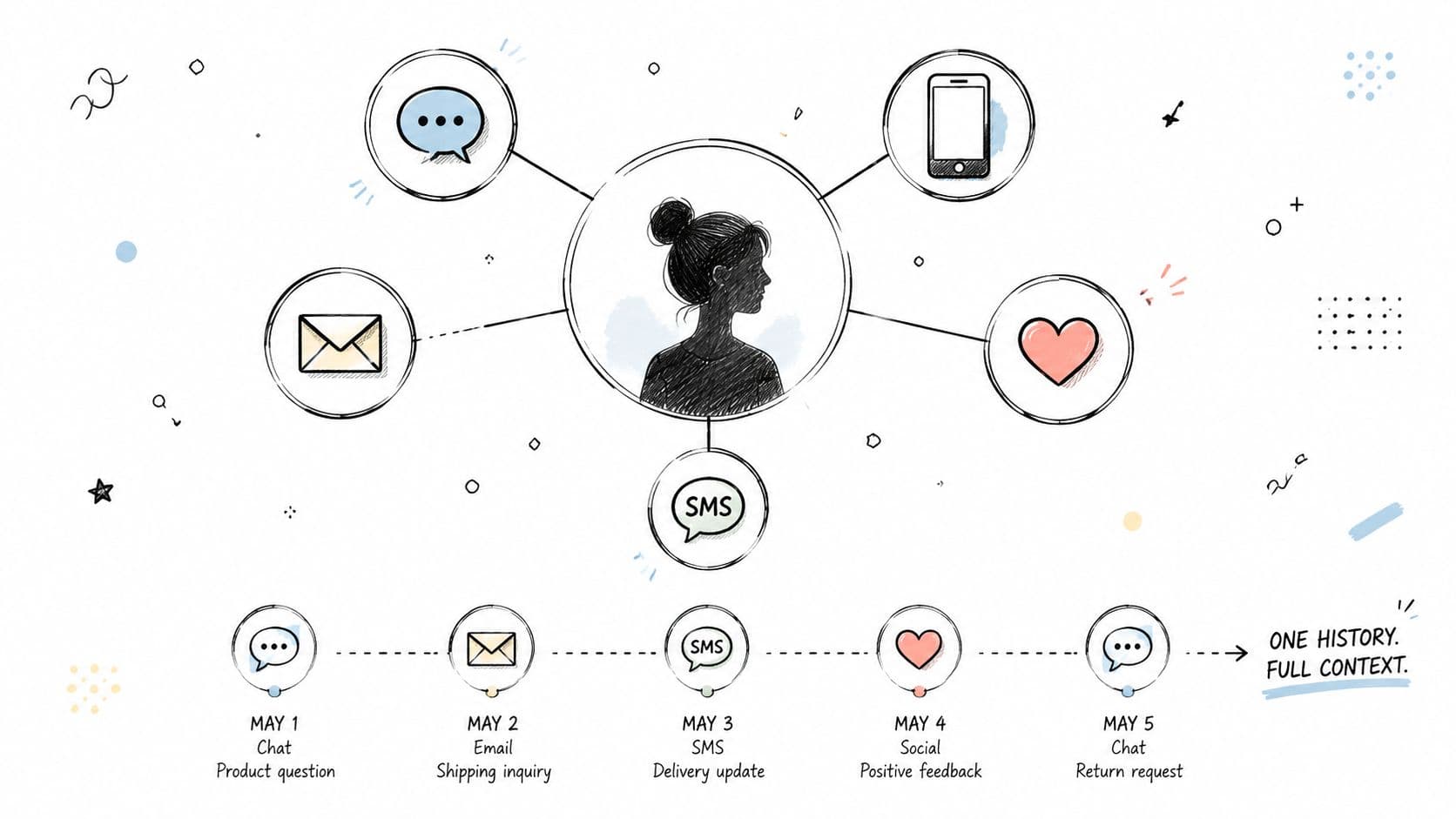
If your chat, email, Instagram DMs, and SMS all live in separate tools, your team is guessing. Shoppers feel that immediately. They repeat the same issue, get inconsistent answers, and lose trust before you ever solve the problem.
For Shopify stores, omnichannel support isn't about being everywhere. It's about carrying context from one channel to the next. A shopper who asks Carti about sizing on-site and replies later by email shouldn't restart from zero. Tools like Zendesk and Intercom help unify history, while Carti can cover high-volume pre-purchase chat and pass cleaner context into the rest of your support flow.
Start with the channels shoppers already use
Don't launch five channels at once. Start with your store chat, support inbox, and one social channel that already drives buyer questions. Then standardize customer identity across them so your team sees order history, previous conversations, and the page the shopper came from.
What works in practice
- Unify the record: Use one customer profile across chat, email, and social so agents don't need to reconstruct the story.
- Keep channel tone consistent: An Instagram reply can be shorter than an email, but the policy and answer should match.
- Use automation where volume is highest: Let Carti handle repetitive site questions. Route exceptions to humans with transcript history attached.
- Protect follow-up deliverability: If your team relies on recovery and service emails, regularly test email deliverability so support replies don't land in spam.
A useful operating model is simple. Let chat handle immediate buying questions, email handle account and post-purchase detail, and social handle triage. If you're mapping channels from scratch, Carti's guide to customer service channels is a good reference point.
Practical rule: Add channels only after you've unified context. More entry points without shared history create more support debt, not better service.
3. 3. Guarantee Instant Responses, 24/7
HubSpot reports that 82% of customers expect an immediate response when they contact a company with a marketing or sales question. On a Shopify store, that expectation shows up at the highest-stakes moments. Delivery questions, sizing doubts, bundle compatibility, subscription terms. If those answers arrive tomorrow, the order often disappears today.
Speed matters most when intent is high
Fast response is not about chasing a vanity support metric. It protects revenue during the exact window when a shopper is deciding whether to buy.
For Shopify merchants, AI handles the first layer well if you train it on the right material. Carti should have your product catalog, shipping rules, return policy, subscription terms, sizing guidance, and the actual questions customers ask before purchase. Then test it against live objections from chat logs and support tickets. That is the difference between a support assistant that converts and a widget that gets ignored.
Thin training data creates expensive failure modes. The bot answers vaguely. Customers rephrase the same question. Human agents inherit a messier conversation and a colder lead.
Build your 24/7 layer in this order
Start with the questions that block checkout:
- Shipping timing: delivery windows, cutoff times, carrier restrictions
- Returns and exchanges: who pays, time limits, final sale items
- Product fit or compatibility: sizing, materials, device match, ingredient concerns
- Order changes: address edits, cancellations, subscription skips
- Payment and promo issues: discount eligibility, failed payment questions, tax confusion
Then configure clear handoff rules. If the question involves an exception, an angry customer, or anything policy-sensitive, route it to a person with the conversation history attached. Instant response helps most when it shortens time to resolution, not when it traps customers in automation.
A practical target is simple. Let AI resolve repetitive pre-purchase and low-risk post-purchase questions. Let agents spend their time on edge cases, retention saves, and revenue-critical conversations.
What good implementation looks like on Shopify
Install the assistant on high-intent pages first. Product pages, cart, checkout-adjacent pages, and order tracking. Those are the pages where response speed has the clearest commercial value.
Keep the copy direct. “Will this arrive by Friday?” deserves a direct shipping answer, not a branded greeting and three menu options.
Review transcripts weekly. Look for unanswered questions, wrong answers, and moments where the bot should have escalated sooner. That feedback loop is where AI support gets better. Stores that skip it usually blame the tool when the underlying issue is poor setup and no maintenance.
Operator rule: Measure instant response by saved orders and reduced ticket load, not by bot containment alone. A fast answer that fails to move the shopper forward is still a miss.
4. 4. Personalize the Customer Experience

McKinsey found that personalization can reduce customer acquisition costs, improve conversion, and increase retention and customer lifetime value. For Shopify merchants, the practical takeaway is simple. Support should use customer context to remove buying friction and increase order value.
Generic replies waste intent. If a returning customer asks about sizing, care, or replenishment, the answer should reflect what they bought, what they viewed, and where they are in the order journey. Static scripts cannot do that well.
Personalization in service does not require invasive tracking. Start with the data you already have in Shopify and your help desk. Recent product views, cart contents, purchase history, location, order status, subscription status, and prior conversations are usually enough.
Carti can put that context to work immediately. On product pages, it can recommend the right variant or bundle based on browsing behavior. In cart, it can answer objections tied to the items already selected. After purchase, it can suggest the next best action, such as care instructions, a refill timeline, or a complementary reorder.
Where personalized support produces revenue fastest
- Pre-purchase guidance: Recommend the right size, color, bundle, or add-on based on the product page and cart contents.
- Post-purchase service: Give order-specific help, including setup steps, care advice, replacement options, or reorder reminders.
- VIP and repeat-buyer handling: Prioritize high-value customers with faster routing, stronger retention offers, and context-aware replies.
- Subscription support: Tailor responses around skip, swap, delay, or frequency-change requests based on the customer's current plan.
The trade-off is accuracy. Personalization helps only when the context is current and the suggestion is relevant. A wrong recommendation feels careless faster than a generic one. That is why implementation matters more than ambition.
How to implement this on Shopify today
First, define the fields your AI assistant can use safely. A practical setup includes viewed products, cart value, last order date, top purchased category, shipping country, and open ticket history.
Second, map that data to clear support actions. If a shopper is viewing a skincare product and previously bought a cleanser, the assistant can recommend the matching moisturizer or answer compatibility questions. If a customer has bought the same supplement twice, the assistant can offer a subscription option or reorder link instead of sending a generic FAQ answer.
Third, set rules for sensitivity. Do not have AI make assumptions about age, health, income, or personal identity. Keep personalization tied to shopping behavior and service history. That keeps the experience useful without crossing the line.
What good personalization looks like in practice
A first-time visitor on a product page needs help choosing. A returning customer with three orders usually needs speed, reorder guidance, or account help. Treating both people the same leaves money on the table.
For most Shopify stores, the best first use cases are narrow and measurable:
- Product recommendation prompts on high-intent pages
- Order-specific help in the post-purchase window
- Replenishment suggestions based on past purchases
- Retention offers for repeat buyers who hit support before canceling
Review transcript quality every week. Check whether personalized replies led to add-to-cart actions, higher average order value, fewer repeat tickets, or stronger retention. If not, tighten the inputs or reduce the number of scenarios the assistant handles. Personalization should improve conversion and service efficiency at the same time.
5. 5. Build Effective Self-Service Resources
81% of customers try to solve issues on their own before contacting support, according to Harvard Business Review's research on customer self-service behavior. For Shopify merchants, that creates a clear opportunity. Good self-service cuts repetitive tickets, shortens time to purchase, and gives AI tools like Carti better answers to work with.
Poor self-service does the opposite. It pushes pre-purchase questions into chat, slows down checkout decisions, and increases refund friction after the sale. That cost shows up in support volume, conversion rate, and repeat purchase rate.
Build content around customer tasks, not internal pages
A useful help center mirrors the buying journey. Shoppers want quick answers to practical questions such as "Will this arrive by Friday?" or "Which size should I buy?" Existing customers need order tracking, returns, exchanges, subscription changes, and warranty steps without hunting through five policy pages.
That structure matters for AI, too. Carti can only give accurate answers if the source content is specific, current, and written in plain language. If your FAQ says "shipping times vary" or "returns may be accepted in some cases," the assistant will sound vague because the documentation is vague.
Start with the pages that remove the most purchase friction and generate the highest ticket volume:
- Pre-purchase FAQs: shipping windows, sizing, ingredients, materials, compatibility, care instructions, and gift options
- Checkout support content: payment methods, promo code rules, taxes, duties, and delivery expectations
- Post-purchase help: tracking, address changes, returns, exchanges, damaged items, and subscription management
- Policy pages: refund rules, restocking fees, final sale items, and response times written in direct language
- Product-page answers: short FAQs on high-intent products where uncertainty blocks add-to-cart
What to implement this week
Start with your top 50 support tickets from the last 30 days. Group them by intent. Then rewrite answers into short articles with one question per page or section. Long policy walls are hard for customers to scan and hard for AI to retrieve cleanly.
Next, connect those answers to the places shoppers hesitate. Put sizing help on product pages. Put shipping cutoffs near delivery estimates. Put return rules in order status flows, not only in the footer.
Then test retrieval. Ask Carti the same questions customers ask in chat. If the answers are incomplete, the problem is usually the content, not the model.
A simple implementation plan works well:
- Export repetitive tickets from Shopify inbox, Gorgias, or your help desk
- Rank them by revenue impact and volume
- Write clear answers with specific conditions, examples, and next steps
- Publish them in the help center and surface them on product, cart, and post-purchase pages
- Sync that content with Carti so the assistant can respond with the same approved guidance
- Review failed answers weekly and update the source content first
Write for resolution, not pageviews
A self-service article should answer the question in under a minute. Lead with the answer. Follow with exceptions. End with the exact next action.
For example, "Can I change my shipping address?" should not open with a paragraph about fulfillment policy. It should state the cutoff, explain what happens after label creation, and give the fastest contact path if the order is already in transit.
This also makes global support easier to manage. If you plan to serve buyers in multiple regions, build source content that can be reused across languages with region-specific rules layered on top. This guide to multilingual customer support for ecommerce teams is a useful next step when you expand beyond one primary market.
Done well, self-service is not a side library. It is a revenue system. It removes hesitation before checkout, reduces low-value tickets after purchase, and gives AI support tools the structure they need to answer accurately today.
6. 6. Offer Multilingual & Global Support
Cross-border demand is already here. Shopify merchants sell to buyers in dozens of markets long before they build local support teams, and that gap shows up fast in pre-purchase hesitation, delivery questions, and return confusion.
English-only support limits conversion in markets where shoppers are willing to buy but less willing to troubleshoot in a second language. Carti can respond in 92 languages with little setup, which gives lean teams a practical way to cover more regions now instead of waiting until ticket volume justifies hiring native-speaking agents for each market.
Language coverage is only the first layer. Support also has to reflect local expectations around delivery timing, duties, returns, payment methods, and tone. A translated answer that cites the wrong carrier window or ignores import fees still creates refunds, chargebacks, and repeat contacts.
That is the actual implementation standard for Shopify stores. Match the language, then match the operating reality of the market.
What global-ready support looks like
- Local-language answers: Let shoppers ask questions in their preferred language across chat, email, and help content.
- Region-specific policies: Show the correct shipping windows, duties guidance, return rules, and payment options by market.
- Localized AI training: Feed Carti approved policy content for each region so answers stay accurate instead of relying on generic translation.
- Human escalation paths: Route high-risk issues like customs disputes, lost packages, and refund exceptions to an agent with the right context.
- Localized pre-purchase reassurance: Surface answers about taxes, delivery expectations, and returns before checkout, not after the complaint arrives.
A simple rollout works best.
Start with the markets that already produce traffic or revenue. Pull support tickets by country, identify the top pre-purchase and post-purchase questions, then localize those flows first. In many stores, that means product FAQs, shipping timelines, duties and taxes, return conditions, and order tracking. After that, review where AI conversations fail, then tighten the source content and routing rules. This practical guide to multilingual customer support for ecommerce teams is a useful framework if you are building that system market by market.
The trade-off is straightforward. Full native support in every country is expensive. AI translation and localized workflows get coverage in place faster, but only if your policies, macros, and escalation rules are clean. For Shopify merchants, the goal is not perfect localization on day one. It is profitable localization that reduces friction, protects margin, and helps more international shoppers complete the order with confidence.
6. 6. Offer Multilingual & Global Support
If you sell across borders, English-only support creates friction before and after checkout. Buyers may still browse in English, but many want help in the language they think in when they need clarity.
Carti can respond in 92 languages without extra configuration, which makes it practical for Shopify merchants that want to open support coverage quickly across regions. That matters most when you don't have the budget to hire native-speaking agents for every market on day one.
Translation isn't the same as local support
Basic translation solves only part of the problem. Cultural fit matters too. A 2025 global study found that 42% of customer service failures in cross-border e-commerce stem from cultural misalignment in proactive messaging, while only 12% of best-practice guides include cultural sensitivity as a core part of predictive support, according to this discussion of cross-cultural service gaps.
That shows up in small ways. Direct sales language may feel pushy in one market and normal in another. Gift suggestions, shipping reassurance, and apology style all land differently depending on the customer.
What global-ready support looks like
- Local language answers: Let shoppers ask questions naturally instead of forcing translation effort onto them.
- Region-specific policies: Show the right delivery windows, duties guidance, return rules, and payment methods.
- Cultural tone control: Adjust recommendation style and proactive prompts for different audiences.
- Timezone-aware escalation: If live follow-up matters, set expectations clearly when human support isn't immediately available.
If you're planning international growth, Carti's overview of multilingual customer support is a useful implementation starting point.
8. 8. Perfect Checkout & Cart Recovery
Nearly 7 in 10 online carts are abandoned, according to the Baymard Institute's checkout research. For Shopify merchants, that is rarely just a pricing problem. It is usually a mix of unanswered questions, checkout friction, and weak follow-up.
The fix is operational. Support, merchandising, and retention need to work from the same playbook. If a shopper hesitates on shipping speed, return terms, bundle fit, or product compatibility, the recovery message should answer that exact objection while the intent is still high. Generic “you left something behind” emails recover fewer orders because they ignore the reason the cart stalled.
Carti works best here when it starts on-site, then hands off to email or SMS only if the shopper leaves. That sequence protects conversion better than relying on a discount-first flow. It also protects margin. Discounting every abandoned cart can raise recovery volume while lowering average order value and training repeat buyers to wait for an offer.
Fix checkout friction before you chase abandoned carts
A better process starts with instrumentation. Review where shoppers drop, which questions appear at checkout, and which SKUs trigger the most hesitation. Then map each issue to a response.
What to implement today
- Answer checkout objections in real time: Show short AI-assisted prompts for shipping, returns, sizing, compatibility, or subscription terms.
- Trigger recovery from shopper behavior: Use exit intent, repeated field edits, or long pauses as signals to offer help before the session ends.
- Personalize the message to the cart: Mention the product category, likely concern, and next best action instead of sending a generic reminder.
- Escalate high-risk orders fast: Route payment disputes, fraud concerns, or chargeback-sensitive orders to human review. Many brands pair this with solutions for Shopify merchants to reduce loss after checkout.
- Keep the tone calm and specific: Good recovery copy should sound helpful, not pushy. Strong customer service etiquette for support teams matters here because poor phrasing can kill the sale.
One practical rule helps. Answer first. Incentivize second.
If the blocker is trust, clarity, or product fit, support-led recovery usually outperforms a coupon. Save discounts for cases where price resistance is the primary issue and margin can support it. That is how Shopify teams recover more carts without teaching customers to abandon on purpose.
9. 9. Lead with Empathetic Communication
PwC has found that customers value speed, convenience, knowledgeable help, and friendly service in nearly equal measure. That matters in e-commerce because a fast reply can still lose the customer if the tone feels cold, scripted, or dismissive.
Empathy matters most when expectations break. A delayed gift order, a damaged package, or the wrong size creates more than a support ticket. It creates doubt about whether the brand will make things right.
For Shopify merchants using AI, the practical question is not whether to automate. It is where to draw the line. AI can handle order status, return windows, and product facts well. Sensitive complaints need a different path. If a shopper is upset, repeating themselves, or describing a failed delivery with real consequences, route that conversation to a person quickly.
That boundary protects revenue. Customers who feel heard are more likely to accept a replacement, store credit, or a short delay. Customers who feel processed push harder for refunds, chargebacks, and public complaints.
How to make empathy operational
Start with language. The first sentence should acknowledge the problem before explaining policy. “I can see why this is frustrating, especially since it was meant to arrive before the weekend” works better than pasting a shipping rule.
Then define escalation triggers inside your helpdesk or AI layer. Carti and similar tools should hand off conversations when they detect anger, urgency, repeat contacts, delivery failure, damaged goods, or any issue involving a special event. That gives AI a clear job and keeps agents focused on moments that decide retention.
Training matters too. Good teams do not memorize generic “empathetic” lines. They practice short responses that sound human, set expectations clearly, and move to a solution. A solid foundation in customer service etiquette for support teams helps here because tone problems usually come from wording habits, not bad intent.
What to implement today
- Acknowledge the emotion first: Name the inconvenience, disappointment, or urgency before asking for order details.
- Set AI handoff rules: Escalate messages that include anger, repeat failure, damaged orders, missed gifts, or refund threats.
- Write response templates for humans, not bots: Keep them short, specific, and easy to personalize.
- Give agents room to fix the issue: Let them offer a replacement, expedite shipping, or apply a limited credit without waiting for manager approval in every case.
- Review empathy in QA: Score conversations on clarity, ownership, and resolution confidence, not just handle time.
There is a trade-off. More human involvement raises support cost per ticket. But in high-friction moments, it usually protects more margin than a rigid policy or a badly timed bot reply. The goal is not to sound nice. The goal is to keep an expensive service failure from turning into a lost customer.
9. 9. Lead with Empathetic Communication
Empathy is easy to praise and hard to operationalize. In e-commerce, it matters most when something goes wrong. The order is late. The gift didn't arrive. The package was damaged. The customer is already frustrated before your team answers.
This is also where many AI-first support setups break trust. Recent trend data shows a 34% increase in consumer frustration with scripted AI responses during crisis situations, while 78% of best-practice guides still prioritize response speed and self-help over human escalation protocols for emotional contexts, according to this discussion of the automation versus empathy gap.
Automation needs an empathy boundary
The answer isn't avoiding AI. It's deciding where AI stops. Routine order-status questions, size lookups, and policy clarifications are fine for automation. Distress, anger, repeat failures, and sensitive complaints need human takeover fast.
Zappos built its reputation on making customers feel heard, not just processed. Shopify merchants don't need that scale to apply the same principle. They need better language, clearer escalation rules, and permission for agents to respond like people.
Empathy habits that improve outcomes
- Acknowledge emotion first: “I can see why that's frustrating” works better than starting with policy.
- Avoid template tone in sensitive cases: Short, warm language beats robotic completeness.
- Own the next step: Tell the customer exactly what you'll do now, not just what they should do.
- Apologize clearly when the store is at fault: A defensive reply turns a fixable issue into a loyalty loss.
If you want your team and automation to sound more human, Carti's guide to customer service etiquette is a useful reference.
Customers forgive mistakes more often than they forgive feeling dismissed.
10. 10. Implement Smart Escalation & Agent Empowerment
Poor handoffs kill trust fast. A customer explains the issue to a bot, gets stuck, reaches an agent, and has to start over. That raises handle time, lowers conversion odds, and turns a support contact into a refund risk.
Smart escalation fixes that by deciding, in advance, which issues AI should solve and which ones should go to a person immediately. For Shopify merchants, that means setting rules around intent, order value, repeat contact, and customer sentiment. Carti can handle order tracking, return-policy questions, product details, and other routine requests. Human agents should step in for edge cases, charged conversations, and revenue-sensitive moments.
The operational detail matters here. If agents need manager approval for every reshipment, partial refund, or exception, the queue slows down and the customer feels it. Strong teams give agents clear resolution limits, documented policies, and the full conversation history at handoff so they can act on the first reply.
Build escalation paths that reduce friction
A workable setup is usually simple:
- Route by issue type: Send payment failures, fraud concerns, damaged orders, and delivery exceptions to a person early.
- Route by customer signal: Escalate faster when sentiment turns negative, the shopper has contacted support twice, or the cart value is high.
- Pass full context: Include transcript, items viewed, cart contents, order history, and prior resolutions in the handoff.
- Set agent decision limits: Let agents approve defined credits, replacements, or shipping fixes without waiting on a manager.
- Review escalation patterns: If one topic keeps reaching humans, update the bot flow, help content, or checkout experience.
AI starts paying for itself. It should remove repetitive work, not create another layer between the customer and a resolution. Stores that get this right use automation to protect agent time, then use human judgment where it has the biggest effect on retention and revenue.
The result is straightforward. Faster resolutions, fewer repeated explanations, and better recovery on high-value orders.
Top 10 Customer Service Best Practices Comparison
A comparison table is useful, but execution is what changes the P&L. On Shopify, these ten practices do not carry equal weight at every stage. The right order depends on ticket mix, margin, repeat purchase behavior, and how much revenue is already slipping through support, checkout, and post-purchase gaps.
The practical mistake is trying to roll out everything at once. That usually creates more tooling, more handoffs, and more reporting without fixing the few issues that hurt conversion or retention. A better approach is to rank each practice by two factors: how often the problem appears, and how much revenue is attached to it.
For example, a store with heavy pre-purchase volume usually gets faster returns from instant answers, cart recovery, and better product guidance than from a full multilingual rollout. A store with strong international demand may see the opposite. A brand with high return anxiety may get more value from clearer self-service content and stronger escalation rules than from another personalization app.
That is the key takeaway from this list.
Use the table to choose the next three moves, not to admire all ten. Then implement them in sequence, with clear ownership and a revenue target tied to each one. Modern AI tools such as Carti make that process faster because they can handle repetitive questions, surface shopper context, and support conversion-focused flows without requiring a large support team to scale first.
The merchants that get results treat customer service like an operating system for revenue. They connect support data to merchandising, checkout, retention, and lifecycle marketing. Done well, customer service stops being a reactive function and starts producing measurable gains in conversion, average order value, and repeat purchase rate.
Turn Your Support from a Cost Center to a Revenue Driver
Support has changed. It isn't just a ticket queue that cleans up problems after the sale. For Shopify merchants, it's one of the most direct levers for conversion, repeat purchase, and retention. A shopper asks a question because something is blocking the sale. When your store answers well, support becomes part of the buying experience.
That's why these customer service best practices matter so much in e-commerce. Omnichannel support keeps context intact. Proactive engagement catches hesitation before abandonment. Instant answers reduce lost intent. Personalization makes guidance relevant. Self-service lowers friction when customers want speed. Multilingual support opens global demand. Insights improve the site itself. Cart recovery saves revenue that would otherwise disappear. Empathy protects trust when stakes are high. Smart escalation ensures human judgment shows up exactly where it should.
The common thread is integration. Tools alone won't fix weak service. Many brands already use AI, but significant gains come when automation, content, support workflows, and revenue goals work in concert. That's the difference between a chatbot installed for coverage and a support system designed to sell.
For most merchants, the best next move isn't a full rebuild. Start with one or two changes that remove obvious friction. Add instant answers on high-intent pages. Clean up your FAQ and returns copy. Turn repeated support questions into better PDP content. Set escalation rules for sensitive issues. If cart abandonment is a pain point, connect support directly to recovery instead of treating it as a separate marketing workflow.
Keep the trade-offs clear. Automation is fast, but it can't carry emotional nuance on its own. Discounts recover some carts, but better answers often preserve margin. More channels can increase reach, but only if the conversation history follows the customer. Personalization can lift revenue, but only when it feels helpful rather than invasive.
Good operators treat support as a live signal from the market. Customers tell you where the site confuses them, where your policies create doubt, and where the buying journey breaks. If you respond by improving both the conversation and the store, support stops being a cost center. It starts acting like a revenue driver.
The stores that win don't just answer faster. They answer better, earlier, and with more context. That's what closes sales.
If you want to put these ideas into production quickly, Carti is built for it. It gives Shopify stores instant answers, proactive product suggestions, cart recovery, multilingual support, and a clearer path to human escalation without a heavy setup project. For merchants who want support to drive revenue instead of just handling tickets, it's one of the fastest tools to implement.

Written by
Daniel AndersonFounder of Carti. 10+ years building ecommerce brands in apparel and supplements. Still runs a Shopify store and built Carti to help merchants convert more browsers into buyers.
Ready to boost your store's sales?
Install Carti in 5 minutes and let AI handle customer questions, recommend products, and close sales 24/7.
Start Free Trial14-day free trial