
You've done the hard parts already. Your products are solid, your Shopify theme looks clean, your ads are bringing people in, and email is pulling back some return traffic. But conversion rate barely moves. New visitors bounce. Returning shoppers browse too long. Product pages get views, carts start, then momentum dies.
That's usually not a traffic problem. It's a relevance problem.
A typical Shopify storefront still treats everyone the same. The first-time visitor from paid social sees the same homepage as a repeat buyer. A shopper comparing products gets the same merchandising as someone who already knows what they want. A customer who bought skincare last month lands on generic featured collections instead of products that fit their routine. That one-size-fits-all experience leaves money on the table.
Introduction: Why Personalization Is No Longer Optional
For many Shopify teams, the warning signs look familiar. Traffic grows, but revenue doesn't keep pace. Merchants keep changing hero banners, refreshing creative, and tweaking discount strategy, yet the underlying issue sits deeper in the customer experience. The site isn't adapting to intent.
That's why ecommerce personalization software matters now. It's not a vanity add-on for enterprise brands. It's the layer that helps a store respond to what each shopper is showing you in real time. Someone viewing multiple product variants needs guidance. Someone returning to a category they browsed last week needs continuity. Someone arriving cold from a top-of-funnel ad needs faster orientation.
This shift is already visible in the market. The global e-commerce personalization software market was valued at USD 263.2 million in 2023 and is projected to reach USD 2.41 billion by 2033, growing at a 24.8% CAGR according to Market.us research on ecommerce personalization software. That kind of growth tells you the category has moved well beyond experimentation.
Where Shopify stores feel the pain first
The stores that benefit most from personalization usually aren't the ones with the fanciest stack. They're the ones with obvious friction:
- Broad catalogs: Shoppers need help narrowing choices.
- Repeat-purchase products: Returning customers should see relevant reminders and replenishment paths.
- High-consideration purchases: Buyers need reassurance, comparisons, and timely nudges.
- Paid traffic dependence: If acquisition costs are already high, generic onsite experiences get expensive fast.
A lot of merchants frame this as a conversion problem. It's often a customer experience problem first. NanoPIM's ecommerce CX insights are useful here because they connect the dots between merchandising, product data, and the experience customers get on site.
A store doesn't need to know everything about a visitor to be helpful. It needs to be relevant faster.
That's the practical lens for the rest of this guide. Not “Which platform has the longest feature list?” but “What can a normal Shopify store implement, measure, and trust to drive revenue?”
What Is Ecommerce Personalization Software?
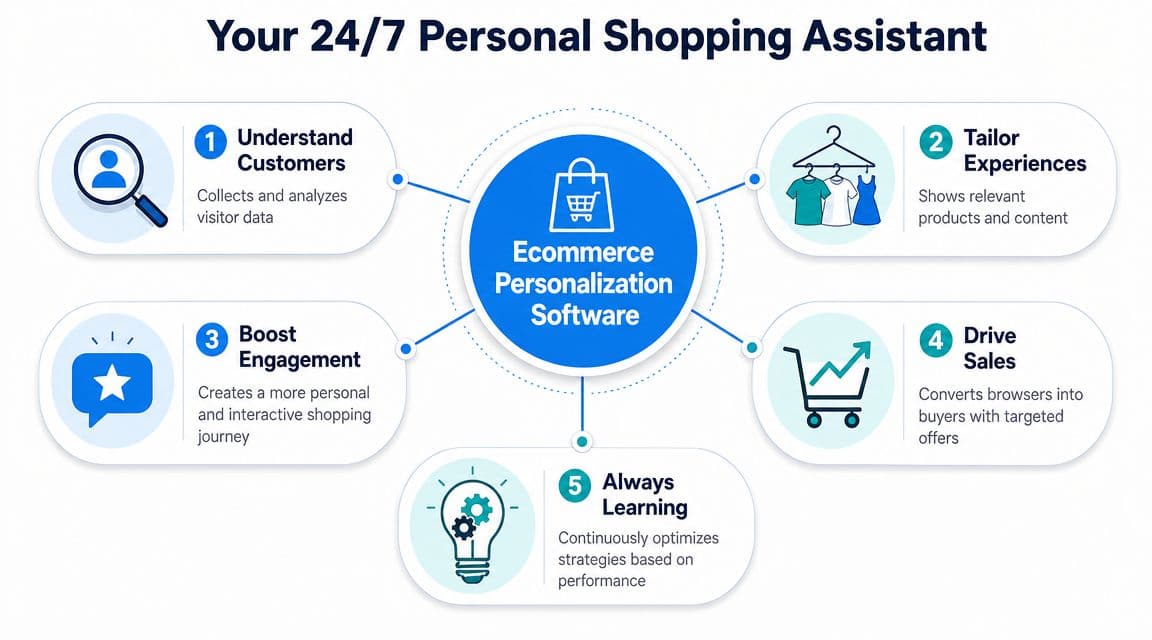
At its best, ecommerce personalization software acts like a strong in-store sales associate. Not the pushy one. The one who pays attention.
It notices what a shopper is looking at, remembers what they've bought before, understands what products go together, and changes its recommendations based on behavior. On a Shopify store, that can mean different homepage modules, smarter product recommendations, adaptive search results, personalized offers, or messages triggered by what someone is doing right now.
Static merchandising versus adaptive merchandising
A standard Shopify setup is mostly static. You choose featured products, pin collections, write sitewide copy, and hope the same layout works for most visitors.
Personalization software changes that model.
Instead of showing the same experience to everyone, it helps the store react to signals like:
- Current browsing behavior: category views, product clicks, scroll depth, and repeated comparisons
- Historical behavior: prior orders, product affinity, and returning-session patterns
- Context: traffic source, device, collection entry point, or campaign landing page
- Intent clues: whether someone looks exploratory, price-sensitive, or close to purchase
What it changes on the storefront
A useful way to think about ecommerce personalization software is by the places it affects most.
-
Product discovery
It helps shoppers find relevant items faster through recommendations, filters, and search behavior. -
Onsite messaging
It changes banners, offers, or prompts based on audience or session behavior. -
Merchandising logic
It can reorder what's surfaced first so the most relevant products appear earlier. -
Lifecycle continuity
It connects the onsite journey with email, retargeting, or cart recovery flows.
Practical rule: If a tool only personalizes one widget and can't influence product discovery or buying decisions, it's not really a personalization layer. It's a merchandising accessory.
What this means for a typical Shopify merchant
You do not need a giant data science team for personalization to be useful. You do need clarity on what the tool is supposed to improve.
For some stores, the first win is better “similar products” logic on product pages. For others, it's a homepage that stops sending first-time visitors into a maze. For stores with repeat customers, the highest-value move may be post-purchase recommendations or customized re-entry experiences.
The point isn't to make every screen feel clever. It's to reduce friction and improve relevance where shoppers stall.
Core Capabilities and AI-Driven Features
Most tools in this category promise the same outcome: better relevance at scale. The difference is how they get there, and whether they can do it with the data a Shopify store has.
The core capabilities that matter
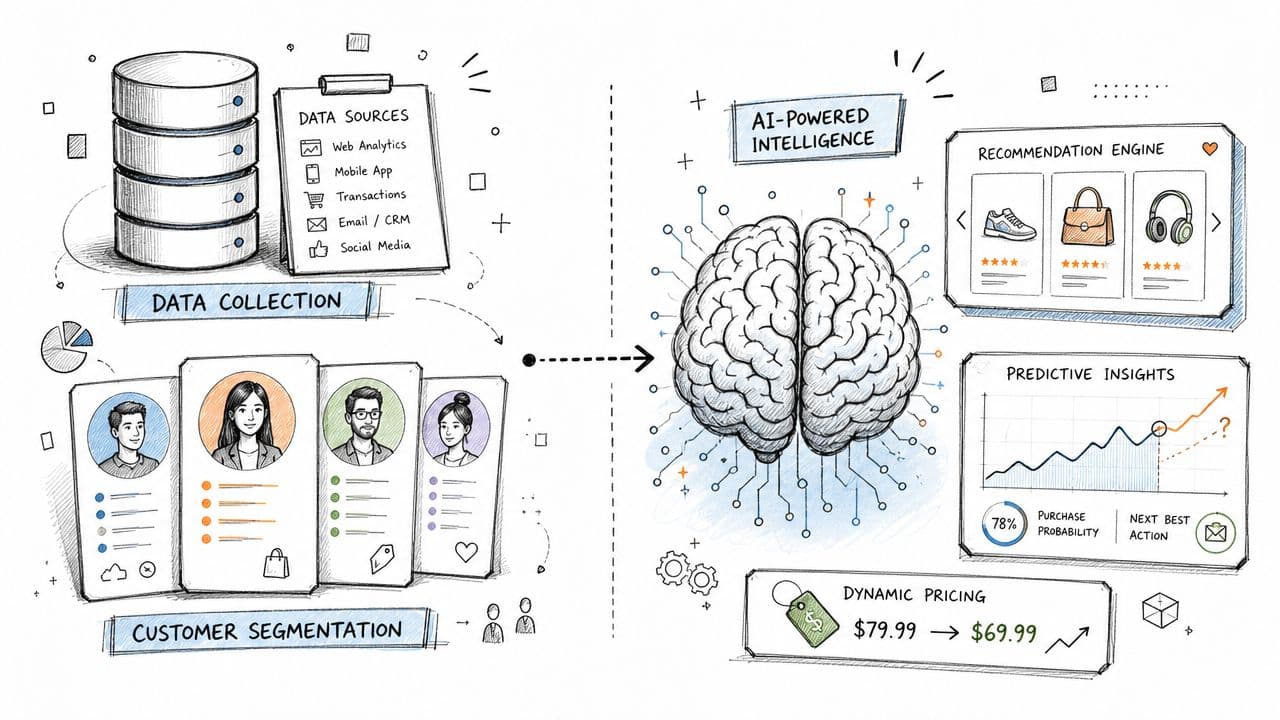
Before AI enters the sales pitch, the foundation is usually straightforward. Good ecommerce personalization software should handle a few basics well.
- Recommendations: related products, cross-sells, upsells, recently viewed items, and complementary bundles
- Behavioral segmentation: separating first-time visitors, returning browsers, cart abandoners, and past buyers
- Dynamic content: changing modules, copy, or promotional emphasis based on user behavior
- Triggered experiences: surfacing prompts at useful moments instead of relying on fixed page elements
These features don't need to feel futuristic to be valuable. They need to be accurate, fast, and easy to measure.
What stronger AI tools add
Where more advanced platforms stand out is in how they interpret signals and respond automatically. A better engine doesn't just say, “People who viewed this also viewed that.” It blends catalog understanding, session behavior, and broader shopper patterns.
Expert implementations increasingly use a hybrid recommendation approach that combines collaborative filtering with content-based filtering, as described in Wonderment's overview of ecommerce personalization software. In practice, that means one model learns from similar shoppers, while the other matches product attributes to what the current shopper has engaged with. That's especially useful for Shopify stores because it helps recommendations stay relevant even when a visitor has limited history.
Why anonymous traffic changes the game
Many buying guides frequently lose the plot. They talk as if every store has rich profiles, perfect customer matching, and years of first-party history. Most Shopify brands don't.
A large share of traffic is anonymous. People arrive from Meta ads, Google Shopping, influencer links, or email clicks without being logged in. Personalization still works there, but the logic has to shift.
What tends to work for anonymous visitors:
- Session-based recommendations
- Category-aware product suggestions
- Entry-page-specific merchandising
- Behavior-triggered prompts based on clicks and dwell patterns
- Search and navigation support
What usually requires stronger profile data:
- Replenishment timing
- Post-purchase product sequencing
- VIP-specific offers
- Long-horizon lifecycle automation
- Deeper channel orchestration
That's one reason I like to separate “AI features” from “AI value.” Fancy language isn't the same as useful personalization. How AI drives ecommerce growth is worth reading if you want a broader view of where AI helps most across the stack. For a Shopify merchant, though, the better question is simpler: does the tool improve decisions shoppers make on site?
Don't ignore the data layer
A technically effective setup depends on a centralized customer data layer that unifies signals across the storefront and connected systems, as explained in Personizely's guide to ecommerce personalization software. Without that backbone, identity resolution gets weaker and real-time decisions become less reliable.
If you want a practical example of how conversational guidance fits into this stack, this sales assist AI approach shows how onsite assistance can support product discovery alongside recommendations and triggers.
The best-performing setup usually isn't the one with the most automations. It's the one that makes the next click easier.
The Business Case: Measurable ROI from Personalization
Most Shopify merchants don't need to be convinced that relevance matters. They need to know whether the software will pay for itself.
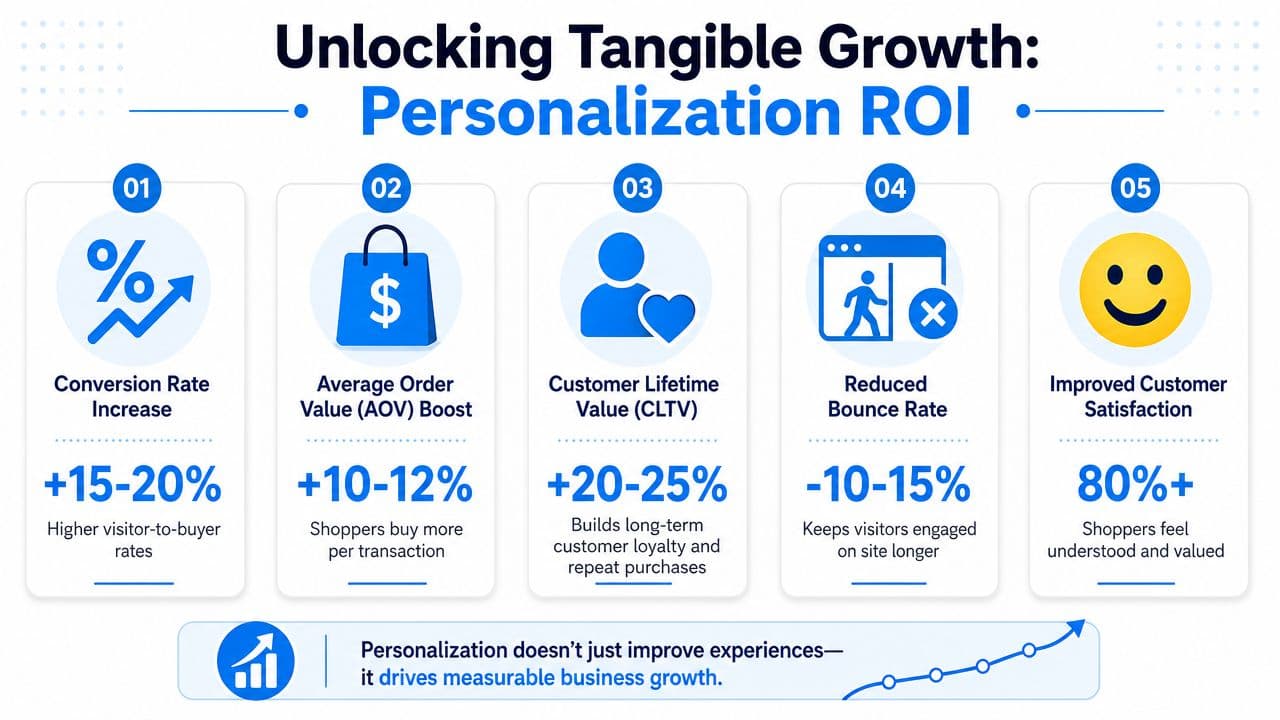
The short answer is yes, if the implementation is tied to buying behavior and not treated like a design experiment. Personalization earns its keep when it improves three levers: what percent of visitors buy, how much they spend per order, and how often they come back.
To ground that in actual reported outcomes, Contentful's ecommerce personalization statistics roundup says personalization increases average order value for 98% of online retailers, 70% of retailers that invested in personalizing customer experience reported an ROI of at least 400%, and personalized recommendations can account for up to 31% of total ecommerce site revenue.
Where the return usually comes from
In practice, the revenue impact tends to come from a few repeatable patterns.
- Better discovery: shoppers find relevant products sooner instead of wandering through collections.
- Smarter cross-sells: add-ons and complementary items appear when they make sense.
- Less hesitation: targeted reassurance reduces drop-off in moments of uncertainty.
- Stronger retention: customers return to a store that feels easier to shop.
That's why personalization should sit next to merchandising and conversion optimization, not off to the side as a branding project. If you're also reviewing broader proven conversion rate strategies, personalization is one of the few levers that improves both user experience and monetization at the same time.
A simple way to pressure-test ROI before rollout is to model the effect of improved product discovery, higher basket size, and recovered checkouts. A tool like this ecommerce ROI calculator can help frame the upside before you commit budget.
Here's a useful explainer if your team needs stakeholder buy-in before implementation:
What doesn't create ROI
A lot of stores miss the return because they personalize low-impact surfaces first.
Examples:
- Changing homepage copy with no traffic segmentation
- Adding generic recommendation widgets with weak placement
- Launching too many experiments without revenue attribution
- Using broad discounts as “personalization”
If the experience doesn't help a shopper choose, trust, or add to cart, it won't drive meaningful return.
The best business case is still operational. Improve the moments closest to purchase first. Measure them cleanly. Expand only after the first layer is working.
How to Evaluate Vendors for Your Shopify Store
Most vendor demos look good. The homepage changes. Recommendations slide into place. Dashboards show elegant charts. None of that tells you whether the tool fits your store.
Evaluation begins with data readiness. An effective personalization engine relies on a centralized customer data layer, but one of the most important buying questions is how well the tool performs for anonymous or first-time shoppers using only in-session signals, as highlighted in G2's ecommerce personalization category overview.
Start with these questions
If you run Shopify, push every vendor on the practical details.
-
How deep is the Shopify integration?
Can it read product catalog structure, collections, variants, tags, order history, and customer events cleanly? -
What works before a shopper identifies themselves?
This matters more than most sales reps admit. -
How much setup is required from your team?
Some tools are lightweight apps. Others develop into implementation projects. -
Can merchandisers control it without engineering?
If every change needs a developer, usage drops. -
How is revenue attributed?
If reporting is fuzzy, you'll struggle to defend budget.
Shopify Personalization Software Evaluation Checklist
| Criteria | What to Ask | Why It Matters |
|---|---|---|
| Shopify integration | Does it sync products, collections, variants, orders, and customer events directly? | Weak integration leads to broken recommendations and stale logic. |
| Anonymous visitor support | What can it personalize from session behavior alone? | Many Shopify stores depend heavily on non-logged-in traffic. |
| Data requirements | Does it need rich historical profiles to work well? | Some platforms underperform if your data foundation is still thin. |
| Setup effort | Is this a quick deployment or a multi-step implementation? | Time-to-value matters, especially for lean teams. |
| Merchandising control | Can marketers override rules, pin products, or exclude items easily? | You need guardrails for launches, stock issues, and campaigns. |
| Analytics | Can it show assisted revenue, widget performance, and segment-level impact? | Without attribution, optimization turns into guesswork. |
| Speed and UX | Does it affect site performance or create layout issues? | Slow personalization can hurt the experience it's trying to improve. |
| Cross-channel use | Can insights or audiences feed email, SMS, or support flows? | Better continuity improves the customer journey. |
| Compliance posture | How does it handle consent, first-party data, and privacy controls? | Privacy-safe execution matters more every year. |
What to prioritize by store stage
A smaller Shopify brand with modest data volume should usually favor tools that can produce useful recommendations from product data and live behavior. A larger store with returning customers, richer CRM data, and multiple channels can justify deeper orchestration.
That distinction matters because many merchants overbuy. They pay for advanced journey mapping before they've fixed product discovery.
Good vendor selection starts with one uncomfortable question: what data do we actually have, and is it good enough to support the promises in this demo?
Red flags to watch for
Some patterns tend to create regret later:
- Feature-heavy, outcome-light positioning
- Vague answers on anonymous traffic
- No clear revenue attribution
- Too much dependence on custom development
- Recommendation quality that looks generic across product types
The best vendor for your store won't be the one with the most slides. It'll be the one that matches your catalog complexity, team capacity, and data maturity.
Your Implementation Roadmap and KPIs to Track
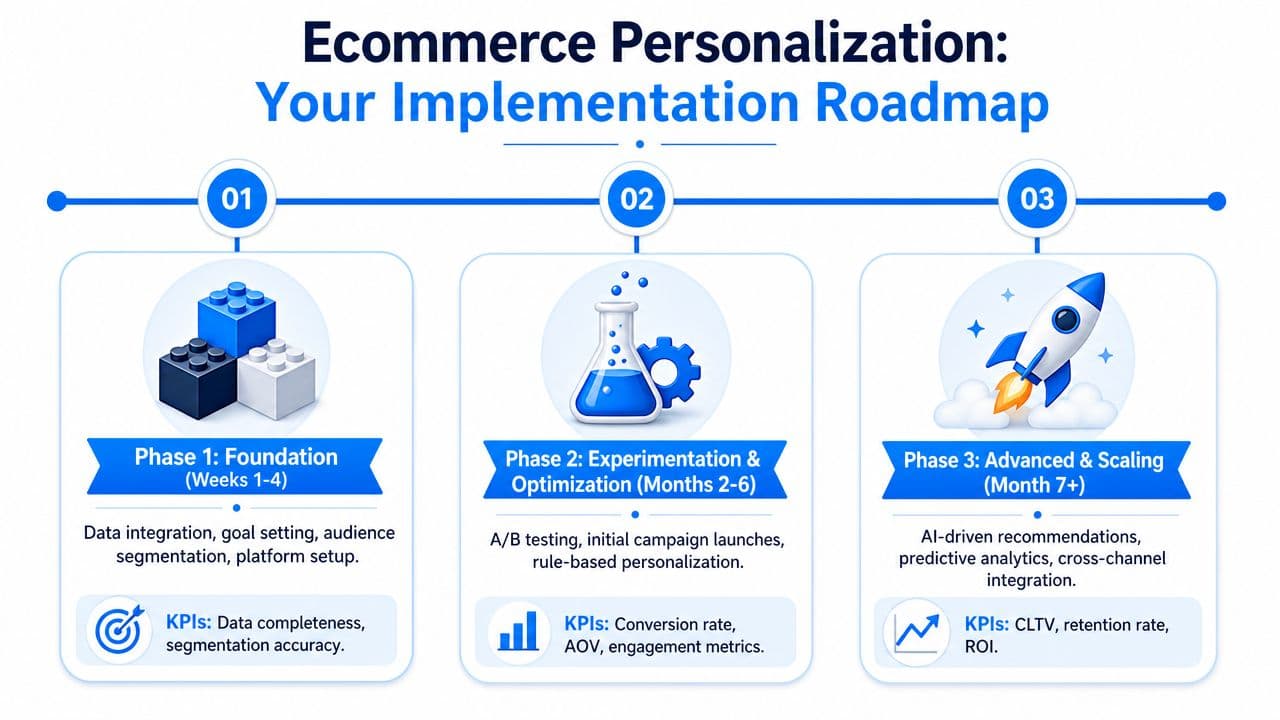
The fastest way to stall a personalization project is to launch everything at once. Most guides talk about features. The harder question is which tactic should come first. MoEngage's perspective on ecommerce personalization software gets at the core issue: store owners need to decide whether to prioritize onsite recommendations, proactive chat, or lifecycle messaging based on effort and expected impact.
Phase 1: Foundation
Start with the shortest path to relevance.
For most Shopify stores, that means implementing a small number of high-intent placements such as product page recommendations, cart cross-sells, or collection-page sorting improvements. Keep the scope tight enough that you can judge whether the tool is helping shoppers move forward.
Track:
- Revenue per visitor
- Product page add-to-cart rate
- Click-through rate on recommendation modules
- Conversion rate by traffic source
- Data quality issues spotted during setup
Phase 2: Optimization
Once the foundation is live, test the mechanics instead of multiplying placements. Compare recommendation strategies. Adjust where modules appear. Change fallback logic for low-data sessions. Introduce triggered experiences where hesitation is common.
Examples include shoppers who loop through multiple products, visitors who appear stuck on sizing or compatibility questions, or carts that stall before checkout.
A strong KPI view matters here. This guide to ecommerce key performance indicators is a useful reference if you want a sharper measurement framework for the storefront, cart, and retention layers.
Phase 3: Automation and scale
Only move into broader automation after you trust the underlying signals. More advanced programs can connect onsite behavior with post-purchase follow-up, dynamic merchandising logic, and deeper customer segmentation.
At this stage, the software should be earning authority. It has seen enough behavior to improve matching over time, and your team should know which touchpoints deserve automation versus manual oversight.
Track:
- Segment-level conversion trends
- Average order value by personalized experience
- Cart recovery rate
- Repeat purchase behavior
- Overall ROI from the tool
Personalization should scale in the same order trust scales. First prove relevance, then automate more of it.
Common implementation mistakes
These are the failures I see most often:
-
Starting with homepage personalization only
Product pages and carts are usually closer to revenue. -
Running with messy product data
If product attributes are inconsistent, recommendations get sloppy. -
Treating every visitor the same in testing
New and returning users often need different logic. -
Skipping governance
Merchants still need override controls for promotions, stock constraints, and seasonal campaigns.
The best rollout feels boring at first. Fewer features. Clear placements. Clean tracking. That's what creates the confidence to expand.
Conclusion: Your Next Steps in Personalization
Ecommerce personalization software works when it solves a specific buying problem. It doesn't work because a vendor says “AI” often enough.
For a Shopify store, the practical path is usually simple. Start where shoppers hesitate most. Choose software that can do useful work with the data you already have. Make sure it handles anonymous visitors well. Then measure relentlessly.
The stores that get value from personalization rarely begin with a massive transformation. They begin with one decision: improve product discovery, improve guidance, or improve recovery. After that, they refine what works and ignore the rest.
If you're deciding where to start, audit your current journey with one question in mind: where does a shopper need help choosing, and where is your store still generic? That answer usually points to the first implementation worth making.
If you want a practical way to add personalized guidance without a heavy implementation project, Carti is built for Shopify teams that need faster answers, smarter product suggestions, and proactive sales support directly on the storefront. It works like a 24/7 sales associate, helping shoppers find the right products and helping merchants recover more revenue from traffic they already paid for.

Written by
Daniel AndersonFounder of Carti. 10+ years building ecommerce brands in apparel and supplements. Still runs a Shopify store and built Carti to help merchants convert more browsers into buyers.
Ready to boost your store's sales?
Install Carti in 5 minutes and let AI handle customer questions, recommend products, and close sales 24/7.
Start Free Trial14-day free trial