
Your Shopify team looks busy all day, yet the backlog barely moves. Support is bouncing between live chat, order edits, cart-recovery nudges, email, and Slack. One person is always waiting on another shift to pick something up. Meetings feel productive in the moment, but by Friday, the same issues are still open.
That's usually the point where operators start shopping for another app. Sometimes that helps. Often it doesn't. Most team-efficiency problems in e-commerce start earlier, with team design, unclear ownership, weak handoffs, and workflows that force people to context-switch all day.
In Shopify operations, efficiency isn't just about speed. It's about getting the right customer answer fast, routing exceptions cleanly, and keeping the team calm enough to make good decisions during promotions, product drops, and support spikes. If you want to know how to improve team efficiency, start with the system your people work inside, then add automation where it removes friction instead of creating more of it.
Understanding the Key Concepts
A common Shopify mistake is building one large “support team” and expecting it to act like a tight operating unit. It usually doesn't. Once too many people share the same queue, ownership gets fuzzy, side conversations multiply, and decisions slow down.
Why team size changes behavior
McKinsey's research, summarized in these teamwork statistics, found that team effectiveness declines significantly when teams exceed ten members, and that the ideal size sits between three and nine people to preserve ownership and communication efficiency. That finding matches what shows up in e-commerce operations every day. A nine-person team can usually align around a promotion issue or a returns-policy edge case quickly. A larger group tends to split into informal pods, and the handoff cost climbs.
In practice, that means a fast-growing Shopify brand should resist the urge to dump chat, email, social DMs, and post-purchase exceptions into one oversized team. Smaller squads with clear scopes usually move faster. For example, one pod can own pre-purchase chat and cart questions, while another owns post-purchase service and exception handling.
Practical rule: If people regularly say “I thought someone else had that,” the problem usually isn't effort. It's team design.
Efficiency is human before it is technical
A lot of leaders treat efficiency like a tooling problem. It's partly a tooling problem. It's also a trust problem.
When agents don't feel safe flagging a broken macro, challenging a confusing policy, or asking for help during a surge, errors stay hidden longer. In Shopify support, that creates real friction. Customers get inconsistent answers on shipping windows, subscriptions, or returns. Supervisors spend more time cleaning up avoidable mistakes. People then become even more cautious, which slows decisions further.
Psychological safety matters because teams work faster when people can raise issues early. That doesn't mean lowering standards. It means making it normal to surface ambiguity before it turns into rework. The best operators I've seen are candid and structured at the same time. They document decisions, assign owners, and still leave room for someone on the frontline to say, “This workflow is breaking at checkout questions” without worrying they'll get blamed for speaking up.
If you skip that layer and jump straight to automation, you usually automate confusion.
Diagnosing Root Causes of Inefficiency
Often, teams don't need more urgency. They need a better diagnosis. In Shopify stores, inefficiency usually hides inside routine work: duplicate replies, unclear escalations, low-value meetings, and shift changes that drop context.
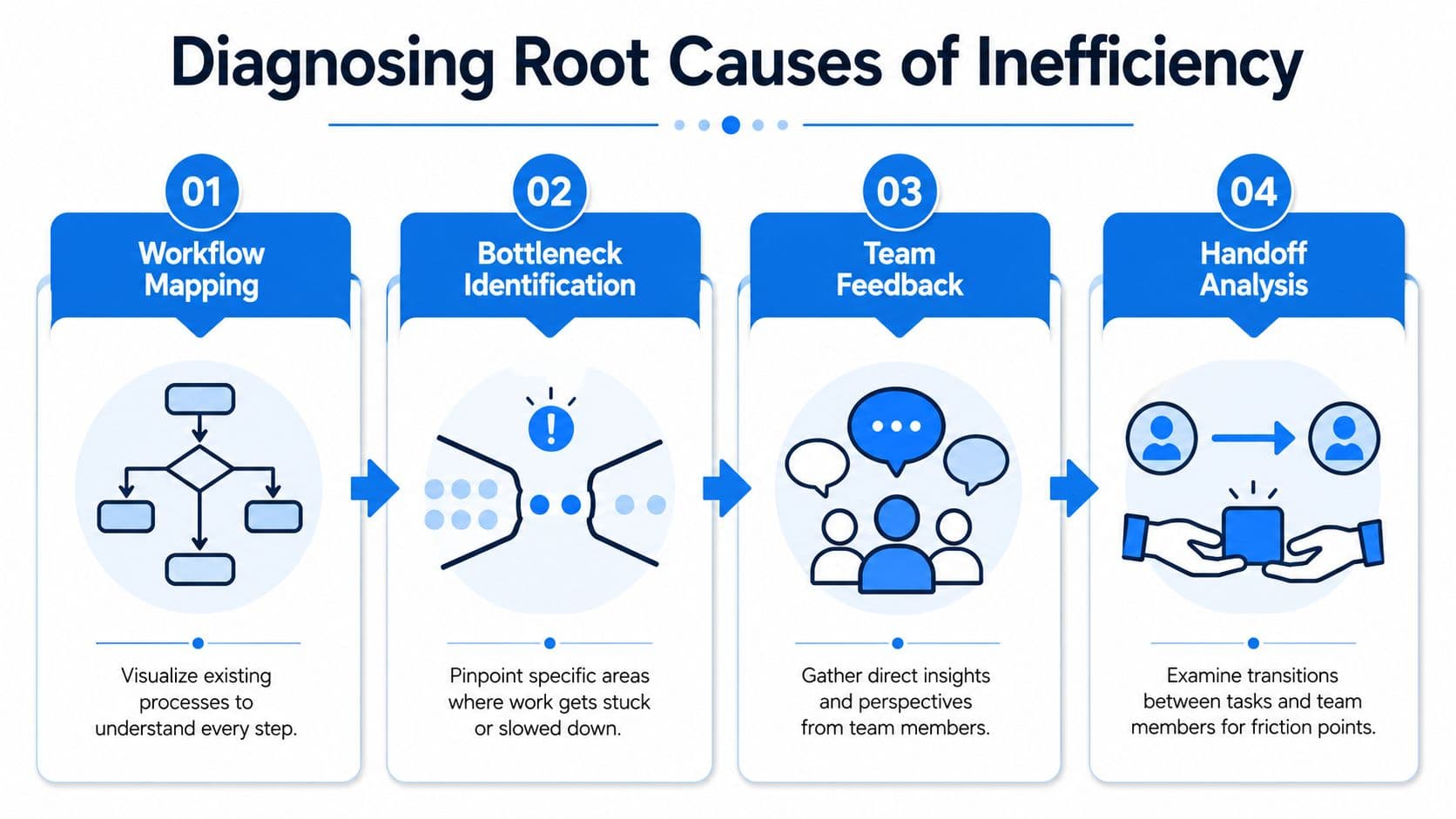
Run a four-part audit
Start with a simple audit that follows the work, not the org chart.
-
Workflow mapping
Write down the actual path for common requests. Use real examples such as “Where is my order?”, “Can I change my size?”, “Why didn't my discount apply?”, or “Can you hold my cart?” Include every tool touched, every approval needed, and every point where a customer waits. -
Bottleneck identification
Look for the step where work piles up. In Shopify support, common bottlenecks are manager approvals, order-edit permissions, refund exceptions, and queues that require product-team input before agents can answer. -
Team feedback
Ask the people doing the work what keeps breaking. Don't ask broad questions like “How can we improve?” Ask what they repeat, what they wait on, and what they dread when a campaign launches. -
Handoff analysis
Review what happens across shifts, channels, and roles. Global teams often lose time in this area, especially when one person leaves a vague note and the next person has to reconstruct the issue from scratch.
A strong evidence base supports structured intervention. A meta-analysis from CIPD covering 83 studies found that well-planned interventions such as teambuilding, training, debriefing, and SMART goals improve team effectiveness, with goal-setting showing a 0.62 standardized mean difference in performance outcomes.
What good diagnosis looks like in a Shopify store
The audit gets useful when you force it into concrete observations.
- Meeting waste: If the same supervisors attend recurring meetings without making decisions, audit those meetings hard. Move status updates to async notes. Keep live time for exceptions, prioritization, and policy calls.
- Weak feedback loops: Use short weekly check-ins with specific examples. The SBI model works well because it keeps feedback grounded in observable behavior rather than opinion.
- Broken shift transitions: Review handoff notes from the last seven days. If the incoming shift can't act without sending follow-up questions, the handoff format is failing.
- Task sprawl: List recurring work by value. Some tasks should be deleted entirely. Others should wait, move to another owner, or be reduced in scope.
The fastest operational gains often come from removing work, not speeding up bad work.
A useful diagnostic habit is to pick one failed customer journey each week and trace it backward. Don't stop at the last mistake. Keep going until you find the structural cause: unclear ownership, a missing template, a bad meeting, a tool mismatch, or a handoff that carried no real context.
Measuring Efficiency with Key Metrics
Teams get lost when they track too much. For Shopify operations, a small dashboard is better than a sprawling reporting stack nobody trusts. The goal is to make weak spots visible early enough to act.
Track a small set of operational signals
For most stores, the best starting point is a weekly view of response speed, resolution quality, workload balance, and revenue-adjacent support outcomes. That can live in a help desk, a spreadsheet, or a lightweight ops dashboard. Keep it boring and reliable.
This is also where leaders miss a major connection. Engagement affects output. According to workplace productivity statistics collected by ActivTrak, employees who feel engaged are 18% more productive, and companies that invest in mental health see a $4 return for every $1 spent. If your metrics improve only when agents are overextended, you're not measuring efficiency. You're measuring short-term strain.
A good KPI should tell you whether the team is getting faster without getting sloppier or more fragile.
When stores want to tie support work to commercial outcomes, it helps to look beyond ticket metrics alone. This guide on ROI from multi-channel outreach is useful because it frames measurement around channel performance instead of isolated activity. That's the right mindset for support, chat, SMS, and recovery flows too.
For teams comparing stack options, reviewing practical summaries of e-commerce automation tools can help clarify which data should live in the help desk, which belongs in Shopify, and which should feed a shared reporting view.
Core efficiency KPIs
| KPI | Definition | Measurement | Target |
|---|---|---|---|
| Average response time | How quickly the team answers inbound chat, email, or ticket requests | Review weekly by channel | Set a channel-specific target your team can sustain consistently |
| Resolution rate | Share of customer issues fully resolved without repeated follow-up | Review weekly and monthly | Aim for steady improvement and fewer reopenings |
| Escalation rate | How often frontline requests require supervisor or specialist support | Review weekly | Lower is usually better, unless a policy change is driving valid escalations |
| Handoff completion quality | Whether the next person can continue work without asking for missing context | Review sampled cases weekly | Incoming shift should have enough context to act immediately |
| Cart recovery assist rate | How often support interactions contribute to salvaging abandoned or at-risk purchases | Review weekly during campaigns and monthly otherwise | Compare against your own baseline and promotion periods |
| Agent utilization | How much time goes to active customer work versus meetings, admin, and rework | Review weekly | Balance workload without pushing constant saturation |
The main mistake with metrics is chasing a faster first reply while ignoring avoidable rework. A quick but incomplete answer can make the dashboard look healthy and the customer experience worse. Measure what happens after the first touch, not just how fast it started.
Enhancing Processes and Team Communication
When a Shopify team says communication is the problem, the issue is usually process shape. People talk too much in the wrong places and not enough in the moments that matter. Standardization fixes more than motivation speeches ever will.
Standardize the work before you optimize it
A practical framework here is D3D: Delete, Defer, Delegate, Diminish. According to marketing operations benchmarks reported by The CMO, implementing a D3D task-elimination framework with a priority matrix yields a 21% average increase in team output efficiency within 90 days.
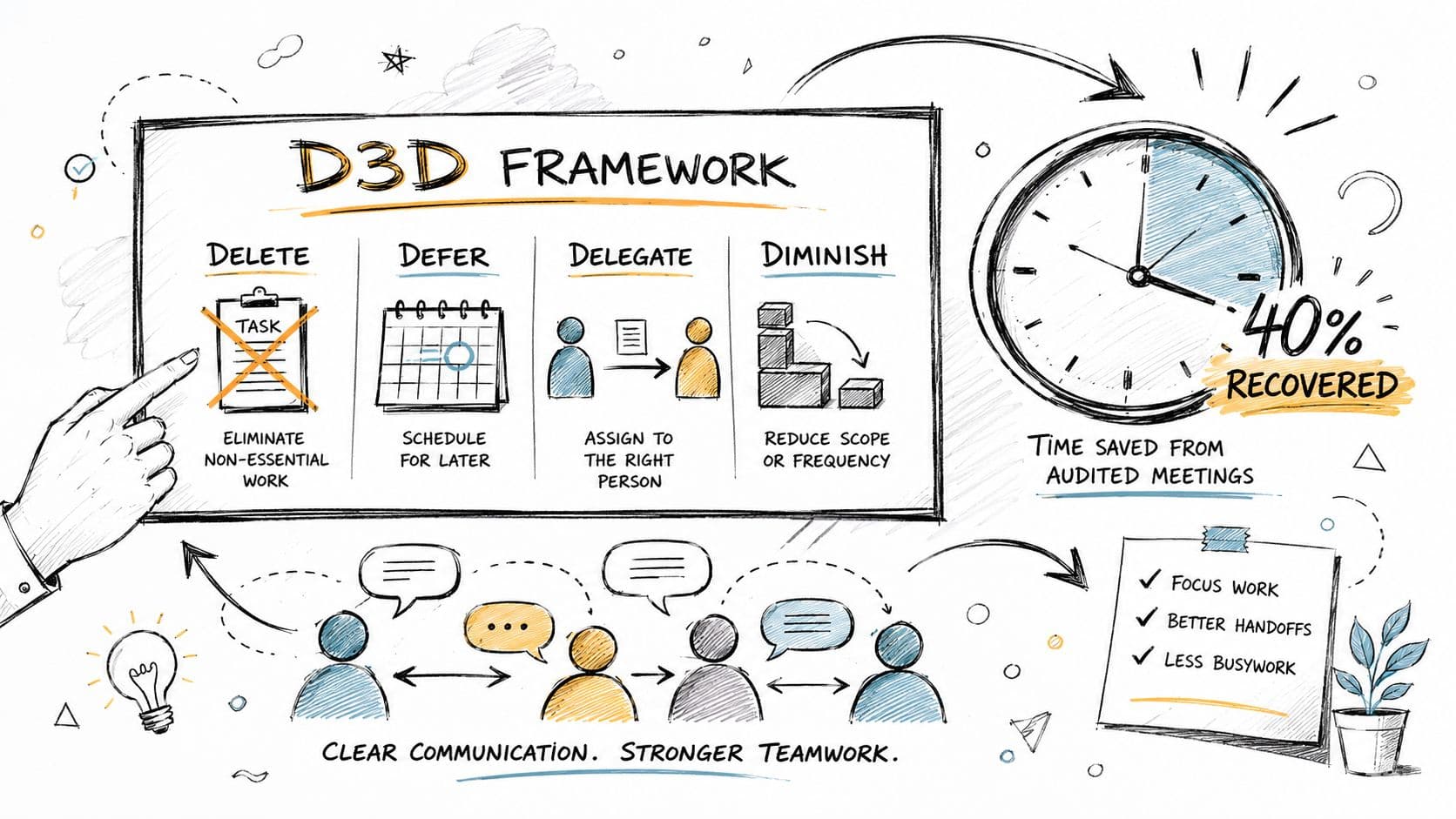
In e-commerce terms, that framework looks like this:
- Delete low-value reports nobody reads, duplicate notifications, and “just in case” approval steps.
- Defer nice-to-have cleanup work into a real backlog instead of letting it interrupt live operations.
- Delegate recurring tasks like FAQ maintenance, macro cleanup, or basic order-status handling to the right owner.
- Diminish work that doesn't need a full custom treatment. Not every edge case needs a meeting, a senior review, and a bespoke response.
That discipline matters most during high-volume periods. Teams under pressure tend to add work. Good operators remove it first.
Set communication rules that reduce drag
Async communication only works when teams know what belongs where. Without that, Slack becomes a ticket queue, email becomes a graveyard, and meetings become a rescue mechanism for poor documentation.
A few norms usually clean this up fast:
- Use chat for fast clarification, not policy decisions that others will need later.
- Use documented notes for handoffs so the next shift sees customer context, current status, and the exact next action.
- Use meetings for decisions, not status recaps people could read.
- Use email sparingly for cross-functional communication that needs a durable record outside the support team.
If you're working on service design in a DTC context, this piece on improving customer experience for DTC brands is worth reading because it connects efficiency choices directly to customer-facing outcomes.
For teams tightening routing and reducing repetitive support effort, a practical next step is evaluating help desk automation approaches that support consistent triage rather than creating yet another inbox to monitor.
Good communication norms don't make the team feel busier. They remove the need to ask where information lives.
Implementing Automation and Tooling
Automation helps when it removes repeated work from the queue and leaves people with the cases that need judgment. It hurts when it adds another tool, another notification stream, or another half-maintained knowledge base.
Automate repetitive storefront conversations
The cleanest automation opportunities in Shopify are repetitive and high-frequency. Think shipping questions, return windows, sizing clarifications, order-status requests, discount-code confusion, and product recommendations tied to browsing behavior.

Good setup follows a simple sequence:
-
Start with FAQ coverage
Pull your top recurring pre-purchase and post-purchase questions. If the same issues keep appearing in chat transcripts or support macros, those are the first candidates for automation. -
Map triggers to intent
Product pages, cart pages, shipping-policy views, and checkout hesitation all signal different customer needs. Automation should respond to that context, not blast the same message everywhere. -
Escalate cleanly
When the request needs policy judgment, empathy, or account-specific action, the system should hand it to a person with enough context attached.
That's why no-code deployment matters. The less time your team spends on implementation complexity, the more time they can spend refining logic, copy, and escalation paths. If you're comparing approaches, this overview of what no-code automation means in practice is a useful starting point.
Connect tooling to the workflow you already run
The hard part isn't installing software. It's fitting it into the operating model you already have. A Shopify brand with global coverage needs tools that support handoffs, knowledge consistency, and clear ownership across shifts.
This matters even more for blended teams. Some brands keep core CX strategy in-house and add flexible support capacity around it. If that's your model, resources on how to Hire LatAm Virtual Assistants can help operators think through staffing coverage, language fit, and process readiness before they expand queue capacity.
Here's a quick walkthrough of what solid implementation should look like in practice:
The biggest mistake with automation is expecting it to fix process ambiguity. It won't. If your return-policy exceptions are unclear, your macros conflict, or your shifts don't leave usable notes, automation will just expose the mess faster. Clean process first. Then automate the repeated parts.
Tracking Outcomes and Quick Wins
Efficiency work sticks when teams review it on a cadence that's light enough to maintain. Most Shopify teams don't need a complex operating review. They need a weekly checkpoint, a monthly pattern review, and a quarterly reset on ownership, tooling, and workload design.
Build a lightweight review rhythm
A useful review template has three layers:
- Weekly check
Review queue trends, unresolved cases, escalation themes, and handoff failures. Pick one friction point and assign one owner. - Monthly review
Look for repeated policy confusion, recurring workflow delays, and channels creating unnecessary rework. - Quarterly reset
Revisit team structure, process documentation, and whether your tool stack still matches the work.
For global teams, handoff quality deserves its own line item. Research summarized in Asana's guide to improving team efficiency at work indicates that without explicit handoff protocols and single-source-of-truth documentation, global teams suffer a 30% productivity drop due to context switching and rework. In e-commerce, that often shows up as duplicated replies, repeated troubleshooting, or a shopper having to restate the issue after every shift change.
Quick wins that usually stick
Some fixes are small enough to apply this week.
- Five-minute async updates help replace status meetings that don't produce decisions.
- Micro-training on one issue at a time works better than broad retraining after a bad week.
- A fixed handoff template reduces guesswork between shifts.
- One source of truth for policies cuts down on conflicting answers.
- A weekly “what created rework?” question surfaces process debt before it spreads.
Teams don't build trust through slogans. They build it when the next person can pick up the work without starting over.
If you're trying to improve team efficiency in a Shopify store, don't chase dramatic overhauls first. Tighten ownership. Reduce avoidable work. Make handoffs explicit. Track a few metrics that reflect both speed and quality. Then add automation where it removes repeated effort from the customer journey and gives your team more room for the work humans should still own.
If you want a practical way to reduce repetitive support load and give shoppers instant answers around the clock, Carti is built for Shopify teams that need faster responses, cleaner pre-purchase support, and less manual strain without a heavy implementation project.

Written by
Daniel AndersonFounder of Carti. 10+ years building ecommerce brands in apparel and supplements. Still runs a Shopify store and built Carti to help merchants convert more browsers into buyers.
Ready to boost your store's sales?
Install Carti in 5 minutes and let AI handle customer questions, recommend products, and close sales 24/7.
Start Free Trial14-day free trial