
You're probably looking at Shopify Analytics right now and seeing a pattern that makes no sense at first glance. Traffic is coming in. Meta ads are spending. Maybe Google is sending product page visits. People browse, a few add to cart, and then sales lag behind what the traffic should support.
That usually isn't a traffic problem. It's a funnel problem.
The awareness consideration conversion model gives you a clean way to diagnose where revenue is leaking. Instead of asking, “Why isn't my store converting?” you ask three sharper questions. Are the right people discovering the store? Are product pages doing enough to build confidence? Is checkout making the final step harder than it should be? Once you frame it that way, the fixes become practical.
Why Your Shopify Traffic Is Not Converting
A common Shopify scenario looks like this. A store launches a paid social campaign, sessions rise, and the founder feels momentum for about a week. Then the uncomfortable part shows up. The ad account says people are clicking, but Shopify says very few are buying.
The mistake is treating all visitors as if they're on the same step of the journey. They're not. Some just discovered your brand. Some are comparing you against two other stores. Some are already sold but hit friction at checkout. If you send all of them to the same product page and hope for the best, the funnel breaks.
That's where awareness consideration conversion stops being marketing jargon and starts becoming a diagnostic tool. It helps you identify whether the primary issue sits in audience targeting, product page persuasion, or checkout execution. In practice, most stores have leaks in more than one place, but one stage is usually doing the most damage.
Practical rule: Don't judge the store by total traffic. Judge each stage by whether visitors are taking the next logical action.
For Shopify merchants, this matters because the platform makes it easy to launch fast, but speed can hide structural problems. A polished theme doesn't guarantee clear messaging. A high click volume doesn't guarantee buyer intent. A decent add-to-cart rate doesn't guarantee completed orders.
If you need a companion resource focused specifically on store-level conversion work, boost your Shopify sales with this guide. It pairs well with a funnel-first approach because it forces attention back to the actual buying path, not vanity metrics.
The Three Stages of the Ecommerce Sales Funnel
Think of your Shopify store like a physical retail store in a busy shopping district.
Awareness is the shop window. People notice the brand, the products, the vibe, and whether the store looks relevant to them. Consideration starts when they walk in and handle the product, read the label, compare options, and ask questions. Conversion happens at the register when they decide to pay and leave with the item.
That sounds simple. In reality, each step requires a different job from your store.
A simple retail analogy
At the awareness stage, your goal is visibility with relevance. Channels like Instagram Reels, TikTok, Google Shopping, SEO content, Pinterest, and creator partnerships bring first-time visitors in at this point. The wrong move here is chasing cheap clicks from people who were never likely to buy.
At the consideration stage, shoppers need clarity and trust. They're checking product photography, descriptions, reviews, delivery details, sizing, ingredients, materials, and return policies. If those signals are weak, they don't keep moving.
At the conversion stage, the shopper has mostly made the decision already. Now they need a checkout that doesn't interrupt them. Forms, surprise fees, payment limitations, or friction on mobile are what kill the sale at this point.
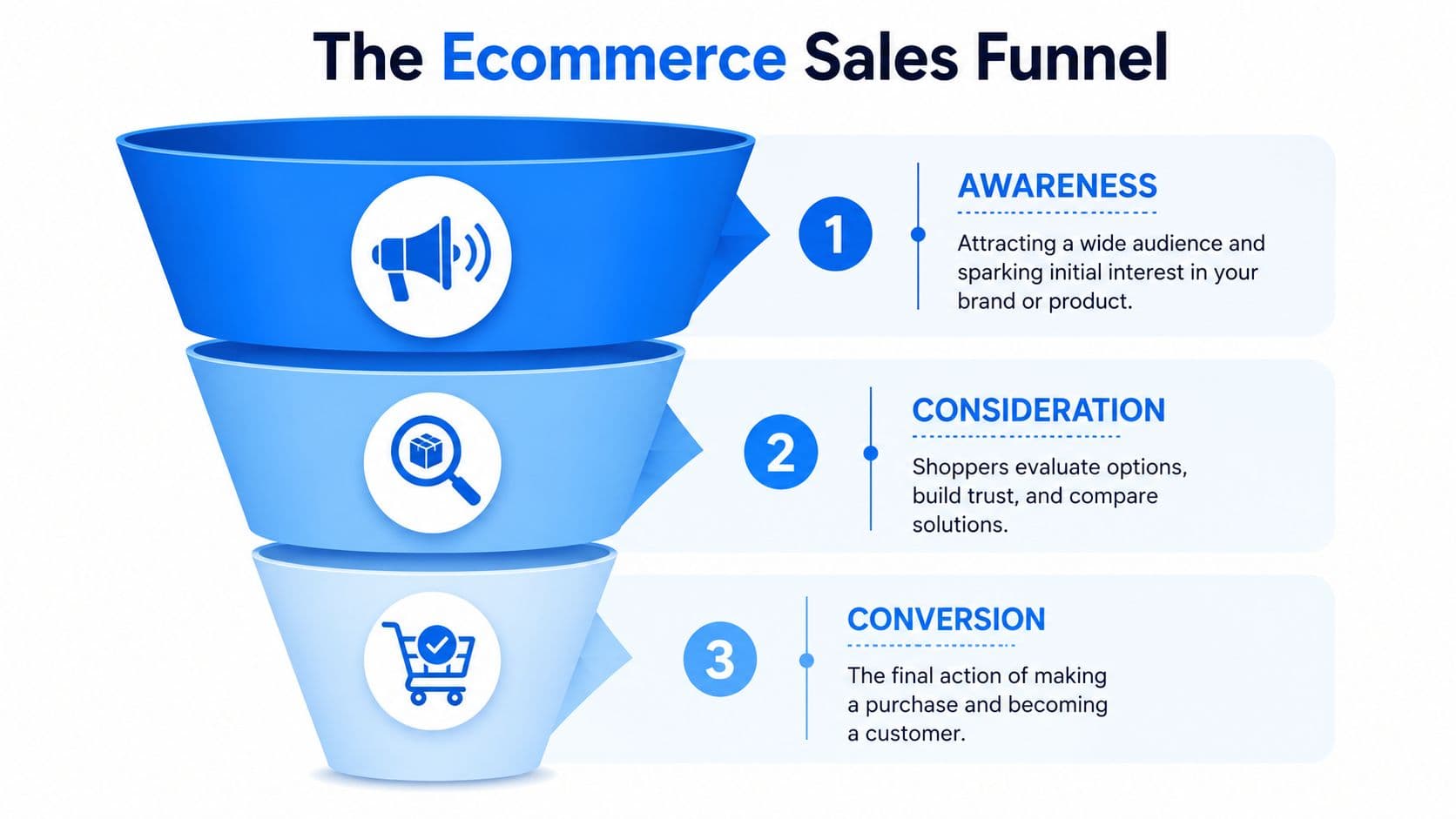
The Shopify Sales Funnel at a Glance
| Stage | Primary Goal | Key KPIs | Common Channels |
|---|---|---|---|
| Awareness | Attract relevant visitors | Impressions, click-through rate, bounce rate | Paid social, SEO, influencer content, Google Shopping |
| Consideration | Build trust and buying intent | Product page engagement, add-to-cart activity, review interaction | Product pages, collection pages, email flows, onsite messaging |
| Conversion | Remove friction and complete purchase | Checkout completion, cart abandonment, payment method usage | Shopify checkout, cart recovery flows, payment options, checkout UX |
A good funnel strategy keeps these jobs separate. You don't ask awareness content to close the sale too early, and you don't ask checkout to compensate for weak product positioning.
If you want another perspective on mapping channels to stages, this modern ecommerce sales funnel strategy is useful because it helps merchants think in systems instead of isolated campaigns.
Mastering the Awareness Stage To Attract Shoppers
Most Shopify stores don't have a traffic shortage. They have a relevance shortage.
If top-of-funnel campaigns attract the wrong audience, the rest of the funnel has to work twice as hard. Product pages end up trying to persuade people who were never a fit, and checkout gets blamed for a problem that started much earlier.
Traffic quality beats traffic volume
At the awareness stage, the job is to pull in shoppers who are likely to care. For consumer funnels, bounce rate and click-through rate are the dominant predictors of whether a user enters the consideration set, and CTR directly correlates to the number of people who put the brand in their consideration set (Webeyez). That's why broad reach by itself can be misleading.
A skincare brand, for example, will usually get more useful traffic from a short routine video that shows texture, use case, and result context than from a polished lifestyle clip that only looks pretty. A home goods brand will often do better with “how this fits in a small apartment” content than with generic brand montage footage. The first type pre-qualifies. The second type often just entertains.
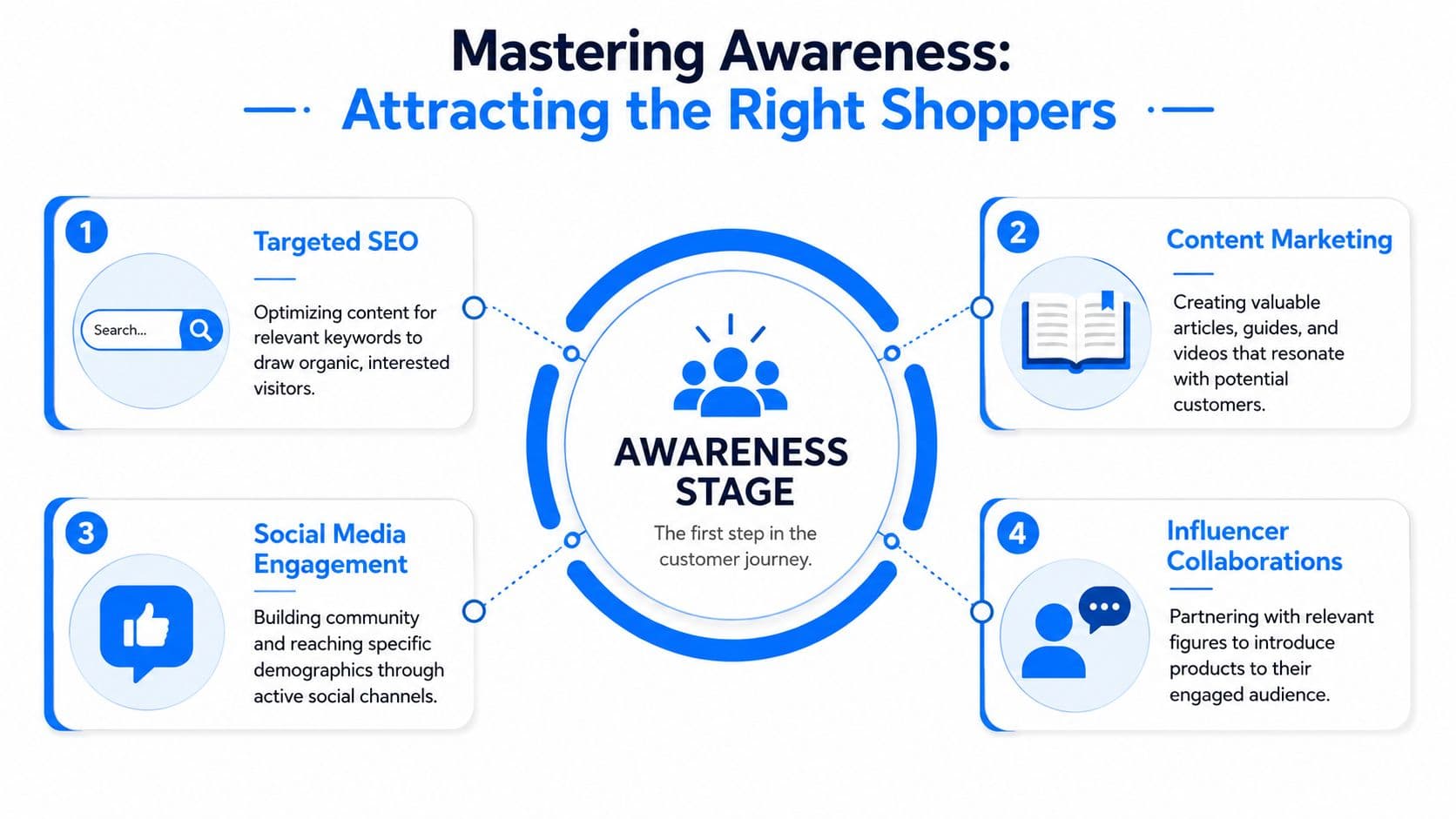
Channels that fit Shopify brands
Different channels pull different intent.
- Paid social works best when the creative demonstrates the product in context. A beauty brand can run a creator-style “get ready with me” clip. A supplement brand can lead with a specific routine or use case. Don't make the ad do too much. Its job is to create enough interest for the click.
- SEO content works when the article matches a real shopper question. If you publish educational content tied to actual buying behavior, organic traffic tends to arrive warmer than random top-funnel visitors. This breakdown of traffic sources for websites is useful if you're sorting which channels deserve more attention.
- Influencer collaborations work when the audience fit is tight. A smaller creator with strong product alignment often drives better consideration than a broad creator whose audience doesn't match the SKU.
- Google Shopping is less about storytelling and more about demand capture. Feed quality matters. Titles, images, and pricing clarity do a lot of heavy lifting.
Awareness content should answer one silent shopper question fast: “Is this for someone like me?”
What to measure at the top of funnel
For Shopify merchants, three signals matter more than vanity metrics:
- Click-through rate tells you whether the message is compelling enough to earn the visit.
- Bounce rate tells you whether the landing page matches the promise of the ad or content.
- Entry-page behavior tells you whether first-time visitors keep browsing or exit immediately.
A practical workflow is to compare each traffic source against its landing page. If Instagram traffic bounces, the problem might be message mismatch. If SEO traffic stays longer but doesn't move deeper, the content may be attracting research intent without enough product pathing. If creator traffic lands well on one collection but not another, your offer framing may be off.
Awareness doesn't need to close the sale. It needs to send the right people to the right page with the right expectation.
Winning the Consideration Stage To Drive Purchase Intent
This is the stage where most Shopify stores either earn trust or lose it.
A shopper who reaches a product page is no longer casually browsing. They're trying to answer specific questions. Is this product right for me? Can I trust this brand? What happens if it doesn't fit, arrive on time, or perform the way I expect? If the page makes them work for those answers, they hesitate.
Why shoppers stall on product pages
The biggest drop often happens here. The move from consideration to evaluation, meaning adding to cart, drops to 15–30%, and products with 11–30 customer reviews increase conversion by approximately 68% compared with products that have no reviews (Peasy).
That lines up with what merchants see every day. People don't usually abandon because they hate the product. They abandon because they still have unresolved doubt.
What strong consideration pages include
Good consideration pages reduce uncertainty in layers, not with one flashy design move.
Start with the obvious. Product photos need to answer practical questions, not just aesthetic ones. Show scale, texture, fit, color variation, and usage context. If you sell apparel, show the garment on different body types if your assets allow it. If you sell home goods, show the product in-room, not only on a white background.
Then fix the copy. Product descriptions should help the shopper evaluate, not fill space.
- Lead with the decision points shoppers care about most, such as material, fit, ingredients, dimensions, or compatibility.
- Handle friction in the page itself by surfacing shipping, return, and care information before the shopper has to hunt for it.
- Use review content intentionally. Don't just display stars. Highlight reviews that answer objections like sizing, feel, durability, or ease of use.
A lot of stores bury their best proof too low on the page. If reviews are one of your strongest trust builders, they shouldn't sit behind a tab that only a few shoppers open.
The shopper shouldn't need to become a detective to feel safe buying from you.
Support should remove doubt, not create more clicks
This is also where live assistance matters. Not because every shopper wants a conversation, but because many want a quick answer without leaving the page. Questions like “Does this run small?” or “Will this work with sensitive skin?” aren't support tickets in the traditional sense. They're purchase-blockers.
Behavioral segmentation helps here. If a returning visitor has viewed the same product twice and hovered around policy sections, they likely need reassurance, not another discount. If someone enters from a comparison-style search or campaign, they may need stronger differentiation. This guide on what behavioral targeting is is a solid reference for thinking through those triggers.
Consideration is where the store proves it understands hesitation. Merchants who win this stage usually do four things well:
- They answer questions early instead of waiting for checkout friction.
- They use social proof with substance instead of generic praise.
- They make policies visible where hesitation happens.
- They align support with buyer intent so help feels immediate, not procedural.
If awareness gets the right person into the store, consideration is what makes that person believe buying is a safe decision.
Optimizing the Conversion Stage To Reduce Abandonment
A shopper adds two products, reaches checkout, sees a surprise shipping charge, and leaves. That is not a traffic problem. It is a checkout design problem.
Conversion is the point where interest turns into cash, and Shopify stores often lose sales here for avoidable reasons. Analysts at Red Stag Fulfillment report that ecommerce conversion rates usually sit in a narrow band, with many stores landing around 2.5% to 3% globally and 2% to 4% considered a healthy range. In practice, that means small checkout issues can erase a meaningful share of revenue, especially for stores with strong product demand.
Where checkout friction shows up
The biggest leaks in Shopify checkout are usually simple. Forced account creation. Fees that appear late. Payment methods that do not match buyer preference. Mobile forms that ask for too much.
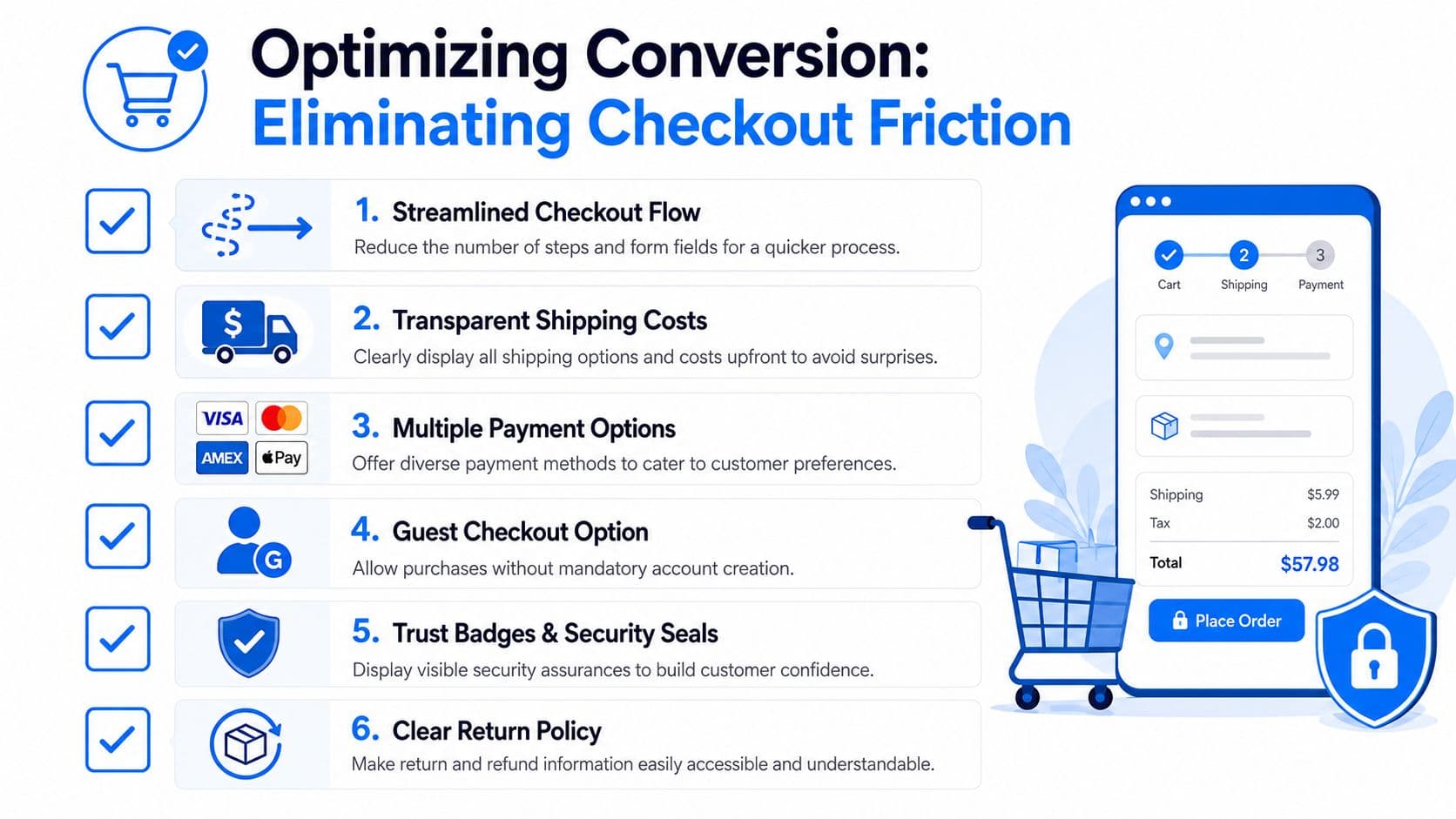
Each one hits at the worst moment. The shopper has already decided the product is worth buying. Now the store asks for extra effort or introduces new uncertainty.
That trade-off matters. A checkout can collect more data for the business, or it can close more orders. In most cases, revenue wins. If an extra field, a required account, or a delayed cost reveal lowers completion rate, it needs a strong reason to stay.
A practical Shopify checkout checklist
Start with the parts of checkout that directly affect completion rate:
- Guest checkout. Let shoppers buy first. Offer account creation after purchase.
- Early cost visibility. Show shipping expectations and likely taxes before the final step.
- Payment options that match intent. Card payments are not enough for every audience. Add Shop Pay, PayPal, Apple Pay, or other methods your customers already trust.
- Mobile form speed. Cut unnecessary fields, enable autofill, and check that buttons stay visible on smaller screens.
- Reassurance near the action. Return windows, delivery timing, and security cues should sit close to the payment decision, not buried in the footer.
Cart recovery tools also matter at this stage, especially for stores with longer consideration cycles. Carti is useful here because it lets merchants trigger recovery flows based on behavior instead of sending the same reminder to every abandoner. A shopper who exited after shipping costs needs a different message than one who dropped off on the payment step.
Some conversion problems start upstream and show up at checkout. If product copy leaves room for doubt about sizing, materials, compatibility, or usage, shoppers often pause before paying. For larger catalogs, it can help to master AI product description strategies so the buying decision feels clearer before checkout begins.
For a visual walkthrough of what merchants should evaluate inside the last step of the funnel, this video is worth watching:
What to fix first
Start where the leak is easiest to measure.
- High cart reach, low checkout completion usually points to hidden costs, weak payment coverage, or form friction.
- Strong desktop checkout but weak mobile completion usually points to input issues, slow load time, or poor wallet support.
- Repeat abandonment on the same step usually means the store is asking for something shoppers do not want to give.
I usually tell Shopify merchants to rank fixes by revenue impact, not by design preference. Remove one blocker, measure the lift, then move to the next. If you want a tighter framework for that audit, this Shopify checkout optimization guide breaks down the highest-impact fixes inside the platform.
How to Continuously Test and Improve Your Funnel
The best-performing stores don't treat awareness consideration conversion as a one-time setup. They treat it like a repeatable operating system.
A simple loop works well. Identify the bottleneck. Form a hypothesis. Run a controlled test. Measure what changed. Then repeat.
Use a simple test loop
Event tracking is non-negotiable if you want clean decisions. The technical side of funnel optimization should include event tracking for key actions and A/B testing on the highest-traffic funnel bottleneck for 2–4 weeks to quantify lift (Product Quant).
That gives you a disciplined way to prioritize. Don't start with the page you like most. Start with the stage where the most shoppers stall.
Here's a practical version for Shopify:
-
Identify the leak
Use Shopify Analytics and Google Analytics to find where people stop. Is it a landing page exit, product page hesitation, or checkout abandonment problem? -
Write one clear hypothesis
Example: “If we move delivery timing above the add-to-cart button, more shoppers will proceed.” -
Test one variable at a time
Change the review placement, not the review placement plus the headline plus the image stack. -
Measure next-step behavior
Look for movement to the next action, not just overall store conversion.
Test the bottleneck with the most traffic first. A small improvement there usually matters more than a dramatic improvement on a low-traffic page.
What your tools should tell you
Your tools should help you answer why shoppers hesitate, not just where they exit.
- Shopify Analytics helps spot product, cart, and checkout patterns.
- Google Analytics helps compare traffic source quality and pathing behavior.
- Heatmaps and session recordings reveal friction that reports can't show, such as rage clicks, missed taps, and ignored content blocks.
- Onsite question logs and support themes tell you what your pages still fail to answer.
That last point matters more than many merchants realize. If shoppers repeatedly ask about fit, ingredients, shipping timing, bundle logic, or returns, they're telling you what the store still hasn't made clear enough. Those questions should shape your next tests, your product page edits, and your merchandising priorities.
The merchants who improve fastest aren't always the ones with the biggest budgets. They're the ones who build a habit of tightening one stage at a time.
Carti helps Shopify stores turn shopper questions into sales by answering product and policy questions instantly, guiding buyers to the right products, and surfacing the hesitation patterns that block conversion. If you want a faster way to support shoppers around the clock and improve the funnel without adding headcount, explore Carti.

Written by
Daniel AndersonFounder of Carti. 10+ years building ecommerce brands in apparel and supplements. Still runs a Shopify store and built Carti to help merchants convert more browsers into buyers.
Ready to boost your store's sales?
Install Carti in 5 minutes and let AI handle customer questions, recommend products, and close sales 24/7.
Start Free Trial14-day free trial