
Your product launch is live. Traffic is up, orders are coming in, and then the support pile starts to swell. One shopper wants to know if a shade is restocking. Another needs help applying a discount code. Someone else is stuck at checkout. Live chat fills, email backs up, and your team starts answering whoever shouts loudest.
That's a queue, even if nobody is physically standing in line.
For Shopify merchants, queues show up in chat widgets, support inboxes, callback requests, appointment slots, and even abandoned carts waiting for intervention. When those requests aren't organized, the damage spreads fast. Customers wait without clarity, high-intent buyers leave, and staff spend their day reacting instead of directing flow. Queue management gives you a system for deciding who gets served, when, through which channel, and with what level of urgency.
Introduction to Queue Management
Queue management is the practice of organizing demand for service so customers move through a system in a controlled, fair, and commercially sensible way. In a store, that might mean one line feeding several cashiers. In e-commerce, it might mean routing preorder questions to self-service, escalating payment failures to a human, and giving VIP shoppers faster help during a launch.
Business leaders often hear the phrase and think only about shortening lines. That's too narrow. More broadly, the issue is matching incoming demand with limited service capacity while protecting customer experience and revenue.
Consider a common online retail moment. A campaign goes out, shoppers flood the site, and support requests spike across chat, email, and social messages. If every request lands in one undifferentiated pile, your team treats a shipping FAQ the same way it treats a checkout failure from a repeat buyer. That is poor queue management, even if response agents are working hard.
Practical rule: A queue is not just a waiting line. It's a decision system.
Once you see it that way, the subject becomes much more useful. You can redesign the order of work, shape expectations during the wait, and use digital tools to keep customers engaged instead of frustrated.
Understanding the Key Concepts
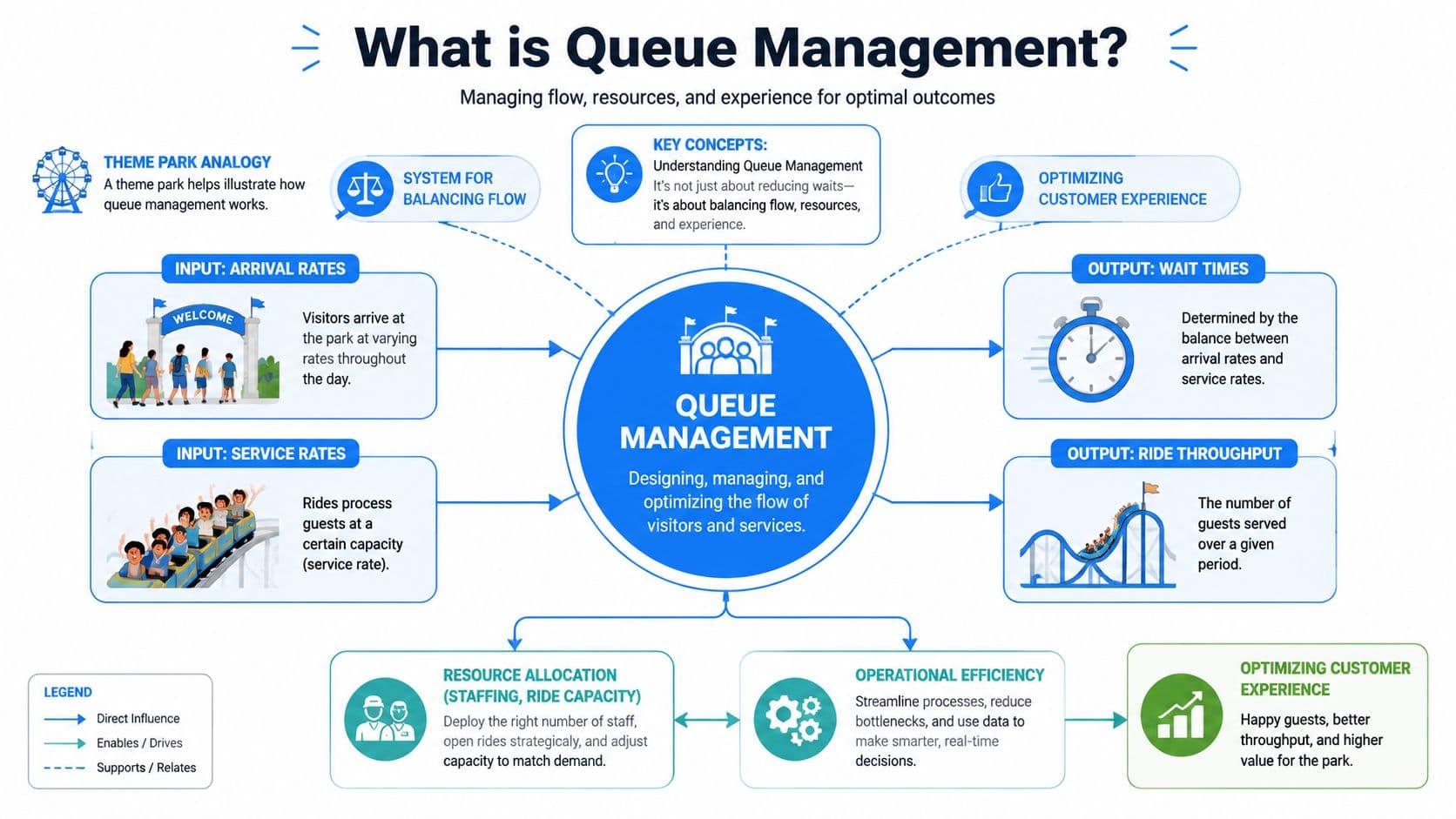
A helpful way to understand queue management is to think about a theme park. Guests arrive at different times. Each ride can process only so many people at once. If arrivals outpace ride capacity, a line forms. Managers can add staff, open more lanes, post wait times, or create priority access. The same logic applies to customer service.
A queue is a flow problem
Queue management balances three forces:
- Arrival rate means how fast requests come in.
- Service rate means how quickly your team or system resolves them.
- Customer expectations shape whether waiting feels tolerable or unacceptable.
If requests arrive faster than they're handled, waiting grows. If customers don't know what's happening, the same delay feels worse. That's why queue design includes both operations and communication.
This is one reason the market keeps expanding. The queue management market projection from Market Intelo says the global market reached $6.2 billion in 2025 and is projected to reach $15.8 billion by 2034, with a 12.3% CAGR.
The terms that matter most
A few terms remove most of the confusion:
| Term | Plain meaning | Why leaders should care |
|---|---|---|
| Wait time | How long a customer waits before service begins | Long waits increase friction |
| Throughput | How many customers you can serve in a period | Higher throughput means more work completed with the same hours |
| Abandonment rate | How often people leave before being served | This reveals lost demand |
| Prioritization | Rules for deciding who gets served first | This protects urgent and high-value interactions |
| Perceived wait | How long the wait feels to the customer | Visibility and updates can improve experience even before speed improves |
Digital queues deserve special mention. A person may still be waiting, but not in a visible line. An email marked queued, for example, is waiting its turn inside a system. If you want a simple operational analogy, Robotomail's email queue explanation is useful because it shows how “waiting” can happen invisibly in digital workflows, not just at a service desk.
Types of Queue Management
Some queues are obvious. Others are hidden inside software, inboxes, or chat systems. The right model depends on your channel mix, customer expectations, and how variable your demand is.
Five common models
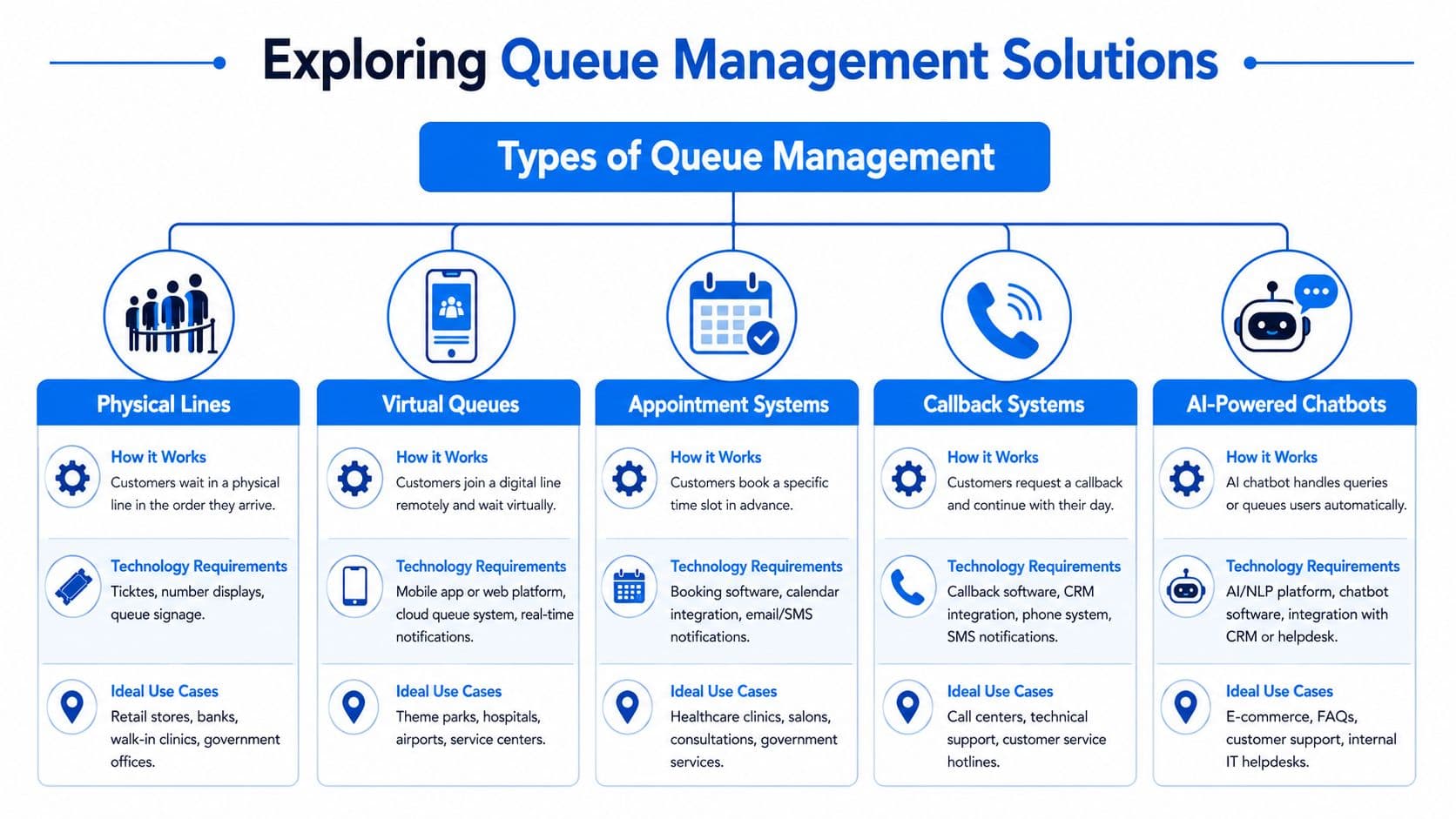
Here are the five approaches leaders run into most often.
-
Physical lines
Customers wait in person, usually first come, first served. This works when demand is visible and service is simple. It requires basic line design, signage, and enough staff at the point of service. -
Virtual queues
Customers join remotely and keep their place without standing in line. They may receive SMS or app updates, then return when it's their turn. This is especially useful when you want to reduce crowding or let shoppers browse while they wait. -
Appointment systems
Customers reserve a service slot in advance. This reduces uncertainty and can smooth daily demand, though it introduces no-shows and scheduling complexity. -
Callback systems
Instead of staying on hold, customers request a return call. This is common for phone support and works well when resolution requires a human conversation but immediate pickup isn't possible.
A short comparison can help:
| Type | Best for | Main strength | Main drawback |
|---|---|---|---|
| Physical lines | In-store demand | Simple to understand | Ties customers to one place |
| Virtual queues | Launches, events, support surges | Flexibility during the wait | Needs messaging and tracking |
| Appointments | Predictable service needs | Better planning | Can create gaps if people don't show |
| Callbacks | Phone-heavy support | Frees the customer from hold time | Depends on follow-up discipline |
Later in the decision process, many teams add automation.
- AI-powered chatbots
These handle routine questions instantly, route edge cases, and keep a customer's place in a digital service flow. In e-commerce, they work especially well for policy questions, order status, product discovery, and cart friction.
How to choose for e-commerce
The biggest mistake is assuming first come, first served is always best. Heyy.io's guide to customer service queue management argues that modern practice requires teams to prioritize tickets by business impact rather than arrival time. That matters in Shopify because a shopper blocked at checkout often deserves faster help than a general return-policy browser.
For stores that want inspiration from other service environments, modern restaurant queuing solutions show how remote check-in and digital waiting can reduce friction when demand spikes.
If you're also reviewing support operating models, this overview of customer service types is a practical companion because queue design works differently across chat, email, phone, and self-service.
Fairness doesn't always mean strict chronology. In many businesses, fairness means protecting the customers and requests with the highest impact.
Benefits and Key Performance Indicators
Queue management matters because it changes operating results, not just customer mood. When leaders can measure those results, queue design stops being a “nice to have” and becomes part of commercial planning.
What improves when queues are managed well
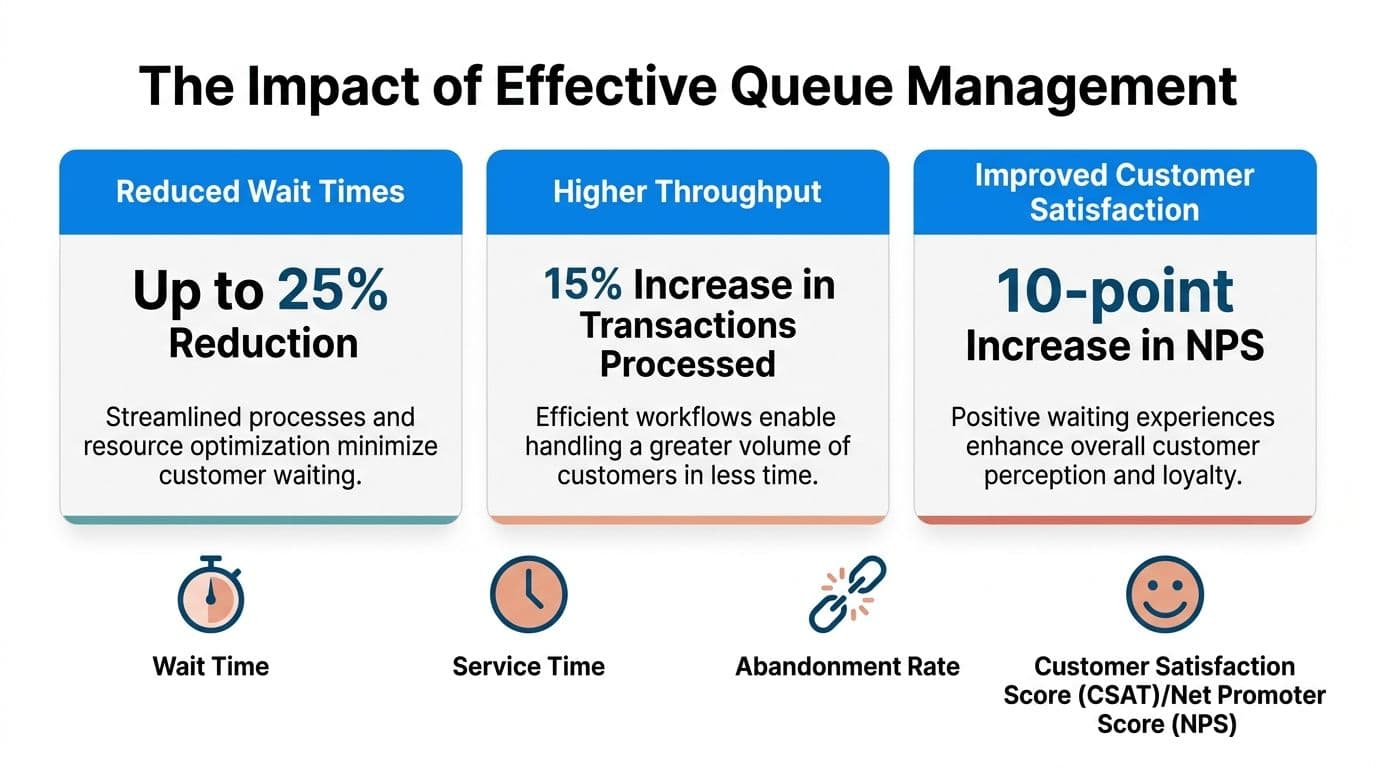
The strongest evidence comes from QueueAway's queue management guide. It reports that implementing effective systems can reduce average wait times by 40%, help businesses serve 32% more customers in the same hours, and generate 340% ROI within the first year.
Those numbers matter because they connect operations to outcomes leaders already care about:
- Faster service lowers visible friction.
- Higher throughput means more customers handled without adding hours.
- Better return on investment turns process improvement into a finance conversation, not just a service conversation.
For online merchants, this can also help frame support as part of conversion. If customers get answers while buying, not long after, service becomes a sales input.
The KPIs worth tracking
You don't need a huge analytics team to start. Most queue programs become clearer when leaders track a short list consistently.
-
Average wait time
Measure the delay before the customer gets meaningful service, not just an auto-reply. -
Service duration
Track how long the interaction takes once work begins. This helps separate waiting problems from process problems. -
Abandonment rate
Count how often customers leave the queue before resolution. In e-commerce, abandonment may show up as chat drop-off, ticket closure without reply, or checkout exit. -
Perceived wait signals
Use survey feedback, complaint themes, and behavior during the wait. Perception changes when customers receive updates and know what comes next.
Leaders who want a broader operational lens can pair queue metrics with this guide on customer service response time, because speed-to-first-response and total time in queue often interact.
Key takeaway: If you only measure agent activity, you'll miss the customer's experience of waiting. Measure the queue itself.
Practical Strategies and Implementation Options
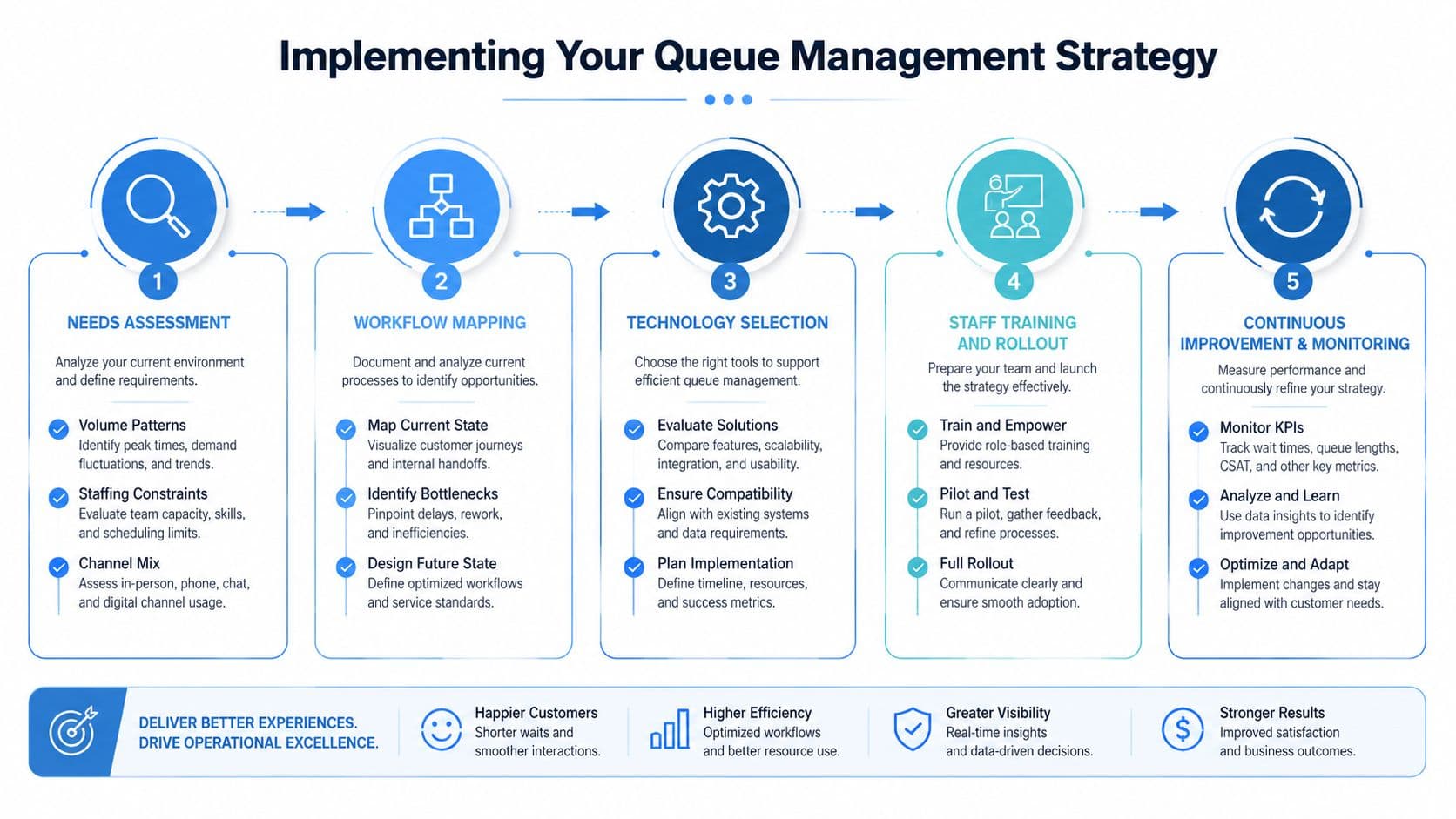
Good queue management starts before you buy software. It starts by learning where demand appears, how it varies, and which delays are expensive.
Start with the operating reality
Many teams try to solve queues by adding another inbox, another app, or another person. That rarely fixes the structure.
A better starting sequence looks like this:
-
Map demand by channel
Separate live chat, email, phone, social, and order-related contacts. Each queue behaves differently. -
Review several weeks of activity
Qminder's implementation guide recommends compiling weeks of arrival data, setting priority rules, and making sure the system supports live wait estimates and two-way messaging. -
Identify service categories
Group requests into order issues, product questions, returns, billing, wholesale, and so on. -
Assign ownership
Match service categories to the people or teams best able to resolve them.
That baseline matters because queue problems are often hidden inside mixed demand. A store may think it has a staffing issue when it really has a routing issue.
Build the system around priority and visibility
Once the baseline is clear, decide how customers will enter and move through the queue.
A simple operating model for Shopify often includes:
-
Virtual waiting for high-volume events
Shoppers get an estimated wait and can keep browsing. -
Appointment booking for high-consideration products
Useful for consultations, fittings, or styling support. -
Callbacks for complex support cases
Better than forcing long live holds. -
Automated triage for repetitive questions
Routine inquiries should not block urgent ones.
If you also manage physical pickup points or in-store service desks, practical resources on effective signage for queues can help because customer confusion often starts before the service interaction itself.
Support the rollout with process design
The software only works if staff know the logic behind it. That means documenting priority rules, escalation paths, and customer messaging standards.
Use a short rollout checklist:
-
Define who jumps the line and why
Repeat customers with payment trouble, urgent fulfillment issues, or vulnerable groups may need priority handling. -
Set communication triggers
Send updates when the wait changes, when a turn is approaching, and when customer action is required. -
Train staff on queue decisions
Agents need to know when to resolve, reroute, or escalate. -
Review reports every week
Staffing and queue rules should change with observed patterns.
Teams exploring automation can also study automated customer support as a companion topic. The useful question isn't whether to automate. It's which part of the queue should be automated, and which part should stay human.
E-commerce Examples and Best Practices
Abstract definitions only go so far. Queue management becomes easier to grasp when you picture the actual operating decisions inside a store.
Fashion launch pressure
A fashion merchant releases a limited drop. Product questions, size checks, and payment issues arrive at the same time. Without triage, the support team answers easy catalog questions while buyers with checkout failures wait.
A stronger setup uses self-service for stock and sizing, a virtual queue for live support, and priority routing for customers who are already in checkout. The queue isn't shorter just because messages disappear. It's better because the high-revenue moments move first.
Beauty brand service triage
A beauty store often sees mixed intent in one support stream. Some shoppers want ingredient details before buying. Others need shade guidance. Others are following up on orders that already shipped.
Treating all three the same wastes specialist time. A better design separates educational questions from transactional problems and lets urgent post-purchase issues skip ahead when needed. That's the practical meaning of prioritizing by business impact.
When demand surges, the best queue is not the one that feels most equal. It's the one that protects the moments most likely to affect revenue and retention.
Wellness store post-purchase volume
A wellness merchant may face a different queue pattern. Launches generate fewer pre-purchase questions but more subscription edits, shipping updates, and reorder concerns afterward.
That store benefits from proactive notifications, order-status self-service, and a callback or message-confirmation option for issues that need a human. The point is not to eliminate waiting entirely. It's to reserve human attention for the interactions where judgment matters.
HubSpot's queue management research notes that unmanaged queues can cause 15% to 25% conversion decay during traffic surges, which is why online merchants should treat queue management as revenue protection, not only as a support process.
Best practices that transfer across stores
Across categories, the same habits show up repeatedly:
-
Show realistic wait expectations
Customers tolerate delay better when they know what's happening. -
Prioritize by value and urgency
Checkout blockers, repeat buyers, and service failures usually deserve faster paths. -
Keep channels connected
A customer shouldn't have to restart the story when moving from chat to email to phone. -
Use the wait productively
During a digital wait, offer clear FAQs, order tools, or relevant product discovery. -
Review queue data with marketing and operations
Repeated questions often signal weak product pages, campaign mismatches, or policy confusion.
Conclusion and Next Steps
What is queue management, then? It's the discipline of controlling how customer demand enters, waits inside, and moves through your service system. Sometimes that system is a physical line. Often, for Shopify merchants, it's a web of chats, emails, callbacks, and onsite buying moments.
The central lesson is simple. Waiting is not just a speed problem. It's a design problem. The strongest queue systems shape expectations, route work intelligently, and protect the requests that matter most to customer retention and revenue.
If you want a practical next move, audit your current queues. List every channel where customers wait. Identify where requests pile up, where buyers drop off, and which interactions deserve priority treatment. Then set a small KPI set: wait time, abandonment, service duration, and throughput.
Start with one controlled improvement. That might be a virtual queue during launches, clearer wait updates, or automated triage for repetitive questions. The goal isn't perfection on day one. It's building a system that lets your team respond with intent instead of reacting under pressure.
If you want to put these ideas into practice quickly, Carti is built for Shopify merchants who need instant answers, smarter customer routing, and always-on support without a heavy setup project. It can help you create a digital front line that answers routine questions immediately, reduces support pressure during traffic spikes, and keeps more shoppers moving toward purchase instead of waiting for help.

Written by
Daniel AndersonFounder of Carti. 10+ years building ecommerce brands in apparel and supplements. Still runs a Shopify store and built Carti to help merchants convert more browsers into buyers.
Ready to boost your store's sales?
Install Carti in 5 minutes and let AI handle customer questions, recommend products, and close sales 24/7.
Start Free Trial14-day free trial