
Self-service support costs $1.84 per contact, while agent-assisted support costs $13.50, according to Gartner-linked benchmarks cited in this AI customer support statistics roundup. For a Shopify merchant, that gap matters. But the bigger issue isn't just cost. It's what happens when a shopper has a sizing question, wants shipping clarity, or needs help comparing products and no one answers fast enough.
Support delays kill buying intent. A customer who can't get an answer during checkout doesn't file that moment away for later. They leave. In a Shopify store, automated customer support works best when you treat it as part sales assistant, part service layer, and part conversion engine.
Why Manual Support Is Costing You Sales
Support delays hit revenue faster than most Shopify operators expect. A shopper with a product question, shipping concern, or return-policy objection is often one unanswered message away from abandoning the cart.
On Shopify, that loss shows up before a ticket ever closes. It happens on product pages, in chat, at checkout, and in post-purchase moments that decide whether the customer buys again or files a chargeback. Manual support slows all of it down because every answer depends on agent availability, queue depth, and business hours.
The principal cost is missed buying intent.
A support inbox only captures shoppers who waited long enough to ask. It does not show the visitor who wanted sizing help at 10:30 p.m., the customer who hesitated over delivery dates for a birthday order, or the repeat buyer who could not find the right subscription option and left. For a Shopify store owner, those are not isolated service issues. They are conversion leaks.
A typical pattern looks like this:
- A shopper asks about fit or compatibility. They want enough confidence to click Buy Now.
- They need a fast answer on shipping or returns. The policy affects whether the order feels safe.
- Response time slips. The shopper keeps browsing, compares another store, or drops out completely.
- The sale disappears. Your team may never see that lost revenue in the help desk.
This is why support should be tied to sales metrics, not handled as a separate back-office function. If the question appears near the PDP, cart, checkout, or order page, it affects conversion rate, average order value, repeat purchase rate, or all three.
For Shopify brands, the operational problem is straightforward. Human agents are spending too much time on repetitive contacts like order tracking, return windows, address changes, subscription edits, and basic product questions. That work still matters, but it does not require a person every time. While agents clear routine tickets, high-value conversations wait. That includes bundle recommendations, pre-purchase objections, VIP issues, and save-the-sale recovery.
Good automation changes the staffing mix. It handles the repetitive flows instantly, pulls order and policy data from the systems your store already uses, and routes exceptions to a human with the right context. A strong AI chatbot for ecommerce on Shopify should reduce waiting time without creating dead-end bot conversations.
The trade-off is important. Full automation on complex or emotional issues can hurt trust. Manual-only support hurts speed and coverage. Shopify merchants get the best result by automating high-frequency, rule-based requests first, then reserving agents for judgment calls and revenue recovery. This guide to Shopify support automation is useful if you want to map those boundaries before rollout.
One practical rule I use is simple: treat pre-purchase support as sales, post-purchase support as retention, and automation as the system that protects both.
Understanding Automated Support Technology
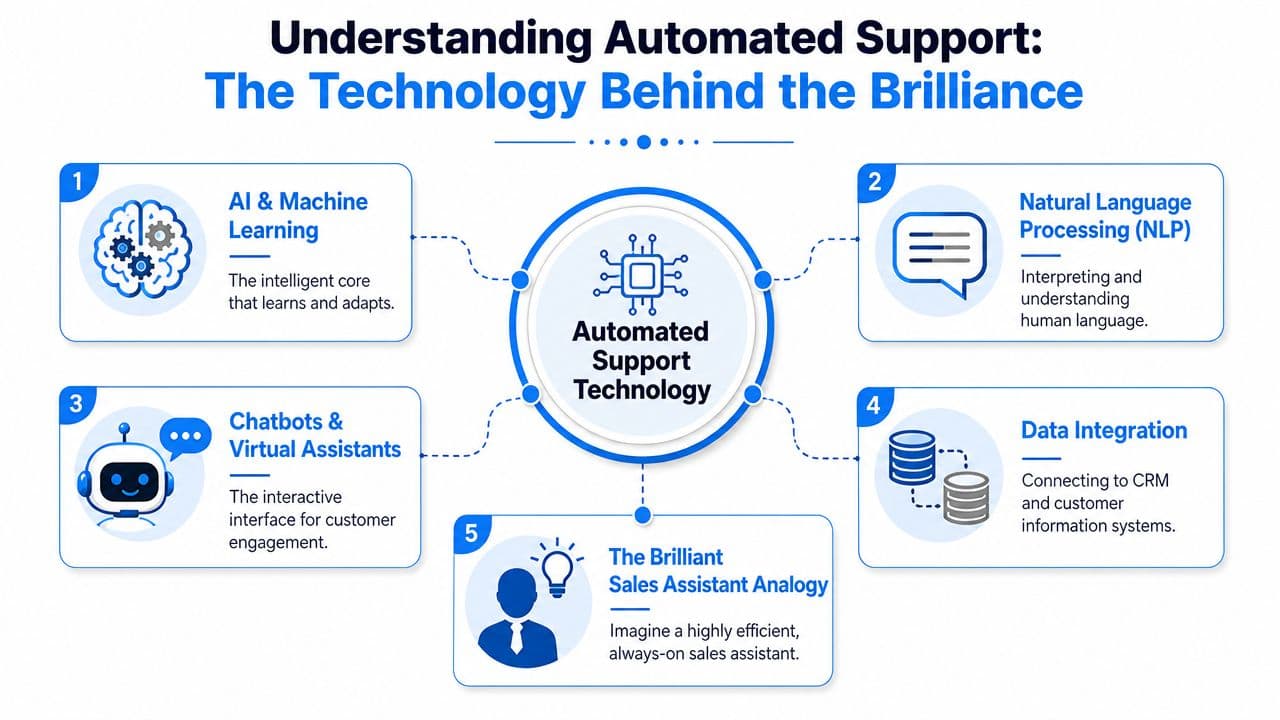
The easiest way to think about automated customer support is this: it's a 24/7 digital sales associate that has memorized your catalog, shipping rules, return policy, and common objections, then follows the right next step without waiting for a person to intervene.
What the system is actually doing
Modern automation runs on intent recognition with NLP plus workflow routing. In plain terms, the system reads the customer's message, figures out what they want, matches that request to a knowledge source or process, and either answers immediately or sends it to the right flow or person. NICE describes that core model in its explanation of automated customer support systems.
That matters because shoppers rarely phrase questions neatly. They type things like "where's my order," "can I return if opened," or "which one is better for dry skin." A useful system doesn't need perfect phrasing. It needs to detect the likely intent behind imperfect phrasing.
For Shopify, the highest-return intents are usually the simplest and most frequent:
- Order tracking
- Return and exchange questions
- Shipping timing
- Product comparison
- Discount or checkout confusion
- Password and account access issues
If you want a practical reference point for how merchants roll this out inside the Shopify ecosystem, this guide to Shopify support automation is a solid companion read. It helps frame setup decisions in store-operator terms rather than abstract AI language.
Why Shopify merchants should care about the mechanics
A lot of merchants don't need to know model architecture. They do need to know why some bots help and others annoy.
A weak setup only generates chat replies. A strong setup connects the reply to store context and action. That can mean surfacing a policy answer, pulling order context, suggesting the right collection, or escalating with the conversation intact.
The difference comes down to workflow design. If you're comparing platforms, look beyond "AI chatbot" labels and focus on how the system handles routing, storefront context, and product-aware answers. This overview of an AI chatbot for ecommerce is useful if you want to evaluate what those capabilities look like in practice.
Good automated support doesn't try to sound human first. It tries to be accurate, fast, and useful.
Key Use Cases and Their Impact on Revenue
The fastest wins in Shopify usually come from automating requests that are both frequent and close to the buying moment. That's where support and sales overlap.
Where automation earns its keep first
Instant answers for common questions reduce hesitation. If a shopper asks about materials, shipping windows, returns, or compatibility, waiting for a morning reply often means losing the sale overnight. Automated replies keep the session alive while intent is still high.
Product recommendations inside support conversations matter more than many merchants expect. When a shopper asks "What's the difference?" or "Which one should I choose?", the right response isn't just information. It's direction. Support can act like assisted selling when the automation understands product relationships and can guide a buyer toward the right item, variant, or bundle.
Automated cart recovery works well when support and follow-up are connected. Many abandoned checkouts happen because something small went unresolved. Merchants exploring this area can borrow ideas from this guide for e-commerce sales recovery, especially around timely follow-up and message sequencing after hesitation appears.
Multilingual support is the most underestimated use case for growth. Many vendors now treat it as a core feature, and some claim support for over 92 languages, but public coverage still doesn't do a good job evaluating quality across markets, as discussed in this overview of automated customer service and multilingual support. For Shopify brands selling internationally, language coverage isn't a nice-to-have. It's part of conversion.
If you sell across borders, a customer asking in their preferred language isn't creating complexity. They're signaling purchase intent.
Impact of automation on key Shopify metrics
| Use Case | Metric Impacted | Typical Improvement |
|---|---|---|
| Common FAQ automation | Response speed, support load | Faster answers and fewer repetitive tickets |
| Product recommendation in chat | Conversion rate, average order value | More guided purchases and better product fit |
| Cart recovery flows | Checkout completion | More recovered buying sessions |
| Multilingual support | International conversion, support coverage | Broader reach and fewer language-related drop-offs |
A few practical scenarios make this clearer:
- A skincare shopper asks which product fits sensitive skin. A static FAQ won't close that sale. Guided product support might.
- A furniture buyer asks about delivery timing before ordering. Fast clarity protects the sale.
- An international shopper asks in a non-English language. If your support flow can't handle that smoothly, your storefront reach is wider than your actual selling capability.
- A customer leaves checkout after a policy question. Recovery works better when the follow-up addresses the original concern instead of sending a generic reminder.
The key is to automate the requests that remove friction from buying, not just the requests that reduce tickets.
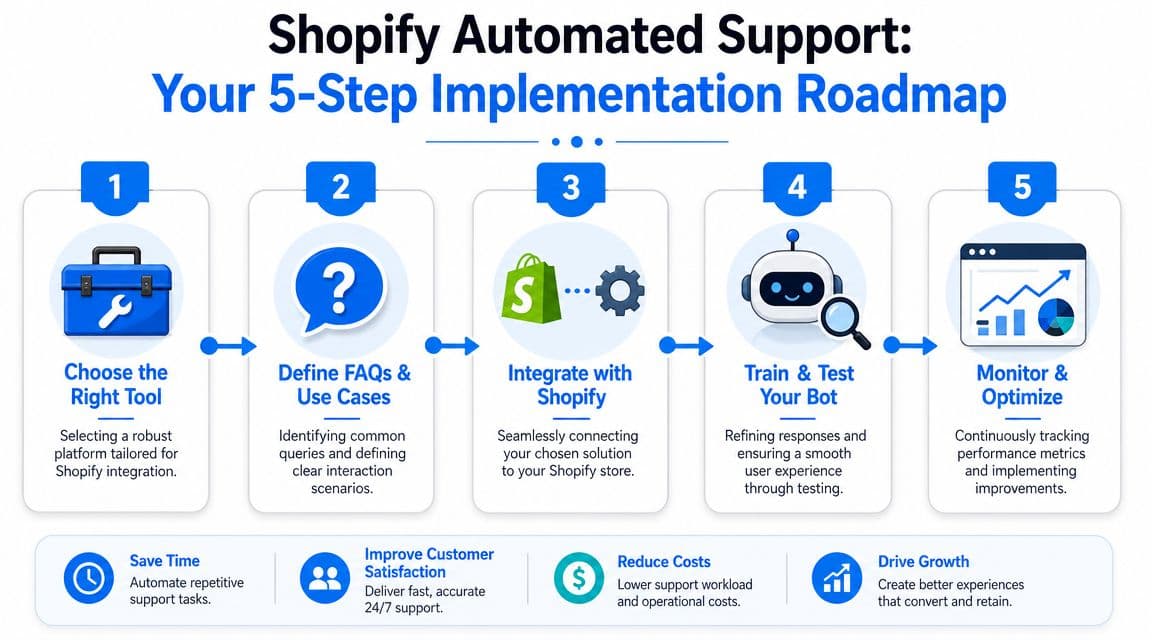
Your 5-Step Implementation Roadmap for Shopify
Most failed automation projects don't fail because the tool was bad. They fail because the merchant tried to automate everything at once, launched without escalation logic, or skipped measurement.
Start narrower.
Step 1 and Step 2
Step 1. Choose a tool that fits Shopify operations
Pick software that connects extensively to your store data and doesn't require a long technical project. Product catalog access, policy ingestion, order awareness, and easy storefront deployment matter more than flashy demo conversations.
A useful evaluation filter:
- Shopify-native context: Can it work with your catalog, FAQs, and support flows without custom engineering?
- Sales use cases: Can it help with recommendations, pre-purchase questions, and cart friction, not just post-purchase tickets?
- Control over escalation: Can you define when a person should step in?
- Operational visibility: Can your team see what customers asked and where the automation failed?
Step 2. Train from real store knowledge
Don't start with a blank bot personality exercise. Start with your existing assets:
- Product pages: Titles, descriptions, variant logic, collections
- Policies: Shipping, returns, exchanges, warranty, subscriptions
- Help content: FAQ pages, support macros, email templates
- Historical support patterns: Repeated questions, objections, confusing terms
Merchants who want a broader framework for setup and workflow design can review this guide on help desk automation, especially for thinking through support operations beyond the chat widget itself.
A short walkthrough helps here:
Step 3 through Step 5
Step 3. Build escalation flows before launch
Many stores get sloppy in this area. Define exactly which conversations stay automated and which should escalate.
Escalate when the issue involves:
- Order exceptions: Lost, damaged, or delayed shipments
- Policy edge cases: Anything outside the standard rules
- High-friction emotion: Angry or confused customers
- High-value pre-purchase intent: Questions tied to expensive or complex products
When escalation happens, pass the transcript, detected intent, and relevant order or cart context to the human team. If the agent has to start from zero, the automation didn't save the experience. It only delayed it.
Step 4. Launch on a pilot, not sitewide complexity
Roll out to a narrow set of use cases first. Order tracking, shipping FAQs, and simple policy questions are usually safer than nuanced product advice for technical or regulated categories.
A practical pilot approach:
- Start with a limited intent set
- Monitor unanswered or misrouted questions daily
- Review transcripts for policy gaps
- Expand only after accuracy is stable
Launching smaller gives you cleaner feedback. When everything is automated at once, it's hard to see what actually broke.
Step 5. Define KPIs tied to revenue and operations
Don't stop at ticket deflection. Track the business outcomes that matter to a Shopify store:
- Response time
- Average handle time for escalated cases
- Admin time saved for agents
- Drop-off points in conversations
- Conversion impact from support interactions
- Revenue influenced by pre-purchase chats
- Themes in repeated questions
This is the difference between "we installed a chatbot" and "we built a support layer that improves margin and conversion."
How to Measure and Optimize Performance
Automation gets better when you instrument it like an operating system, not a widget. Salesforce's guidance on automated customer service emphasizes tracking response time, drop-off points, and conversation logs so teams can see where automation reduces friction and where human handoff is still needed.
What to track from day one
For Shopify, the most useful metrics sit in two buckets.
Operational metrics
- Response time: Are shoppers getting answers immediately or bouncing before resolution?
- Drop-off points: Which questions cause exits, confusion, or abandoned conversations?
- Conversation logs: What topics repeat, and where does the system fail to resolve confidently?
- Escalation patterns: Which intents routinely need a human anyway?
Commercial metrics
- Pre-purchase conversation themes: Which questions appear before product views, add-to-cart, or checkout?
- Support-assisted conversion signals: Which chats seem tied to completed purchases?
- Policy friction: Which return, shipping, or pricing questions show up often enough to justify site changes?
If email follow-up is part of your recovery flow, delivery quality matters too. A technically sound sequence won't help if messages land in junk. This guide on how to check if emails are going to spam is worth using when support and retention automations include email.
How to turn support analytics into store improvements
True value isn't in dashboards alone. It's in what you change after reading them.
For example:
- Repeated sizing questions usually mean your PDP content is weak.
- Frequent shipping complaints may point to unclear promises or bad placement of delivery information.
- Many product-comparison chats often signal that collection pages and merchandising need better differentiation.
- High drop-off after bot replies can mean the answer is technically correct but commercially useless.
A strong analytics loop turns support into research. Merchants looking to get more from that layer should study chat bot analytics with the same seriousness they give ad reporting or checkout behavior.
The best support automation programs don't just answer questions better. They expose what your storefront still fails to explain.
Common Pitfalls and How to Avoid Them
Most automation problems aren't caused by AI being "bad." They're caused by weak setup decisions.

The bot sounds competent but isn't helpful
Some merchants spend too much time making the bot sound friendly and not enough time making it useful. The result is a polished assistant that gives vague answers, repeats policy language, or dodges the actual buying question.
Fix that by grounding answers in store reality:
- Use product-specific knowledge: Generic wording hurts trust.
- Write for decisions, not decoration: Help the shopper choose, not just read.
- Audit unhelpful responses weekly: Especially around sizing, fit, shipping, and returns.
Brand voice matters. Accuracy matters more.
The handoff breaks the customer journey
Handoff quality is the most common failure point that merchants underestimate. RingCentral notes in its write-up on automated customer service that the difficult part is integrating AI with human teams and CRM data so context is preserved when the bot escalates. When that doesn't happen, customers have to repeat themselves, and a previously helpful interaction turns frustrating.
That's especially expensive in Shopify flows tied to conversion. A shopper asking pre-purchase questions is often close to ordering. If the bot hands off without transcript, cart context, or issue summary, your agent enters the conversation blind.
Use a simple prevention checklist:
| Pitfall | What it looks like | Better approach |
|---|---|---|
| Generic bot behavior | Vague, brand-safe answers | Train on catalog, policies, and real FAQs |
| Weak escalation rules | Bot hangs on too long | Trigger human handoff for edge cases and emotional conversations |
| Context loss | Customer repeats everything | Pass transcript, intent, and store context to the agent |
| Ignored analytics | Same failures recur | Review logs and tune flows on a regular cadence |
Another common mistake is neglecting multilingual quality. A tool may technically support many languages but still miss nuance in mixed-language or market-specific queries. Test real customer phrasing from your store, not idealized examples from a demo account.
Automation should remove effort from the customer. If it creates another layer to push through, you've built a blocker, not a support system.
The Future of E-commerce Is Automated and Intelligent
Support automation is becoming part of the Shopify revenue engine, not a side system for deflecting tickets. It now sits closer to the buying moment. It answers product questions while a shopper is deciding, resolves policy concerns before they abandon checkout, and gives store operators a clearer view of where hesitation shows up across the funnel.
For Shopify merchants, the stores that win will be the ones that reply fast, stay accurate, and move customers from question to purchase without friction. That requires more than adding a chat widget. It means connecting automation to your catalog, order data, shipping rules, and escalation paths so the experience holds up under real buying conditions.
Human teams still matter. Their job changes. Automation should absorb repetitive questions and standard workflows so agents can spend time on edge cases, chargebacks, VIP customers, and pre-purchase conversations with real revenue potential.
That is what turns support into a growth system instead of a cost center.
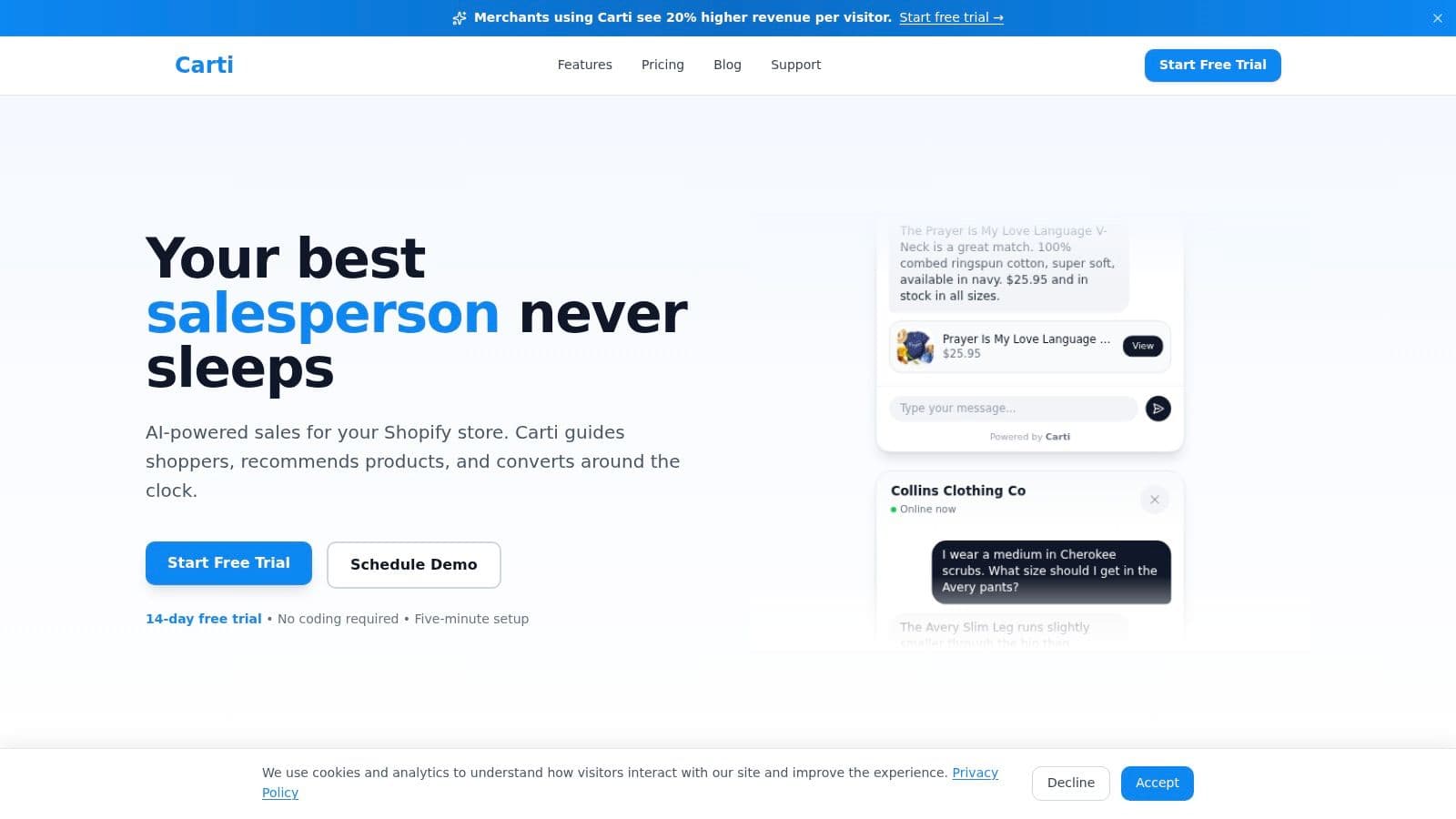
Building that kind of system is why we created Carti. It helps Shopify merchants answer product and policy questions instantly, recover carts, recommend relevant products, and support shoppers in multiple languages without a heavy setup process. For stores that want support to increase sales while keeping service load under control, it is a practical place to start.

Written by
Daniel AndersonFounder of Carti. 10+ years building ecommerce brands in apparel and supplements. Still runs a Shopify store and built Carti to help merchants convert more browsers into buyers.
Ready to boost your store's sales?
Install Carti in 5 minutes and let AI handle customer questions, recommend products, and close sales 24/7.
Start Free Trial14-day free trial