
By February 2026, ChatGPT had reached 900 million weekly active users and was processing about 2.5 billion prompts per day, a sign that conversational interfaces have become mainstream digital behavior rather than a novelty, according to this ChatGPT usage roundup. For Shopify merchants, that changes the baseline. Shoppers don't arrive at your store thinking, “I hope there's a contact form.” They expect an answer now.
That expectation is why online chat services for businesses need to be evaluated as a sales channel, not just a support expense. A chat box that only deflects return-policy questions is useful. A chat flow that answers product objections, recovers abandoned carts, and routes high-intent shoppers to the right offer is materially more valuable.
I've seen the same pattern across e-commerce stores. Merchants install chat for support, then discover the primary upside comes from revenue moments: sizing hesitation, shipping uncertainty, bundle discovery, coupon confusion, and checkout friction. Those are buying moments. If chat shows up well there, it earns its place.
Why Online Chat Is No Longer Optional in 2026
Consumer AI changed what “normal” feels like online. Once hundreds of millions of people got used to asking a question in plain language and getting an immediate answer, every slow support experience started to feel broken. That shift is already hitting commerce.
For a Shopify store, the issue isn't whether customers like chat. The issue is whether your site can keep up with the speed shoppers now expect during product discovery, pre-purchase questions, and checkout hesitation. If it can't, many buyers won't complain. They'll just leave.
Shoppers also don't separate “support” from “buying” the way merchants often do. A question about shipping times can be a support question on paper, but on a product page it's really a conversion question. A question about sizing, ingredients, compatibility, or stock availability is the same. Good chat closes the gap between interest and confidence.
Practical rule: If a customer has to leave the product page to get a basic answer, your store is adding friction at the exact moment you should be reducing it.
That's why I'd look beyond simple widget installation and study practical chat widget conversion strategies that tie timing, placement, and copy to buying intent. The stores that get results usually treat chat as part of onsite merchandising, not just customer service software.
The broader shift also fits with how brands are approaching conversational marketing. Chat now sits inside the same revenue conversation as email capture, cart recovery, and product recommendation logic. It's becoming part of the storefront itself.
The Evolution from Support Ticket to Sales Engine
The market has moved because the economics now make sense. A 2026 business-chat roundup says the global chatbot market was about $9.6 billion in 2025 and is projected to exceed $41 billion by 2033. The same roundup says chatbots can reduce customer support costs by as much as 30%, and 64% of internet users say the best chatbot feature is 24-hour service, according to these chatbot market statistics.
Those numbers matter, but they only explain part of the story. Cost reduction gets chat approved. Revenue impact is what makes teams keep investing in it.
Three models merchants actually buy
The simplest way to think about online chat services for businesses is to compare them to store staff roles.
A basic live chat tool is like a service rep at the counter. Helpful when available. Limited by staffing. Good for nuanced issues, weak for after-hours coverage.
A rule-based chatbot is like a scripted greeter. It can answer predictable questions and route people into fixed flows, but it struggles when shoppers ask things in their own words.
A modern AI chatbot or virtual agent acts more like a trained sales associate. It can interpret intent, pull from policies and product data, and keep the conversation moving without forcing the customer through a decision tree.
What works depends on the store:
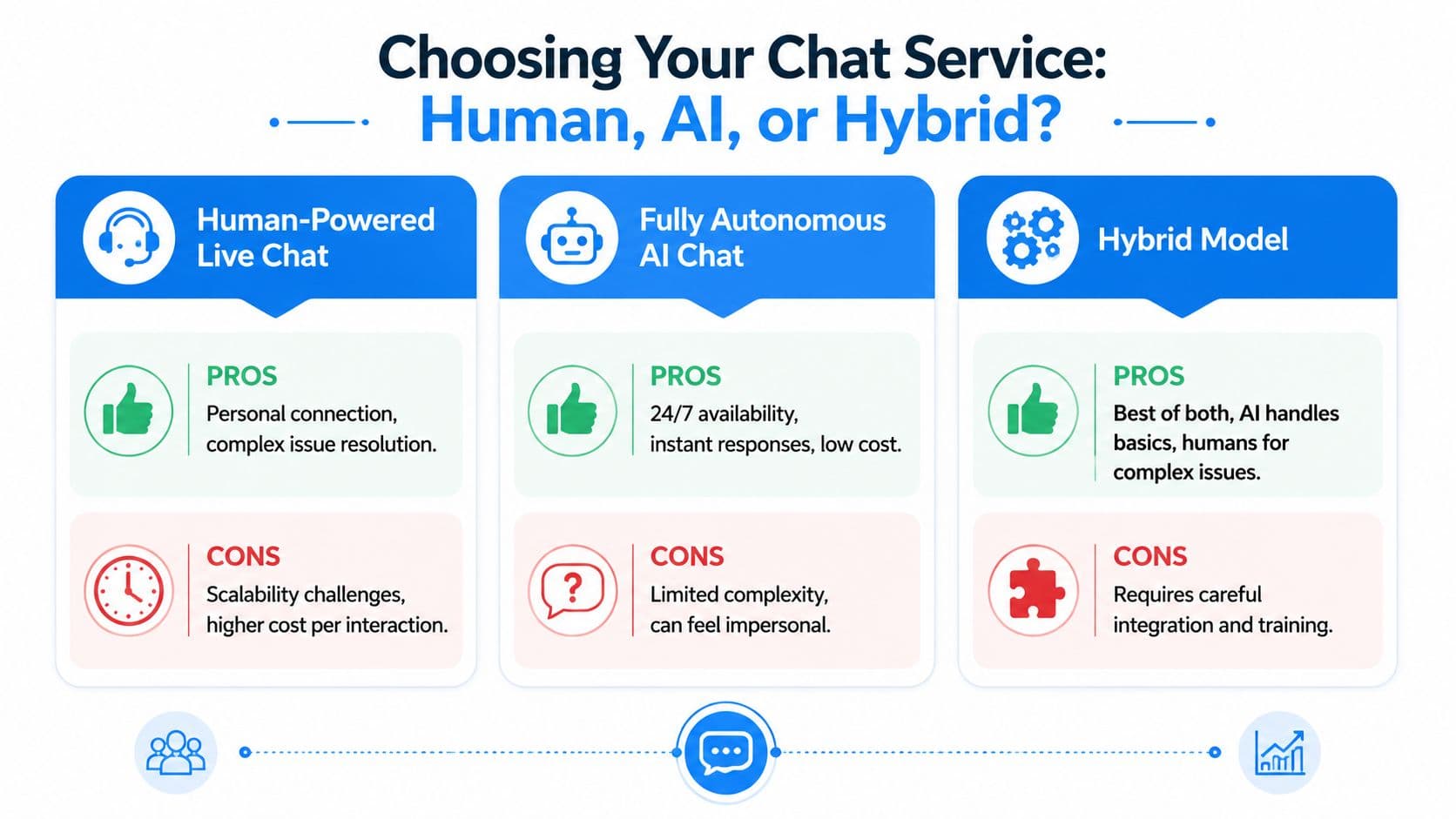
- Human-only live chat: Strongest for luxury, technical, or high-consideration products where tone and expertise matter more than scale.
- Rule-based automation: Fine for small stores with narrow catalogs and repetitive support volume.
- AI-first or hybrid chat: Usually the best fit for growing Shopify brands that need both coverage and selling assistance.
Types of Online Chat Services
| Chat Type | How It Works | Best For | Example |
|---|---|---|---|
| Human-powered live chat | A support or sales agent answers messages manually in real time | High-touch service, complex pre-purchase questions, premium categories | A shopper asks whether a sofa fabric works in a home with pets |
| Rule-based chatbot | Uses preset flows, buttons, and keyword-based routing | FAQs, simple routing, smaller catalogs | “Track my order,” “What is your return policy?” |
| AI chatbot or IVA | Understands natural language and responds using store knowledge, catalog data, and policy content | Sales assistance, after-hours coverage, product discovery, support deflection | A shopper asks for waterproof jackets under a budget and gets relevant options |
The old model waited for a ticket. The newer model engages while purchase intent is still alive.
That's the key change. Online chat used to sit at the edge of the customer experience. Now it sits in the middle of the funnel, where revenue decisions happen.
Key Features That Drive Sales and Satisfaction
Most feature lists are padded with things that sound advanced but don't change buying behavior. What matters is whether the system helps shoppers get to a confident decision faster, while keeping your team from drowning in repetitive conversations.
Modern Intelligent Virtual Agents can resolve 60-70% of routine inquiries automatically and reduce support costs by up to 40%. Features like context-aware memory improve first-contact resolution by 22%, and AI-suggested canned responses can increase agent productivity by 35%. Those capabilities matter because they turn chat from a queue into an operating layer for sales and service.
What actually changes shopper behavior
Instant answers are the baseline. If a customer asks about shipping, returns, sizing, ingredients, compatibility, or restock timing, they should get a useful answer immediately. Waiting kills momentum.
Context-aware memory is more important than most merchants realize. A good system shouldn't force the shopper to repeat themselves every turn. If someone asks for a gift, then narrows by budget, then asks about shipping, the assistant should retain that thread. That's one reason chatbot best practices matter more than flashy demos. The handoff, memory, and answer quality shape the overall experience.
AI-assisted replies for human agents are underrated. Even if you keep a support team in the loop, suggested responses help agents answer faster and more consistently. That matters during launches, seasonal peaks, and campaign traffic spikes.
Features that matter on a Shopify storefront
For Shopify merchants, I'd prioritize five capabilities over everything else:
- Catalog awareness: The chat tool should understand products, variants, availability, and common buying questions. A generic support bot that can't discuss real products won't help much on product pages.
- Policy intelligence: Your shipping, return, warranty, and delivery rules need to be easy for the assistant to access and explain in plain English.
- Proactive engagement: This matters when someone lingers on a product page, stalls at checkout, or bounces between FAQ and cart.
- Clear human handoff: When a buyer has a nuanced issue, the bot shouldn't fake confidence. It should escalate cleanly.
- Conversation analytics: You need visibility into what customers keep asking so merchandising and support can improve the site itself.
A chat system earns trust when it answers directly, admits limits, and knows when to hand off.
For subscription brands, this feature stack also overlaps with retention. The same mechanics that help a first purchase can also reduce support friction after the sale, which is why resources on how to reduce SaaS churn for startups can still be useful conceptually. Fast answers, clear expectations, and less customer effort are universal levers.
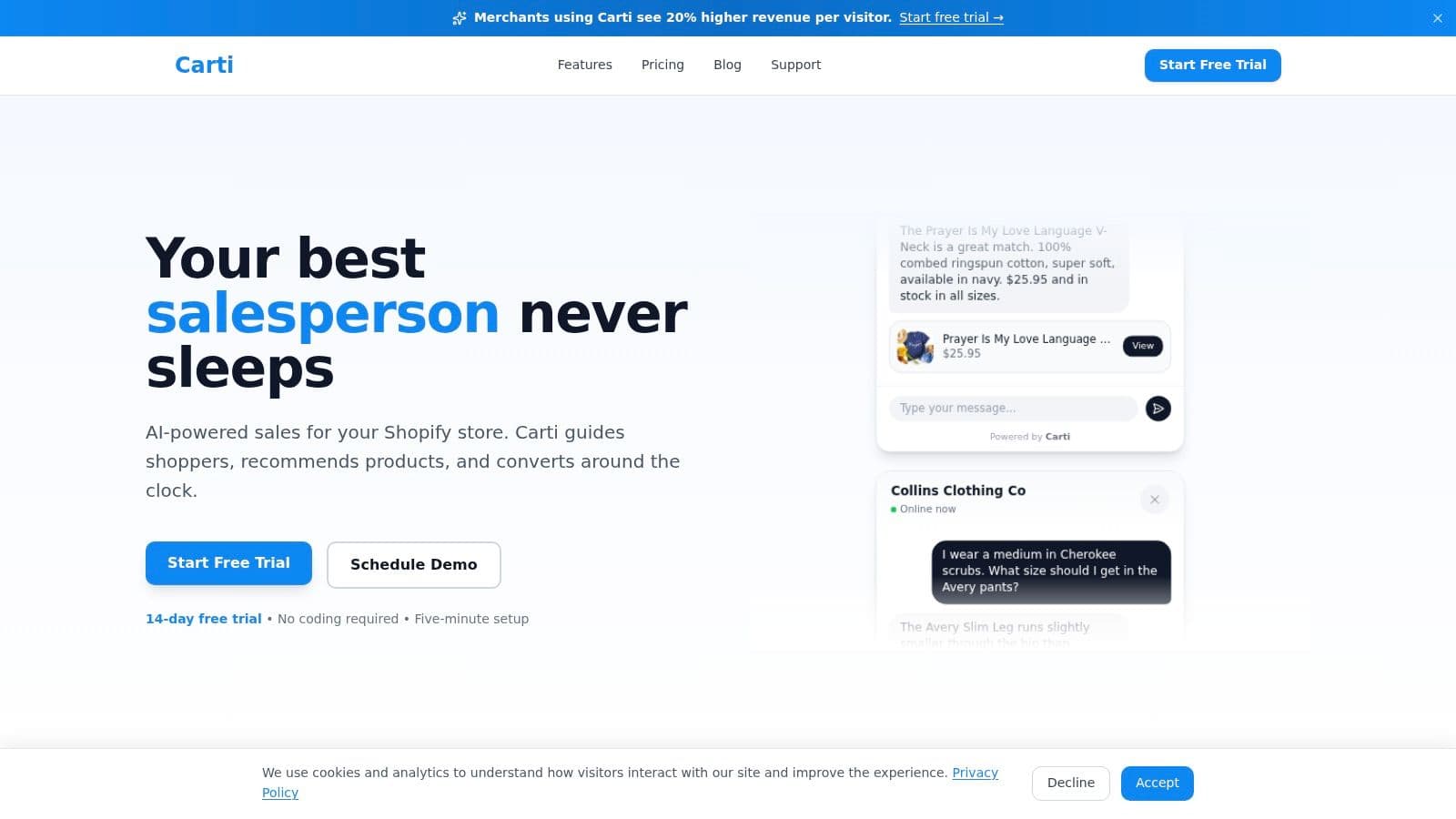
One product in this category is Carti, which is built for Shopify stores and focuses on catalog-aware answers, product suggestions, and automated sales support rather than generic website chat.
How to Choose the Right Online Chat Service
Most merchants ask the wrong opening question. They ask, “Which chat app has the most features?” The better question is, “Where do we want chat to create value?”
If repetitive support load is the problem, one type of tool makes sense. If the goal is to lift conversion on product pages and rescue otherwise-lost carts, you need a different setup. Plenty of teams buy a live chat product and then discover they had purchased a staffing commitment.
Start with the business goal
There are usually three valid reasons to implement online chat services for businesses on a Shopify store.
The first is support efficiency. You want fewer repetitive tickets and faster customer answers.
The second is conversion support. You want the tool to answer objections, guide product selection, and keep people moving toward checkout.
The third is coverage. You need useful answers outside business hours without creating a dead-end experience.
If your main goal is support efficiency, automation depth matters. If your main goal is conversion, product understanding and trigger timing matter more. If your main goal is coverage, you need a system that can do a lot on its own without sounding robotic.
Where merchants underestimate cost
The U.S. Chamber notes that live chat can reduce support costs and cart abandonment, but it also highlights capabilities such as visitor tracking, canned responses, and handling multiple chats at once. That's a reminder that the primary question is often about staffing and process design, not whether chat works at all, as discussed in the Chamber's live chat overview.
In practice, hidden costs show up in places like:
- Coverage expectations: Once customers see a chat bubble, they expect responsiveness.
- Training burden: Agents need product knowledge, brand voice guidelines, and escalation rules.
- Operational maintenance: Someone has to update policy changes, shipping rules, and seasonal answers.
- Handoff quality: If AI and humans don't share context, customers end up repeating themselves.
A lot of merchants still assume live chat is a cheap alternative to email. It can be. It can also become an expensive inbox that interrupts your team all day if you don't automate the right layer.
If you can't staff fast responses consistently, don't pretend you offer live service. Use automation for the first layer and reserve humans for the conversations that actually need judgment.
A practical shortlist for Shopify evaluation
When I evaluate a tool, I care less about the homepage copy and more about what happens on an actual product page.
Use a shortlist like this:
- Shopify depth: Does it sync product data, policies, and order context cleanly?
- Sales usefulness: Can it recommend products, answer pre-purchase questions, and support cart recovery?
- Brand control: Can you customize tone, widget design, greetings, and handoff rules?
- Reporting: Does it show which questions influence sales, not just ticket volume?
- Human fallback: Can your team step in smoothly when nuance matters?
If you're comparing vendors broadly, it can help to review an overview of top virtual customer support providers so you can separate generic outsourced support options from actual commerce-focused chat platforms.
Human-only, AI-only, and hybrid can all work. The wrong choice is the one that doesn't match your margin structure, catalog complexity, and team capacity.
Online Chat in Action: Three Shopify Use Cases
The easiest way to judge chat is to stop thinking about software categories and look at real moments inside a buying journey. On Shopify, the highest-value conversations usually happen when the customer is close to acting but still unsure about something.
Here's what that looks like in practice.
Use case one: cart recovery while intent is still high
A shopper adds two products to cart, reaches checkout, then pauses. Maybe they're wondering about delivery timing. Maybe they want to confirm a return policy before committing. Maybe they're comparing one more tab.
Chat can act like a sales associate instead of a passive widget. A timely prompt can answer the exact objection that's slowing the purchase.
Good recovery chat doesn't nag. It helps. On Shopify stores, that usually means surfacing concise answers, clarifying checkout friction, or pointing the customer toward the next step. For merchants thinking about this flow specifically, there are practical examples in this guide on how to recover abandoned carts.
Use case two: instant answers that remove purchase friction
A customer lands on a product page and asks, “Is this true to size?” Then they ask if it ships internationally. Then they ask whether the material is machine washable.
If the assistant can answer those cleanly from the store's product and policy knowledge, the page keeps doing its job. If the customer has to hunt through tabs, FAQ pages, or a delayed support channel, the session gets colder.
This is also where many generic chatbots fail. They can greet. They can route. They can't effectively help someone buy. A useful storefront assistant needs to understand the catalog and speak in plain language about what the shopper is looking at.
The most valuable chat answer is often the boring one that removes hesitation at the right second.
The same logic applies to common policy questions. Buyers don't want to decode legal copy. They want a direct answer that helps them decide.
A quick product walkthrough helps here:
Use case three: product recommendations that feel useful
The highest upside use case is when chat behaves like a competent in-store associate. Not pushy. Not vague. Helpful.
A shopper browsing skincare might ask for something for sensitive skin. A home goods buyer might want a smaller version of a product they've already viewed. An apparel customer might ask for alternatives within a budget. Those aren't support tickets. They're sales conversations.
When recommendation quality is good, the chat flow becomes part discovery engine and part objection handler. That's where a Shopify-focused assistant can be especially useful because it can connect product questions, inventory awareness, and shopper context inside the same exchange.
For merchants using a tool like Carti, these use cases are the practical center of the product. It's designed to learn a Shopify store's catalog, FAQs, and policies so it can answer pre-purchase questions, suggest relevant products, and assist with cart recovery out of the box.
Your First 30 Days: A Chat Implementation Checklist
Most chat launches fail for a boring reason. The tool goes live before the knowledge, triggers, and handoff rules are ready. Then the team concludes that chat “didn't work,” when the underlying issue was weak setup.
The first month should be disciplined and narrow. Start with the questions that already block purchases. Then make the widget useful before trying to make it clever.
Week by week rollout
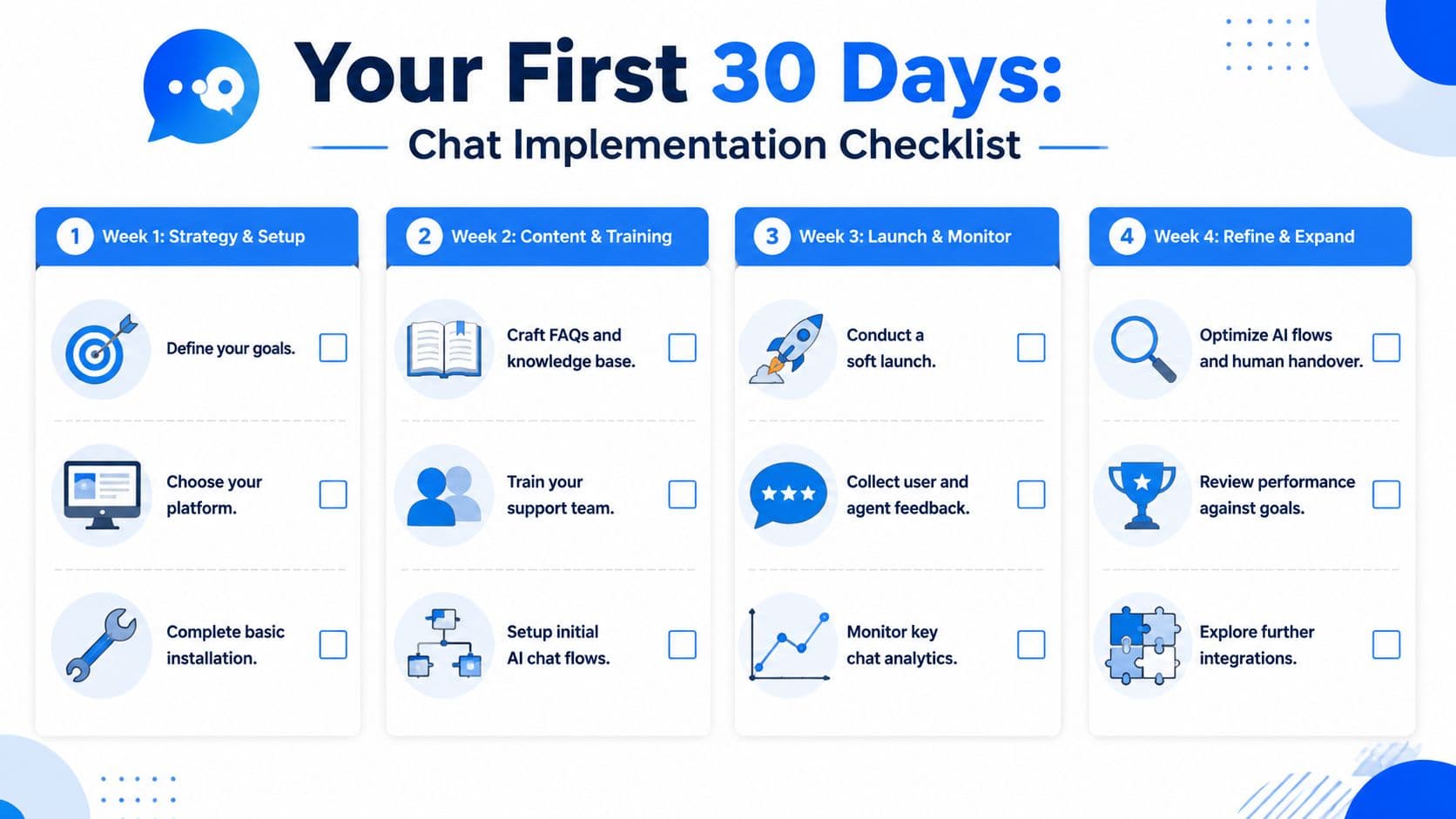
-
Week 1, define the job
- Pick one primary goal: Support deflection, conversion help, or cart recovery.
- Install the core integration: Make sure products, FAQs, and store policies are available to the system.
- Match the storefront: Adjust colors, launcher placement, and opening copy so the widget feels native.
-
Week 2, train the content
- Load high-friction answers: Shipping, returns, sizing, delivery timing, and product-specific objections.
- Write escalation rules: Decide when the system should hand off to a person instead of improvising.
- Test real prompts: Use actual customer wording, not internal jargon.
-
Week 3, launch carefully
- Start on key pages: Product pages, cart, and help areas are usually enough for an initial rollout.
- Review transcripts daily: Find weak answers, missing product details, and repetitive dead ends.
- Listen to the team: Agents will quickly spot where the bot helps and where it creates more work.
-
Week 4, tighten the loop
- Refine triggers: Make proactive messages more relevant and less intrusive.
- Promote common selling paths: Add answers that recommend products, bundles, or policy clarifications.
- Measure business outcomes: Look at chats tied to purchases, repeated objections, and support issues the site should fix.
A strong launch doesn't try to automate everything. It automates the obvious, preserves trust, and gives the team enough visibility to keep improving.
If you run a Shopify store and want chat to do more than deflect tickets, Carti is worth a look. It's an AI chatbot built for Shopify that learns your catalog, FAQs, and policies, then helps shoppers get instant answers, discover products, and recover carts without adding a heavy setup burden.

Written by
Daniel AndersonFounder of Carti. 10+ years building ecommerce brands in apparel and supplements. Still runs a Shopify store and built Carti to help merchants convert more browsers into buyers.