
You paid for the click. The shopper landed on the product page. They liked the photos, skimmed the reviews, chose a variant, and then hit the button that kills momentum fast: Sold out.
That moment looks small inside Shopify. It isn't. It wastes marketing spend, breaks trust, and sends a buyer to another tab where a competitor is still in stock. For a lot of merchants, this happens often enough that it starts to feel normal. It shouldn't.
Stock outs are one of the clearest signs that revenue is leaking between demand generation and fulfillment. They also deserve more than a warehouse fix. Good operators work on two fronts at once: they reduce the odds of stock outs happening, and they build storefront systems that recover sales when they do.
The Most Frustrating Page on Your Shopify Store
A sold-out product page is frustrating because everything before it may have worked. Your Meta ad did its job. Your email campaign got the click. Your influencer mention created intent. Then the product page tells the customer the one thing they didn't want to hear: not available.
For the shopper, it's a broken promise. For the merchant, it's a P&L problem hiding behind a gray button.
I've seen stores treat stock outs like an operations issue that lives in the back office. That misses the point. The stock out shows up on the storefront, where buyers make decisions about whether your brand is reliable. If the page doesn't offer a clear next step, the customer doesn't wait around to solve your inventory problem for you.
A stock out isn't just missing inventory. It's demand you already paid to create, now handed to someone else.
The scale of the problem is massive. Stockouts cost retailers over $1.2 trillion annually in lost sales, and the pattern has persisted for years according to Mirakl's analysis of out-of-stock losses. That figure matters because it tells you this isn't a niche issue affecting only badly run stores. It's systemic.
What this means for a Shopify merchant
When merchants say, "We're getting traffic but revenue feels inconsistent," I usually check product availability before I check creative. A strong campaign can't overcome an unavailable best seller.
Three consequences show up fast:
-
Revenue leaks immediately: Demand exists, but the transaction can't happen.
-
Customer confidence drops: Buyers start questioning whether your store can fulfill what it advertises.
-
Growth gets distorted: Marketing reports may look healthy while merchandising and inventory execution drag down actual sales.
This is why stock out rate matters. It tells you how often shoppers encounter unavailability across the products and moments that matter.
What Is Stock Out Rate and How to Calculate It
Stock out rate is the percentage of selling opportunities where an item isn't available. It's one of the most useful operating metrics in e-commerce because it connects inventory health directly to revenue risk.
A simple way to illustrate this: your store is a bucket collecting demand. Every stock out is a hole in that bucket. If you only look at total sales, you may miss how much demand leaked out before checkout.
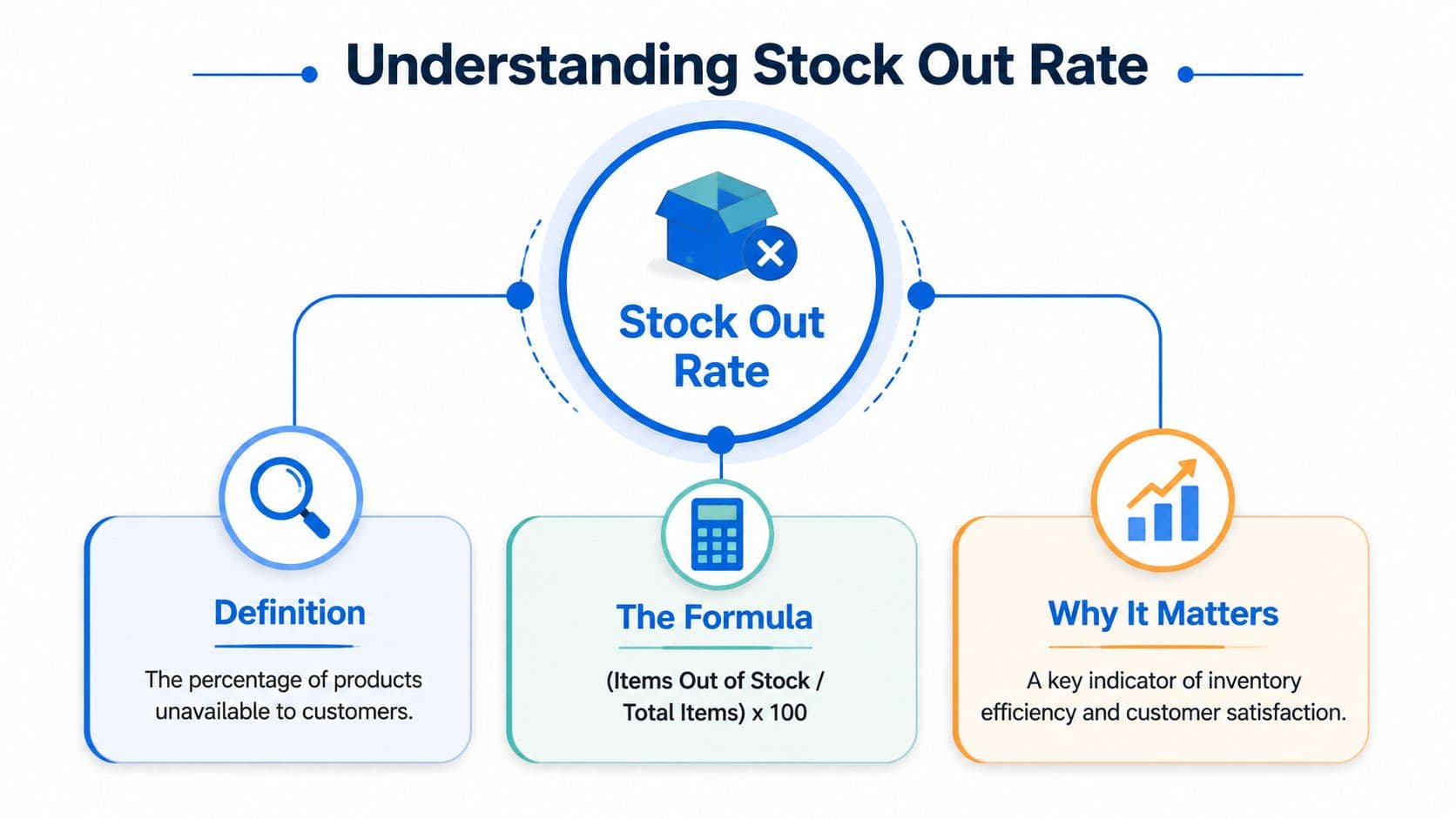
The formula that matters
The standard formula is (total stockout events / total selling opportunities) × 100%, as explained in Alexander Jarvis's guide to stock-out rate. The same source notes that high rates correlate to a 20% loss in potential sales per incident and push 36% of customers to competitors.
That definition is useful. The bigger issue is using it correctly.
If you calculate one store-wide number and stop there, you'll miss the products doing the damage. Averages hide pain. One slow-moving category can make your overall metric look acceptable while a handful of high-intent SKUs are out of stock at the worst possible moments.
For merchants tracking broader operating health, it helps to pair this metric with other e-commerce KPIs that shape profitability, especially conversion rate, cart abandonment, and revenue by product.
Why SKU-level tracking changes decisions
Track stock out rate at the SKU level, not just category level and not only store wide. That's how you find the core commercial problem.
A practical workflow looks like this:
-
Pull your top-demand SKUs: Start with products that drive the most sessions, add-to-carts, or repeat purchases.
-
Review availability over time: Look for patterns around launch days, promotions, payday spikes, and seasonality.
-
Separate core products from long-tail items: A stock out on a hero SKU deserves a different response than a stock out on a niche variant.
-
Check by variant: Size and color stock outs often do more damage than merchants realize because customers came for a specific option, not a generic product page.
Practical rule: If a product drives demand, measure availability where buyers actually experience it, at the variant and SKU level.
Use benchmarks carefully. A benchmark is not a comfort blanket. If your best-selling items go unavailable during peak demand, the average won't save you.
The True Cost of an Empty Shelf
The direct lost sale is only the first layer. A stock out usually creates several costs at the same time, and some don't show up clearly in the same report.
Start with the visual summary below, then look at how the damage spreads across marketing, retention, and operations.
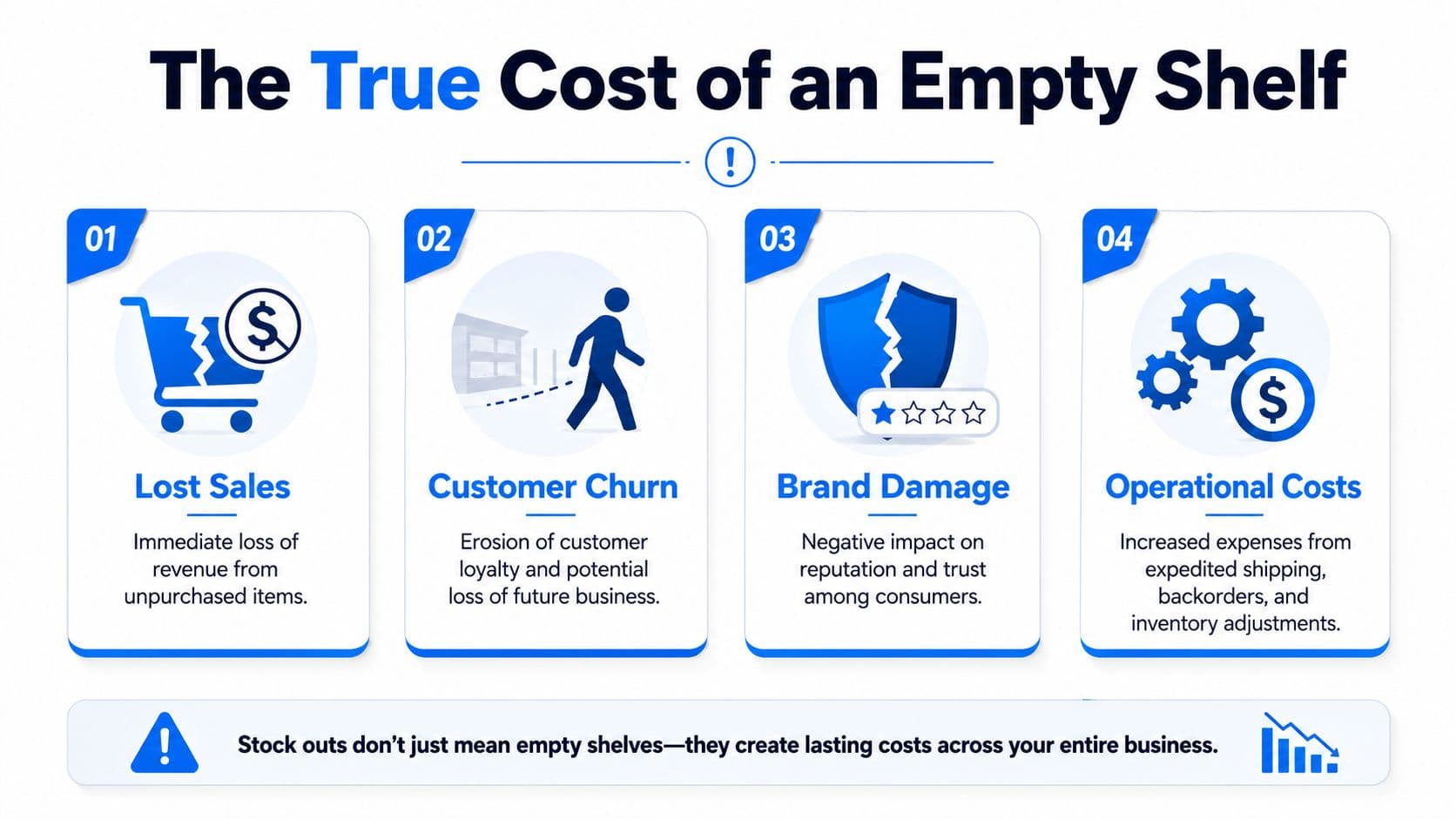
What the lost sale hides
If a customer lands on an unavailable product, you don't just lose the order. You may also waste the cost of acquiring that visit, trigger support questions, and train the customer to look elsewhere next time.
For merchants selling on multiple channels, this gets even more expensive. If you're trying to understand how unavailability affects marketplace economics too, this guide to Amazon stockout costs is useful because it frames the problem beyond one missed order.
A stock out can create all of these at once:
-
Wasted marketing spend: Paid traffic hits a page that can't convert.
-
Higher support load: Customers ask when the item will return, whether a backorder is possible, or what to buy instead.
-
Brand erosion: Repeated unavailability makes the store feel unreliable.
-
Messier merchandising decisions: Teams often react emotionally and overcorrect with rushed purchasing.
Here's a good walkthrough on how operators think about availability and demand pressure in practice:
Why Shopify merchants feel this harder
For Shopify brands, the storefront is where brand and transaction meet directly. There isn't a marketplace buffer. If the page fails, the brand takes the hit.
The platform-specific data is ugly enough to force attention. 53% of products on Shopify experience stockouts, and 69% of online shoppers abandon purchases instantly when items are unavailable, according to 8fig's analysis of stockout impact on e-commerce.
That explains why some stores feel like they're constantly "almost converting." The demand is real. The offer fails at availability.
When a customer hits an out-of-stock page, the choice isn't between waiting and buying. Very often, the choice is between leaving and buying somewhere else.
The practical takeaway is simple. Don't treat the sold-out state as a minor merchandising inconvenience. Treat it like a conversion event that requires its own strategy.
Diagnosing the Root Causes of Stock Outs
Most stock outs don't come from one dramatic mistake. They come from ordinary weaknesses that stack up until demand exposes them. When a merchant tells me, "This keeps happening," the cause usually falls into one of three buckets: forecasting, suppliers, or internal process.
Forecasting failures
Forecasting breaks when teams rely too much on gut feel or too little on recent demand behavior. A product sells steadily for months, then a creator post, email push, or seasonal swing changes the pattern. The team reorders based on old velocity, and the winner disappears first.
Common warning signs include:
-
Promotions without inventory review: Marketing launches before merchandising confirms depth.
-
New product optimism: Buyers assume the next PO can be smaller because the launch spike won't repeat.
-
Seasonality blindness: Teams remember last year loosely instead of checking the exact windows when demand accelerated.
Ask hard questions here. Which SKUs surprise you most often? Which products sell out right after campaigns? Where are teams making decisions from memory instead of a report?
Supplier and logistics issues
Sometimes your forecast is fine and the weakness sits upstream. A supplier misses a date, sends partial quantity, changes production timing, or ships inventory that can't be received cleanly.
If that sounds familiar, it helps to review broader strategies to improve supply chains, especially around bottlenecks, communication cadence, and contingency planning. The point isn't to master every logistics detail. It's to stop pretending supplier variability is rare.
A fast diagnostic looks like this:
| Question | What it usually reveals |
|---|---|
| Are lead times stable or drifting? | Reorder points based on outdated assumptions |
| Do you rely on one supplier for hero products? | Single-point failure risk |
| Do inbound delays get shared quickly? | Communication gaps between ops and marketing |
Internal process gaps
This category is less dramatic and more common. Inventory exists, but the system doesn't reflect reality fast enough. Or stock gets received late, counted poorly, assigned to the wrong variant, or held up by approval steps nobody revisits.
The store rarely says "sold out because of process." But that's often the truth.
Look closely at these friction points:
-
Receiving delays: Purchase orders arrive, but stock isn't available online quickly.
-
Variant mapping errors: The product is in the building, but the buyable option is wrong in Shopify.
-
No clear safety stock policy: Teams reorder when inventory feels low, not when the business rule says to act.
-
Disconnected ownership: Marketing, operations, and customer support work from different assumptions about availability.
If you don't know which bucket is causing the issue, review the last few stock outs one by one. Patterns show up fast when you stop treating them as random bad luck.
Proactive Strategies to Prevent Stock Outs
A stock out usually starts weeks before the PDP flips to “sold out.” It starts when demand rises and nobody adjusts the buy. Or when a supplier slips three days and the reorder point still assumes the old lead time. By the time the storefront shows the problem, margin has already taken the hit.
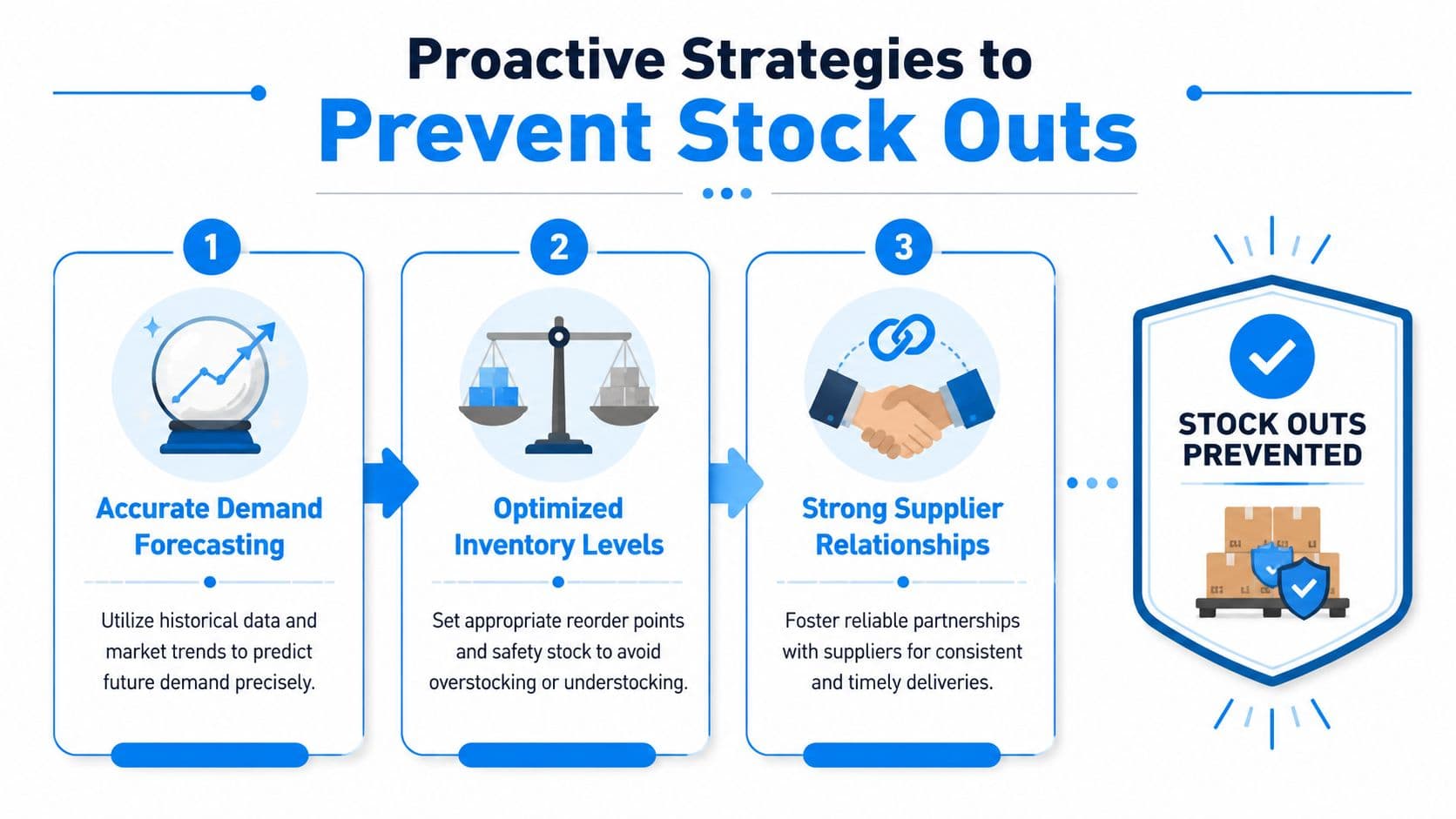
Build a forecasting rhythm
Forecasting fails when it lives in a monthly spreadsheet nobody revisits until inventory gets tight. On Shopify, demand moves faster than that. Paid spend changes, creators post unplanned content, a bundle takes off, and one variant starts draining faster than the parent SKU suggests.
Set a weekly inventory review with one job: spot pressure early enough to act. Review hero SKUs, days of cover, current sell-through, campaign plans, seasonality, inbound POs, and any supplier risk you already know about. Then make a decision. Reorder, throttle promotion, shift budget, or protect remaining stock for higher-margin channels.
Segmenting the catalog makes this meeting useful instead of bloated:
-
Hero SKUs: Review weekly, sometimes more often during promotions.
-
Seasonal products: Reforecast before demand shifts.
-
Long-tail items: Manage more lightly unless they support bundles, subscriptions, or high-converting collections.
One mistake I see often is using a storewide forecast process for every product. That creates false precision on low-impact items and not enough attention on the SKUs that drive revenue.
Use safety stock as a policy, not a feeling
Buffer inventory only works when the rule is clear. If the team is making judgment calls from memory, stock protection will be inconsistent. One person buys too late to preserve cash. Another buys too early and traps working capital in the wrong products.
Set safety stock by SKU class and business risk. A replenishable bestseller with unstable lead times deserves more protection than a test product with uneven demand. Write down the rule in plain language so the team can use it under pressure.
A useful policy answers three questions:
-
Which SKUs get protected inventory?
-
What lead-time variation or demand spike are you covering for?
-
Who can approve an exception?
That last point matters. I have seen teams break their own inventory rules for a campaign push, then spend the next two weeks apologizing to customers and issuing partial refunds. If that happens in your business, keep a ready process for customer communication and use templates like these inventory delay and order issue apology email examples.
More advanced forecasting tools can help, especially when demand patterns shift faster than a manual spreadsheet can keep up. The practical takeaway is simple. Use better prediction where it changes buying decisions, not because the model looks impressive.
Manage suppliers like revenue partners
Supplier management affects conversion more than many Shopify teams admit. If replenishment is late or inconsistent, merchandising plans break, paid traffic gets wasted, and customers hit product pages with no path to purchase.
Treat critical suppliers as part of the revenue engine. Share promotional calendars early. Confirm lead times and fill-rate expectations in writing. Ask for fast notice on delays, not after the ship date has already moved. For hero products, line up a backup source or an approved substitute before you need one.
The merchants who stay in stock do this work before things get messy:
-
Share demand context early: Give suppliers enough lead time to prepare for launches, promotions, and seasonal lifts.
-
Document service expectations: Put lead times, MOQs, fill assumptions, and escalation contacts in writing.
-
Create a fallback plan for top sellers: A second supplier, alternate material, or substitute bundle can protect revenue.
-
Review every failure: If a stock out happened, identify the break point and update the process.
Optimism is expensive here. If a SKU matters to revenue, supplier reliability needs the same scrutiny you give CAC, conversion rate, and contribution margin.
Prevention does the first job. It lowers the odds of an empty shelf. The stronger strategy does both jobs. Prevent the stock out where you can, and be ready to recover the sale fast when you cannot.
How to Save Sales When Stock Outs Happen
A shopper lands on a product page from a paid ad, picks a size, reaches for the Add to Cart button, and hits "Sold out." That is the moment margin starts leaking. You already paid to get the click. If the page gives the customer nowhere to go, you lose the order and often waste the acquisition cost too.
Stock-out recovery is a conversion problem, not just an inventory problem. Prevention protects availability. Recovery protects buying intent when availability breaks.
Before inventory reaches zero, truthful low-stock messaging can also create urgency on your Shopify store and encourage interested shoppers to act while the product is still available.
Turn a dead end into a buying decision
A sold-out page should still help the shopper complete a purchase. The fastest way to do that is to show the best next option based on why they wanted the original item: fit, use case, price, material, bundle value, or delivery speed.
Keep the back-in-stock form. It captures future demand and helps with replenishment planning. But it does not save the session in front of you.
Use a recovery setup that gives the shopper an immediate path:
-
Back-in-stock capture: Collect email or SMS from shoppers willing to wait.
-
Relevant in-stock substitutes: Show alternatives matched by job-to-be-done, price range, material, or style.
-
Variant rerouting: If one size, color, or pack format is gone, push nearby available options to the top.
-
Clear availability messaging: Say what is unavailable and what the shopper can buy now.
The trade-off is real. Push substitutes too aggressively and the page feels manipulative. Offer no guidance and conversion drops. The fix is relevance. If the original product was a premium cotton hoodie, do not replace it with a clearance fleece just because it is in stock. Protect trust first. Revenue follows.
Keep the shopper in motion
A strong sold-out experience reduces hesitation and shortens the path to the next action.
| Weak sold-out experience | Strong sold-out experience |
|---|---|
| Disabled button with no direction | Restock signup plus in-stock alternatives |
| Generic "out of stock" message | Specific guidance on comparable options |
| Related products buried below the fold | Substitute products shown near the purchase area |
| No follow-up after exit | Follow-up that explains the issue and offers the next best option |
Placement matters. If substitute products sit at the bottom of the page, many shoppers never see them. Put the recovery path near the out-of-stock message and near the buy box. On mobile, that matters even more.
If the shopper leaves, follow-up still has revenue value. Send a message that acknowledges the product is unavailable, gives a useful alternative, and sets expectations on restock timing if you have it. For tone and structure, these customer apology email examples for e-commerce are a useful reference.
One more practical point. Prioritize recovery on the SKUs that carry demand, not every SKU equally. A stock out on a slow seller is an operations issue. A stock out on a hero product is a conversion and profit issue. Build your fastest response around the pages where lost intent costs the most.
The merchants who handle this well do not treat "sold out" as the end of the journey. They treat it as a live merchandising moment and give the customer the next best way to buy.
Your Shopify Toolkit for Stock Out Recovery
Recovery gets easier when you build it into your operating stack instead of improvising each time a product disappears. Shopify already gives merchants useful visibility, and that should be your starting point.
What to use inside Shopify
Begin with the basics you can act on immediately:
-
Inventory reports: Use them to spot products and variants that repeatedly run thin.
-
Product performance data: Compare demand signals against availability so you know which stock outs hurt most.
-
Collection and product page merchandising: Control what substitutes appear when primary items are unavailable.
-
Flow and app workflows: Automate alerts, tags, and internal notifications so teams react faster.
If you're evaluating your broader stack, this roundup of e-commerce automation tools for Shopify teams is a good place to benchmark where inventory, support, and recovery workflows can connect.
A lot of merchants already have the underlying ingredients. What they lack is orchestration. The inventory signal exists. The related product exists. The customer intent exists. The store just doesn't connect them fast enough.
What a recovery workflow should do
A strong Shopify recovery workflow should handle four jobs at once:
-
Answer availability questions instantly: Customers shouldn't need to email support just to ask if a product is coming back.
-
Recommend the closest in-stock alternative: Not random related items, but substitutes that preserve buying intent.
-
Capture the shopper if they won't buy now: Email and SMS collection still matter.
-
Reconnect after the session ends: If the shopper leaves because of the stock out, follow-up should reflect what they wanted.
Dedicated on-site assistance offers significant value. Instead of leaving shoppers alone with a sold-out button, a well-configured AI assistant can answer restock questions, surface alternatives, and support cart recovery in real time. For Shopify stores with broad catalogs, that can be the difference between a dead-end session and a salvaged order.
The merchants who improve stock out rate the fastest usually stop thinking in departments. Inventory prevention sits with operations. Sale recovery sits on the storefront. The actual win happens when both work together.
If stock outs are costing you sales, don't settle for a dead-end product page. Carti helps Shopify merchants recover revenue in real time with instant answers, relevant product suggestions, and cart recovery flows that keep shoppers moving even when an item is unavailable.

Written by
Daniel AndersonFounder of Carti. 10+ years building ecommerce brands in apparel and supplements. Still runs a Shopify store and built Carti to help merchants convert more browsers into buyers.
Ready to boost your store's sales?
Install Carti in 5 minutes and let AI handle customer questions, recommend products, and close sales 24/7.
Start Free Trial14-day free trial