
Around the clock support has become a baseline expectation, not a luxury. One 2026 CX roundup reports that 74% of customers now require 24/7 service availability, up from 48% in 2022, and e-commerce benchmarks show that 28% to 38% of total support tickets arrive outside standard 9-to-5 hours. For Shopify merchants, that means the question isn't whether buyers will ask for help at night. It's whether your store answers fast enough to keep the sale alive.
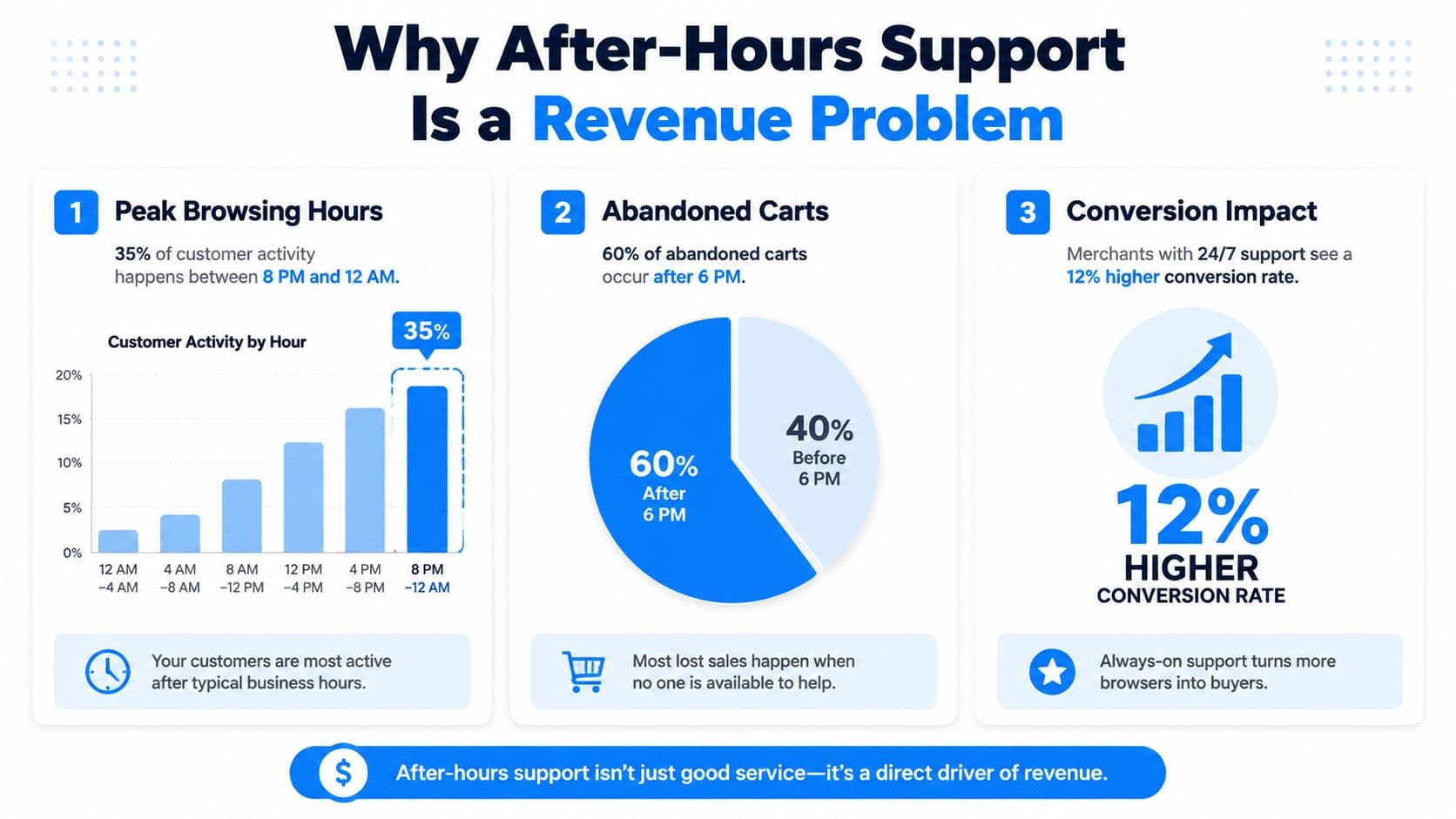
Why After-Hours Support Is a Revenue Problem
E-commerce support doesn't politely stay inside office hours. The same CX roundup reports that after-hours volume rises to 38% to 44% for retail and e-commerce tickets between 6 PM and 9 AM, and once weekends are counted, combined off-hours volume reaches 51% to 58%. If your team only watches the inbox during the day, a large slice of customer intent is landing in a black hole. That's not just a service gap, it's a conversion gap.
The operational penalty is real. Businesses without after-hours coverage are reported to face a 12-point CSAT penalty versus peers with full-shift or follow-the-sun coverage, according to the same benchmark roundup. In plain terms, shoppers don't separate “support experience” from “buying experience.” If they're waiting on a sizing question, a shipping reassurance, or a checkout issue, the delay can push them back to browsing, or straight to a competitor.
Why the clock changed for Shopify stores
Mobile commerce has made support timing messy. Buyers browse in bed, on commutes, during late breaks, and across time zones, so the old assumption that customers shop during local business hours doesn't hold. That's why around the clock support now behaves more like checkout infrastructure than a help desk feature. The store that responds first often keeps the session alive.
Practical rule: if a shopper asks a product, shipping, or cart question after hours, the cost of silence is usually higher than the cost of a quick automated answer.
I like to compare this to other high-intent service categories. A resource like automated call answering for home services shows the same pattern in a different market, namely, customers need acknowledgement immediately even when a human isn't available. Shopify support works the same way. The message doesn't have to solve everything at midnight, but it does have to prevent abandonment.
The fastest way to see whether your schedule is leaking revenue is to inspect your own response-time curve by hour. If response times stretch after dinner, your conversion path is stretching too. For a practical benchmark on how response speed shapes customer expectations, the internal guide on customer service response time is a useful companion.
Comparing Human and Automated 24/7 Strategies
Not every store needs the same coverage model. A boutique brand with high-touch pre-sale questions has a different support shape from a high-volume catalog store that mostly answers shipping, sizing, and order-status requests. The right around the clock support setup depends on traffic, complexity, and how much margin you can spare on overnight labor.
Where each model fits
Human-only overnight coverage gives you judgment and nuance, which matters when issues are risky or emotionally charged. It also gives you the highest labor burden and the least flexibility during quiet periods. Hybrid human plus AI coverage usually lands in the middle, because automation handles the repetitive layer while a person steps in for exceptions. Fully automated AI coverage scales cleanly, responds consistently, and keeps the store open all night, but it needs strong policies and escalation design to avoid sounding generic.
The trade-off is easiest to see in a working comparison.
| Criteria | Human-Only Overnight | Hybrid Human + AI | Fully Automated AI |
|---|---|---|---|
| Response speed | Depends on staffing and queue depth | Consistent for common questions | Consistent for most questions |
| Scalability during spikes | Limited by headcount | Better absorption of repetitive volume | Strongest scaling for high-volume surges |
| Handling complex issues | Strongest | Strong, if escalation is clean | Weak unless escalation is built in |
| Cost discipline | Highest labor intensity | Balanced | Lowest labor intensity for routine coverage |
| Conversion support | Good when staffed well | Good for most stores | Strong for simple buying journeys |
A useful filter is simple. If the issue can be answered from policy, catalog, or order data, automation can usually carry it. If the issue involves exceptions, emotion, or risk, a human still needs a handoff.
For operators evaluating a contact-center-style approach, the guide to 24/7 customer support is a good way to think about coverage design. It frames overnight support as a service architecture problem, not just a staffing decision.
What Shopify merchants should choose first
Human-only overnight shifts make sense for stores with high-ticket products, complicated buying decisions, or regulated products where mistakes are expensive. Hybrid coverage fits most growing Shopify stores because it protects response time without committing every slow hour to payroll. Fully automated support is the cleanest fit for stores with repetitive questions, clear policies, and enough catalog depth that shoppers mostly need direction, not negotiation.
If you're already mapping support automation, the internal playbook on how to automate customer service pairs well with this model comparison.
Implementing 24/7 Support with Carti in Five Minutes
A Shopify store doesn't need a six-week rollout to become responsive after hours. A practical setup starts with the store's own data, then layers in policy handling, product guidance, and cart recovery. In that flow, Carti can act as one option because it learns the catalog, store policies, and FAQs automatically, then responds in 92 languages without extra configuration.
A clean setup path
Start by connecting the store so the assistant can ingest products, policies, and common questions. That matters because late-night shoppers rarely want a generic reply, they want an answer grounded in your own catalog and shipping rules. Then turn on proactive product guidance so the assistant can suggest relevant items when a shopper is still deciding.
The strongest deployments also activate cart recovery early. A shopper who has already added items and then stalls after hours is closer to checkout than a new visitor, so a timely nudge can recover momentum without a human on duty. Once the store has basic flows in place, the Insights Dashboard becomes the control center for support and merchandising. It shows recurring questions, which often point to missing product content or policy confusion that deserves a catalog fix.
For installation details, the internal setup page at install Carti is the right place to start.
Implementation rule: automate the repeatable questions first, then decide where human escalation still matters. If you reverse that order, you usually end up paying for overnight labor while the bot still answers the easy stuff poorly.
The payoff of a clean launch isn't just shorter response time. It's fewer interruptions for the team during the night, cleaner routing for the morning shift, and a better chance that a late shopper sees a useful answer before they close the tab.
KPIs That Actually Measure 24/7 Support Health
A support dashboard can look busy and still tell you almost nothing. Response counts, agent activity, and raw ticket volume are easy to track, but they don't tell you whether your around the clock support setup is preserving sales. The metrics that matter are tied to time of day, resolution quality, and what happens after the customer interacts with support.
The metrics worth watching
First response time by hour of day is the first signal I'd watch. If your evening response is much slower than daytime response, customers feel the difference immediately, even if your average looks fine. Resolution rate during off-hours versus business hours tells you whether your automation or night coverage is solving problems, or just acknowledging them.
Cart recovery rate from automated nudges is the most direct tie to revenue for stores that use proactive messaging. A nudge that brings a shopper back to checkout matters more than a generic conversation count. CSAT by time of interaction is another useful lens, because a store can have strong daytime satisfaction and still deliver a poor after-hours experience.
Don't optimize the dashboard before you optimize the handoff. A clean escalation path usually improves the KPI before the metric gets redesigned.
The right benchmark work often starts with the site experience itself. A find Core Web Vitals guide is useful because support and page speed meet at the same conversion point, if the site is slow and support is slow, the shopper feels both delays at once.
The pattern I look for is consistency. Healthy 24/7 coverage keeps response times from falling apart after hours, keeps resolutions from collapsing outside business hours, and gives clear evidence that automation is rescuing sessions instead of merely closing tickets.
Common Pitfalls That Undermine 24/7 Coverage
The easiest way to break a good support model is to automate too aggressively. Complex complaints, damaged-order cases, payment issues, and anything with emotional heat often need judgment. If automation keeps a customer trapped in a scripted loop, the store doesn't just lose speed, it loses trust.
Where coverage usually breaks
The first failure is unintegrated tools. When daytime and nighttime teams use separate systems, the customer has to repeat the story and the handoff gets sloppy. The second failure is no clear escalation path. Agents, or bots, can't solve a problem they aren't authorized to solve, so the issue just sits there. The third failure is generic after-hours scripts. Shoppers can tell when the reply is a template that doesn't match the actual issue.
A healthier approach is to design the boundary on purpose. Use automation for catalog questions, shipping rules, order lookups, and cart recovery. Move to a human when the issue touches refunds, exceptions, account-specific troubleshooting, or anything where the shopper is clearly frustrated. The goal isn't to replace every person at 2 AM. It's to keep the store responsive while preserving judgment where it matters.
The healthcare and tele-support world has been moving toward remote and AI-enabled coverage precisely because handoff quality matters, especially when urgency is high. That logic applies to ecommerce too, even if the stakes are different. If the transfer loses context, the customer experiences it as being ignored.
When not to force full overnight staffing
Some stores should start smaller. If ticket volume is still light, the smarter move is often limited-hours expansion, strong self-service, and careful response-time tracking before paying for a full overnight team. That's especially true when the support mix is mostly repetitive. In those stores, the overnight human is expensive insurance for questions automation could already answer cleanly.
Real-World Use Cases Across Shopify Verticals
Fashion, beauty, and wellness all need support after hours, but they need it for different reasons. The same coverage model can fail if you copy it from one vertical to another without adjusting the questions, the urgency, and the buying path.
Fashion, beauty, and wellness in practice
A fashion retailer tends to use late-night support as a shopping assistant. The shopper might ask about fit, fabric feel, or what pairs with a jacket already in the cart. Smart Suggestions can surface complementary items while the buyer is still exploring, which turns a basic support moment into a basket-building moment.
Beauty is more sensitive because shoppers often want ingredient clarity, shade help, or product compatibility before they buy. At 2 AM, they're not looking for a long brand story. They want a precise answer that reduces hesitation and keeps the selection moving. In that setting, around the clock support is less about speed alone and more about giving confident product guidance when a purchase decision is still fragile.
Wellness stores usually face a different pattern. Subscription changes, delivery timing, and usage questions tend to drive after-hours contacts, especially when customers are managing routines across time zones. That's where support has to protect both service continuity and retention. If the shopper can adjust the order or confirm the next shipment without waiting for morning, churn pressure drops before it starts.
Operator takeaway: match the support flow to the shopping intent, not just the channel. A late-night fashion question, a skincare ingredient check, and a subscription change all need different routing logic.
A single support model stops being enough. Fashion benefits from product recommendation logic, beauty needs stronger policy and catalog precision, and wellness benefits from account and order workflows that reduce friction across time zones. The store that treats all three like the same inbox usually ends up with slower responses and weaker conversion recovery.
Choosing Your Starting Tier Based on Store Volume
The right starting point is the one your store can sustain without overspending on labor or underserving shoppers. If you're still proving demand, start with a lighter automation setup and track what happens after hours. If you're already dealing with steady late-night questions and checkout stalls, a more complete 24/7 model makes sense faster.
A practical decision rule
Use the Launch plan if you're justifying your first automation investment and want quick coverage for common questions, cart nudges, and policy answers. Move to Scale if your store volume is high enough that you need white-glove onboarding, priority support, and more hands-on configuration. The limited-time offer for the first 100 merchants can make sense if you're planning to test quickly and want to reduce the upfront risk of that first deployment.
The best starting tier depends on two things, how much traffic reaches support after hours, and how much revenue each session can justify. Stores with higher order value can support more sophistication sooner. Stores with lower volume should prove the automation layer first, then expand once the data shows that after-hours coverage is rescuing sales.
If you want the simplest path, activate product answers, policy handling, and cart recovery first. Then watch response time, off-hours resolution, and recovered checkout behavior for the first 30 days.
If you're ready to turn after-hours silence into active selling, Carti gives Shopify stores a practical way to answer shoppers, recommend products, and recover carts without staffing the inbox all night. Set it up, measure the off-hours lift, and use the data to decide where human coverage still earns its keep.

Written by
Daniel AndersonFounder of Carti. 10+ years building ecommerce brands in apparel and supplements. Still runs a Shopify store and built Carti to help merchants convert more browsers into buyers.
Ready to boost your store's sales?
Install Carti in 5 minutes and let AI handle customer questions, recommend products, and close sales 24/7.
Start Free Trial14-day free trial