
Your chatbot looked fine in staging. It answered product questions, linked out to policies, and sounded polished enough that nobody blinked. Then a customer asked about a return exception, the bot gave a clean but wrong answer, and the problem turned out to be the same one most Shopify stores run into, the knowledge behind the bot was stale, fragmented, and only partially connected to the systems that changed.
That's what knowledge base integration exposes. The chatbot isn't the root problem, it just makes the root problem visible faster. On many stores, the help center, product pages, support threads, policy docs, and internal notes don't agree with each other, so the bot has to guess which version is current. If you want a practical reminder of how brittle answer quality gets when retrieval is off, how AI search affects local SEO is a useful outside read because it shows how quickly visibility and trust can drift when the underlying content layer isn't controlled.
The fix isn't “add more AI.” It's to treat integration as a content quality system, not a wiring job. The five things that matter are simple to name and hard to do well, audit what you already have, map what the bot should read, sync it on the right schedule, validate the edge cases, and keep the content alive after launch. If you skip any of those, the bot will still ship, but it'll ship confidence with no guarantee of correctness. If you're trying to understand how hallucinations happen in the first place, the internal guide on preventing AI hallucinations is worth keeping open while you work through the setup.
Why Your Chatbot Gives Confident Wrong Answers
A shopper asks whether a final-sale item can be returned under a specific exception, and the chatbot answers with clean, confident wording. The answer sounds right until someone checks the source trail and finds the rule sitting in a Notion page, a Slack thread, or a support macro that never made it into the knowledge layer.
That is the part merchants run into fast. A production knowledge base can be skewed by stale pages, uneven ownership, and content that only exists in one corner of the business. In that kind of setup, the bot is not inventing truth, it is repeating whatever it can retrieve most easily.
The imbalance is often worse than teams expect. In a production knowledge base, fewer than 1 in 20 documents were updated in a given month, the top 1% of contributors created 47% of all content, and 76% of registered users never created a single doc, which is exactly the kind of spread that lets old material dominate answer quality (Slite knowledge base statistics). Once that pattern exists, integration does not clean it up on its own. It gives the bot faster access to the same stale material, so the wrong answer becomes easier to repeat.
The bot is downstream of the content layer
Thin source material produces a polished interface over weak answers. That is why a demo can look tidy while the first week in production gets messy. The model may understand the question, but if the knowledge base is incomplete or inconsistent, the reply still drifts toward the text that is easiest to retrieve.
Practical rule: if a policy change has not reached every customer-facing source, do not assume a chatbot will infer the current version.
This is the part merchants usually underestimate. They think they are wiring software together. In practice, they are connecting content ownership, editing rights, and freshness checks.
Integration changes the business problem
Once the bot is connected, every inconsistency shows up at the point of sale. That is why integration should be treated as a content discipline from the start, not as a one-time install. The retrieval side matters here, and the internal overview on chatbot knowledge base structure is a useful reference.
Revenue loss is not just a wrong answer. It is the shopper who stops asking and leaves because the bot sounded certain enough to be trusted, even though the underlying source layer was not ready. For a useful reminder of how answer quality collapses when retrieval is off, how AI search affects local SEO shows how quickly trust and visibility can drift when the content layer is not controlled.
What to Audit Before You Connect Anything
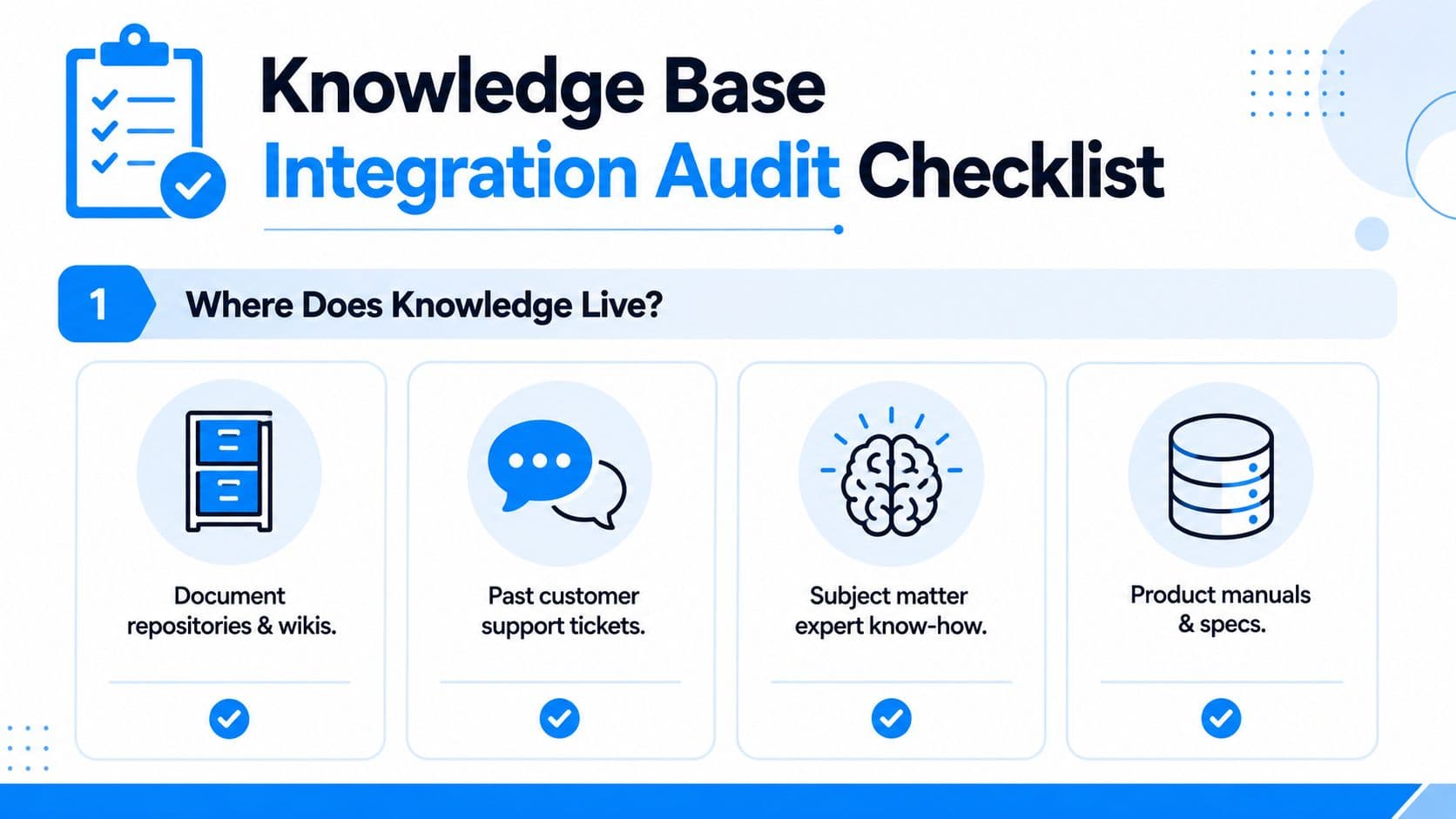
Before you touch an integration screen, inventory where knowledge lives. For most Shopify stores, that means product pages, policy PDFs, help center articles, support tickets, Slack threads, internal runbooks, Notion docs, and whatever lives in the heads of two people who answer every hard question. The goal is to separate customer-facing truth from internal notes, because the bot shouldn't see everything just because it exists.
A clean audit starts with ownership. Who can edit each source, who approves changes, and which source wins when two pages disagree? If the marketing team updates a shipping promo but support still answers from the old article, you've got a governance problem, not a chatbot problem.
Decide what belongs in v1
Don't try to ingest everything. A better first pass is to keep the pilot focused on the questions that repeat and the content categories you can defend with confidence. Policy pages, shipping info, returns, sizing, and catalog details usually belong early. Internal troubleshooting notes, edge-case exception handling, and half-finished draft pages usually do not.
Use the pilot to capture a baseline. That baseline should include the support questions your team sees most often, the issues that drag response times, and the content areas where humans still have to step in. You're not hunting for perfection here. You're deciding whether the first version should answer broad questions well or narrow questions extremely well.
Check access before you connect systems
Permission mapping matters as much as content quality. If a source can be edited by people who don't own customer-facing policy, the bot can end up citing material nobody meant to publish broadly. That's why you need to know which content is approved, which is draft, and which must stay internal.
If the answer would make a customer upset when support sees it in a transcript, keep it out of the customer-facing layer until ownership is settled.
A quick readiness test helps. If you can't point to the owner of each source, the approval path, and the scope of the pilot in one page, clean up first. If you can, then you're ready to integrate with less risk and much less cleanup later.
Mapping and Syncing Content Without Losing Your Mind
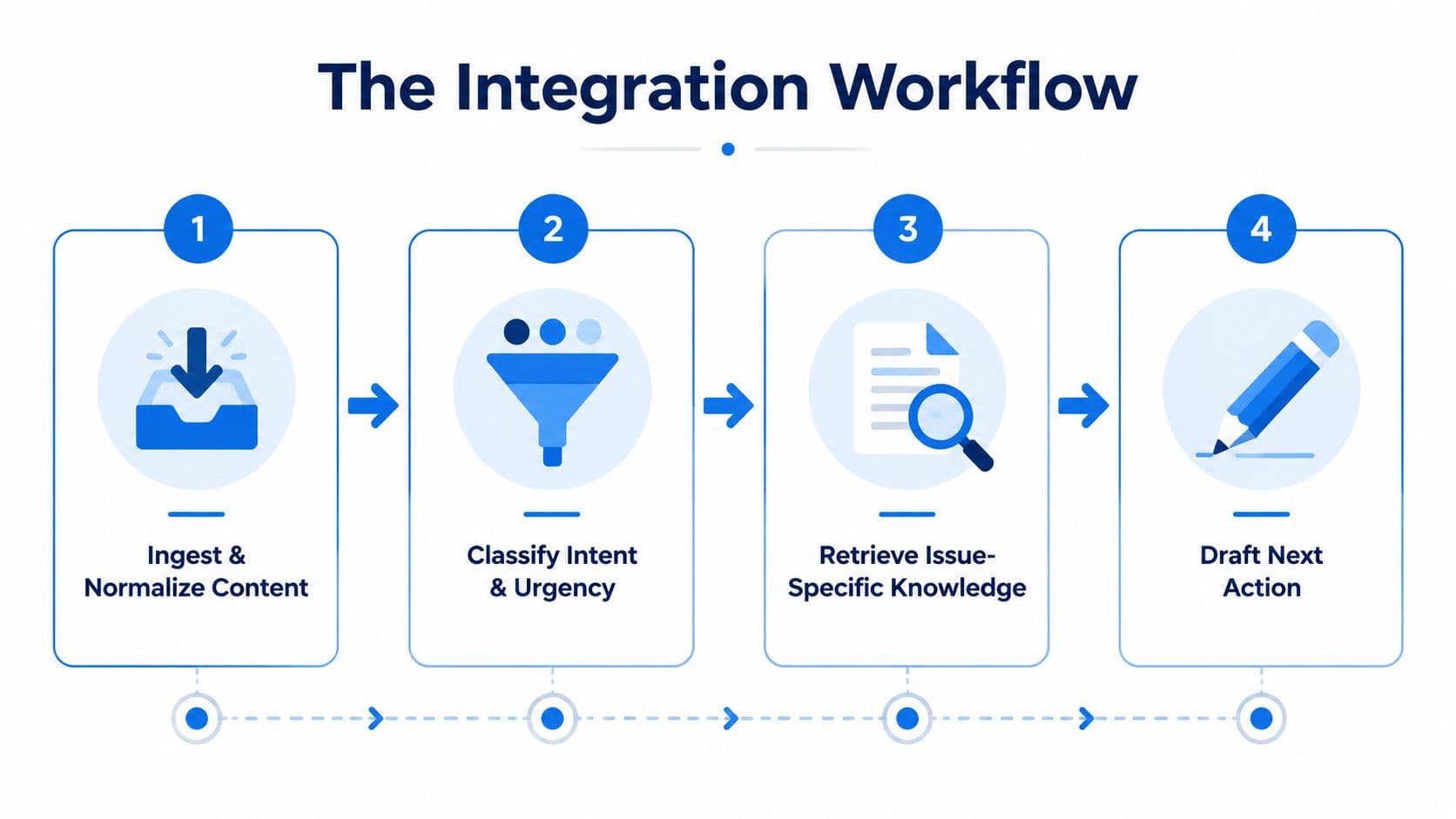
The cleanest setup looks dull because the bot is doing less guessing. Content comes in, the system classifies the question by intent and urgency, pulls only the knowledge that matches the issue, drafts the next action from policy and ownership, and logs the citation trail for review. That sequence keeps a chatbot from sounding confident while inventing shortcuts that no store would approve in a live transcript.
Mapping means matching real objects to real answers
Mapping is where product data turns into answerable knowledge. In a Shopify setup, that usually means deciding how SKUs, product types, collections, order status, customer tiers, and policy categories should be read by the bot, and which of those it can safely write back to, if anything. A catalog field that looks harmless in admin can become risky if the bot treats it like a promise to a shopper.
Some platforms learn the catalog, policies, and FAQ surfaces automatically. Others need custom API work or webhooks when the store has unusual logic, like regional exceptions or layered fulfillment rules. The difference is not polish, it is whether the answers stay dependable once real orders, refunds, and edge cases start flowing through the system.
Keep the citation trail visible
The citation trail matters because escalation changes the conversation. If a customer service lead asks why the bot answered a refund question a certain way, you need to show the source path, not a vague model explanation. A one-way flow is often safer for content sources because it reduces the chance that the bot writes back into the material it was supposed to read.
Rule of thumb: let the bot retrieve from the source of truth, not mutate the source of truth unless that workflow is tightly controlled.
Carti, Zendesk, or a custom retrieval layer each handle this a little differently. Carti connects directly to a Shopify store's catalog, policies, FAQs, and support surfaces, which helps when the goal is to cut down the number of disconnected places a shopper can get an answer. The same rule applies whichever system you choose, fewer hops usually mean fewer places for stale content to creep in.
Sync Timing, Data Flow, and Search Relevance
Not every source needs the same sync behavior. Inventory and price are time-sensitive, so they usually belong on a real-time path. Policies, help articles, and evergreen FAQs can often run on a scheduled sync without hurting the shopper experience. That difference matters because an always-on sync is overkill for static content and too slow for changing offers.
Real-time isn't always the right answer
A simple decision rule works well in practice. If the content changes often enough that a shopper could make a buying decision on the old version, prioritize real-time or near-real-time. If the content changes slowly and human approval matters more than speed, scheduled sync is safer. One-way flow is usually the cleaner default for content layers, because it reduces accidental overwrites and keeps the answer source stable.
The source-specific workflow below is a good starting point.
| Content Source | Sync Mode | Flow Direction | Why |
|---|---|---|---|
| Catalog | Real-time or near-real-time | Usually one-way into the bot | Prices, variants, and availability shift fast |
| Policies | Scheduled | One-way | Keeps approvals and version control intact |
| Blog | Scheduled | One-way | Useful for promotional or educational context, not urgent truth |
| Support tickets | Scheduled with filtering | One-way into a distilled knowledge layer | Raw tickets are noisy and need cleanup before reuse |
Relevance is a content problem too
Search relevance isn't just a model setting. Tags, categories, metadata, and clean naming decide whether the bot finds the right answer fast or the almost-right answer first. If internal and external content are mixed together without boundaries, a shopper can surface a runbook, a draft note, or an outdated article that only made sense to the team who wrote it.
OAuth 2.0 is the default choice where it's available, but the bigger issue is permissions. Map access before connecting systems, then separate internal content from external content so the retrieval layer doesn't cross the line by accident. That discipline is what keeps the bot useful after the first few content updates.
When Integration Hurts Conversion
A lot of guidance treats integration like a universal win. That is too simple. If the knowledge base is thin, noisy, or outdated, the bot does not just reflect that weakness, it amplifies it at the point of sale, faster and more confidently than a human rep usually would.
AWS's enterprise-search guidance makes the underlying issue clear, retrieval quality depends on ingestion, indexing, and retrieval design, not model behavior alone (Amazon Bedrock Managed Knowledge Base enterprise search guidance). A poorly prepared content layer produces poor answers even when the infrastructure looks modern. That is the part merchants miss when they assume the chatbot itself is the problem.
Watch for these warning signs before launch
If zero-result searches are already common in the help center, the bot may just paper over them with generic language. If article helpfulness is trending down, the bot is probably learning from material shoppers already do not trust. If support tickets start quoting the bot verbatim, the assistant has become part of the failure chain.
Fragmentation is another hidden risk. Ask the same question of the help center, the internal wiki, Slack, and product docs, then see whether the answers line up. When they do not, integration does not solve the disagreement, it surfaces it.
Fragmented knowledge is the failure mode
That is why the strongest implementation habit is consolidation. The help center should not be the only source if it is incomplete, but Slack or an internal runbook should not become the source of truth for shoppers either. The bot needs a curated layer with clear ownership, because scattered knowledge creates answer drift.
If two sources disagree, the bot does not need more confidence, it needs a human decision about which source wins.
The merchant who skips consolidation ships a faster path to wrong answers. The merchant who cleans the knowledge layer first gives the bot something worth connecting.
Testing, Validation, and the KPIs That Prove It Worked
Launch the integration in stages. Start with internal dogfooding so your team can hit the worst questions first. Then expose it to a small slice of traffic, watch for bad citations and broken handoffs, and only then expand. The first test cases should be messy on purpose, promo stacking, partial refunds, regional shipping exceptions, and product variants that behave differently from the rest of the catalog.
Validate against the weird stuff
The happy-path question is easy. The edge case is what tells you whether the integration is production-ready. If the bot can handle a variant-specific return policy, a split shipment, or a promo that applies only under certain conditions, you're closer to something durable. If it fails there, fix the mapping before you widen traffic.
Track the metrics that matter
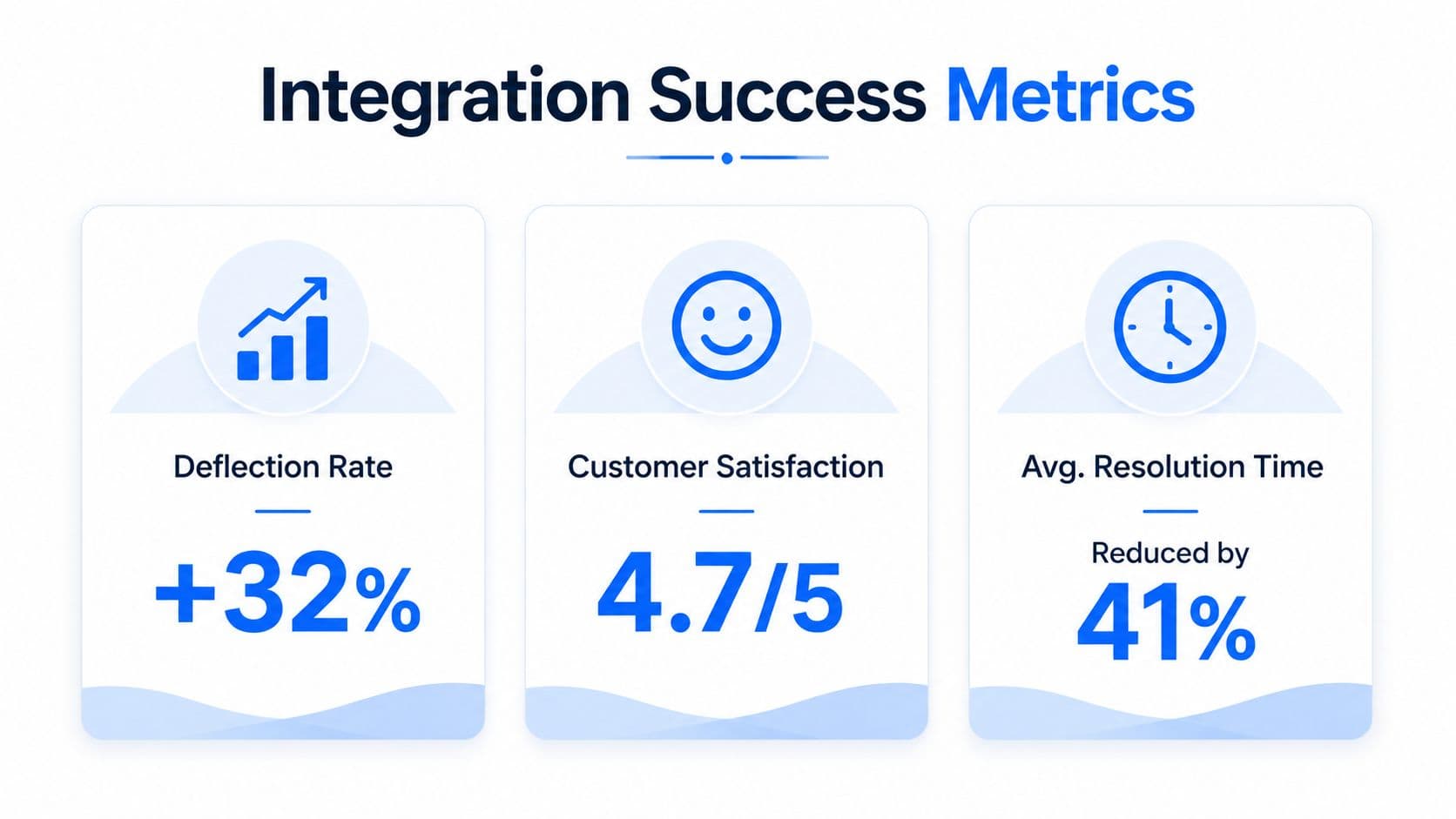
The numbers worth watching are the ones that tie answer quality to business impact. Keep an eye on KB search zero-result rate, article helpfulness, ticket deflection, resolution time, conversion rate on sessions that used the bot, and revenue attributed to conversations. The internal guide on chat bot analytics is a useful companion for setting up that measurement habit without drowning in vanity metrics.
Use a weekly review for low-rated answers and a monthly check for broader patterns. If you can't connect a metric to an action, drop it from the dashboard. A dashboard full of unloved charts is just another tab nobody opens.
Keeping It Alive After Launch
The quiet failure mode is drift. The bot launches cleanly, traffic shifts, policies change, and three months later the answer layer is already behind the store. That's why a live knowledge system needs a weekly review of low-rated answers, a monthly sweep for stale articles, and a regular look at which sources the bot hits most often.
The useful part of that rhythm is that it turns the bot into a signal source. If shoppers keep asking the same shipping question, merchandising and content can respond to the confusion instead of guessing at it. That's where an Insights Dashboard pattern helps, not because dashboards are exciting, but because repeated questions are content strategy data in disguise.
Stop doing the things that create drift
Manual FAQ updates don't scale once the bot is live. Parallel runbooks create conflicting truth. And adding more knowledge sources without retiring the old ones usually makes retrieval worse, not better.
A healthy 90-day check looks simple. The content owner can name the top failure modes, the support lead can point to the stale articles that were fixed, and the bot is still pulling from a smaller, cleaner source layer than it had on day one. That's what good looks like, not perfection, just a tighter loop between what shoppers ask and what the store publishes.
If you want a chatbot that's built around accurate Shopify knowledge instead of patchwork content, Carti is one place to start. It connects to your store's catalog, policies, FAQs, and support surfaces, then surfaces shopper questions you can use to clean up the content layer that powers every answer.

Written by
Daniel AndersonFounder of Carti. 10+ years building ecommerce brands in apparel and supplements. Still runs a Shopify store and built Carti to help merchants convert more browsers into buyers.
Ready to boost your store's sales?
Install Carti in 5 minutes and let AI handle customer questions, recommend products, and close sales 24/7.
Start Free Trial14-day free trial