
Across 150 million shopping sessions, only 7% of traffic came from visitors who clicked a recommendation, yet those sessions generated 26% of revenue and spent about 5x more per visit than non-clickers, according to Salesforce research cited by Hello Retail. That's the story behind cross sell recommendations: they're not a widget problem, they're a revenue-concentration problem.
If you've run enough Shopify carts, you start to see the pattern fast. The shoppers who engage with a relevant add-on are not the same crowd as the people who ignore everything on the page, and treating both groups the same is how merchants leave AOV on the table. Good cross sell systems separate the buyers who are ready for a companion product from everyone else, then meet them in the right place, at the right time, with the right level of restraint.
What Cross Sell Recommendations Actually Are
Cross sell recommendations are the relevant companion products you surface after a shopper has already shown intent. The main item is already in motion, and the recommendation helps the customer finish the job with something that fits, completes, or protects that purchase.
That is why cross sell is different from upsell. An upsell asks the buyer to move to a bigger or more expensive version of what they already wanted. A cross-sell suggests the fries with the burger, not the larger burger. The difference matters because the shopper's mental friction is different, the page placement is different, and the risk of annoying them is different too.
Merchants care about this category because attention is uneven. Hello Retail cites Salesforce research showing that recommendation clickers were only a small share of traffic, yet they contributed a much larger share of revenue and spent far more per visit than shoppers who did not click. The lesson is simple. A recommendation is not decoration, it is a filter that pulls high-intent shoppers toward the next sensible step.
The four common shapes merchants use
You'll usually see cross sell recommendations show up in four familiar forms, even if the labels change by app or theme:
- Frequently bought together, which pairs products that solve the same task.
- Customers also bought, which leans on prior basket behavior.
- Complementary product, which suggests an accessory, refill, or add-on.
- Recently viewed, which helps a buyer return to something they were already considering.
Practical rule: if the shopper would say, “That makes sense,” you're in cross-sell territory. If they'd say, “Why are you showing me that?”, you've drifted into noise.
| Type | What it does | Best placement |
|---|---|---|
| Cross-sell | Suggests a related companion item | Product page, cart, chat, post-purchase |
| Upsell | Moves the shopper to a higher-value version | Product page, comparison step, checkout |
| Bundle | Packages items into one combined offer | Product page, cart, email |
The cleanest way to think about it is this. Cross sell is a segmentation lever, not just a merchandising block. It separates shoppers who are already signaling intent and are likely to respond to relevance from everyone else who needs a lighter touch.
The Three Numbers That Decide if Recommendations Work
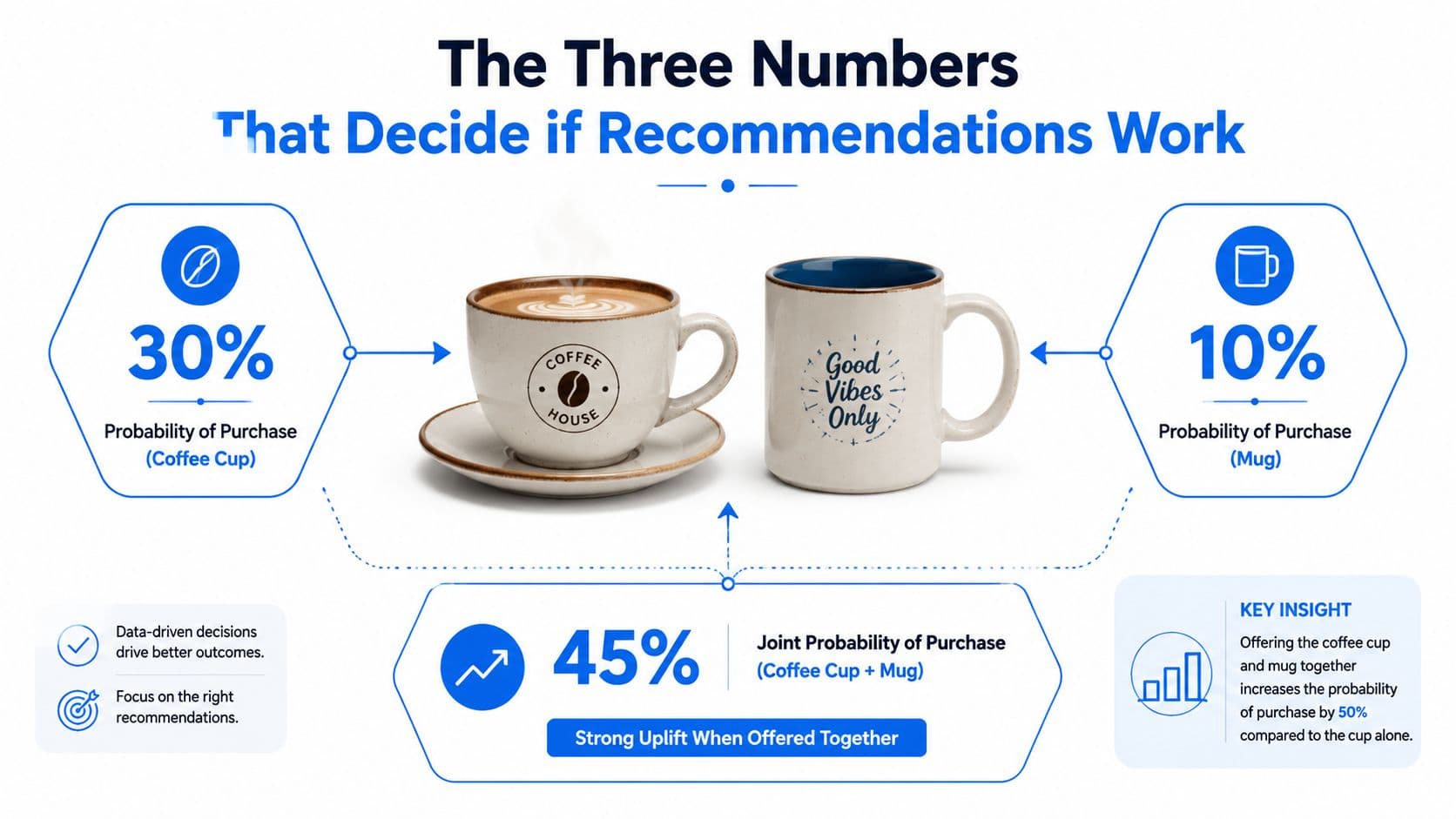
Think about a coffee store selling a cup and a mug. You don't just want to know whether they were bought together once, you want to know whether the pair shows up often enough to matter, whether the relationship is directional, and whether it beats chance.
Support tells you whether the pair is real
Support is how often two items appear together in the basket history. If a skincare brand sees a cleanser and a toner together again and again, that pair has more support than a random cleanser and a random face tool that happened to co-occur once.
A tiny support value can trick you into chasing coincidence. That's why experienced merchants filter weak pairs before they ever think about showing them to shoppers.
Confidence tells you what happens after item A
Confidence asks, given that a shopper bought item A, how likely are they to also buy item B? In a skincare store, if someone buys a serum and often adds a face cream, confidence tells you how frequently that second step happens after the first one.
That's useful, but it can still be misleading if item B is already popular on its own. A high confidence score alone can make a common item look smarter than it is.
Lift tells you whether the pair beats popularity bias
Lift normalizes the pair against baseline purchase frequency, which is why it's the ranking signal that matters most. A pair with strong lift is doing more than riding the wave of a best seller, it's showing a genuine affinity.
That's the language most tools should be speaking under the hood. The E-commerce key performance indicators framework matters here because recommendation performance should be tied back to real revenue behavior, not just clicks on a module.
Don't deploy raw pairs because they look cute in admin. Validate the strongest candidates with a small test first, or you'll ship noise dressed up as personalization.
Choosing the Right Recommendation Approach for Your Store
The right recommendation engine depends on your data state, not your wish list. A brand-new Shopify store with a thin catalog and very little order history needs a different system than a mature storefront with a stable basket pattern and enough transactions to learn from.
Rule-based works when the catalog is still small
Rule-based recommendations are the simplest path. You hard-code pairs in your admin, which makes them useful for new stores, limited assortments, and products where the relationship is obvious, like a camera and a memory card.
For a first-time visitor, rule-based logic is predictable and easy to control. For a brand-new SKU, it's also safer because you can attach it to an existing hero product instead of waiting for the algorithm to discover it.
Collaborative filtering needs history to earn its keep
Collaborative filtering learns from basket history and shopper behavior. It becomes far more useful once the store has enough order volume and the catalog isn't changing every week, because then the model can spot real purchase patterns instead of noise.
That makes it a poor fit for the cold-start problem described in the newer recommendation research cited in the brief. If you only have a handful of orders, the model has too little to separate true affinity from randomness.
Content and LLM approaches help when history is sparse
Content-based and LLM-assisted recommendation systems are stronger when product attributes, descriptions, and intent signals matter more than pure order history. They can match semantically, which helps with sparse data, new products, and long-tail catalog items that don't yet have enough buyer behavior behind them.
If you want a useful outside reference on site personalization strategy, Silva Marketing local business strategies gives a practical view of how personalization logic should follow the business, not the other way around.
A useful decision tree looks like this:
- Under 1,000 orders and a thin catalog: start with rule-based logic plus LLM-enhanced search.
- Past that threshold with stable basket history: layer in collaborative filtering.
- Large catalog with strong product copy: lean harder on semantic matching.
The internal personalized product recommendations guide fits well here because it helps you think beyond one recommendation method and toward a mixed system. In practice, that's usually the right answer.
Where Recommendations Live in the Shopify Shopper Journey
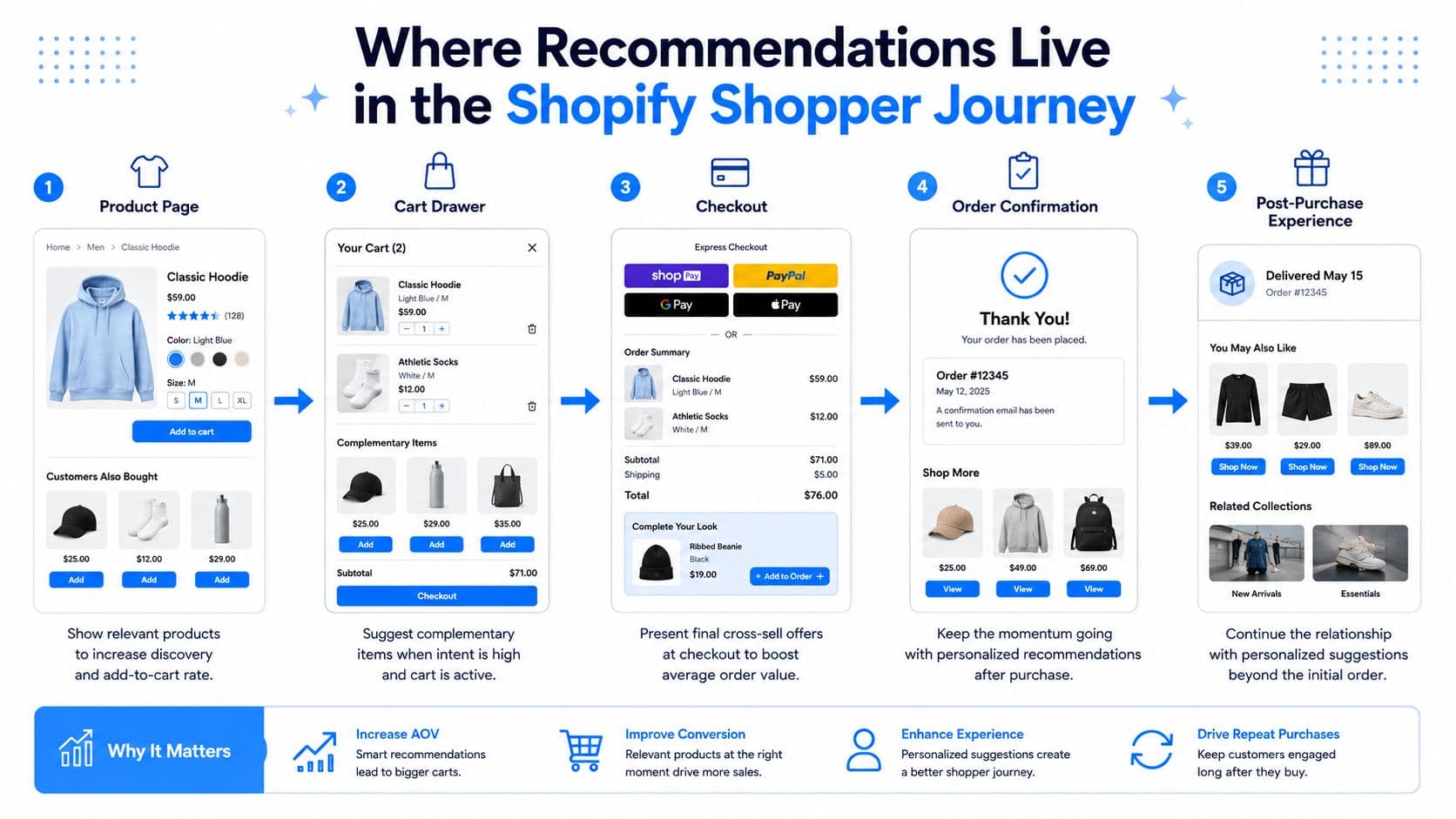
A shopper doesn't experience recommendations as one thing. They experience them as a series of tiny decisions across the journey, and each surface has a different job.
Product pages do the first heavy lifting
On the PDP, the shopper is still comparing. Complementary products and recently viewed items belong here, because the buyer is already mentally assembling the order and deciding what else they need.
The UX rule is simple. Keep suggestions visually distinct from the main product image, otherwise the primary item loses focus and the page starts feeling crowded.
Cart drawer and checkout are for final relevance checks
In the cart drawer, the buyer has already chosen once, so this is the right place for frequently bought together suggestions. The timing matters more than the cleverness of the copy, because you're not interrupting discovery, you're helping them finish.
Checkout is tighter. Any suggestion there needs to be one-click accept and never compete with the buy button, because friction in that moment does more harm than the add-on can repair.
Post-purchase and email are not afterthoughts
The post-purchase window is still active buying time, not dead time. SureSwift Capital argues that trust is highest right after the transaction, which is why the order confirmation screen and the first recovery email can both carry a useful add-on without feeling pushy.
A simple operating rule helps here:
- PDP: use suggestions that feel like product guidance.
- Cart drawer: use suggestions that feel like completion.
- Checkout: use suggestions that are fast and unobtrusive.
- Email and order confirmation: keep it to a small, clean set of add-ons.
That's also why abandoned carts are really cross-sell recovery problems. When a buyer leaves, the recovery message can still rescue the main order and offer the accessory they forgot to add.
A short walkthrough video can help teams align on the journey flow.
Applying Carti to Power Recommendations on Your Store
Carti is an AI-powered Shopify chatbot that learns your catalog, policies, and FAQs automatically, responds in 92 languages without extra configuration, and uses Smart Suggestions to recommend relevant products based on shopper behavior. That makes it useful in the moments where a shopper is already asking for help, not just staring at a static widget.
Map the tool to the shopper journey
On the PDP, Smart Suggestions can answer the classic “what goes with this?” question without forcing the buyer to hunt through the catalog. In cart chat, it can recommend a relevant add-on after the shopper has already committed to the main item, which is where the intent is strongest.
Instant Answers matter too, because a sizing question or policy question can kill the sale before a recommendation ever has a chance to land. Cart Recovery then takes the abandoned checkout and turns it into a second chance to suggest the forgotten accessory, as long as the message stays relevant.
Here's a simple mapping for store teams:
| Placement Zone | Carti Feature | What it does |
|---|---|---|
| Product page chat | Smart Suggestions | Recommends complementary products based on shopper behavior |
| Cart drawer chat | Smart Suggestions | Surfaces add-ons after the main item is chosen |
| Help moments | Instant Answers | Removes friction from sizing, policy, or availability questions |
| Abandoned checkout | Cart Recovery | Brings back the order and can include a related add-on |
| Merchandising review | Insights Dashboard | Surfaces common questions that hint at cross-sell gaps |
For merchants who want the mechanics spelled out, How Carti recommendations work is the most direct reference.
Copy merchants can use today
- PDP chat opener: “What are you using this with? I can suggest a matching add-on or two.”
- Cart drawer nudge: “This pairs well with the item in your cart, want to add it before checkout?”
- Recovery message: “Your order is still waiting. If you're finishing the set, here's the matching add-on to go with it.”
The best recommendation copy sounds like a helpful store associate, not a push notification with a quota.
The Insights Dashboard is the quiet advantage here. It shows the questions shoppers keep asking, and those questions often reveal the exact add-ons, bundles, or support articles that should be surfaced sooner.
Why Most Recommendations Underperform and How to Fix Them
Recent consumer data shows a real trust problem. Product recommendations based on previous purchases fell to 38% of consumers from 62% the year before, and browsing-history recommendations dropped to 23% from 33%, according to Cordial's 2025 consumer research. That doesn't mean recommendations are broken, it means generic personalization is getting ignored.
The failure mode is usually repetition, not relevance in theory
Most stores make the same mistake. They show the same pair in every slot, repeat it too often, and call that personalization because the products are technically related. Shoppers notice the pattern fast, and once the suggestion feels mechanical, trust drops.
The fix starts with frequency control. If a visitor has already seen the same pair once in session, don't keep pushing it in every location just because the rule still fires.
A better recommendation system is more selective
Use recency as part of the logic, not just historical affinity. A high-lift pair can still be the wrong recommendation if the shopper just saw it twice, and behavior-triggered suggestions usually feel more useful than static “customers also bought” blocks.
A practical audit list helps keep the system honest:
- Cap repetition: stop showing the same pair over and over to the same visitor.
- Weigh recency: prefer what's relevant now, not only what worked months ago.
- Trigger on behavior: tie the suggestion to a real action, not a default slot.
- Check buyer value: ask whether the item helps the customer or only nudges AOV.
Relevance beats recall. A smaller, sharper set of suggestions usually earns more trust than a loud feed that tries to be everywhere at once.
Recommendation systems succeed or fail based on how they perform in practice. Even a seemingly perfect pairing on paper can be ineffective on screen if the shopper is already tired of seeing it.
Testing Recommendations Without a Data Team
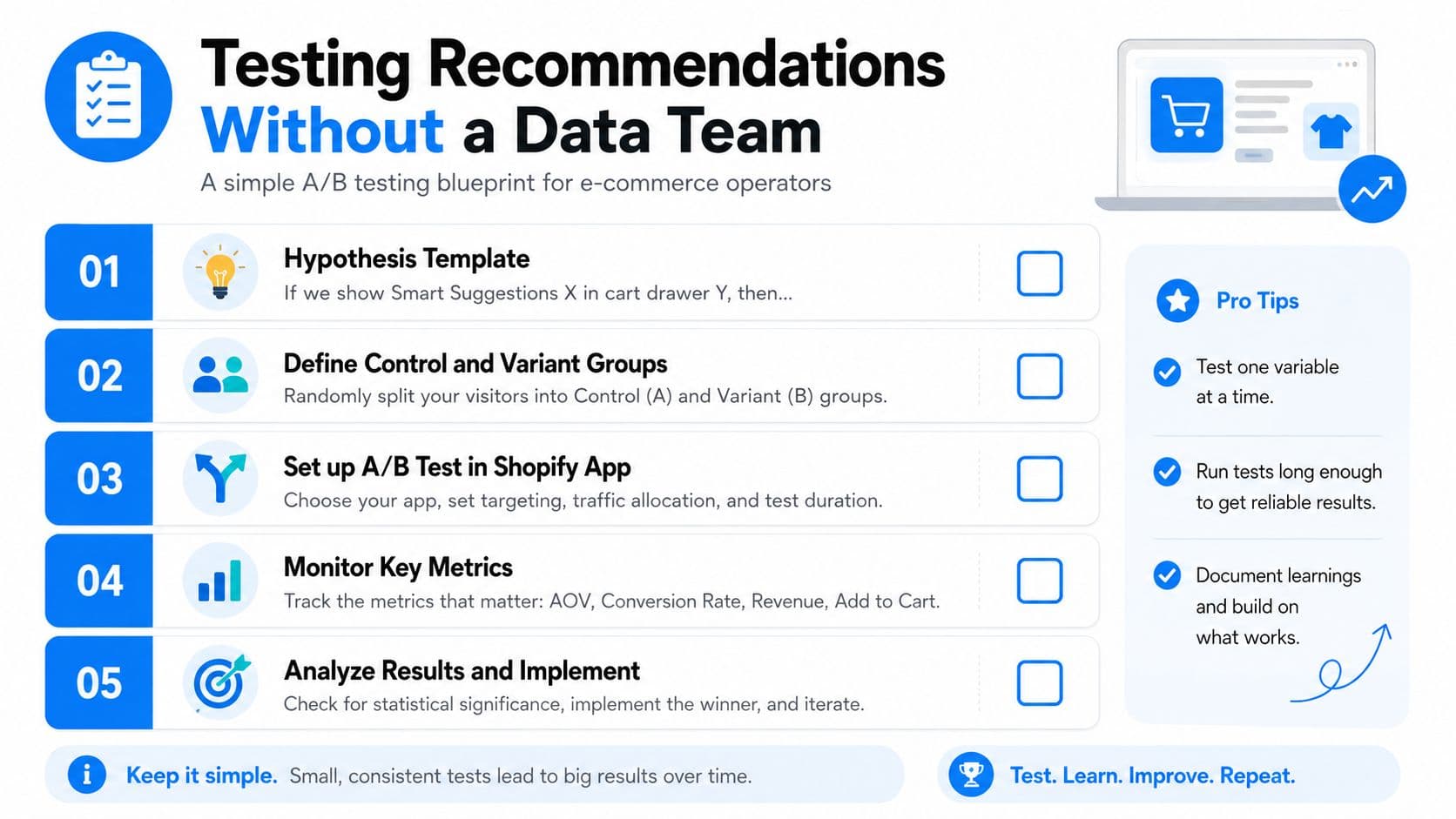
Testing doesn't need to be complicated, but it does need to be disciplined. If you want to know whether cross sell recommendations are moving revenue, write the test like an operator, not like a brainstorm.
Start with one clean hypothesis
Use a sentence like this. “If we show Smart Suggestions in the cart drawer after the main item is added, then recommendation-attributed revenue per visitor will rise because the shopper has already committed and is more open to a relevant companion product.”
Your primary metric should be recommendation-attributed revenue per visitor, not clicks. Clicks are useful, but revenue tells you whether the suggestion changed the basket.
Watch the right guardrails
Your secondary metrics can include AOV and conversion rate. The guardrail metric should cover the part of the experience most likely to get hurt, such as unsubscribe rate from recovery emails or support tickets if the suggestion feels off.
A simple intuition keeps the team grounded. A meaningful lift should be worth shipping, while a tiny gain can disappear into normal noise.
Test one variable at a time
A good test only changes one thing. Compare top versus bottom placement in the cart, test two products versus four, or compare immediate suggestion timing against a delayed trigger.
A merchant running a 14-day fashion test might find one variant lifts AOV while another wins on conversion, then ship the hybrid instead of forcing a false winner. That's normal. The best recommendation strategy is often a blend of curated bundles and behavior-led suggestions, not a single winner-takes-all setup.
Your 14-Day Launch Plan and What to Measure Next
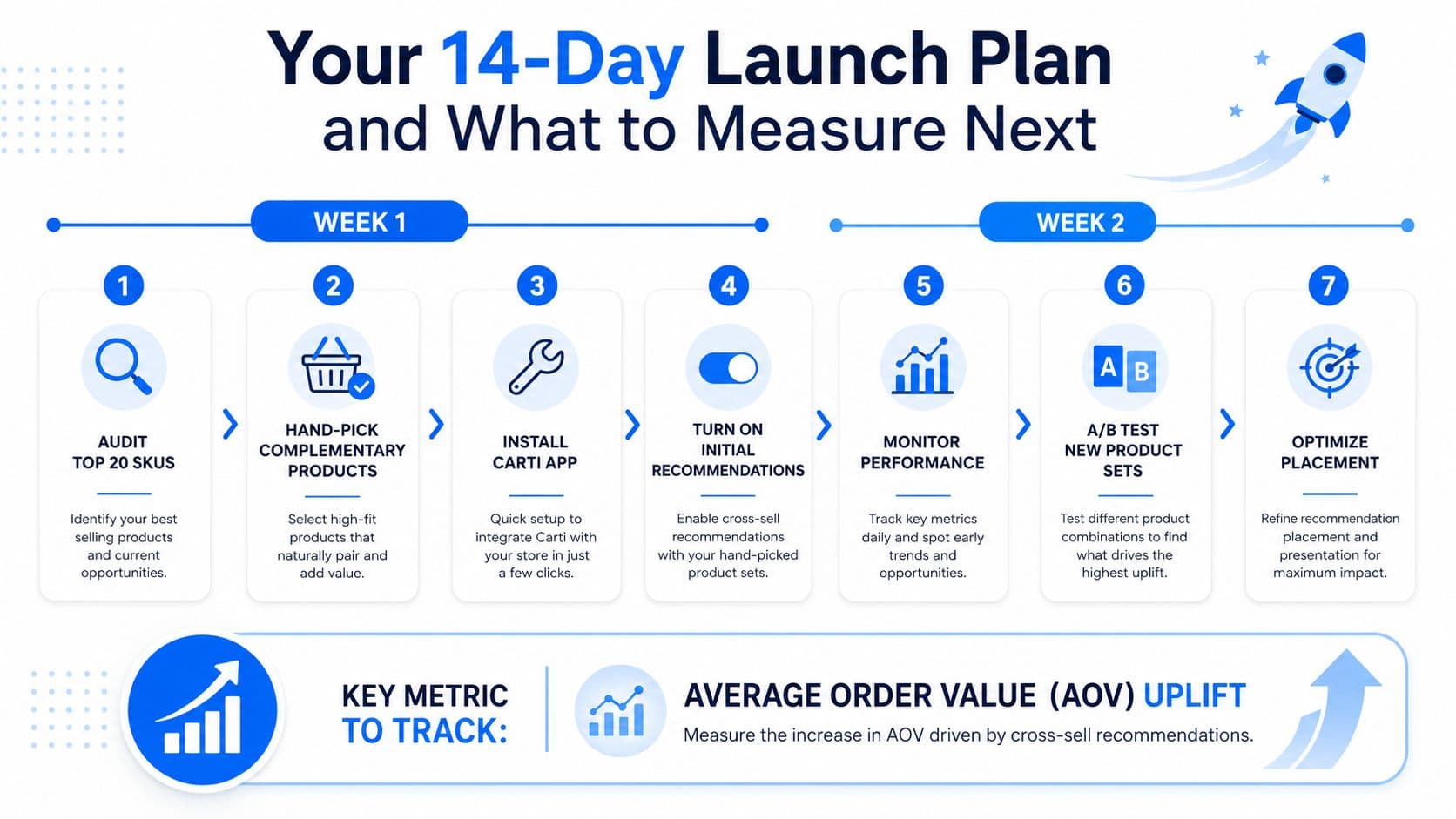
The fastest way to make progress is to launch in two clean waves. Week one is for setup and control, week two is for recovery, frequency caps, and your first comparison test.
Keep the rollout simple
Start by auditing your top 20 SKUs and pairing each hero product with one clear companion. Then turn on Smart Suggestions in chat and cart, so the recommendation logic has a live surface before you start stacking more channels.
In week two, activate Cart Recovery with a message that includes a relevant add-on, set frequency caps, and launch your first A/B test. Don't turn on chat, recovery, and email all at once with no baseline, because you won't know which surface moved the basket.
| Day | Action | Owner |
|---|---|---|
| 1 | Audit top 20 SKUs | Merchandising |
| 2 | Hand-pick complementary products | Merchandising |
| 3 | Install Carti and verify catalog import | Ecommerce manager |
| 4 | Turn on Smart Suggestions in chat | CX or growth |
| 5 | Turn on cart drawer suggestions | Ecommerce manager |
| 6 | Review early question patterns | CX lead |
| 7 | Check baseline metrics | Growth |
| 8 | Launch Cart Recovery with add-on copy | Lifecycle marketing |
| 9 | Set frequency caps | Growth |
| 10 | Start A/B test | Ecommerce manager |
| 11 | Monitor support tickets | CX |
| 12 | Review AOV and conversion | Growth |
| 13 | Adjust underperforming pairs | Merchandising |
| 14 | Decide ship, pause, or iterate | Team lead |
Measure the right thing
The one metric that matters most is cross-sell-attributed revenue per visitor, which you can track as revenue from sessions that clicked a recommendation divided by total sessions. Watch AOV lift, conversion among recommendation-clickers, and support ticket volume alongside it.
Avoid three common traps:
- Overloading the PDP: too many suggestions make the main product harder to buy.
- Ignoring mobile drawer space: cramped layouts hide the add-on.
- Treating it like a one-time setup: the catalog changes, so the pair logic should too.
If you want the next 30 minutes to count, open Shopify, pick one hero product, choose one companion, and put that pairing into one live surface today. Then revisit the rest of the journey with the same discipline next week.
If you want a cross sell system that works across chat, cart, recovery, and support instead of only one widget, explore Carti. It brings Smart Suggestions, Instant Answers, and Cart Recovery into the same Shopify workflow, so the recommendation logic can follow the shopper instead of stopping at the product page.

Written by
Daniel AndersonFounder of Carti. 10+ years building ecommerce brands in apparel and supplements. Still runs a Shopify store and built Carti to help merchants convert more browsers into buyers.
Ready to boost your store's sales?
Install Carti in 5 minutes and let AI handle customer questions, recommend products, and close sales 24/7.
Start Free Trial14-day free trial