
You're probably seeing the same pattern every week. Traffic lands on your Shopify store, shoppers click through product pages, a few add to cart, and most disappear without ever telling you why. Some had a sizing question. Some wanted to compare two products. Some were one honest answer away from buying, but your store gave them a passive chat bubble and a contact form instead of a salesperson.
That's the gap an AI powered sales assistant closes.
Used well, it doesn't behave like a support widget waiting in the corner. It works more like a digital sales associate that engages shoppers while intent is still high, answers buying questions instantly, recommends the right products, and removes the friction that kills conversion. For Shopify brands, that matters because revenue often slips through tiny moments of hesitation: shipping uncertainty, bundle confusion, product fit, ingredient questions, return policy anxiety, or simple indecision.
The stores getting the most value from this category aren't treating AI as a help desk shortcut. They're using it as onsite revenue infrastructure.
Why Your Store Needs More Than a Chat Bubble
A shopper lands on a product page for a serum, a sofa, or a pair of running shoes. They scroll, pause, compare variants, and hover around the add-to-cart button. Then the questions start. Is this right for my skin type? Will this fit in a small apartment? What's the difference between these two options? If they don't get an answer in that moment, the sale usually stalls.
Most Shopify stores are still set up to react after friction appears. A basic chat widget says hello. An email form promises a reply later. A support rep catches up the next morning. By then, intent has cooled off and the shopper has moved on.
That's why a passive chat bubble underperforms. It waits for work. A real AI powered sales assistant does the opposite. It helps the shopper choose, reduces hesitation, and keeps the session moving toward purchase.
When support logic hurts sales
Support tools are built to resolve issues. Sales assistants are built to remove buying friction before it turns into abandonment. That difference sounds subtle, but on a storefront it changes everything.
A support-first setup tends to focus on things like:
- Ticket deflection: reducing repetitive customer questions
- Queue management: routing issues to humans
- After-purchase help: tracking orders, returns, and policies
A sales-first setup focuses on different moments:
- Product selection: helping shoppers decide what fits their need
- Confidence building: answering objections before checkout
- Purchase momentum: nudging the shopper toward the next action
Stores don't lose sales only because products are weak. They lose sales because uncertainty goes unanswered.
On a busy Shopify store, unanswered questions don't show up neatly in a dashboard. They show up as bounced sessions, abandoned carts, lower conversion on high-intent pages, and support teams buried in the same pre-purchase questions every day.
The fix isn't more popups or more discounts. It's better guidance at the exact moment a shopper is deciding whether to trust your store with their money.
What an AI Powered Sales Assistant Actually Is
Think of an AI powered sales assistant as your best in-store salesperson, turned into software and placed everywhere your shoppers need help. It knows your catalog, understands shopper intent, and responds instantly across routine buying questions that would otherwise slow the sale down.
A basic chatbot is closer to a store directory. It points people around. It can answer simple scripted questions if the shopper asks them the right way. That's useful, but limited.
An AI sales assistant behaves more like a personal shopper. It reads the question in context, understands what the shopper is trying to accomplish, and guides them toward the next best step.
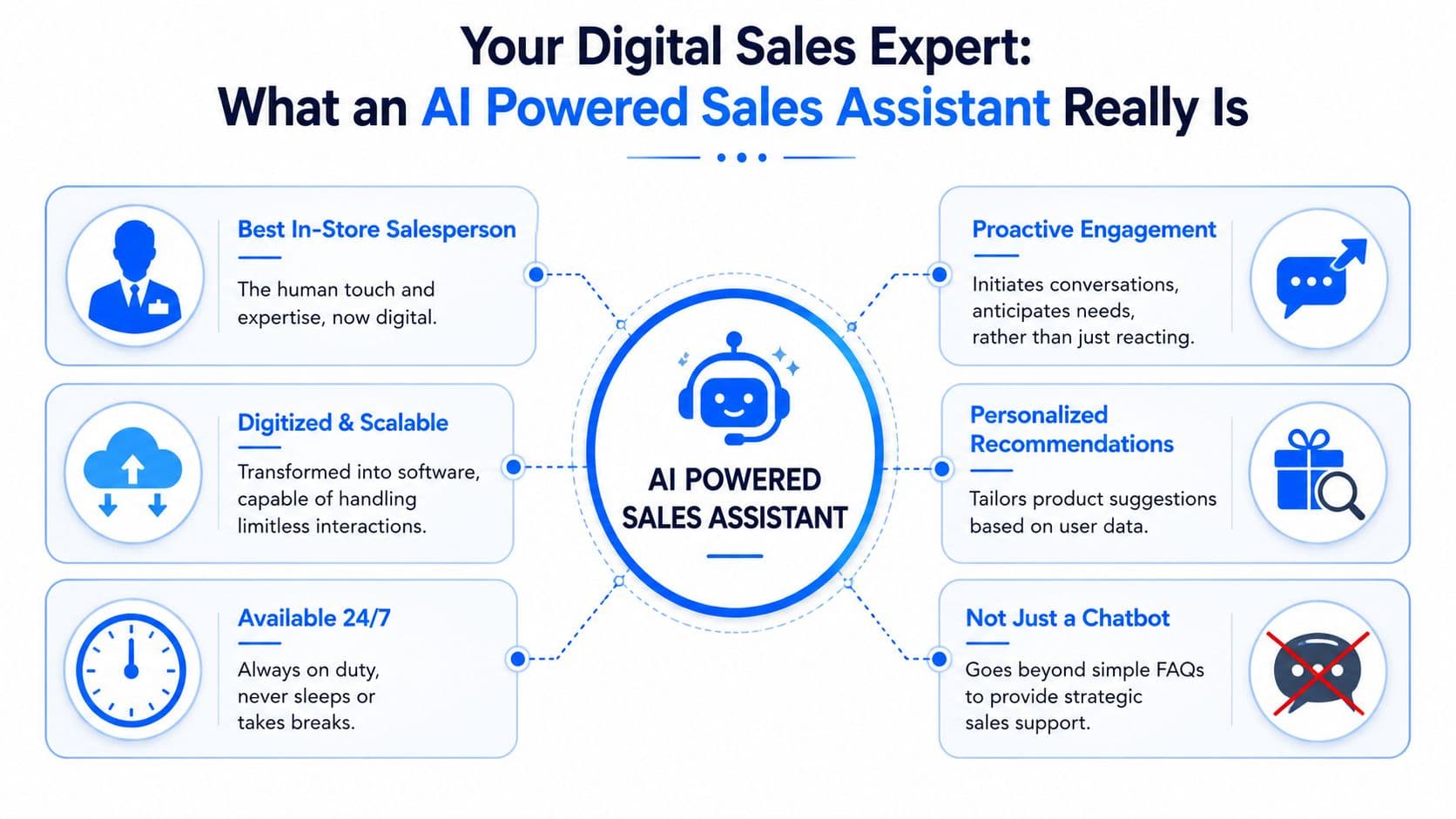
A chatbot answers questions. A sales assistant moves the sale forward
That distinction matters in e-commerce because buying intent is messy. Shoppers rarely ask clean FAQ-style questions. They ask things like:
- “Which one is better for hot sleepers?”
- “I want a gift for someone who likes neutral colors.”
- “Will this work for sensitive skin?”
- “What should I buy with this?”
A rule-based bot struggles there. An AI assistant can interpret the intent behind the question and connect it to product details, policies, recommendations, and follow-up prompts.
Industry guidance on AI sales assistants describes them as systems that combine natural language processing, predictive logic, and workflow automation to parse buyer language, suggest next actions, and reduce manual load across the funnel, as explained in Nooks' overview of AI-powered sales assistants.
What it's automating behind the scenes
The commercial value comes from how much repetitive work these systems can absorb. According to MarketsandMarkets' guide to choosing the right AI sales assistant, AI sales assistants can handle up to 65% of time-consuming administrative tasks, reduce time spent on administration by 40%, and improve lead generation and customer retention by 50%.
For a Shopify operator, “administrative tasks” translates into real storefront work:
- Answering repeat questions: shipping, returns, sizing, ingredients, compatibility, delivery windows
- Surfacing products faster: matching need states to the right SKUs
- Routing edge cases: sending high-risk or unusual conversations to a human
- Capturing intent signals: saving useful customer questions and objections for later analysis
If your team is trying to Integrate AI into operations, this is the category to evaluate carefully. The useful tools don't just reply faster. They connect catalog knowledge, policy knowledge, and shopper behavior into one sales workflow.
Practical rule: If the tool only answers static FAQs, you bought support automation. If it helps shoppers choose, compare, and commit, you bought a sales assistant.
The Tangible Benefits for Your Shopify Store
For Shopify brands, the payoff isn't abstract. It shows up in conversion, revenue efficiency, and workload reduction. That's why the strongest use case for an AI sales assistant isn't “better chat.” It's better commercial performance.
Revenue impact shows up in familiar places
The clearest lift usually comes from removing delays and uncertainty during purchase decisions. Research summarized by Datagrid on AI sales agent adoption reports that sales teams using AI saw an 81% increase in revenue compared with 66% for non-AI teams, plus a 15% boost in sales conversion rates. The same source says reps using AI save 2 to 5 hours per week.
Those numbers come from sales organizations, but the operating logic applies directly to e-commerce. Faster answers, better qualification, and less wasted human effort tend to produce the same downstream effect on a Shopify storefront:
- Higher conversion: shoppers get answers before doubt turns into exit
- Better product matching: recommendations reduce bad-fit purchases and hesitation
- More recovered demand: uncertain carts get nudged instead of forgotten
If you're comparing conversational tools for storefront use, this overview of an AI chatbot for ecommerce is useful because it connects chat performance to buying behavior rather than support volume alone.
Operations improve at the same time
The second win is operational. Most merchants treat pre-purchase questions and support workload as separate issues. They're usually the same issue in two forms. If your store can answer repetitive buying questions well, your team handles fewer interruptions and more meaningful exceptions.
That changes daily operations in practical ways:
| Store pain point | What the assistant does | Business effect |
|---|---|---|
| Repetitive product questions | Answers instantly using store knowledge | Less manual support load |
| Shoppers comparing options | Recommends relevant products | More decisive buying sessions |
| Hesitation before checkout | Resolves objections in session | Fewer lost carts |
| Team buried in inboxes | Handles common requests continuously | Staff can focus on edge cases |
A good deployment also creates a cleaner feedback loop. Chat logs tell you where copy is weak, where PDPs leave questions unanswered, and which products create confusion before purchase. That's valuable merchandising intelligence.
The strongest stores use AI conversation data to improve pages, bundles, FAQs, and offers. They don't leave the learning trapped inside the widget.
There's also a staffing angle. When the assistant handles routine demand, your human team can spend more time on returns exceptions, VIP customers, wholesale inquiries, or higher-consideration shoppers who need a person. That's where margin and customer experience improve together.
Core Features That Drive Sales Not Just Answers
The feature list matters less than the interaction design behind it. Plenty of tools can answer questions. Fewer can guide a shopper from uncertainty to purchase without feeling robotic or off-brand.
The section below is where most evaluations go wrong. Merchants compare chat interfaces and miss the sales mechanics.
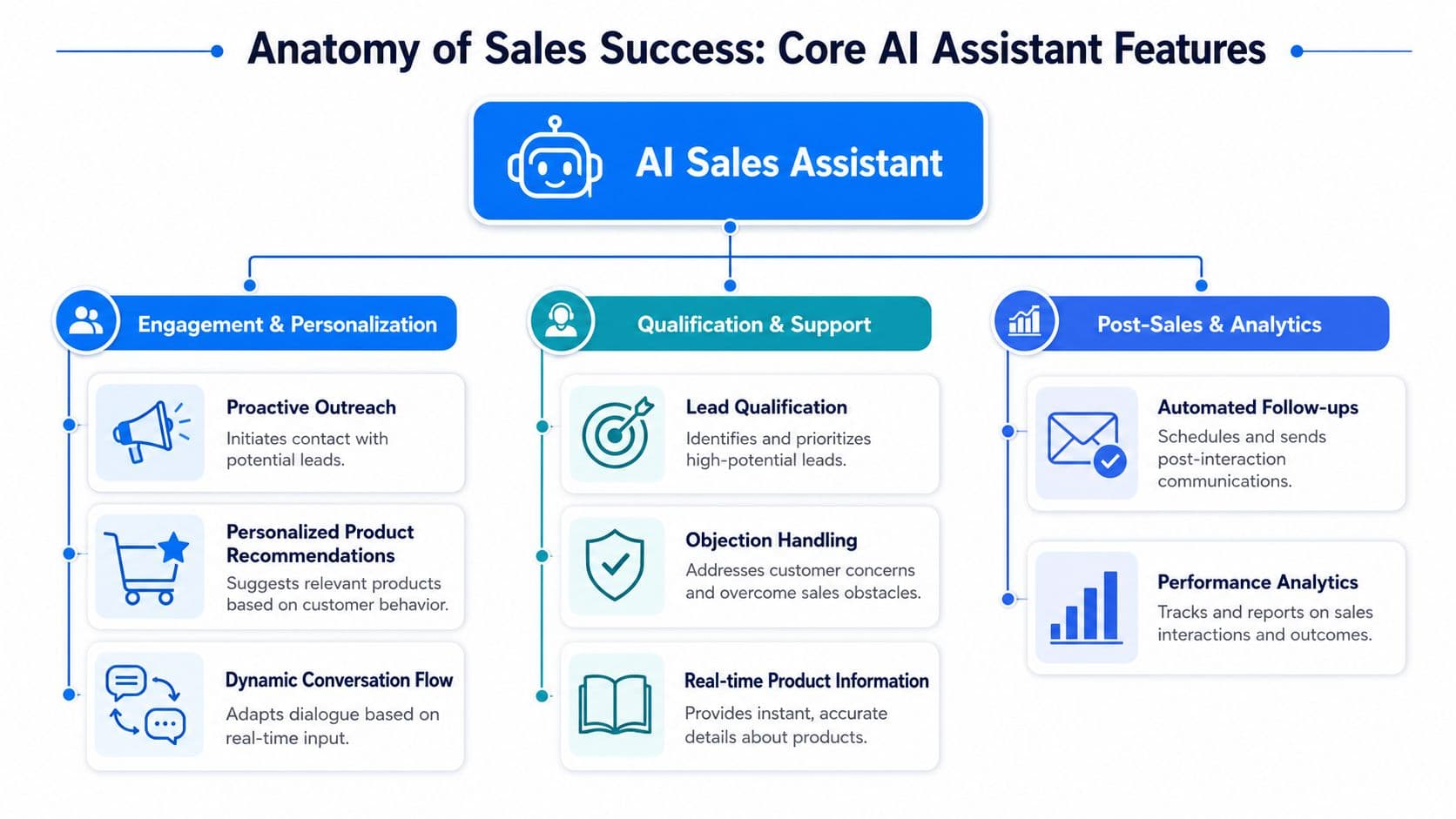
Features that influence the buying moment
The first capability to look for is instant product and policy answers. If a shopper has to leave the page to hunt for shipping terms, ingredient details, dimensions, or fit guidance, conversion risk rises immediately.
The second is personalized recommendations. Such recommendations allow the tool to act more like a salesperson instead of a help widget. It should be able to steer the customer toward the right product, variant, bundle, or add-on based on intent, not just keyword matching.
The third is proactive engagement. A good assistant doesn't interrupt everyone blindly. It appears when behavior suggests hesitation or decision friction. That might be on a product page with repeated variant changes, a cart page, or a long dwell session.
A fourth feature that matters is guided selling. If you want to understand what that looks like in practice, this breakdown of a guided selling solution is a useful reference point. The point isn't to overwhelm shoppers with AI. It's to narrow choice and build confidence.
Here's a practical buying checklist:
- Context awareness: it should understand the page, product, and shopper intent
- Recommendation logic: it should suggest products for a reason, not randomly
- Cart rescue behavior: it should re-engage hesitation before the shopper disappears
- Escalation paths: it should know when to hand off to a human
A short product demo helps show the difference between passive chat and active selling:
The real differentiator is store knowledge
The more advanced systems do something most merchants underestimate. They ingest internal assets and retrieve useful information in real time during buyer conversations. According to First Line Software's case study on AI-powered sales efficiency, advanced AI sales assistants can pull from internal assets like case studies and product specs to support real-time conversations, reducing time spent searching for content and standardizing response quality.
For Shopify, that means the assistant should be able to draw from sources like:
- Product catalog data
- FAQ and policy pages
- Shipping and return rules
- Brand language and merchandising priorities
- Common objections from previous conversations
That knowledge layer is what keeps answers accurate and commercially useful. Without it, you get generic chat. With it, you get answers that sound like they came from someone who knows your store.
How the pieces work together
An effective AI assistant isn't a stack of isolated features. It's a sequence.
A shopper lands on a PDP. The assistant detects hesitation and opens a relevant prompt. The shopper asks whether the item works for a specific use case. The tool answers from product knowledge, recommends the right variant, suggests a complementary item, and removes the final objection around shipping or returns.
That is a sales flow.
One example in this category is Carti, which is built for Shopify stores and focuses on catalog learning, instant answers, smart suggestions, cart recovery, and analytics. That mix matters because each part supports a different point in the buying journey instead of treating chat as a standalone function.
How to Implement Your AI Sales Assistant A Checklist
Implementation goes well when merchants treat it like merchandising, not just app installation. The software part is usually easy. The store knowledge, message quality, and decision logic are what determine whether it sells.
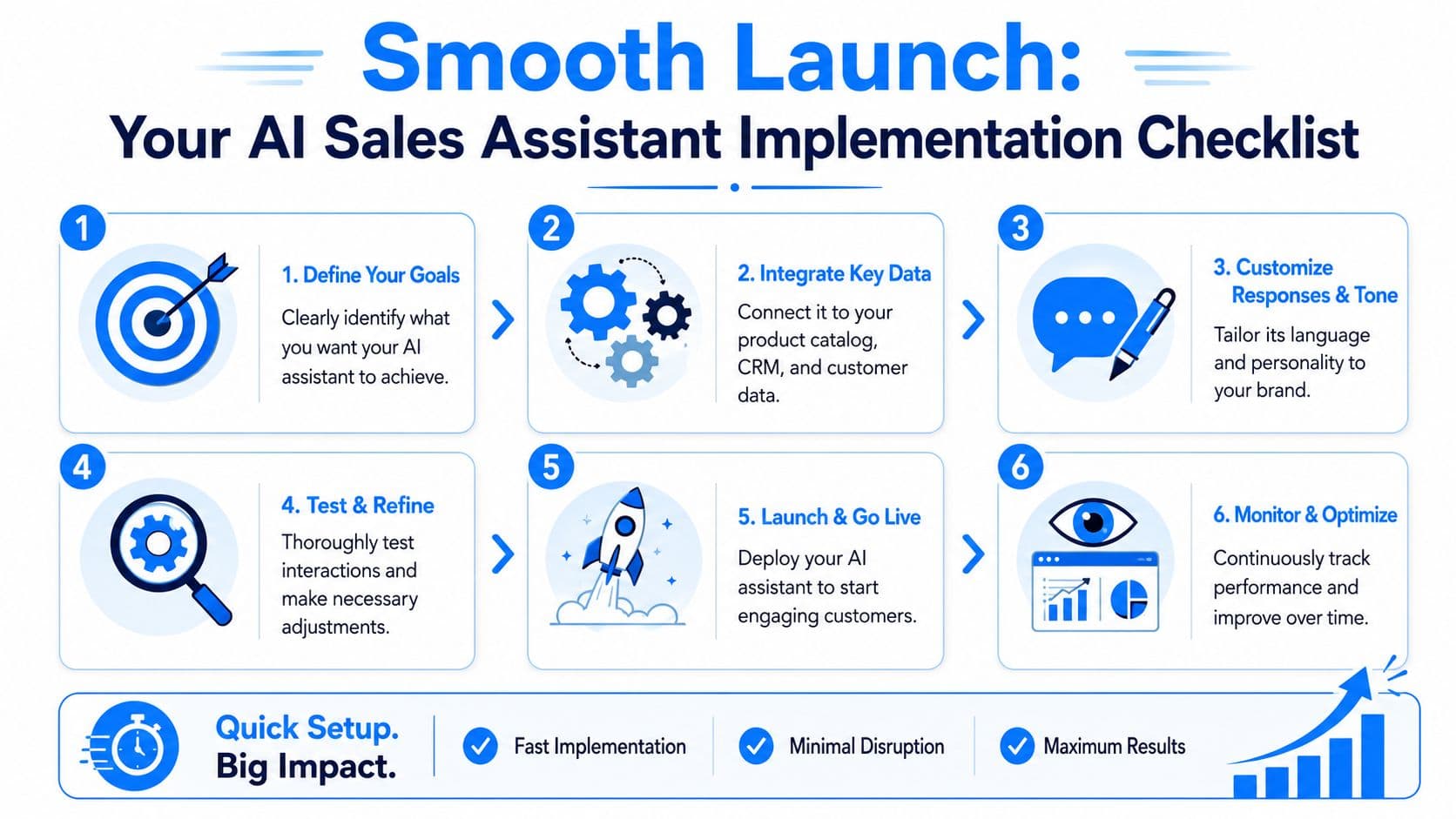
Start with store reality not software settings
Before launch, identify the buying friction that already exists in your storefront. Don't start with every possible use case. Start with the questions that repeatedly block purchase.
A practical rollout usually looks like this:
-
Define the primary goal
Pick one commercial outcome first. That could be helping shoppers choose between products, reducing pre-purchase support volume, or recovering uncertain carts. -
Sync the right store data
Your assistant needs access to the catalog, product descriptions, policies, and FAQs. If those assets are messy or contradictory, the assistant will reflect that. -
Set the brand voice carefully
Tone matters more than many teams expect. Luxury, wellness, fashion, and home brands don't all sound the same. Your assistant should reflect how your store already sells. -
Map escalation rules
Decide what stays automated and what gets handed to a person. Payment issues, unusual order exceptions, and edge-case product questions usually need a human path.
Clean product data beats clever prompting. If the catalog is inconsistent, the conversation quality will be inconsistent too.
Launch narrow then expand
The smartest first launch is usually narrower than merchants expect. Start with high-intent pages and common pre-purchase questions. Once the assistant is answering accurately and converting well, expand into bundles, cross-sells, and post-purchase support.
Use this pre-launch review before going live:
- Check answer quality: test real customer questions, not idealized ones
- Review recommendation behavior: make sure suggestions are relevant to margin and intent
- Audit policy responses: shipping, returns, and exchanges need precise wording
- Test mobile experience: a sales assistant that gets in the way on mobile can hurt conversion
- Confirm human handoff: make sure the customer isn't trapped in automation
A no-code setup matters because most Shopify teams don't have time for long implementation cycles. But speed alone isn't the win. The win is getting a useful assistant live quickly enough that you can refine it from real shopper interactions instead of debating hypotheticals for weeks.
Measuring Success and Avoiding Common Pitfalls
The fastest way to waste an AI deployment is to treat it like a widget you install once and forget. Sales assistants need review, tuning, and boundaries. If you don't manage those, you'll get polite conversations without much revenue impact.
Track commercial outcomes not vanity metrics
Start with business metrics, not novelty metrics. Chat volume alone doesn't tell you much. The core question is whether the assistant influences sales, reduces friction, and lowers manual workload.
Here's a practical KPI table to use.
| KPI | What It Measures | Why It Matters for Shopify Stores |
|---|---|---|
| Revenue influenced by AI | Orders or revenue connected to assistant interactions | Shows whether the tool affects buying behavior |
| Conversion from assisted sessions | Purchase rate for shoppers who interacted with the assistant | Reveals whether conversations help shoppers commit |
| Cart recovery rate | How often hesitant or abandoned carts return to purchase | Measures impact on lost demand |
| Ticket deflection rate | Common questions handled without human support | Indicates support cost reduction |
| Product recommendation acceptance | Whether shoppers click or add suggested items | Shows recommendation relevance |
| Escalation rate | How often the assistant passes a conversation to a human | Helps define automation boundaries |
| Top pre-purchase question themes | Recurring concerns raised before checkout | Exposes weak PDP content and merchandising gaps |
If you want a clearer view of what to watch in the data, this guide to chat bot analytics is a useful reference for turning conversations into actionable store decisions.
Where automation should stop
Autonomy is where many teams get overconfident. An assistant can answer quickly and still be wrong in ways that damage trust. That's why the autonomy boundary needs to be intentional.
Snowflake offers a useful enterprise example. In its discussion of a sales knowledge assistant, the company notes that the tool is human-vetted and does not respond to customers automatically, highlighting the brand and accuracy risks that come with full autonomy, as described in Snowflake's write-up on AI assistants for sales.
That doesn't mean Shopify stores should avoid automation. It means they should separate low-risk and high-risk tasks.
A practical split looks like this:
- Good for automation: product discovery, common policy questions, recommendation flows, routine pre-purchase objections
- Better with review or handoff: refund disputes, unusual shipping exceptions, legal claims, sensitive product advice, VIP complaints
Don't ask the assistant to protect margin, compliance, and trust at the same time without guardrails.
Common mistakes that weaken results
Most weak deployments fail for boring reasons, not technical ones.
- Thin knowledge inputs: the assistant can't answer well if product data is vague
- Off-brand tone: generic responses can lower trust even when factually correct
- No transcript review: merchants miss the objections and missed-sales cues hidden in real conversations
- Over-automation: forcing the assistant into conversations it shouldn't own creates friction instead of reducing it
The best operating rhythm is simple. Review conversations regularly, tighten weak answers, update product knowledge, and keep the handoff rules honest.
Making the Right Choice with Carti
The right AI powered sales assistant for Shopify does four things well. It understands your catalog, responds instantly, guides product selection, and gives you usable data about what shoppers are getting stuck on. If it can't do all four, it's probably a chat tool wearing a sales label.
For most merchants, the evaluation should stay practical. Does it help shoppers choose faster? Does it reduce pre-purchase support load? Does it recover buying intent that would otherwise disappear? Is the setup simple enough that your team will maintain it?
For Shopify specifically, a tool built around storefront conversion has an edge over generic business chat software. Catalog awareness, policy retrieval, recommendation logic, cart recovery, and analytics all need to work together inside a commerce environment.
That's where Carti fits cleanly. It's built for Shopify, uses a no-code setup, learns store catalog and policy content automatically, supports proactive sales assistance, and includes an insights dashboard so merchants can review what shoppers ask before they buy. That makes it a practical option for stores that want AI to influence revenue and operations, not just answer tickets.
If you want to turn your chat experience into a revenue channel, take a look at Carti. It's designed for Shopify merchants who need faster answers, smarter recommendations, and better visibility into what's blocking conversion.

Written by
Daniel AndersonFounder of Carti. 10+ years building ecommerce brands in apparel and supplements. Still runs a Shopify store and built Carti to help merchants convert more browsers into buyers.
Ready to boost your store's sales?
Install Carti in 5 minutes and let AI handle customer questions, recommend products, and close sales 24/7.
Start Free Trial14-day free trial