
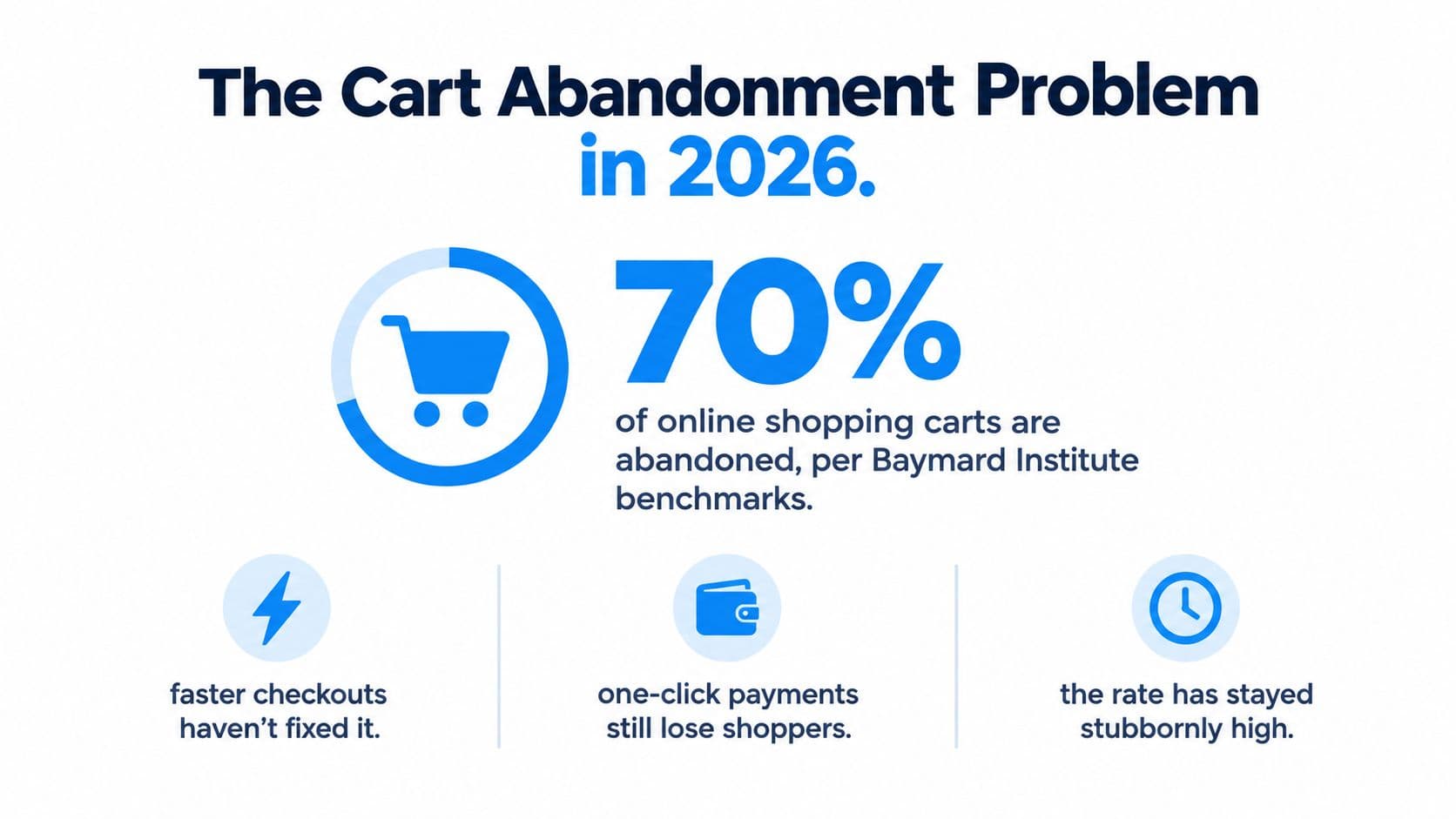
Roughly seven out of every ten online shopping carts never become completed purchases. Baymard Institute's average documented abandonment rate is approximately 70.22% across 50 studies, while Shopify cites a closely matching 70.19% figure from Baymard's 2024 analysis (Shopify's checkout research summary). That number creates a large opportunity, but it doesn't mean every abandoned cart deserves another discount email. Some shoppers are browsing. Others are ready to buy but encounter an unexpected delivery charge, unclear returns policy, or a checkout that answers critical questions too late.
A useful cart abandonment Shopify app must therefore do two jobs. It should reduce hesitation while the shopper is still on the store, then recover qualified demand after the shopper leaves. Merchants that treat abandonment as an email-only problem usually miss the more valuable intervention point, the moment when a buyer is still asking whether the order makes sense.
The Cart Abandonment Problem in 2026
Baymard's benchmark gives the problem its scale, but the percentage alone can lead merchants toward the wrong solution. Faster checkout, accelerated payments, and improved mobile experiences remove some effort. They don't remove uncertainty about the final price, delivery timing, product fit, or returns.
Consider two shoppers who leave the same Shopify store. The first adds a jacket while comparing colors and closes the tab before deciding whether to buy. A reminder might bring that shopper back later, but a discount could reduce margin without changing intent. The second reaches checkout, discovers that shipping costs more than expected, and leaves because the store never explained the landed total. Sending that shopper a generic “You left something behind” message treats a solvable pricing problem as a motivation problem.
Intent and friction are different problems
The research supports this split. Some people abandon because they're not ready to buy. Others abandon because the store makes the purchase harder to evaluate than it should be. An app can help with both, but through different mechanisms:
- Low-intent browsing: Use reminders, education, product comparisons, and later re-engagement without assuming a coupon will create demand.
- Active purchase friction: Show costs earlier, answer delivery and returns questions, clarify product details, and remove uncertainty before checkout.
- Recoverable interruption: Use a direct recovery link and a timely message when a shopper exits after showing meaningful buying intent.
A store's broader acquisition strategy matters here too. Merchants investing in growing Shopify traffic with SEO should connect landing-page intent with the checkout experience. More qualified visitors can improve the recovery opportunity, but traffic won't compensate for a cart that reveals essential costs only at the final step.
Practical rule: Treat the benchmark as a measure of lost purchase intent, not as a promise that 70% of carts can be recovered.
The right app should expose where abandonment happens and what shoppers needed before leaving. It can't fix an uncompetitive shipping policy, an inaccurate delivery promise, or a product with weak demand by itself. Those require changes to pricing, merchandising, logistics, or positioning. The app's job is to identify the objection, resolve what can be resolved in context, and follow up only when a shopper still appears worth recovering.
What Makes Shoppers Leave
Abandonment data becomes useful when it explains the objection behind the exit. The largest recoverable losses often start inside checkout, where shoppers discover costs, delivery limits, or timing that should have been clear earlier.
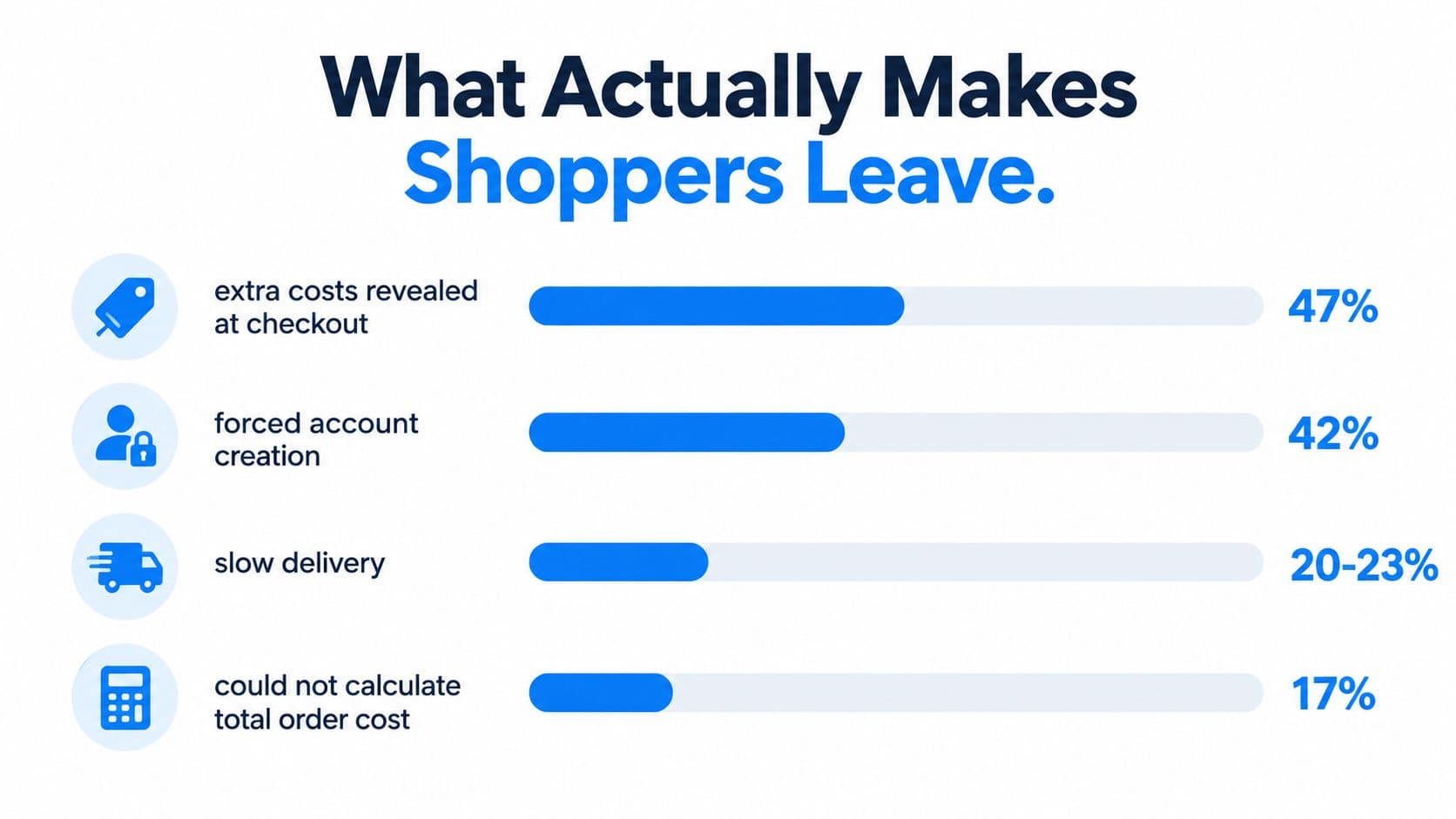
Baymard's research found that 47% of shoppers abandoned because extra costs such as shipping, taxes, or fees were too high, while 17% couldn't calculate the total order cost upfront (Baymard's checkout usability research). These figures point to the same operational problem: cost uncertainty. A shopper may accept a delivery charge when the store explains it before checkout, but reject it after choosing products and investing time in the cart.
Start with the objection, not the message
Delivery timing creates a similar problem. Slow delivery is a leading abandonment reason in Baymard's research. If the promised window does not fit the shopper's need, a later recovery email cannot make that window acceptable. Show delivery estimates, destination restrictions, and dispatch timing while the cart is still active.
The same Baymard research found that 42% of US online shoppers had abandoned a cart in the previous three months because they were just browsing or weren't ready to buy. These shoppers may need product education, saved-cart convenience, or later re-engagement rather than an immediate discount. Treating every exit as a messaging opportunity wastes sends and can train customers to wait for promotions.
Use a practical priority order:
- Reveal the full cost: Show shipping rules, thresholds, taxes where possible, and fees before the final checkout step.
- Set delivery expectations: Give shoppers a clear delivery window and explain market-specific restrictions.
- Answer purchase questions: Cover sizing, compatibility, materials, returns, payment options, and stock details while the cart remains active.
- Recover genuine intent: Send the abandoned products with a direct checkout path and wording that addresses the likely objection.
- Learn from repeated objections: If shoppers keep asking about the same destination or return condition, improve store content instead of increasing message volume.
A 17% share of shoppers also cited a checkout process that was too long or complicated in the same Baymard research. Checkout design, accelerated payments, guest purchasing, and clear navigation can remove that friction. A chatbot can answer questions, but it cannot compensate for a checkout that requires unnecessary steps or hides important information. Merchants can use this Shopify checkout optimization guide to inspect the experience before adding another recovery workflow.
Features That Move Recovery Numbers
A serious cart abandonment Shopify app should earn its place by reducing uncertainty before checkout and recovering qualified intent after exit. Settings volume is not performance. I evaluate six capabilities against the point where they can change a buying decision.
Onsite assistance before exit
Proactive chat should respond to hesitation rather than interrupt every visitor. Trigger it when a shopper opens the shipping policy or remains on the checkout step for more than 60 seconds, not on first page load. The assistant can address product fit, delivery, returns, or payment questions while the cart is still active. Track whether assisted sessions reach checkout or purchase, then use repeated questions to improve product and policy content.
Recommendations with a reason
Smart product recommendations should solve a clear buying problem. A beauty store might suggest a compatible cleanser for a treatment product. A fashion store might show a matching layer or explain which size suits a particular fit. Random “you may also like” tiles add noise. Relevant suggestions can strengthen product confidence and basket quality without making a discount the main reason to buy.
Answers that reduce uncertainty
Instant policy and delivery answers matter when taxes, shipping limits, sizing, compatibility, or international delivery could stop a purchase. The assistant should use the merchant's catalog and policies as its source. It should not guess when information is missing. A confident inaccurate answer creates support work and can damage trust more than a clear admission that the shopper needs human help.
Shipping and tax clarification belongs before exit. A recovery message cannot fully repair a cost that appeared late in checkout.
Follow-up across appropriate channels
Email and SMS recovery reconnect with shoppers after they leave, provided consent, timing, and relevance are handled correctly. The first message can restore the cart and address the likely objection. Later contact may clarify delivery or returns. Use discounts deliberately. An incentive can recover one order while teaching price-sensitive shoppers to delay future purchases.
Timing and flow controls
Custom recovery flows need settings for delay, audience, channel, stopping conditions, and product context. Stop messages when an order is completed or a shopper opts out. Separate an abandoned checkout from a casual cart addition whenever the available data supports that distinction. The workflow should also avoid sending the same offer through several channels at once.
Insights that change the store
An insights dashboard is useful when it turns abandoned carts and conversations into store changes. Review objection categories by product, market, and destination. Repeated questions about duties for one country should lead to clearer policy and landed-cost information. Repeated fit questions should strengthen the product's size guide. Recovery data should improve the storefront, not merely report lost sessions.
| Feature | Buyer question it addresses | Merchant signal |
|---|---|---|
| Onsite chat | “Can someone help me decide?” | Assisted progression |
| Smart recommendations | “What works with this?” | Product and basket relevance |
| Instant answers | “What will happen after I pay?” | Objection resolution |
| Email and SMS | “Can I return later?” | Qualified re-engagement |
| Flow controls | “When should this shopper hear from us?” | Message efficiency |
| Insights dashboard | “Why did this happen repeatedly?” | Merchandising priorities |
Email-Only Recovery Versus an AI Sales Assistant
Email-only recovery remains useful because it reaches identified shoppers after they leave. Its weakness is timing. The store waits until the buyer has exited, then tries to restart a decision that may have stalled because of a question the email cannot answer.
An AI sales assistant works earlier in the journey. It can explain a delivery policy while the shopper is evaluating the cart, recommend an appropriate product, and clarify whether a purchase fits the shopper's needs. If the shopper still exits, the recovery flow becomes a second layer rather than the entire strategy. The distinction is practical, not cosmetic.
For a deeper look at the conversational model, see this guide to an ecommerce AI chatbot.
| Dimension | Email-Only Recovery App | AI Sales Assistant, for example Carti |
|---|---|---|
| Intervention point | After the shopper leaves | Before exit and after exit |
| Main job | Remind and return the shopper to checkout | Answer, recommend, reassure, then recover |
| Dependence | Requires an identifiable contact and a completed trigger | Can assist during the onsite session, with follow-up for eligible shoppers |
| Cost objection | Usually addressed after abandonment | Can clarify shipping, taxes, or fees while intent is active |
| Product guidance | Often limited to cart contents | Can support comparison and relevant recommendations |
| Optimization data | Sends, clicks, and recovered orders | Conversation objections, product questions, and recovery outcomes |
| Main risk | Repetitive messages and premature discounts | Incorrect answers or intrusive onsite prompts |
The benchmark looks different under each model. An email tool sees only the shoppers it can identify and contact. An assistant can influence some shoppers before they become abandoned checkouts, which means a lower abandonment rate can be a success even when the recovery email count doesn't rise.
The trade-off is implementation quality. A conversational tool needs accurate catalog data, current policies, sensible escalation, and restrained triggers. If it answers confidently but incorrectly, it creates friction instead of removing it. Email automation is simpler to control, but it can't solve an objection that appears during the session.
How Carti's Cart Recovery Works in Practice
A fashion shopper adds a dress and a matching accessory, then reaches checkout. The shipping total is higher than expected, and the shopper pauses because the store hasn't made the delivery cost or return conditions clear earlier in the journey.
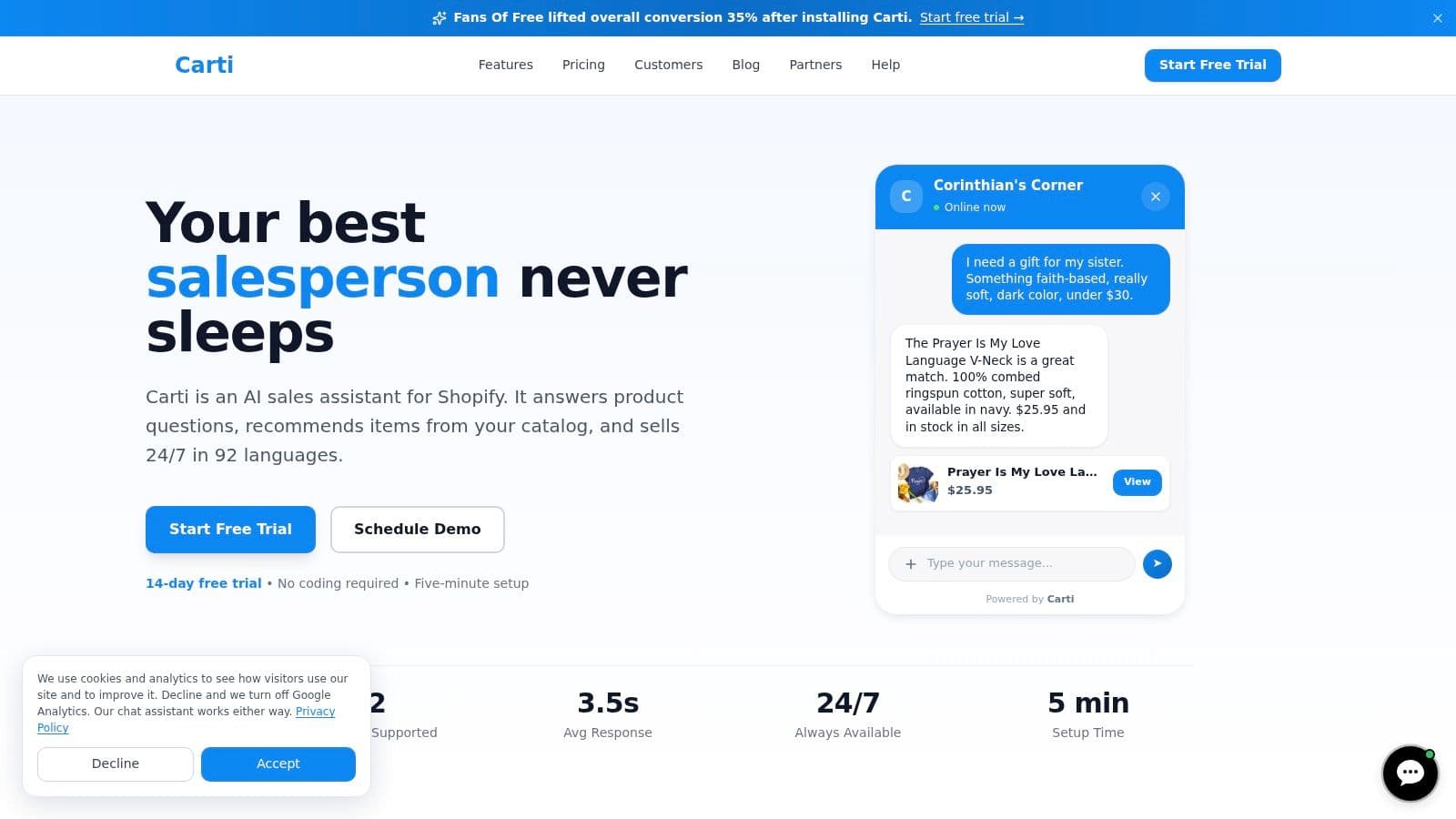
An onsite assistant can respond to the immediate question instead of waiting for an abandoned-checkout email. The shopper asks about shipping and returns. The assistant surfaces the relevant policy, explains the available delivery information, and keeps the conversation tied to the products in the cart. That's a better intervention than offering an unexplained coupon when the underlying concern is cost certainty.
The conversation should support the purchase
The shopper then asks whether the accessory works with the dress. A Smart Suggestions capability can recommend a relevant alternative or complementary item based on the catalog and the shopper's current context. The recommendation should be useful, not a forced upsell. If the shopper needs a different size, color, or related product, the assistant should help narrow the choice.
If the shopper completes checkout, the interaction still produces useful information. If the shopper leaves, Cart Recovery can send a timely reminder containing the specific items left in the cart, subject to the store's configured channels, permissions, and workflow rules. The message should return the shopper to the relevant checkout path and reflect the unresolved concern rather than repeating generic promotional copy.
Merchant perspective: The valuable event isn't only the recovered order. It's the repeated objection that tells you which product page, delivery rule, or policy needs work.
The merchant can then review the Insights Dashboard for patterns. If shipping questions cluster around one destination, the store may need clearer country-specific delivery information. If shoppers ask about the same fit issue, the product page may need stronger measurements or model guidance. If customers frequently seek a matching accessory, the bundle structure may deserve a merchandising update.
The journey is simple from the shopper's perspective: ask a question, get a useful answer, decide, and receive a relevant follow-up only if the cart remains unfinished. The merchant's experience is more analytical. Each interaction can become either a conversion aid or evidence for a storefront improvement.
The following product walkthrough shows how that type of interaction can fit into a Shopify store:
Setting Up and Tuning Your Recovery App
Installation is the easy part. The difficult work is giving the app enough accurate information to help without creating another layer of confusion.
Start by connecting the catalog, shipping policies, returns information, payment details, and frequently asked questions. Review the imported answers manually. Product descriptions often omit the details buyers ask about, such as fit, compatibility, care, delivery exclusions, or regional restrictions.
Configure the intervention points
Set onsite prompts around meaningful hesitation. A shopper opening the returns policy may need reassurance. A shopper who has just added a product may not want a sales message. Keep the first interaction useful and easy to dismiss.
Then define the recovery conditions:
- Choose the event: Separate cart inactivity, checkout exit, and identifiable abandoned checkout where the platform supports those distinctions.
- Set timing deliberately: Start with a service-oriented reminder, then allow enough time for the shopper to return before sending another message.
- Limit incentives: Don't use a discount to compensate for a shipping explanation the store should have provided earlier.
- Respect consent: Use email and SMS only under the store's applicable permissions and suppression rules.
- Write the return path clearly: Send shoppers to the relevant cart or checkout state, not a generic homepage.
The first follow-up should sound like assistance, not a demand. Mention the items, make the path back obvious, and answer the most likely question when the data supports it. If the shopper asked about delivery before leaving, address delivery. Don't send a generic urgency message that ignores the reason for the exit.
Use a weekly review loop
During the first month, review conversations and recovery outcomes each week. Look for unanswered questions, incorrect responses, products with repeated hesitation, and countries where delivery objections recur. Update product content and policy explanations before changing message volume.
A practical first-month checklist:
- Confirm catalog and policy accuracy.
- Test questions about delivery, returns, sizing, and payment.
- Review every active recovery message.
- Check that completed orders suppress follow-ups.
- Group objections by product and destination.
- Update weak product pages.
- Compare assisted sessions with unassisted sessions.
- Remove prompts that interrupt high-intent actions.
The app should become quieter and more relevant as tuning improves. More messages aren't the objective. Better answers at the right moment are.
Metrics That Tell You Whether the App Is Working
Recovery performance needs more than a dashboard showing sent messages. Track the full chain from cart creation to completed order.
Abandonment rate shows how often carts or checkouts fail to become orders. Read it by device, product, market, and traffic source when the data supports those views. A falling rate can indicate that onsite clarification or checkout improvements are working even if recovery messages generate fewer attributed orders.
Recovery rate measures how often eligible abandoned carts or checkouts return and complete an order. Define the denominator consistently. Mixing anonymous carts with identified abandoned checkouts makes month-to-month comparisons unreliable.
Recovered revenue per cart connects performance to commercial value. A flow that recovers more orders but mostly low-value carts may contribute less than a smaller flow that recovers high-intent purchases. Review margin impact when discounts or additional message costs are involved.
Time-to-recover shows how quickly shoppers return after exit. A short interval may indicate interruption or uncertainty that the first message resolves. A longer interval may reflect consideration, comparison, or a later purchasing need.
Read the metrics together. A lower abandonment rate with a flat recovery rate can still represent a win because the store prevented exits before the recovery workflow needed to run.
Objection data completes the picture. Repeated questions about shipping should feed into delivery messaging and checkout visibility. Fit questions should improve product pages. Bundle requests should inform merchandising. Merchants focused on growing customer lifetime value should also connect recovery insights with retention, because a clearer first purchase can influence what happens after checkout.
Use the cart abandonment rate formula to keep reporting definitions consistent, then investigate stalled performance in this order:
- Check the denominator: Are bots, duplicate sessions, and anonymous carts distorting the view?
- Check the objection: Did shipping, delivery, returns, or product questions increase?
- Check the intervention: Did prompts appear at the wrong moment or send shoppers to the wrong destination?
- Check the economics: Did discounts recover revenue without protecting contribution margin?
- Check the storefront: Does the same unanswered question appear repeatedly?
The best cart abandonment Shopify app doesn't merely report lost carts. It helps you prevent avoidable exits, recover qualified shoppers, and turn objections into changes that make the next checkout easier.
Carti combines onsite AI assistance, product recommendations, instant answers, and cart recovery workflows so Shopify merchants can address friction before exit and follow up afterward. Visit Carti to see how its assistant can support shoppers, recover eligible carts, and turn recurring questions into practical store improvements.

Written by
Daniel AndersonFounder of Carti. 10+ years building ecommerce brands in apparel and supplements. Still runs a Shopify store and built Carti to help merchants convert more browsers into buyers.
Ready to boost your store's sales?
Install Carti in 5 minutes and let AI handle customer questions, recommend products, and close sales 24/7.
Start Free Trial14-day free trial