
At some point, most Shopify merchants hit the same wall. A shopper lands on a product page after hours, likes what they see, then hesitates over one detail: sizing, shipping timing, compatibility, return policy, or whether a variant is still in stock. Nobody answers fast enough. The shopper leaves, and the store owner sees the session later in analytics with no clear explanation for why it died.
That's where a retail chatbot starts to matter. Not as a novelty widget. Not as a support cost play alone. As an always-on sales layer that catches buying intent while it's still warm, answers questions in context, and moves the shopper toward checkout.
The timing matters. According to Grand View Research's chatbot market analysis, the global chatbot market was valued at USD 9,560.7 million in 2025 and is projected to reach USD 41,244.2 million by 2033, with a 19.6% CAGR from 2026 to 2033. The same source says retail and e-commerce dominate growth because chatbots support personalized recommendations and order tracking. For a Shopify brand, that's the signal. This category has moved from experimental to operational.
Your 24/7 Sales Associate Has Arrived
A customer is browsing your store at 11:40 p.m. They're one question away from buying. “Does this jacket run large?” “Can this arrive before Friday?” “Will this serum work for sensitive skin?” If that question sits unanswered until morning, the sale often disappears with it.
That's why a good chatbot for retail should be viewed like a 24/7 sales associate, not a support add-on. It steps in during the moment that decides whether a visitor keeps browsing, adds to cart, or leaves. On Shopify, where a lot of buying decisions happen fast and on mobile, that timing matters more than most merchants admit.
The stores getting value from chat aren't using it like a static help box. They're using it to remove friction in the buying journey, especially outside support hours. A bot that can answer product questions, surface the right item, and handle post-purchase basics turns dead time into selling time.
On-store reality: Most revenue opportunities don't arrive neatly during business hours. They show up when someone is ready to buy and wants one clear answer.
If you're evaluating this category, it helps to look at retail-specific tooling instead of generic AI chat apps. This guide to an AI chatbot for ecommerce is useful because it frames the bot around sales and storefront behavior, not just customer support tickets.
Beyond FAQ Bots: What Is a Retail Chatbot, Really?
A lot of merchants still picture a chatbot as that old corner widget that asks, “How can I help?” and then traps the customer in a menu. That's not what matters anymore.
The old widget versus the modern assistant
The easiest way to think about it is this. A basic FAQ bot is like a phone tree. A modern chatbot for retail is closer to your best store associate. One waits for exact keywords and pushes people into rigid flows. The other interprets intent, understands product context, and helps someone choose.
Here's the practical difference:
| Type | What it does | Where it fails | Where it works |
|---|---|---|---|
| FAQ widget | Answers fixed questions from a script | Breaks on nuance, typos, multi-part questions | Store policies, shipping basics, return windows |
| AI retail assistant | Understands intent and guides the shopper | Needs clean data and strong integration to work well | Product discovery, recommendations, order help, guided selling |
The technical shift matters because the commercial outcome changes. Once the system can understand phrases like “I need a gift under budget,” “which shade matches medium skin,” or “is this sofa apartment friendly,” it stops behaving like a help center and starts behaving like a sales tool.
If you're working on visibility in AI-driven discovery more broadly, this overview of LLM visibility strategies is worth reading. It helps clarify how content structure and answer quality affect whether AI systems can surface useful information cleanly.
What changes when the bot understands commerce
A real retail bot doesn't just recognize language. It understands catalog logic. It should know collections, variants, product attributes, policies, and how those pieces connect to buying questions.
That's why the knowledge layer matters. A chatbot trained only on a homepage and some FAQs tends to give shallow answers. A bot built on a structured help center, product data, and policy content gives useful answers that can move a shopper forward. If you're tightening that foundation, this piece on building a chatbot knowledge base is the right starting point.
The old bot answered questions. The modern one reduces decision friction.
What doesn't work is pretending every conversation is a support conversation. On a retail site, many chats start because the customer wants confidence, not service. They're asking for reassurance before spending money. If the bot can't handle that, it won't contribute meaningfully to revenue.
How a Chatbot Drives Measurable Revenue Growth
The commercial case for a chatbot for retail isn't that it “helps customers.” Plenty of tools help customers. The fundamental question is whether it changes shopper behavior in a way you can measure.
A useful signal here is customer willingness to use the channel. A 2026 roundup cited by Master of Code's chatbot statistics page says 62% of consumers prefer using a digital assistant over waiting for a human agent, and 87.2% rate bot interactions as neutral or positive. That doesn't mean every bot performs well. It means the channel itself no longer faces the resistance many merchants assume it does.
Speed captures intent
The first revenue lever is simple. Fast answers keep buying intent alive.
When someone asks about fit, delivery, ingredients, compatibility, or stock, they're often not browsing casually. They're evaluating risk. If the bot removes that uncertainty in the same session, the shopper is more likely to continue toward checkout instead of opening another tab or postponing the decision.
That's especially useful after hours, during campaign spikes, and on product pages where your human team can't respond in real time.
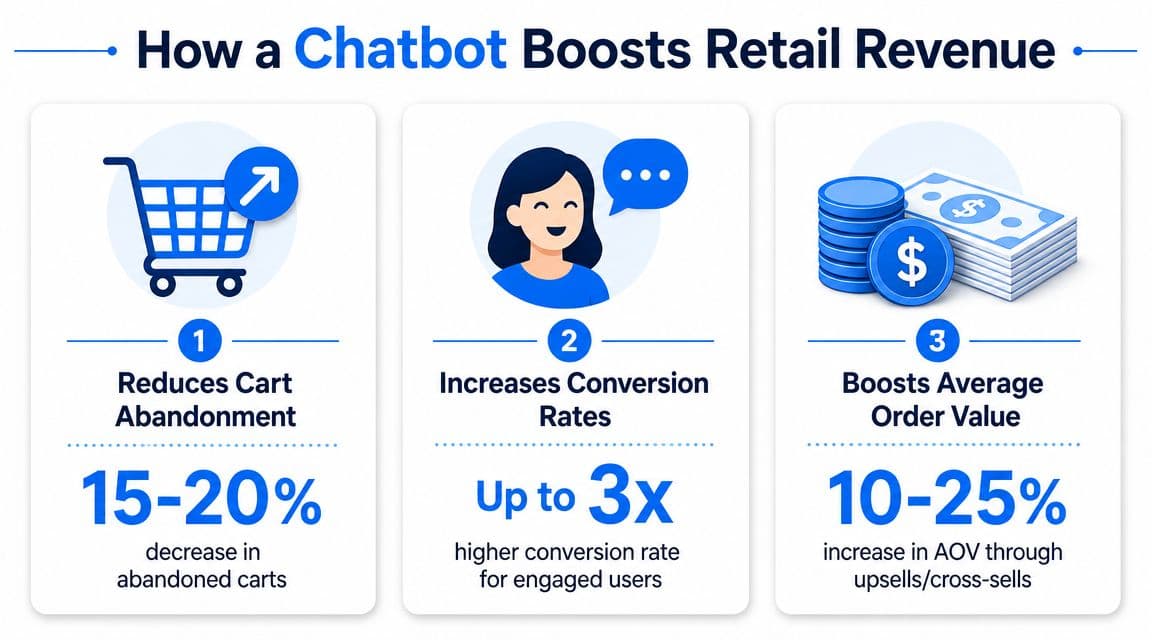
Revenue comes from more than one path
The second lever is cart recovery. A good bot can intervene when someone stalls, remind them of what's in the cart, answer the objection that caused the pause, and bring them back into checkout. The point isn't to spam users with prompts. The point is to identify hesitation and respond with relevance.
The third lever is agent efficiency with revenue impact. If your support team spends all day answering repetitive policy and order-status questions, they can't focus on high-intent shoppers with bundle questions, complex product matching, or pre-purchase objections. Automation shifts human time toward conversations that still need judgment.
That's why analytics matter. If you're serious about proving impact, don't stop at chat volume. Measure what happens after the chat. This guide to chat bot analytics is useful because it pushes the conversation beyond vanity metrics.
A practical framework is to watch these paths separately:
- Pre-purchase assistance: Did product-page chats lead to higher checkout starts?
- Cart rescue: Did sessions with abandonment nudges return to checkout more often?
- Agent reallocation: Did human reps spend more time on high-value chats and less on routine requests?
- Merchandising insight: Did repeated questions reveal content gaps that were suppressing conversion?
A bot earns budget when it performs like a revenue channel, not when it reduces inbox volume.
Core Features of a True Sales-Focused Chatbot
If you're buying a chatbot for retail, the fastest way to make a bad decision is to judge it by how polished the demo feels. Demos are easy. Store complexity is hard.
What to demand from the product layer
A sales-focused chatbot needs strong product intelligence. That means it should understand more than product titles and short descriptions. It needs to work with variants, stock state, pricing logic, collections, materials, sizing details, and policy content.
For a Shopify merchant, the practical checklist looks like this:
- Catalog awareness: The bot should answer product-specific questions with enough depth to reduce hesitation.
- Variant handling: It needs to distinguish between colors, sizes, bundles, and other selectable options.
- Behavior-based prompts: It should trigger help based on browsing context, not random interruptions.
- Guided selling flows: The best bots narrow choices, compare products, and recommend next steps instead of dumping links.
- Clear human handoff: When the issue gets nuanced, the conversation should move to a person with context preserved.
An AI system is only as good as the information it can access. If you're evaluating how to structure source material for better answer quality, Shoptank's AI knowledge base solution offers a useful perspective on organizing Shopify content so an assistant can answer more precisely.
Why integration decides whether it sells or stalls
Many implementations break because the bot sounds smart but can't do anything useful, as it isn't connected to real systems.
According to Couchbase's guide to chatbots for retail, the highest-value retail chatbots are tightly integrated with backend systems like product catalogs, CRM, and order management systems. That setup enables real-time stock checks, order status updates, and personalized recommendations that help accelerate purchase decisions.
That cause and effect is direct. If the bot can query live inventory and order data, it can answer the question the shopper asked. If it can't, it gives stale or generic responses that create more doubt than confidence.
Practical rule: If the bot can't see your catalog, orders, and policies in real time, it's not a sales assistant. It's a script with a chat bubble.
A few signs you're looking at a real commerce tool:
- It syncs with Shopify data without requiring manual copy-paste maintenance.
- It can distinguish support flows from sales flows.
- It logs conversations in a way that reveals buying objections.
- It supports escalation without restarting the conversation.
One example in this category is Carti, which is built for Shopify and focuses on product answers, recommendations, proactive prompts, and analytics tied to store interactions. The point isn't that every store needs the same tool. The point is that the tool must be designed for commerce, not generic chat automation.
Retail Chatbot Use Cases and Key Performance Indicators
A chatbot for retail becomes easier to evaluate when you watch it in real shopping scenarios instead of product marketing language.
How it plays out in real stores
In fashion, the most valuable conversation often starts with uncertainty. A shopper likes the dress but asks whether it runs small, whether the fabric has stretch, or what to buy if they're between sizes. A weak bot sends them to a size chart. A better one interprets the question, points to the relevant fit guidance, suggests the closest option, and reduces the risk of a bad purchase.
In beauty, discovery is the primary job. A customer might ask for a moisturizer for dry, sensitive skin or a routine for acne-prone skin that layers well under makeup. The bot should narrow options, explain differences between products, and avoid throwing five unrelated SKUs into the chat.
In home and furniture, confidence comes from specificity. Customers want dimensions, material details, care instructions, shipping constraints, and compatibility. If the bot can answer those clearly, it reduces one of the biggest causes of product-page abandonment: uncertainty about whether the item will work in the customer's space or routine.
The dashboard that actually matters
Once the bot is live, merchants usually make one mistake first. They look at chat counts and feel encouraged. That's incomplete.
Industry research summarized by Emerj's review of retail chatbot applications argues that well-designed retail chatbots should be instrumented as conversion systems, tracking metrics like click-through rates, conversion, and average order value (AOV) to optimize guided selling and cart recovery nudges.
That means your KPI stack should look more like a growth dashboard than a support dashboard.
Track these closely:
- Conversion after chatbot interaction: Separate sessions that involved the bot from sessions that did not.
- Click-through from product recommendations: Measure whether suggested items are explored.
- AOV for assisted orders: Watch whether guided selling changes basket composition in a healthy way.
- Drop-off points inside chat: See where shoppers disengage, especially in recommendation or checkout-assist flows.
- CSAT: Use satisfaction feedback to catch answer quality problems before they show up in sales.
- Deflection with context: Keep this metric, but don't let it dominate decision-making.
Don't confuse activity with impact. More conversations can mean more friction if the bot attracts questions it can't answer well.
A strong implementation also turns repeated chat questions into merchandising and content actions. If shoppers repeatedly ask whether a cleanser is fragrance-free, the issue may not be support coverage. It may be a weak product page. The chatbot becomes a listening layer for revenue leaks you can fix across the storefront.
Your 6-Step Chatbot Implementation Roadmap
Most chatbot projects don't fail at launch. They fail in setup because the merchant installs the app before deciding what success should look like.
A cleaner rollout starts with a narrow objective and expands once the bot has earned trust. Before getting into the steps, this visual roadmap is a good shorthand for how the process should flow.
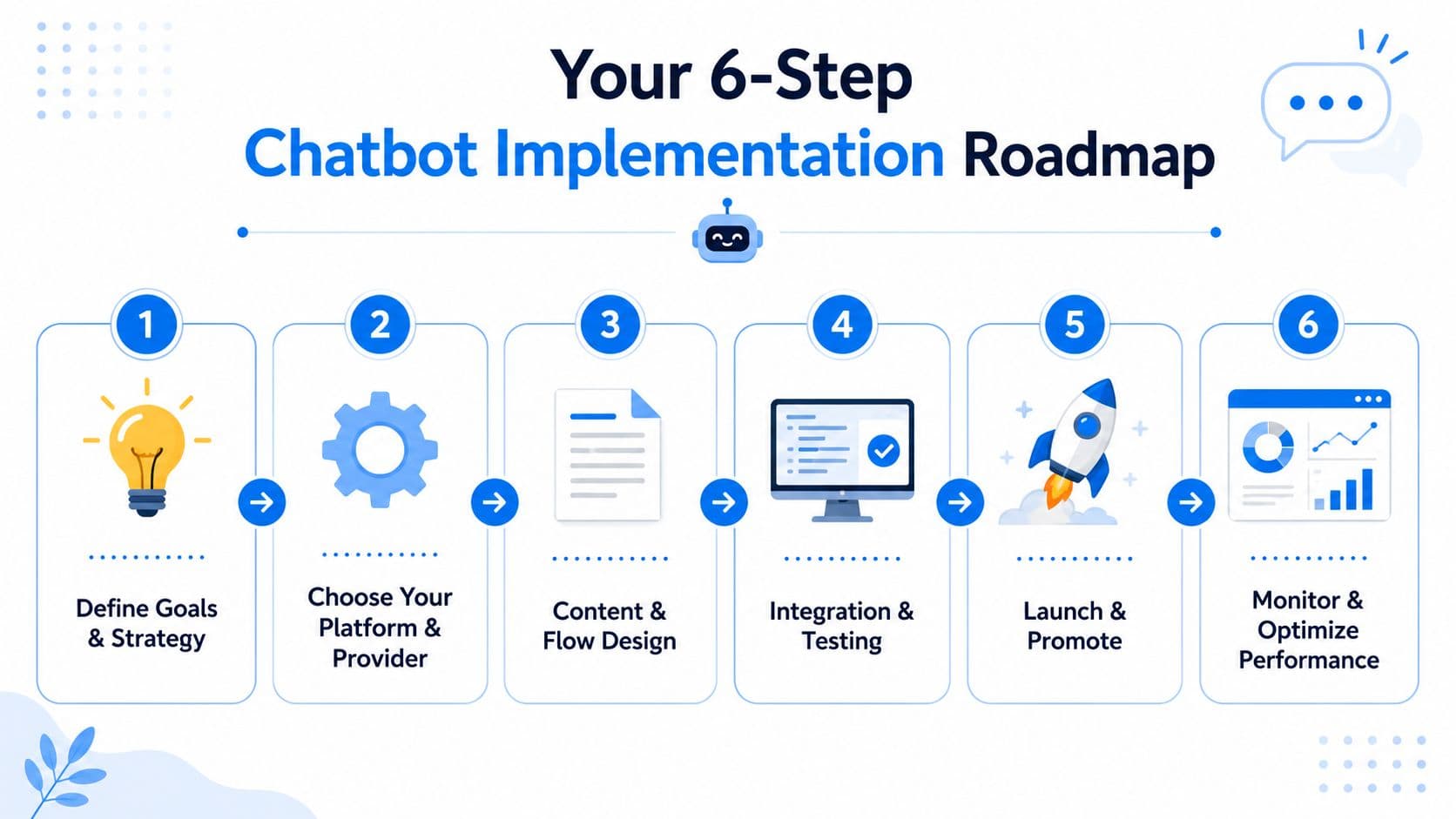
Step 1 through Step 3
-
Pick one commercial job first
Don't launch with a vague goal like “improve support.” Choose a primary job. For most Shopify stores, that's one of three things: product discovery, pre-purchase objection handling, or cart recovery. A single job makes training, testing, and measurement much cleaner.
-
Feed it the right data
Sync product data, policy content, FAQs, and order-related information. Then review what the bot is ingesting. If your product pages are thin, contradictory, or outdated, the chatbot will mirror those weaknesses.
-
Set voice and boundaries
Good retail bots don't sound generic. They reflect the store's brand tone and know when to stop pretending certainty. If the answer is unclear, the bot should say so and hand off cleanly instead of improvising.
A short walkthrough can help teams visualize where implementation tends to go right or wrong:
Step 4 through Step 6
-
Test against real shopping scenarios
Don't test with idealized prompts. Use the messy questions real customers ask. Try typos, vague product requests, mixed intents, and policy edge cases. Include scenarios from paid traffic, returning customers, and mobile users.
-
Launch in phases
Start with a controlled surface area. Product pages and help flows are usually the right first zone. Once answer quality stabilizes, expand into proactive prompts, recommendation flows, and cart-recovery use cases.
-
Measure incrementality, not just automation
The discussion surrounding ROI, according to ChatBot.com's retail chatbot analysis, indicates a major challenge in proving it, and the better approach is to measure incrementality and margin-aware outcomes such as lift in conversion rate or AOV rather than focusing only on support ticket deflection. The same source notes that only 35% of large retail and consumer-goods organizations had fully deployed generative AI in 2024, while 57% were still in pilot or proof-of-concept, which tells you many teams still haven't solved the proof problem at scale.
That proof problem usually comes down to measurement discipline. Use holdout logic where you can. Compare similar traffic cohorts. Separate support automation effects from recommendation effects. If the bot drives more orders but lowers order quality or encourages unnecessary discount dependence, the dashboard can look healthy while profit worsens.
A practical measurement model includes:
- Incremental conversion: Did assisted sessions convert better than comparable unassisted sessions?
- Margin quality: Did recommended products preserve healthy basket economics?
- AOV movement: Did the bot increase basket size through relevant add-ons or through weak-fit upsells?
- Support efficiency: Did agents gain time for higher-value work without harming customer experience?
- Resolution quality: Did the bot solve the issue, or just keep the chat contained?
A chatbot should be judged like a sales channel with service effects, not a service tool with vague sales potential.
Checklist for Choosing a Shopify Chatbot
By the time you compare vendors, most of the flashy differences won't matter. The core question is whether the product can operate inside a real Shopify store without creating more maintenance than value.
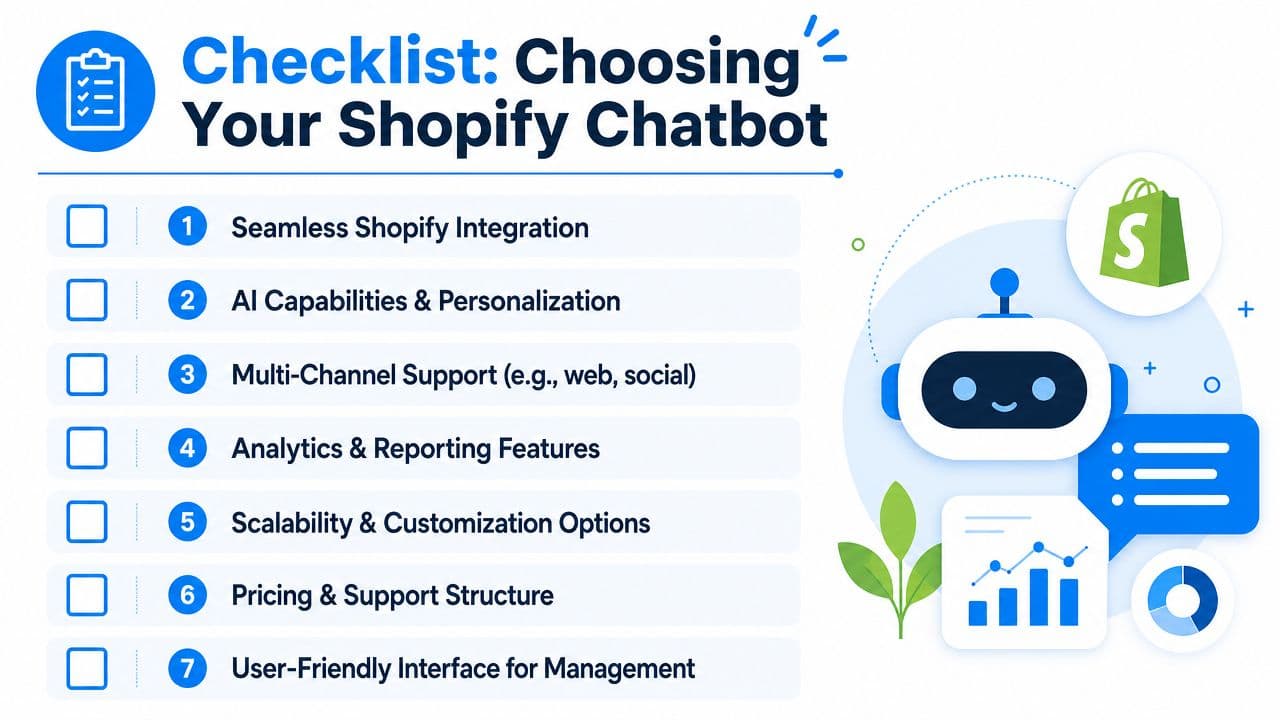
Use this checklist when you evaluate options:
- Shopify integration is native: It should sync catalog, order, and policy data without fragile workarounds.
- The bot is built for sales use cases: Look for guided selling, recommendation logic, and proactive triggers, not just FAQ coverage.
- Answer quality is controllable: You need a way to inspect source content, refine responses, and fix recurring errors quickly.
- Analytics go beyond chat volume: The dashboard should help you monitor conversion impact, AOV movement, drop-off, and customer satisfaction.
- Human handoff is clean: When the bot can't resolve the issue, staff should inherit context instead of restarting the conversation.
- Setup is manageable for operators: If merchandising or CX teams can't maintain it without engineering support, adoption slows down.
- Pricing matches store reality: Watch for usage models that become expensive once chat volume rises.
This visual summary is useful when you're comparing options side by side.
One final point. A chatbot won't fix weak traffic quality, poor product pages, or broken merchandising. It works best as part of a broader storefront performance stack. If you're also tightening organic acquisition, this guide on how to streamline Shopify SEO with apps is a practical companion because it addresses another major source of conversion friction: getting the right visitors to the right pages in the first place.
If you want to see what an AI-powered Shopify chatbot looks like in practice, Carti is one option built specifically for Shopify merchants. It handles product and policy questions, recommends products, supports proactive engagement, and gives teams an analytics layer to track what shoppers ask before they buy.

Written by
Daniel AndersonFounder of Carti. 10+ years building ecommerce brands in apparel and supplements. Still runs a Shopify store and built Carti to help merchants convert more browsers into buyers.
Ready to boost your store's sales?
Install Carti in 5 minutes and let AI handle customer questions, recommend products, and close sales 24/7.
Start Free Trial14-day free trial