
A customer places their first order, gets a receipt, and then hears nothing useful. No guidance. No reassurance. No answer to the questions that show up right after checkout. Did the order go through? When will it arrive? What happens if sizing is off? How do they use the product well enough to want a second purchase?
That silence is where a lot of Shopify stores leak retention.
Most merchants treat post-purchase communication as an operations task. It's usually a confirmation email, a tracking update, and maybe a review request later. But the stores that compound customer lifetime value use that same window differently. They treat it as onboarding. Not B2B account setup. Customer onboarding after the first sale, where every message reduces uncertainty, builds trust, and nudges the buyer toward a successful first experience.
For Shopify brands, client onboarding automation is really customer onboarding automation in disguise. The mechanics are familiar: triggers, workflows, reminders, internal routing, and exception handling. The difference is the goal. You're not trying to get an account live. You're trying to turn a first-time buyer into someone who buys again, asks fewer support questions, and trusts your brand enough to stay.
Beyond the First Sale: Why Onboarding Automation Matters
The first sale doesn't prove loyalty. It proves curiosity and enough trust to place one order.
What happens next decides whether that customer becomes profitable over time or disappears after a single purchase. In Shopify, the post-purchase stretch is where people decide if your brand feels organized, responsive, and worth buying from again. If the only thing they receive is a receipt and a generic shipping notice, you're leaving a lot of retention work undone.
The post-purchase gap costs more than most stores think
A buyer who's waiting for a first order is unusually attentive. They check email. They revisit your site. They look for shipping updates. They read policy pages. They open support chats with basic questions that could have been answered proactively.
That's why structured onboarding matters. The shift from manual, spreadsheet-based onboarding to workflow-driven orchestration is a major milestone in this field, and recent industry guidance says those systems can reduce first-year churn by 23% and cut onboarding time by 60% when milestone triggers, AI personalization, and unified tracking are used, according to Vantage Point's onboarding automation guidance.
For a Shopify merchant, the lesson isn't that you need enterprise software. It's that orchestration beats one-off messages. A welcome note, delivery update, usage tip, care guide, reorder reminder, and support fallback should work like one system, not six disconnected sends.
Practical rule: If a customer has to ask a predictable question after buying, your onboarding flow is incomplete.
Why this is really an LTV system
Merchants often think of onboarding as a support efficiency project. It does reduce manual work, but that's not the main upside. The bigger upside is behavioral. A confident first-time customer is more likely to complete the experience you want: receiving the package smoothly, using the product correctly, avoiding preventable frustration, and returning for another purchase.
That matters even more for stores with products that require fit, setup, routines, replenishment, or education. Apparel needs sizing reassurance. Beauty needs usage cadence. Home goods need assembly or care guidance. Wellness products need expectation-setting. Without onboarding, customers improvise. Improvisation hurts repeat purchase intent.
Good post-purchase automation feels simple from the buyer's side. Behind the scenes, it's doing serious retention work.
Blueprint Your Customer Journey From Purchase to Loyalty
Before you automate anything, map the journey as the customer lives it. Not as your operations team sees it in Shopify admin. Not as your email platform sees it in campaign logic. As the buyer experiences it from the second they click Buy.
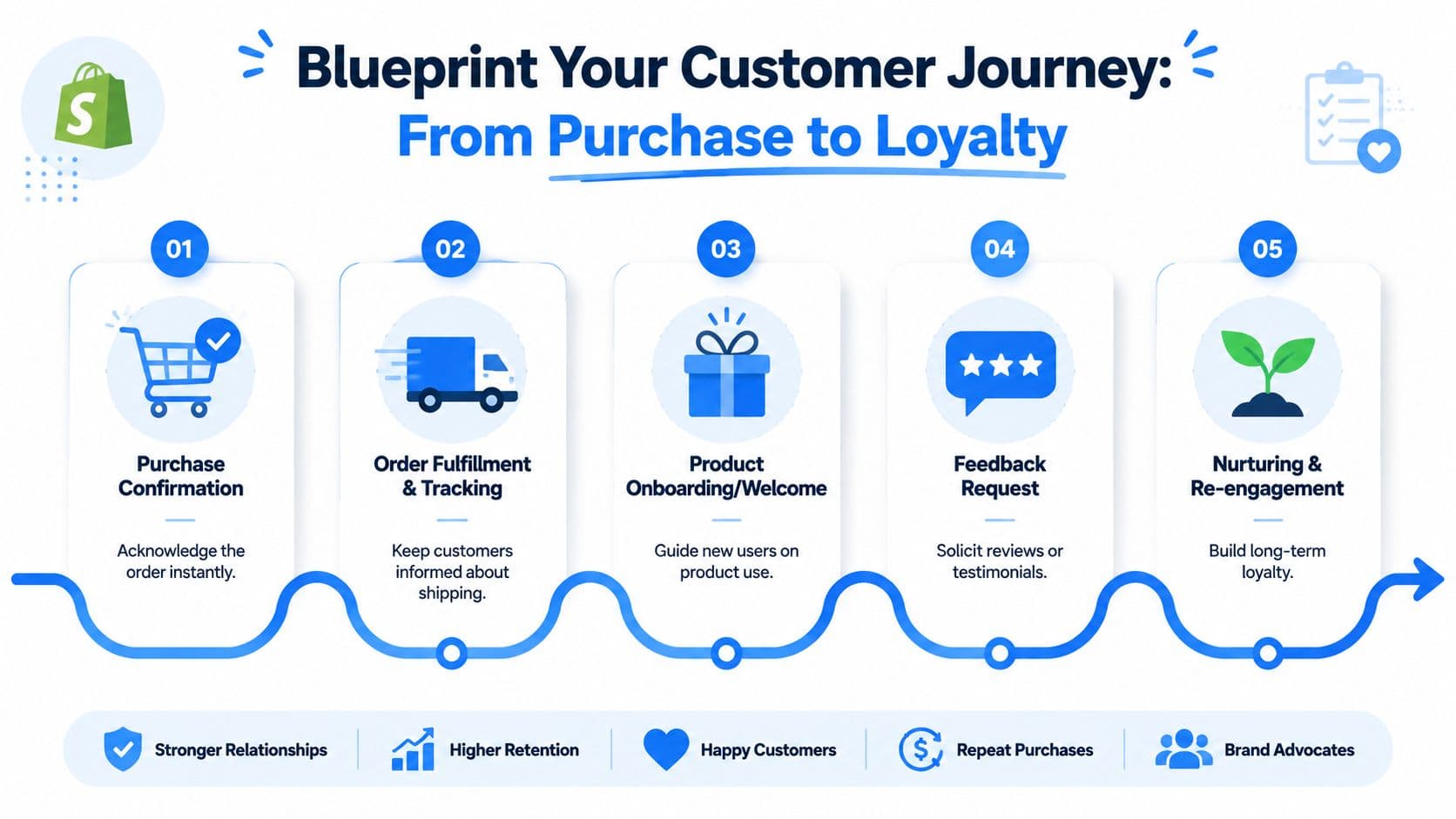
Map the moments the customer actually experiences
A practical onboarding method is to map the entire journey, identify repetitive and delay-prone steps, and automate the highest-friction segments first, as explained in Onramp's customer onboarding automation guide.
For Shopify, the journey usually looks something like this:
-
Purchase confirmation
The customer wants reassurance that payment worked and the order exists. -
Order processing
They want to know what happens before shipment, especially if fulfillment takes time. -
Shipment and tracking
They want visibility, not radio silence. -
Out for delivery and delivered
Anxiety peaks for many first-time buyers during this phase. -
First-use or first-wear moment
They need help getting value from the product quickly. -
Early follow-up
Early follow-up involves asking for feedback, solving friction, and guiding the next action. -
Re-engagement
The customer either moves toward a second purchase or drifts away.
Find friction before you automate it
Many stores automate the easiest steps first because the tools make it convenient. That's backwards. You should automate the points where delay, confusion, or drop-off are most likely.
Use a simple filter:
-
High anxiety moments
These include payment confirmation, shipping silence, failed delivery expectations, and unclear return steps. -
High value moments
These include setup guidance, care instructions, refill timing, and product education that improves the first experience. -
High support volume moments
These usually show up in repetitive tickets, chat questions, and policy-page visits.
The best flows don't send more messages. They remove uncertainty at the exact moment uncertainty appears.
A practical Shopify journey map
A useful map doesn't need fancy software. A spreadsheet or whiteboard works if it captures three things for each step:
| Stage | Customer mindset | Best automated response |
|---|---|---|
| Thank you page | “Did that work?” | Confirm order, next steps, support access |
| Order confirmation | “What happens now?” | Explain processing timeline and key policies |
| Shipment notification | “Can I trust the delivery?” | Share tracking, expected flow, self-serve help |
| Delivered | “Now what?” | Offer setup, care, fit, or usage guidance |
| Days after delivery | “Was this a good purchase?” | Ask about friction first, not just for a review |
| Replenishment or follow-up | “Do I need anything else?” | Suggest relevant next products or reminders |
For high-consideration products, add branch paths. A skincare buyer might need ingredient guidance. A furniture buyer may need assembly help. A fashion customer may need sizing exchange support. Don't force every order through the same path just because your automation tool can.
If you map this well, your future automation decisions get easier. You stop guessing which flows matter and start seeing where one proactive message can prevent a refund request, a support ticket, or a lost second order.
Selecting Smart Triggers for Proactive Engagement
Automation works when timing feels natural. The same message can be useful or annoying depending on when it fires.
Independent business guides describe automation as capable of eliminating up to 80% of the time and effort normally required to onboard new clients by automating data collection, document handling, communication, and tracking, according to Kroolo's overview of onboarding automation. For a Shopify team, that translates into fewer repetitive updates and more consistent follow-through after purchase.
Use events first and behaviors second
The strongest post-purchase triggers usually start with order events. They're reliable, clear, and easy for customers to understand.
The core event triggers are straightforward:
-
Order confirmed
Send reassurance, order summary, and what happens next. -
Fulfillment created
Explain that the order has moved, and set expectations around tracking. -
Shipment in transit
Reduce “where is my order?” anxiety before it turns into contact volume. -
Delivered
This is the best opening for product education, care guidance, and issue prevention.
Behavior triggers sit on top of those event triggers. They add context.
Timing decides whether automation feels helpful
A few timing rules hold up well in practice:
-
Immediate confirmation should answer, not sell
Right after purchase, the customer wants certainty. Don't lead with cross-sells. -
Education belongs near first use
A usage tip sent too early gets ignored. Sent too late, it arrives after frustration. -
Cross-sells work after confidence
If the package hasn't arrived yet, the customer isn't ready for a recommendation unless it's directly useful to the order. -
Recovery messages should reflect intent
Someone checking tracking repeatedly likely needs reassurance. Someone browsing related items after delivery may be ready for an add-on.
A short walkthrough of trigger logic helps if you're building this in-house:
Where behavior-based triggers help most
Behavior triggers are powerful when they explain why the customer needs a message now.
Examples that work well:
-
Help center visit after purchase
Trigger a message that surfaces the exact shipping, returns, or usage answer they're probably looking for. -
Related product view after delivery
Offer a complementary product only if it fits the purchased item and the timing makes sense. -
Repeat tracking page visits
Send a reassurance message with the clearest available delivery status and a path to support if something looks off.
Helpful automation follows customer intent. Spam ignores it.
Many stores often overdo it. They trigger messages because they can, not because the customer has reached a point where the message solves something. If you want client onboarding automation to improve retention, every trigger should correspond to a real customer question, not just a workflow opportunity.
Crafting Your Automated Chatbot Welcome and Recovery Flows
The flow should sound like a capable store associate, not a notification engine. Most weak onboarding messages fail for one reason. They state what happened but don't help the customer with what happens next.
What strong onboarding messages do differently
A good post-purchase chatbot flow does three jobs at once:
-
It reassures
The customer knows the order is real, tracked, and supported. -
It guides
The customer gets clear next steps, especially for products that need education. -
It recovers
If anything feels off, the flow routes the person toward the right answer instead of forcing them to hunt.
If you're refining conversational tone, these chatbot best practices for Shopify stores are a useful reference point. The main principle is simple. Write for the next likely question.
Onboarding Message Templates
| Touchpoint | Generic Message (Avoid) | Effective Message (Use This) |
|---|---|---|
| Order confirmation | Thanks for your order. | Thanks for your order, [First Name]. We've received it and we'll send your tracking details as soon as it ships. If you need sizing, shipping, or policy help before then, reply here and we'll point you to the right answer. |
| Processing delay | Your order is being processed. | Your order is in progress. We're preparing it now, and the next update you'll get is your shipping confirmation. If your purchase is time-sensitive, ask here and we'll help you check the status. |
| Shipment sent | Your order has shipped. | Good news. Your order is on the way. You can track it here anytime. If this is your first order, we've also included a quick guide so you know what to expect when it arrives. |
| Delivered | Your order was delivered. | Your order shows as delivered. If you've received it, here's the fastest way to get started with [Product]. If something looks wrong with the delivery, tell us and we'll help you sort it out. |
| Product education | Here are some tips. | To get the best first result with [Product], start with this one step: [specific action]. Most first-time issues happen when customers skip it. If you want, we can also show care, fit, or usage guidance. |
| Cross-sell | You may also like these items. | Since you bought [Product], the most useful add-on is usually [Complementary Product] if you want [specific outcome]. If you already have that covered, ignore this and enjoy your order. |
| Review request | Leave us a review. | How's your order so far? If anything isn't right, reply here first so we can help. If it's going well, we'd love your feedback. |
| Reorder prompt | Buy again now. | Running low on [Product]? If you want, we can help you reorder the same item or suggest the version that fits your last purchase best. |
The “effective” versions work because they do one thing generic messages don't. They acknowledge the customer's context. They reduce friction instead of adding another notification.
Build the recovery branch before you need it
Most merchants build the happy path and stop there. That's not enough.
Recovery branches matter for situations like these:
-
Missing delivery confidence
The package says delivered, but the customer can't find it. -
Product confusion
The customer has the item but doesn't know how to use it properly. -
Expectation mismatch
The item is technically correct, but the customer is unsure whether it's right for them. -
Pre-return hesitation
The customer doesn't want to commit to a return yet. They want one useful answer.
A simple recovery message often beats an immediate review ask.
If the first post-delivery automation asks for a review before it checks for friction, you're optimizing for vanity over retention.
For stores with broad catalogs, keep templates modular. One welcome structure. Separate content blocks for shipping, care, setup, sizing, replenishment, and product pairing. That's easier to maintain than writing a fully custom flow for every SKU, and it still feels specific when the logic is set up well.
Activating Your Onboarding with Carti and Shopify
Planning is often where teams feel smart. Activation is where they discover whether the workflow survives real customer behavior.
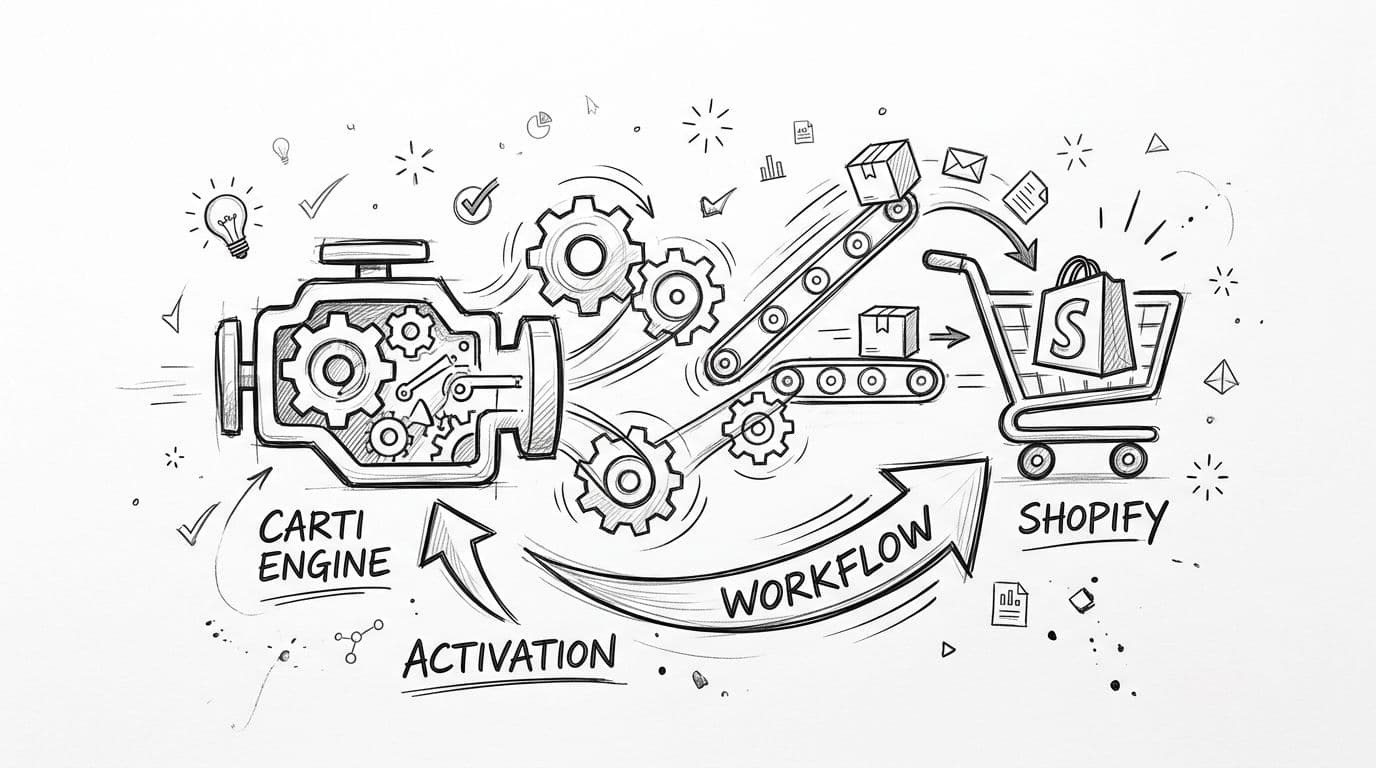
Turn the journey map into live automation
In Shopify, implementation usually starts with a small set of triggers and a narrow group of flows. That's the right approach. You don't need a massive automation tree to start seeing value. You need a reliable one.
A practical setup looks like this:
- Connect Shopify order events to your automation layer.
- Match each event to a customer-facing flow you already mapped.
- Add product-specific branches only where they change the customer experience in a meaningful way.
- Create support fallbacks for questions your automation can't resolve cleanly.
- Review conversation logs so you can tighten weak spots after launch.
For merchants using chatbot-led onboarding, Carti is one option in that stack. It connects with Shopify, learns store catalog and policy context, and can be used to trigger post-purchase conversations tied to order events. If you're replacing an older setup, this guide on how to migrate your Shopify chatbot to Carti covers the transition considerations.
Pilot first because real buyers expose weak spots
Customer-success guidance consistently recommends pilot testing with a small group before full launch because teams often uncover missing fields, broken handoffs, or unclear triggers only after real users interact with the workflow, as noted in Clustdoc's client onboarding automation guide.
That advice matters even more in Shopify because post-purchase data changes fast. Orders get edited. Tracking updates lag. Customers enter the wrong email. Inventory shifts. Address issues show up late. A flow that looked clean in staging can fall apart once live orders start moving through it.
Start with one segment:
-
New customers only
Returning buyers often need different messaging. -
A limited product category
Choose products with clear support patterns and easy fulfillment logic. -
One recovery path
Delivered order plus first-use help is often the best place to begin.
Then review what transpired. Not just sends and clicks. Read the conversations. Look for messages customers misunderstood, support questions that kept repeating, and moments where the flow should have handed off to a person sooner.
That's how client onboarding automation becomes usable. Not from bigger flowcharts. From smaller launches with tighter feedback loops.
Measuring Onboarding KPIs and Troubleshooting Your Funnel
Most stores measure post-purchase automation like a campaign. Opens, clicks, maybe revenue from a cross-sell. That's too shallow.
If onboarding is supposed to improve retention, the question becomes whether the customer had a better first ownership experience and behaved differently afterward.
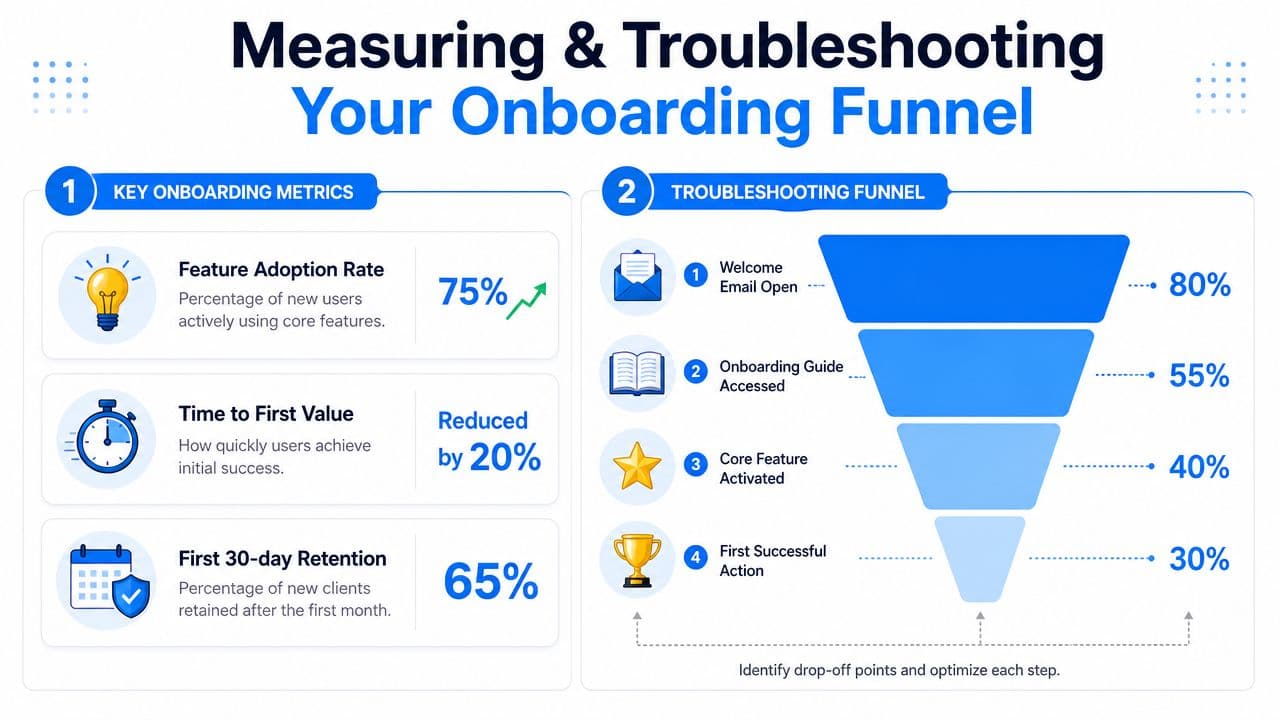
Track outcomes, not just message activity
Recent guidance increasingly recommends defining a single activation milestone and adding health scoring, which points toward more outcome-based orchestration rather than static welcome sequences, according to Braze's article on customer onboarding automation.
For Shopify, your activation milestone should reflect a meaningful customer success event after purchase. That might be first successful use, no-support-needed delivery completion, registration of a product, or a second session with educational content. The exact milestone varies by store, but the principle holds. Choose one event that signals the customer is on track.
Useful KPIs include:
-
Repeat purchase behavior by onboarded cohort
Compare customers who completed the intended onboarding path against those who didn't. -
Time to first successful product experience
Especially important for products that need instructions, care, or setup. -
Support demand after first order
Watch for recurring post-purchase questions and unresolved issues. -
Abandonment at specific onboarding steps
Find where customers stop engaging or start needing manual help.
For a broader framework, this article on e-commerce key performance indicators is useful when deciding which metrics deserve dashboard space.
Fault-tolerant automation beats perfect-looking automation
The most overlooked part of onboarding automation is exception handling.
A customer enters incomplete information. Tracking doesn't update. A product arrives in multiple shipments. A policy answer changes. The buyer's behavior no longer matches the path you expected. If your automation can't handle that, it doesn't matter how polished the happy path looked.
This is why fault-tolerant automation beats perfect-looking automation. The stronger system does things like:
-
Detect missing or mismatched data
Then pause or route the case instead of sending an irrelevant message. -
Escalate edge cases early
Don't make a delayed shipment customer sit through standard education messages. -
Preserve context for human follow-up
When support steps in, they should see what the customer already received and did.
Healthy onboarding funnels are monitored systems, not finished systems.
The stores that get long-term value from client onboarding automation keep tuning it. They review edge cases, refine activation definitions, and cut flows that look busy but don't improve retention.
If you want to turn post-purchase support into a retention system, Carti can help you connect Shopify order events, customer questions, and automated onboarding conversations in one workflow. The goal isn't more messages. It's faster answers, cleaner handoffs, and a first-order experience that gives customers a reason to come back.

Written by
Daniel AndersonFounder of Carti. 10+ years building ecommerce brands in apparel and supplements. Still runs a Shopify store and built Carti to help merchants convert more browsers into buyers.
Ready to boost your store's sales?
Install Carti in 5 minutes and let AI handle customer questions, recommend products, and close sales 24/7.
Start Free Trial14-day free trial