
Global retail ecommerce sales are forecast to hit $7.4 trillion in 2025, according to eMarketer. Yet the average store still loses the vast majority of its visitors before they ever reach checkout.
For most ecommerce teams, growth stalls long before traffic does. Shoppers land on the site with intent, then hit friction. They cannot find the right product fast enough. They hesitate on shipping, sizing, returns, or compatibility. They abandon the session because no system steps in at the moment that matters.
That is why strong ecommerce growth strategies start with conversion and retention, not just acquisition. Returning customers buy more often, convert faster, and cost less to reactivate than net-new traffic. Bain & Company has long reported that improving customer retention can materially increase profits across many industries, which is why smart operators treat repeat purchase rate as a growth metric, not just a CRM metric.
The stores pulling ahead are closing that gap with one operating layer across the customer journey. An AI chatbot can qualify intent, answer pre-purchase questions, recover carts, surface relevant products, capture objections, and feed merchandising and marketing teams cleaner first-party data. Used that way, it stops being a support widget and starts acting like the store's decision engine.
If you want a practical model for that setup, this guide to an AI chatbot for ecommerce shows how the system works across sales, support, and retention.
The ten strategies in this article focus on one goal: turning more of your existing traffic into revenue, while building a store that gets smarter with every conversation.
1. AI-Powered Conversational Commerce & Chatbot Integration
Global retail ecommerce sales are projected to exceed $6.8 trillion in 2025. In a market that large, stores do not lose sales only because of weak products or bad pricing. They lose because shoppers hit friction, hesitate, and leave before they get the answer that would have closed the order.

A well-configured chatbot fixes that in real time. More importantly, it becomes the operating layer that ties sales, support, merchandising, and retention together. The best setups do more than answer questions. They guide product discovery, handle objections, capture buying signals, and push those signals into the rest of your growth system.
That is the value of conversational commerce.
For a fashion or beauty brand, the bot should handle fit questions, ingredient concerns, shipping policies, bundle suggestions, and low-stock prompts inside one conversation. Tools like AI chatbot for ecommerce matter because they centralize those touchpoints instead of sending shoppers through product pages, FAQ articles, and support forms that were never built to sell.
The trade-off is straightforward. A chatbot connected only to canned FAQs is cheap to launch and easy to maintain, but it rarely improves revenue. A bot trained on catalog data, policy logic, inventory context, and common pre-purchase objections takes more setup work, yet that is the version that can actually influence conversion.
I have seen the same pattern repeatedly. If the bot cannot explain the difference between two similar SKUs, recommend the right option for a stated need, or clarify return terms without confusion, shoppers stop trusting it fast.
What good conversational commerce looks like
Good conversational commerce supports decisions at the exact moment intent shows up. It should do three jobs well:
- Guide product selection: Recommend the right SKU based on use case, size, style, skin type, routine, or budget.
- Reduce hesitation: Answer shipping, returns, compatibility, materials, and policy questions without forcing the shopper to leave the page.
- Keep momentum alive: Trigger prompts when a visitor lingers on a PDP, compares products, or shows exit behavior.
The strongest operators also use the chatbot as an input source, not just an output channel. Repeated questions about sizing, delivery timing, or product compatibility usually point to weak product pages or unclear merchandising. That feedback loop is what makes the chatbot the central nervous system of the storefront. It does the selling, records the friction, and gives the team a clearer view of what needs fixing.
If you want that system to contribute beyond the first session, connect it to your recovery flows too. A chat interaction that captures hesitation around price, shipping, or product fit can feed smarter follow-up later, including cart abandonment recovery strategies that address real buying objections.
Practical rule: If the chatbot cannot help a shopper choose with confidence, it is not a growth channel yet.
Done right, conversational commerce improves conversion, lowers support load, and sharpens merchandising decisions from the same customer interactions. Few growth strategies pull that much value from one implementation.
2. Abandoned Cart Recovery & Cart Abandonment Sequences
Abandoned carts aren't a reminder problem. They're usually a timing and relevance problem.
A customer adds to cart because intent exists. Then something interrupts the purchase. Maybe it's uncertainty about shipping, price, delivery timing, or whether the product is really right. Recovery works when your follow-up answers the actual hesitation instead of sending the same bland “you left something behind” email every brand sends.

Build recovery around objections
A strong sequence starts with context. If someone abandoned a skincare item, the follow-up should focus on benefits, routine fit, and policy reassurance. If they abandoned a high-consideration apparel order, size guidance and delivery clarity usually matter more than a coupon.
For Shopify teams looking to tighten this flow, ways to reduce cart abandonment usually work best when chat, email, and SMS support the same message instead of operating independently.
What works in practice:
- Fast first touch: Reach out while the product is still top of mind.
- Channel matching: Use email for detail, SMS for urgency, and chat for live objections.
- Offer discipline: Don't train customers to wait for discounts on every cart.
Recovery gets stronger when your chatbot joins the system. Instead of only sending reminders, it can reopen the conversation on return visits, ask if the shopper had a concern, and guide them back to checkout with the original items in context.
Most carts don't die because the customer said no. They die because the store stayed silent at the wrong moment.
That's the difference between passive recovery and active recovery.
3. Personalization & Behavioral Product Recommendations
McKinsey reports that companies that grow faster drive 40% more of their revenue from personalization than slower-growing peers. In ecommerce, that usually comes down to a simple question. Are you helping the shopper choose, or are you adding more products to ignore?
Personalization works when it reduces effort. A shopper who viewed three fragrance-free moisturizers does not need your global bestseller shoved into the slot because it performs well across the catalog. They need the next best fit for their stated preference, and they need it in the moment they are deciding.

The highest-performing setup treats the chatbot as the operating layer behind personalization, not just a support widget. It sees browsing patterns, product questions, cart contents, and return visits in one place, then turns that context into useful recommendations across the site. That is what makes it the central nervous system for growth execution. The same system can recommend a substitute on the product page, suggest an add-on in cart, and continue the thread inside chat without losing context.
Placement matters. Recommendation blocks belong where intent is already high: product pages, cart, and conversation flows. Each placement should have a job. On the product page, reduce indecision with close substitutes or better-fit variants. In the cart, raise order value with obvious complements. In chat, explain the recommendation so the shopper understands why it fits.
For Shopify brands, Shopify product recommendations based on shopper behavior work best when they use real signals such as viewed categories, prior orders, price sensitivity, and product attributes. Broad best-seller logic is easy to launch, but it often underperforms because it optimizes for catalog popularity instead of shopper intent.
Start with recommendation logic that is simple enough to manage and specific enough to matter:
- Similar intent: Show close alternatives when a shopper stalls on a product, such as lighter coverage, lower price, or a different size.
- Natural pairings: Suggest products that improve the primary purchase, such as a case for a device or cleanser for a treatment product.
- Lifecycle fit: Show discovery-focused recommendations to first-time visitors and replenishment or bundle recommendations to repeat customers.
Personalization improves conversion and average order value, but there is a trade-off. More logic is not always better. If your team cannot explain why a recommendation appears, the shopper probably cannot either. Keep the system readable, test a few high-intent placements well, and let the chatbot coordinate the experience across those touchpoints.
4. Instant Customer Support & Reduction of Response Time
Shoppers spend heavily on mobile. Statista reports that mobile commerce accounted for a majority of global retail ecommerce sales in 2023, and that matters because mobile buying leaves less room for hesitation and slower support responses.
Support speed affects revenue because buying questions are often final objections, not casual inquiries. “Will this fit a narrow foot?” “Is this safe for sensitive skin?” “Will this arrive before Friday?” If those answers are delayed, the shopper keeps scrolling, opens another tab, or clicks back to the ad that brought them there. Teams running expert Facebook advertising for businesses see this problem clearly. Paid traffic is expensive, and weak response time wastes intent you already paid to create.
The operational goal is simple. Remove uncertainty while the shopper is still in session.
An AI chatbot should handle the high-frequency questions immediately, then route the exceptions without losing context. That means answering shipping, returns, materials, ingredients, sizing, care instructions, compatibility, and stock questions in real time. It also means knowing what product page the shopper is viewing, what variant they selected, and whether they are at product, cart, or checkout.
That last part matters more than many teams expect. A generic support bot reduces ticket volume. A context-aware bot improves conversion because it responds like part of the buying flow, not a separate help desk. In strong ecommerce setups, the chatbot acts as the central nervous system. It connects product data, policy logic, purchase intent, and human escalation into one response layer.
There is a trade-off. Instant answers are useful only if they are accurate. If the bot guesses on fit, ingredients, or delivery windows, it may lift conversion and increase returns or complaints later. Set clear boundaries. Let the bot answer known questions fast, and pass edge cases such as warranty disputes, damaged orders, prescription-related concerns, or policy exceptions to a human agent with the full chat history attached.
A useful support workflow usually includes:
- Instant answers for repeat questions: shipping times, return windows, sizing basics, care, ingredients, and compatibility
- Smart escalation paths: warranty issues, damaged items, unusual order changes, and other exceptions that need human judgment
- Session-aware context: page viewed, product discussed, cart contents, and customer history when available
- Sales-aware prompts: a helpful nudge to compare options, confirm fit, or complete checkout when the question signals buying intent
For beauty brands, fast support often prevents shade, ingredient, or routine mismatches before the order is placed. For apparel and footwear, it reduces hesitation around fit and sizing. For higher-consideration products, it can be the difference between a same-session purchase and a lost visit.
Fast support is not just a customer service metric. It is conversion infrastructure.
5. Multi-Channel Engagement & Omnichannel Presence
Retail ecommerce sales worldwide are projected to reach about 4.3 trillion U.S. dollars in 2025. At the same time, Asia-Pacific is expected to account for more than half of global ecommerce market value by 2025. More demand is flowing through more channels, and that raises the cost of disconnected execution.
Customers already move across channels without thinking about your org chart. A shopper might see a paid social ad, browse on mobile, leave, open an email later, then return with a question in chat before purchasing. If the offer, product story, or support context resets at each step, conversion drops and trust erodes.
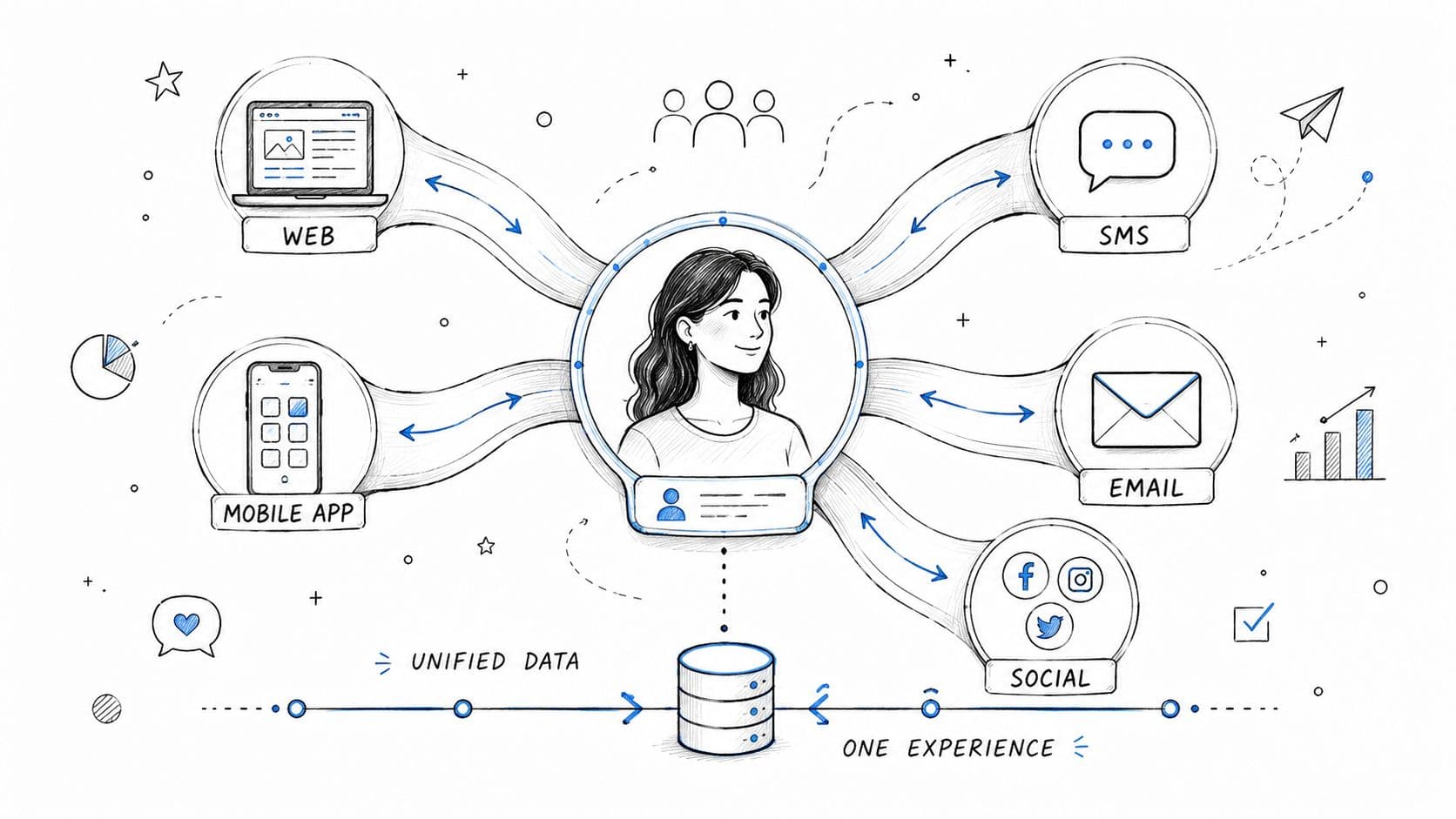
Keep channels coordinated, not duplicated
Omnichannel execution works best when each channel does a specific job. Email carries education and follow-up. SMS handles timing-sensitive reminders. Paid social creates discovery. Onsite chat handles the last-mile questions that block a purchase. Teams running expert Facebook advertising for businesses see this firsthand. Ad performance improves when the landing page, chatbot, and follow-up messages continue the same promise instead of starting over.
The chatbot is the operating layer that ties those pieces together. It should know which campaign brought the visitor in, which products they viewed, whether they already received a cart email, and what objections came up in past conversations. That turns chat from a support widget into the central nervous system for cross-channel growth. It connects acquisition, conversion, and retention in one place.
A few rules keep this practical:
- Assign a clear role to each channel: Use email for depth, SMS for urgency, ads for reach, and chat for real-time conversion support.
- Carry customer state across touchpoints: Returning buyers should not see first-time offers or have to repeat questions they already asked.
- Keep campaign language aligned: The discount, bundle, shipping promise, and product framing should match from ad to landing page to chatbot.
- Use chat to close channel gaps: If a shopper clicks from an ad about a bundle, the bot should be ready to explain that bundle, compare options, and guide checkout.
There is a trade-off. More channels create more chances to over-message, send conflicting promotions, or trigger the wrong automation. Good omnichannel setup is not about being present everywhere. It is about making each touchpoint informed by the last one so the customer gets a consistent path to purchase.
6. Proactive Sales Engagement & Smart Product Recommendations
Shoppers rarely announce hesitation. They show it through behavior. Extra time on a PDP, repeated variant switching, multiple visits to the same category, and back-and-forth comparisons usually mean the shopper is interested but not ready to commit.
That is the moment to sell.
A chatbot should not sit idle until someone opens the widget. Used well, it acts like the store's sales floor system. It reads intent signals, starts the right conversation, recommends the next-best product, and removes friction before the shopper leaves. This matters even more as buying shifts toward more interactive channels. Accenture's social commerce analysis points to major growth in social-led purchasing, which raises the bar for guided shopping experiences.
The trade-off is straightforward. Trigger too early or too often, and chat becomes another interruption. Trigger with context, and it lifts conversion.
Trigger help based on behavior
The highest-performing prompts are tied to a specific decision point. Apparel shoppers hesitate on size and fit. Beauty shoppers hesitate on regimen order, ingredients, or shade match. Home shoppers hesitate on dimensions, materials, and compatibility. Generic prompts miss that context and get ignored.
Use behavior to decide both timing and message:
- Exit-intent support: Intercept product-page exits with a concrete question tied to the product category.
- Time-on-page prompts: Wait for real evaluation behavior, then offer comparison help, bundle guidance, or sizing support.
- Variant and repeat-view triggers: If a shopper keeps switching colors, sizes, or product versions, surface the recommendation logic directly.
- Category-specific flows: Ask fit questions for apparel, skin concerns for beauty, and room or spec questions for home goods.
The best proactive message is specific. “Need help choosing the right shade?” beats “Need help?” every time because it shows the system understands the job the shopper is trying to complete.
This is also where recommendation quality matters more than recommendation volume. A chatbot connected to catalog data, margin data, and customer behavior can steer shoppers toward products that fit their needs and support the business. That includes bundles, substitutes for out-of-stock items, higher-AOV options that make sense, and replenishment paths for returning buyers. If you want those recommendations to improve retention economics, you also need to calculate customer lifetime value before deciding which segments should get aggressive upsell treatment and which should get a faster path to purchase.
Strong proactive sales engagement feels like assisted selling, not a popup strategy. The chatbot becomes the control layer for timing, recommendations, and conversion support. That is what turns chat from a support feature into a revenue engine.
7. Customer Insights & Data-Driven Decision Making
McKinsey found that companies using customer analytics extensively are more likely to outperform peers on profit and sales growth. In ecommerce, that advantage usually starts with a simple discipline. Treat buyer conversations as operating data, not just support history.
Every question about sizing, materials, refill compatibility, delivery windows, or product differences points to a decision the storefront failed to answer clearly. If that information stays buried in a help desk, the team misses one of the fastest feedback loops in the business. The chatbot should sit at the center of that loop, capturing questions at scale, tagging patterns, and pushing those patterns back into merchandising, lifecycle, and acquisition decisions.
The practical value is straightforward. Repeated pre-purchase questions usually signal missing or weak conversion content. If shoppers keep asking whether a dress runs small, the PDP needs fit guidance. If they ask whether a serum works for sensitive skin, the page needs clearer ingredient and usage education. If the same concern appears right before checkout, fix the objection where it shows up instead of paying to reacquire that shopper later.
Strong teams review conversation data like this:
- Merchandising fixes: Update product descriptions, imagery, comparison tables, and FAQs based on repeated buying questions.
- Segment quality checks: Separate high-intent customers from high-maintenance, low-margin segments before assigning retention budget.
- Message testing inputs: Use real buyer language in ads, email, SMS, and landing page copy.
- Operational flags: Catch recurring complaints about shipping promises, stock confusion, or return expectations before they hurt conversion and repeat rate.
This also sharpens customer quality decisions. High retention is not automatically good retention. If a segment buys only on discount, returns heavily, and generates repeated support contacts, revenue can look healthy while contribution margin gets worse. Pairing chatbot transcripts with order history, return rate, and service cost gives operators a clearer view of which segments deserve more lifecycle investment and which need a lower-cost service path.
For teams building a stronger testing process, these data-driven strategies for conversions are useful because they start with observed buyer friction instead of opinions from inside the company.
If your team wants to calculate customer lifetime value, conversation data adds the missing context. It shows who buys with confidence, who needs repeated reassurance, who returns for replenishment, and who consumes support time without enough margin to justify white-glove treatment.
Used well, the chatbot becomes the central nervous system for customer intelligence. It does more than answer questions. It surfaces friction, exposes demand patterns, and gives every growth team a clearer view of what to fix next.
8. Conversion Rate Optimization (CRO) & A-B Testing
A small lift in conversion rate often outperforms a large increase in traffic. That is why strong CRO work starts at the point of hesitation, where buyers pause, question, or leave, not in a design file full of cosmetic ideas.
The fastest gains usually come from pages closest to revenue. Product pages, cart, checkout, and mobile interactions deserve priority because that is where friction turns into lost sales. In practice, a chatbot should sit inside that testing program, not beside it. It can surface recurring objections in real time, trigger help at the right moment, and give the team direct evidence for what to test next.
Test buying friction, not creative preferences
Mobile behavior should already shape the CRO queue, especially for brands selling into Asian markets where shopping on phones dominates. If the product page buries delivery information, size guidance, reviews, or payment options, the problem is rarely traffic quality. The problem is that buyers cannot get to confidence fast enough.
A stronger test roadmap usually includes:
- Product pages: image sequence, benefit hierarchy, comparison content, review placement, sticky add-to-cart
- Cart and checkout: shipping clarity, total cost visibility, guest checkout, field count, payment method visibility
- Chatbot timing and logic: which pages trigger outreach, what objections the bot addresses, and when it should hand off versus stay silent
As the operating layer for CRO, the chatbot earns its place by guiding improvements. If visitors repeatedly ask about sizing before converting, test a size guide higher on the page. If they ask about shipping in checkout, test delivery messaging before the cart. If proactive chat increases add-to-cart but lowers checkout completion, adjust the trigger instead of assuming the feature works.
For teams that want stronger testing discipline, these data-driven strategies for conversions are a better frame than random experimentation. Start where purchase intent is high and friction is observable.
One pattern shows up again and again. A checkout fix beats a homepage redesign more often than teams want to admit.
That is why CRO remains one of the highest-return ecommerce growth strategies for stores that already have demand. The job is not to make the site look busier. The job is to remove uncertainty, reduce effort, and use the chatbot as a live feedback loop that improves each test cycle.
9. Scalable Customer Support Infrastructure & Automation
Customer experience leaders report that support demand jumps across channels during peak periods, and the strain usually shows up before teams notice it in revenue reports. In ecommerce, that strain looks familiar. Slower first responses, repeated questions piling up in the queue, and support agents spending expensive hours on requests a bot should have handled in seconds.
The fix is not adding headcount every time volume spikes. The fix is building a support system that can absorb growth without letting service quality slip.
That starts with treating the chatbot as the control layer for support operations, not a widget parked in the corner of the site. It should answer routine questions instantly, collect context before a handoff, trigger workflows for common requests, and surface patterns the team can act on. Used well, it does more than deflect tickets. It helps the business keep campaigns, product launches, and retention efforts running without support becoming the bottleneck.
A scalable model separates work by complexity and business risk. Order tracking, shipping timelines, return policy questions, subscription edits, sizing basics, and product availability should be handled automatically whenever the answer is clear. Refund disputes, damaged orders, fraud concerns, and emotionally charged complaints should move to a human with the full conversation history attached.
That division protects margin.
It also improves team output. IBM explains that automation reduces the time employees spend on repetitive work, which is a significant operational win in support. The benefit is not just speed. It is giving agents more time for cases where judgment, retention risk, or revenue recovery matter. (IBM on workflow automation)
A support infrastructure that scales usually includes:
- Automated first-line resolution: Instant answers for repeat questions, 24/7
- Clear escalation logic: Rules for when the bot should route to billing, CX, ops, or a manager
- Shared conversation context: No customer should need to repeat the issue after handoff
- Workflow automation: Refund requests, order updates, and policy actions routed without manual triage
- Training loops: Conversation logs reviewed weekly to improve replies, flows, and help content
The trade-off is real. More automation increases efficiency, but bad automation increases frustration. If the bot blocks access to a human, gives vague answers, or misses edge cases, ticket volume comes back with more urgency and lower CSAT. The standard should be simple. Automate the predictable work. Escalate the sensitive work fast.
For small ecommerce teams, this is how support stays stable during launches, holiday peaks, creator campaigns, and sudden traffic spikes. For larger teams, it is how the chatbot becomes the central nervous system for service, sales, and insight at the same time.
10. Fast Implementation & No-Code Solutions for Rapid Growth
Teams that ship growth tests in days learn faster than teams that spend a quarter on setup.
That matters in ecommerce because timing affects results. Merchandising changes every week. Paid traffic gets more expensive without warning. A recovery flow, product quiz, or onsite assistant launched this week can influence revenue now. The same idea launched two months later often misses the moment.
Speed also changes who can execute. If every update needs engineering time, simple improvements sit in a backlog behind theme fixes, checkout work, and app conflicts. No-code tools remove that bottleneck. The best ones let marketing, CX, and ecommerce managers launch, test, and refine flows on their own, while keeping enough control to avoid messy customer experiences.
For an AI chatbot, fast implementation matters even more because it can support several growth motions at once. One deployment can answer product questions, recover carts, route support issues, surface buying objections, and collect conversation data the team can act on. That is the key advantage. The chatbot is not another widget to manage. It becomes the operating layer connecting sales, service, and insight.
I use a simple filter before adding any new tool:
- Time to first value: Can the team launch a useful version in a few days, not after a long integration project?
- Ownership: Can ecommerce, marketing, or CX update flows without filing tickets for every change?
- Cross-functional impact: Does the tool improve more than one metric, such as conversion, support load, and customer insight?
- Maintenance burden: Will the setup stay accurate as products, promos, and policies change?
There is a trade-off. Fast setup is only useful if the tool stays accurate after launch. A no-code system that is easy to publish but hard to maintain creates stale recommendations, broken logic, and extra cleanup work. In practice, the better choice is usually the platform that starts with templates, syncs with your catalog and help content, and gives the team clear controls for edits, testing, and escalation.
A static walkthrough is better for page speed than an embedded video. Use a linked thumbnail or screenshot of the demo so readers can choose to watch without adding extra load to the article.
Watch the implementation walkthrough on YouTube
10-Point Ecommerce Growth Strategies Comparison
A good comparison table should help a team choose what to implement first, where the trade-offs sit, and which systems can improve more than one metric at once. That is the main reason AI chat stands out. Used well, it does more than answer support tickets. It connects merchandising, conversion, retention, and insight in one operating layer.
| Solution | Implementation Complexity | Resource Requirements | Expected Outcomes | Ideal Use Cases | Key Advantages | Main Limitations |
|---|---|---|---|---|---|---|
| AI-Powered Conversational Commerce & Chatbot Integration | Medium to high. Setup, training, and catalog mapping | AI chat platform, training data, catalog integration, ongoing monitoring | Faster responses, higher conversion, increased AOV, round-the-clock engagement | DTC ecommerce, high-Q&A products, cart recovery | Real-time personalization, scalable support, recommendation-driven AOV lift | Quality of training data, human escalation needed for complex queries, ongoing tuning |
| Abandoned Cart Recovery & Cart Abandonment Sequences | Low to medium. Automation flows and triggers | Email or SMS provider, templates, segmentation, discount management | Recovered carts, improved revenue, strong ROI | Stores with high cart abandonment, transactional recovery focus | Automated revenue recovery, multi-channel reach, proven retention use case | Messaging fatigue, discounts reduce margins, deliverability and list management |
| Personalization & Behavioral Product Recommendations | Medium to high. Recommendation logic and data integration | Customer data, recommendation engine, storefront integration | Higher AOV, stronger engagement, more repeat purchases | Large catalogs, repeat customers, cross-sell and upsell programs | Relevant experience, incremental revenue, lower decision friction | Requires sufficient data, privacy compliance, and integration effort |
| Instant Customer Support & Reduction of Response Time | Medium. Chatbot, escalation paths, and knowledge base setup | Knowledge base, chatbot technology, training content, monitoring | Faster answers, higher CSAT, reduced abandonment | Time-sensitive purchases, high-support-demand products | Eliminates wait time, consistent answers, lower support costs | Continuous updates needed, complex issues still require humans, brand risk if setup is weak |
| Multi-Channel Engagement & Omnichannel Presence | High. Cross-channel integration and orchestration | Unified customer data, channel tools, cross-team coordination | Better engagement, higher LTV, more consistent messaging across touchpoints | Brands with retail and digital channels, complex customer journeys | Connected journeys, more touchpoints, better retention | Complex integration, higher technology and organizational cost, privacy challenges |
| Proactive Sales Engagement & Smart Product Recommendations | Medium to high. Trigger logic and real-time monitoring | Real-time behavior tracking, AI triggers, testing infrastructure | Higher engagement, more conversations started, incremental revenue | Browsing-heavy sites, complex product discovery, guided selling | Captures intent moments, guided selling, timely offers | Can feel intrusive if miscalibrated, needs accurate tracking and testing |
| Customer Insights & Data-Driven Decision Making | Medium. Data aggregation and analytics setup | Analytics tools, data integration, analyst time, dashboards | Better merchandising, less guesswork, stronger CRO and product decisions | Scaling brands, merchandising optimization, content strategy | Actionable trends, better product and marketing decisions, clearer prioritization | Requires clean integrated data, analyst resources, organizational buy-in |
| Conversion Rate Optimization (CRO) & A-B Testing | Medium. Testing discipline and hypothesis management | A/B testing tools, traffic volume, design or development support, analytics | Incremental conversion gains, improved UX | High-traffic sites, checkout and landing page optimization | Measurable ROI, lower CAC, cumulative gains over time | Needs enough traffic for significance, tests take time and resources |
| Scalable Customer Support Infrastructure & Automation | High. Systems, routing, and escalation architecture | Automation platform, trained staff, escalation rules, monitoring | Support scales without matching headcount growth, faster resolutions, cost savings | Rapid-growth stores, high ticket volume, seasonal spikes | Cost-efficient scaling, consistent quality, frees humans for complex issues | Initial investment, staff training, orchestration complexity |
| Fast Implementation & No-Code Solutions for Rapid Growth | Low. Plug-and-play deployment | No-code vendor, minimal IT support, onboarding help | Faster time to value, quicker first wins | SMBs, lean teams without development resources, quick experiments | Speed, low technical barrier, easy iteration and testing | Limited customization, potential vendor lock-in, scalability constraints |
The practical read on this table is simple. Some strategies drive one outcome well. A chatbot can support several at the same time if it is connected to product data, help content, and lifecycle flows. That makes it one of the few growth tools that can improve conversion, reduce support load, recover revenue, and surface customer insight from the same set of interactions.
From Strategy to Execution Your Next Step
The common mistake in ecommerce is treating growth as a channel problem. Traffic sits with paid media. Retention sits with email. Support sits with CX. Merchandising sits with ecommerce. Each team does its part, but the customer experiences one journey. When those systems don't connect, conversion suffers.
That's why the strongest ecommerce growth strategies share the same core principle. They reduce friction at the exact moment a customer is deciding whether to buy, buy more, or come back. Some do that through better recommendations. Some do it through faster support. Some do it by following up after abandonment or by improving the product page based on real customer questions. The best operators build all of those into one system.
An AI-powered chatbot is one of the few tools that can sit in the middle of that system and improve multiple outcomes at once. It can guide product discovery, answer objections, recover carts, surface merchandising gaps, support mobile shoppers, and give your team better visibility into what customers need. That's a very different role from a basic support widget. It becomes the layer that helps your storefront sell more effectively without requiring more manual effort.
This matters even more as ecommerce keeps expanding. Mobile behavior is dominant. Cross-channel shopping is normal. Customers expect instant answers and relevant recommendations, not static pages and delayed replies. If your store still relies on a patched-together mix of FAQs, slow inbox support, and generic lifecycle flows, you'll keep losing buyers who were already close to converting.
The good news is you don't need to rebuild everything at once. Start where the friction is clearest. If customers ask the same questions repeatedly, fix support and product education. If carts are stalling, connect recovery with live assistance. If recommendation blocks feel random, make them behavior-based. If your team lacks visibility into buyer objections, centralize the data.
For many Shopify stores, the fastest path is to start with the tool that activates several strategies at once. That's why a chatbot like Carti is a practical first move. It supports conversational commerce, proactive selling, cart recovery, personalization, and customer insights from one no-code layer. Instead of adding another disconnected app, you create a foundation the rest of your growth system can build on.
If you want a faster way to put these ecommerce growth strategies into practice, Carti is a strong place to start. It's built for Shopify stores that want to turn more browsers into buyers with instant answers, smart product suggestions, proactive engagement, and cart recovery, without adding more manual work for the team.

Written by
Daniel AndersonFounder of Carti. 10+ years building ecommerce brands in apparel and supplements. Still runs a Shopify store and built Carti to help merchants convert more browsers into buyers.
Ready to boost your store's sales?
Install Carti in 5 minutes and let AI handle customer questions, recommend products, and close sales 24/7.
Start Free Trial14-day free trial