
More than 59% of consumers say excellent customer service matters more than price, 70% say they'll switch companies when service is poor, and 58% say great past service influenced their decision to buy, according to Shopify's summary of Zendesk benchmark data in its roundup of customer service statistics. For Shopify merchants, that changes the conversation completely. Support isn't just what happens after a problem. It shapes whether a shopper buys, comes back, and recommends the brand.
That's why strong Shopify customer service belongs in the same operating plan as merchandising, paid acquisition, and retention. The stores that outperform usually don't treat support as a ticket queue. They use it as a live revenue function. Fast answers remove buying friction. Clear policies reduce hesitation. Good agents rescue carts, save subscriptions, and stop small issues from becoming refunds or chargebacks.
Why Shopify Customer Service Is Your New Sales Team
Support starts affecting revenue long before a ticket is ever tagged as “resolved.”
On Shopify stores, the highest-value service conversations often happen in the same places sales friction shows up: product pages, cart, checkout hesitation, and the first 30 days after delivery. A shopper asking about sizing, delivery timing, bundle compatibility, subscription terms, or return policy is often one clear answer away from buying. If that answer arrives fast and with confidence, support contributes to conversion. If it arrives late or creates doubt, support contributes to abandonment.
I have seen this shift play out with stores doing seven figures in annual revenue. One apparel merchant treated support as a post-purchase queue and kept pre-sale questions buried in a shared inbox. Conversion stalled because shoppers with fit questions waited hours for replies. Once the team moved those questions into live chat, added clear macros for sizing and shipping, and gave agents permission to recommend the right product instead of only answering policy questions, support started influencing revenue directly. More carts converted. Fewer orders came back as returns because customers bought with better information the first time.
That is the operational change. Support is not just there to close complaints. It handles buying objections, protects margin, and increases repeat purchase rate when the post-purchase experience is handled well.
For operators working on broader strategies for selling online, support should be designed around revenue moments. Pre-purchase conversations should reduce friction and help customers choose. Post-purchase conversations should protect trust, prevent refunds where appropriate, and create the conditions for the next order.
A simple rule works well here.
Practical rule: Questions before payment affect conversion. Questions after payment affect retention and LTV.
That shift changes hiring, QA, and tooling. Agents need product judgment, not just queue discipline. Macros should answer objections clearly, not sound like policy copy pasted into chat. Coverage should match demand peaks, especially evenings, launches, and promotion windows. AI also has a role, but only if it improves speed without creating confusion. A strong AI-powered sales assistant can handle repetitive buying questions in real time, while human agents step in for edge cases, exceptions, and moments where reassurance closes the sale.
The Three Pillars of Modern Shopify Support
The easiest way to build strong Shopify customer service is to think like a great retail associate in a high-performing store. That person is nearby when needed, gives the right answer the first time, and knows when to step in before the customer asks.
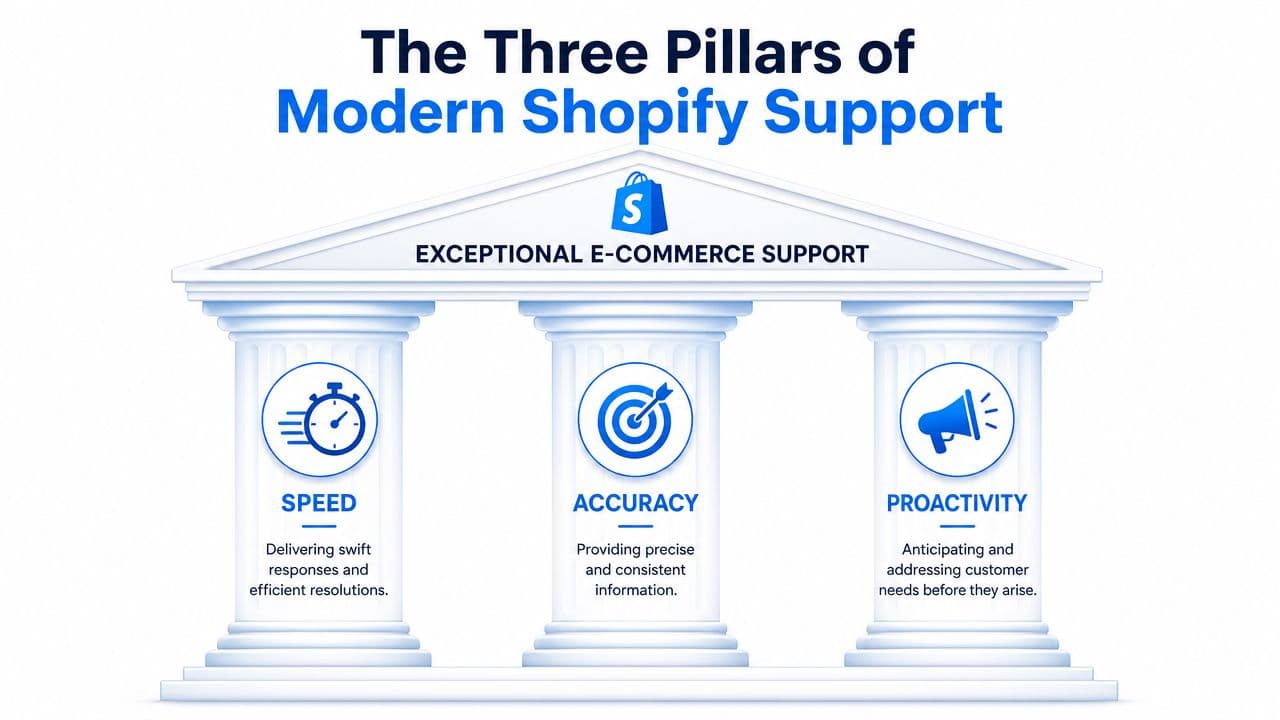
Speed means access not just reply time
Most merchants define speed too narrowly. They look at inbox response time and ignore the bigger issue, which is whether a customer can get an answer immediately.
A fast team can still create a slow experience if the customer has to dig through policy pages, switch channels, or repeat information. Real speed means the answer is available where the question happens. On the product page. In chat. In the help center. In the order lookup flow.
Accuracy builds trust faster than charm
Friendly support that gives the wrong answer is expensive. It creates reopens, refunds, and internal confusion.
Accuracy depends on three things:
- One source of truth: Shipping, returns, warranty, and promotion rules need one maintained reference.
- Channel consistency: Email, chat, social, and help docs should match. A customer shouldn't get three different answers to the same question.
- Escalation logic: When an issue touches billing, subscriptions, custom apps, or storefront bugs, the case needs the right owner fast.
Proactivity creates revenue before a ticket exists
Proactivity is where support stops being a cost center. It shows up when you identify common hesitation points and solve them before the shopper leaves.
That can look like:
- Contextual help: Showing sizing, delivery, or compatibility answers on high-exit product pages.
- Checkout reassurance: Surfacing return and shipping clarity when customers are deciding whether to complete payment.
- Post-purchase updates: Sending useful order and delivery communication so customers don't need to ask what's happening.
Good support doesn't wait for a complaint. It reduces the number of reasons a customer would need to complain.
When these three pillars work together, the operation feels effortless to the customer and manageable to the team. Speed reduces friction. Accuracy protects trust. Proactivity turns service into conversion support.
Building Your Support Channels and Workflows
A lot of stores add channels without building a system. They open email, install chat, reply to Instagram DMs, and call it a support stack. The result is fragmented work, duplicated effort, and customers repeating themselves across touchpoints.
Channel design starts with routing
The better approach is to decide what each channel is for, then route work based on complexity and urgency.
A practical setup usually looks like this:
| Channel | Best use | Workflow rule |
|---|---|---|
| Order issues, nuanced cases, attachments | Use for anything that needs documentation or back-and-forth | |
| Live chat | Pre-sale questions, quick order help | Prioritize buying intent and time-sensitive issues |
| Social DMs | Public-facing inquiries, lightweight support | Move account-specific problems into a private support flow |
| Help center | Policies, tracking, returns, FAQs | Deflect repeat questions before they become tickets |
A lot of operators borrow ideas from broader work on optimizing SME operations. The useful takeaway is that channel design only works when the process behind it is clear. Customers need a clean front door. Agents need a clean path to resolution.
I've found triage rules matter more than channel count. If “where is my order,” “how do I return this,” and “which size should I buy” all hit the same queue with the same priority as a broken checkout, your team will stay busy and still underperform.
Use a simple routing model:
- Automate repeatable questions: Tracking, return steps, shipping windows, basic policy lookups.
- Send pre-sale product questions to trained frontline agents: These interactions often influence conversion directly.
- Escalate technical storefront issues immediately: Theme bugs, app conflicts, discount logic, and checkout problems shouldn't sit in a general queue.
Your best agents need technical range
Shopify support work gets technical fast. A store owner may describe the issue as “the product page is broken,” but the actual cause could be theme code, app scripts, Liquid logic, CSS conflicts, or a bad integration.
That's why generic customer service training isn't enough. According to LTVplus, a proficient Shopify support agent needs technical fluency in Liquid, HTML, and CSS, and support teams without that fluency struggle to resolve 50% of technical tickets within the first contact in its discussion of the Shopify tech support agent role.
The most expensive support handoff is the avoidable one. When an agent can diagnose the issue without bouncing it to a developer, the customer feels momentum instead of delay.
That doesn't mean every agent needs to be a developer. It means the workflow should separate operational support from technical support, and the team should know exactly when to shift from script-based service to technical troubleshooting.
How to Automate and Improve Support with AI
Stores that answer pre-purchase and post-purchase questions faster usually convert more of the traffic they already paid for. That is why AI belongs in Shopify support. It cuts repetitive workload, but the bigger payoff is commercial. It keeps shoppers moving, protects checkout intent, and gives agents more time for cases where judgment affects retention.
Start with high-volume questions that do not need judgment
The first AI use cases are usually order tracking, return instructions, shipping policy questions, and basic product FAQs. These contacts are frequent, predictable, and time-sensitive. They rarely need a skilled agent, but they do need accurate answers tied to live order and policy data.
Ringly notes that AI chatbots can answer routine questions like order status and return instructions instantly, and in its guide to customer service for Shopify it describes how self-service flows connected to Shopify data can reduce repetitive WISMO tickets. That is where automation earns its keep. Customers get a fast answer, and the team gets capacity back for higher-value conversations.
A useful AI layer does four things:
- Identifies the customer quickly: Pull up the right order, account, or return request without forcing extra back-and-forth.
- Responds from current data: Tracking status, shipping cutoffs, and policy details must match what is true today.
- Suggests the next step: If a package is late or an item is out of stock, the flow should offer a clear path instead of stopping at an explanation.
- Routes exceptions fast: Gift deadlines, damaged deliveries, payment disputes, and subscription issues should move to a person with context attached.
Put AI where hesitation blocks revenue
A common mistake is to stop at support deflection. That saves labor, but it misses the stronger use case.
AI should also sit in the buying journey where uncertainty slows conversion. Product pages, cart, and checkout are the obvious places. Shoppers ask support-style questions there, but the business impact is sales. Sizing doubts, compatibility checks, shipping timing, subscription terms, and return eligibility often decide whether the order happens now or gets abandoned.
A practical guide to support automation for Shopify stores starts by mapping questions to intent instead of department. “Will this work with my current setup?” is a sales question disguised as support. “Can this arrive before the weekend?” is often the last barrier before payment. If AI can answer those questions accurately and hand off the edge cases, support starts generating revenue instead of just absorbing cost.
Automation should absorb repetition, not responsibility.
That distinction matters. Teams often get into trouble when the bot is treated like a gatekeeper. Customers end up trapped in loops, confidence drops, and agents inherit frustrated conversations instead of clean handoffs. The better model is simple. Use AI to speed up known workflows and let people step in early when the situation affects trust, spend, or loyalty.
Make the handoff useful for the agent and invisible to the customer
The handoff is where weak implementations break down. If a shopper has already given the order number, described the issue, and answered triage questions, the agent should receive all of that before joining the conversation.
Pass the conversation summary, order details, detected topic, sentiment, and any actions already attempted. That reduces handle time, but more importantly, it preserves momentum. In practice, this is where AI stops being a cost-cutting tool and starts acting like an operations layer that supports conversion and retention. Customers feel continuity. Agents spend their time solving the problem. That is the version of AI support that scales.
Essential Policies and Messaging Templates
Most avoidable tickets come from ambiguity, not complexity. If shipping windows are fuzzy, returns are hard to find, or damaged-item steps aren't spelled out, customers ask support to clarify what the site should have made obvious.
Policies that prevent avoidable tickets
Every Shopify store should make a few policies painfully clear and easy to access.
- Returns and exchanges: State the window, item conditions, exclusions, refund method, and exchange process in plain language.
- Shipping: Explain processing time separately from transit time. Customers care about both.
- Damaged or incorrect items: Tell customers exactly what to send, where to send it, and what happens next.
- Order changes and cancellations: If you allow edits, define the cutoff. If you don't, say so clearly before checkout.
- Promotions and discount rules: Spell out stacking rules, final sale conditions, and expiration behavior.
A good test is simple. If a new hire can't answer the question by reading the policy once, the customer won't understand it either.
Templates your team can use today
These should live as macros in your helpdesk and as approved replies for chat. Edit the tone to fit your brand, but keep the structure tight.
Order tracking reply
Hi [First Name], thanks for reaching out. I checked your order and it's currently [status]. You can follow the latest tracking updates here: [tracking link]. If the tracking hasn't updated after [your internal threshold], reply to this message and we'll look into it for you.
Return request reply
Hi [First Name], we can help with that. Your order is eligible for return based on our policy. Please use this link to start your return: [return portal link]. Once the item is received and reviewed, we'll process the refund to your original payment method.
Damaged item reply
Hi [First Name], I'm sorry your order arrived that way. Please reply with your order number and clear photos of the damaged item and packaging. Once we review them, we'll arrange the next step as quickly as possible.
Pre-sale sizing question
Hi [First Name], happy to help. The best fit usually depends on [fit variable such as height, weight, usual size, or preferred fit]. If you send those details, we can recommend the most suitable option.
Shipping delay reply
Hi [First Name], thanks for your patience. I checked the shipment and there's a carrier delay in transit. The latest tracking link is here: [tracking link]. If it doesn't move by [internal threshold], reply and we'll step in.
Clear templates do two jobs at once. They speed up the team and protect consistency across channels.
Measuring Success with the Right KPIs
Support metrics only matter if they change decisions. A dashboard full of numbers won't help if nobody uses it to improve conversion, retention, or operational quality.
Track operational KPIs and business outcomes together
Most Shopify teams should review four core support measures:
- First Response Time: How quickly the team acknowledges a customer.
- Resolution Rate: Whether cases are closed without unnecessary back-and-forth.
- Customer Satisfaction: What customers report after the interaction.
- Ticket Volume: Which issues are increasing, shrinking, or repeating.
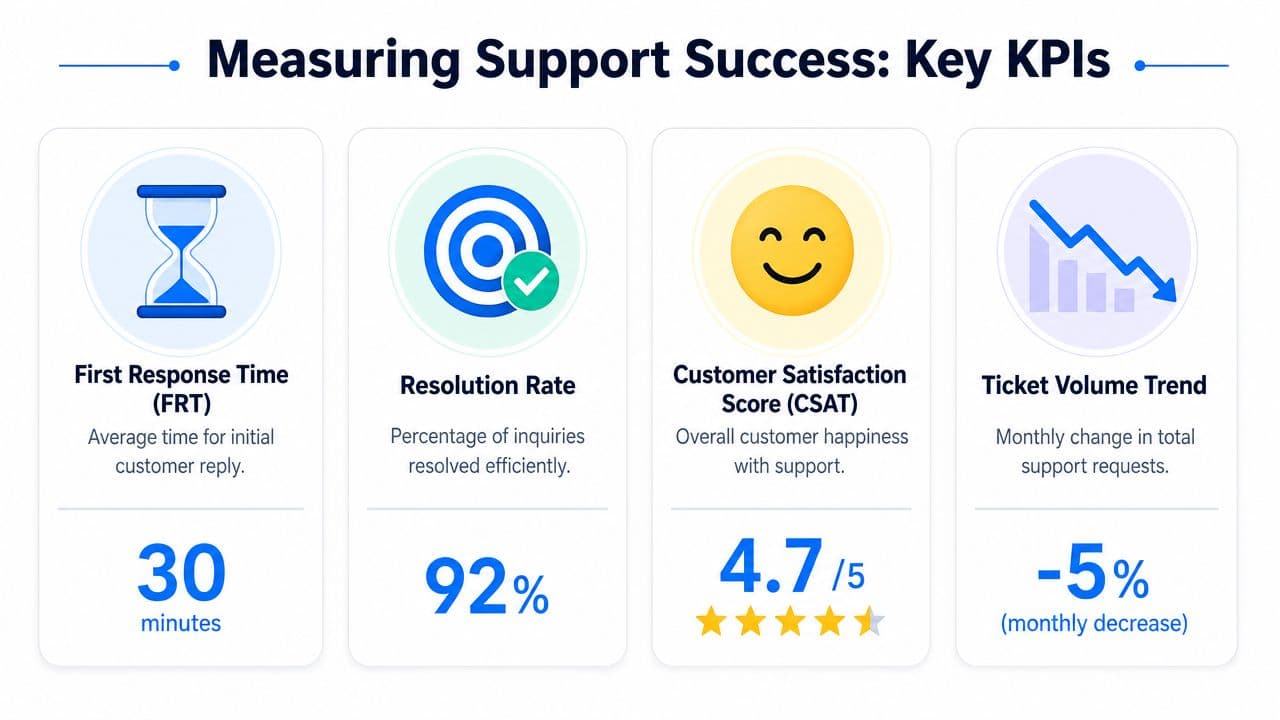
The mistake is treating those as isolated support stats. They should be paired with business signals. If pre-sale tickets increase on a product line, review the product page. If return questions spike, check whether the policy is unclear or the PDP is overselling fit. If shipping complaints rise, inspect carrier performance and your delivery promise language.
A useful framework for reviewing service quality is this evaluation of customer service, especially if you want to connect customer-facing experience with operational root causes instead of just watching queue metrics.
What to review every week
A weekly support review doesn't need to be long. It needs to be disciplined.
Use a short checklist:
- Top contact reasons: What are customers asking most often?
- Conversion friction: Which pre-sale questions appear repeatedly before purchase?
- Policy confusion: Where are customers misunderstanding shipping, returns, or discounts?
- Store issues: Are tickets pointing to broken UX, theme bugs, or app conflicts?
- Training gaps: Which replies require escalation too often?
Support data is one of the best diagnostic tools in the business. It shows where the storefront is unclear, where promises are weak, and where internal processes are creating customer-facing problems. Teams that use it well don't just answer faster. They improve the store itself.
Scaling Your Support as Your Store Grows
Support should evolve in stages. The tools, staffing model, and expectations that work for an early store won't hold up once volume increases and channels multiply.
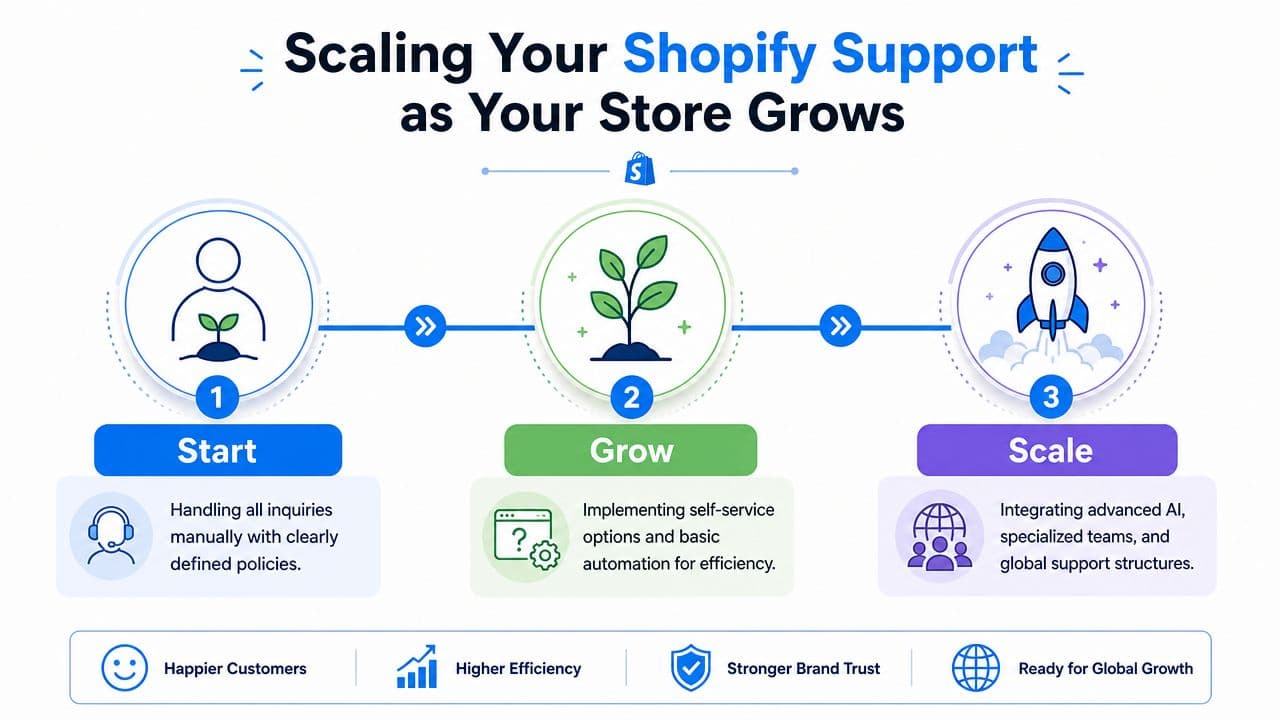
Start
At the start, the founder or a small team often handles everything manually. That's fine if the basics are in place.
Focus on these moves first:
- Write clear policies: Returns, shipping, damaged goods, and cancellations should be easy to find.
- Create core macros: Standardize replies for tracking, returns, sizing, and order changes.
- Define ownership: Someone must own the inbox, the chat queue, and escalations.
Grow
Growth creates a different problem. The issue isn't whether customers get answered. It's whether the team can answer consistently without drowning in repetition.
This is the point to add structure:
- Install a helpdesk: Centralize email, chat, and social support in one system.
- Launch self-service: Help center content and order lookup tools reduce preventable contacts.
- Add automation carefully: Start with repeatable questions and preserve a clear path to a person.
When support volume rises, the right response isn't always more headcount. It's usually better routing, better documentation, and better automation.
Scale
At scale, support becomes a cross-functional operating system. It informs merchandising, retention, product education, and site experience.
The stronger setup usually includes:
- Specialized roles: Separate general support from technical troubleshooting and VIP or retention cases.
- Quality control: Review conversations, update macros, and coach agents regularly.
- Feedback loops: Send recurring issues to the teams that can fix them, whether that's operations, growth, product, or development.
The stores that scale cleanly treat Shopify customer service as infrastructure. It protects revenue today and improves the business over time.
Frequently Asked Questions
Does Shopify handle customer service for my customers
No. Shopify supports merchants on the platform side, but your store is responsible for serving your own customers. That includes product questions, order issues, returns, shipping concerns, and post-purchase communication. If a shopper bought from your store, they expect your brand to answer.
Should I outsource Shopify customer service
It depends on the type of support you need. Outsourcing can work for routine coverage, extended hours, and standardized workflows. It usually struggles when the brand has complex products, unusual policies, or frequent technical storefront issues.
If you outsource, document everything. Build a clear knowledge base, approved macros, escalation rules, tone guidelines, and refund permissions. Without that structure, outsourced support often sounds polite but resolves too little.
How much should I budget for support
Treat support as an operating investment tied to retention and conversion, not as a fixed overhead line you want to minimize at all costs. The right budget depends on order volume, product complexity, channel mix, and how much of the workload you can automate.
A simple rule works well. Budget enough to keep response times reasonable, maintain policy clarity, and prevent pre-sale questions from going unanswered. If support is slow during buying moments, you're not saving money. You're leaking revenue.
What should I automate first
Start with the questions your team answers repeatedly and consistently. Order tracking, return steps, shipping policy questions, and basic product FAQs are usually the cleanest first layer. Leave exceptions, complaints, and technical issues for trained humans.
When should I hire a dedicated support lead
Hire one when support becomes operationally messy. That usually shows up as inconsistent replies, missed handoffs, unclear ownership, or repeated issues that nobody fixes upstream. A strong support lead doesn't just manage tickets. They improve workflows, documentation, training, and the customer experience across the store.
If you want to turn support into a revenue channel instead of just a ticket queue, Carti is built for that job. It helps Shopify stores answer shoppers instantly, automate repetitive service requests, recommend products in real time, and recover carts without adding operational drag. For merchants who want faster support and stronger conversion from the same workflow, it's worth a close look.

Written by
Daniel AndersonFounder of Carti. 10+ years building ecommerce brands in apparel and supplements. Still runs a Shopify store and built Carti to help merchants convert more browsers into buyers.
Ready to boost your store's sales?
Install Carti in 5 minutes and let AI handle customer questions, recommend products, and close sales 24/7.
Start Free Trial14-day free trial