
You run a Shopify store selling coffee, snacks, sauces, tea, or functional drinks. A shopper lands on a product page late at night, reads the description, checks the photos, and still opens chat with one question: “Does this contain peanuts?” Or, “Is this decaf?” Or, “Can I pause the subscription if I'm traveling?”
Those questions look small, but they sit directly on the path to purchase. A useful food and beverage chatbot doesn't just repeat shipping policies. It helps shoppers decide whether a product is safe, suitable, practical to receive, and worth buying again.
The opportunity is real, but the implementation has to be grounded in your catalog. Conversational commerce was coined in 2015 by Chris Messina, while chatbot-style automation has roots as far back as ELIZA in 1966. By August 2017, more than 34,000 businesses had opened shops on Messenger, showing how quickly chat-based selling moved into mainstream commerce. In food and beverage, a 2022 sector report found that 69% of users preferred a chatbot over other communication channels because it could provide instant, accurate responses around the clock, as documented in this review of chatbot applications in food and beverage.
What an Online F&B Shopper Is Really Asking Your Chat
A shopper lands on a coffee roaster's single-origin page at 9 p.m. They ignore the email signup, skip the reviews, and open the chat box.
“Is this decaf?”
That question may be about breastfeeding and avoiding caffeine. It may also be a test of whether the store understands its own products. If the assistant answers clearly, the shopper can move on to grind size, freshness, shipping, and eventually a subscription. If the answer is vague, the sale usually stops there.
This is why F&B chat needs a different priority order from generic ecommerce support:
- Ingredients and allergens
- Dietary fit
- Freshness and shipping
- Subscriptions and repeat purchase
The first question often carries the highest stakes. A shopper asking about peanuts, milk, gluten, caffeine, or a specific ingredient isn't browsing casually. The bot should retrieve the relevant product data, state what the catalog confirms, and hand off when the information is incomplete. It should never infer safety from marketing language such as “clean,” “natural,” or “healthy.”
Dietary fit comes next. “Is this vegan?” and “Does this work for keto?” require more than keyword matching. The assistant needs the ingredient list, dietary tags, and a way to signal uncertainty where the product content doesn't support a confident answer.
Freshness and delivery then determine whether the product makes sense for the shopper's situation. Coffee roast date, chocolate melt risk, storage instructions, shipping zones, and delivery windows all matter more than a generic “fast shipping” badge.
Finally, subscriptions turn a first purchase into a repeat relationship. The shopper wants to know whether they can save compared with a one-time order, change the cadence, skip the next shipment, or pause future charges. Our customer profile guide is useful here because the assistant needs enough account and purchase context to make the conversation relevant without becoming intrusive.
Practical rule: The chatbot should answer the question the shopper typed before it tries to increase the order value.
Most Shopify stores already answer shipping windows, return policies, and discount-code questions in chat. Those are useful, but they're generic ecommerce jobs wearing an F&B costume. If your store's product assistant can't handle ingredients, dietary restrictions, freshness, and subscriptions, it's functioning as a help widget rather than a sales layer.
Teams should also review how to avoid AI pitfalls in marketing, especially the risks of allowing automation to make unsupported claims. In food and beverage, a confident wrong answer isn't merely poor personalization. It can damage trust and create a serious customer-safety problem.
What a Food and Beverage Chatbot Actually Does
A food and beverage chatbot for Shopify is a conversational layer over the parts of a direct-to-consumer store that shoppers use to make decisions. It connects the storefront experience with the product catalog, collections, inventory, subscription rules, customer accounts, and published policies.
That makes it different from a restaurant POS bot. A restaurant bot may capture a phone order, send a ticket to a kitchen, or coordinate pickup. A delivery aggregator bot may handle dispatch and last-mile updates. A Shopify F&B chatbot helps someone choose a bag of coffee, understand a snack's ingredients, select a tea, recover a cart, or manage an existing subscription.
The technology has moved through several practical stages. Early systems relied on button-based FAQs and fixed rules. Later intent-classification bots could identify questions such as “Where is my order?” GPT-era assistants are better at the unstructured language shoppers use, including incomplete questions, comparisons, and follow-ups.
A production-ready assistant can cover:
- Product discovery, by narrowing a catalog based on flavor, format, use case, or dietary preference.
- Ingredient and allergen triage, by retrieving structured product information and escalating uncertain questions.
- Dietary guidance, by combining tags with the full ingredients field rather than trusting a single badge.
- Order status, using Shopify order and customer-account context where available.
- Subscription management, including skip, pause, swap, and account questions.
- Loyalty and lead capture, when the shopper gives the required consent.
- Human handoff, when the question is sensitive, ambiguous, or outside the store's verified data.
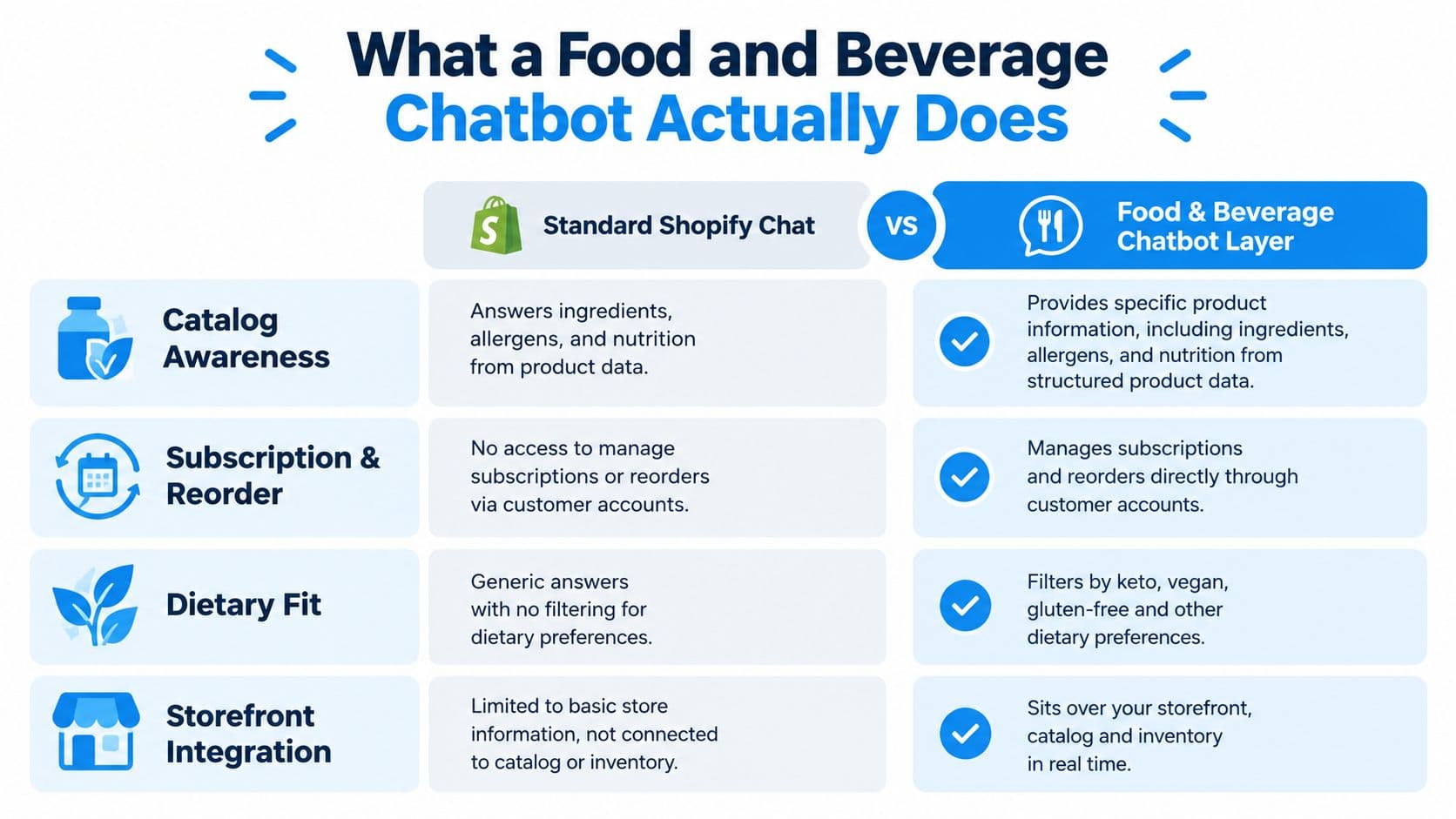
The distinction matters because standard Shopify chat often searches page text or routes support questions. A specialized layer should understand that “Can I drink this before bed?” might involve caffeine, ingredients, serving context, and health-adjacent uncertainty. It should answer only what the catalog supports and make the next step obvious.
Merchants evaluating automated customer support bots should ask where the system gets its answers, how frequently it syncs product changes, and whether a human can take over without forcing the shopper to restart the conversation. A deeper explanation of the category appears in this guide to AI chatbots for ecommerce.
A chatbot isn't a magic revenue button. It won't repair thin product descriptions, missing ingredient lists, stale inventory, or contradictory subscription policies. It can expose those problems quickly, which is valuable, but the merchant still has to fix the underlying store data.
To see how this works on a Shopify store, our page on Carti for food and beverage stores covers ingredient and allergen questions, perishable shipping and subscriptions.
The Four Conversations Every F&B Chat Must Handle
The most reliable way to design an F&B chat flow is to map each high-intent question to a verified Shopify data source. The assistant shouldn't improvise an answer because the wording sounds familiar.
| Priority | Example shopper question | Bot answer pattern | Shopify data source |
|---|---|---|---|
| Allergens | “Does the granola contain peanuts?” | State the confirmed allergen information. If the data is missing or ambiguous, stop and hand off to a human. | allergen_tags metafield and ingredient list |
| Dietary fit | “Is this keto?” | Combine dietary tags with ingredients, nutrition details, and a confidence flag. | diet_tags metafield, ingredients body field, nutrition data |
| Freshness and shipping | “When was this roasted, and how fast can it ship to California?” | Give the freshness detail, shipping zone, cutoff information, and any handling caveat. | roast_date metafield, shipping zones app, cutoff policy |
| Subscriptions | “Can I get 500g every 3 weeks and skip a delivery?” | Confirm available cadence and show skip, swap, or pause actions inline. | Subscription app API and customer account |
Allergens come first
A good answer might say: “The product information lists peanuts as an allergen,” followed by the relevant ingredient or facility statement. If the catalog doesn't distinguish between an ingredient and cross-contact warning, the bot should say that it can't confirm the answer and offer a human handoff.
Don't let the model turn “peanut-free recipe” into “safe for someone with a peanut allergy.” Those statements aren't equivalent. Your product content needs an explicit allergen field, not just a prose description.
Dietary fit needs evidence
For “Is this keto?” the bot should use the diet_tags metafield alongside the ingredients and nutrition panel. A dietary label can become stale after a formulation change, so the assistant needs a confidence rule that sends uncertain cases to support instead of presenting a guess as a guarantee.
Freshness is operational
Coffee shoppers may ask about roast date. Chocolate shoppers may care about heat exposure. Tea and pantry products may need storage guidance. The answer should join product-level freshness data with shipping-zone rules and cutoff times, rather than promising a delivery speed that the store can't verify.
Subscriptions should be actionable
Shopify supports customer self-service for subscriptions. A customer can skip the next order, pause future charges and upcoming orders until they resume, and manage subscriptions, payment methods, and shipping addresses from their account, as explained in Shopify's customer subscription experience documentation.
If any of these four questions sends the shopper to a support email or a static FAQ, the chatbot is decorative. The conversation should either resolve the question or provide a clear, immediate handoff with the relevant context preserved.
Upsell and Bundle Flows That Answer Fit First
The ecommerce version of a restaurant combo is a sampler, bundle, or replenishment plan. It works when the shopper already understands why the first product fits.
A coffee shopper asks, “Is the medium roast low-acid?”
The assistant should answer from the product details first. Then it can ask how the shopper brews. If the customer says French press, the logical recommendation may be the matching grind, followed by a sampler as a low-risk way to explore other roasts.
The sequence is simple:
- Confirm fit: Answer the low-acid question from the product content.
- Ask one useful follow-up: Find out whether the shopper uses a French press, pour-over, or another method.
- Recommend one logical add-on: Offer the appropriate grind or a sampler.
- Keep the choice connected: Explain why the add-on follows from the shopper's answer.
This approach matches cart-upsell guidance that recommends establishing the original product fit before presenting one relevant accessory, bundle, or add-on through a focused cart-upsell flow. “You might also like” is weaker because it ignores the intent already expressed in the conversation.
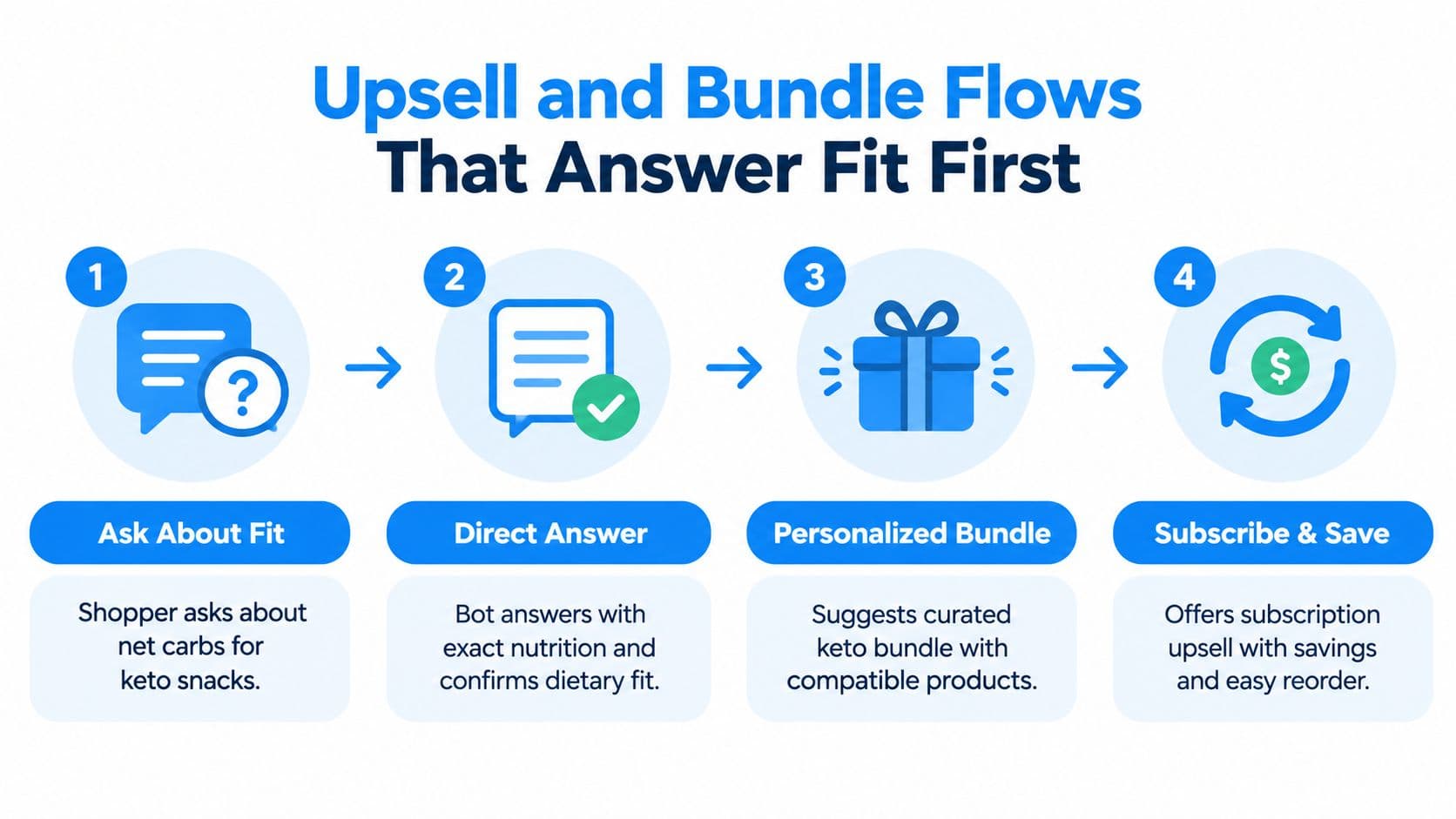
The same principle applies to a keto snack shopper. The bot should retrieve the nutrition panel and confirm what the product data says about dietary fit. Only then should it present a compatible trio bundle and subscription option. The bundle is relevant because the shopper has already signaled a dietary need and may want variety or replenishment.
A useful message might follow this shape:
Fit first: “The product details list the net-carb information and ingredients. Based on those published details, it matches the keto filter in our catalog.”
Next step: “Would you like a variety bundle, or would you prefer to start with one flavor?”
Replenishment: “The bundle is also available as a recurring order, with the option to change or pause it from your account.”
Don't invent social proof, savings, or price-per-serving claims unless those values exist in the store data. The assistant should render the current bundle price and subscription terms from Shopify or the connected subscription system, not rely on a promotional script that can go stale.
The best upsell is usually one next product, not a wall of recommendations. A shopper who asked about acid levels, ingredients, or net carbs wants confidence first. Relevance earns the right to recommend.
Shopify Setup and Integration in One Sitting
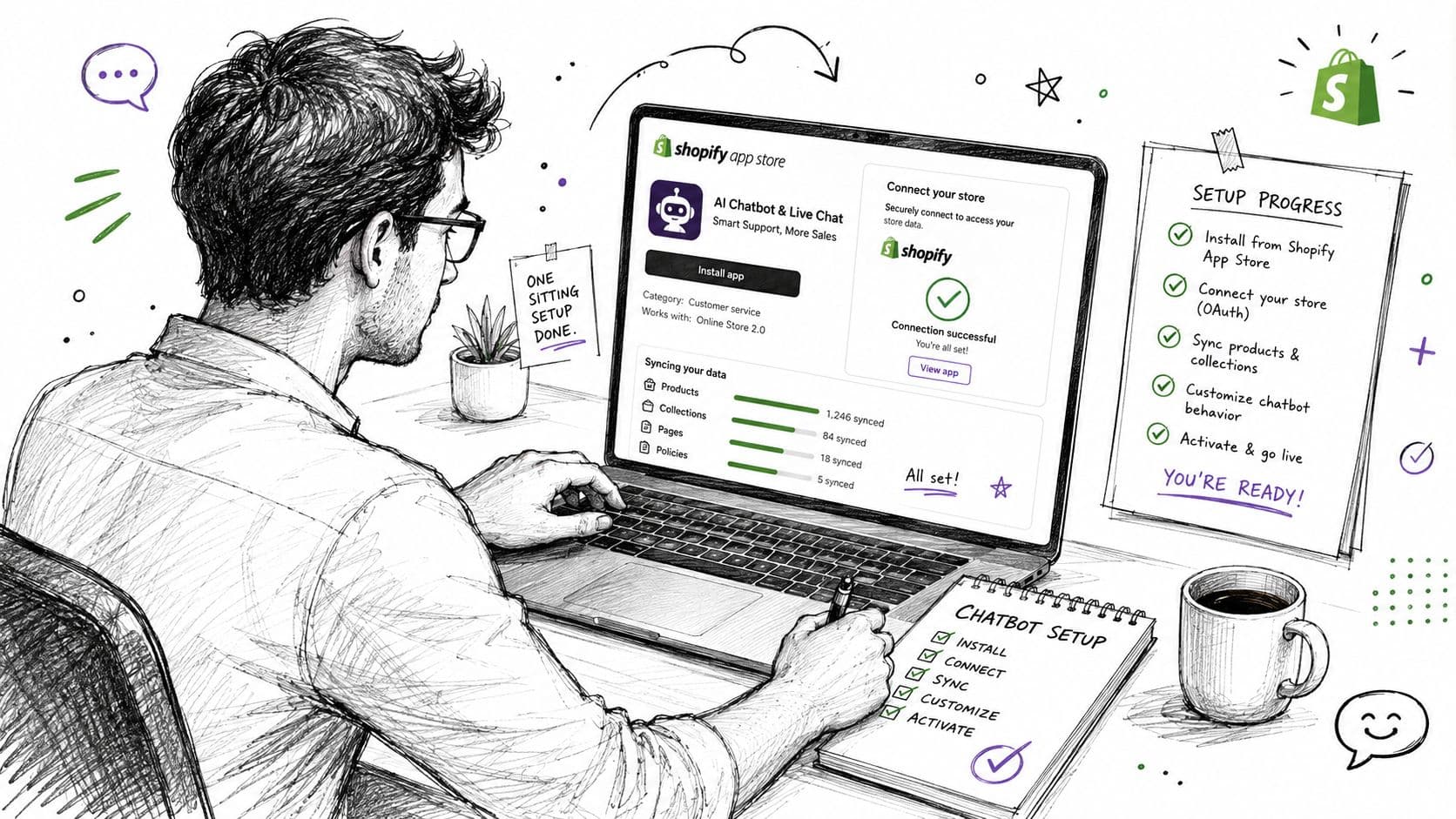
A Shopify F&B chatbot can stay focused on Shopify. You don't need POS or restaurant delivery API plumbing for a coffee roaster, tea company, snack brand, sauce store, or functional-drink merchant selling online.
Start with the app-store installation and OAuth connection to the store. The assistant should then sync products, collections, inventory, prices, product content, shipping policies, and subscription information. Carti's stated setup is install-and-sync, with the assistant reading the live catalog and store policies at answer time.
Audit the catalog before inviting traffic
The most important manual task is not technical. It's content quality.
Review every product's:
- Ingredient list, including the exact current formulation.
- Allergen information, including relevant facility or cross-contact language.
- Dietary tags, such as vegan, gluten-free, keto, kosher, or organic, only where the store can support them.
- Nutrition panel, where dietary questions depend on nutritional values.
- Freshness fields, such as roast or production details where applicable.
- Storage and shipping notes, especially for products affected by heat, cold, or transit time.
If that information doesn't live in Shopify product content or connected policy data, the assistant has nothing reliable to retrieve. It should hand off rather than guess, particularly for health-adjacent questions.
Connect policies, subscriptions, and escalation
Keep shipping details such as delivery zones, cutoff times, processing times, and special handling current in Shopify's shipping settings and policies, since the assistant reads them from there. Connect Shopify Subscriptions or a subscription platform such as Recharge or Bold if those are part of the store's stack. The assistant needs to quote the actual cadence and customer controls, including whether shoppers can skip, pause, swap, or cancel.
Set a clear handoff path for allergy emergencies, uncertain ingredient questions, complaints, and questions that require account access. After-hours chats can collect an email address, but marketing follow-up should require separate consent.
Merchants that need broader implementation help can review Shugert's Shopify integration offerings. For the chatbot itself, this guide to adding a chatbot to Shopify covers the store-side installation path.
Before launch, check four controls:
- Fallback threshold, so uncertain answers escalate.
- Response length cap, so shoppers get usable answers rather than essays.
- Currency and tax display, so the cart reflects the store's actual commercial context.
- Consent banner copy, so lead capture and promotional follow-up are explicit.
Run a short QA script. Ask about an allergen, dietary fit, freshness, shipping to a specific region, and skipping a subscription delivery. Then test a failed handoff. If the human route loses the conversation context, fix that before sending paid traffic to the chat.
Metrics That Prove the Chat Is Worth Its Slot
A food and beverage chatbot earns its place by moving commercial and service outcomes, not by generating a high message count.
The first metric is engaged-shopper conversion versus baseline. Track sessions where the shopper asked a question or interacted with the assistant, then compare completed orders with an appropriate non-chat baseline. The content owner's operating benchmark is roughly 3.5 times across stores, but treat that as an observed benchmark rather than a universal promise, and segment it by product category, traffic source, and question type.
The broader industry picture also varies sharply. One 2026 benchmark roundup reported Food & Beverage conversion at 1.20% in one dataset versus 5.03% in another, which shows why traffic quality, merchandising, and recommendation relevance matter, as described in the benchmark comparison. The same source discusses broad ecommerce chatbot lifts often estimated around 15% to 30%, but those figures shouldn't replace your own controlled measurement.
Track revenue and resolution together
Attributed revenue should connect the chat interaction ID to the actual Shopify order. Last-click reporting can overstate or understate the assistant's role, especially when a shopper has also received email, paid, or retargeting touchpoints.
Resolution without a human matters for operating cost, but exclude allergen emergencies and other conversations that should require review. A separate platform study covering more than 2.3 million interactions found that top performers averaged 0.9 seconds in response time compared with 2.8 seconds industry-wide, and that the faster response correlated with a 22% higher CSAT score, according to the chatbot response-time analysis. Speed helps, but only when the answer is accurate.
| Metric | New, 0 to 90 days | Established, 90+ days |
|---|---|---|
| Engaged-shopper conversion | Establish a baseline by intent and category | Compare against the same traffic and product segments |
| Attributed revenue | Validate event and order-ID joining | Monitor contribution by flow and recommendation |
| Resolution without human | Separate safe FAQs from allergen and medical handoffs | Review unresolved intents and content gaps |
| First-order to subscription attach | Track first subscription offers and objections | Measure recurring-plan adoption after chat |
| Average ticket size | Watch bundle and sampler interactions | Compare chat-engaged and non-chat baskets |
The most valuable commercial signal may be first-order-to-subscription attach rate. A conversation that answers pause-and-skip concerns can turn a hesitant first-time buyer into a recurring customer. Total messages and bounce rate are supporting diagnostics, not proof of impact.
Compliance, Trust, and the F&B Edge Cases
Ordering efficiency gets most of the attention in chatbot marketing. For F&B brands, trust is the harder advantage to build and the faster one to lose.
An incorrect allergen answer is not a minor support defect. The assistant needs structured allergen data in Shopify product metafields, a conservative response policy, and a visible “speak to a human” route. If the information is missing, it should say so and escalate.
Dietary tags also drift. A supplier changes an ingredient, a recipe is reformulated, or a product is moved into a new collection while the old vegan or gluten-free tag remains. Schedule regular catalog audits and make the product content the source of truth. Don't let the model infer dietary suitability from a product title.
Four controls belong in every production flow:
- Allergen governance: Maintain explicit allergen fields and review them with the same care as the ingredient list. The failure mode is an unsupported safety claim.
- Reformulation monitoring: Recheck diet tags and nutrition content after product changes. The failure mode is a confident answer based on stale catalog data.
- Mandatory escalation: Route medical, allergy-emergency, and ambiguous health questions to a human. The failure mode is automation continuing when judgment is required.
- Consent management: Use clear SMS or marketing opt-in copy and preserve consent tags in tools such as Klaviyo. The failure mode is turning a helpful answer into unwanted promotional outreach.
Research coverage also has limitations. A 2025 review found that 38% of studies used user-generated text, 33% relied on one-shot surveys, and fewer than 5% ran live field experiments, leaving questions about trust, fairness, personalization tolerance, and long-term behavior underexplored, as discussed in the review of AI food-ordering research. That's a reason to measure your live store carefully, not to assume every conversational lift will persist.
Quarterly, audit ingredient lists, allergen fields, dietary tags, shipping rules, subscription actions, escalation paths, and consent copy. The bot should never answer a question your catalog can no longer back up.
Carti gives Shopify food and beverage brands a no-code chatbot that answers questions about ingredients, dietary fit, shipping, subscriptions, and store policies while recommending relevant products in the same conversation. Visit Carti to connect your catalog, test the four priority flows, and give shoppers a faster path from product question to confident purchase.

Written by
Daniel AndersonFounder of Carti. 10+ years building ecommerce brands in apparel and supplements. Still runs a Shopify store and built Carti to help merchants convert more browsers into buyers.