
Shopify takes no hidden platform cut per sale, you pay the monthly plan plus 2.5% to 2.9% + 30¢ on Shopify Payments, with the rate stepping down by plan, or you add 0.6% to 2% extra if you use a third-party gateway. The payout feels smaller than expected the first time because the fee stack is easy to misread, especially when you're staring at a single order and trying to work out where the missing dollars went.
A lot of merchants ask how much Shopify takes per sale and expect one clean answer. The honest answer is a two-layer model, subscription plus processing, and the effective cost changes with order value, plan choice, and whether you stay on Shopify Payments or route through another gateway.
If you're trying to understand your real margin, this is the right way to think about it. I'm using the current U.S. pricing structure from Shopify's own pricing page so the math matches what merchants see at publish time. I'll also show a worked example, because the fee table by itself doesn't tell you why a low-AOV store feels the hit more sharply than a higher-ticket store.
For context on the difference between revenue and what a store really keeps, see the distinction between sales and GMV. That distinction matters here, because Shopify fees sit on top of gross sales, not on profit.
Introduction: What You Actually Pay on Every Shopify Sale
The first time a merchant opens a payout report, the number can look off. A $100 order doesn't land as $100 in the bank, and the instinct is to blame Shopify for taking a mystery cut.
That's usually the wrong mental model. Shopify's pricing separates subscription cost from payment processing, and its own pricing page shows that structure clearly across the main plans, with card rates and third-party transaction fees listed separately rather than bundled into one flat per-sale toll (Shopify pricing, Shopify pricing overview).
The important part is what Shopify does not do. If you use Shopify Payments, there isn't a hidden platform percentage layered on top of every order. You're paying for the plan, then paying the card processing fee tied to that plan.
That's why two stores with the same sales volume can feel very different in practice. One may keep more of each order because it uses Shopify Payments and a higher plan with a lower card rate, while another may pay an extra surcharge through a third-party gateway and see the effective take rise.
Practical rule: Don't ask only what Shopify “takes.” Ask what your store pays per order, per month, and per payment setup.
The rest of this guide breaks the fee structure into plain English, shows the current U.S. rate card, and then translates the table into unit economics you can use. You'll see where the fixed 30¢ bites hardest, why order value changes your effective percentage, and how to think about pricing without guessing.
How Shopify Pricing Really Works Behind Each Order
Shopify's pricing works like rent plus a toll booth. The monthly subscription is the rent for keeping the store open, and the card processing fee is the toll that applies when a checkout happens.
Those two costs behave differently, so they need separate math. The subscription stays fixed for the month, which means you spread it across all orders. The processing fee follows each sale, so order volume and order value both change what you keep. Shopify's pricing pages show that the plan cost, credit card rates, and third-party transaction fees are listed separately across the main plans (Shopify pricing, Shopify pricing overview).
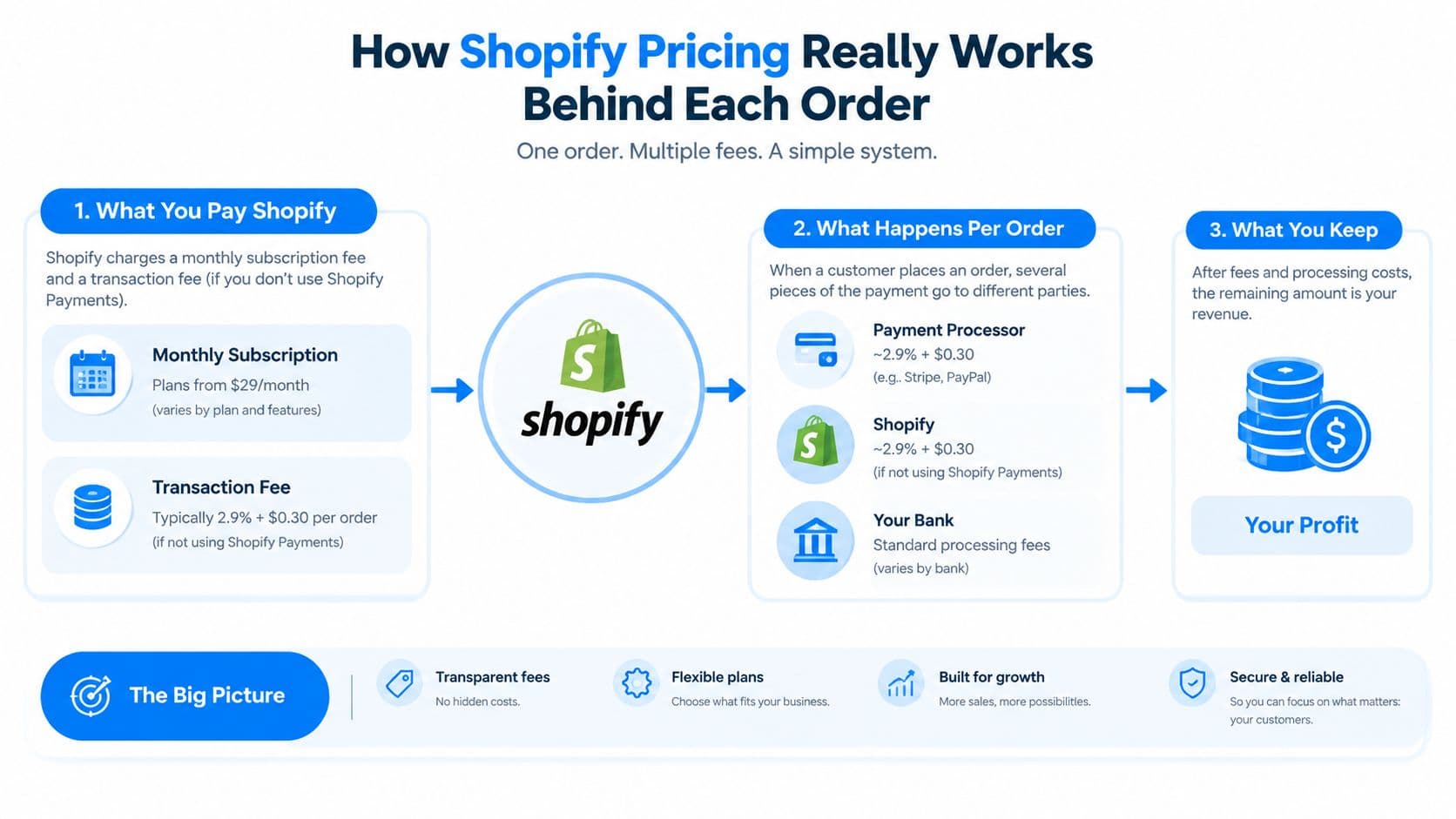
The two layers to keep separate
First, model the plan as a fixed monthly line item. A Basic subscription costs the same whether you ship a few orders or a full month of sales.
Second, model the payment method as a per-order line item. If you use Shopify Payments, the card fee is the main cost attached to each checkout. If you use a different gateway, Shopify adds a separate transaction fee on top of what your processor already charges, and that changes your all-in take quickly (Shopify pricing).
A $39 Basic subscription is still $39 whether you process 10 orders or 1,000. The fee on each order is what moves with the sale, so a low-AOV store feels the fixed 30¢ more sharply than a higher-AOV store. That is why unit economics matter more than a headline rate.
For a plain-English explanation of the payment flow, the Shopify payments explained by Rebus overview is useful because it lays out the checkout stack without collapsing every fee into one bucket.
Model the plan and the processor as two separate line items before you judge your margin.
Each store also has a different mix of order sizes. Two merchants can pay the same subscription, yet the one with smaller baskets gives away a larger share of each sale to the fixed fee. That is the part to watch first when you are trying to understand what Shopify really takes per order.
Shopify Payments Rates Versus Third Party Gateway Surcharges
A merchant comparing Shopify's fee card usually starts with the payment route, because that is where the math changes. On U.S. plans, Basic is $39/month with online card processing at 2.9% + 30¢, Grow is $105/month at 2.7% + 30¢, and Advanced is $399/month at 2.5% + 30¢. For in-person sales, the published rates are 2.6% + 10¢ on Basic, 2.5% + 10¢ on Grow, and 2.4% + 10¢ on Advanced (Shopify pricing). If you use a third-party gateway, Shopify adds a separate surcharge on top of the processor's own fee, and that changes the order math fast (NerdWallet on Shopify pricing).
| Plan | Monthly Price | Shopify Payments Online Rate | Extra Fee If Using Third-Party Gateway |
|---|---|---|---|
| Basic | $39/month | 2.9% + 30¢ | 2.0% |
| Grow | $105/month | 2.7% + 30¢ | 1.0% |
| Advanced | $399/month | 2.5% + 30¢ | 0.6% |
What the table actually means
The table is easier to read if you split each order into two parts. The percentage moves with the sale, while the fixed 30¢ stays the same every time. That is why a small basket feels the fee more sharply than a larger one.
If you stay on Shopify Payments, your per-order cost is the card rate plus the fixed fee. If you choose a third-party gateway, Shopify adds an extra platform surcharge, so the total take per sale rises even before your processor's own charge is counted. A Basic-plan store can therefore pay a very different all-in cost depending on the payment route, even when the customer pays the same cart total.
That is the point many merchants miss when they ask how much Shopify takes per sale. The answer is not one flat number. It depends on whether you keep the payment flow inside Shopify Payments or route it through another gateway.
Why the plan choice matters
Higher plans lower the card rate, but the monthly bill rises too. The right tier depends on order volume and average ticket size, not just the desire for a smaller percentage.
There is also a separate path for larger merchants. Industry summaries note that Shopify Plus begins around $2,300 per month and uses negotiated add-on fees, which puts it in a different cost structure altogether (NerdWallet on Shopify pricing).
Decision rule: On standard plans, compare the payment route first, then weigh the monthly subscription against your order value and volume. The published rate card gives you the starting point, but the real question is how each order behaves on your books.
Why Order Value Changes Your Effective Fee Percentage
The fixed 30¢ fee is the part that trips up low-AOV stores. On a $10 order, 30¢ is 3% of the ticket, while on a $100 order it's 0.3%. Same fee, very different pain.
That's why looking only at the percentage rate can mislead you. The percentage portion scales with revenue, but the flat fee hits every order the same way, so it weighs more heavily when basket sizes are small. FirstPier's explanation of Shopify per-sale math makes this distinction clearly, especially when it separates card processing from platform surcharges (FirstPier on Shopify per-sale cost).
Think in effective rate, not sticker rate
The useful question is not just “what is the plan's rate?” It's “what percentage of revenue disappears once the fixed fee, card percentage, and subscription are all in the same sheet?”
Refunds and chargebacks sit outside this core model, but they can muddy the picture if you treat them as part of everyday checkout math. That's why the cleanest unit-economics sheet keeps the recurring fees separate from exception costs and measures the fee burden against real basket size.
For a practical way to frame basket size, the average order value formula is worth keeping nearby. Once you know AOV, you can see whether your pricing is being dragged down by too many small carts or whether the percentage fee is the main pressure point.
The fee schedule is fixed. The economics change when the basket gets bigger.
That's also why revenue-per-session matters so much. If the platform cost is mostly fixed by plan and payment structure, the controllable lever is the amount of revenue each visit produces. Raise AOV, improve conversion, and the same fee schedule sits on more revenue.
Worked Example: Turning Rates Into Real Dollars Per Sale
Here's the model example, and it's just that, a model. It's not Carti store data, and it's not meant to pretend every store has the same traffic pattern.
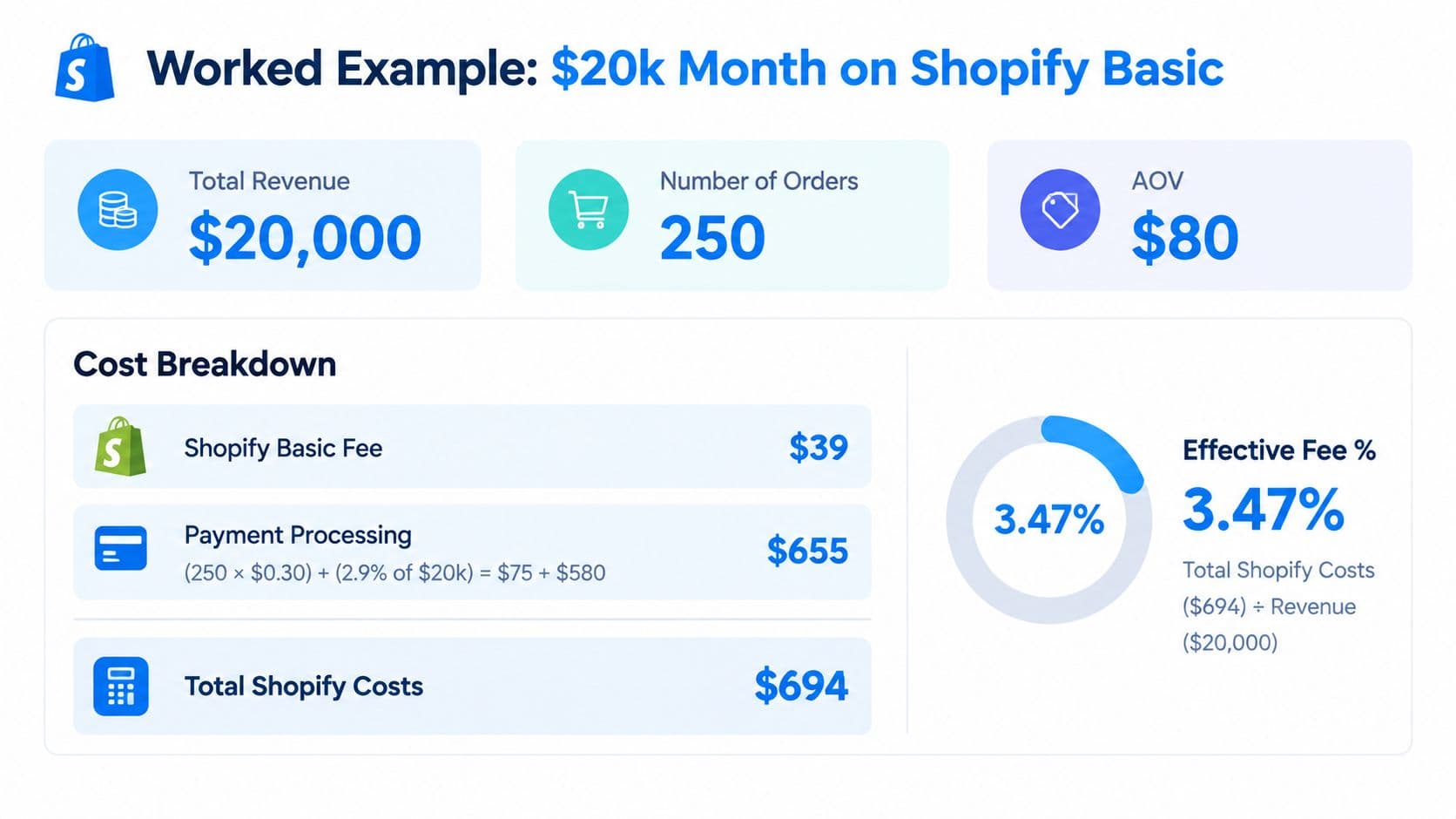
A merchant on Basic with Shopify Payments brings in $20,000 in monthly gross sales across 250 orders, which means $80 AOV. Using the published 2.9% + 30¢ online rate, the percentage part is $580 and the fixed-fee part is $75, for $655 in processing, then add the $39 subscription for $694 total (Shopify pricing).
That makes the effective Shopify cost about 3.5% of gross on this example. It also means the cost per order is about $2.78 when you spread the total monthly Shopify cost across 250 orders, which is the number that matters when you're mapping margin by SKU or channel.
The same traffic, higher AOV
Now keep the traffic count the same and lift AOV to $120. Monthly gross rises to $30,000, but the order count stays at 250, so the fixed 30¢ is now spread across bigger baskets.
The percentage fee grows with revenue, while the flat fee doesn't care about ticket size. That means the effective fee percentage falls as AOV rises, even though the total dollars paid to Shopify and the processor go up. The store is paying more in absolute terms because it sold more, but it's giving away a smaller slice of each order.
Copy this formula into your sheet: total Shopify cost equals subscription plus card percentage times gross sales plus 30¢ times order count. Then divide that by gross sales to get your effective rate.
This is the part that should change how you price. If you only chase a lower rate, you may miss the bigger lever sitting in front of you, which is order value. A store that nudges customers into larger baskets can improve unit economics without waiting for a better platform deal.
How to Price Products With Shopify Fees Built In
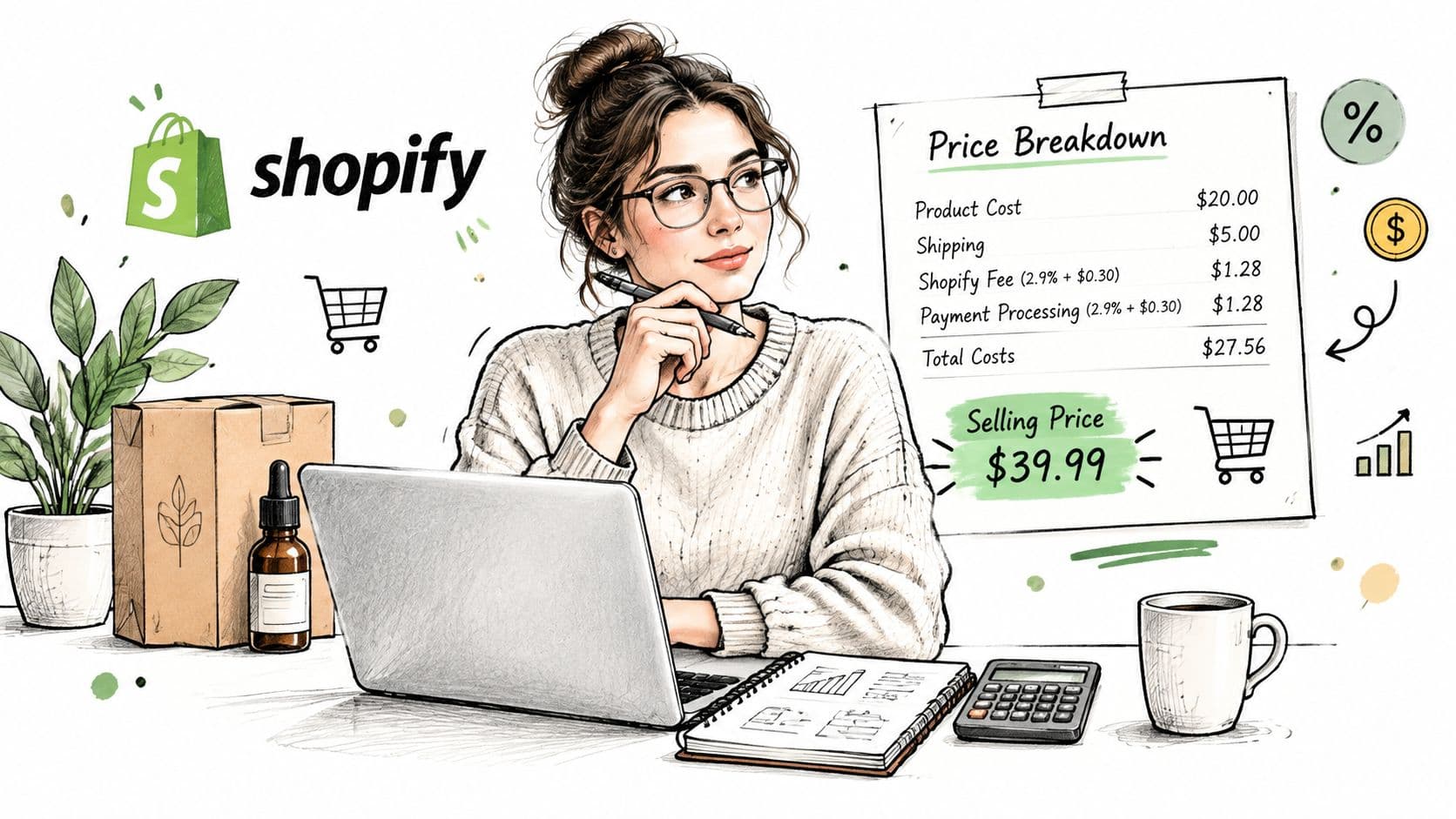
Healthy stores don't treat Shopify fees as an afterthought. They put subscription amortized per order, payment processing, COGS, and shipping on the same line sheet, then price from contribution margin instead of guessing from instinct.
That habit sounds boring, but it protects you from bad pricing. If you know the true cost per SKU, including the checkout fee stack, you can tell whether a product is earning enough after fulfillment, payment fees, and ad spend. A store that ignores the fee layer often thinks a product is profitable right up until the monthly reconciliation lands.
A simple checklist for pricing
- List the true unit cost: Include product cost, shipping, and the Shopify fee burden you expect on that basket size.
- Amortize the subscription: Spread the monthly plan over the number of orders you realistically expect, not over a fantasy volume.
- Test basket mixes: Compare a small order with a larger cart because the fixed 30¢ behaves very differently.
- Price for contribution margin: Set prices so each order still leaves room for ads, support, and returns.
If you run an app stack, this is also where more revenue per session matters. One Shopify app can reduce support load, another can recover carts, and a chatbot like Carti can help answer shopper questions and influence conversion, which matters because more revenue flows through the same fee structure rather than a different one.
The better move is usually to improve what each visit produces. Raising AOV or conversion does more for your margin than obsessing over a tiny rate difference, because the fee burden is mostly fixed relative to how much revenue the store creates.
Lowering Your Effective Take Without Chasing Discounts
A store owner can waste time asking support for a lower fee and still end up with the same unit economics. The better levers are structural, choose the right tier, choose the right processor, and model when the extra surcharge disappears or shrinks.
If your monthly volume already sits in the low tens of thousands, a higher plan can make sense when the lower card rate offsets the higher subscription. Switching to Shopify Payments can also remove Shopify's extra surcharge if you are currently using a third-party gateway, which is often cleaner than trying to negotiate a custom deal. Enterprise merchants may have more room to negotiate through Shopify Plus, which follows a different setup from standard plans.
A practical decision check
- Upgrade when the math works: Compare the monthly savings from the lower rate with the higher subscription.
- Stay put when the savings are smaller than the plan jump: If the lower card rate does not save more than the extra subscription cost, the upgrade raises your fixed load instead of lowering it.
- Consolidate payment methods: Fewer gateways usually mean fewer moving parts and a clearer effective rate.
- Verify regional pricing: Shopify's published fees vary by market, so do not model a U.S. assumption for a non-U.S. store.
A quick test helps here. If a rate drop saves less than the subscription increase, keep the current plan. That same logic applies when AOV changes, because a higher basket can make the fixed 30¢ matter less on each order.
For a broader margin discipline view, the guide to reducing operational costs pairs well with this topic because fee control sits inside a wider cost structure.
Re-run your effective-rate calculation after any plan or gateway change, and after any sustained AOV shift.

Written by
Daniel AndersonFounder of Carti. 10+ years building ecommerce brands in apparel and supplements. Still runs a Shopify store and built Carti to help merchants convert more browsers into buyers.
Ready to boost your store's sales?
Install Carti in 5 minutes and let AI handle customer questions, recommend products, and close sales 24/7.
Start Free Trial14-day free trial