
If you want to know how to increase Shopify sales, start with the part most merchants avoid: the leak in the funnel, not the top of it. Global ecommerce cart abandonment has long hovered at roughly 70%, which means about seven in ten carts never become orders, according to Shopify's guidance on first sales and checkout improvement.
That changes the strategy immediately. More traffic can help, but traffic poured into a weak storefront, a confusing checkout, or a silent site experience usually just makes inefficiency more expensive. The smarter sequence is simpler: tighten conversion first, use conversations to rescue hesitation, increase revenue per order, then scale acquisition into a store that's ready to convert.
The Real Reason Your Shopify Sales Are Flat
Flat sales usually don't mean your product is doomed. They usually mean your store is wasting demand.
Most operators jump straight to ads, influencers, or more content because traffic feels like the obvious lever. It's visible. It's easy to buy. It also hides the underlying issue. If shoppers reach product pages, add to cart, ask questions, and still don't convert, the problem isn't reach. It's funnel leakage.
Shopify points merchants toward abandoned-cart emails, faster checkout, trust signals, and alternative payment methods for a reason. Those fixes target the exact moments where purchase intent breaks down, not the top of the funnel where intent is still weak.
Why efficiency beats volume
A visitor who already landed on your product page is far more valuable than another cold click. Someone who added to cart is even more valuable. When that shopper leaves because shipping appears too late, the page loads poorly on mobile, or a policy answer isn't obvious, you don't have a traffic problem. You have a conversion problem.
Practical rule: Don't scale what you haven't earned. If your store leaks buyers after they show intent, more spend just buys more abandonment.
This is why experienced operators obsess over the bottom half of the funnel. Better product pages, cleaner checkout, faster answers, and stronger merchandising improve the revenue you get from the traffic you already worked to acquire.
What usually doesn't work
Some fixes feel productive but don't move revenue much on their own:
- More homepage banners: They rarely solve hesitation on product or checkout pages.
- Blanket discounts: They can create urgency, but they also train shoppers to wait.
- Broad ad scaling: Useful only after the site converts cleanly.
- Endless app installs: Extra widgets often slow pages and clutter decision-making.
A healthy sales engine starts with one question: where are buyers dropping off right before revenue should happen?
If you answer that, your priorities usually become obvious.
Optimize Your Storefront Before Scaling Ads
The storefront has one job. Turn interest into confidence.
A strong Shopify store doesn't need fancy design tricks. It needs clarity, speed, trust, and pages built for people who are ready to decide. A practical optimization workflow is to diagnose funnel leakage with analytics, improve product pages, and validate changes with ongoing measurement, with details like high-quality images, clearer CTAs, and mobile-friendly layouts carrying real weight, as noted in this Shopify-focused growth workflow.
Start with the pages that already get buying intent
Don't begin with your homepage redesign. Start where money is won or lost:
-
Top product pages
Check your highest-traffic and highest-intent products first. If those pages are weak, every campaign underperforms. -
Collection pages that introduce discovery
These pages should help shoppers narrow choices quickly. If filtering or sorting feels clumsy, people leave before they ever reach a product. -
Mobile layouts
Product pages often look acceptable on desktop and fall apart on phones. Buttons get buried, media loads slowly, and value props disappear below the fold.
Audit the store like a customer, not like an owner
Store owners know too much. Shoppers don't. Your page has to answer basic buying questions without making people work for them.
Use this audit checklist:
- Imagery first: Show the product clearly, from multiple angles when relevant, and in context if fit, texture, or scale matter.
- Description second: Lead with what problem the product solves, then cover materials, fit, usage, or care in plain language.
- CTA clarity: “Add to cart” should be obvious. Size, variant, and delivery-related choices should be easy to complete.
- Trust markers: Reviews, shipping policy access, return details, and clear contact options reduce hesitation.
- Mobile scanability: Short paragraphs, clean spacing, thumb-friendly buttons, and no clutter near the CTA.
Here's the trade-off most brands face: polished design can improve perception, but conversion usually improves faster from better information architecture than from a visual overhaul. A more attractive page that still hides shipping, sizing, or returns doesn't sell better. It just looks better while failing.
If a shopper has to hunt for core buying information, the page is underperforming no matter how good the theme looks.
A simple way to prioritize changes is to split them into three buckets:
| Area | High impact | Low impact |
|---|---|---|
| Product pages | Better images, clearer CTA, reviews, policy visibility | Decorative animations |
| Navigation | Cleaner collections, filters, simpler menus | More menu items |
| Mobile UX | Faster load, larger tap targets, shorter content blocks | Desktop-only refinements |
The biggest mistake here is changing too many things at once. Edit one page template, track behavior, then expand what works. Revenue grows faster when you improve proven surfaces instead of redesigning the whole store on instinct.
Turn Conversations into Conversions with AI
A lot of buying hesitation has nothing to do with price. It comes from unanswered questions.
Shoppers want to know whether the item runs small, whether shipping is delayed, whether a bundle is worth it, or whether your return policy covers a specific case. Many stores still treat those questions like support tickets instead of sales opportunities. That's a missed revenue channel. As discussed in this Shopify community discussion on stores getting traffic but no sales, most advice focuses on traffic or site tweaks, while the operational problem of converting shoppers who need immediate help gets less attention, even though live chat can produce meaningful conversion gains.
The lost sale usually happens at the moment of doubt
AI chat has become more useful than the old “leave us a message” widget. The right setup acts like a sales associate on the floor, not a passive inbox.
That means it should do things like:
- Answer pre-purchase questions immediately about shipping, materials, compatibility, or policies
- Recommend products contextually based on what the shopper is viewing
- Surface the right collection or bundle when a visitor sounds unsure
- Nudge cart recovery inside the session before the shopper disappears
The difference matters. Reactive support waits for a ticket. Conversational commerce tries to keep a purchase moving.
What a sales-focused AI chat setup should actually do
A useful benchmark is whether the tool learns your catalog and store policies well enough to reduce friction without constant manual scripting. For example, AI chatbots for ecommerce have become practical because they can answer product questions, recommend relevant items, and stay active around the clock instead of only covering support hours.
One option in this category is Carti, which is built for Shopify stores and designed to ingest catalog and policy information so it can answer shopper questions, suggest products, and support cart recovery inside the buying journey. That's the right framing for AI chat. Not as a support add-on, but as an onsite conversion layer.
A sales conversation doesn't need to be long. It just needs to remove the one doubt blocking checkout.
There are trade-offs. If your catalog is tiny and your products are simple, a basic FAQ and clear product pages may cover most objections. If you sell apparel, beauty, wellness, home goods, or anything with fit, compatibility, ingredients, usage questions, or shipping sensitivity, chat usually matters more because buyers hesitate more.
What doesn't work is adding a generic bot with weak training data. If it gives vague answers or punts every question to email, conversion trust drops fast. The bar is simple: faster answers, better recommendations, fewer exits. If the tool can't help at those moments, it's just another widget.
Increase Average Order Value with Smart Merchandising
Getting the conversion is only half the job. The other half is increasing the value of that order without making the shopper feel pushed.
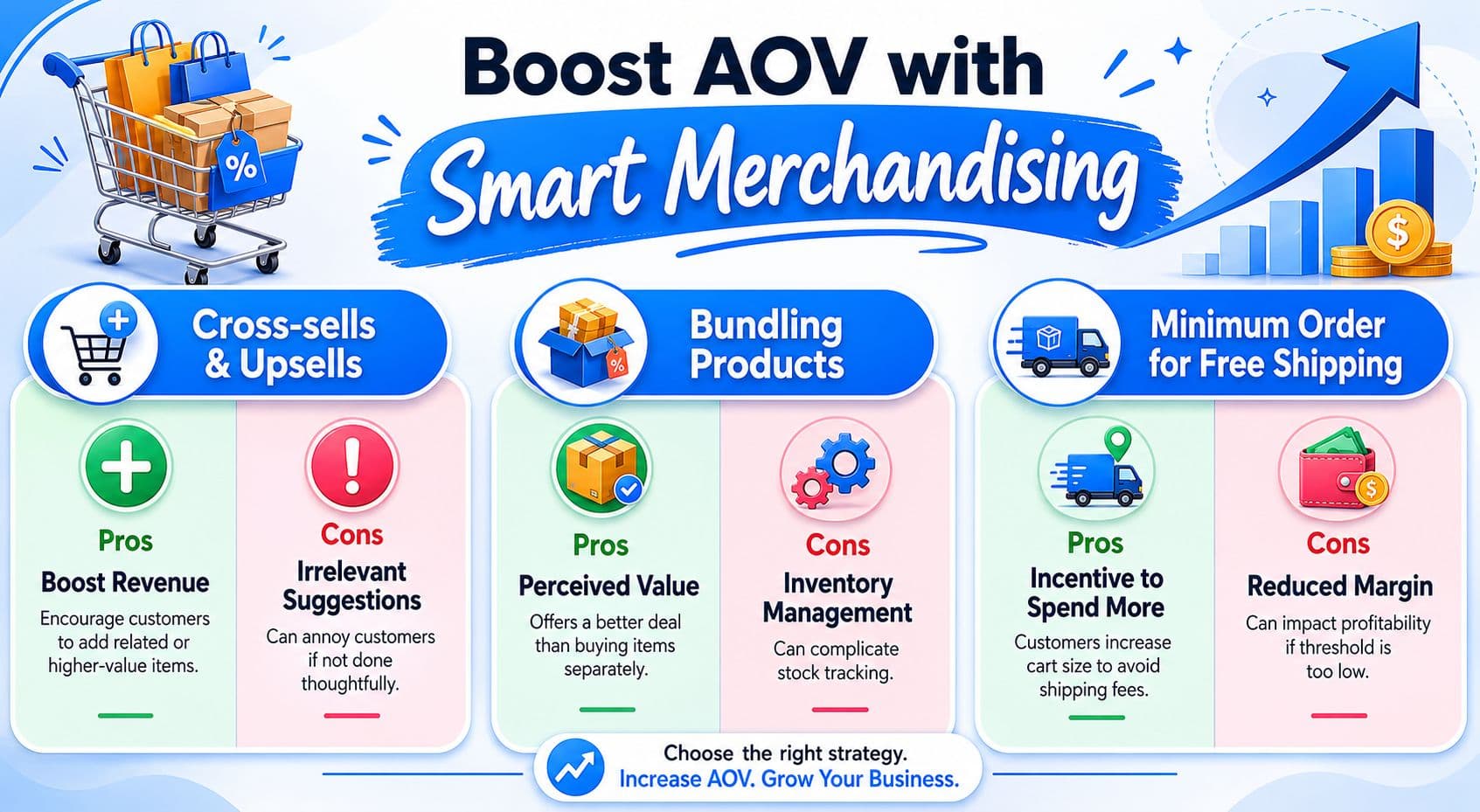
That's where merchandising earns its keep. Shopify merchants typically operate around an average order value of about $85, and improving that through upsells, cross-sells, or free shipping thresholds can increase total revenue without proportional growth in spend or traffic, as summarized in these Shopify AOV statistics.
Use order behavior, not guesswork
The easiest mistake is suggesting products that make sense to you but not to customers. Use Shopify analytics to find what people already buy together, then turn those relationships into offers.
Three practical formats work well:
- Cross-sells on product pages: Pair complementary items. Think serum with moisturizer, pan with lid, or shirt with matching accessory.
- Bundles with a clear use case: Don't just group products. Build “starter,” “complete,” or “best-value” sets.
- Cart thresholds: Free shipping thresholds can push buyers to add one more item if the gap feels reasonable.
A strong product recommendation setup should feel helpful, not random. If you want a model for implementation, Shopify product recommendations are most effective when they're tied to actual browse and purchase behavior rather than generic bestseller blocks.
A quick visual breakdown helps when planning offer types:
Choose the offer based on margin and buying intent
Not every store should use the same AOV tactic. Match the method to the economics.
| Tactic | Best use case | Main risk |
|---|---|---|
| Cross-sell | Strong accessory or refill logic | Irrelevant add-ons clutter the page |
| Bundle | Customers need multiple items to get full value | Inventory complexity |
| Free shipping threshold | Margins support a higher cart target | Threshold set too low hurts profit |
A few operating rules keep this clean:
- Keep offers tightly related: Relevance beats volume.
- Present one strong option: Too many suggestions stall decisions.
- Protect contribution margin: Revenue gains that erode profit aren't real wins.
- Test placement carefully: Product page, cart drawer, and post-purchase each behave differently.
What doesn't work is forcing upsells everywhere. If every page screams for add-ons, shoppers stop trusting the guidance. The goal isn't to stuff the cart. It's to help customers buy the complete solution.
Streamline Your Checkout to Stop Abandonment
Checkout is where stores expose all the friction they thought they could get away with.
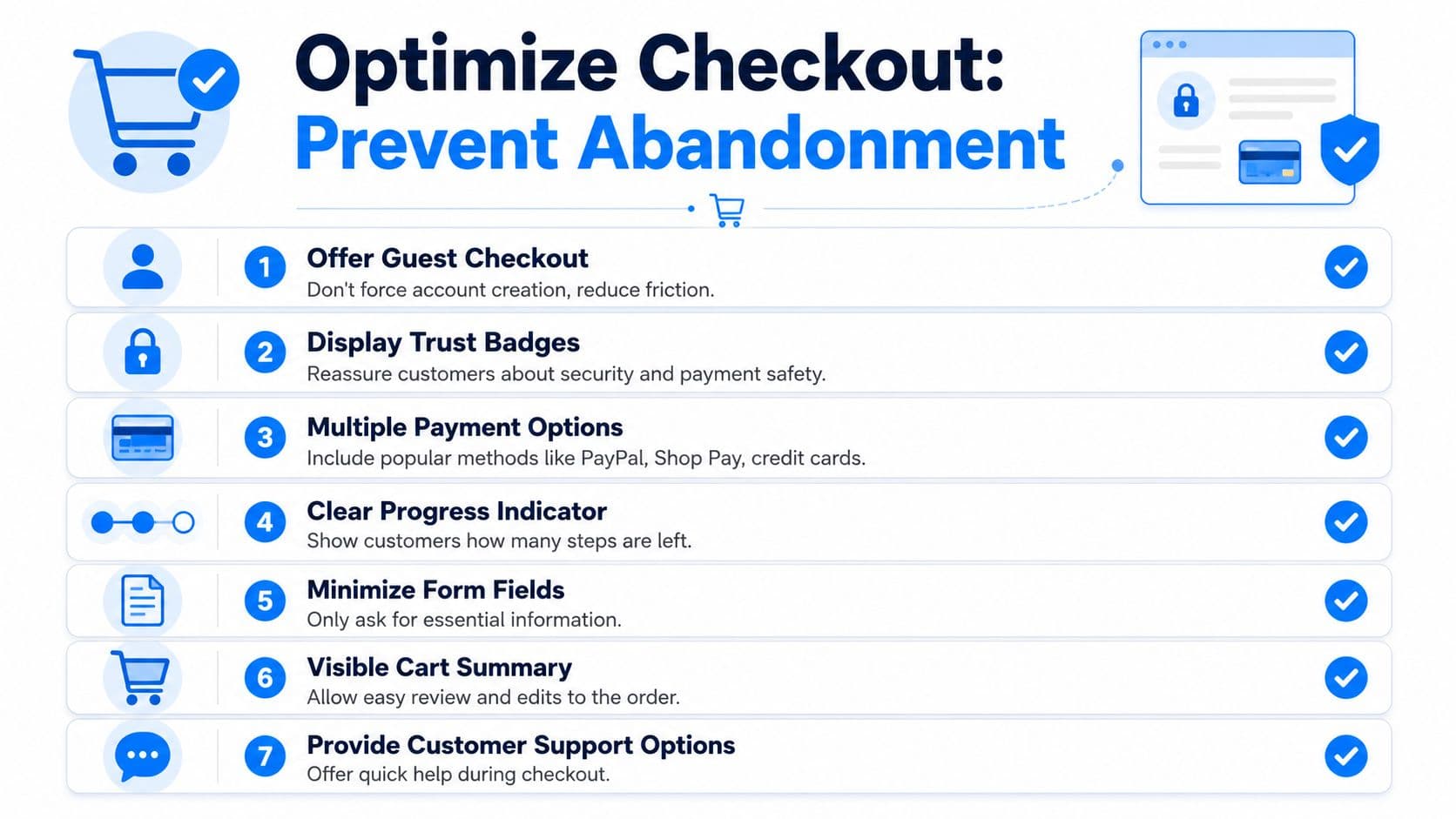
You can have a strong product page, a persuasive offer, and solid traffic, then lose the sale on account creation, hidden shipping costs, clumsy mobile fields, or limited payment options. Shopify community guidance consistently points to guest checkout, fewer form fields, and early display of shipping costs as core fixes, while warning against scaling traffic before those leaks are addressed in this discussion on improving Shopify conversion rates.
Run your own checkout test on mobile
Don't inspect checkout from the admin side. Buy from your own store on your phone.
Go through it as if you're a first-time customer and note where you hesitate:
- Do you have to create an account before paying?
- Are shipping costs visible early enough?
- Are there unnecessary fields?
- Does the payment step offer the methods your customers expect?
- Can you edit the cart without feeling trapped?
This test is brutally revealing. Founders usually discover friction they've normalized because they know the store too well.
Fix the friction that kills completed orders
The fastest improvements usually come from operational basics, not flashy CRO experiments.
Prioritize these:
-
Enable guest checkout
Forced account creation adds work at the worst time. -
Cut form fields aggressively
If a field doesn't help fulfill the order or prevent fraud, question it. -
Show shipping costs early
Surprises late in checkout create distrust fast. -
Support familiar payment methods
Buyers should be able to complete the purchase the way they prefer. -
Add support access inside checkout
A policy or delivery question at this stage is still a sales question.
Your checkout should feel shorter than it is. Clean layout, visible progress, and fewer decisions matter as much as raw step count.
There's a bigger business issue here too. Many brands pour effort into top-of-funnel channels like paid social or even human-powered Instagram growth while their checkout still creates avoidable drop-off. Acquisition support can be useful, but it pays off far better when the cart and checkout experience already convert cleanly.
For stores that want to recover more of this lost intent, practical guidance on reducing cart abandonment usually works best when it combines cleaner checkout UX with timely reminders and onsite assistance.
What doesn't work is trying to compensate for checkout friction with discounts. If the process feels risky or annoying, a coupon might save a few orders, but it won't fix the system.
Drive and Recapture High-Intent Traffic
Once your store converts better, traffic becomes more valuable. That's when acquisition starts making sense again.
At this stage, the playbook gets more selective. You're no longer sending people into a leaky funnel. You're feeding a store that has stronger product pages, cleaner checkout, smarter merchandising, and a way to answer hesitation in real time.
Send traffic to proven pages
Not every page deserves paid traffic. Send visitors to pages that already show strong buying intent in your store data.
That usually means:
- Top-converting product pages with clear fit between ad promise and landing experience
- Focused collection pages for category-level search intent
- Seasonal or promotional landing pages only if the offer is sharp and the path to product is short
For organic growth, keep the basics disciplined. Write product titles and descriptions around how customers search, maintain clean page structure, and make sure collection pages explain what's inside. SEO won't rescue weak merchandising, but it compounds when the store is already conversion-ready.
Build a recapture system, not a one-time campaign
Most shoppers won't buy on the first visit. That's normal. The mistake is treating follow-up like an afterthought.
A practical recapture setup includes:
- Abandoned-cart email flows: Remind shoppers what they left behind and remove obvious doubts
- SMS follow-up where appropriate: Useful when consent and timing are handled carefully
- Retargeting ads: Show the specific products or categories people viewed, not generic brand creative
- Browse abandonment sequences: Useful for visitors who showed product interest without reaching checkout
The key is message match. If someone viewed one product repeatedly, bring them back to that product or the closest relevant collection. Don't restart the pitch from scratch.
This is also where channel economics improve. Better conversion on-site means your paid traffic can tolerate higher costs without becoming unprofitable. Better recapture means you extract more value from visitors you already paid to attract. That's how to increase Shopify sales without relying on brute-force ad spend alone.
Your Prioritized Shopify Sales Action Plan
Stores usually stall for a simple reason. The team works on too many sales tactics at once, so none of them get far enough to lift revenue.
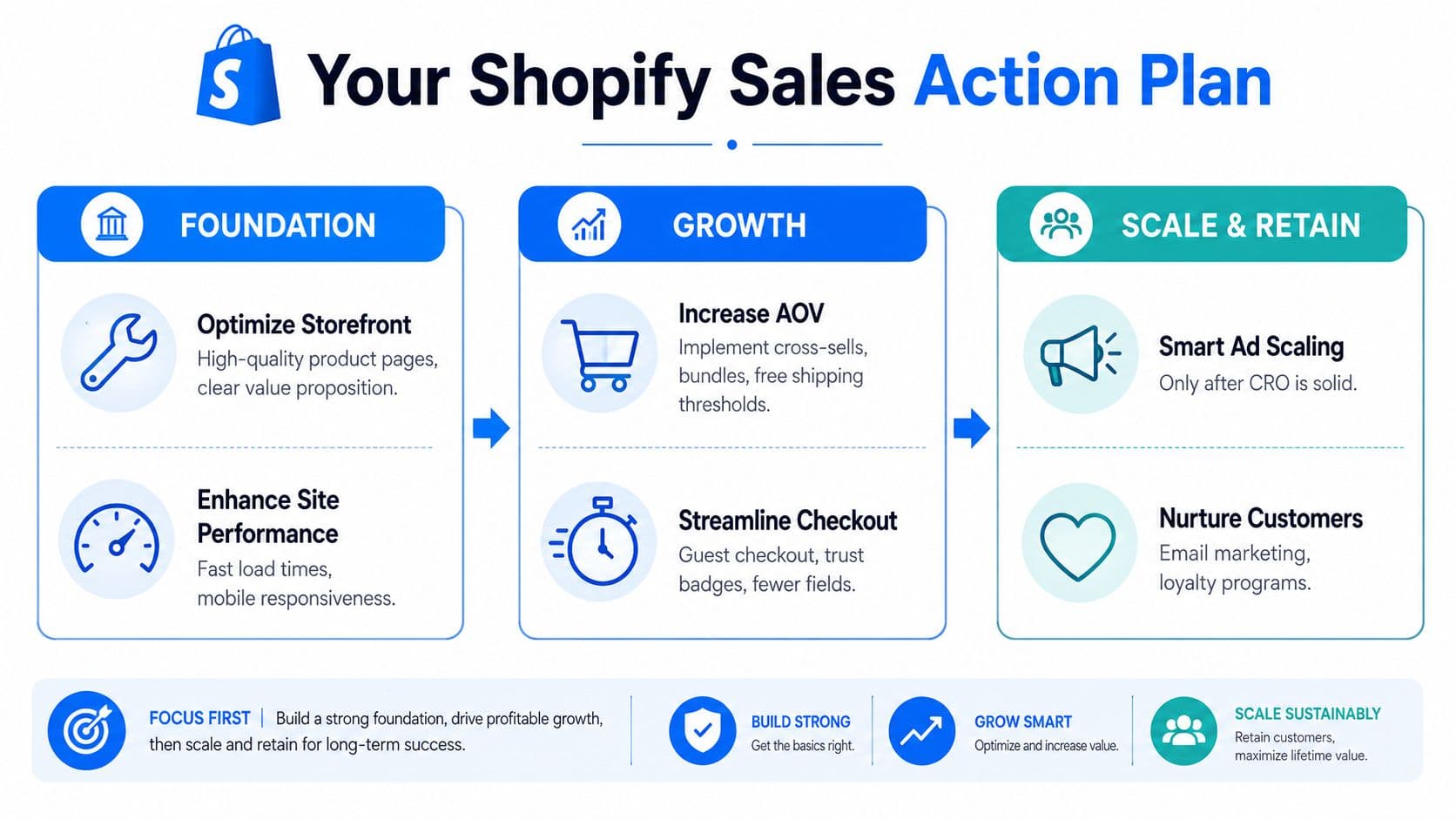
A better plan is sequential. Fix conversion first. Add AI-led selling once the storefront can close. Scale traffic after both are doing their job. That order protects cash, makes paid acquisition more efficient, and keeps you from buying visitors your store cannot convert.
What to do first this week
Start with the pages and flows closest to the purchase.
- Audit your highest-traffic product pages: Upgrade images, tighten copy, sharpen the call to action, and make reviews, shipping details, and return policies easy to spot.
- Run your mobile checkout end to end: Test it like a customer. Remove extra fields, confirm guest checkout works, and show total costs before the final step.
- Review analytics for drop-off points: Find pages that attract traffic but fail to turn product interest into carts or checkouts.
- Simplify navigation: Reduce dead ends and help shoppers reach key collections and products faster, especially on mobile.
These fixes are rarely expensive. They do require focus, and they tend to pay back faster than a broad redesign or another ad campaign.
What to add after the foundation is working
Once product pages convert and checkout friction is under control, increase revenue per visitor.
- Add onsite conversational selling: Use AI chat to answer buying questions, recommend products, and keep hesitant shoppers from leaving.
- Launch merchandising offers: Test bundles, cross-sells, and threshold offers where contribution margin supports them.
- Build recovery flows: Recapture product viewers and cart abandoners with messages tied to the item or category they considered.
- Increase paid spend with discipline: Put budget behind offers, landing pages, and customer segments that already produce profitable orders.
If you sell beyond Shopify, the same operating logic applies. Conversion issues show up on every channel, which is why resources on optimizing e-commerce for Amazon sellers can be useful when you want a broader view of merchandising, funnel friction, and channel economics.
Fix what blocks the sale. Add what increases order value. Scale only after both are working.
Revenue gains that erode profit are not wins. The stores that grow cleanly usually follow a tighter order of operations, then keep reinvesting into what improves contribution margin and repeatable conversion.
If you want an extra conversion layer without adding headcount, Carti gives Shopify stores an AI sales assistant that can answer shopper questions, recommend products, and recover carts directly on-site. It works best after product pages and checkout are already in good shape, because conversational selling performs better when the rest of the funnel is ready to close.

Written by
Daniel AndersonFounder of Carti. 10+ years building ecommerce brands in apparel and supplements. Still runs a Shopify store and built Carti to help merchants convert more browsers into buyers.
Ready to boost your store's sales?
Install Carti in 5 minutes and let AI handle customer questions, recommend products, and close sales 24/7.
Start Free Trial14-day free trial