
The popular advice is to wait until a shopper clicks the chat bubble. That sounds respectful, but it also means the assistant only meets visitors who have already decided to ask for help. The more valuable signal is often quieter: a shopper rereads shipping information, pauses over a variant, adds a product, or moves toward the browser's back button without typing a word.
A proactive AI assistant treats those behaviors as possible hesitation, not as permission to blast every visitor with a popup. The difference matters. Proactive outreach works when it answers a likely question at the right moment, stays easy to dismiss, and leads the shopper back to the product. It fails when it interrupts browsing with a generic greeting.
For Shopify merchants, this is a behavior-trigger system. The assistant watches for meaningful friction, offers context-aware help, and measures whether that intervention produces a useful next step.
The Shopper Who Never Clicks the Chat Bubble
A chat bubble isn't a conversion strategy. Many shoppers inspect a product, compare details, check delivery terms, and leave without ever opening support. The absence of a question doesn't mean the absence of uncertainty. It often means the shopper decided that asking would take more effort than leaving.
That's why the first trigger should be silent hesitation. Repeated product views, extended attention on a product page, an idle cart, a failed size choice, or movement toward the browser's back button can all justify a carefully timed offer. The assistant doesn't need to announce itself on arrival. It needs a credible reason to speak.
The useful question behind the signal
A shopper lingering near shipping information may be wondering whether the item will arrive in time. Someone revisiting the same product may need reassurance about fit, materials, compatibility, or returns. A cart that sits untouched may reflect delivery cost or checkout uncertainty rather than a desire for a discount.
The message should address the likely question directly:
- Shipping hesitation: “Want me to check delivery timing for this item?”
- Product uncertainty: “I can help compare the two sizes you're considering.”
- Cart inactivity: “Would it help to review delivery and returns before you check out?”
The wording should offer one clear path, not force a conversation. Generic prompts such as “Need help?” ask the visitor to explain the problem before the assistant has demonstrated relevance.
Practical rule: Speak first only when the shopper's behavior gives you a specific reason to help.
Carti's adoption trigger came from observing that shoppers who leave are often the ones who never ask. A bubble that waits for a click filters out hesitant buyers by design. The better approach is to identify the moment of friction, ask about that friction, and then stay quiet when no credible need appears.
The commercial context supports that focus. Baymard Institute's synthesis of independent research places average cart abandonment at about 70.2%, making checkout hesitation a structural ecommerce problem rather than an unusual edge case, as summarized by Baymard's cart abandonment research. A proactive assistant doesn't need to start more conversations for their own sake. It needs to remove uncertainty before abandonment becomes the shopper's next action.
Reactive Chatbots vs Proactive AI Assistants
A reactive chatbot waits for a visitor to type. It then searches connected product data, policies, FAQs, or scripts and returns an answer. That model remains useful because the shopper controls the interaction and the assistant can focus on the question in front of it.
A proactive AI assistant adds a decision before the answer. It asks whether the visitor may need help at all, using signals such as product views, cart contents, time on page, checkout activity, and prior interactions. It changes the job from answering what shoppers type to noticing what shoppers appear to be trying to do.
Passive availability versus measured initiative
The distinction isn't “old chatbot versus AI.” A modern assistant can be reactive after it initiates a conversation, and a proactive assistant still needs accurate retrieval and reliable answers once the shopper responds. The contrast is help on demand versus measured outreach based on behavior.
A useful implementation combines three decisions:
- Detect: Is there enough evidence of hesitation to justify a message?
- Engage: Can the assistant offer a relevant answer or recommendation?
- Stay quiet: Would another message add value, or would it create noise?
Triggering on every page view is a fast way to train visitors to dismiss the widget. Proactivity must include restraint, frequency caps, and suppression rules. A visitor who has just received help on a product page shouldn't immediately receive another unrelated prompt after navigating to the cart.
The same principle appears in adjacent assistant categories. If you're comparing tools that support broader growth workflows, this guide to grow faster with Trendy assistant offers useful context on how assistants can move beyond one-turn responses. For Shopify, however, the operational question stays narrower: can the system recognize a shopper's likely obstacle and resolve it without making the shopper work harder?
Reactive chat remains the fallback layer. Proactive behavior is the routing layer. When both work together, the assistant can begin with a focused offer, answer accurately, recommend a relevant product, and stop when the shopper has what they need.
E-Commerce Moments Where Proactive Outreach Pays Off
Proactive outreach earns attention when the trigger is specific and the response is useful. The same message shown at the wrong time feels like advertising. Shown after a credible hesitation signal, it can feel like assistance.
Product-page uncertainty
A shopper repeatedly opens the same product page, reads reviews, checks materials, and then returns to shipping information. The visible behavior suggests interest, but the unresolved question may be delivery timing, returns, stock, or product suitability.
A useful prompt doesn't push urgency. It surfaces the missing information: “I can check delivery timing and returns for this product if that's what you're weighing.” If the shopper engages, the assistant should answer from the store's current policies and product data, then provide a direct route back to the item.
Independent marketplace research supports this kind of targeting. A 2021 live-chat study in product marketplaces found that live chat had a positive conversion effect, with a stronger effect when product-page information was less thorough and when perceived product value was higher. The practical lesson is simple: place help where information gaps create friction, not where the page already answers everything.
Selection and smart suggestions
A visitor viewing complementary products may need help deciding what fits together. Another shopper may switch between variants without adding anything, which can indicate uncertainty about size, color, compatibility, or use.
The assistant can ask one qualifying question, then use catalog context to narrow the choice. For example, “Are you choosing this for everyday use or a specific occasion?” is more useful than listing every available product. The next step could be a recommendation, a comparison, or a link to the relevant product detail.
This approach keeps recommendations tied to intent. It also prevents the assistant from presenting an arbitrary cross-sell because the shopper opened a product page.
Cart and checkout hesitation
An idle cart or checkout return can justify intervention, but cart recovery is where merchants most often over-message. A discount-first prompt assumes price is the problem and can make a confident buyer wait for an offer that wasn't necessary.
Start with the unresolved reason instead. If delivery cost is unclear, explain it. If the shopper may be worried about fit, surface the relevant sizing information. If the checkout process appears incomplete, offer to clarify the next step. A practical guide to cart abandonment recovery can help merchants build that recovery path around context rather than repetition.
The measurable next step should be explicit. Track whether the prompt produces a reply, product interaction, add-to-cart event, checkout continuation, or order. Suppress the prompt when the shopper has already completed the action, dismissed the message, or moved into a different intent state.
KPIs That Separate Hype From Real Lift
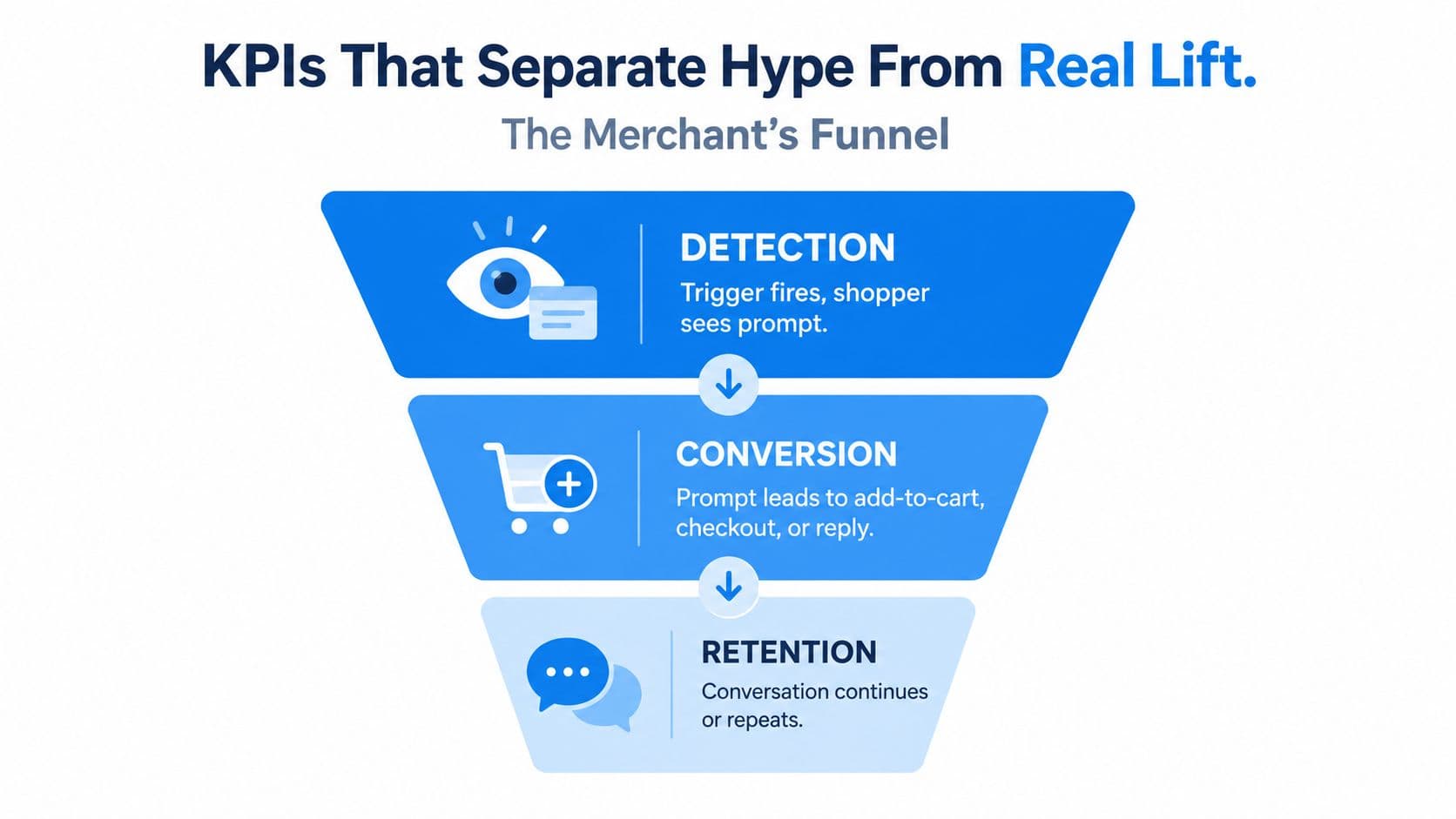
A proactive funnel can fail before the shopper sees anything, after the shopper engages, or during fulfillment. Treating every prompt as a conversion win hides the actual leak. AWS's AI Agent performance dashboard separates proactive intents detected, engagement rate, and response rate, a useful structure for ecommerce measurement.
Detection
Detection asks whether the assistant recognized a credible hesitation moment and delivered the prompt. Useful measurements include triggered sessions, prompt visibility, trigger suppression, and the share of eligible behaviors that produced an outreach.
Ask: Did the right shoppers see the message, or did the trigger fire too broadly?
If detection is weak, changing copy won't solve the problem. Review the behavioral rule, page context, and threshold. A prompt that fires before meaningful hesitation creates noise. A threshold that waits too long misses the opportunity.
Conversion
Conversion measures what the shopper did after seeing or engaging with the prompt. Track prompt-to-reply, prompt-to-add-to-cart, prompt-to-checkout, and prompt-to-order paths. A high click-through rate can still be hollow if shoppers open the widget and leave without progressing.
Ask: Did the interaction resolve uncertainty?
Compare outcomes by trigger type. Product-page prompts may produce recommendations, while cart prompts may produce checkout continuation. Keep those journeys separate so a strong response on one trigger doesn't hide poor fulfillment on another.
Downstream value
The final bucket connects the conversation to business value. Monitor recovered carts per session, revenue attributed to engaged prompts, revenue per triggered prompt, and repeat visits where the assistant helped resolve an earlier question. Attribution must be defined before launch, especially when shoppers interact with several messages.
Carti's dashboard uses the same three-bucket logic, separating the initial signal from engagement and the resulting order path. Merchants evaluating platforms can also use this ecommerce AI tool comparison for 2026 to compare capabilities, but the decisive test is whether a tool exposes the leakage clearly enough to improve it.
Shopify Implementation Checklist for a Proactive AI Assistant
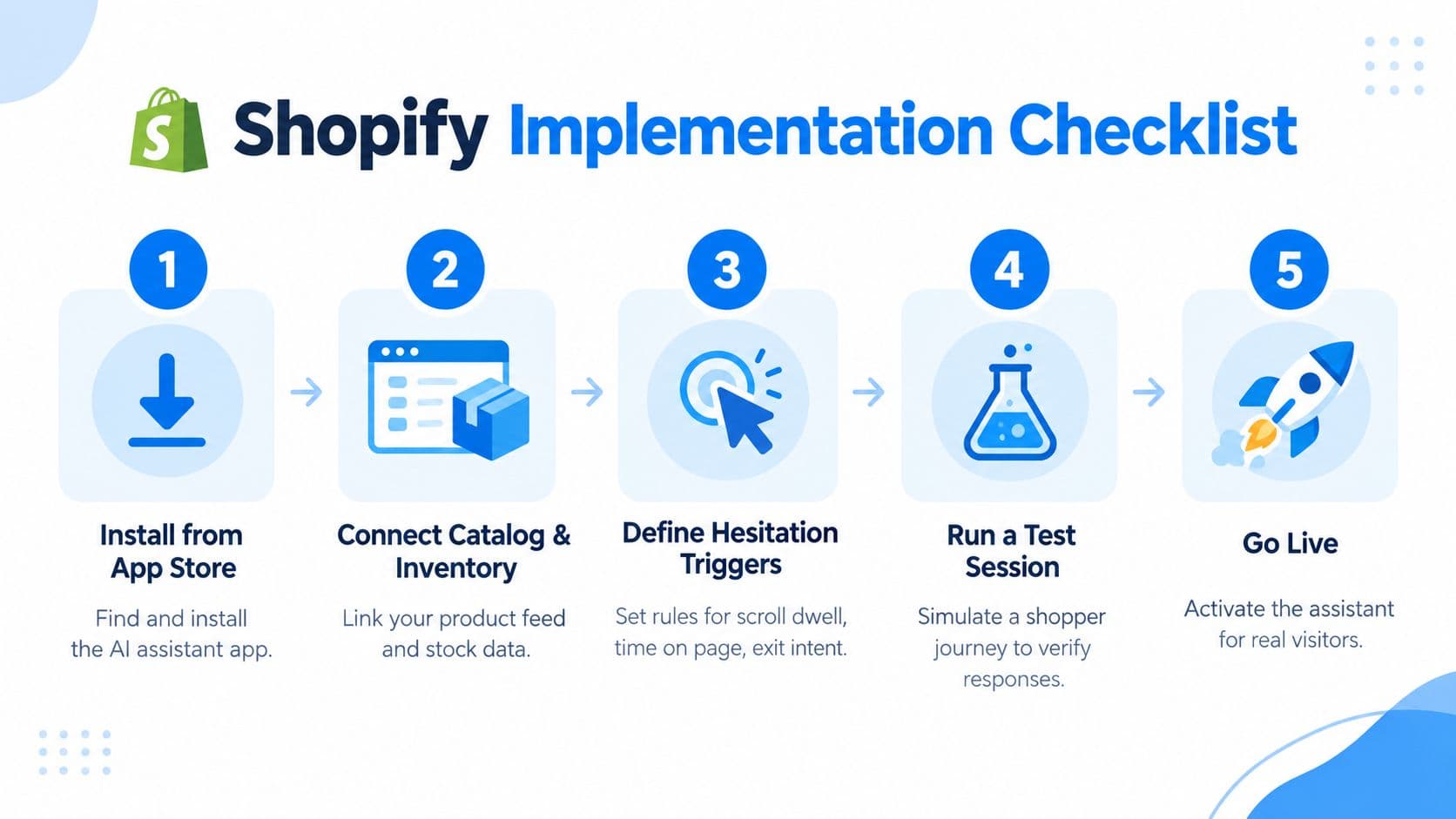
A Shopify merchant shouldn't need a long implementation project to test one behavior trigger. The first Carti setup is designed to take under five minutes: install the app from the Shopify App Store, let it sync the catalog and policies, then review the widget and add a welcome line. Proactive behavior is on by default with exit-intent, post-add-to-cart, and idle-cart triggers, plus built-in frequency caps.
Use this checklist to keep the first launch controlled.
1. Install and sync the store data
Install the assistant from the Shopify App Store and confirm that product titles, descriptions, variants, availability, shipping rules, returns, and FAQs are available. Accuracy depends on the source data, so fix outdated policies before inviting shoppers into a conversation.
2. Choose one hesitation event
Start with one high-intent behavior, such as an idle cart or checkout exit. You can later add repeated product-page views, scroll dwell, variant hesitation, and exit intent. The first test should answer one question, not activate every possible trigger at once.
3. Review the opening messages
You don't need a library of static campaigns. Context-generated prompts should reflect the product and shopper behavior, but review examples before launch. Add a short welcome line that sounds like your store, then verify that the assistant offers help rather than pressure.
4. Set the two controls merchants often get wrong
Frequency caps prevent the assistant from repeating itself across pages or sessions. Quiet hours and suppression rules protect shoppers who have dismissed a message, completed an order, or are already in an active support conversation. Too many merchants treat these controls as secondary, then blame proactive chat for the annoyance caused by unrestricted repetition.
5. Run a real test journey
Use a test session that starts on a product page, changes a variant, adds the item to cart, pauses, and moves toward checkout. Check mobile behavior separately. Confirm that delivery and return answers match the store policy, recommendations link to available products, and the cart-recovery handoff doesn't restart an old message after the shopper has moved on.
The Carti setup guide for proactive messages provides the operational path for configuring the behavior. Launch with one event, inspect the transcripts, and only then expand the trigger set.
Best Practices That Keep Proactive Chat Helpful, Not Annoying
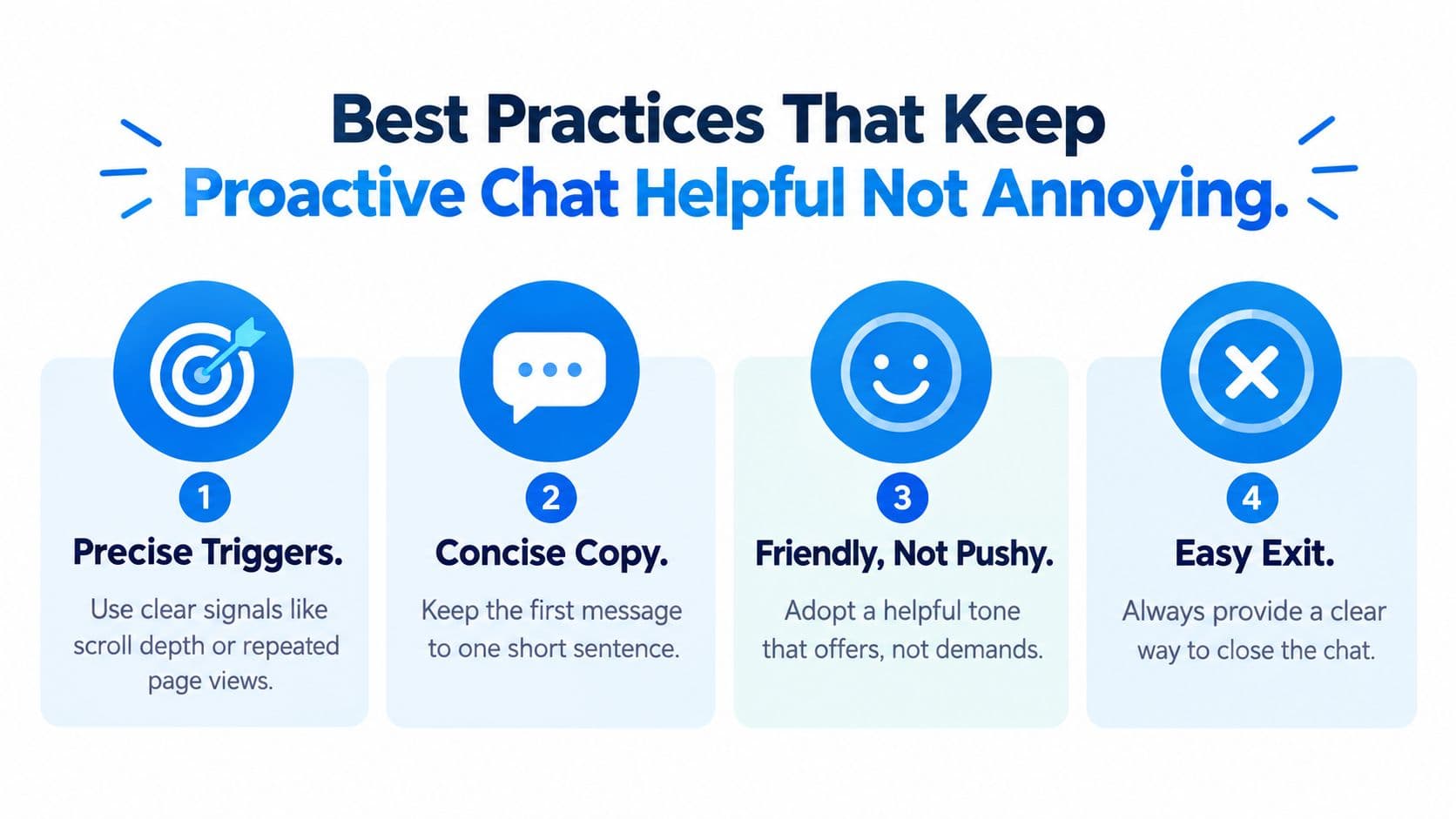
Annoyance isn't an unavoidable property of proactive chat. It comes from poor trigger precision, excessive copy, pushy tone, weak suppression, and an exit path that makes the shopper fight the interface.
Field evidence makes the trade-off clear. One study of proactive AI help at work found users were about 1.08 points less satisfied on a 7-point scale when help was proactive rather than reactive, as reported in the study on proactive AI assistance. The same source discusses user reactions to assistants that felt nagging, aggressive, pushy, verbose, or patronizing. That doesn't prove proactivity is bad. It shows that initiative without relevance carries a satisfaction cost.
Precision beats reach
Use clear signals such as repeated product views, cart inactivity, exit intent, or a variant-selection problem. Don't trigger on every scroll event or every landing page. A shopper who has shown no sign of friction hasn't given the assistant a meaningful question to answer.
Keep the first message short
One sentence is usually enough for the opening. “Want help choosing the right size?” gives the shopper a clear response path. A paragraph about free shipping, product benefits, and a limited-time offer forces the visitor to parse a campaign before deciding whether help is relevant.
Offer, don't demand
The assistant should sound available, not insistent. A question tied to context feels different from “How can we help?” repeated across the store. If the shopper doesn't respond, one quiet follow-up may be reasonable. A rapid sequence of nudges is not.
Make closing easy
The close control should be visible, work on mobile, and stop the same prompt from returning immediately. Mobile shoppers have less room for an expanding widget, so test whether the message covers product controls, variant selectors, or checkout fields.
A shopper should always understand why the assistant appeared and how to make it disappear.
Shoppers sometimes respond with thanks when a prompt catches the exact question they were considering. That reaction isn't mysterious. Timing and phrasing changed the interaction from interruption to relief. The same person may ignore a generic welcome popup and engage with a question about the product they've been examining.
For broader context on service design and CX management trends for 2026, focus on the operating principle rather than the trend label. Measure satisfaction and business outcomes together. The guide to preventing AI hallucinations is also relevant because an inaccurate proactive answer creates more distrust than no message at all.
Putting It All Together and What to Do Next
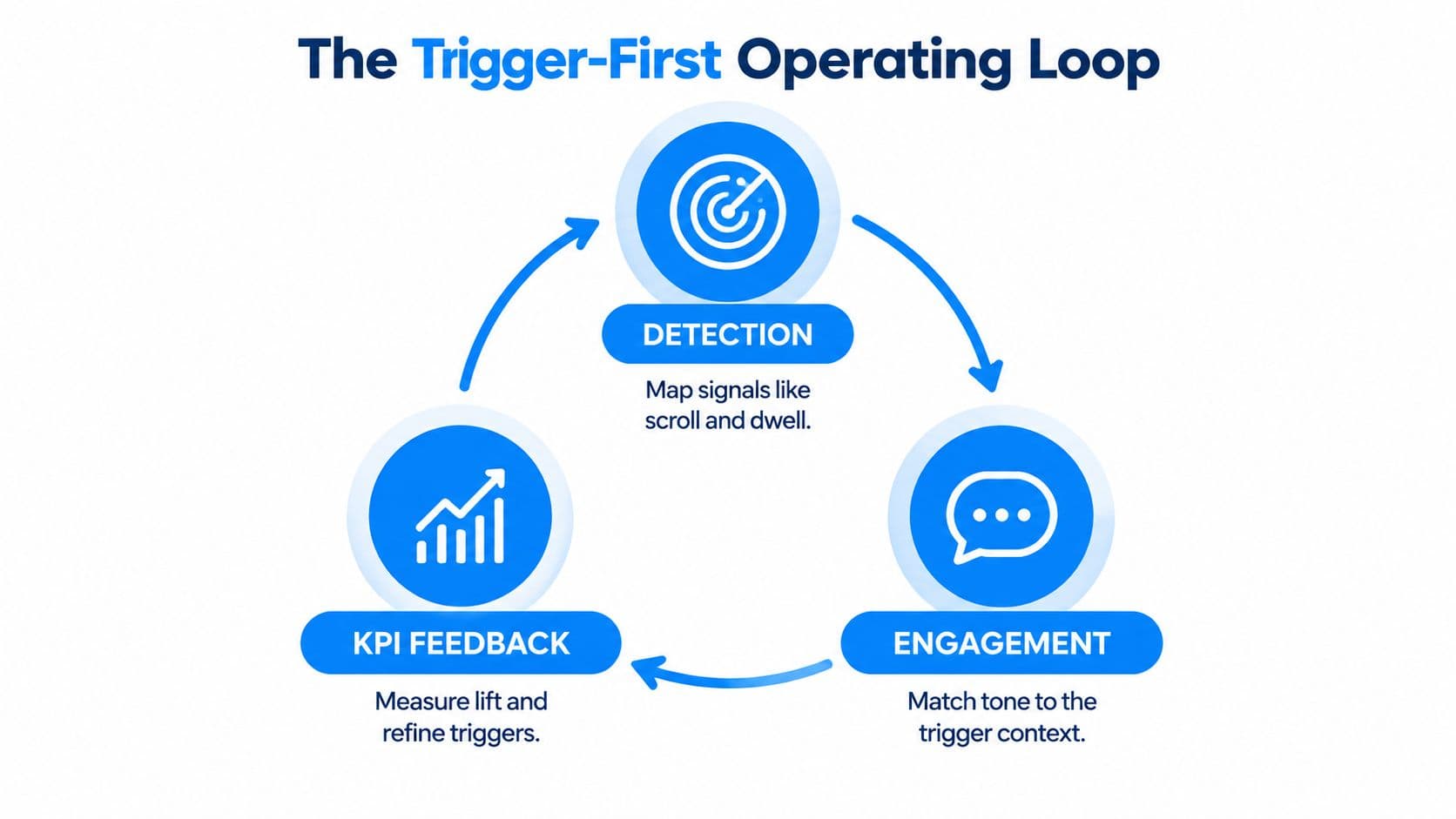
A proactive AI assistant works as an operating loop, not a campaign calendar. The loop begins with a behavior signal, turns that signal into a restrained conversation, and uses the result to refine the trigger. Merchants get into trouble when they optimize the message before checking whether the system identified the right moment.
Start with one high-intent event
Pick the behavior closest to a commercial decision. An idle cart is a practical starting point because the shopper has already selected a product. Define the threshold in plain language, such as a cart remaining inactive after meaningful browsing, then decide what the assistant should answer first.
Don't layer product-page prompts, checkout exits, and cross-sells until the first journey is measurable. More triggers create more attribution ambiguity and make it harder to tell whether a message helped or merely appeared near an order.
Match every trigger to an outcome
Detection should lead to a relevant offer. Engagement should resolve the likely uncertainty. Fulfillment should produce a measurable next step, such as checkout continuation or a completed order.
Use the funnel to diagnose the problem:
- Detection is weak: revise the signal or threshold.
- Engagement is weak: shorten the message or improve relevance.
- Fulfillment is weak: check product data, policy accuracy, links, inventory, and handoff logic.
The benchmark design described by π-Bench for long-horizon agent evaluation is useful here because it emphasizes multi-turn tasks, hidden intents, dependencies, and cross-session continuity. A commerce assistant should connect the shopper's current behavior with prior context instead of treating every page as a new conversation.
Make the next decision this week
Instrument one Shopify event now. Choose cart inactivity, define the exact condition that will fire the prompt, write one short offer, add a frequency cap, and record detection, engagement, and resulting orders. Review the transcripts before adding a second trigger.
This is the practical standard: one signal, one useful intervention, one measurable outcome. If the numbers and shopper reactions support the first loop, expand carefully. If they don't, fix timing and relevance before adding more automation.
Carti connects your Shopify catalog and policies, then uses behavioral triggers to offer product help, recommendations, and cart recovery without requiring a shopper to click first. Visit Carti to start with one hesitation signal and test a more useful form of proactive assistance in your store.

Written by
Daniel AndersonFounder of Carti. 10+ years building ecommerce brands in apparel and supplements. Still runs a Shopify store and built Carti to help merchants convert more browsers into buyers.
Ready to boost your store's sales?
Install Carti in 5 minutes and let AI handle customer questions, recommend products, and close sales 24/7.
Start Free Trial14-day free trial