
About 7 out of 10 shoppers leave without buying. The global average shopping cart abandonment rate reached 70.22% in 2026, leading to an estimated $18 billion in lost potential revenue annually for eCommerce businesses, according to Statista's cart abandonment data.
Most merchants respond to that problem too late. They install an email flow, maybe add SMS, and hope to win shoppers back after they've already walked away. That's better than doing nothing. It's also incomplete.
Good shopping cart abandonment software should recover lost carts after the fact. Modern software should also reduce how many carts get abandoned in the first place. If your stack only does the first job, you're treating checkout friction as a messaging problem when it's often a real-time buying problem.
The $18 Billion Problem Happening in Your Store
Roughly 7 out of 10 carts are abandoned. The revenue leakage adds up to about $18 billion a year. As noted earlier, that scale matters because it changes how merchants should read their own numbers.
A high abandonment rate does not automatically point to a broken store. In many Shopify businesses, it reflects normal buyer behavior under pressure. Shoppers compare tabs, pause over shipping costs, get distracted on mobile, second-guess sizing, or leave because one checkout detail creates doubt at the wrong moment.
The important question is not whether abandonment exists. It does. The useful question is where your store is creating avoidable exits.
Some categories carry more risk by default. Beauty, luxury, and other consideration-heavy purchases usually face more hesitation late in the session because buyers need confidence before they commit. Shade matching, fit, delivery timing, return policy, authenticity, and final landed cost all influence the decision. If any of those answers are hard to find, conversion drops before your follow-up flow even has a chance to work.
What usually drives the drop-off
Unexpected extra costs remain one of the biggest reasons shoppers abandon cart, as noted earlier in the article. Shipping, taxes, and duties do more than reduce margin tolerance. They interrupt purchase momentum and force the buyer to reassess value at the last click.
The rest of the losses usually come from a short list of operational problems:
- Checkout friction adds delay when intent is highest.
- Forced account creation asks for commitment before the order is earned.
- Payment gaps block conversion when preferred methods are missing or transactions fail.
- Unanswered pre-purchase questions around delivery, returns, sizing, or product fit stay unresolved until the shopper leaves.
These are not all equal.
Some are merchandising problems. Some are checkout UX problems. Some are trust problems. And some should be handled before the shopper reaches the cart at all, which is why a strong AI-powered sales assistant for ecommerce teams can influence revenue earlier than a standard recovery app.
That distinction matters in practice. Post-abandonment emails can recover a portion of lost demand, but they only work after the exit has already happened. Merchants that treat abandonment software as both a recovery system and an in-session diagnostic tool get a clearer picture of what is suppressing conversion.
Reactive Recovery vs Proactive Prevention
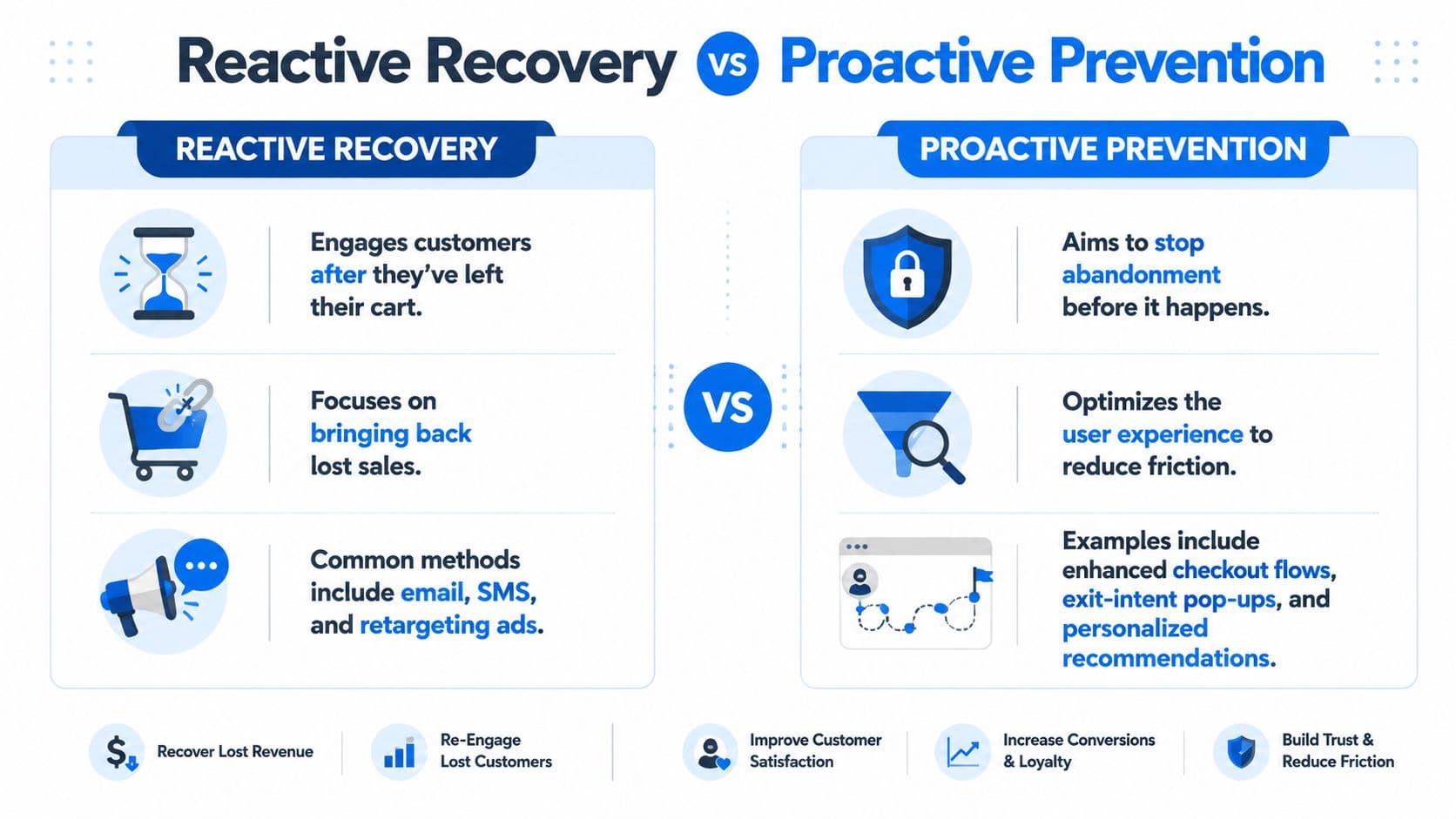
Most software in this category is built around reactive recovery. That means the shopper leaves first, then the platform follows up through email, SMS, or retargeting. It's useful. It's familiar. It's also a safety net, not a fix.
Proactive prevention works earlier. It identifies hesitation while the shopper is still on-site and tries to remove the obstacle before the exit happens.
Why most tools stop halfway
The category has been dominated by post-exit tools for years. Email platforms, SMS apps, and retargeting workflows are easier to explain and easier to bolt onto an existing stack. But Baymard's abandonment research page makes an important distinction. Most abandonment software focuses on post-exit recovery, while in-session prevention is more effective because it stops the abandonment event before the user leaves the checkout page.
That difference matters operationally.
Reactive recovery depends on access. You need an email address, SMS consent, or a retargeting match. If the buyer leaves before you capture any of that, your “recovery strategy” has nobody to reach. Even when you can reach them, the shopper is now distracted, comparing alternatives, or back in their inbox fighting through noise.
A lot of merchants confuse channel coverage with strategy. Adding more reminders doesn't automatically solve the underlying problem.
What proactive software actually does
Think of reactive recovery as the follow-up team. Proactive prevention is the closer on the floor.
Prevention-focused shopping cart abandonment software usually includes tools like:
- Exit-intent detection that recognizes when a shopper is about to bounce
- On-site prompts that answer objections before they harden
- Checkout experience aids like progress indicators that reduce anxiety
- Conversational support that helps the buyer resolve confusion in real time
The most interesting shift is toward systems that can respond contextually instead of firing the same popup to everyone. That's where conversational tools start to matter. A shopper lingering over shipping options needs a different intervention than someone failing payment or hesitating over product fit. If you want a broader view of how that model works on-site, this piece on an AI-powered sales assistant for eCommerce is a useful companion.
Recovery is what you do after you lose momentum. Prevention is how you keep it.
The strongest setup does both. Use reactive channels to bring back buyers you can still reach. Use proactive tools to reduce how many high-intent shoppers disappear in the first place.
Essential Software Features for 2026
A feature checklist is only useful if it helps you buy the right type of system. For 2026, the main question is whether the software handles two jobs well: recovering demand after a shopper leaves, and reducing abandonment while that shopper is still trying to buy.
Plenty of tools cover the first job. Fewer handle both.
The table stakes
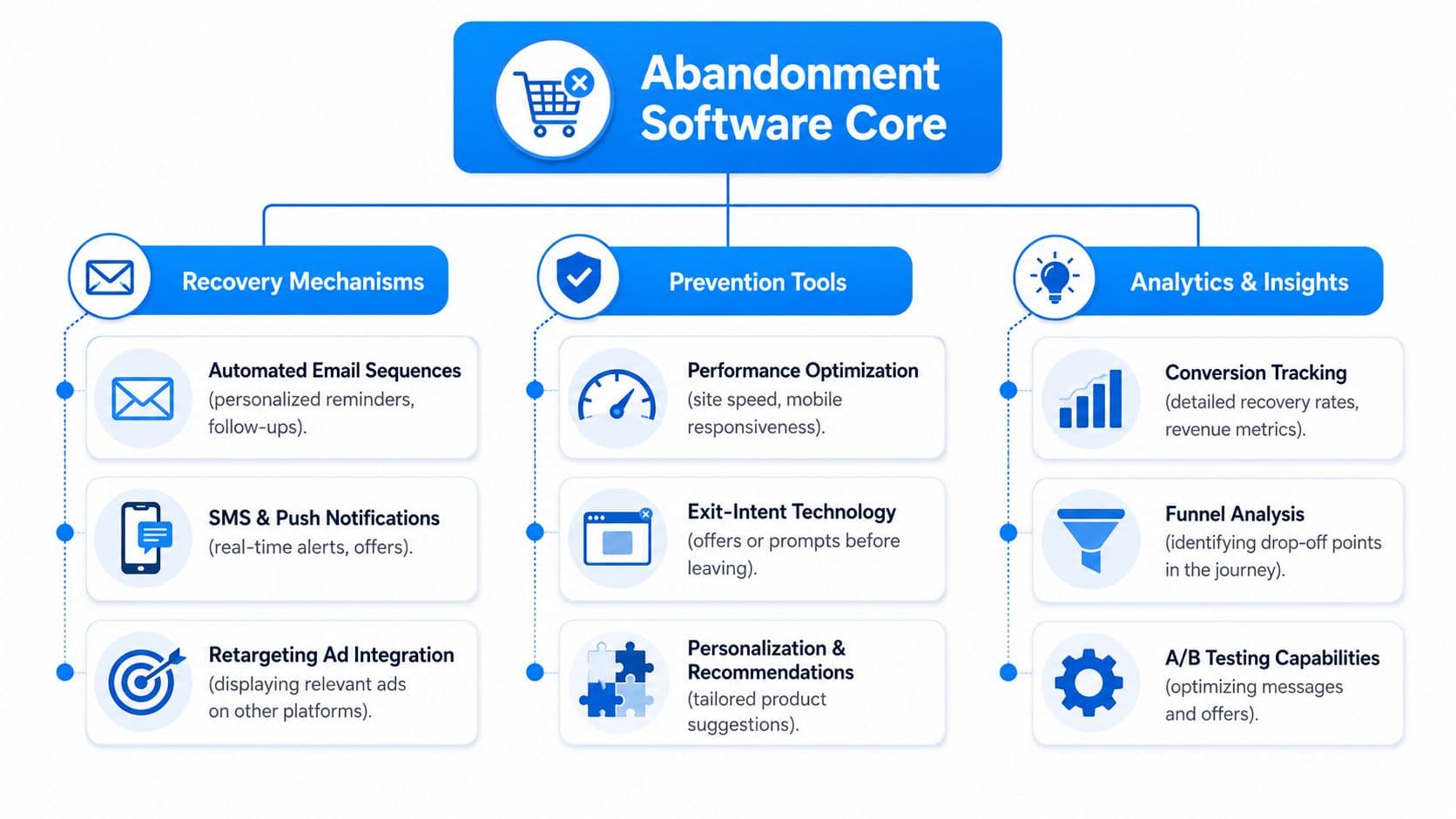
Start with the recovery layer. If a platform cannot run dependable post-abandonment programs, it is missing the basics.
Look for these baseline features:
- Automated abandoned cart emails that trigger reliably after cart or checkout exit
- Retargeting support through tracking pixels for buyers whose email was never captured
- Pre-built flows for cart, browse, and checkout abandonment
- Segmentation controls so first-time visitors, repeat buyers, and high-value carts don't get the same message
- Easy offer handling for free shipping, reminder messaging, or limited incentives
Optimizely's overview of shopping cart abandonment describes the standard recovery stack clearly: automated abandoned cart emails, ad retargeting pixels, pre-built flows, and analytics that show where buyers dropped. That is still the floor for any serious platform.
For stores with no triggered recovery in place, fixing that gap usually produces the fastest near-term lift.
The features that change outcomes
The next layer is prevention. Here, weaker tools start to show their limits, because post-abandonment email can only follow up on friction that already cost you the session.
The features worth paying for are the ones that remove uncertainty before the shopper quits:
- Exit-intent interventions that trigger only when behavior suggests drop-off risk
- Real-time answers to shipping, returns, sizing, compatibility, or stock questions
- Preferred payment support or alerts when payment friction is causing exits
- Checkout progress indicators that show how close the buyer is to completion
- Behavior-aware personalization that changes prompts based on cart contents or where the user hesitates
These capabilities matter for a simple reason. Abandonment is rarely one problem. It is a mix of unanswered questions, payment friction, policy anxiety, and moments where intent fades because the store gives the buyer no help at the point of hesitation.
That is why email-only tools top out. They can recover part of the demand later. They cannot fix confusion during the session.
One option in this category is Carti, which combines on-site shopper assistance with cart recovery capabilities for Shopify merchants. That blended model makes more sense than treating abandonment as an email workflow problem alone.
What analytics should reveal
Reporting should explain buyer behavior, not just claim revenue.
Good software should help you answer questions like these:
| Question | Why it matters |
|---|---|
| Where do shoppers stall most often? | It shows whether the problem starts on product pages, cart, or checkout |
| What objections appear repeatedly? | It gives your team direct input for FAQ, PDP, shipping, and policy updates |
| Which interventions help, and which annoy? | It prevents you from overusing popups or discounts |
| Which traffic sources abandon differently? | It helps align your tools to channel behavior |
The best teams pair cart recovery reporting with a stronger customer analytics solution for ecommerce teams, because intervention data only becomes useful when you can connect it to channel quality, buyer intent, and checkout behavior.
Software that only reports recovered revenue is useful. Software that shows why buyers leave and what reduced that friction is much more valuable.
That is the difference between a reactive cart tool and a system that improves conversion before the shopper disappears.
Measuring Success Beyond Recovered Revenue
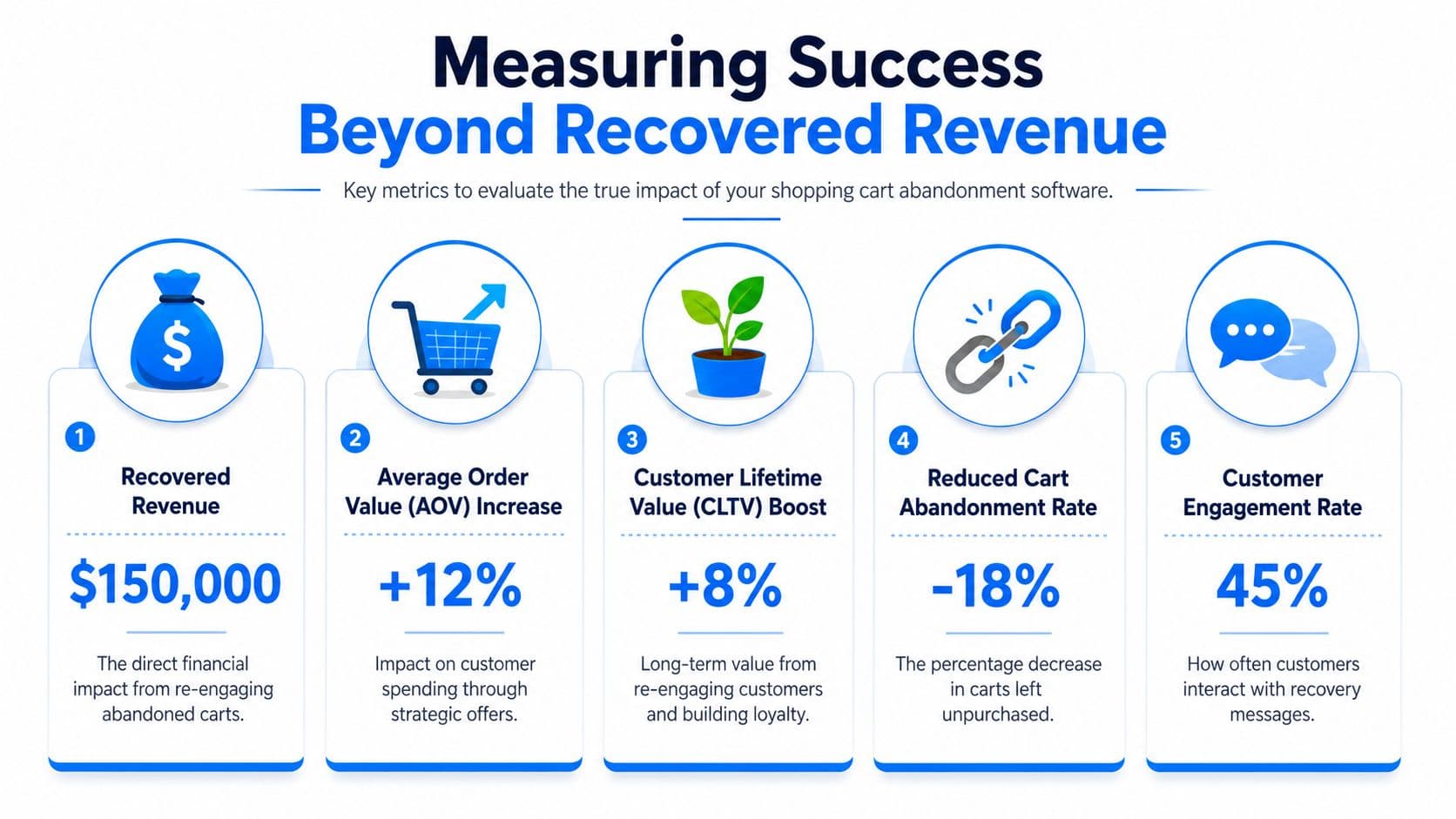
Recovered revenue is the metric everyone shows in the demo. It is also the metric that gets overstated most often.
A recovery platform can claim credit for orders that were already likely to happen, especially if the buyer was comparison shopping, got distracted, or needed another tab to finish checkout. That is why recovered revenue should be treated as one output, not the scorecard.
Track lift, quality, and prevented abandonment
The first question is simple. Did the software create incremental orders, or did it just intercept buyers who were already on their way back?
That means looking past opens, clicks, and attributed sales. Those numbers still matter, but they are response metrics. They do not tell you whether the tool improved conversion economics.
A better measurement framework looks like this:
- Incremental conversion lift measures whether exposed shoppers convert at a higher rate than similar shoppers who did not receive the intervention.
- Recovered order quality shows whether recovered buyers have healthy average order value, repeat purchase behavior, and acceptable discount levels.
- Time to purchase helps you separate true recovery from delayed attribution. If buyers convert minutes later with or without intervention, your software may be taking too much credit.
- Prevention rate shows how many at-risk sessions were saved before abandonment happened. Proactive tools are designed to reduce the number of carts that need recovery in the first place.
- Margin impact keeps the team honest. A recovered cart driven by aggressive discounting can look great in platform reporting and weak in the P and L.
The reactive versus proactive distinction becomes practical. Email and SMS recovery tools are measured by what they bring back after exit. In-session tools should also be measured by what they prevent from being lost. If your platform does both, success should include fewer abandonment events, fewer support-heavy checkout sessions, and cleaner conversion paths.
Use the software to find conversion friction
Good abandonment software should improve diagnosis, not just attribution.
The strongest teams use session behavior, objection trends, and intervention performance to find where intent breaks down. That could be unclear shipping thresholds, weak product page context, coupon hunting, payment hesitation, or a mobile checkout step that creates drop-off. Those insights usually matter more than one more recovery email.
For merchants that want to connect abandonment signals with broader site behavior, a customer analytics solution for Shopify teams helps tie conversation patterns, session paths, and conversion drop-offs together.
I pay close attention to one question: what changed because we learned from this data?
If the answer is just "we sent more reminders," the software is still operating like a reactive patch. If the answer is "we removed a shipping objection, changed when assistance appears, and reduced abandonment upstream," the tool is improving the sales process, not just collecting missed demand.
How to Choose the Right Software for Your Shopify Store
Most Shopify merchants don't need more features. They need fewer blind spots.
The right shopping cart abandonment software depends on how your customers shop, where your traffic comes from, and whether your biggest issue is unreachable abandoners, weak follow-up, or friction inside the session itself. Buying a powerful platform for the wrong failure mode is still a bad purchase.
Start with your traffic source and buying behavior
Your channel mix should shape your shortlist.
If your store gets a lot of traffic from social platforms, that matters because shoppers from that source are especially likely to leave without buying. Contentsquare's cart abandonment statistics guide reports that 91% of shoppers abandon without purchasing when they visit online stores via social media channels. That doesn't mean social traffic is worthless. It means social browsers often need more reassurance, more context, and better on-site guidance before they commit.
Ask these questions first:
- Do shoppers usually reach checkout before leaving? If yes, post-exit recovery can do real work.
- Do they leave before giving you contact details? If yes, you need stronger in-session prevention.
- Is your traffic more impulse-driven or consideration-heavy? High-consideration products need objection handling more than reminders.
- Does your brand rely on social discovery? If yes, your software should support real-time assistance, not just after-the-fact email.
Compare the trade-offs that matter
A simple comparison framework works better than a giant feature checklist.
| If your main problem is... | Prioritize this kind of tool | Watch out for this trade-off |
|---|---|---|
| You have lots of recoverable emails but weak follow-up | Email and SMS automation platforms | They may not reduce live-session friction |
| Shoppers leave before identification | On-site prevention tools and conversational support | They still need a recovery layer for captured users |
| Your team is lean | Fast setup and pre-built flows | Simplicity can limit testing depth |
| You run a more complex Shopify stack | Deep integrations and flexible data sync | Setup and ownership often get harder |
A few practical buying filters matter more than marketers admit:
- Shopify integration depth affects how well the tool reads carts, products, discounts, and customer state.
- Setup burden decides whether the tool launches this week or stalls in backlog.
- Attribution discipline matters because some platforms over-credit themselves.
- Support quality becomes critical when flows break during promotions or peak season.
Buy for the problem you have now, but don't ignore the next one. Most brands eventually need both prevention and recovery, even if they start with one.
That's the key decision. Not which tool looks most impressive in a demo, but which one matches your store's current leak.
Actionable Recovery Strategies for DTC Merchants
The most reliable recovery programs aren't flashy. They're disciplined.
A DTC brand usually gets better results from a few coordinated touches than from a messy stack of coupons, popups, and reminders all firing without logic. Recovery works when the message matches the buyer's hesitation.
Build a sequence that earns the second chance
For most merchants, a simple three-part structure is enough:
- Send a clean reminder first. No coupon. Just bring the shopper back to what they already chose.
- Use the second touch to reduce uncertainty. Highlight shipping clarity, returns, product details, or support access.
- Reserve the final touch for a selective incentive. Don't train every abandoning shopper to wait for a code.
That sequence should also connect to the rest of your lifecycle logic. If you already run flows in Klaviyo, Omnisend, or Postscript, don't let a separate abandoned cart tool duplicate those messages and create channel clutter. If you need a broader implementation reference, this guide on how to recover abandoned carts in Shopify covers the operational side well.
Use incentives carefully
Discount strategy is where a lot of brands get sloppy.
Barilliance's discussion of abandonment behavior notes a shift toward non-monetary incentives because coupon-driven clicks don't always translate into healthy margin outcomes. That lines up with what many DTC teams see in practice. Discounts can rescue a sale, but they can also teach customers to abandon intentionally.
What tends to work better:
- Free shipping when shipping friction is the main objection
- Exclusive access or early access for brands that want to preserve pricing power
- Simple reassurance around delivery windows, returns, or product fit
- No incentive at all for shoppers who likely just needed a reminder
A luxury brand should be stricter here than a volume-driven cosmetics brand. Same category, different economics.
Handle objections while the shopper is still present
Proactive software wins.
If a shopper hesitates because they can't find your return policy, the best recovery message is the one they never need because the answer appeared before they left. The same applies to shipping timing, ingredient questions, material details, and product compatibility.
A quick product walkthrough helps make that concrete:
The fastest way to recover a cart is often to prevent the abandonment event entirely.
That's why I'm wary of merchants who obsess over discount timing but ignore live-session hesitation. If the buyer is asking a solvable question right now, answer it now.
From Recovery to a Resilient Sales Process
Shopping cart abandonment software shouldn't be treated like a patch for a leaky checkout. It should be part of a more resilient sales process.
That means using recovery channels well. It also means admitting that post-exit email can't do every job. Some buyers need a reminder later. Others need clarity right before they leave. The stores that improve fastest are the ones that build for both realities.
What a stronger system looks like
A resilient setup usually has three characteristics:
- It removes friction early through clearer checkout, better information, and smarter on-site support.
- It recovers what can still be saved with well-timed email, SMS, or retargeting.
- It learns from every abandonment event so your team can fix the underlying cause instead of just chasing the symptom.
If you want a practical example outside the software angle, these mattress website UX fixes are worth reviewing because they show how much abandonment reduction still comes from straightforward user experience improvements, not just messaging automation.
The merchants who win here don't just “recover carts.” They build a store that gives fewer shoppers a reason to leave.
If you want a Shopify-native way to combine proactive shopper support with cart recovery, Carti is worth a look. It's designed to help merchants answer buyer questions in real time, guide shoppers toward purchase, and support recovery workflows without relying only on post-abandonment email.

Written by
Daniel AndersonFounder of Carti. 10+ years building ecommerce brands in apparel and supplements. Still runs a Shopify store and built Carti to help merchants convert more browsers into buyers.
Ready to boost your store's sales?
Install Carti in 5 minutes and let AI handle customer questions, recommend products, and close sales 24/7.
Start Free Trial14-day free trial