
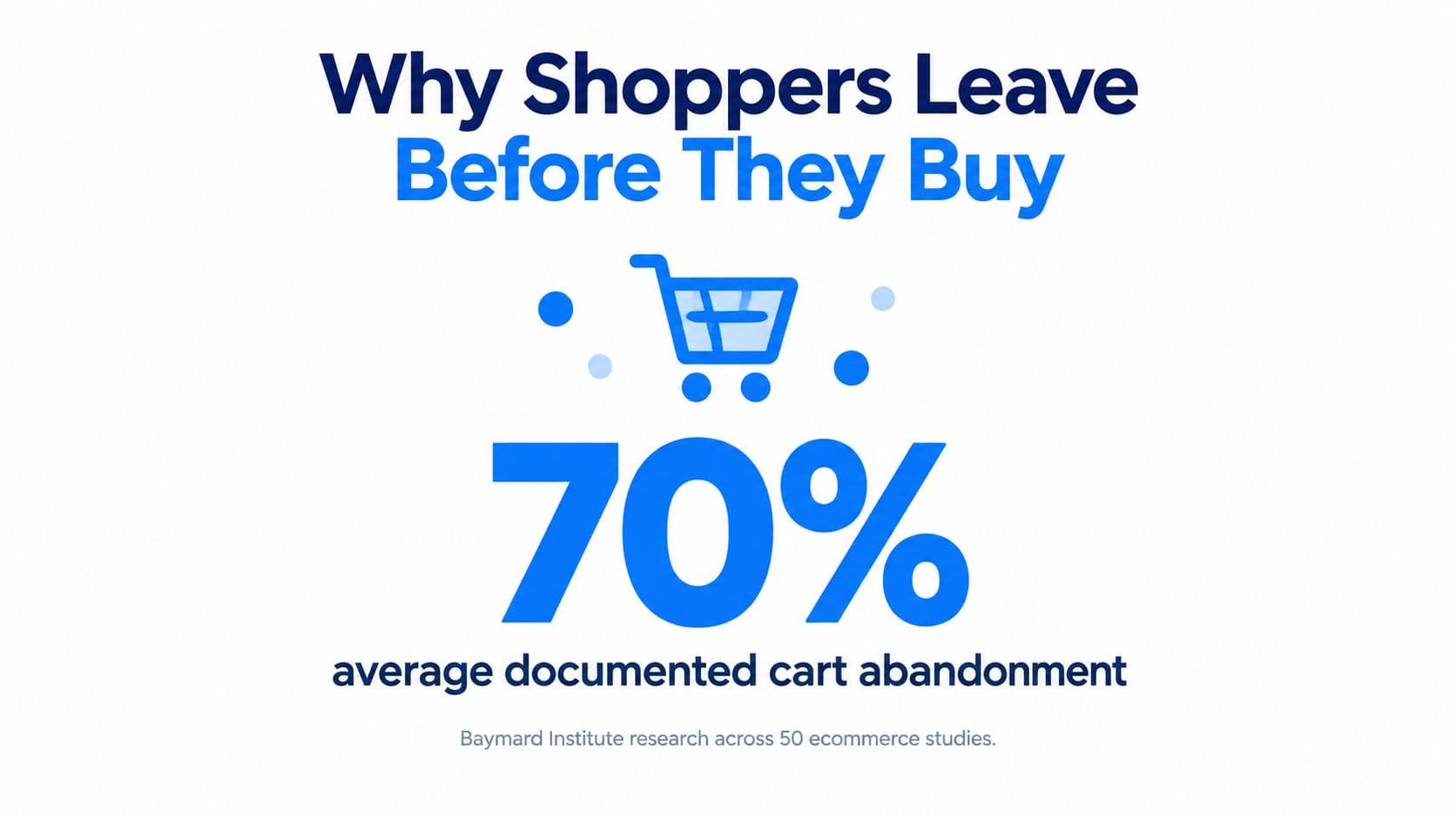
Average documented cart abandonment is approximately 70.22% globally, according to the Baymard Institute's synthesis of 50 ecommerce studies. That makes choosing the best Shopify apps to increase conversions less about adding sales widgets and more about identifying why shoppers stop.
A shipping estimate, a simpler checkout and an accurate sizing answer solve different problems. The right app addresses an observable obstacle, then earns its place through a controlled test.
Why Shoppers Leave Before They Buy
Cart abandonment has several causes. Some shoppers are only browsing; others are ready to buy but face unexpected costs, an account requirement or a question the store has not answered.
In Baymard's cart-abandonment findings, shoppers who left for reasons other than just browsing reported these obstacles:
- Extra costs: 48% cited shipping, taxes or fees.
- Account creation: 24% were prompted to create an account.
- Slow delivery: 22% considered delivery too slow.
- Payment trust: 18% did not trust the site with their credit-card information.
Separate missing information from unnecessary effort
Checkout fields create another kind of friction. Baymard's cart and checkout testing found an average of 11.3 form fields. 22% of users had abandoned because checkout was too complicated, and 14% left when asked for a phone number.
Choose an app to address a specific obstacle. A discount popup cannot clarify an unclear delivery promise, and a review carousel cannot remove an unnecessary checkout field. Measure whether the change affects the checkout step or shopper question it targets.
Sometimes product uncertainty calls for better content, not another widget. For apparel stores, on-model photography can help shoppers see how a garment looks when worn. Photos add context to measurements, while a usable size guide still helps shoppers compare fit.
Start with a concrete question: Which reason appears most often in your abandoned carts and support inbox? That points to the checkout problem an app should address, and the measure to track before and after installation.
Quick Picks by Conversion Problem
| Store problem | App category to test | What the app changes | Metric to watch |
|---|---|---|---|
| Shoppers surprised by shipping or tax costs | Shipping and delivery estimator apps | Shows costs before checkout | Checkout completion rate |
| Long or fiddly checkout | Checkout and form optimization apps | Removes fields and steps | Checkout and mobile completion rate |
| Doubt about fit, size or quality | Review and sizing widgets | Shows fit notes and photos near the product | Product-page add-to-cart rate |
| Repeated pre-purchase questions | AI shopping assistant | Answers from catalog, policies and reviews | Assisted-session conversion rate |
| Visitors leave without engaging | Proactive engagement triggers | Opens a conversation at a behavior signal | Trigger response and conversion rate |
| Slow pages or heavy scripts | Performance audit and script control | Finds and defers costly code | Mobile load time and revenue per session |
Each row starts with something a shopper experiences. The category describes a possible intervention, not a recommendation to install everything in that category.
A delivery estimator and an AI assistant can both answer a shipping question, but they do different jobs. The estimator presents structured information without interaction. The assistant handles a question that needs context, such as whether a particular item can arrive before an event.
Pick the problem before the brand
For stores with steady traffic, checkout and trust problems usually deserve attention before additional engagement tools. An assistant becomes a stronger candidate when support messages repeatedly contain the same pre-purchase questions.
Merchants should select the problems their analytics show most clearly and leave the other categories alone for now. A store with poor mobile checkout completion doesn't need a loyalty widget to investigate that leak.
After choosing a category, shortlist competing apps by name and read their current listings. Judge.me and Loox are candidates for a review shortlist. TinyIMG and Swift Performance are candidates for a performance shortlist, but their listings still need checking against the store's actual technical problem.
Evaluate scope, permissions, theme compatibility and removal instructions. An image optimization app won't necessarily identify a slow third-party tracking script, and a sizing widget won't supply measurements the merchant hasn't entered.
Treat prices as part of the specification
Category names in the table are generic. Pricing should come from the vendor's own pricing page or current Shopify App Store listing, not a comparison article that may describe an older plan.
Check what triggers billing, which features require an upgrade and whether usage charges apply. A low subscription price isn't the same as a low total operating cost.
An app that cannot name the metric it should move is a guess.
Checkout Apps That Cut Friction
Across 344 leading U.S. and European ecommerce sites, Baymard's checkout usability benchmark found that 65% had a mediocre-or-worse checkout experience, while only 2% rated as good. The same benchmark identifies substantial opportunities to improve usability, but those findings aren't a guaranteed uplift for an individual Shopify store.
The practical distinction is between tools that help shoppers finish and tools that ask them to do more.
Separate checkout apps by their actual job
Cost-visibility tools show shipping estimates, thresholds and applicable charges before payment. Their job is to prevent a shopper from discovering a materially different total at the last moment.
Form and checkout optimization tools address entry and navigation. Check mobile keyboards, address behavior, error messages and whether the app can actually change the targeted field within the store's Shopify plan and checkout configuration.
Payment and merchandising tools need separate evaluation. Express payment can shorten the path to purchase, while an upsell introduces another decision. Grouping them together under conversion optimization hides that trade-off.
Shopify's own checkout mechanics also belong in the comparison. Shopify reports that Shop Pay checkout converts up to 50% higher than standard checkout and that Shop Pay Installments reduces cart abandonment by 28% on average. These are platform-reported results for payment functionality, not evidence that a third-party widget will produce the same outcome.
For a broader diagnostic sequence, the guide to checkout process optimization helps frame the purchase path rather than treating every checkout change as an app purchase.
Higher baskets can still mean a worse result
Consider a store that adds a bundle popup during checkout. Completed orders contain more products, but more shoppers leave without paying.
If the additional basket value doesn't offset the lost orders and discount cost, the store loses money. Looking only at average order value would conceal that result.
Practical rule: A checkout addition has to justify the interruption it creates.
Before installation, the listing and documentation should answer these questions:
- Added steps: Which screens, fields or decisions does the app introduce?
- Popup placement: Does an offer interrupt payment or obscure the order summary?
- Compatibility: Does it support the store's theme, Shopify plan and checkout configuration?
- Failure behavior: Can a shopper still complete payment if the enhancement doesn't load?
Native configuration should be checked before buying an app to reproduce it. Sometimes the cheapest checkout improvement is removing an existing obstacle.
Shipping, Returns and Review Apps That Build Trust
Delivery promises are operational commitments, not decorative conversion copy. The U.S. Federal Trade Commission's shipping rule requires sellers to ship within the promised timeframe or, when none is stated, within 30 days.
When that commitment can't be met, the seller must notify the customer, provide a revised shipping date and explain the right to cancel for a full and prompt refund. Longer or indefinite delays require consent, and an unapproved delay requires a prompt refund.
An estimator must reflect fulfillment reality
A delivery app that displays a faster promise than the warehouse can meet creates a compliance problem, not merely a customer-service problem. Configuration should account for processing time, order cutoffs, destination and products that ship separately.
That rule applies to U.S. sellers. Stores elsewhere should check their local delivery and cancellation requirements rather than assuming the same legal framework applies.
Returns need comparable clarity. The return window, eligibility conditions and responsibility for return shipping should appear where shoppers decide, including the product page and cart.
A short summary can link to the complete policy. It shouldn't omit a condition that would materially change the purchase decision, such as final-sale exclusions or bulky-item collection charges.
Reviews should resolve a specific doubt
Review apps such as Judge.me, Loox, Yotpo, Okendo and Fera deserve evaluation for the usefulness of their content and their storefront loading behavior. A widget full of generic praise may be less helpful than a clearly displayed review explaining fit, fabric or assembly.
Merchants should check:
- Delivery accuracy: Does the displayed promise match real fulfillment times?
- Policy visibility: Can shoppers find return conditions before checkout?
- Loading behavior: Does the review widget load without blocking primary content?
- Decision value: Can photos and fit notes answer the questions shoppers ask?
The guide to common questions about shipping can help identify gaps in customer-facing explanations. Trust tools work when shoppers encounter accurate information at the moment of doubt, not when useful answers sit on an isolated policy page.
AI Shopping Assistants Compared by Job
A fashion store receives repeated questions about whether a jacket runs small. A static FAQ helps only if it covers that product's sizing, while staffed live chat helps only when an available agent can find the answer.
An AI shopping assistant offers another route, but its usefulness depends on the store information it can access. An assistant shouldn't turn an ambiguous review into an unsupported sizing guarantee.
| Capability | Static FAQ page | Live chat with staff | AI shopping assistant (Carti) |
|---|---|---|---|
| Answers sizing, shipping and returns questions | Only if the page covers them | Only when an agent is free | Yes, learned from the store's catalog, policies and FAQs |
| Starts the conversation | No | Usually waits for the shopper | Yes, through six proactive triggers |
| Recommends products with live price and stock | No | Agent must check current catalog information | Yes, price and stock shown in chat with an add-to-cart button |
| Replies in the shopper's language | Only if translated | Only if staff speaks it | Yes, 92 languages with automatic detection |
| Uses the store's product structure | Not applicable | Not applicable | Yes, works with variants, tags and collections |
Match the answer channel to the question
A FAQ page remains useful for stable, widely relevant information. It doesn't need a conversation interface to explain the return address or basic care instructions.
Staffed chat is appropriate when judgment, exceptions or sensitive situations require a person. Its constraint is staffing capacity, not the quality of the chat widget.
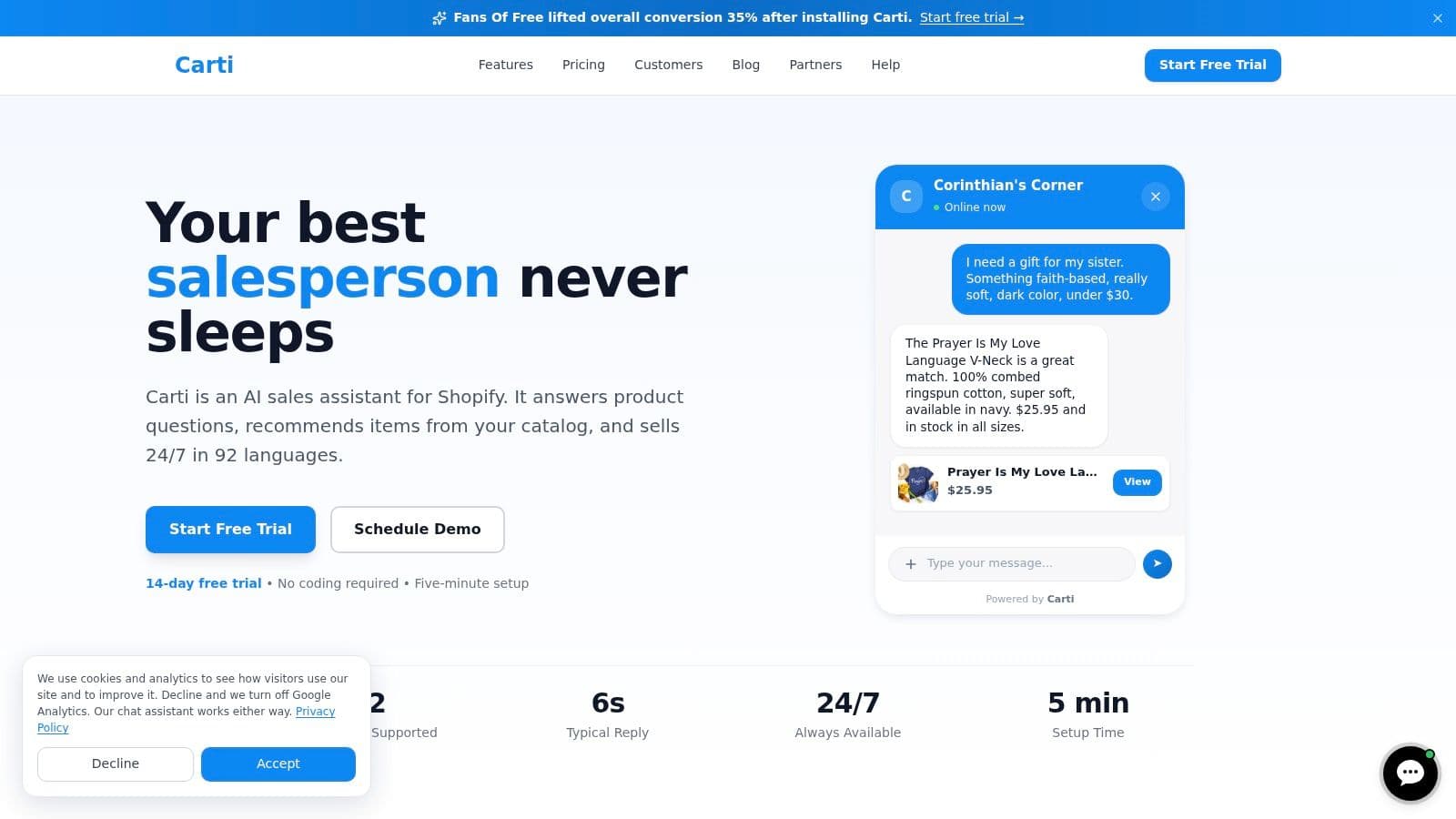
The assistant learns the store's catalog, policies and FAQs. It can use reviews from Judge.me, Loox, Yotpo, Okendo and Fera to address fit and quality questions, and its proactive triggers cover rage click, inactivity, exit intent, scroll depth, time on page and post add-to-cart.
Verify answers before widening exposure
Most Shopify themes work out of the box, but some custom themes need minor adjustments for Add to Cart and discount codes to work from chat. Those actions need testing on the live theme before broad promotion.
The acceptance checks should include:
- Policy grounding: Does the answer reflect the store's actual exclusions rather than invent an exception?
- Actionable insights: Does the Insights Dashboard expose questions the merchant can use to improve product content?
- Trigger timing: Does engagement arrive when assistance is useful rather than while a shopper is already selecting a variant?
- Product accuracy: Does the recommendation identify the intended size, variant and availability?
Full product details are available on the assistant's product page. Other AI chat apps should be compared from their own current listings using the same questions, not unsupported claims about which assistant is smartest.
Matching Store Size and Vertical to a Stack
| Store situation | Plan | AI conversations per month | Price per month |
|---|---|---|---|
| Testing whether chat sells before paying | Free | 50 | $0 |
| Steady chat traffic on a focused catalog | Starter | 250 | $49 |
| Fashion, home or beauty store with frequent size, delivery or ingredient questions | Growth | 600 | $99 |
| High-volume store also answering Instagram and Messenger messages | Scale | 1,750 | $249 |
Carti plan selection should follow expected conversation volume, not total store revenue. Paid plans include a 14-day free trial, and the current app listing should be checked before choosing a subscription.
A compact catalog can generate substantial chat demand if its products require explanation. A larger catalog may generate little demand when descriptions already answer the questions shoppers care about.
Product questions determine the useful stack
Fashion stores need accurate measurements, fit context and reviews that distinguish personal preference from consistent sizing feedback. An assistant can surface those details, but missing garment measurements remain a merchant content problem.
Beauty stores need shade, skin-type and ingredient information. Product records should distinguish manufacturer guidance from customer opinions, especially where suitability is subjective.
Home stores need dimensions, delivery access requirements and bulky-item return rules. A recommendation that ignores doorway clearance or assembly requirements can create an avoidable return even if it wins the initial order.
Wellness stores need careful boundaries around usage and claims. The assistant should stick to approved product information rather than infer medical suitability from a shopper's description.
Buy capacity and measurement, not a status tier
Every paid plan includes advanced conversion analytics, including conversion lift, revenue per conversation and engagement trends over time. Growth therefore includes the measurement needed to evaluate performance, but analytics alone aren't a reason to choose it over Starter.
The social channels also matter. The assistant replies to Instagram and Facebook Messenger messages, so merchants handling pre-purchase questions there should consider that workload alongside storefront demand.
Before subscribing, merchants should review how Shopify AI chatbot pricing works, including metered conversations, add-ons and overage charges. The important question is what counts as billable usage and what happens when the included allowance is reached.
A store with few repeated pre-purchase questions should start with checkout and shipping fixes, not buy chat capacity in anticipation of a problem.
Set a Baseline and Test Each App
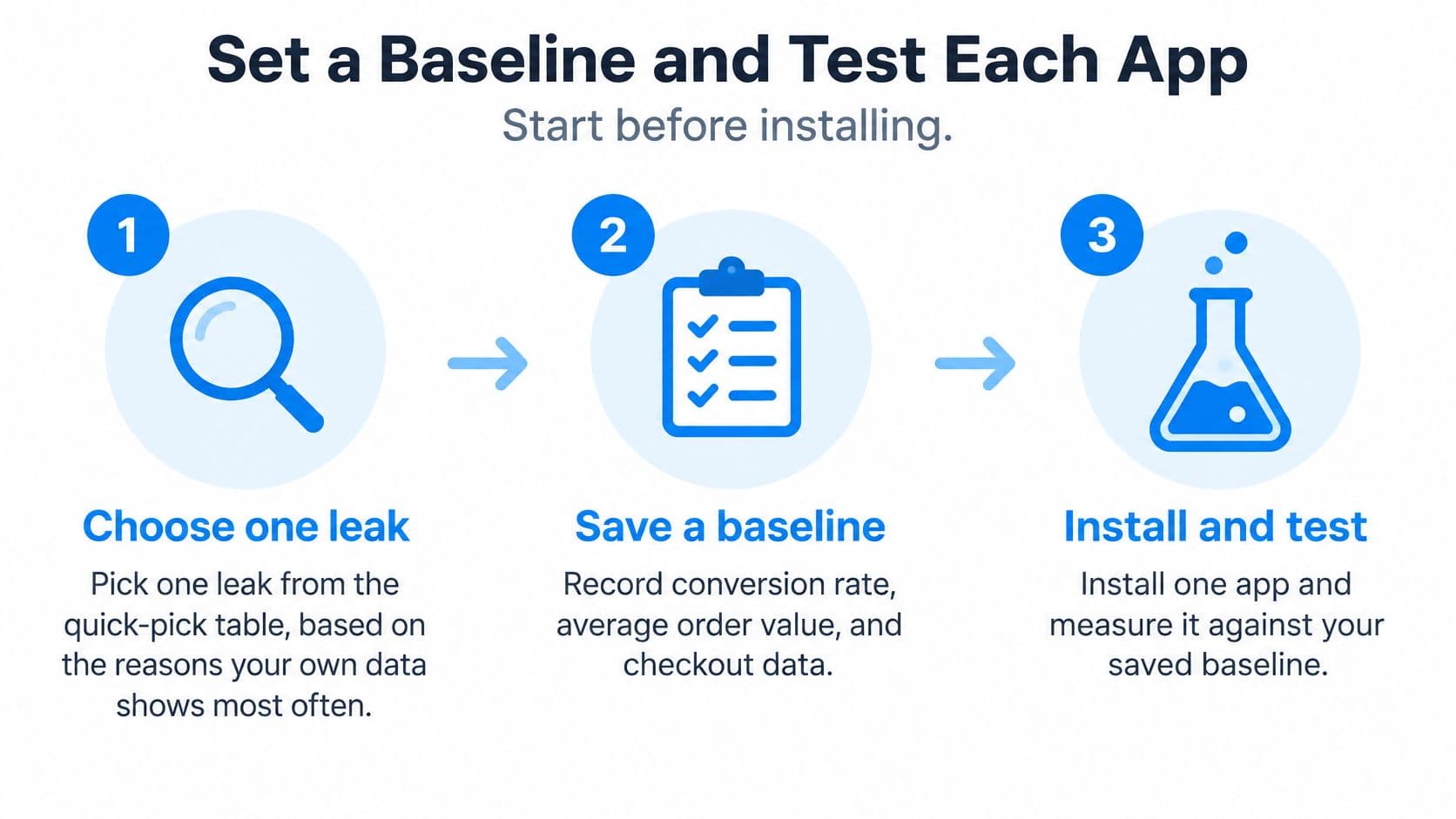
An installation is the start of an experiment, not proof of improvement. Before changing the storefront, the merchant should define the result that would justify keeping the app.
Prepare the experiment before installation
-
Choose a single leak.
Use abandoned checkout patterns, support messages and product-page behavior to select the intervention. The hypothesis should describe a shopper problem and an expected change, such as making delivery charges visible before checkout. The common mistake is choosing an app because a competitor uses it. -
Save a segmented baseline.
Record conversion rate, average order value, checkout completion and product-page add-to-cart rate. Split results by device and traffic source, and capture median and 75th-percentile mobile load time. An aggregate rate can hide a mobile problem behind stronger desktop performance.Google states that retail conversions can fall by up to 20% for every additional second of page-load delay. That makes performance part of the experiment, not a separate technical concern.
-
Shortlist alternatives and inspect billing.
Read the selected apps' own listings, pricing pages and documentation. Check required permissions, Shopify plan restrictions and whether an existing app already performs the same function. Buying overlapping functionality makes attribution harder and adds another subscription to justify.
For context, the guide to Shopify conversion rate benchmarks can help merchants interpret measurement. The store's own comparable traffic remains the more useful test of whether an installation helped.
Separate technical deployment from commercial success
-
Inspect script behavior.
Confirm asynchronous loading, deferral of noncritical JavaScript and whether large widgets render above the fold. Use Shopify's performance reporting, PageSpeed Insights and browser developer tools to examine the affected templates. Testing only the homepage misses apps that load primarily on product or cart pages. -
Install a single app and preserve a comparison.
Use a randomized control group or split test where available, especially for upsells and discounts. Without that option, compare equivalent business periods and document promotions, stock changes and traffic shifts. A before-and-after chart can suggest improvement, but simultaneous changes weaken the conclusion.The assistant's setup takes under 10 minutes, from Shopify App Store installation to a live widget. That deployment time doesn't replace functional checks or the business cycle needed to evaluate results.
-
Measure commercial outcomes alongside activity.
Track revenue per session, average order value and checkout completion together. For an assistant, add assisted-session conversion, answer-to-product-click rate, add-to-cart rate, assisted revenue and response latency.Assisted shoppers may already have stronger purchase intent, so a chat-versus-non-chat comparison isn't automatically causal evidence. The product's conversion-lift reporting compares shoppers who interact with the assistant against those who don't. A controlled exposure test offers a stronger basis for judging incremental impact.
Decide what stays
- Review the result over a full business cycle.
Allow normal trading patterns to occur, then evaluate the primary metric alongside guardrails. If load time rises without a conversion improvement, defer or remove the widget before dismissing the entire category. If revenue rises only because discounts increased, examine margin before renewing.
Paid acquisition needs the same discipline. Wojo Media's guide on how to turn paid traffic into profitable sales provides useful context for evaluating conversion work against business outcomes rather than clicks alone.
Carti also offers a Shopify AI chatbot ROI calculator, a two-slider model showing how much additional revenue the assistant could drive. Its output is a planning estimate, not a substitute for observed results.
The final decision should be simple: keep an app when it improves its assigned outcome without unacceptable costs elsewhere. Checkout friction calls for checkout and shipping work. Repeated pre-purchase questions justify an assistant test, while a small, accountable app stack is preferable to a crowded storefront.
Carti offers a Shopify AI shopping assistant that answers pre-purchase questions and recommends products from the store's catalog. Store owners facing repeated sizing, shipping or comparison questions can visit Carti, choose an appropriate conversation allowance and test whether assisted shopping improves purchase outcomes.

Written by
Daniel AndersonFounder of Carti. 10+ years building ecommerce brands in apparel and supplements. Still runs a Shopify store and built Carti to help merchants convert more browsers into buyers.