
A Shopify store owner checks the phone after dinner and finds a new thread on the brand Page. The shopper wants a size and a return window. The only note that went out says thanks for messaging us. Nobody is at a laptop, and the shopper is still deciding whether to buy tonight.
That note is a Facebook Messenger auto reply in the weakest sense. It shows the Page is switched on. It doesn't answer the question that would move the order. A first-touch thanks isn't a service workflow. The workflow is a short set of separate replies, each tied to one moment, plus a log that shows whether the shopper got an answer or only waited longer for a person.
Meta Business Suite already holds those controls. The work is choosing which one fires, writing a message a shopper can act on, and checking whether it helped.
Which Messenger Automation to Turn On First
Saturday night, a shopper messages a fashion Page and asks whether a jacket runs small and how long returns stay open. The only automation that sends is thanks for messaging us. Both questions sit there until someone opens a laptop in the morning.
Stores hit this because the first toggle they find feels like a finished setup. Messenger's help on Inbox automations describes three relevant types inside Meta Business Suite Inbox for Facebook business messaging. An instant reply is for people who message a business for the first time. An away message covers periods when the business is unavailable. A custom keyword reply sends when the message contains specified terms, such as shipping, returns, or size.
Those three aren't substitutes. The table is the choice to make before any setting changes.
Which Inbox automation fits the moment
| Automation | When it fires | Use it for | Do not use it to |
|---|---|---|---|
| Instant reply | First message from someone new to the Page | Expectation and one next step | Answer size, stock, or returns with a generic thanks |
| Away message | Business is marked unavailable | Closed hours and the next time a person replies | Pretend someone is online |
| Keyword reply | Message contains a term the store sets | Repeat questions such as shipping, returns, or sizing | Guess live inventory, delivery dates, or discount codes |
Use the instant reply to state a real response-time expectation. Use the away message only for closed hours, including weekends when nobody watches the Page. Use keyword replies for questions that repeat every week, with one intent on each rule.
A greeting isn't a resolution. The first message should name what the store can answer, say when a person will reply, and give one next step, such as a keyword to type.
If two rules could match the same chat, pick a winner before writing copy. Overlap is why a shopper gets the wrong note. A first message that also contains "size" shouldn't fire a vague thanks and a sizing script together. One rule owns that chat.
Practical rule: One automation, one customer moment. If the note can't name the next step, it isn't ready to turn on.
Teams weighing fixed rules against a wider workflow can read Silver Spoon Agency on using AI to improve marketing automation. The useful line is the boundary. A saved phrase can route a known question. It can't check a live product or a policy the store hasn't written down.
Configure the instant reply first. It's the note a new shopper sees, and a generic thanks is what most Pages are already sending.
Set Up Inbox Auto Replies in Order
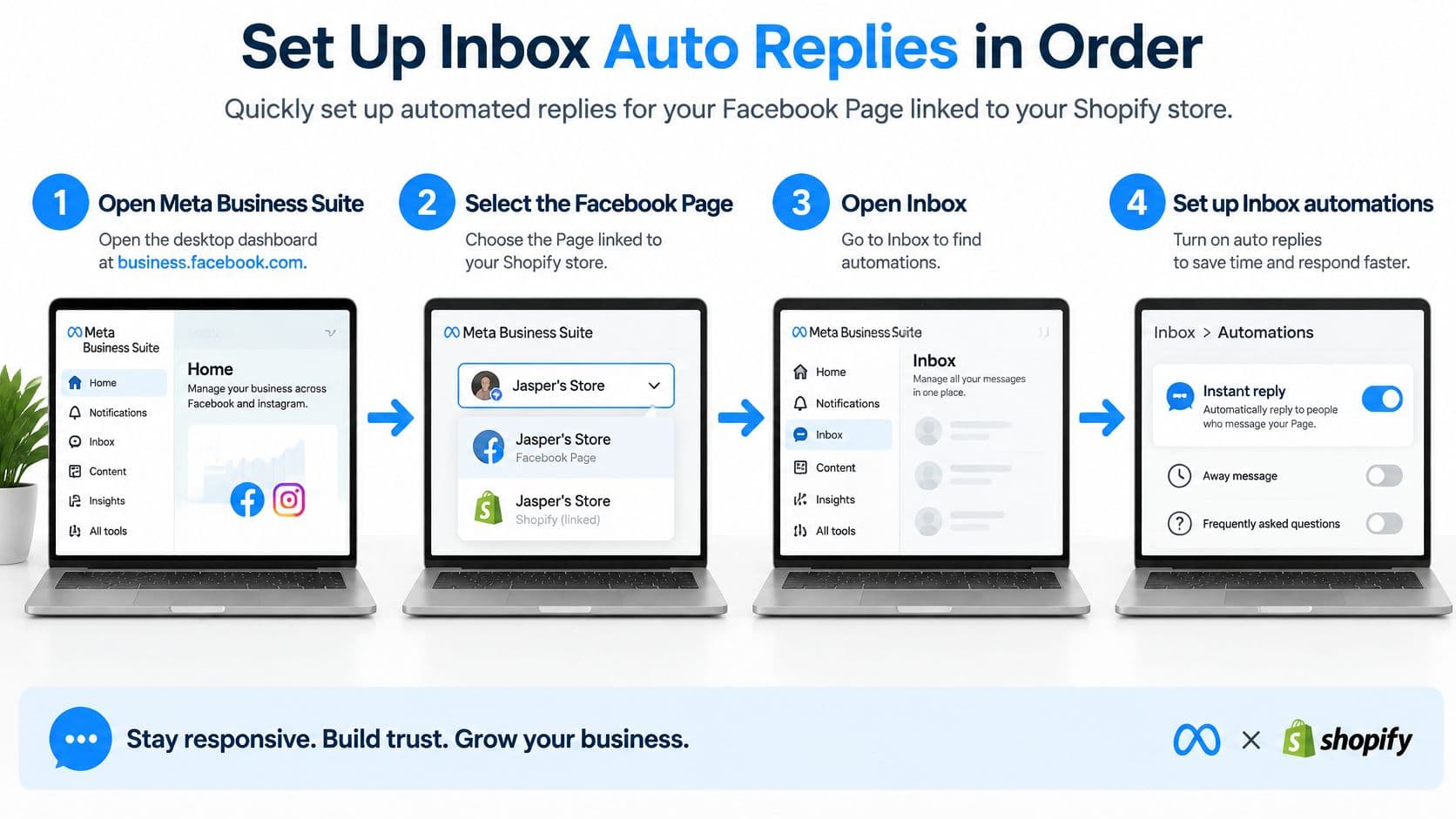
The controls are easiest to find in Meta Business Suite on a desktop browser. Mobile hides some of the same screens, so a phone setup often stops halfway. Work through the clicks in order, and attach a pass or fail check to each one before moving on.
Open the right Page
- Open Meta Business Suite on desktop and confirm the business portfolio in the top-left menu is the one that owns the store. Pass means the Facebook Page linked to the Shopify store is in that list. Fail means a different portfolio is selected, which is why the Page never appears.
- Select that Facebook Page. Pass means the Page name matches the shop customers already follow. Fail means a test Page or an old brand Page is selected, so later replies will never reach real shoppers.
Turn on the three replies
- Open Inbox, then Automations. Enable the instant reply. State the reply window in the store's timezone, such as replies on business days by 5 pm. Pass means a stranger could tell when a person writes back. Fail means the text still says thanks with no time.
- Enable the away message and enter only the hours nobody monitors the Page, including weekends when that is true. Pass means open hours send no away note. Fail means the unavailable schedule still covers a shift when someone is in Inbox.
- Create keyword replies for one intent each, starting with shipping, returns, and sizing. Skip broad words like help, because they match almost every chat. Pass means each rule has one clear term. Fail means two rules share a word, so one shopper can get two answers.
Prove it with a second account
- From a personal profile that has never messaged the Page, send a first message and confirm the instant reply arrives. Send a second message from that same profile and confirm the instant reply does not arrive again. Pass means one greeting, then silence on the repeat. Fail means every new line gets the same hello, which trains shoppers to ignore it.
- Send one keyword, such as shipping, and confirm only that reply returns. Then check the away schedule against the store clock. Pass means the keyword answer matches the intent, and the away message is off during open hours. Fail means the wrong script fired, or the clock on the schedule doesn't match the store.
Shoppers don't only start from a profile visit. Shopify's Facebook Shop guide notes that Facebook Shop customers can message a business through its Facebook Page using Messenger, and the business can respond as the business. The same guide states that Facebook requires merchants to handle customer information collected through Facebook Shop according to Meta's Commerce Merchant Agreement. Treat names, order questions, and addresses in those threads under that agreement, not as casual chat.
After the three tests pass, stop adding toggles. Edit the wording instead. Stores that later need one place to manage ecommerce messages across a busier Inbox can look at PlatformDTC once the native tests are clean. More switches before the copy is honest only create more wrong notes.
Message Templates Shoppers Can Act On
A saved reply has to stay readable on a phone. Four short notes cover the moments from the Inbox choice. Swap only the store name, the true hours, and a product name when the shopper already typed it. Don't invent stock, a delivery date, or a discount code inside a saved reply.
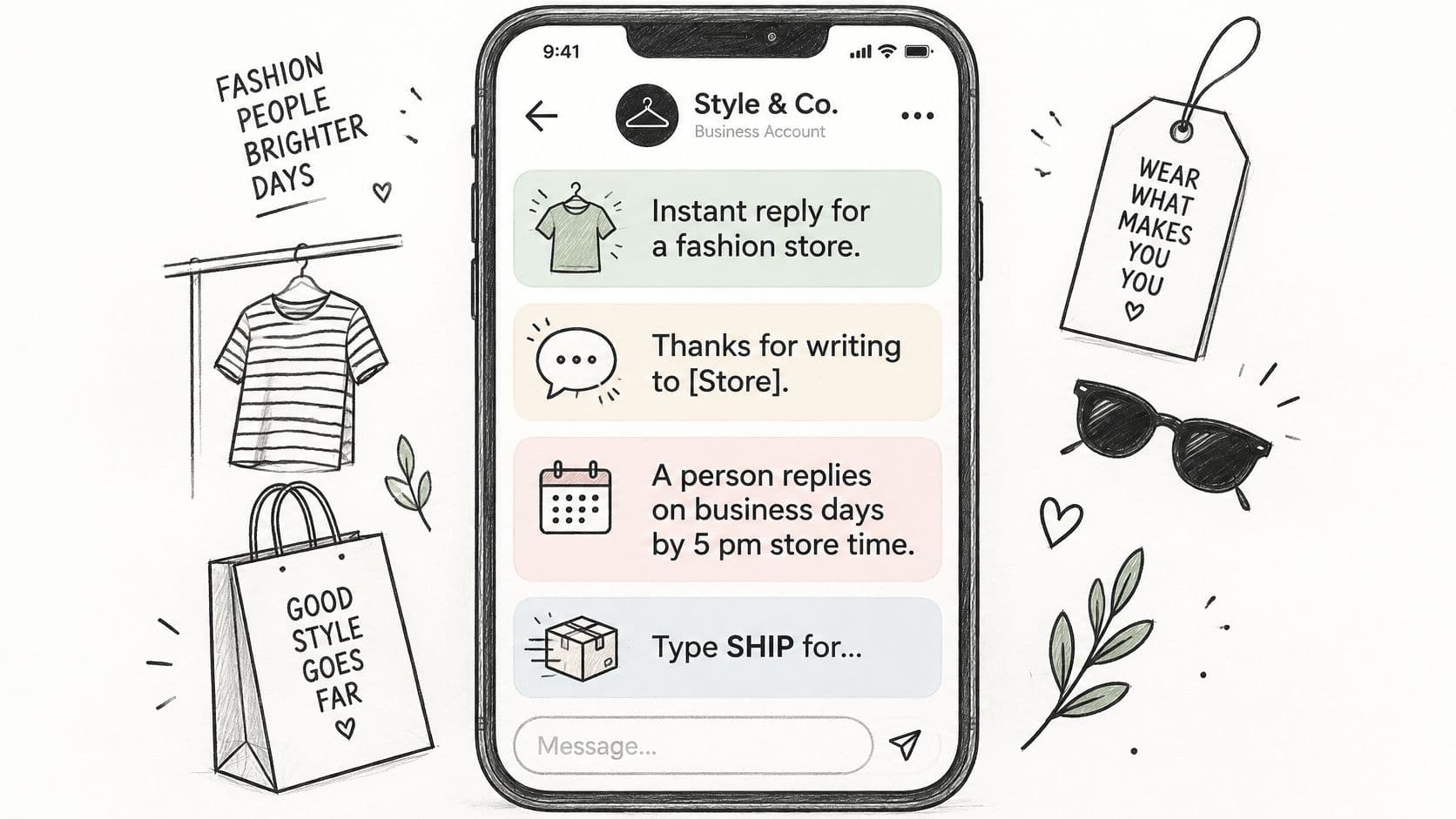
Four notes to paste
Instant reply, fashion store. Thanks for writing to [Store]. A person replies on business days by 5 pm store time. Type SHIP for shipping, RETURNS for returns, or SIZE for sizing.
Away message. The Page is closed until [day and time]. The note is saved, and a person replies when the store opens.
Shipping keyword. Standard shipping on in-stock orders leaves within [the handling window from the store policy]. Put the policy page link in the same message.
Sizing keyword. Send the product name and the size usually worn in a similar fit. The reply should point to the size guide rather than guess a fit.
What a store may change
Personalization stays narrow on purpose. The store name belongs in the instant reply so the shopper knows which brand answered. The hours belong in the instant reply and the away message, and they have to match the schedule already saved in Inbox. A product name belongs in a reply only after the shopper typed it. Pulling a different product into the thread looks like the store wasn't reading.
Vary the first line so the four messages don't all open the same way. The away note can start with the closed time. The shipping note can start with the handling window. The sizing note can start with the request for a product name. Repetition is what makes a Facebook Messenger auto reply feel like a menu nobody asked for.
Leave volatile facts out of every template.
- Stock: Don't say an item is available unless that sentence is copied from a page the team already approves.
- Dates: Don't promise a delivery day. Use the handling window already printed on the policy page.
- Codes: Don't drop a discount into a keyword reply. A code that isn't on an approved offer becomes a promise the checkout can't keep.
Longer sample threads, including ones that hand off cleanly, sit in these chat conversation examples. Use them to compare tone, not to add extra promises.
If this note landed in the store's own inbox, the reader would know what happens next.
Read each template that way before saving it. If the next step is missing, the automation is only delaying a person.
Metrics That Show the Reply Is Working
Speed is easy to celebrate and easy to fake. A fast thanks can look busy while the sizing question is still open. Run the current human or default replies as a four-week baseline, then compare a similar slice of Messenger traffic on the new automations. Same hours, same kind of product questions, same language mix if the store can separate them.
What to log for each auto reply
| Metric | What to record | Split by |
|---|---|---|
| Qualified conversation rate | Chats that asked a real product or policy question | Intent and business hours |
| Product click rate | Taps on a product or policy link in the reply | Keyword |
| Purchase conversion | Orders tied back to that Messenger chat | Product category |
| Escalation rate | Chats that still needed a person | Intent |
| Helpfulness | Shopper said the reply answered the question | Language |
| Containment | Chat ended with no person | Count as a win only if the question was answered |
Log qualified conversations, clicks on a product or policy link, add to cart when the store can see it, purchases tied to the chat, gross margin on those orders, refunds, escalation to a person, and whether the shopper said the reply helped. Split every result by intent, language, product category, and business hours versus after hours. One storewide average hides a bad sizing answer inside a pile of easy shipping taps.
Meta's Messenger success stories publish case results, not targets a store should promise. One case reported a 20% conversion lift, another a 5x increase in conversion rate, and one automated experience resolved 80% of questions within five minutes. Treat those as directional. They describe specific setups, not a guarantee for the next fashion or home store.
A chat that never reaches a person isn't a win if the shopper left without an answer. Containment only counts when the question was resolved. Refunds matter in the same log, because a confident wrong policy can create the order and the return.
Sample weak and negative chats once a week. Keep, rewrite, or turn off each keyword from its own row at the end of the month. A shipping keyword with steady clicks can stay. A sizing keyword with high escalation should be rewritten or switched off, not averaged into a green dashboard.
Response time still belongs in the review, next to whether the answer was right. Sift AI's social care response-time benchmarks are a useful outside reference for how teams talk about speed, as long as the store's own log stays tied to resolution. For a closer look at what to chart inside a shopping chat, see this guide to chat bot analytics.
Fixes for Replies That Miss the Question
A returning customer messages again about a hem length and gets nothing back. The instant reply already fired on the first visit, so a later chat has no automatic note at all. The repeat question needs its own keyword. That miss shows up right after a clean setup, along with three others.
Reply problems and the Inbox fix
| What the shopper sees | Usual cause | Fix |
|---|---|---|
| No auto reply on a later chat | Instant reply only covers a first message | Add a keyword for that repeat question |
| Away note during open hours | Unavailable schedule still active | Match the schedule to real coverage, including weekends |
| Two different answers in one chat | Overlapping keyword terms | One term per intent, then preview before saving |
| Asked for a person and stayed in the bot | No handoff keyword | A keyword such as agent that says a person will reply |
An away note during open hours means the unavailable schedule is still on. Match it to real coverage, including weekends, and send a test during a staffed hour. Two different answers in one chat mean the terms overlap. Give each intent one term, then use the preview before saving. A shopper who asks for a person and stays in the menu had no handoff keyword. A word such as agent should say a person will reply, with the same hours already used in the instant reply.
Facts the reply must not invent
Some Pages can go past canned text. Meta's help on automated and AI chats says some Pages can use AI to generate responses, that people may be legally required to receive notice when a chat is automated, and that those replies can be inaccurate or inappropriate. The same help page says conversations with business AIs are shared with the user, the business, and Meta. A person can ask for a representative or stop AI messages in that conversation.
The risky part isn't a fancy label on the tool. It's a confident line about a fact that changes. Never let a saved or generated reply guess inventory, a delivery date, return eligibility, or a regional policy. If the fact isn't on an approved product or policy page, the message should say a person will confirm it.
Stores selling in more than one country shouldn't rely on one English script. Disclosure rules and return terms differ by market, and a shopper who writes in another language still needs a path to a person. Messaging rules also limit when a Page can send a follow-up after a shopper's last message. Confirm the current window in Meta's documentation before scheduling any follow-up automation, and never schedule a promotional message those rules don't allow.
A wrong size or a made-up return window costs more than a slow honest reply.
Review a handful of missed chats each week and fix the term, the schedule, or the handoff before adding another automation.
Keep Native Replies or Add Carti
Keep the native instant reply, away message, and keyword replies when the Page gets a modest number of questions and the answers don't change with the catalog. Move past canned notes when shoppers ask about sizing, shipping, returns, and product comparisons that depend on live products and policies.
Carti is an AI shopping assistant for Shopify. It learns the catalog, policies, and FAQs, answers those pre-purchase questions, recommends products that fit, and replies on Instagram and Facebook Messenger. A conversation starts when a shopper sends a first message, and follow-up messages in the same session don't count as separate conversations. Plans are Free at 50 AI conversations a month, Starter at $49 for 250, Growth at $99 for 600, and Scale at $249 for 1,750, with a 14-day free trial on paid plans. Setup takes a few minutes and needs no code. Details on the messaging channels are in whether Carti can answer Instagram and Messenger DMs.
This week, finish the three native tests. Start the trial if the keyword list can't answer buying questions without guessing.
Carti answers sizing, shipping, returns, and product questions on Facebook Messenger from the store's own catalog and policies, instead of sending the same thanks note to every shopper. It also recommends products that fit and keeps follow-ups in the same conversation. Visit Carti to see the plans and turn on a Facebook Messenger auto reply that can resolve the question.

Written by
Daniel AndersonFounder of Carti. 10+ years building ecommerce brands in apparel and supplements. Still runs a Shopify store and built Carti to help merchants convert more browsers into buyers.