
The usual advice is to pick the helpdesk with the lower monthly sticker and the longer feature checklist. That advice sends Shopify merchants toward the wrong bill, because Gorgias vs Richpanel is really a choice between two billing models and two kinds of work.
One platform is built so agents finish complex tickets inside the inbox. The other is built so shoppers finish routine order tasks before a ticket exists. A lower plan price can still cost more once ticket overages, AI meters, and human cleanup are in the same month. A higher automation percentage can still lose the sale if the answer is wrong.
Match the tool to the conversation you have. Then price the resolved outcome, not the brochure.
Gorgias and Richpanel Side by Side
A side-by-side comparison is useful only when it separates billing mechanics from workflow design. The monthly price is a starting point, not the decision. The key question is what the store pays to resolve each contact, and whether the tool resolves it before or after a shopper needs an agent.
| Criterion | Gorgias | Richpanel |
|---|---|---|
| Founded | 2015 | 2020 |
| Primary orientation | Configurable multi-channel helpdesk | Shopify-native order self-service |
| Automation style | Multi-step rules, dynamic macros, conditional logic | Self-service flows, tracking, returns, FAQ deflection |
| Native Shopify actions | 19 | Check current product documentation for the supported action list |
| AI billing unit | Per resolved automated interaction | Per AI-handled conversation, usually through usage or credits |
| Helpdesk billing model | Monthly ticket volume tiers | Seats plus AI usage |
| Entry plan price, own pricing page | Starter, $10/mo for 50 tickets | Check Richpanel's pricing page for current plan names, seat allowances and AI billing terms before budgeting |
Read the orientation row before the price row. A store where shoppers ask for product advice, exception handling, VIP routing, or app-specific order edits needs an inbox that can branch on context. A store dominated by tracking requests, returns, and policy answers can gain more from self-service flows that stop the ticket from forming. That distinction changes the value of every price that follows.
What the orientation row actually means
Gorgias's own comparison positions Gorgias as the broader helpdesk: multi-step automation, dynamic macros, conditional logic, and live dashboards for ticket volume, response time, resolution time, and CSAT, with 19 native Shopify actions. Richpanel is positioned around self-service workflows such as order tracking, returns, and FAQ-driven deflection.
That is a functional split, not a quality ranking. The same comparison does not publish a benchmark for storefront answer accuracy, conversion lift, or product-recommendation quality. Any claim that one AI is generally smarter should be treated as unproven until it is tested against the store's own tickets and pre-purchase questions.
Practical rule: Match the dominant contact type to the orientation row first. Only then read the cost sections for the billing lever attached to that column.
Gorgias charges the helpdesk side through monthly ticket volume tiers and meters AI through a separate resolved-interaction count. Richpanel combines seats with AI usage, so a team's bill depends on both human coverage and automation volume. Before comparing quotes, check Richpanel's current pricing page for plan names, seat allowances, included AI usage, and overage rules. Those mechanics matter more than a headline monthly figure, because two stores with the same ticket count can land on different bills if one has more agents or more AI-handled conversations.
This is also where pre-purchase selling changes the analysis. Post-purchase support asks whether a routine task was completed correctly. Pre-purchase chat asks whether the answer helped the shopper choose, which can affect revenue attributed to the conversation. A helpdesk that deflects a "where is my order" message and a shopping assistant that recommends a product are both automation, but they belong on different sides of the P&L.
How to use the table this week
- List last month's contacts by intent, then by channel.
- Mark each intent as order self-service or agent action.
- Mark the pre-purchase contacts separately, especially product questions and recommendation requests.
- Pick the column whose orientation matches the larger share.
- Open the cost section for that column's billing lever, then calculate cost per resolved outcome at the store's real volume.
A store with 70% tracking and return requests should be skeptical of buying a macro studio nobody will staff. A store with 70% exceptions, VIP routing, and app-specific order edits should be equally skeptical that a portal can replace the inbox. The useful comparison is the one that follows the work.
How Each Helpdesk Handles Tickets, Chat and Automation
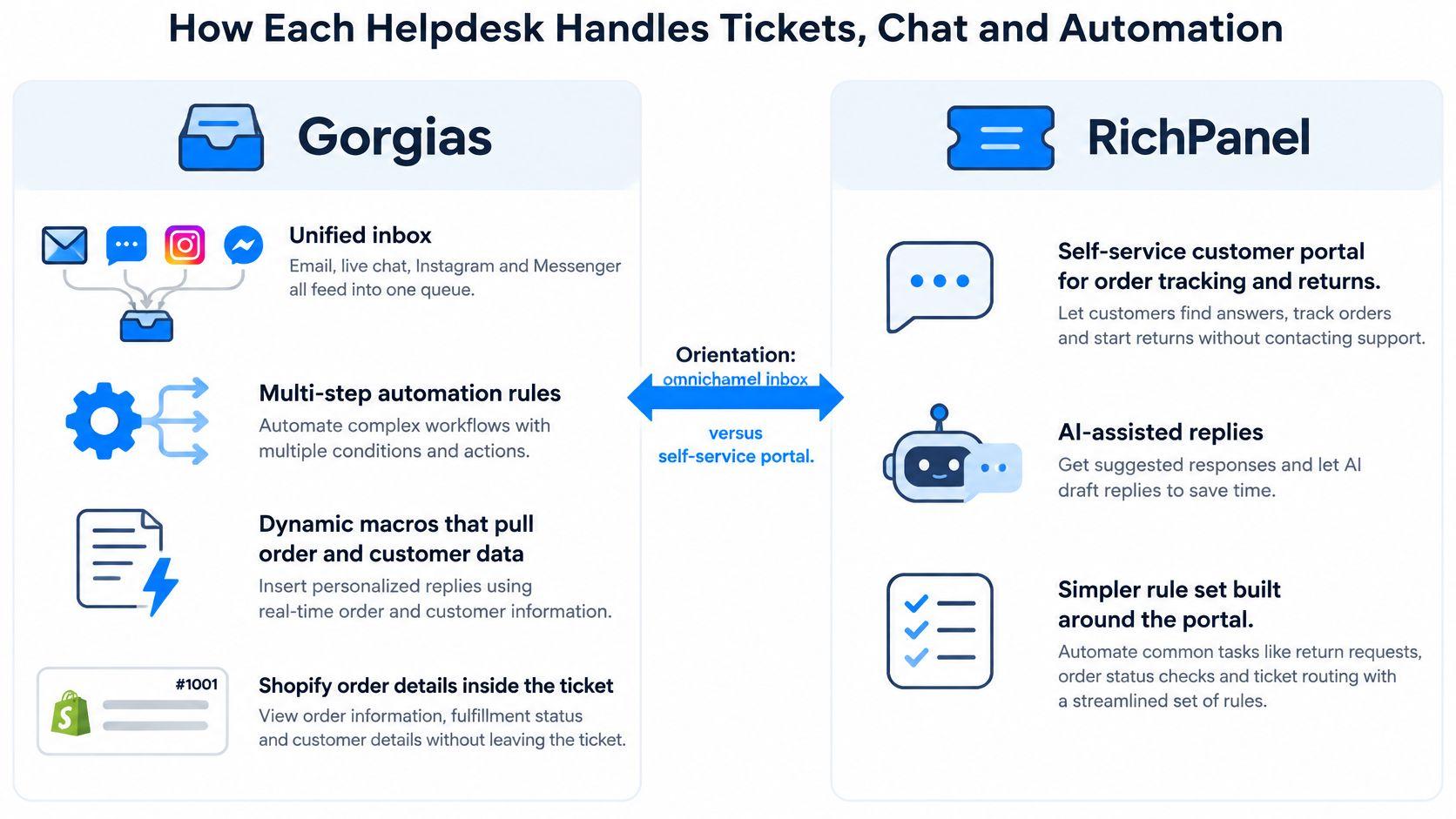
The orientation row is a daily workflow, not a slogan. Agents either live in one queue with rules, or they inherit only what the portal could not close.
Gorgias as a configurable inbox
Gorgias pulls email, live chat, Instagram, and Messenger into one queue. Rules can branch across steps. Dynamic macros insert order and customer fields, and conditional logic changes the reply when the order is unfulfilled, partially shipped, or already refunded. Dashboards track ticket volume, response time, resolution time, and CSAT, so a lead can see whether a new macro helped or just moved the backlog.
Native Shopify actions let an agent edit the order, issue a refund, or change an address inside the ticket. The agent does not open a second admin tab for the routine case. That depth matters when the ticket is an exception, not a status check. Stores that also compare helpdesks with a general support suite can use a Gorgias vs Zendesk walkthrough for the routing differences. The Shopify action set is the part that usually decides the ecommerce shortlist.
Say a fashion store gets "I ordered a medium, the bust is tight, I want the large." A macro can check the variant, offer the exchange, apply the policy window, and write the steps. Conditional logic skips the exchange path if the item is final sale. The agent confirms and the Shopify action updates the order. The manual work left is the judgment call, not the data lookup.
Richpanel as deflection before the ticket
Richpanel centers on a self-service path. Shoppers track an order, start a return, or read an FAQ before a ticket is created. Deflection is the product. Volume that never enters the queue does not need a macro, a seat minute, or an AI reply.
Say a home goods store sees a wave of "I need a return label for the lamp." The shopper opens the portal, sees the order, starts the return, and gets the label. No agent touches it unless the lamp arrived damaged and the policy needs a photo review. The inbox stays for exceptions. The founder stops spending mornings on tracking links.
What reviewers actually signal
G2's comparison reports Richpanel at 9.2 versus Gorgias at 8.8 for ease of setup, and 9.6 versus 9.1 for quality of support. The same comparison records more Gorgias reviewer mentions for integrations, features, automation, and macros, and some complaints about a learning curve, reporting limits, and ticketing issues.
These are aggregate review signals, not a controlled test. They do not match sample size, merchant size, theme, ticket volume, or how long each team had been live. A higher setup score can mean a faster first week. It does not prove faster resolution at month three.
A clean setup score lowers onboarding risk. It does not tell you which intents your team will still handle by hand.
Map your top five intents to the workflow that removes the most manual steps. If four of the five are status, tracking, and returns, the portal path wins even if the inbox looks thinner. If four of the five need routing, app data, and an order edit, the macro path wins even if week one feels slower.
What You Actually Pay at Your Conversation Volume
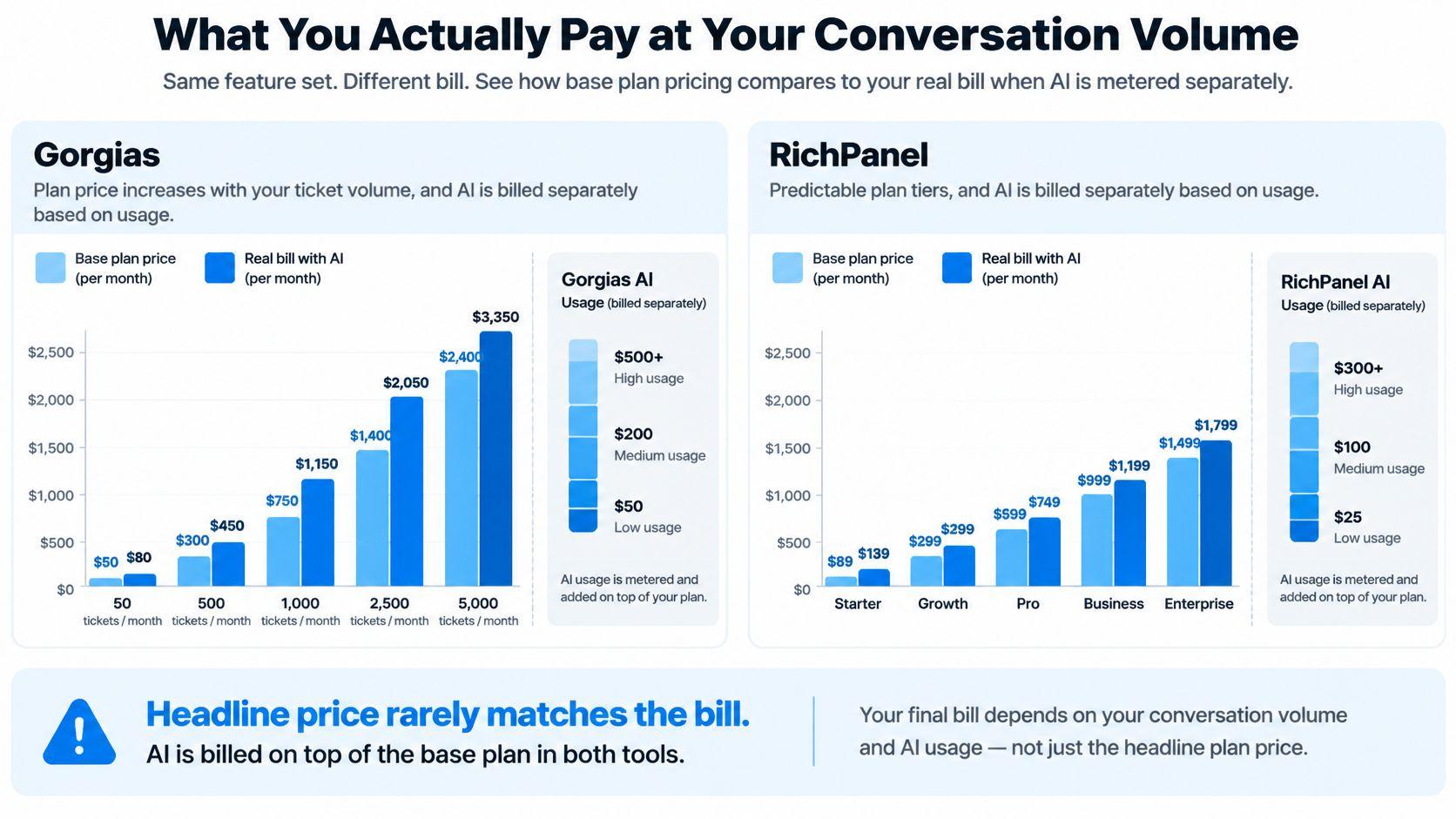
Headline price rarely matches the bill. Both tools meter AI apart from the base plan, so a quiet month and a launch month are different products.
Gorgias ticket tiers, from its own listing
Gorgias prices the helpdesk by monthly ticket volume, not by agent. The Shopify App Store listing shows plans ranging from 50 to 5,000 tickets per month, with extra tickets above the allowance. The Starter tier is $10 per month with 50 tickets included, a $0.40 charge for each additional ticket, three customer support agents, live chat, and a 7-day free trial.
Forecasting is the whole comparison. A founder at 40 tickets sits inside Starter. The same store at 180 tickets in a product drop pays the base plus 130 extras at $0.40, which is $52 on top of $10 before any AI line. Seats are not the lever on this plan. Volume is.
A fuller walkthrough of tier math sits in this Gorgias pricing breakdown. Use it to map your last 90 days onto an allowance before you assume Starter is the bill.
The separate AI meter
Gorgias product information says plans include between 30 and 530 automated interactions per month, depending on the plan. Additional automated interactions cost $1.50 each. The listed rate is $1.00 per interaction with monthly billing or $0.90 with annual billing. An AI interaction counts as billable only when the AI resolves the conversation without human intervention.
That last rule changes the spreadsheet. A draft the agent rewrites is not the same line item as a conversation the AI closes alone. You pay the higher outcome rate for completed automation, not for every suggestion. If humans still edit most replies, the AI meter stays small and labor stays large. If the AI closes hundreds of tickets, the meter becomes the dominant line even when the ticket tier looked affordable.
What cannot be quoted for Richpanel
Richpanel combines helpdesk seats with AI usage or credits. Its exact plan price, plan name, seat allowance, conversation quota, and AI billing rule are not stated here, because those figures were not available from Richpanel's own pricing page. Third-party writeups are not a substitute. Model Richpanel only after you export a quote from the vendor for your seat count and your AI volume.
Three volume scenarios
| Scenario | Dominant cost driver | Gorgias mechanic to watch | What to calculate |
|---|---|---|---|
| Founder-led, low volume | Base ticket tier | Starter $10/mo, 50 tickets, $0.40 per extra ticket | Cost per resolved ticket at your monthly count |
| Growing omnichannel DTC | Ticket overages plus channel mix | Ticket allowance vs added social and SMS volume | Effective cost per outcome across channels |
| High-volume AI-assisted | AI interaction meter | 30 to 530 included, $0.90 to $1.50 per extra resolved interaction | Cost per AI-resolved conversation plus human fallback |
Compute cost per resolved outcome, not cost per seat. Add the plan, ticket overages, AI overages, and the labor minutes still spent on edits, repeat contacts, and wrong refunds. Divide by conversations that ended correctly.
A low-volume founder should watch the 50-ticket wall, because one campaign can flip a $10 plan into overage territory. A growing brand should watch social and chat volume eating the allowance while email still looks "fine." A high-volume brand should watch the AI meter, because a successful automation rate is also a larger invoice. The cheap plan is the one whose lever matches the month you have.
Why Automation Rates Do Not Tell You Which Is Better
A higher automation percentage is not a better platform. Independent benchmark data shows Gorgias, Zendesk, and Re:amaze reaching broadly similar automation levels, 71% to 73% in one 2026 benchmark, according to Yuma's CX automation benchmark. When three products land in the same band, the percentage stops being a tie-breaker.
Reply, deflection, and a finished job
Most comparison pages count an AI reply, a deflection, and a completed outcome as if they were the same event. They are not.
- An AI reply is a message sent. It can be right, vague, or confidently wrong.
- A deflection is a contact that never reached an agent. The shopper may have given up.
- A completed outcome is a correct refund, cancellation, address change, or return, done once, with no human fixing it later.
Answering a question is not the same as producing a commercially correct outcome.
The question that matters is what share of automated conversations are accurate, policy-compliant, and finished without a later correction. Ticket-touch rate hides that. A bot can touch 80% of threads and still create refunds, repeat contacts, and bad reviews on the 20% it mishandles.
Where a wrong answer costs more than a ticket
Fashion, beauty, and wellness shoppers ask about fit, ingredients, compatibility, shipping deadlines, and returns before they pay. A wrong size suggestion does not "save" a ticket. It creates a return, or it kills the order. A wrong ingredient claim is a trust problem, not a deflection win. Post-purchase automation can absorb a bad status reply with a second email. Pre-purchase automation often gets one chance.
That is why a storefront assistant and a helpdesk should not be scored on the same percentage. One is trying to resolve a ticket. The other is trying to help someone buy the right product. Optimizing both for "percent automated" pushes the selling conversation into a tool built to close support work.
A controlled test you can run
Run the same historical conversations through both systems. Do not trust a demo inbox.
- Pull a set of identical historical conversations, tagged by intent.
- Run both systems against that set with your real policies loaded.
- Record answer correctness and policy-grounding rate by intent.
- Log escalation rate and error rate, including answers a human had to undo.
- Measure median first-response latency and time to resolution.
- Validate on a slice of live traffic, then track refunds, repeat contacts, and whether the shopper bought.
Keep the sample boring and representative. Include final-sale items, split shipments, and "this ingredient with that routine" questions. A perfect score on "where is my order" will flatter whichever tool has a portal, and it will tell you nothing about the intents that lose money.
If one tool automates fewer threads but almost never needs a correction, it is the better operations choice. The benchmark band already says the raw percentage will not separate serious helpdesks. Your error log will.
Which Tool Fits Your Store Size and Vertical
No tool wins across every store. Fit depends on where conversations cluster, how much exception handling the team can absorb, and whether the expensive conversation happens before checkout or after. A helpdesk is built around tickets that already exist. A storefront assistant works on the questions that decide whether a ticket ever becomes an order.
When Gorgias is the stronger fit
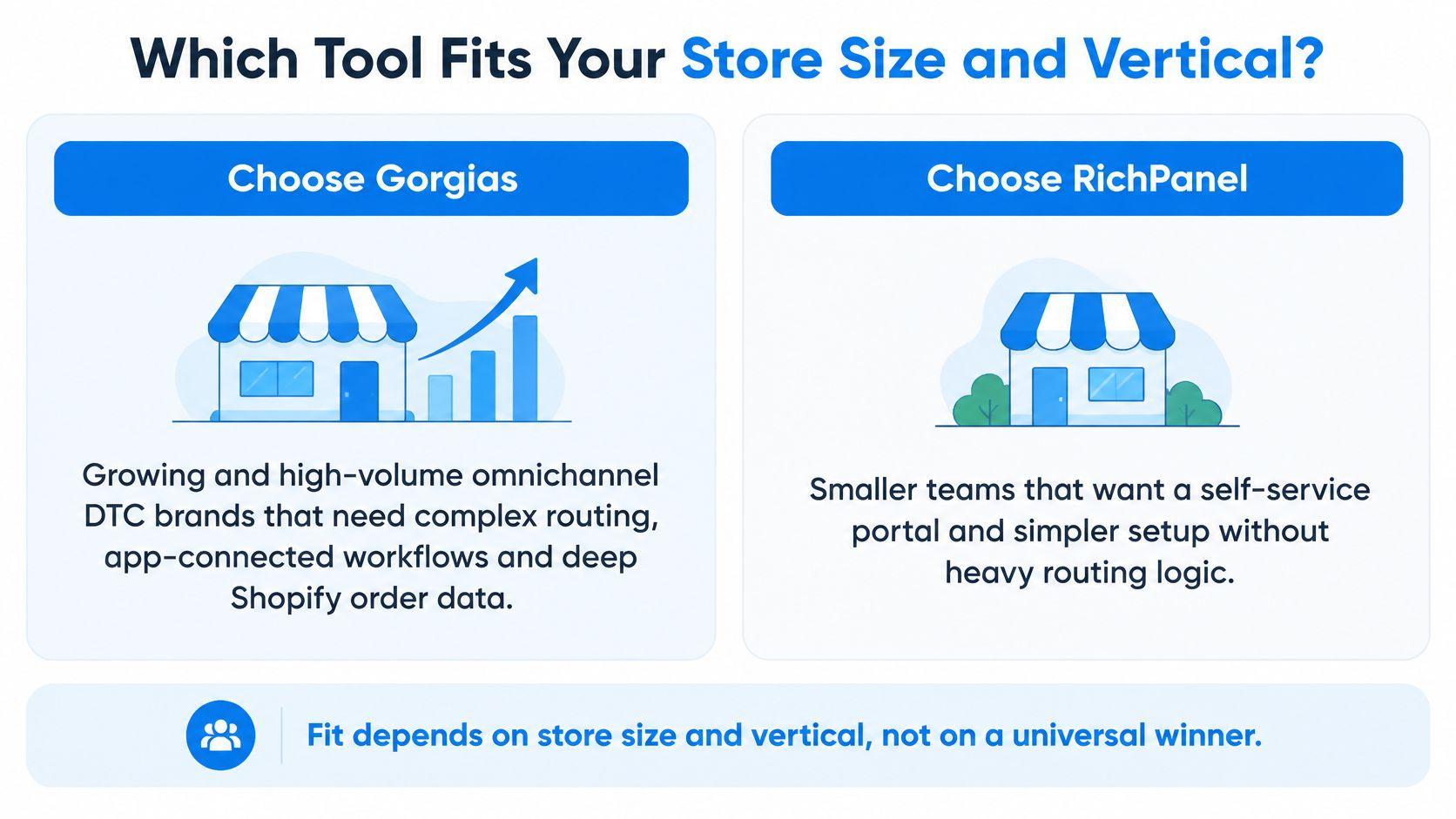
Choose Gorgias for a growing or high-volume omnichannel brand that needs complex routing, app-connected workflows, and deep order actions. The longer operating history is part of the bet. Gorgias's about page traces a Paris founding in 2015. By its 2022 Series C, the company reported more than 10,000 stores. That scale matters less as a status signal than as evidence that the product has been used across enough ticket shapes, integrations, and merchant workflows to expose weak spots.
That history does not make every workflow better. It does mean more stores have already tested the macros, the Shopify actions, and the ticket logic under real volume. If your team lives in exceptions, that installed base is a practical advantage. Gorgias is the safer choice when the queue includes order edits, split shipments, VIP routing, marketplace messages, and support flows that need to connect to other apps. The cost is configuration overhead. A store with a narrow queue may pay for routing depth it never uses.
When Richpanel is the stronger fit
Choose Richpanel for a smaller Shopify-native store whose volume is order status, tracking, and returns. It was founded in 2020, about five years later than Gorgias. Its public footprint is smaller, which is consistent with the product's tighter focus on a Shopify-native support model.
For a founder, that trade can still be the right one. Easier setup and a portal that absorbs WISMO and returns remove hours a two-person team does not have. You do not need the largest ecosystem if five intents are 80% of the queue. Richpanel fits best when support work is repetitive, the team is small, and the main goal is to keep routine tickets out of the inbox. It becomes less compelling when the brand needs layered routing, many app-connected workflows, or support operations spread across channels and regions.
The pre-purchase gap neither inbox was built to close
Both tools are support-first. They are built for tickets that exist after someone needs help with an order. Neither is designed to sell on the storefront before checkout. Fashion, beauty, home, and wellness stores lose revenue on sizing, fit, ingredients, and "which one should I buy" questions, and those questions often never become tickets.
Carti is an AI shopping assistant for Shopify that answers those pre-purchase questions and recommends products. Plans are Free at 50 AI conversations a month, Starter at $49 for 250, Growth at $99 for 600, and Scale at $249 for 1,750, with a 14-day free trial on paid plans. It can sit beside a helpdesk. Escalations integrate with Gorgias, and the Settings page includes a Test Connection button so API credentials can be checked before go-live. The helpdesk keeps post-purchase work. The assistant handles the questions that decide the cart.
That split changes the cost math. A helpdesk plan looks expensive or cheap based on agents, tickets, and automations. A storefront assistant should be judged against the conversations where shoppers are still deciding. Corinthian's Corner saw shoppers who engaged with Carti convert at 3.5 times the rate of shoppers who did not engage, and a Carti case study reported a 3.5× conversion lift. The same case study recorded human escalations down 18% and $3,480 in revenue directly attributed to Carti conversations over 30 days, from March 21 to April 20, 2026. Attributed revenue rose 34% period over period during that span.
Those figures do not turn Carti into a helpdesk replacement. They show why pre-purchase assistance deserves its own line in the budget. If your highest-value questions happen before checkout, a helpdesk-only comparison will understate the full cost of unanswered product questions. If your highest-value work happens after checkout, the stronger helpdesk is still the first purchase to get right.
How to Migrate Between Helpdesks Without Losing Data
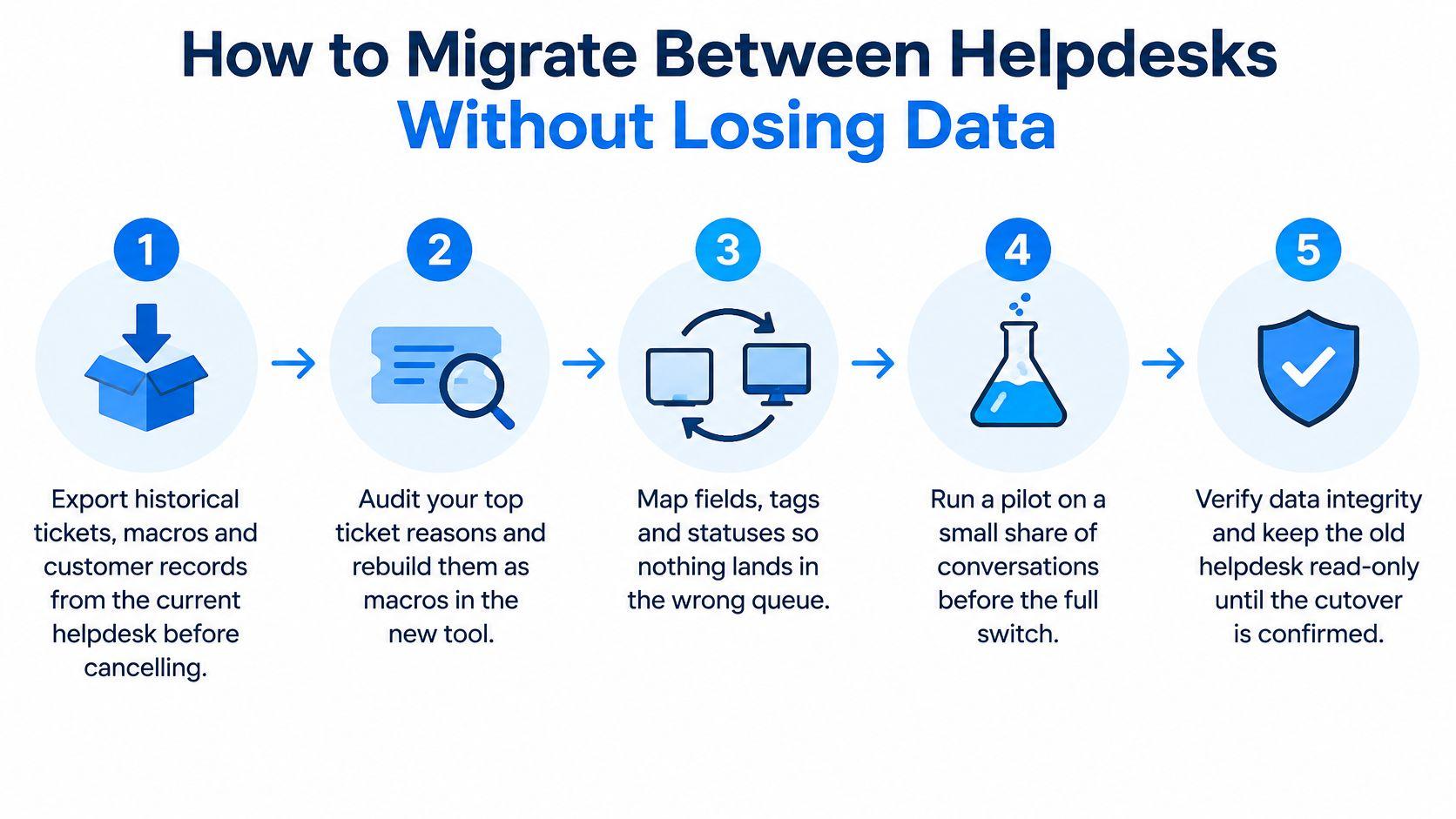
Switching in either direction fails the same way. Macros vanish, channels point at a dead inbox, and two bills overlap while nobody owns the cutover. The practical risk is rarely the export file itself. It is losing the operating logic that made the old queue predictable.
- Export historical tickets, macros, and customer records before you cancel. The export is your only rollback once the old subscription ends. Store it somewhere the new vendor cannot overwrite.
- Audit the top intents and tag each one as order self-service or complex routing. Rebuild only what still earns its steps. A bloated macro library is how the learning curve comes back on day two.
- Connect the new platform to Shopify and run a test order through every native action you rely on. Confirm refunds, address changes, and cancellations land in Shopify, not only in the ticket note.
- Rebuild rules and macros, and map conditional logic by hand. Rule syntax does not transfer cleanly, and a pasted condition that "almost" matches will mis-route VIP or final-sale orders. This is the step where teams lose the logic they thought they had exported.
- Reconnect email, chat, Instagram, and Messenger, then send a test message on each. Routing that worked in the old tool is not inherited. A channel left on the old address becomes a silent queue.
- Run both systems in parallel on live traffic for a short overlap and compare resolution accuracy on the same intents. Expect double billing during that window, and put an end date on the old plan before the overlap starts. Teams comparing a wider set of inboxes can use a Zendesk alternative checklist for the same parallel-test habit.
- Cut over forwarding only after the parallel test passes, then keep the old export archived. Do not delete the archive when the first quiet day feels like success.
Treat the overlap as a controlled cost, not a temporary mess. Give both platforms the same intent set, then compare where each ticket lands, whether Shopify actions complete, and how many cases need human correction. That comparison matters more than a clean-looking import. It shows which workflows are reliable enough to carry into the new billing cycle.
If you add a storefront assistant at the same time, decide the escalation path before go-live. Escalation can be turned off, sent by email to a support address you specify, or set to create tickets in Gorgias. Carti also integrates with Zendesk for escalations. Use the Test Connection button in Settings to verify the API credentials, and re-point that destination in the same pass as the channel cutover. A missed escalation address sends pre-purchase questions to a mailbox nobody watches.
Readiness check: you can name the five intents, show one successful test order action, and point every channel plus every escalation at the new queue.
Pick the Right Tool for Your Store
Choose Gorgias if you run a growing or high-volume omnichannel brand, you need deep Shopify order actions and configurable routing, and you can forecast ticket volume so overages do not surprise you.
Choose Richpanel if you are a smaller Shopify-native store, most tickets are order status, tracking, and returns, and you would rather deflect that work than staff a macro system.
If the leak is pre-purchase questions that never become tickets, add a storefront shopping assistant instead of forcing a helpdesk to sell. Carti is an AI shopping assistant for Shopify with a Free plan of 50 AI conversations a month and paid plans from $49. Try the Live Demo or the free plan before you commit a helpdesk tier to a job it was not built for.
Run the controlled test on your own historical conversations, and model cost per resolved outcome at your real volume, before you sign. Re-check each vendor's pricing page before you subscribe, because tiers move.
Carti answers pre-purchase questions on a Shopify storefront, including sizing, shipping, returns, and product comparisons, and it recommends products from the live catalog while Gorgias or Richpanel keeps the post-purchase queue. That split is the practical way to stop scoring a selling conversation like a ticket. Visit Carti to try the Live Demo or start on the free plan.

Written by
Daniel AndersonFounder of Carti. 10+ years building ecommerce brands in apparel and supplements. Still runs a Shopify store and built Carti to help merchants convert more browsers into buyers.