
Is the store choosing a better support inbox, or buying a ticketing system for questions shoppers need answered before checkout? That distinction matters more than a long feature checklist in a Gorgias vs Zendesk comparison.
For a live Shopify store, the decision should start with actual order work, monthly ticket volume and the people maintaining integrations. A platform that looks feature-rich in a demo can still be the wrong purchase if agents spend their shifts copying order details between tabs.
Gorgias vs Zendesk at a Glance
Gorgias is the more natural starting point for Shopify order support. Zendesk is the stronger candidate for broader, more complex service operations. Neither wins by having more features.
Gorgias was founded in Paris in 2015, and its corporate materials report more than 10,000 customers and more than 400 employees by 2022, according to its company history. These are company-reported milestones, not independently audited market-share figures.
Zendesk went public in 2014 and passed a $500 million annual revenue run rate by April 2018, according to its enterprise expansion announcement. That history establishes enterprise scale, not automatic suitability for an individual Shopify merchant.
Gorgias and Zendesk compared on core criteria
| Criteria | Gorgias | Zendesk |
|---|---|---|
| Built for | Ecommerce support, Shopify-first | Broad enterprise customer service across industries |
| Pricing model | Monthly ticket volume | Agent seats and automated resolutions determined by plan |
| Native Shopify data | Reads and writes order data inside tickets | Comparable commerce actions generally need marketplace apps or added integration work |
| Automation and AI | AI Agent available across plans | Automated resolution allowances determined by plan and agent count |
| Ecommerce integrations | More than 100 reported in the eesel migration guide | Broader general-purpose ecosystem |
| Channels | Email, chat, social, help center and Shopify | Broader options including voice, community forums and skills-based routing |
| Reported scale | Ecommerce-focused customer base | Established enterprise revenue scale |
How to read the comparison
A favorable row isn't a purchase recommendation. Voice support has little value to a store that doesn't operate a phone queue, while native order actions matter considerably when agents handle cancellation and address-change requests throughout the day.
Likewise, a large integration marketplace isn't proof that the required workflow works without customization. The useful question is whether the chosen configuration lets an agent finish the store's actual work.
- Order-heavy support: Prioritize commerce context and permitted order actions.
- Complex service operations: Prioritize routing, reporting and channel requirements.
- Limited implementation capacity: Favor workflows the team can maintain without a developer.
Use the table as a filter. Give the most weight to the rows that describe existing operational problems, not hypothetical capabilities the store might someday need.
How Each Platform Handles Shopify Order Data
A refund request, cancellation, order edit or shipping-address change requires more than a well-written reply. An agent needs the correct order, permission to change it and confirmation that the change succeeded.
The central distinction is native commerce data access versus general-purpose ticketing extensibility. Gorgias's Zendesk comparison page describes Shopify read-and-write access, including order history, refunds, cancellations, order edits and shipping-related changes inside the ticket workflow. It positions comparable Zendesk workflows as requiring marketplace applications or additional integration work, a claim merchants should treat as the competing vendor's assessment.
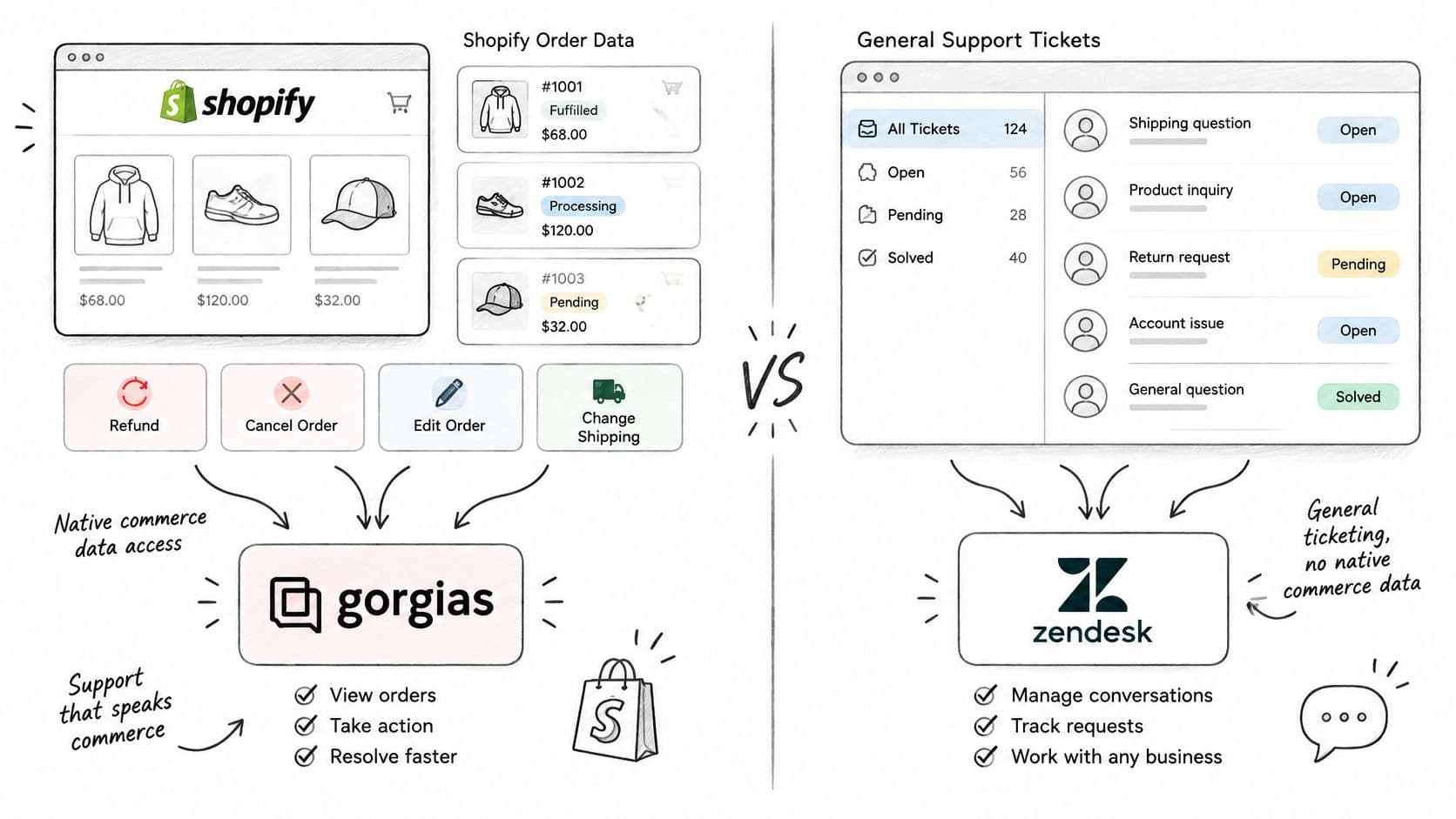
Test the action, not the sidebar
Say a customer requests an address change before fulfillment. A useful demo should show the agent identifying the order, checking fulfillment eligibility, applying the change and confirming the result.
A sidebar displaying an address doesn't prove that the helpdesk can update it. Similarly, an available refund button doesn't establish which refund conditions, permissions or exceptions the implementation supports.
The evaluation should follow a short operational check:
- List the five most common post-purchase requests. Use ticket categories rather than whichever examples the salesperson chooses.
- Count the tools required to finish each request. Include Shopify admin, returns software and subscription management.
- Record every API-dependent step. Identify which app performs it, who maintains it and how an agent recognizes a failure.
Automated actions require configuration and approval. Refund authority, cancellation eligibility and escalation rules should reflect store policy rather than whatever a default workflow permits.
Separate customer guidance from order execution
A clear help article can explain a returns policy, but it can't replace a successful order update. For Zendesk teams documenting customer-facing procedures, Tutorial AI's guide to add Zendesk videos with Tutorial AI can help with the instructional layer. The underlying transaction still needs its own tested integration.
Practical rule: Measure context switches and successful write actions, not the number of logos on an integrations page.
Gorgias favors lower-friction ecommerce work. Zendesk becomes more attractive when the store needs to customize service processes beyond order handling and has someone accountable for that configuration.
Pricing and Total Cost of Ownership
Gorgias plans and Zendesk pricing references
| Plan | Monthly price (billed monthly) | Tickets included | Source |
|---|---|---|---|
| Gorgias Starter | $40 | 50 tickets | Gorgias official pricing |
| Gorgias Basic | $90 | 300 tickets | Gorgias official pricing |
| Gorgias Pro | $550 | 2,000 tickets | Gorgias official pricing |
| Gorgias Advanced | $1,430 | 5,000 tickets | Gorgias official pricing |
| Zendesk plans | Select configuration on the official pricing page | Automated resolutions vary by plan and agent count | Zendesk official pricing |
The Gorgias figures above are monthly-billed prices from its official pricing page, which also lists an API limit of 2 requests per second across plans. Its primary helpdesk pricing unit is monthly ticket volume rather than agent seats.
Zendesk's pricing page states that automated resolution quantities depend on the selected plan and agent count. No Zendesk subscription price is quoted here because a useful comparison requires the actual seat configuration and automation allowance, not an isolated entry price.
Model the whole workload
Consider a hypothetical store with 500 monthly conversations and two agents, requiring Shopify order context, Instagram and Facebook messages, automation and human escalation. Those are scenario inputs, not a benchmark for how much work an agent should handle.
The merchant shouldn't automatically treat every conversation as a billable ticket or an automated resolution. Each vendor's counting rules need to be applied before selecting a tier.
Ask each vendor these questions:
- What triggers an AI charge? Establish whether billing follows a resolution, conversation or another defined outcome.
- How are duplicate contacts counted? A shopper may email and send an Instagram message about the same order.
- What happens when automation fails? Confirm how the bill changes when a human completes the work.
- Which ecommerce components cost extra? For Zendesk, identify any paid connectors or add-ons required for the demonstrated workflow.
The same scenario should include a normal month and a peak trading period. An average can hide the month when both conversation volume and staffing increase.
Include implementation and administration
The Gorgias pricing breakdown can help merchants organize the ticket-volume side of the evaluation. The purchasing worksheet should also include migration, channel setup, reporting configuration, connector subscriptions and ongoing administrator time.
Bulk synchronization deserves its own technical assessment. A helpdesk can have adequate ticket capacity while a custom integration struggles to move historical records within the available API throughput.
Calculate cost per resolved conversation using the full operating cost, not subscription price alone. Track reopened cases separately so an inexpensive automated reply doesn't count as a successful resolution when the customer returns with the same problem.
A lower base price can become the more expensive option after missing channels, integration maintenance and reporting work are included. Conversely, an ecommerce-focused platform can still be unnecessary spending when the merchant mainly needs a lightweight storefront answer layer.
How to Move Your Support Stack Step by Step
A support migration should preserve ownership of customer requests, not merely transfer records. The team needs a clear answer to where each incoming message will land and who must act on it.
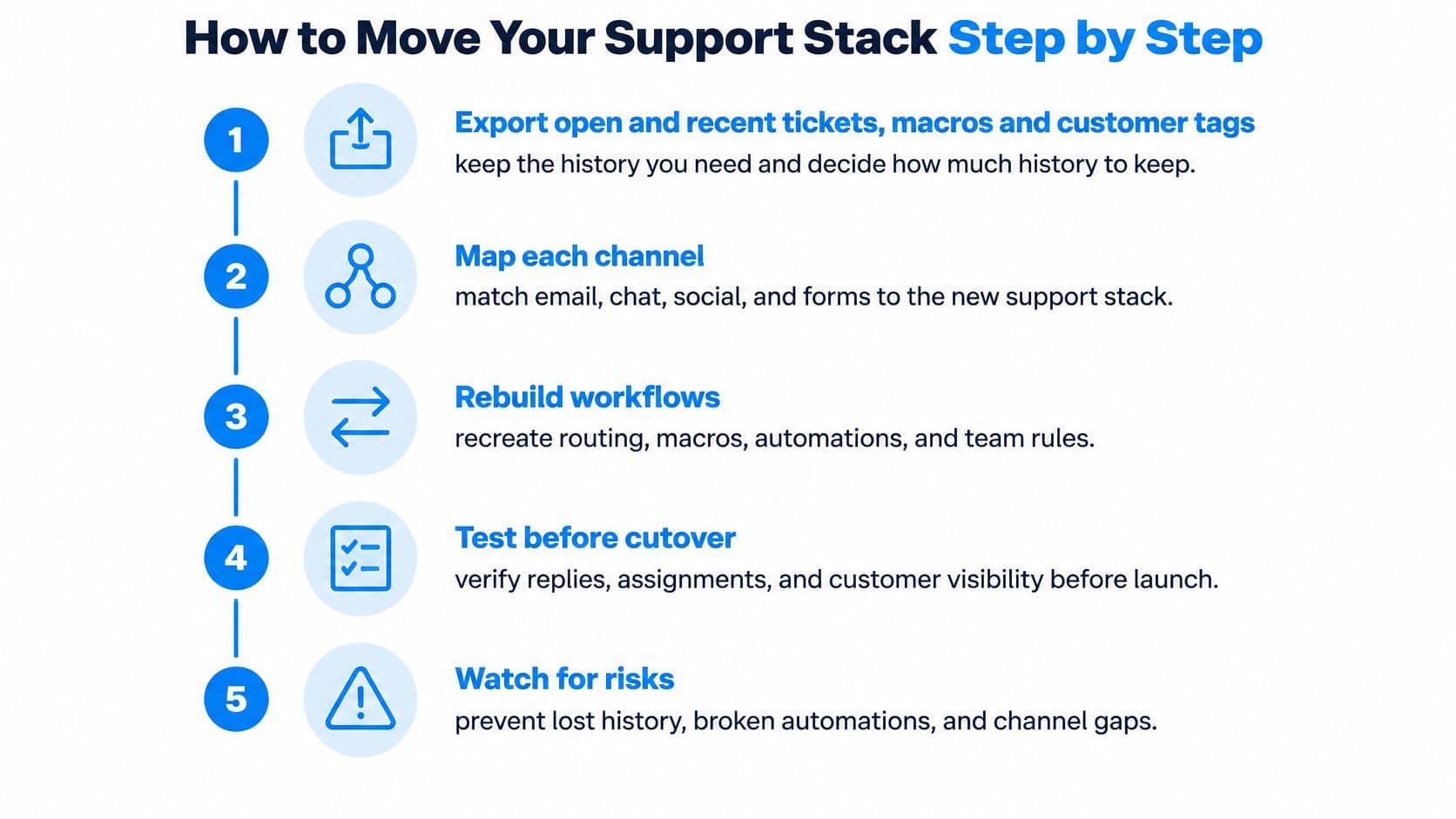
A controlled migration sequence
-
Export open and recent tickets, macros and customer tags. Decide which historical records agents genuinely need, then remove duplicate customer identities before import. Importing every record without checking identity matching creates confusing histories.
-
Map each channel to a destination. Give email, chat, Instagram, Facebook messages and forms an explicit inbox or view. The common slip is testing the main support address while overlooking a secondary social account.
-
Connect Shopify and test order context. Use a test ticket to verify order visibility, fulfillment status and the intended refund action, subject to the chosen integration and permissions. A successful connection isn't proof that every required action works.
-
Rebuild routing, macros and escalation paths. Assign a named owner to each workflow and remove outdated instructions instead of copying them blindly. Conflicting automations are harder to diagnose when nobody owns the rule.
-
Run a two-week parallel pilot. Route a controlled share of incoming email to the new helpdesk while keeping ownership explicit. Sending every message into both systems without assignment rules risks duplicate replies.
-
Switch the main support address after reconciliation. Compare incoming messages with created tickets before retiring the old inbox. Keep a rollback procedure available if a channel stops delivering messages.
Protect the cutover
Schedule large imports in batches and verify current API limits in the vendor's documentation before starting. Build retries and progress logging into any custom import so an interrupted job does not skip records or create duplicates.
Zendesk implementation effort follows the channels, marketplace apps and custom workflows selected. Request a written implementation estimate covering those components rather than accepting a generic setup promise.
A finished migration has a clear intake queue, relevant order context on matched order tickets and escalation rules a new agent can explain.
Anonymous shoppers won't always have a matchable order. Agents need a safe verification process for those cases, not an assumption that every ticket should automatically expose customer records.
Scale, Support and Enterprise Needs
Enterprise scale matters when a merchant needs enterprise workflows. It doesn't make a general-purpose platform better at a routine Shopify address change.
Gorgias's merchant-focused expansion and Zendesk's larger enterprise footprint point to different priorities. The practical question is which operational demands the store expects to add, not which vendor has the more impressive corporate history.
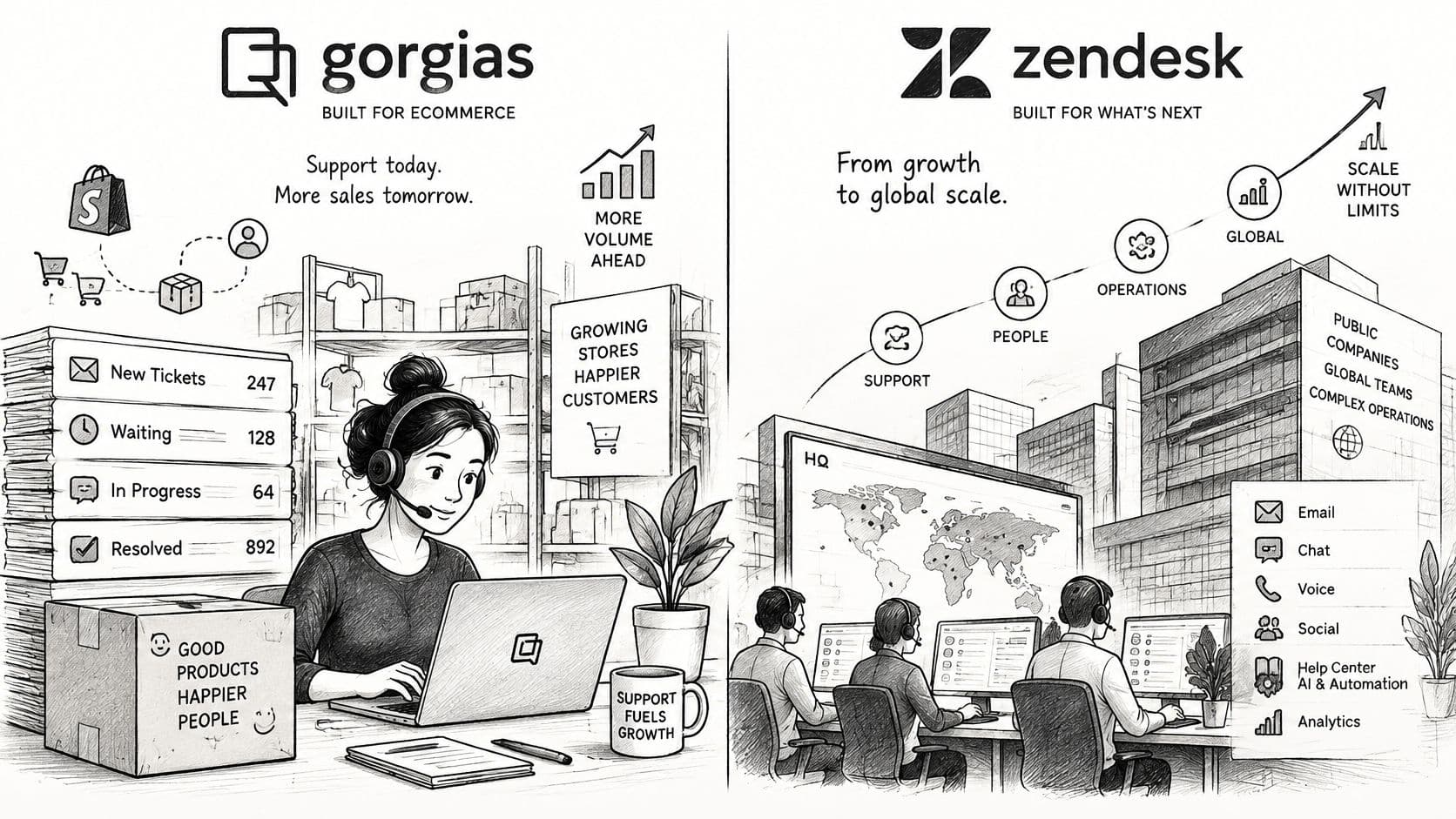
Define growth in operational terms
More orders don't necessarily require more complex routing. A store can grow substantially while still handling the same types of shipping, returns and product questions.
Complexity changes when separate brands use different policies, specialist agents handle different products, or managers need reports that combine channels and business units. Those requirements make Zendesk's broader service architecture more relevant.
An operations lead should document:
- Expected staffing: Include permanent agents, seasonal help and specialist teams.
- Language coverage: Identify which conversations need a fluent human rather than automated translation alone.
- Channel expansion: Distinguish a real phone-support requirement from a possible future experiment.
- Reporting ownership: Name the person who will define metrics and maintain dashboards.
- Brand separation: Specify whether teams share policies, permissions and escalation paths.
The multichannel contact center guide offers a useful planning lens for channel coordination. Adding channels without assigning staffing and ownership merely gives customers more ways to enter an unmanaged queue.
Match software investment to staffing
When hiring becomes the constraint, a resource to hire remote customer service representatives from Virtustant can support the staffing search. Before recruitment, the merchant should define required hours, Shopify permissions, product knowledge and escalation authority.
Software can't compensate for an agent who lacks permission to resolve the case. Equally, adding agents won't fix an integration that repeatedly fails to update an order.
Zendesk is worth serious consideration for teams needing voice, community forums, skills-based routing and more elaborate reporting. It's often the wrong tool for an ecommerce team buying that breadth without an administrator or a clear operational use for it.
Obtain written support terms from either vendor before committing. Clarify onboarding assistance, integration troubleshooting, issue escalation and the boundary between vendor support and third-party app support.
Pros and Cons of Each Helpdesk
The most useful pros and cons describe the work each platform makes easier, along with the responsibility the merchant takes on. Neither platform removes the need for policy ownership, access controls or integration testing.
Gorgias strengths and limits
- Strength, commerce-first execution: Agents can combine customer communication with Shopify order work rather than treating commerce as a separate project.
- Strength, volume-based purchasing: Merchants can evaluate costs against an established ticket history.
- Strength, ecommerce ecosystem: Its integration focus aligns with the surrounding retail stack.
- Limit, tier sensitivity: A promotional spike can change the appropriate purchasing tier.
- Limit, synchronization planning: Large imports and custom data flows need careful throughput management.
Zendesk strengths and limits
- Strength, broader service design: Voice, forums, routing and reporting can support operations that extend beyond consumer order questions.
- Strength, extensibility: A general-purpose ecosystem gives teams more ways to build specialized processes.
- Limit, commerce implementation: A merchant must validate the precise order actions available through the chosen apps.
- Limit, configuration cost: Seats, automation allowances and additional components must be evaluated together.
For merchants evaluating automation separately, Yellow.ai's resource to find software for automated customer resolution can help frame that buying category. Any shortlisted product should demonstrate a completed task and a usable human handoff, not just a plausible answer.
The dividing line is operational fit. Gorgias's specialization can reduce ecommerce setup work, while Zendesk's flexibility can justify additional configuration when the service operation requires it.
Which Helpdesk Fits Your Store
Shopify's 2025 merchant survey found that 75% of store owners use AI tools, yet fewer than one-third use AI specifically for customer service, according to its chatbot guide. That gap doesn't establish which helpdesk a merchant needs. It reinforces the importance of defining the job before buying automation.
Which starting point fits which store situation
| Store situation | Stronger starting point | Why |
|---|---|---|
| Mostly post-purchase tickets on one Shopify store | Gorgias | Native order actions keep agents inside the ticket |
| Multi-brand team needing voice, forums and skills-based routing | Zendesk | Broader omnichannel and reporting depth |
| Many pre-purchase sizing, shipping and fit questions | A storefront answer layer alongside any helpdesk | Buying uncertainty needs attention before checkout |
| Tight budget with unpredictable ticket spikes | Compare both on cost per resolved conversation | Volume tiers and automation quotas change the bill |
| Agency managing several client stores | Gorgias for ecommerce workflows, Zendesk for complex client processes | Workflow depth differs by client type |
Situational verdicts
A Shopify store dominated by post-purchase work should start with Gorgias. The decisive demo is whether an agent can complete the most common order requests with the appropriate permissions.
A multi-brand service team should investigate Zendesk. Its broader capabilities deserve the implementation effort when the team needs separate processes, specialist routing and more involved reporting.
A store with buying-question volume shouldn't assume either helpdesk is the first purchase. Helpdesks can handle pre-purchase conversations, but ticket management alone doesn't establish whether the implementation helps shoppers select a product.
A budget-constrained merchant should model normal and peak demand. Neither a low advertised starting price nor a generous-looking allowance proves the lower operating cost.
An agency should standardize the evaluation, not necessarily the vendor. Clients with similar storefronts can still have very different service processes.
The pre-checkout exception
A fashion shopper asking whether a garment fits hasn't necessarily created a support case. A beauty shopper comparing formulas, a home shopper checking dimensions and a wellness shopper asking about product suitability may need accurate guidance before an order exists.
The Zendesk alternatives guide can help broaden the shortlist when a full service platform doesn't match that need.
Before deciding, the merchant should distinguish:
- Support cases: Conversations requiring order investigation or operational action.
- Buying questions: Questions answerable from product information and store policies.
- Commercial measurement: Whether assisted conversations are connected to orders and revenue, not just reply speed.
The highest-value customer moment should decide the system, not the feature count.
Run a 90-Day Ticket Audit Before You Buy
A 90-day ticket audit provides the merchant with a defensible purchasing model. It also reveals whether the underlying issue is ticket handling, missing product information, or inadequate escalation.
Build the decision worksheet
-
Export 90 days of tickets. Include channel, customer identity, assigned agent, status and available order references. Remove spam and internal tests without removing difficult cases.
-
Tag the conversation purpose. Classify each as post-purchase, pre-purchase or escalation, with a secondary reason such as sizing, shipping, refund or damaged item. Keep reopened conversations identifiable.
-
Count monthly demand and staffing. Separate normal months from promotional periods and record which agents handle the work. Include managers who need operational access.
-
Price the actual configuration. Apply the vendors' current official pricing to those counts, including required channels, automation and connectors. Keep migration and administrator effort visible.
-
Verify required integrations. Check the vendor listings, then test the exact actions rather than accepting a logo as proof of compatibility. Record a named owner for every custom dependency.
Consider the storefront option separately
If pre-purchase questions dominate, Carti is an AI shopping assistant for Shopify that can answer product, sizing and shipping questions alongside a helpdesk. Its plans are Free with 50 AI conversations a month, Starter at $49 for 250, Growth at $99 for 600 and Scale at $249 for 1,750, with a 14-day free trial on paid plans.
Escalation can be disabled, sent to a specified support email address or configured to create tickets in Gorgias or Zendesk. The Settings page includes a Test Connection button to verify API credentials, and current plan details should be confirmed before subscribing.
The final selection should match the audit's cost and workflow requirements. A helpdesk earns its place when it helps the team resolve the actual queue, while a storefront assistant earns its place when shoppers need answers before joining that queue.
Carti offers Shopify storefront answers with escalation to Gorgias or Zendesk when human support is needed. Merchants can visit the site to compare its conversation allowances with their audit results and test the storefront experience before choosing a paid plan.

Written by
Daniel AndersonFounder of Carti. 10+ years building ecommerce brands in apparel and supplements. Still runs a Shopify store and built Carti to help merchants convert more browsers into buyers.