
Online apparel return rates can reach 75% for particular categories and brands, with overall rates of approximately 25% to 40%, according to fashion e-commerce fit research. A sizing reply isn't just customer service. It's a return-prevention decision that should explain what a shopper gains, and gives up, by choosing a particular size.
Why Unanswered Sizing Questions Cost You Sales
In Baymard's UX benchmark of 344 e-commerce sites, 84% of test participants used sizing information to determine their size. When shoppers couldn't find a size guide, some guessed or abandoned the purchase.
Say a shopper wants a fitted shirt but worries about tight shoulders. A reply that merely recommends medium leaves the important question unanswered: will that size allow comfortable movement?
Most sizing conversations fall into these groups:
- Size choice: The shopper needs help choosing between available sizes.
- Fit outcome: The shopper wants room in a particular area or prefers a fitted, standard, or relaxed silhouette.
- Availability: The shopper needs a specific size and color combination.
The generic instruction to order a usual size doesn't resolve any of those concerns. A familiar label doesn't establish how another brand's cut, fabric, or proportions will fit.
Treat sizing as purchase support
For merchants reviewing product-page friction, practical ecommerce CRO advice from Wistec provides useful context for evaluating sizing alongside the rest of the purchase journey. The operational fix starts with answering the uncertainty blocking the order, not making the size guide more prominent.
A reusable answer system needs a question-type table, a repeatable decision method, readable charts, adaptable replies, escalation rules, and a prelaunch test for the Carti sales assistant. Learning how to answer sizing questions on Shopify means building that system rather than accumulating disconnected replies.
Sizing Question Types and What Each Needs
Use this sizing question types and the answer each needs table to identify the evidence required before recommending anything.
| Question type | What to check or ask for | Answer format | Fallback when data is missing |
|---|---|---|---|
| Between two sizes | Height, chest or bust, waist and hips, where relevant to the chart | Recommend one size and name the second option with its trade-off | Measure a comparable garment, or suggest the larger size only when its proportions remain suitable |
| Close or relaxed fit | Preferred fit and a garment the shopper already owns that fits well | Recommend from garment measurements, not body measurements alone | Ask where the shopper wants extra room |
| Runs small or true to size | Size chart and fit notes first, then verified reviews | State the chart guidance, then a verified review pattern for the same variant | Say fit data isn't yet published and link the size guide |
| Fabric stretch | Fabric notes on the product page | State whether the fabric stretches or stays rigid and how that changes fit | Say stretch isn't listed and recommend the chart size provisionally |
| Size or color availability | Requested size and color | Confirm the exact variant and whether it can be selected | Offer the nearest available variant without implying equivalent fit |
| Extended or unusual sizes | Shopper measurements and the chart's size range | Confirm whether the chart covers that size | Hand the question to the store team |
Between sizes isn't a single decision
Choosing the larger size can relieve tight hips while creating loose shoulders or an oversized neckline. The useful answer names those consequences, rather than treating extra fabric as automatically safer.
Shopify's sizing-guide guidance supports publishing measurements and fit context. Apply that context to the shopper's priority: waist definition, hip room, layering, or length.
Stretch needs similar care. A fabric's ability to stretch doesn't establish whether a shopper will like the resulting tension or compression. Answers should describe the documented material behavior, not infer it from a product photograph.
When evidence is missing, state the gap and offer a next step. A missing fit note isn't permission to invent a true-to-size claim.
Build a Size Chart Shoppers Can Use
Build the chart as readable text, using these size chart fields and what each one prevents as the starting structure.
| Field | Body or garment | Question it prevents |
|---|---|---|
| Chest or bust | Body | Whether the shopper falls within the recommended body range |
| Garment chest, pit to pit | Garment | How much room the cut leaves |
| Waist | Body and garment, separately labeled | Whether the item fits close at the waist |
| Hips | Body | Fit through hips for pants and skirts |
| Length or inseam | Garment | Sleeve, hem and leg length questions |
| Model height and size worn | Model | How the garment sits on a real body |
Baymard reports that 82% of apparel sites don't provide sufficient sizing information. A chart needs more than labels. It should establish what was measured, how it was measured, and how the garment is intended to fit.
Make measurement instructions unambiguous
For body chest or bust measurements, instruct shoppers to pass a tape around the fullest part, keep it level, and avoid pulling it tight. For garment chest width, explain that the item lies flat and the measurement runs between the underarm seams.
For waist measurements, distinguish the body's natural waist from the garment's waistband position. A low-rise waistband measurement shouldn't be presented as a natural-waist measurement.
Publish centimeters and inches, and label every measurement as body, garment circumference, or flat garment width. A shopper comparing a bust circumference against a pit-to-pit width will otherwise reach the wrong conclusion.
Keep product copy and selectors aligned
Add model height and size worn as context, not as a substitute for measurements. Match chart labels to Shopify's variant labels exactly, so the chart never recommends a size that the selector names differently.
For product-page wording, test and improve Shopify product copy alongside the chart. Store-wide measuring instructions can follow a Shopify FAQ template, while product-specific dimensions stay attached to the relevant item.
After publishing, review a small batch of recent sizing questions and check whether the chart answers each one. Look for fewer repeated questions about the same measurement and fewer exchanges attributed to the same fit problem, rather than assuming publication alone solved it.
How to Answer a Sizing Question in Six Steps
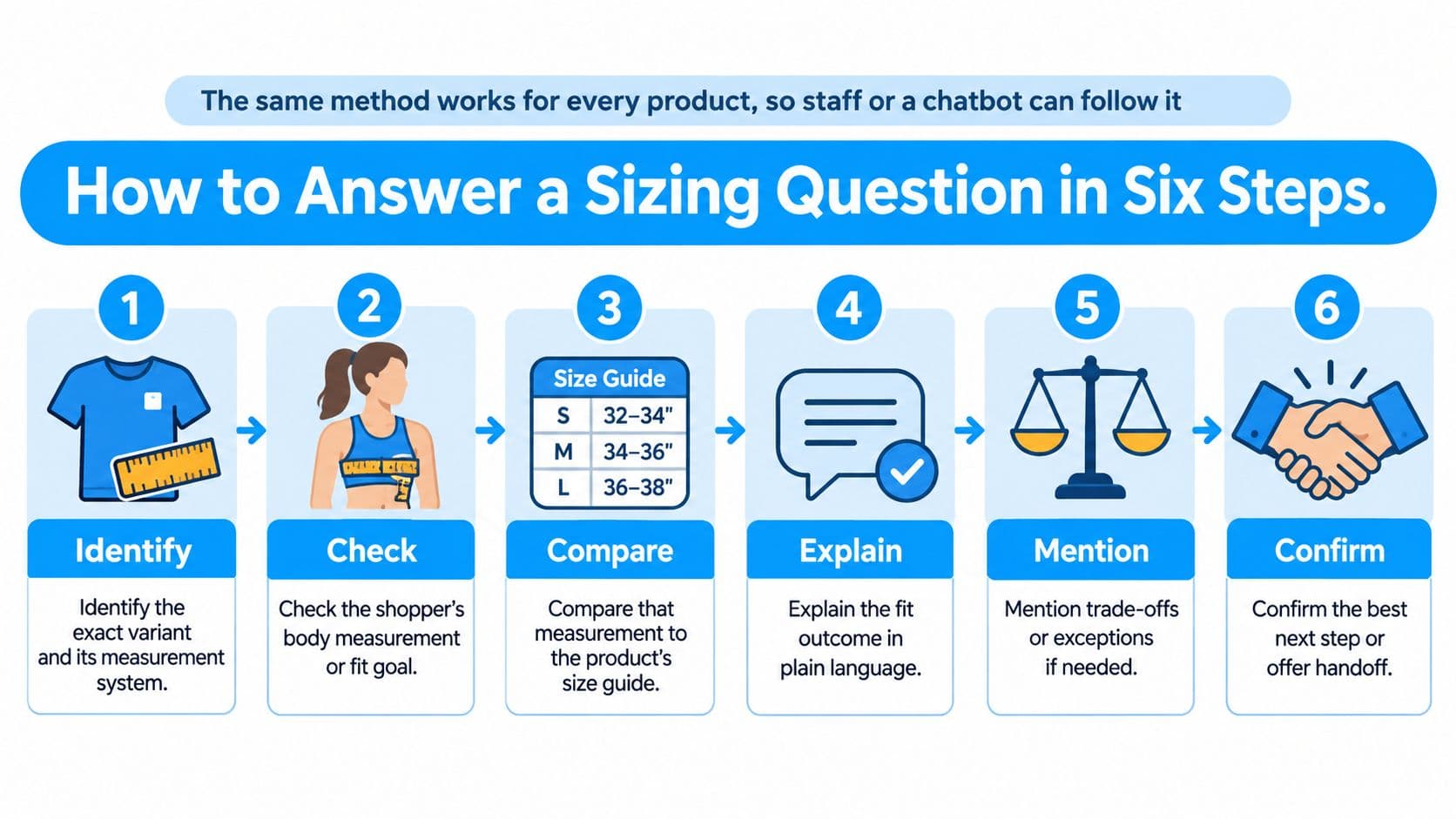
The same method works across products, so staff or a chatbot can follow a consistent decision path. The inputs change with the garment, but the answer should always connect evidence to a fit outcome.
-
Identify the exact variant and measurement system. Confirm the product, color, size labels, and units. Shopify treats each combination of product options as a separate variant, with variant-level inventory, pricing, and shipping settings, so availability must match the requested combination.
-
Retrieve the product's chart and fit notes. Use the chart attached to that item, including any notes about cut, fabric, and intended ease. A store-wide chart shouldn't override a product-specific exception.
-
Ask only for relevant measurements. Request chest or bust, waist, hips, height, or inseam only when those inputs help interpret the chart. For a skirt, asking about chest measurements adds work without improving the recommendation.
-
Compare each measurement separately. Record where the shopper falls for each relevant dimension. If the waist points toward M and the hips toward L, preserve that conflict instead of hiding it behind an average.
-
Resolve the conflict through fit priorities. Consider the limiting dimension, documented stretch, cut, and desired room. A rigid fitted garment needs a different recommendation from a loose stretch garment, even when the nominal labels match.
-
Recommend with a confidence qualifier and fallback. Explain what supports the choice and what remains uncertain. When the evidence is incomplete, offer a comparable-garment check or team handoff.
For a hypothetical slim style whose chart supports either option:
Based on your chest and waist measurements, the chart places you between M and L. Because this style is cut slim with little stretch, choose L for a relaxed fit. If you prefer a close fit, choose M.
Keep the recommendation conditional
That sample works only if M still accommodates the shopper's relevant measurements. It shouldn't justify recommending a physically unsuitable size merely because the shopper prefers a close fit.
The fit knowledge study in the Journal of Innovation & Knowledge provides context for using product-specific fit information. Avoid substituting weight or usual size for the measurements the chart requires.
When implementing automatic answers to Shopify customer questions, make these checks explicit. Common failures include retrieving a neighboring product's chart, confusing measurement units, and dropping a shopper's fit preference from the final answer.
Reply Templates for Common Sizing Questions
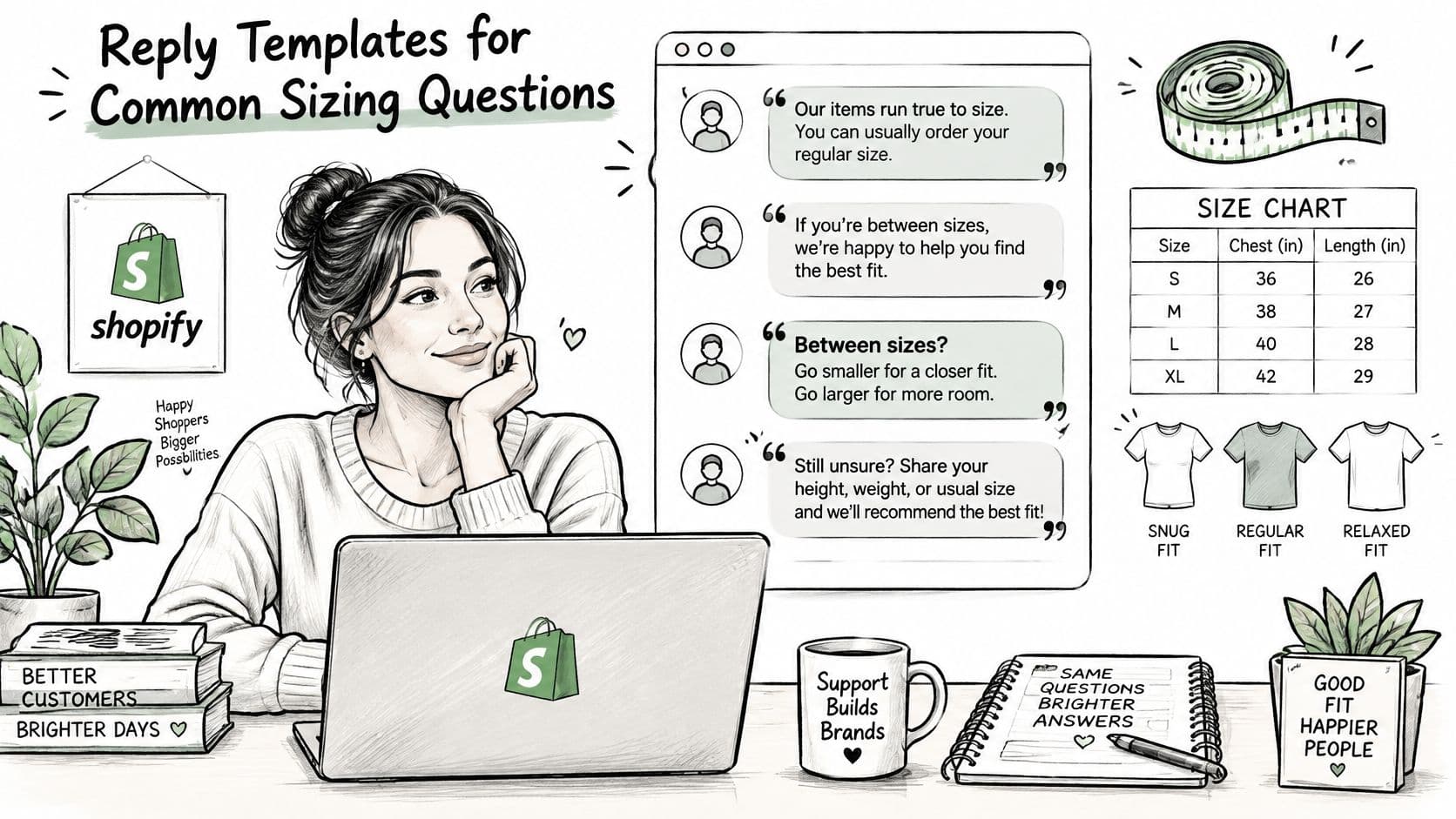
These templates work as conditional wording, not ready-made fit claims. Replace the bracketed fields and retain only statements supported by the item's chart and notes.
Between sizes
Use this when the chart supports adjacent options.
For [product name], [measurements] place you between [sizes]. The smaller option gives a closer waist fit. The larger option provides more hip room but leaves the waist looser. Which matters more, waist definition or hip room?
The question resolves a specific trade-off. It doesn't ask the shopper to repeat information already supplied.
Close or relaxed fit
Use this when the missing input is preference rather than body size.
The garment measurements for [product name] can help compare its shape with something that already fits well. Where would you like more room, through the chest or around the waist?
Once the shopper identifies the priority, compare that area with the garment they already own. Don't turn the conversation into an unnecessary full-body questionnaire.
Stretch fabric
Use this wording only when the fabric notes confirm stretch.
The fabric in [product name] stretches, so [sizes] offer different fit outcomes. The smaller option will feel closer, while the larger option leaves more room without relying as much on stretch. The size guide lists [measurements].
This answer explains material behavior without promising that stretch guarantees comfort.
No published measurements
Use this when product-level dimensions aren't available.
The brand hasn't published garment measurements for [product name], so a precise fit recommendation isn't available yet. The general size guide is at [link]. Could you measure a comparable garment that fits well so the store team can check it?
Don't suggest that measuring an existing garment resolves the issue without a product measurement to compare against.
Remove these phrases from saved replies:
- Unsupported shortcut: Order your usual size.
- Universal promise: It fits everyone.
- Unverifiable guarantee: Any claim of perfect fit unsupported by the chart.
The same wording can become knowledge-base answers. Keep sizing and questions about shipping separate so a combined conversation doesn't blur fit advice with delivery commitments.
Edge Cases, Returns and When to Hand Off
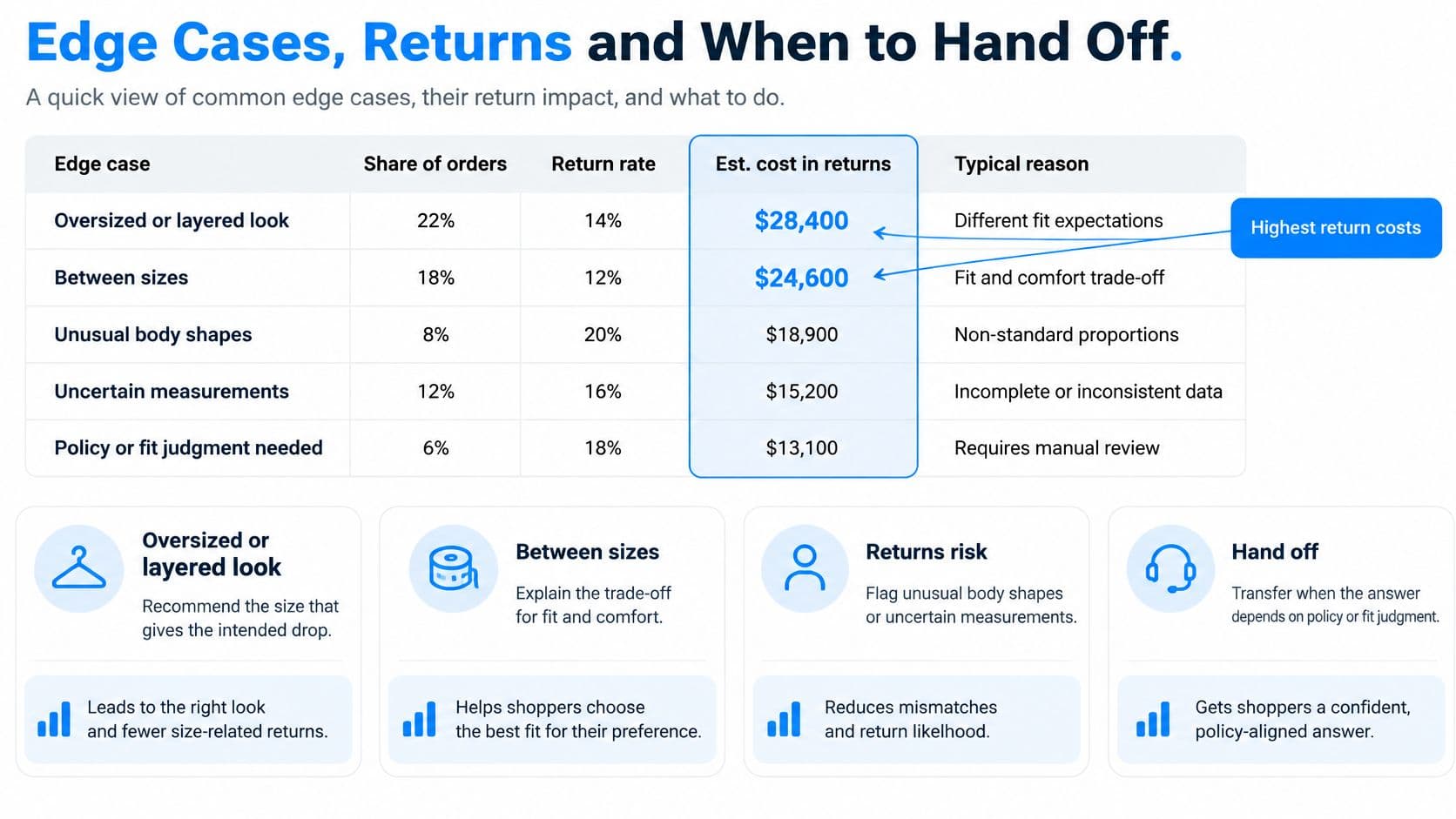
Assign each exception a response and an owner using this sizing edge cases, the response and the next action table.
| Edge case | What to say | Next action |
|---|---|---|
| Question about a size not in the chart | Say the chart doesn't cover that size yet | Hand the question to the store team |
| Product has no published measurements | Say the brand hasn't published measurements for this item | Suggest measuring a similar garment that fits well |
| Oversized or layered look | Recommend the size that gives the intended drop and name the effect on shoulders and sleeves | Confirm the shopper accepts the trade-off |
| Return reason says too small after a recommendation | Ask which area was tight and compare it with the chart | Log the reason and review the chart |
| Gift for someone else | Ask for the recipient's measurements or a garment they already wear | Share the size chart and fit notes |
Investigate the fit failure
Processing an ecommerce return cost an average of $21 to $46 in 2024, according to McKinsey research cited in a 2025 report by The Economic Times. That makes the return reason operationally useful, not just a label for issuing an exchange.
Say a customer returns trousers because the thighs felt tight, although the waist fit. The team should check whether the chart omitted the relevant garment measurement rather than merely recommending a larger waist size next time.
For oversized looks, explain the visible consequence before ordering. More layering room may also mean dropped shoulders, longer sleeves, or a lower hem. The shopper should accept that silhouette knowingly.
Route uncertainty to a named person
Hand off questions outside the chart, requests for unlisted sizes, and sensitive issues that require individual judgment. For example, a request about accommodating a medical device shouldn't become an improvised sizing guarantee.
When Carti can't confidently answer a shopper, it emails the store's team. Assign a named support lead to check those emails at opening and before closing, with cover during absences.
Keep the unresolved question, product, variant, missing field, and eventual answer together. NanoPIM's essential fields for catalog templates offer a useful reference for organizing the product information that these cases expose.
Give every exception an owner and a review date. A handoff is complete only when someone answers the shopper and decides whether the product record needs correcting.
Test Your Sizing Answers Before You Go Live
Don't enable live sizing advice until the assistant has correctly handled a test set covering every question type. Use at least ten sizing questions as a practical launch gate, not as proof of statistical accuracy.
Install and validate
-
Install and enable the embed. Install Carti from the Shopify App Store, then enable the Carti Sales Assistant app embed in the theme. To publish it on the storefront, toggle the Carti embed on in the theme editor's left sidebar and click Save, after completing the checks below.
-
Run shopper conversations in the Playground. The Playground uses Carti's current appearance, tone, knowledge base, and trigger settings. Test between-sizes requests, fit preferences, stretch questions, availability, extended sizes, and missing information.
-
Check answers against the selected variant. Verify the recommendation's chart, units, reasoning, and size-color combination. Include deliberately incomplete questions to confirm that the assistant asks for clarification rather than guessing.
-
Fill knowledge gaps. Add missing sizing FAQs and shopper questions to Carti's knowledge base. Each addition improves its answers, but the amended answer still needs a retest.
The storefront check should include the product recommendation and its purchase controls.
-
Inspect product cards and actions. Confirm that cards show both View Item and Add to Cart. Test Add to Cart and discount codes on the actual theme, since some custom themes need minor adjustments.
-
Schedule an ongoing review. Review the Insights Dashboard weekly for repeated sizing questions and drop-offs. Turn recurring uncertainty into specific chart or FAQ edits.
Measure outcomes, not conversation volume
Track recommendation acceptance, size exchanges, fit-related returns, and abandonment after sizing replies. Segment those checks by product and fit concern so an apparently acceptable store-wide result doesn't conceal a poorly documented item.
A size-finder study found a statistically positive association between tool use and returns. Engagement therefore shouldn't be treated as evidence that recommendations prevent returns.
Set a clear pass condition for each test answer: correct evidence, understandable trade-off, no unsupported certainty, and a workable next action. A confident answer built from missing measurements should fail.
Carti's monthly plan limits are Free, 50 AI conversations, Starter, 250, Growth, 600, and Scale, 1,750, with a 14-day free trial on paid plans. Select capacity after establishing that the underlying answers are useful.
Carti answers storefront sizing questions using a store's catalog, policies, and FAQs, with a Playground for testing shopper conversations before launch. Visit Carti to set up the assistant, add product-specific sizing guidance, and test whether its recommendations explain the fit trade-offs clearly.

Written by
Daniel AndersonFounder of Carti. 10+ years building ecommerce brands in apparel and supplements. Still runs a Shopify store and built Carti to help merchants convert more browsers into buyers.