
52% of consumers identified real customer reviews as the biggest factor in final purchase decisions, according to Bazaarvoice's 2025 survey of more than 8,000 consumers across six major markets. For Shopify merchants, those reviews are more than testimonials. They contain answers to the questions product descriptions often leave open.
Knowing how to use Judge.me reviews to answer product questions starts with a repeatable evidence check, not a summary of positive comments. Each published answer needs a mapped attribute, a scored review set, and a pass rule. That makes the workflow manageable for a support operator and safer to reuse in product FAQs or a chatbot.
Matching Review Evidence to Each Product Question
| Shopper question | Review attribute | What the reviews should mention | Minimum evidence before answering |
|---|---|---|---|
| Will it fit me? | Fit and sizing | Size usually worn, height or weight, and whether it ran true | 2 or 3 verified reviews that agree |
| Will it last? | Durability | Wear over weeks or months, seams, fading or pilling | 3 verified reviews from different buyers |
| Is it comfortable? | Comfort | Feel on skin, weight, stiffness or softness | 2 verified reviews with the same comment |
| Does the color match the photos? | Color accuracy | Comparisons of screen and real color, usually with photos | 2 reviews with photos |
| What is it made of? | Material quality | Fabric, finish, texture or thickness | 2 verified reviews |
| Is it right for my use? | Suitability | A named use case, skill level or setting | 2 verified reviews naming that use |
| Which model is better? | Product comparison | Reviews that name both products and compare them | 2 verified reviews naming both |
| How fast does it arrive? | Store experience, not product | Delivery time and packaging from store reviews | Store policy and store reviews, never product reviews |
These are recommended editorial thresholds, not Judge.me requirements or guarantees of accuracy. A useful starting exercise is applying the table to the five questions appearing most often in support emails.
The threshold governs whether a merchant can describe a customer pattern. It doesn't turn an opinion into a specification. Reviews can describe fabric as thick or soft, but the product catalog must establish its composition.
Match the evidence to the actual decision
A sizing comment without the size purchased has limited value for a variant-specific recommendation. Likewise, praise for a backpack's appearance doesn't establish whether its straps remain comfortable during a commute.
Comparison questions require particular restraint. Separate positive reviews for different products don't prove that either product is better. Without customers explicitly comparing both, the answer should compare documented specifications and explain which differences matter for the shopper's use.
Shopper behavior supports this question-led approach. A Pew Research Center survey published on December 19, 2016 found that 82% of U.S. adults read online customer ratings or reviews at least sometimes before buying an item for the first time, including 40% who always or almost always did so, as described on Judge.me's product reviews page.
A PowerReviews report based on nearly 16,000 U.S. consumers found that 92% look for answers from verified buyers, as summarized in Shopify's user-generated content guide. A useful answer therefore explains what buyers experienced, rather than rewriting promotional copy.
Evidence boundary: No matching review evidence means no customer-derived claim. The alternative is a documented product fact or a relevant follow-up question.
Delivery needs its own boundary. Judge.me distinguishes product reviews from store reviews, with the latter covering the buying experience, including service, delivery, packaging, and checkout. A delivery complaint shouldn't become evidence that an item performs poorly.
How to Pull, Verify and Tag Your Review Data
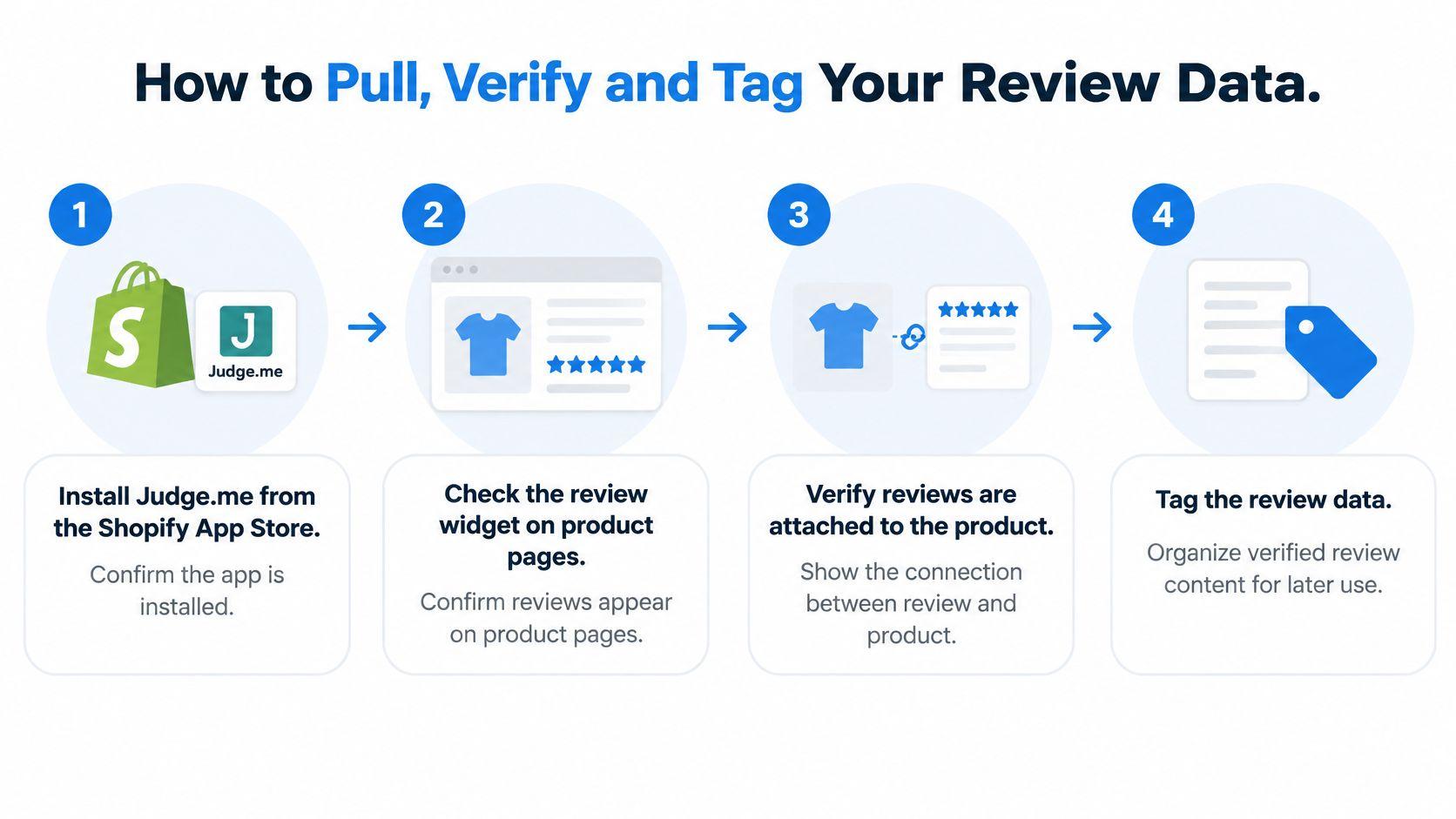
Start with the storefront setup. The Judge.me getting-started guide covers installing the app from the Shopify App Store, enabling the app embed, adding the Review Widget to the product template, and saving the theme changes.
A visible widget is a useful setup check, but it doesn't prove every imported review belongs to the correct item. Open representative product pages and compare the displayed comments with the products they describe.
Prepare an auditable working file
A spreadsheet is sufficient for an initial answer library. Keep the original review text alongside the product identifier, review identifier, verification status, variant evidence, date, and attribute tag.
-
Confirm imported product assignments. Check reviews brought in from another review app, a marketplace, or a CSV file against the current Shopify catalog. Similar product names and replaced listings deserve manual inspection.
-
Collect reviews for question-heavy products. Pull the review text for products that repeatedly generate support requests. Preserve the full comment, since a useful qualification may appear after an enthusiastic opening.
-
Separate verified evidence from background. Retain verified-purchase reviews in the answer evidence set. Unverified comments can flag a topic for investigation, but shouldn't establish the published customer pattern.
-
Match the relevant variant. Record the size, color, capacity, or option when the review identifies it. Leave the field unknown when it doesn't, rather than assigning the current default variant.
-
Remove duplicate imports. Compare review identifiers, reviewer details, dates, and identical text. A repeated import isn't independent corroboration, even when it appears as another row.
-
Assign a primary attribute. Tag the review as fit, durability, comfort, color, material, or use case. Use the detail described, not the star rating or the merchant's preferred selling point.
-
Separate store-experience comments. Put delivery, checkout, and service feedback under a store-experience tag. If a comment discusses both delivery and fit, preserve the distinction between those passages.
Keep tagging narrow
Use one primary tag per review, with a secondary tag only when the text clearly addresses another attribute. Tagging every complimentary review with every possible attribute makes retrieval less useful.
A comment describing a soft shirt with tight sleeves belongs primarily under fit if the shopper's decision concerns sizing. The softness observation can support comfort separately, but it shouldn't erase the sleeve limitation.
Keep an evidence excerpt beside each tag. That lets an editor inspect the exact supporting passage without repeatedly searching the full review collection.
Scoring Reviews Before They Shape an Answer
An extreme review shouldn't define an answer just because its wording is memorable. A detailed complaint can reveal a real limitation, but a recommendation still needs context from the relevant review set.
Review-helpfulness research published through Springer identifies review length and recency as positive predictors and highlights the usefulness of concrete assertions. For an answer library, that supports prioritizing descriptive evidence over vague praise.
Use a practical scoring model
The following weights are an operator-set model, not a published industry standard. The proposed allocation gives variant match 40%, attribute specificity 25%, corroboration 20%, and recency 15%, using the practical framework summarized alongside FTC review-integrity guidance.
| Factor | What earns stronger consideration | What weakens the evidence |
|---|---|---|
| Variant match | The same size, color, or option | Unknown option or a different version |
| Attribute specificity | Details about waist fit, seams, texture, or use | General approval without explanation |
| Corroboration | Independent buyers describing the same attribute | Duplicate wording or an isolated assertion |
| Recency | Feedback relevant to the current product | Comments predating a material product change |
Score each factor consistently using a simple internal scale, then calculate the weighted result. Keep the individual factor scores visible, since a combined score can conceal a poor variant match.
Judge.me's product-management tools provide review statistics across periods including 30 days, 90 days, and 12 months. Compare those views to check whether a recent complaint reflects an emerging issue or an older pattern.
Preserve disagreement in the answer
Consider a hypothetical black, medium-size garment with eleven recent reviews. Eight describe the fit as true to size, while two mention a snug chest and another doesn't discuss fit.
A suitable draft would describe the majority view, preserve the chest-fit concern, and suggest checking the size chart before considering the larger option. It shouldn't turn that distribution into a universal promise.
A high score can rank relevant evidence. It can't supply an observation that no buyer made.
The guide to preventing AI hallucinations is relevant when turning these scores into generation rules. Retrieval should limit what an answer can claim, rather than merely provide inspiration.
The minimum-evidence table remains a hard gate. When support falls short, the response should qualify the observation or request the shopper's measurements instead of averaging conflicting comments into a confident recommendation.
Drafting Answers and Product FAQs From Reviews
Judge.me's Product FAQs feature can draft up to 10 question-and-answer pairs for an individual product, with AI generation requiring at least 2 verified reviews tied to real purchases. The store owner still needs to review, edit, and publish only answers that accurately reflect the evidence.
A generation threshold isn't an editorial approval threshold. A draft may be available before enough relevant evidence exists to support a useful answer about durability, sizing, or a particular use case.
Follow a consistent answer pattern
The strongest answer connects the customer observation to the shopper's decision:
- Customer report: State the attribute buyers describe.
- Evidence scope: Identify the supporting review count and relevant variant when available.
- Counter-view: Include a concrete minority observation when one exists.
- Buyer implication: Explain the practical next step without inventing a guarantee.
A copyable drafting prompt can use third-person wording:
Using only verified reviews for [product] and variant [variant], answer [question]. State the supporting review count, include a concrete counter-view when present, and identify thin or conflicting evidence. Separate customer observations from catalog facts.
The Shopify FAQ template offers a structure for organizing approved answers by topic. Keep each FAQ focused on a single purchase decision so it remains easy to review and update.
Compare confident and qualified drafts
Consider these hypothetical fabric answers.
Supported pattern: Seven of nine verified buyers describe the fabric as soft and mid-weight. Two report pilling after several washes, so shoppers prioritizing a consistently smooth finish should consider that limitation.
Thin evidence: Only two verified reviews discuss the fabric, and both describe it as thin. That is an early observation rather than an established pattern.
Neither answer should recommend a washing technique unless the care instructions support it. Reports of pilling don't establish that washing inside out will prevent it.
Sizing requires the same distinction. A supported answer might say that most verified buyers of the black medium describe it as true to size, with the exact support count included in the published wording.
A qualified alternative could state that four verified reviews discuss sizing but disagree. In that scenario, a chest measurement and the product's size chart are more useful than another generated recommendation.
Store owners can add FAQs and shopper questions to Carti's knowledge base, and each addition improves its answers. Keep the approved product-page wording and chatbot wording aligned, including the same limitations and variant scope.
How to Connect Review Answers to Your Chatbot
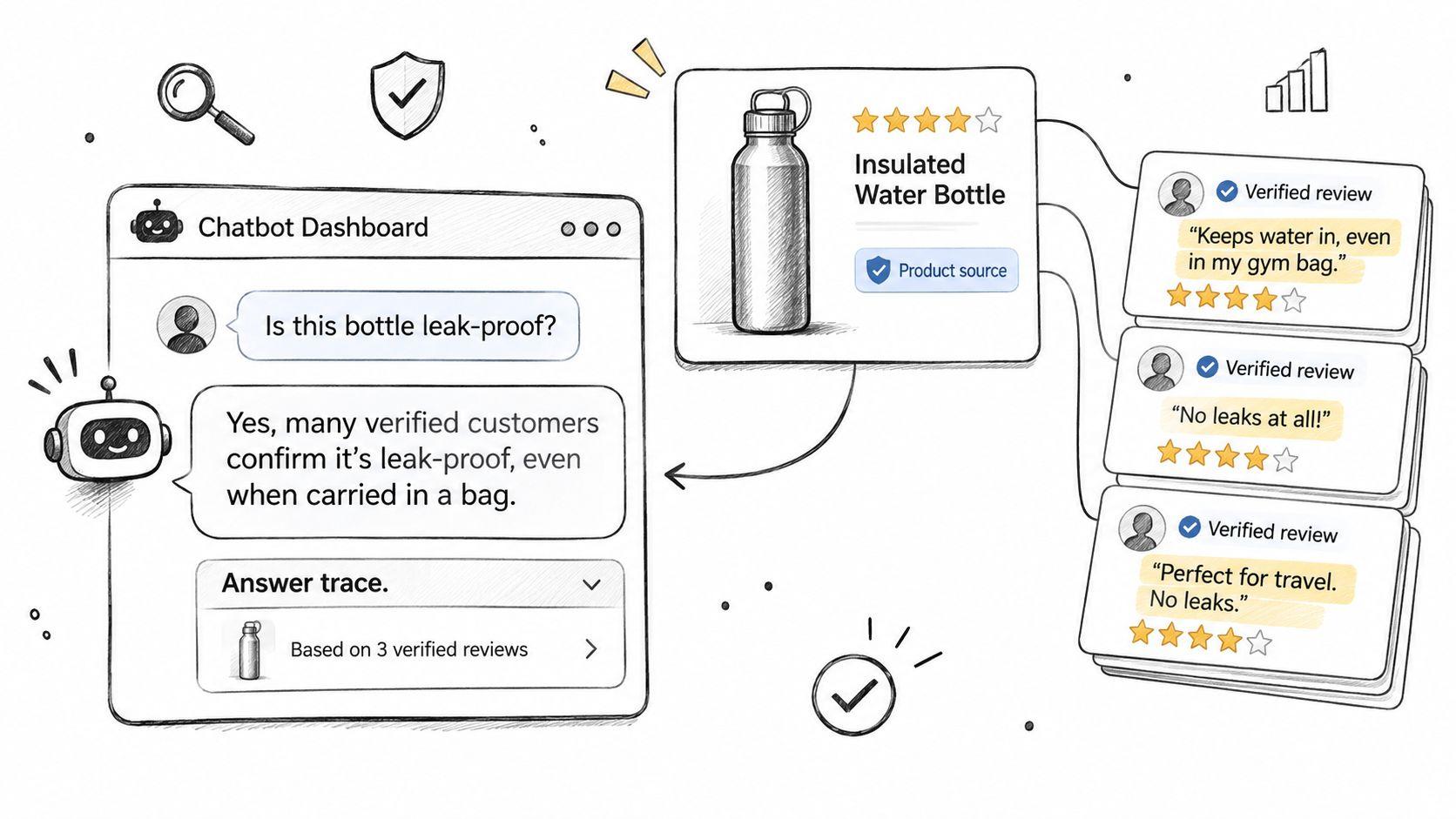
The chatbot should use the evidence already prepared for the answer library. Every review-derived claim needs a traceable product association, rather than access to an undifferentiated collection of comments.
Carti can pull from real customer reviews through Judge.me, as well as Yotpo, Loox, Fera, Areviews, or Okendo. The Judge.me connection guide provides the relevant setup overview without changing the editorial checks required before publication.
Connect the source and test the responses
-
Connect Judge.me as the review source. Check a known product against its corresponding reviews. Start with an item whose variants are easy to distinguish so a mistaken association is obvious.
-
Add approved FAQs and frequent questions. Include the final wording rather than an earlier draft. Preserve the product name, variant, and qualifications so chat doesn't make a broader claim than the product page.
-
Test shopper questions in the Playground. The Playground supports a live conversation using the assistant's current appearance, tone, knowledge base, and trigger settings. Inspect whether each answer describes the relevant review pattern and avoids unsupported details.
-
Assign an escalation owner. When the assistant can't confidently answer a shopper, it emails the store's team. Choose the person or shared inbox responsible for reading those messages and resolving product-specific uncertainty.
-
Correct errors in Chat Logs. A correction written on a specific message automatically creates an FAQ, so the same question is answered correctly going forward. Make the correction narrow enough that a response about one garment doesn't become a general sizing rule.
-
Maintain the evidence set. Recheck answers when the supplier, material, construction, or product option changes. New reviews about a revised product shouldn't be merged uncritically with comments about its predecessor.
Evaluate the work beyond chat volume
Track whether a conversation answers the purchase question accurately, not whether the shopper stops replying. A shopper may leave because the answer helped, because it confused them, or because the product wasn't suitable.
Magnitude Marketing's guide to AI customer support chatbot ROI provides useful context for evaluating the commercial side of support automation. Pair that assessment with an editorial record of corrections, unresolved questions, and escalations.
Operational checkpoint: A corrected response should be tested using the original question and a differently worded version before it becomes trusted library content.
Keep a named owner for the answer library. Without ownership, product changes and support corrections can leave the storefront FAQ and chat giving different advice about the same item.
Test, Publish and Track Your First Ten Answers
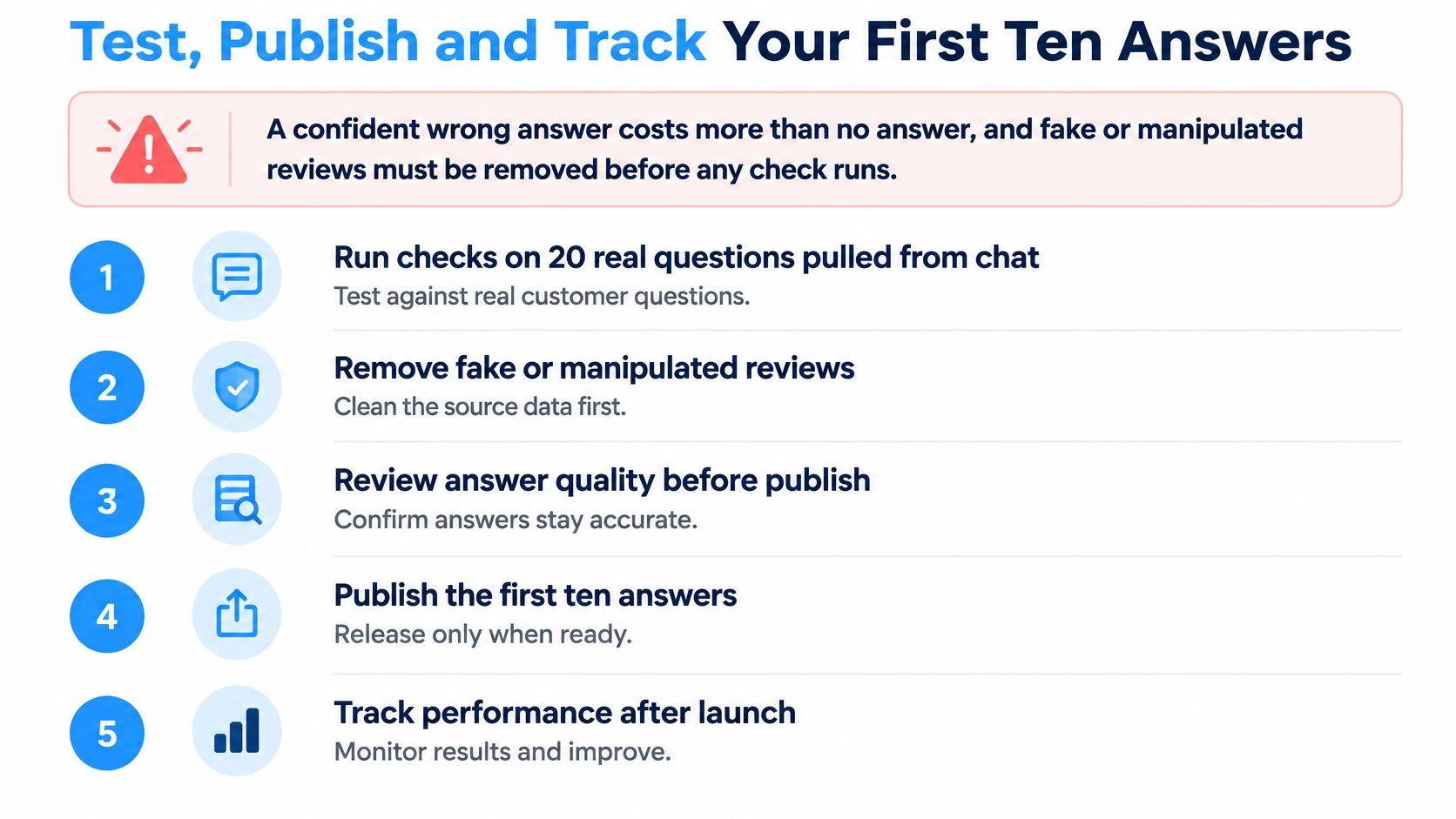
A confident wrong answer costs more than no answer when it leads a shopper toward an unsuitable purchase. Remove fake or manipulated reviews before testing, because an accurate summary of unreliable evidence is still unreliable advice.
For a practical pilot, use 20 real questions from chat logs and support emails. Treat that sample and the publication threshold below as an internal acceptance test, not a proven benchmark.
Apply the publication checks
-
Trace the evidence. Each review-derived answer must connect to at least two independent verified reviews for the same variant, with the stricter attribute-specific threshold applied where necessary.
-
Check the negative pattern. Relevant limitations must appear when the evidence supports them. A polished answer that omits a recurring drawback fails.
-
Inspect variant boundaries. Confirm that the response doesn't combine different sizes or colors into a single fit or appearance claim. Unknown variant evidence can't support variant-specific certainty.
-
Remove high-stakes inferences. Claims involving safety, medical effects, legal compliance, or guaranteed results require verified product documentation or human support. Customer anecdotes aren't substitutes.
-
Validate policy answers. Shipping and return responses must match current store policies. A past delivery experience doesn't establish the next order's arrival date.
-
Screen suspicious patterns. Flag repeated wording and bursts of reviews from the same date for inspection. Exclude questionable entries from the answer evidence until their integrity is resolved.
Set the pilot gate at 18 passing answers out of 20, with each passing answer meeting every applicable check. Rewrite or retire the failures rather than publishing them because the overall batch passed.
Run a focused launch week
A workable one-week rollout starts with the ten products generating the most questions. Pull and tag their reviews, score the relevant evidence, and draft the first ten answers against the actual support questions.
Publish only approved answers and load the matching versions into the knowledge base. Rerun the pilot questions after loading, since a correct source FAQ doesn't automatically establish that every conversational response is correct.
Maintain a small tracking sheet with the question, product, evidence references, approval status, correction, and escalation outcome. Review unresolved questions to identify missing product documentation or the next FAQ worth writing.
Carti's Free plan includes 50 AI conversations per month. Paid plans start at $49/month for 250 conversations, with 600 conversations on Growth and 1,750 on Scale. Before choosing a plan, compare current limits with monthly conversation volume and allow room for ongoing testing.
Carti connects Judge.me reviews with storefront product answers and supports approved FAQs in its knowledge base. Visit Carti to explore the setup, then pilot the workflow on question-heavy products before expanding the answer library.

Written by
Daniel AndersonFounder of Carti. 10+ years building ecommerce brands in apparel and supplements. Still runs a Shopify store and built Carti to help merchants convert more browsers into buyers.