
A shopper sends a sizing question at 11 p.m. on Sunday. The store's team is offline, the message sits unanswered, and the shopper buys from a competitor the next morning. That's a familiar failure point for Shopify stores running Instagram campaigns without matching inbox coverage.
An Instagram auto reply message can close the initial gap by acknowledging the question, setting honest expectations, and offering a useful next step. Speed matters, but an acknowledgment isn't the same as an answer. A sizing question still needs product-specific guidance, not just a greeting.
The templates below map to the shopper's journey, from the first DM through product selection and post-purchase support. Each includes personalization tokens, suggested triggers, and a handoff rule. The tokens are placeholders to adapt to the chosen automation tool, not universal Instagram variables.
For additional wording variations, these copy-and-paste replies for social DMs offer a useful starting point. The strongest version always reflects the store's actual catalog, policies, and support capacity.
1. Welcome Message for New Instagram DM Conversations
Journey stage: first contact. A welcome message should help a new sender choose a direction without making them repeat a question they've already asked.
For a fashion store, sizing, shipping, and order tracking are useful starting options. A beauty brand might offer shade guidance and order support instead.
Copy-and-adapt template
Thanks for contacting {brand_name}. This automated assistant can help with sizing, shipping, or an existing order. For the store team, replies are available during {support_hours} {time_zone}.
- Trigger: A new inbound conversation, rather than a keyword.
- Tokens:
{brand_name},{support_hours},{time_zone}. - Handoff: Route requests for a person, complaints, and account-specific questions to the team.
Meta Business Suite's automation documentation confirms that Inbox automations are available for eligible connected Instagram business accounts. Start in the connected account's Inbox automation settings and test the greeting from a separate account.
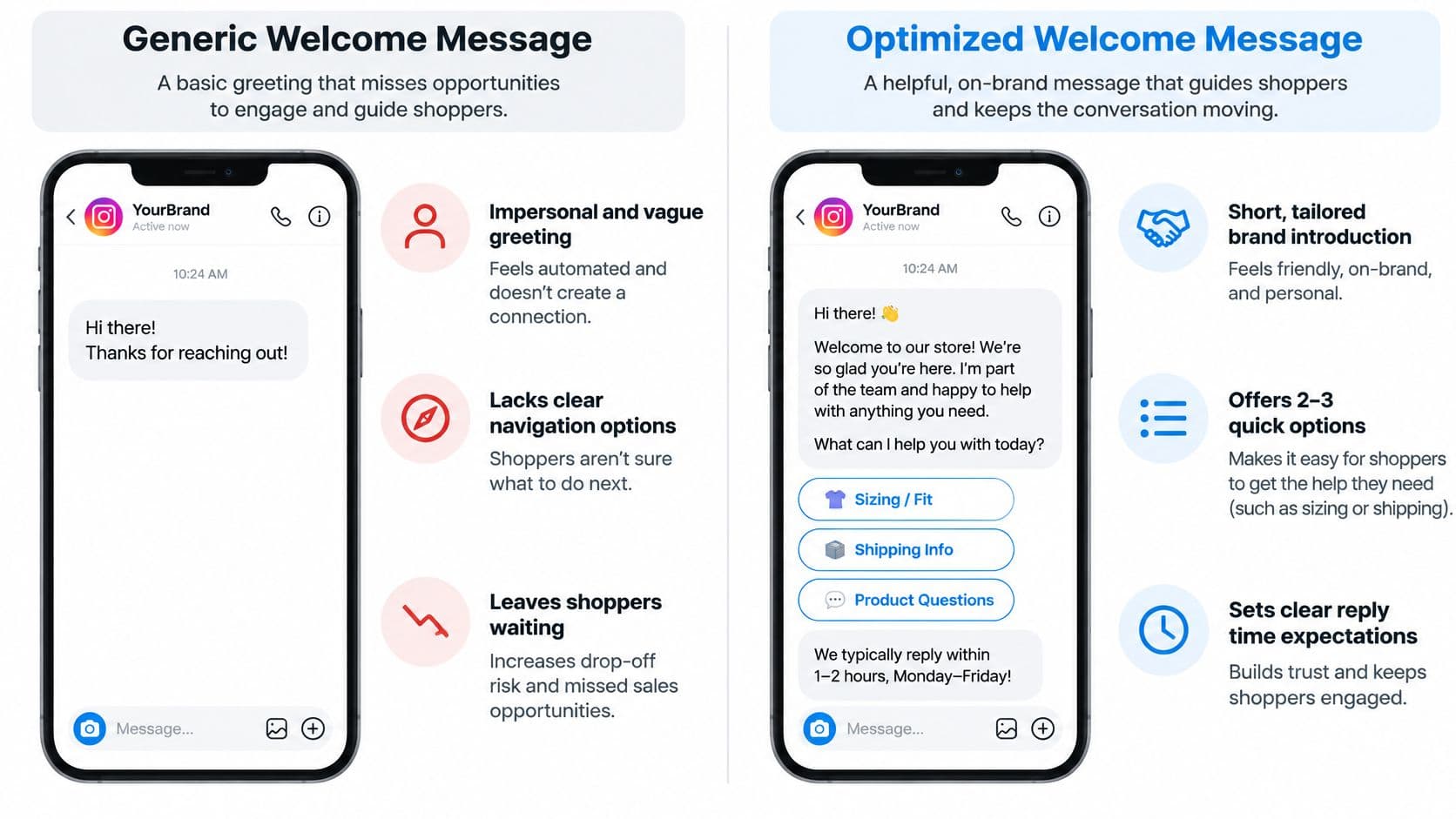
Keep the greeting short. If the shopper already asked about delivery, an intent-aware workflow should answer delivery rather than force a menu selection. This Instagram chatbot guide explains the broader setup considerations.
Review the opening options against actual DM topics each month. A welcome message shouldn't become a miniature product catalog.
2. Away Message for Outside Business Hours
A shopper asking about sofa dimensions after dinner still needs a useful next step. Many Instagram DMs arrive outside standard business hours, so a schedule-only reply can leave questions unanswered until the team returns.
Copy-and-adapt template
The {brand_name} team is currently offline and returns {next_open_day} at {next_open_time} {time_zone}. Product guides and common answers are available at {faq_url}. Messages needing staff assistance will be reviewed during {support_hours}.
Trigger this reply outside the published support schedule, including holiday exceptions. Use the same schedule your staff follow for {next_open_day}, {next_open_time}, and {time_zone}.
For a wellness store, {faq_url} might lead to delivery and ingredient information. Keep the guidance within scope: an automated reply should not present general product information as personalized medical advice.
Handoff rule: Flag urgent order changes, complaints, and sensitive product-safety questions for staff review. Don't promise an order can be changed until someone checks its fulfillment status.
3. Keyword-Triggered Auto Reply
Journey stage: focused product research. Keywords work best when a shopper's request is narrow and the answer is stable. A sneaker launch's RESTOCK command is a better fit than a broad question about which shoe will feel comfortable.
Copy-and-adapt template
Restock updates for {product_name} are available at {restock_signup_url}. Availability can change, so the product page shows the current selection. For another product, send its name or product link.
- Triggers: RESTOCK, BACK IN STOCK, and relevant spelling variations.
- Tokens:
{product_name},{restock_signup_url}. - Handoff: Escalate when the product can't be identified or the requested restock date isn't confirmed.
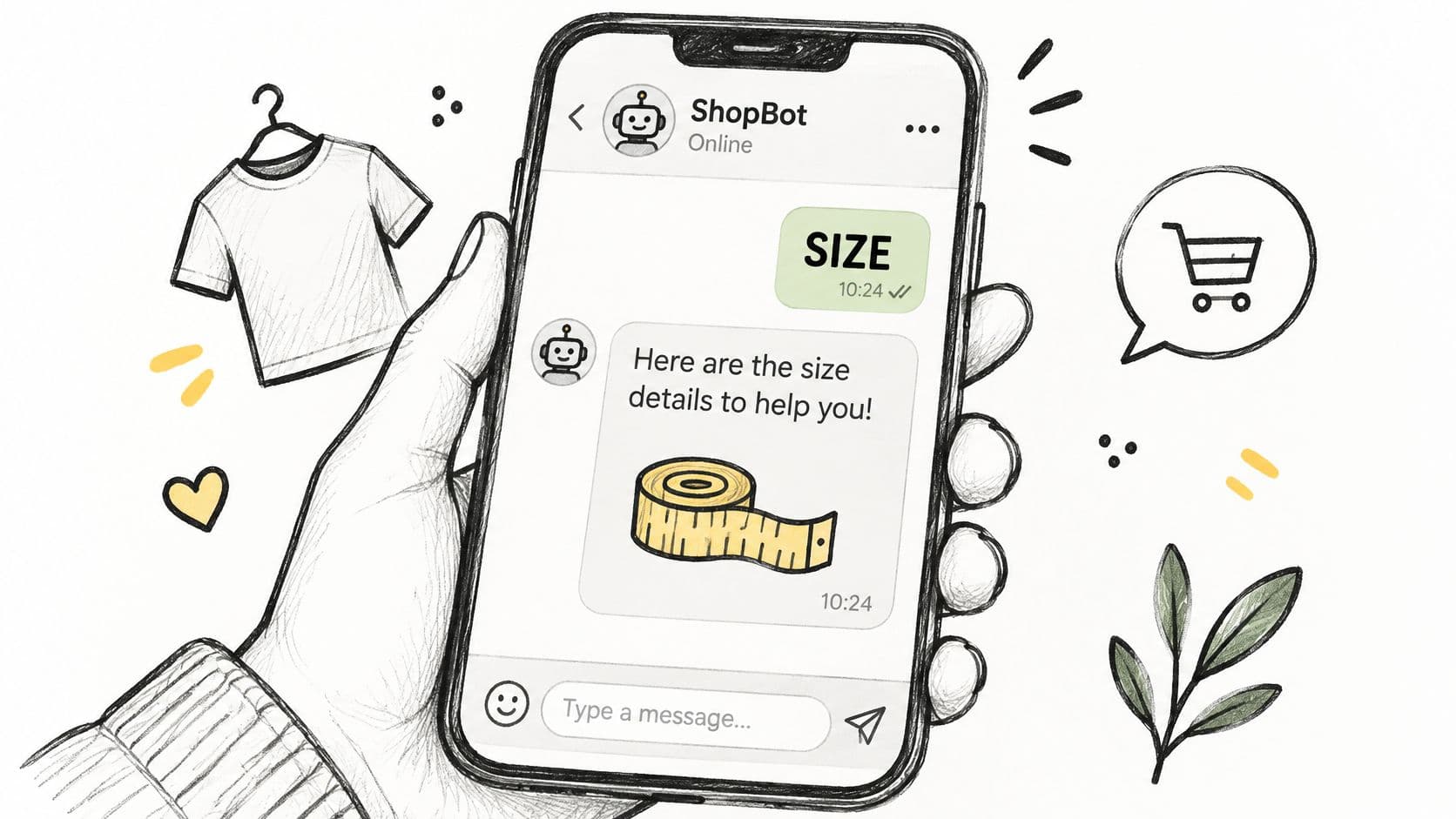
A jewelry store can build a separate SHIP response around destination and delivery guidance. PRICE and SIZE deserve their own flows rather than a combined paragraph containing every possible answer.
Practical rule: Keyword automation should answer the matched intent, not merely react to a word.
Test sentences containing competing signals, such as a shopper requesting a refund because the wrong size arrived. The presence of SIZE shouldn't override the refund request.
The Wabpo guide to Instagram auto replies highlights limitations of keyword matching and generic greetings. An unmatched-message fallback should ask for clarification or offer staff assistance, never repeatedly replay the menu.
4. Comment-to-DM Auto Reply for Story and Post Engagement
A skincare Reel invites followers to comment GLOW for a routine guide. The resulting private message should deliver that guide, not introduce an unrelated promotional sequence.
Journey stage: engagement becoming product discovery. Post comments and Story replies are different entry events, so configure and test them separately in the selected tool.

Copy-and-adapt template
The {guide_name} requested from {campaign_name} is available at {guide_url}. For help choosing products from the guide, reply with the main shopping concern.
- Trigger: GLOW on the specified campaign post, or the separately configured Story response.
- Tokens:
{guide_name},{campaign_name},{guide_url}. - Handoff: Send adverse-reaction reports and medical-suitability questions to the appropriate human support process.
Before implementation, compare Instagram comment reply APIs for supported entry events and account requirements. Don't assume every automation tool treats comments and Story interactions identically.
Meta's Standard Messaging Window documentation allows app responses for up to 24 hours after a person messages an Instagram Professional account, subject to its conditions. A comment-triggered private reply shouldn't be treated as permission for unrestricted follow-up.
Track the originating campaign alongside subsequent product interest and purchases. Comment volume alone doesn't establish commercial value.
5. Order Status and Shipping Auto Reply
Journey stage: post-purchase reassurance. The safest order-status automation distinguishes general shipping information from verified details about a particular order.
A fashion store can explain processing times immediately. It shouldn't claim a parcel has shipped unless a trusted order record confirms that status.
Copy-and-adapt template
Tracking is available through the order-status link in the {brand_name} shipping confirmation. Standard processing is {processing_window}, followed by the selected delivery service. If tracking is missing or hasn't updated as expected, the support team can review the order through {secure_support_channel}.
Trigger words: TRACK, TRACKING, ORDER STATUS, WHERE IS THE ORDER, and WISMO. Use {brand_name}, {processing_window}, and {secure_support_channel} only when their values are current and verified.
- For connected order lookup: Return
{carrier_name},{tracking_url}, and{estimated_delivery_window}only after the required identity checks. - Without order access: Explain where tracking lives and route the request rather than inventing a status.
- For exceptions: Escalate delivered-but-missing parcels, damage, address changes, and refund requests.
A tracking link is useful. An unsupported delivery promise creates another support problem.
Never request full payment details in Instagram DMs. An order number may help locate a record, but it shouldn't automatically authorize disclosure of personal information.
This guide to reducing order-status emails on Shopify covers the supporting communication workflow. Keep shipping emails, policy pages, and automated replies aligned.
6. Sizing and Fit Auto Reply
A shopper asking whether a shoe fits a broad foot isn't asking for a generic size chart. The answer depends on the exact product, its measurements, and reliable fit notes.
Journey stage: purchase evaluation. Start by identifying the product before recommending a size.
Copy-and-adapt template
Fit guidance for {product_name} is available at {size_guide_url}. For a closer comparison, send {required_measurement} with the unit used and the preferred fit. The product's confirmed fit note is {verified_fit_note}.
For footwear, {required_measurement} might be foot length and width. For denim, waist and hip measurements are more useful than an unsupported recommendation based only on height or weight.
- Triggers: SIZE, FIT, WIDE, measurements, and product-specific fit questions.
- Tokens:
{product_name},{size_guide_url},{required_measurement},{verified_fit_note}. - Handoff: Escalate conflicting measurements, missing product dimensions, or accommodation needs outside the available guidance.
A footwear store should recommend sizing up only when that product's guidance supports it. A denim brand should describe a style as running small only when its own fit evidence supports that statement.
Keep category replies separate. Footwear, fitted denim, and relaxed outerwear need different questions and decision rules. This walkthrough on answering sizing questions on Shopify offers additional workflow guidance.
An intent-aware assistant can compare relevant attributes, but it shouldn't guarantee a perfect fit or invent measurements absent from the catalog.
7. Returns and Exchange Auto Reply
Return questions appear both before checkout and after delivery. The reply should clarify the policy without treating every question as a request to approve a refund.
For swimwear, hygiene conditions may determine eligibility. For candles, the relevant distinction might be unused merchandise versus damage in transit.
Copy-and-adapt template
Eligible items can be returned within {return_window}, subject to {condition_requirements}. Return shipping is {return_shipping_responsibility}, and exceptions include {policy_exceptions}. Requests can be started through {returns_portal}, with full terms at {returns_policy_url}.
Suggested triggers: RETURN, EXCHANGE, REFUND, FINAL SALE, and RETURN SHIPPING. Every token should draw from the published policy, including exclusions and responsibility for shipping costs.
Sprout Social's Instagram messaging guide reports that 67% of consumers identify responsive customer service as the most important factor in creating a positive brand experience. For returns, responsiveness means explaining the next step clearly, not promising approval before eligibility is checked.
Handoff boundary: Automation can explain the policy. Exceptions and disputed decisions need authorized staff.
Route damaged goods, disputed eligibility, missing refunds, and legal complaints to a secure support process. Avoid asking shoppers to post order details publicly.
A swimwear store's automated reply should mention applicable hygiene conditions directly rather than burying them behind a policy link. Update the message whenever the underlying policy changes.
8. Product Recommendation Auto Reply
Journey stage: guided selection. A recommendation flow should narrow the choice before presenting products. Sending an entire collection leaves the shopper with the same decision they started with.
For a home goods store, room dimensions and intended use can distinguish a compact side table from a larger storage piece. For skincare, preferences and stated product concerns can guide discovery without turning the conversation into medical advice.
Copy-and-adapt template
To narrow the {category_name} options, send the main use, preferred {decision_attribute}, and budget range. Matching suggestions will include the relevant product details and any important limitations.
- Triggers: RECOMMEND, HELP CHOOSE, COMPARE, and WHICH PRODUCT.
- Tokens:
{category_name},{decision_attribute},{product_name},{product_url},{match_reason}. - Handoff: Escalate medical questions, incompatible requirements, and recommendations lacking sufficient catalog evidence.
Make the match explainable
A follow-up should state the reason for each suggestion: compact dimensions, a particular material, or compatibility with the shopper's stated use. Review-derived claims should be identified as customer feedback rather than guaranteed outcomes.
Instagram's automated-chat guidance requires disclosure of automation where legally required, including at the beginning of the conversation and when transferring from a human back to automation. A recommendation assistant shouldn't impersonate a staff member.
Fixed rules work for clearly defined choices. An AI shopping assistant becomes useful when shoppers combine requirements or ask follow-up comparisons that don't fit a rigid menu.
How the Eight Instagram Auto Reply Templates Compare
Each reply fits a different point in the shopper's journey. Match the trigger to the request, then set a clear handoff for cases a fixed reply cannot resolve.
| Template | Trigger | Best for | Main limitation |
|---|---|---|---|
| Welcome Message for New Instagram DM Conversations | A user sends their first direct message | Greeting shoppers and directing them to common help options | A generic greeting can feel impersonal |
| Away Message for Outside Business Hours | The team is outside its set schedule or unavailable | Setting expectations about replies after hours | It does not answer the shopper's question |
| Keyword-Triggered Auto Reply | An incoming message contains a specified keyword | Answering repeated questions or campaign queries | It may miss differently worded questions |
| Comment-to-DM Auto Reply for Story and Post Engagement | A commenter uses a specified word or emoji | Sending campaign links or product details to engaged followers | Unsolicited or excessive messages can feel like spam |
| Order Status and Shipping Auto Reply | A shopper asks about an order or shipping | Sharing tracking steps and shipping information | Order details need verification |
| Sizing and Fit Auto Reply | A shopper asks about size or fit | Helping apparel and footwear shoppers choose a size | General size-chart guidance may not suit every shopper |
| Returns and Exchange Auto Reply | A shopper asks about returns or exchanges | Explaining policy details and next steps | Replies need updating when policies change |
| Product Recommendation Auto Reply | A shopper shares needs or preferences | Guiding shoppers to relevant products | Poor matches can mislead shoppers |
Use exact triggers for questions with fixed answers, and include personalization tokens such as {order_number} or {product_name} where they help make the reply specific. Set a handoff rule for requests that need order verification, policy interpretation, or more context. An AI shopping assistant such as Carti can handle product questions that fixed replies cannot answer.
Turn Your Auto Replies Into a Sales Channel
Start with the welcome message, away message, and order-status reply this week. Those workflows establish an entry point, honest availability information, and a dependable post-purchase route without requiring a complex recommendation system.
Before activation, replace every placeholder and test overlapping intents. A message containing both SIZE and REFUND should reach the correct support path, not trigger competing replies.
Measure answers, not just activity
- Response coverage: Check whether inbound questions receive a relevant response.
- Resolution quality: Review whether the answer addresses the shopper's request.
- Escalation quality: Confirm that staff receive the question and useful context.
- Commercial outcomes: Compare assisted purchases alongside complaints and unresolved conversations.
Review DM logs each month for missing information, confusing policies, and repeated handoffs. Update the underlying catalog or FAQ before adding another keyword. Otherwise, automation distributes the same incomplete answer more efficiently.
The Rapid Ads guide to ecommerce automation provides broader context for connecting repetitive workflows. Instagram messaging should remain part of the store's service operation, not an isolated campaign tool.
Carti is an AI shopping assistant for Shopify that learns the store's catalog, policies, and FAQs, answers product questions on the storefront and in Instagram and Messenger messages, and can recover abandoned carts in chat. Its Free plan includes 50 AI conversations a month, paid plans include a 14-day free trial, and setup takes a few minutes with no code.
When Carti can't confidently answer a shopper, it emails the store's team. Support questions can be sent to support@heycarti.com.
The operating principle remains the same regardless of the tool: answer from reliable store information, clarify genuine ambiguity, and stop automation when a person needs to make the decision.
Carti offers catalog-grounded product answers and recommendations across Shopify storefronts, Instagram, and Messenger. Store owners ready to move beyond fixed Instagram replies can visit Carti to explore its shopping assistant and start with the questions shoppers already ask.

Written by
Daniel AndersonFounder of Carti. 10+ years building ecommerce brands in apparel and supplements. Still runs a Shopify store and built Carti to help merchants convert more browsers into buyers.