
89% of retailers managing 1,000+ SKUs now use product catalog automation, and 73% of online retailers use at least one AI-powered automation system. Product catalog automation has moved from an advanced extra to a baseline operating capability for Shopify merchants who want to scale without letting product data become a bottleneck.
That shift changes the question. You're not deciding whether automation sounds useful. You're deciding which parts of your catalog should run automatically, which rules need human approval, and how clean product data should reach every shopper touchpoint, from collection search to product chat to abandoned-cart recovery.
A catalog is no longer just a list of products in Shopify Admin. It's the source that powers filters, search results, marketplace feeds, structured product information, recommendations, customer support answers, and inventory messages. If the source is incomplete or inconsistent, every downstream experience inherits the problem.
What Product Catalog Automation Really Means in 2026
The 2025 adoption picture makes the business case clear. Product catalog management reached 89% adoption among retailers managing 1,000 or more SKUs, while 73% of online retailers used at least one AI-powered automation system, up 45% from the previous year, according to this 2025 ecommerce automation industry roundup. Customer service automation stood at 58% adoption in the same report, which positions catalog operations as a common starting point for wider commerce automation.
For a Shopify merchant, automation means creating a dependable operating layer around product information. Supplier files, ERP records, inventory systems, and manual inputs enter the system. Rules standardize them, AI can enrich them, validation checks flag problems, and channel feeds publish approved information to Shopify and other sales surfaces.
The important distinction is between automating data movement and automating catalog quality. Copying a supplier CSV into Shopify faster doesn't solve a missing material attribute, a duplicate title, or an incorrect variant relationship. A useful system decides what belongs in the catalog, how each field should be formatted, what must be present before publication, and where each version should appear.
The catalog is a customer-facing system
A shopper may encounter your data through a search result, a product filter, a comparison page, a marketplace listing, or a chat question. If a customer asks whether a jacket is waterproof, an assistant needs a trustworthy product attribute. If a shopper filters by size, Shopify needs consistent variant data. If a product feed contains an outdated price, the customer sees a contradiction before checkout.
Search engines and AI shopping tools also need structured, readable information. A product with a clear title, accurate category, usable identifiers, descriptive attributes, current availability, and strong imagery gives downstream systems more context than a product page assembled from a short supplier description.
For merchants exploring AI-generated product content, MyMentions AI listing analytics can help frame the relationship between generated listings and listing performance. The tool itself doesn't replace your source-of-truth rules. It reinforces a broader principle: enrichment should be measured against the shopper and channel outcomes it supports.
Practical rule: Treat every product field as an input to a shopper experience, not as an administrative detail.
The Six Building Blocks of an Automated Catalog
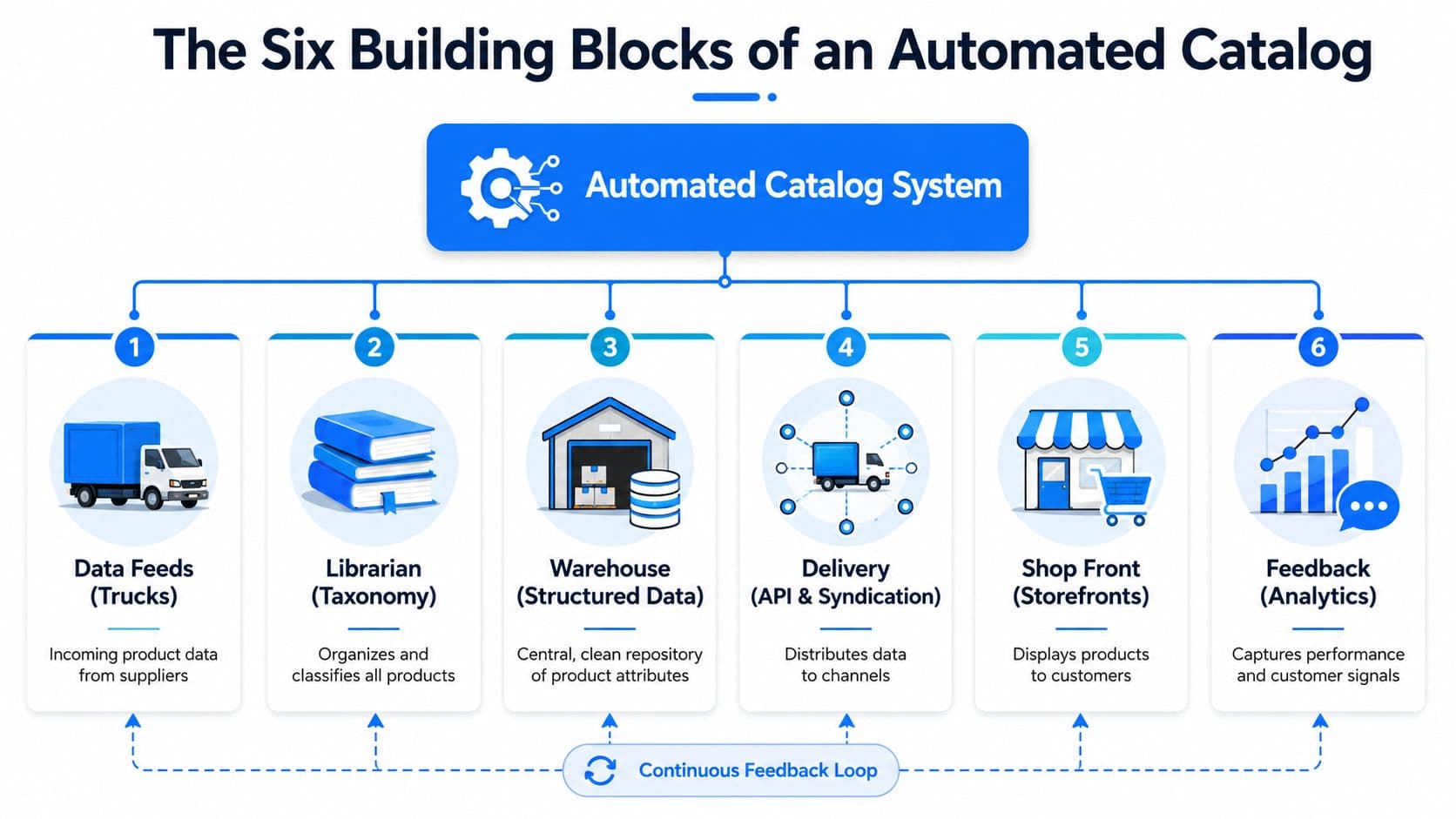
An automated catalog combines two functions: organizing product information like a librarian and managing product records like a warehouse. Automation connects intake, organization, inspection, and delivery, so a change to one product can reach the right shopper touchpoints, from search and filters to chat and recovery messages.
Intake starts with data feeds
Data feeds are the trucks arriving at the warehouse. They bring supplier details, inventory updates, prices, images, specifications, and identifiers through CSV files, spreadsheets, APIs, or platform connections. A Shopify fashion store might receive color and size data from a brand supplier, stock data from a warehouse system, and retail pricing from an ERP.
Incoming data still needs controls. Set a schedule, map each field, and define error handling so one malformed file does not overwrite accurate product information. Feed failures should become visible tasks rather than silent catalog changes.
Taxonomy creates the shelf system
Taxonomy organizes products into a structure people and channels understand. Your internal category might be “outerwear,” while a marketplace expects a more specific product type. That choice affects collection navigation, filters, reporting, search relevance, and feed eligibility. It also determines whether a shopper can find the right product without knowing your internal naming conventions.
Mapping translates supplier language
Mapping converts external fields into your own schema. One supplier might call a field “fabric,” another “material,” and a third “composition.” Mapping places those values in a consistent field while preserving the original value for review when needed. This matters when search, chat, or a product comparison depends on one dependable attribute.
Structured data gives the warehouse a master model
A PIM or equivalent structured repository stores the approved product record. It can hold titles, descriptions, media, technical specifications, variants, identifiers, localized content, and channel rules in one controlled model. Merchants deciding whether to implement PIM for e-commerce should ask whether their current process has a reliable master record, regardless of the software label.
Enrichment and validation improve the stock
Enrichment fills useful gaps. Rules might derive a searchable title from brand, product type, and model. AI might draft a description from approved attributes. A merchandiser should review claims that could affect compliance or customer expectations, especially details an AI sales assistant may later use in a shopper conversation.
Validation acts as the quality inspector. It checks required attributes, image presence, identifier formats, variant consistency, price, availability, and prohibited values. Products that fail can move into an exception queue instead of publishing automatically, protecting search results and recovery messages from stale or incomplete details.
Syndication delivers the approved record
Sync and syndication are the delivery network. They push the right version to Shopify, Google, Meta, TikTok, marketplaces, email tools, and shopper-facing assistants. Channel-specific fields matter. A retail title, technical specification, and marketplace description may need different formatting even though they come from the same base product.
For a broader view of how these systems fit into a Shopify technology stack, see these e-commerce automation tools. The practical test is whether a tool can manage the path from incoming data to monitored customer-facing output, rather than only storing product fields.
Why Clean Catalog Data Lifts Conversion, SEO, and CX
Bad product data creates a commercial problem before a shopper reaches checkout. Independent ecommerce research estimates that mid-market companies lose an average of 23% of potential revenue to bad product data. The same research reports that 87% of shoppers consider detailed product content a key purchase factor, while 83% abandon sites when information is insufficient. See the product catalog data quality research for the underlying figures.
The mechanism is practical. Missing dimensions make comparison harder. Inconsistent materials weaken filters. Duplicate titles make search results look interchangeable. Price and availability mismatches create distrust. A clean catalog removes friction at the exact moment a shopper is deciding whether to continue.
| Catalog issue | Shopper impact | Business cost |
|---|---|---|
| Missing identifiers or product types | The item may fail channel diagnostics or become harder to classify | Lost eligibility and manual remediation |
| Incomplete descriptive attributes | Shoppers can't answer fit, use, or compatibility questions | More hesitation, support questions, and abandonment |
| Duplicate or vague titles | Search results become difficult to scan | Lower relevance and weaker product discovery |
| Price or availability mismatch | The shopper encounters an unexpected change | Lost trust, failed checkouts, and avoidable service work |
| Inconsistent variant data | Size, color, or configuration choices become unclear | Selection errors and a poorer buying experience |
Completeness is a control, not a feeling
A merchant shouldn't ask whether a catalog “looks complete.” The team should define a threshold and monitor the share of SKUs that meet it. Independent ecommerce guidance recommends auditing brand, identifier, product type, image, price, availability, and at least two descriptive attributes through automated product feed optimization.
That threshold can power publication rules. A product missing a required identifier might remain available in a controlled Shopify collection but stay out of a marketplace feed. A product without an image might enter an exception queue. The rule depends on the channel, but the principle stays consistent: detect the problem before the shopper does.
Manual work also has a measurable operational cost. Adding one SKU manually can take 20 to 46 minutes, while PIM-enabled workflows run six times faster than spreadsheet-based processes, according to the cited product data quality research. Automation therefore supports both the storefront and the team operating it.
How a Shopify Store Actually Automates Its Catalog
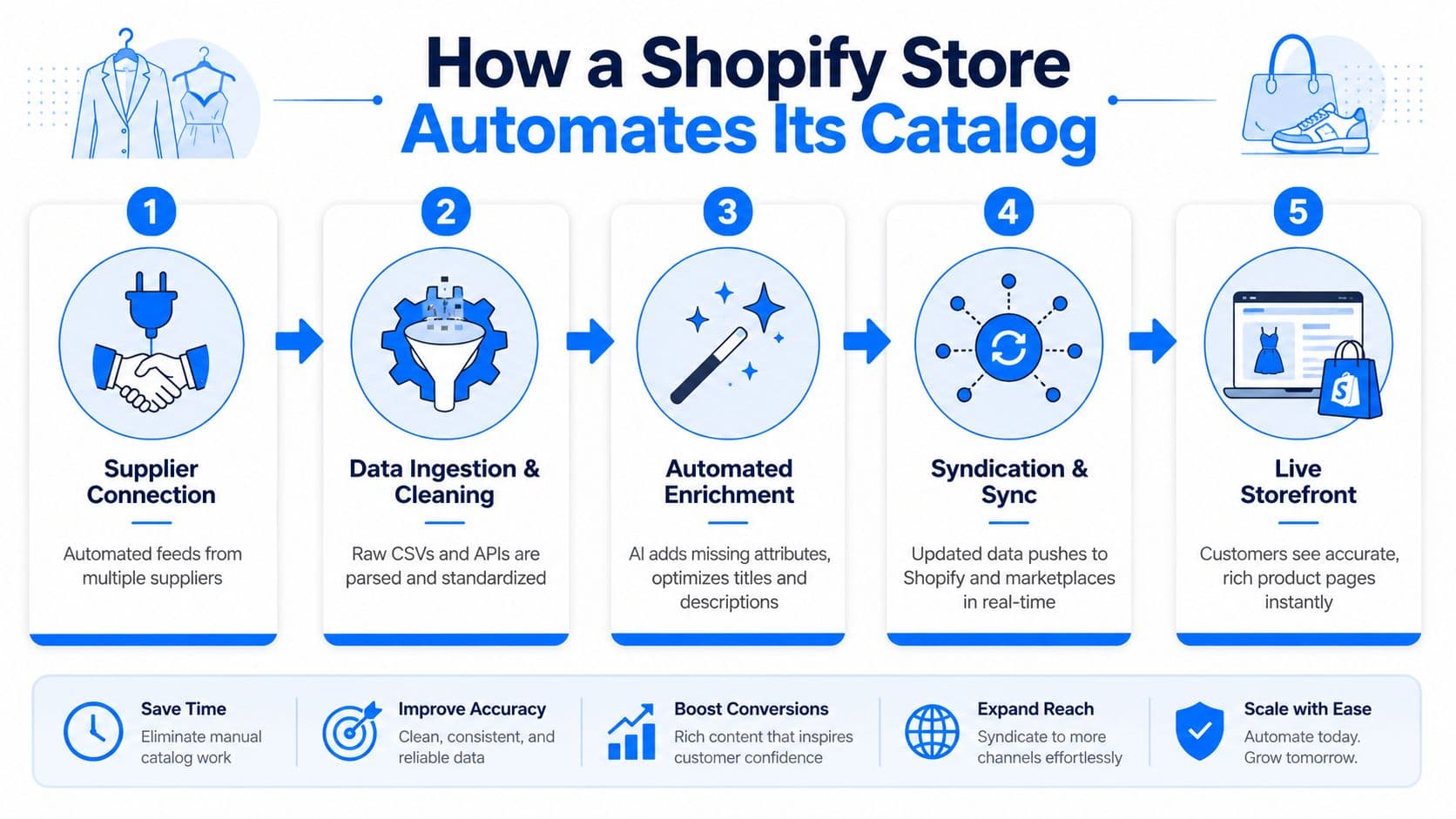
Consider a mid-sized Shopify fashion brand that receives supplier spreadsheets, updates stock from a warehouse system, and uploads CSV changes whenever the merchandising team finds time. The store doesn't need to start with a massive transformation. It needs to replace disconnected handoffs with a controlled sequence.
Step one connects the sources
The brand connects supplier feeds, its warehouse or inventory system, and Shopify. Each source gets an explicit role. The supplier may own composition and imagery, the warehouse may own stock, and the merchant may own retail titles and merchandising status.
Step two standardizes the incoming records
Raw CSV columns are mapped into a common model. “Colour,” “Color,” and a supplier's internal shade code can map into the store's color field. Variant identifiers are checked so sizes and colors don't split into unrelated products.
Step three enriches approved content
The team defines which fields can be generated and which require human review. AI can draft descriptions from verified material, fit, and care attributes. It shouldn't invent claims that aren't present in the source record. A rule can also build consistent titles, alt text, and search terms from approved values.
Step four validates before publishing
The pipeline checks required fields, image availability, identifiers, variant relationships, price, and stock. Failed records are routed to a review queue. Approved records flow into Shopify and channel-specific feeds rather than being copied manually into each destination.
Step five separates fast changes from structural changes
The brand regenerates the full catalog daily, while updating price and availability every 2 to 4 hours, following independent feed-management guidance. This split avoids rebuilding every product record whenever a single inventory value changes. Merchants can also review the practical mechanics of a catalog refresh before setting their own operating cadence.
The result is a decision system, not just a connector. A new product follows the same path as an existing one, and every exception has a visible reason.
The Three Pitfalls That Quietly Kill Catalog Automation
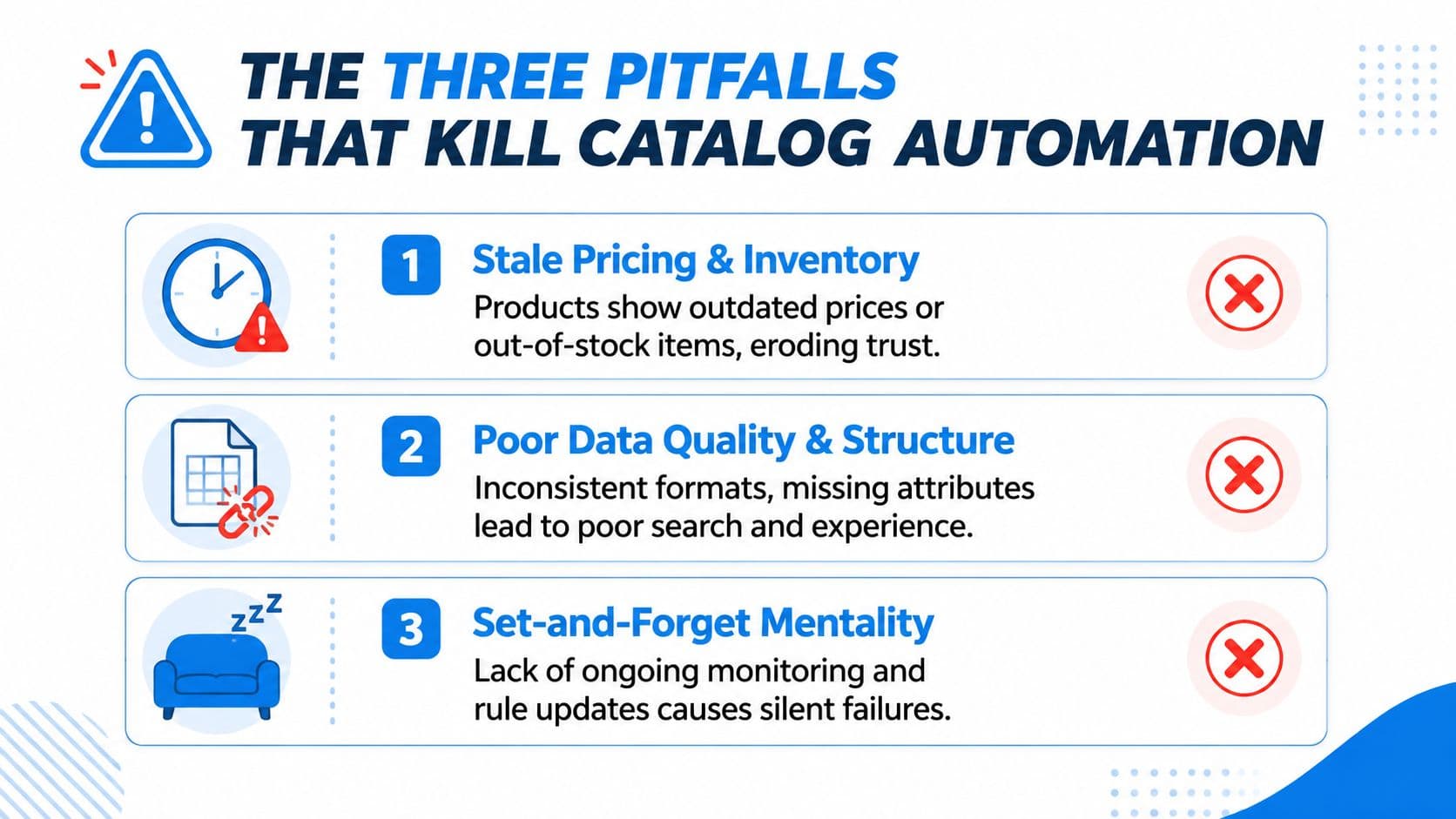
Automation fails when merchants automate the wrong handoff or stop maintaining the rules. A catalog can appear synchronized while customers still see incorrect stock, weak product detail, or market-inappropriate content.
Stale price and inventory data
Price and availability change more often than structural attributes. If a store publishes a price update slowly, a customer may see one amount on a channel and another at checkout. If inventory lags, an apparently available item can create a failed order or a service escalation.
The prevention pattern is a delta update. Refresh fast-changing fields on a cadence that matches the store's change frequency, and reserve full catalog regeneration for structural updates. Monitoring should show the latest successful sync, the affected channel, and records that failed.
Supplier onboarding becomes the hidden bottleneck
Supplier onboarding is often more difficult than maintaining an existing catalog. Vendors use different schemas, naming conventions, image standards, identifiers, and variant logic. One industry source identifies supplier-focused product catalog work as the fourth most time-consuming PIM/PXM task, as discussed in this analysis of the product data management automation gap.
A repeatable onboarding template helps. Require a sample file, map fields before importing the full assortment, validate identifiers and variants, and record ownership for every attribute. Don't let a supplier's format become your master model.
Channel compliance overwrites the base record
A product may need localized copy, channel-specific titles, technical fields, or emerging sustainability information. Recent catalog-management guidance highlights the importance of standardized taxonomy, localized product data, and fields associated with Digital Product Passports for AI discovery and market requirements. It also recommends separating channel-specific fields from base attributes, as described in this catalog automation guidance.
Store the canonical attribute once, then create controlled channel views. A marketplace description shouldn't overwrite the technical specification used by your storefront or support assistant.
Audit question: If a supplier changes a value tonight, can you tell which system accepted it, which channels received it, and who can approve the correction?
KPIs and Monitoring That Keep Your Catalog Honest
A catalog automation project becomes an operating practice when someone reviews its health on a schedule. Your dashboard doesn't need dozens of metrics. It needs signals that connect a data problem to a specific action.
Weekly operational checks
- Attribute completeness rate: Track the share of SKUs meeting your required-field threshold. A decline usually points to a new supplier field, a failed mapping, or a product type with missing rules.
- Feed error rate: Group errors by cause, such as missing identifiers, invalid values, image failures, or price mismatches. Fix the rule creating repeated errors instead of correcting records one at a time.
- Time to publish: Measure how long an approved new SKU takes to reach Shopify and its required channels. A long delay may indicate an approval queue or a failed syndication job.
- Price and stock sync latency: Compare the source timestamp with the channel timestamp. Investigate delays that exceed your operating tolerance.
- Channel eligibility: Monitor how many products qualify for each feed. A sudden drop often signals a taxonomy or required-attribute change.
Monthly commercial review
Connect catalog metrics to storefront outcomes without assuming causation. Compare product groups with stronger completeness against search engagement, conversion, support questions, and return-related feedback. If shoppers repeatedly ask about dimensions, add a required dimension field and update the relevant product templates.
The useful dashboard doesn't only say that a feed failed. It shows which rule failed, which products are affected, and who needs to act.
How an AI Sales Assistant Turns Your Catalog Into Revenue
Clean catalog data becomes commercially useful when a shopper-facing system can read it and respond accurately. Carti is one example of an AI-powered Shopify chatbot that ingests a store's catalog, policies, and FAQs, then uses that information for instant answers, product suggestions, and cart recovery.
The shopper journey makes the connection concrete. A customer opens a product page and asks whether a sweater contains wool. The assistant needs the material attribute. The same customer asks which size to choose, so the answer depends on the store's fit guidance and size information. When the shopper compares two colors, accurate variant availability determines which recommendation is sensible.
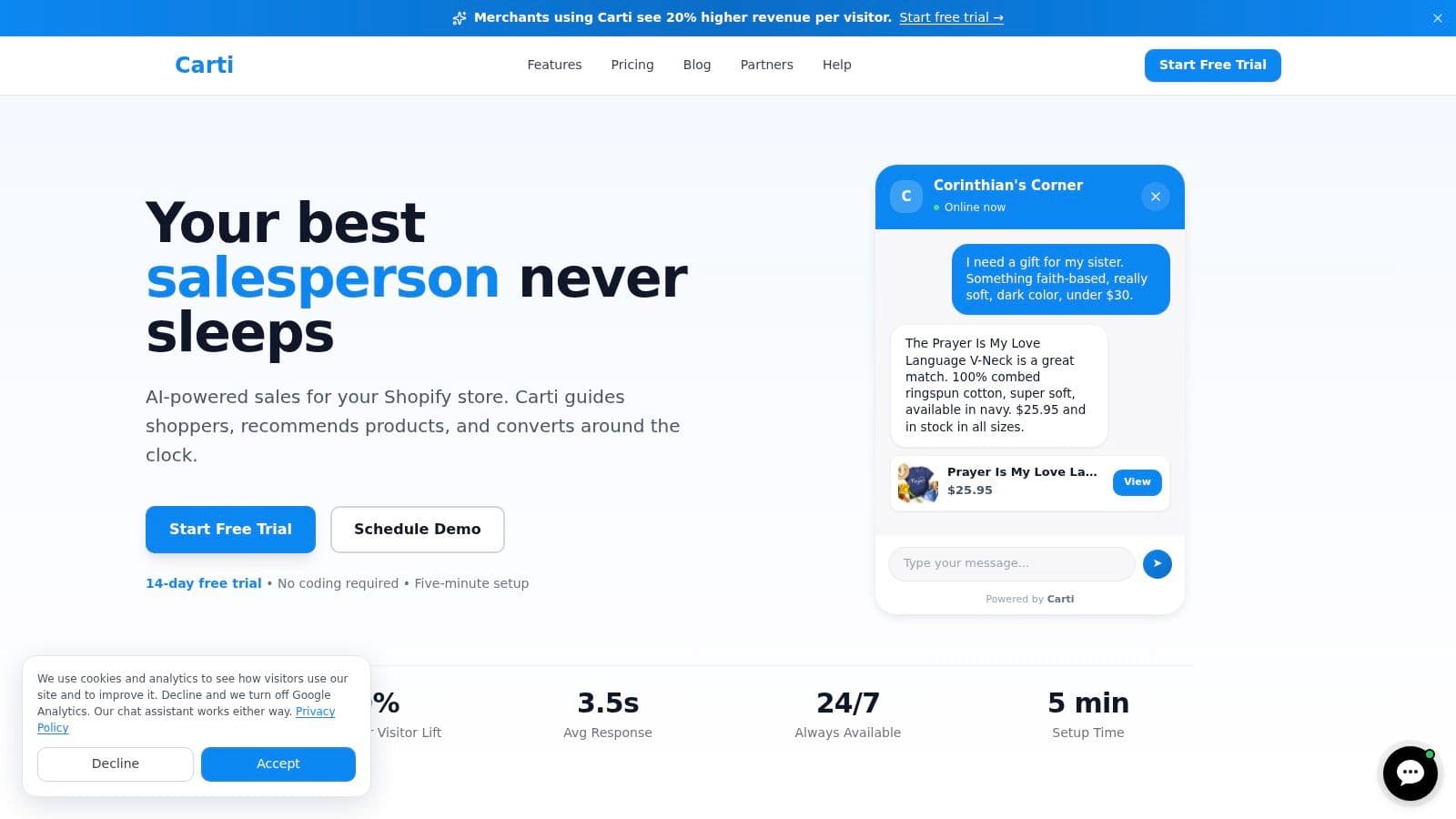
Each response depends on a catalog field
A recommendation engine can't reliably suggest an alternative if product type, compatibility, price, or availability is missing. A recovery message shouldn't promote an item that has gone out of stock. A support answer should use current policy content rather than an old description copied from a supplier file.
This is why an AI sales assistant isn't separate from catalog operations. It is a shopper-facing layer over the structured records, rules, and updates built behind the storefront. For merchants evaluating recommendation workflows, this guide to AI product recommendations provides useful context on how product information supports those interactions.
The commercial measurement should follow the journey. Review which questions appear most often, which products generate recommendation interactions, and whether unresolved questions reveal missing attributes. Those insights can feed the next enrichment rule, turning conversations into catalog improvement rather than treating support as an isolated function.
Your 30 60 90 Day Catalog Automation Roadmap
A Shopify merchant can formalize catalog automation without treating it as an all-at-once technology project. Start with visibility, then add control, then monetize the clean data.
Days 1 through 30 establish the source of truth
Export your current product records and audit required attributes, identifiers, images, variants, pricing, availability, and descriptive content. List every source that changes product information, including suppliers, spreadsheets, inventory tools, ERP records, and Shopify edits.
Choose ownership for each field. Decide which system is authoritative for stock, price, specifications, media, and merchandising content. Document the exceptions that currently require manual work, because those exceptions will become your first automation rules.
Days 31 through 60 introduce structure
Add a PIM or enrichment layer if your current Shopify fields can't manage multiple sources and channel views cleanly. Map supplier fields into a stable schema, create taxonomy rules, separate base attributes from channel-specific content, and add validation before publication.
Set the refresh cadence for each data class. Structural catalog content can follow a slower publishing cycle, while price and availability need a faster delta process. Start with one supplier and one channel, then expand after the exception queue is manageable.
Days 61 through 90 connect the shopper experience
Once the catalog is dependable, add a shopper-facing AI sales assistant such as Carti. Configure it against approved catalog content, policies, and FAQs, then review the questions shoppers ask. Use those questions to identify missing attributes, confusing descriptions, and weak comparison content.
Track catalog health beside commercial signals. Look for relationships among completeness, search engagement, conversion, support volume, and cart activity, without claiming that one metric automatically caused another.
Common questions from Shopify merchants
Do I need a PIM? Not always. A smaller catalog may work with Shopify, well-defined metafields, and disciplined feed rules. A PIM becomes more useful when you manage many suppliers, markets, channels, variants, or frequent attribute changes.
What does catalog automation cost? Costs vary by catalog size, source systems, channel count, enrichment needs, and approval requirements. Compare the software cost with the labor spent correcting listings, investigating feed errors, and answering questions caused by missing data.
How long does rollout take before measurable lift appears? Timing depends on the starting quality of your catalog and the number of integrations. You can measure operational improvements as soon as validation and sync monitoring are active, while commercial effects require enough shopper and product data to compare responsibly.
Carti adds a shopper-facing layer to your catalog automation, answering product questions, suggesting relevant items, and helping recover stalled carts from the information already maintained in Shopify. Visit Carti to see how an AI sales assistant can turn cleaner product data into more useful conversations and a smoother path to purchase.

Written by
Daniel AndersonFounder of Carti. 10+ years building ecommerce brands in apparel and supplements. Still runs a Shopify store and built Carti to help merchants convert more browsers into buyers.
Ready to boost your store's sales?
Install Carti in 5 minutes and let AI handle customer questions, recommend products, and close sales 24/7.
Start Free Trial14-day free trial