
A fast chatbot response can still lose the sale if it answers the wrong question. The more uncomfortable truth is that average response time often hides the moments when shoppers leave. After-hours buying questions can wait about 15 hours, compared with a 2.2-hour median during business hours, according to Gorgias research on after-hours shopper support. For a Shopify store, that isn't a minor reporting issue. It's the difference between answering while purchase intent is alive and replying after the shopper has bought elsewhere.
The Average Response Time Is Lying to You
Most store owners open a support dashboard and look for one reassuring number. The average chatbot response time appears low, so the system seems healthy. That number can conceal slow evenings, unanswered weekends, stalled escalations, and product questions that arrive when nobody is available.
A human-only support model makes this especially obvious. Industry benchmarks place average email first response at about 12 hours, with good performance under 4 hours and best-in-class performance under 1 hour. Live chat is faster, with industry averages around 2 minutes and best-in-class performance around 5 to 10 seconds, as outlined in customer service response-time benchmarks. An average blends all those moments together, even though shoppers don't experience an average. They experience the exact wait in front of them.
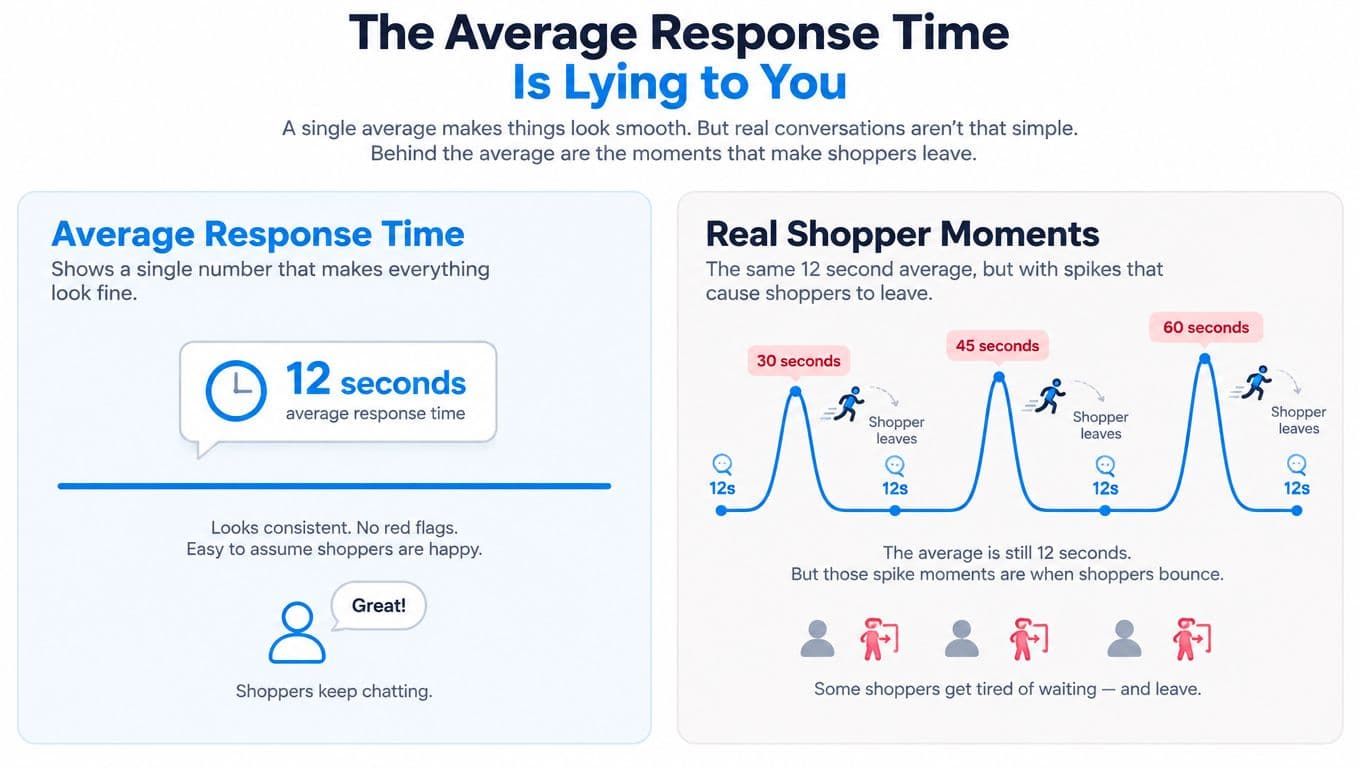
Measure the moments that matter
A shopper asking about sizing on a weekday afternoon may tolerate a short delay. Someone asking whether an order can arrive before a wedding, birthday, or flight is operating under a deadline. The second conversation carries more immediate buying intent, yet an average report gives both interactions equal weight.
The benchmark worth remembering is brutally simple. Satisfaction peaks when a live-chat reply arrives within 5 to 10 seconds, reaching 84.7% at that speed, while satisfaction drops sharply when the wait reaches the 3-to-5-minute range, according to Freshworks' live-chat statistics. Your dashboard should therefore show performance by hour, channel, intent, and escalation status, not just one blended figure.
Practical rule: If your report can't show what happens at night and on weekends, it isn't reporting response time honestly.
For an AI assistant, speed should become a baseline rather than the headline achievement. Once replies consistently arrive while the shopper is still looking at the screen, the merchant's attention belongs on answer quality, completed goals, attributed revenue, and repeat contact.
What Chatbot Response Time Actually Means
“Response time” can describe several different moments, and confusing them creates bad decisions. The first-response moment is the delay between a shopper sending a message and the system displaying its first visible reply. The first-useful-response moment is later, when the shopper has enough accurate information to act.
That distinction matters because a bot can acknowledge a message instantly and still make the customer repeat the question. A fast greeting isn't a successful support interaction. A useful answer should resolve the question, request only necessary clarification, or move the shopper toward a clear next action.
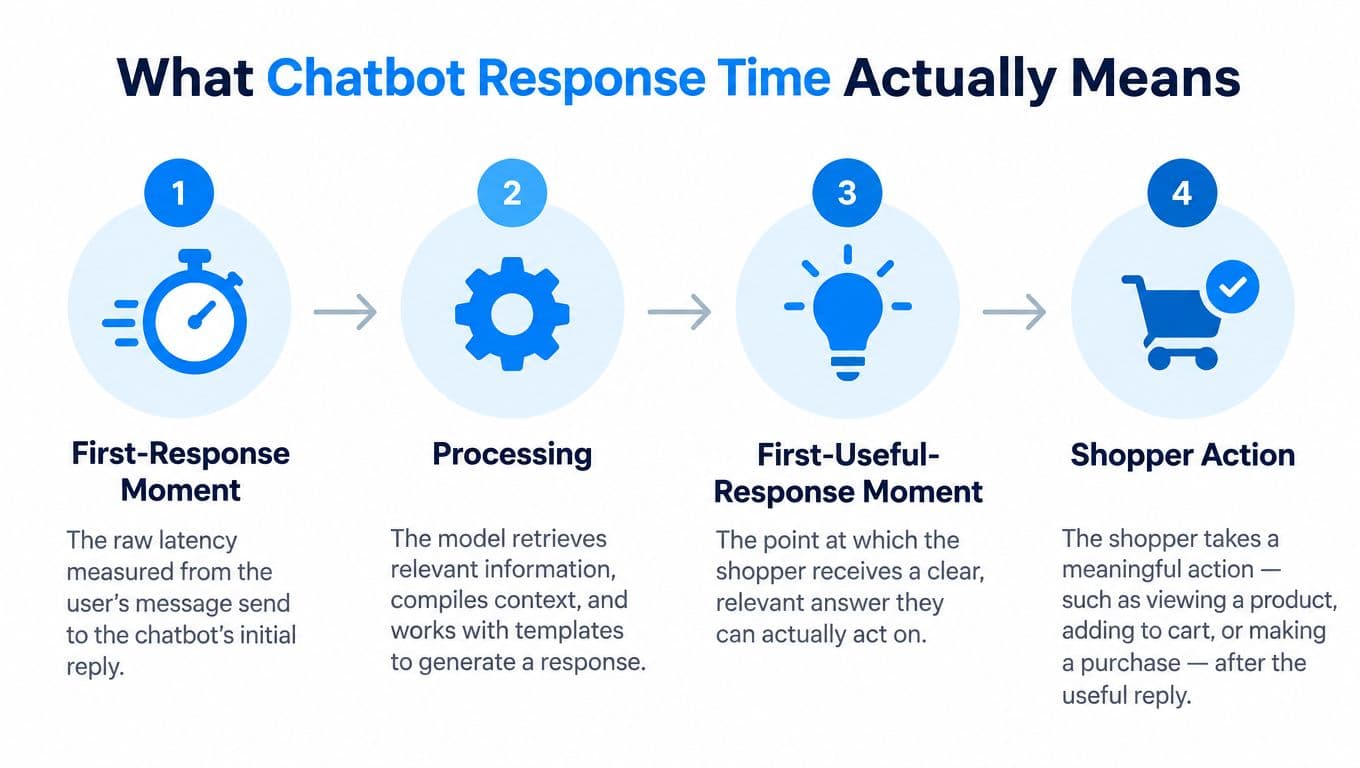
Track three separate windows
Time to first visible output measures raw system latency. It tells you whether the interface responds promptly after the shopper presses send, but it says little about whether the answer is correct.
Time to first complete answer measures how long the shopper waits for a coherent response about shipping, sizing, returns, stock, or another intent. This is closer to the actual experience because partial text may create motion without creating confidence.
Time to resolution measures the entire exchange, including follow-up questions and handoffs. A bot that replies quickly but needs several clarification turns may have impressive first-response performance and poor resolution performance.
Use a simple mental model. Milliseconds belong to infrastructure and interface rendering. Seconds belong to the first useful answer. Conversational turns belong to resolution. If you need practical guidance on improving the technical layer, reduce MCP latency for sellers offers useful context on query performance.
Users generally expect chatbot replies in under 3 seconds. Rule-based systems should target under 1 second, while AI-powered systems commonly operate in the 1-to-3-second range depending on infrastructure. Once a delay passes 5 seconds, users may perceive the interaction as broken, which is why the chatbot analytics metrics guidance from Conferbot recommends keeping P50 latency under 2 seconds and P99 under 5 seconds.
Measure speed and usefulness together. Otherwise, your team may celebrate a fast bot that sends shoppers into the wrong product flow.
Benchmarks and the Conversion Cost of Waiting
Average response time is a vanity metric if it hides nights and weekends. A store can report a fast weekly average while shoppers still wait through closed hours for answers about shipping, sizing, returns, or stock. Set a response standard that applies during every selling hour, then judge the bot by useful answers and completed buying journeys.
Independent latency research reports that delays of 100 to 300 milliseconds can reduce conversions by 4% to 12%, while delays above 1,000 milliseconds can drive 25% to 45% abandonment, according to Tanqory's latency and conversion research. Use those figures to set operating limits, not to predict an identical result for every store.
| Response Time | Shopper Behavior | Conversion Impact |
|---|---|---|
| Under 1 second | Simple requests feel immediate. | Preserves momentum and keeps the shopper engaged. |
| 1 to 3 seconds | Usually acceptable when the answer is useful. | Protects product research and the buying journey from avoidable friction. |
| 3 to 5 seconds | Patience weakens and the interface feels less reliable. | Raises the chance that the shopper abandons the exchange. |
| Above 5 seconds | The chat may appear stalled or broken. | Reduces the bot's ability to guide a purchase. |
| Minutes | The shopper may move to another tab, channel, or store. | Converts a live buying opportunity into delayed support. |
Put the benchmark in context
Reporting collected in chatbot statistics for 2026 places average chatbot response times around 0.8 to 1.1 seconds. The same coverage describes some AI replies as under 5 seconds, compared with roughly 2 minutes and 40 seconds for human live-chat agents, and reports that 59% of customers expect a chatbot response within 5 seconds.
Use the speed target as a solved operating constant. Once the bot consistently answers within the acceptable range, put the team's attention on answer accuracy, product relevance, and whether the shopper reaches the right next step. A fast wrong answer still loses the sale.
A store handling 400 assisted sessions a week that moves from 1.2s to 3.5s median latency would, on Tanqory's midpoint figures, put roughly 20-30 sessions into the abandonment band each week. That is the practical cost of treating latency as a technical score instead of a store performance constraint.
After-hours coverage makes the comparison sharper. A shopper asking about shipping at night cannot act on a next-morning reply, so design support automation workflows around intent and availability instead of sending every question to a human queue. For a fuller breakdown of how response-time benchmarks translate into revenue, see our guide to customer service response time.
Why Most Chatbots Are Slow
Slow replies usually come from a small number of predictable design failures. The model may be waiting for too much context, the retrieval layer may be searching irrelevant content, or the interface may hide a response that has already started.
Long prompts are a frequent culprit. Some Shopify implementations send broad catalog data, policy pages, customer history, inventory checks, and shipping logic with every message. That creates unnecessary processing and increases the chance that the system spends time sorting through information that has nothing to do with the shopper's question.
| Root Cause | Layer | Typical Delay Added | Cheapest First Fix |
|---|---|---|---|
| Full catalog included in every request | Context and model | Extra processing before generation | Send only the relevant product and collection context. |
| Inventory and shipping calls run in sequence | Integrations | The slowest external service blocks the answer | Run independent checks in parallel where possible. |
| Greeting appears before useful content | User experience | The shopper sees motion without information | Render the answer state immediately and stream meaningful content. |
| Broad intent such as “help with my order” | Conversation design | The system asks avoidable clarification questions | Split the intent into order status, cancellation, returns, and delivery questions. |
| Stale knowledge base pages | Retrieval and content | Search returns conflicting or irrelevant passages | Remove outdated pages and assign clear source ownership. |
Run a simple latency audit
Take a representative set of real conversations and timestamp each visible state change. Record when the message is sent, when the interface reacts, when retrieval begins, when the first text appears, and when the complete answer is available.
Then tag each delay as model, retrieval, integration, or UI. Don't ask an engineering team to “make the bot faster” until you know which layer is responsible. A slow inventory endpoint needs a different fix from a bloated prompt, and neither is solved by changing the typing indicator.
Content structure matters just as much as infrastructure. A knowledge base with duplicate return policies and old shipping pages forces the system to choose among conflicting answers. The principles behind NLP and chatbots for customer conversations are useful here, especially the need to map natural language to clear intents and reliable source material.
Tactics to Make Your Chatbot Faster
Start with the fixes that remove waiting from the critical path. Don't begin by tuning obscure infrastructure while the bot is still loading the entire catalog or asking three questions before answering one.
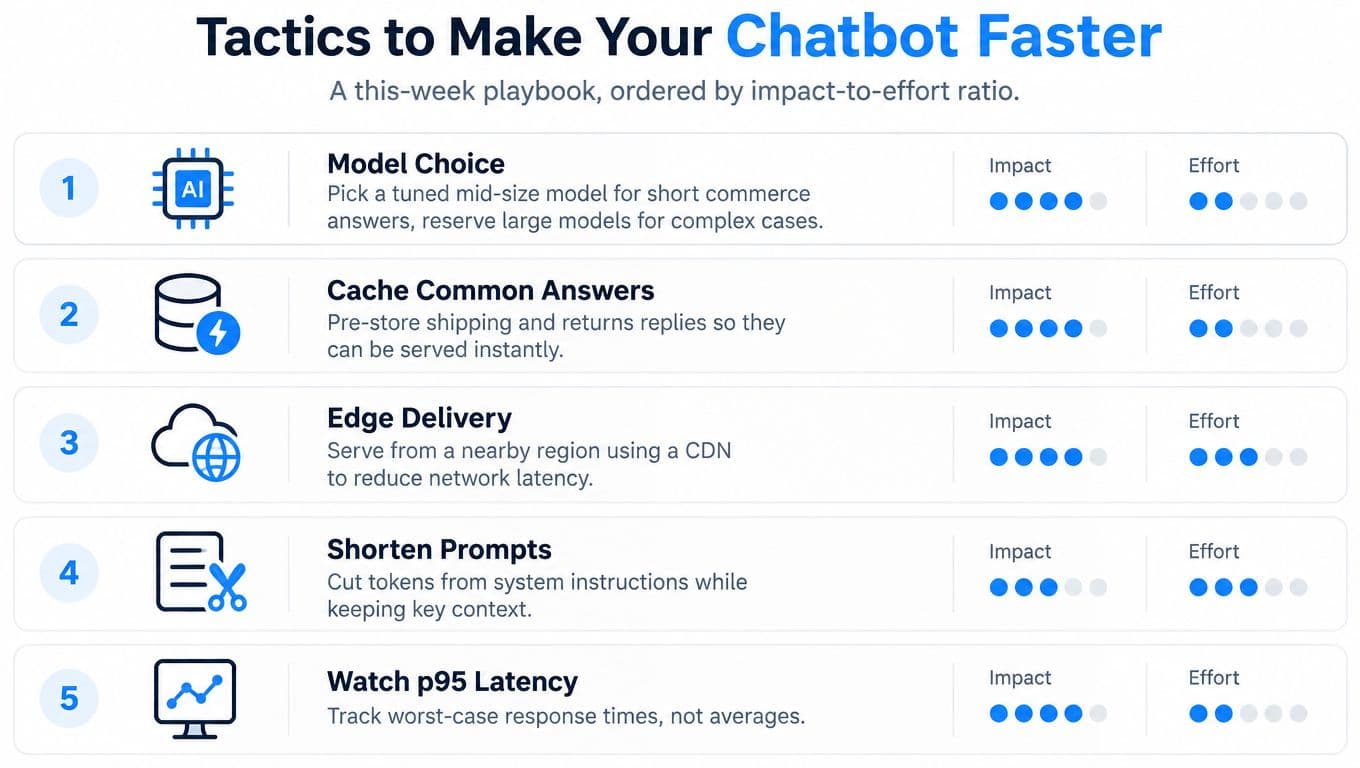
Fix the request before replacing the model
Use a tuned model suited to short commerce answers for common questions. Reserve a larger model for ambiguous cases that need deeper reasoning. A smaller, focused request often beats a powerful model burdened with irrelevant product, policy, and customer data.
Prefetch context that you already know. Locale, product page, selected variant, and cart state can load before the shopper sends a message, so the system isn't forced to discover basic page context after the question arrives.
Trim prompts aggressively. Keep instructions focused on tone, source priority, answer format, and escalation rules. Structured outputs also reduce the work required to produce predictable product cards, policy summaries, and suggested next actions.
Remove retrieval and interface friction
Scope search to the relevant collection, product family, or policy type before semantic retrieval begins. Metadata filters should exclude discontinued items, duplicate pages, and unrelated content before the model sees the results.
On the interface side, render the chat bubble immediately and show useful progress rather than an empty typing animation. If generation stalls, present a clear fallback that tells the shopper what the assistant can answer or offers a human escalation path.
Caching helps with repeated questions about shipping, returns, care instructions, and popular products. Cache only answers that remain valid, and invalidate them whenever the underlying policy or stock information changes. A stale instant answer is a conversion liability.
Prioritize quality over cosmetic speed
Track the slowest meaningful interactions, not only the average. Averages reward a system that answers simple greetings quickly while allowing complex purchase questions to stall.
For Shopify teams improving their content foundation, chatbot knowledge-base practices provide a useful way to organize product information, policies, and frequently asked questions. The fastest system is still unhelpful if it retrieves the wrong size chart or gives a confident answer from an outdated shipping page.
What Instant Replies Actually Look Like in Practice
The clearest example is the deadline shopper. Late in the evening, someone asks whether a jacket will arrive before a specific date for a wedding, birthday, or trip. The assistant checks the store's actual shipping policy, confirms the relevant stock information, answers in the shopper's language, and handles the next product question in the same thread.
That shopper isn't looking for a general support experience. They're deciding whether to buy now. A reply the next morning may be accurate, but it arrives after the decision window has closed.

A similar pattern appears on a skincare product page. A shopper asks about ingredient sourcing after normal support hours. A useful answer about the formula, relevant policy, or product suitability can keep the shopper evaluating the item on the store's page. A delayed email response gives comparison shopping time to take over.
Follow the useful-answer timeline
The visible anatomy of a strong reply is straightforward:
- Immediate acknowledgement: The interface confirms that the message arrived without making the shopper wonder whether the chat failed.
- Relevant interpretation: The assistant identifies whether the question concerns delivery timing, ingredients, sizing, stock, or another intent.
- Complete answer: The response uses the store's approved information and addresses the decision the shopper is trying to make.
- Actionable follow-up: Product suggestions, policy links, variant choices, or escalation options appear without forcing the shopper to restart.
The difference between a sale and an abandoned cart is rarely the first character on the screen. It's the speed at which the shopper receives a trustworthy answer that lets them proceed.
This video offers another visual perspective on how conversational support can fit into a buying journey.
What to Measure Once Speed Is Solved
Once replies arrive within the shopper's patience window, response speed stops being a meaningful competitive advantage. It becomes table stakes. Continuing to optimize milliseconds while the bot gives incomplete answers is a poor use of a merchant's time.
A useful reporting setup should focus on four outcomes. First, measure time to first useful response, not just the first visible token. Second, track goal completion, such as a product recommendation accepted, a shipping question resolved, or an order-status request completed. Third, compare sales attributed to bot sessions with comparable human-only support journeys. Fourth, monitor repeat contact, because a shopper who returns with the same question wasn't properly helped.
| Vanity Metric | Revenue Metric | Why It Matters |
|---|---|---|
| Total conversations | Completed shopper goals | Volume shows activity, not whether the interaction moved toward a purchase. |
| Average first response time | First useful response time by intent | A blended average hides slow or incomplete answers. |
| Basic satisfaction clicks | Conversion from assisted sessions | Polite feedback doesn't prove that the shopper bought. |
| Deflection rate alone | Repeat-contact rate after deflection | A deflected conversation can still create frustration and future workload. |
| SLA compliance percentage | Escalation quality and resolution outcome | A vendor can meet a broad SLA while missing the buying moment. |
Stop rewarding SLA theater
A vendor promise of “under 60 seconds” may sound impressive in a support contract. For on-site selling, it can be meaningless. The shopper's patience window is closer to seconds, and the acceptable delay depends on whether the assistant is answering a routine question or processing a complex escalation.
The right operating model has two distinct promises. The assistant should respond at conversational pace, while human escalations should have a realistic window that the merchant states clearly and keeps. The human queue shouldn't disguise itself as instant service.
The reporting focus should move in the same direction. Review answer accuracy, missing intents, escalation reasons, assisted revenue, and repeat contacts every week. A fast wrong answer costs more than a slower correct answer because it can create distrust at the exact point where the shopper is deciding whether to pay.
Your Next Move on Chatbot Response Time
Treat chatbot response time as a baseline requirement and audit it like one. Start by exporting a representative set of recent transcripts. Flag conversations where the first useful answer takes longer than the 3-second expectation, and separate those from conversations where the first reply arrives quickly but the shopper still needs repeated clarification.
Next, map the questions your shoppers ask. Check whether the assistant can answer order status, returns, sizing, delivery timing, stock, and product suitability without immediately sending the shopper into a human queue. Missing coverage is often a bigger commercial problem than raw latency because a fast handoff still leaves the buying question unresolved.
Use a focused afternoon checklist
- Review the slowest conversations: Group them by time of day, intent, product, and integration dependency.
- Find incomplete answers: Mark replies that acknowledge the question but don't resolve it.
- Audit source content: Remove conflicting policy pages and update product information that retrieval repeatedly mishandles.
- Inspect escalations: Identify whether humans receive genuine edge cases or routine questions the assistant should handle.
- Connect conversations to outcomes: Track completed goals, assisted orders, and repeat contact instead of relying on conversation volume.
- Set the human promise: Publish a credible escalation window and make sure the team can meet it.
Modern chatbot infrastructure can make instant support a solved constant. Benchmark coverage reports average chatbot response times around 0.8 to 1.1 seconds in some 2026 datasets, while other guidance places typical AI-powered replies in the 1-to-3-second range. The precise number matters less than consistent performance during the moments that generate revenue.
Don't spend the next quarter chasing microscopic latency improvements while your assistant misunderstands shipping questions or recommends products without checking the relevant policy. Make speed reliable, then spend your review time on answer quality, goal completion, conversion, and deflection quality. That is the operating standard a Shopify store can carry into its next growth cycle.
Carti provides an AI-powered Shopify assistant that answers product, sizing, shipping, and policy questions in seconds, supports shoppers around the clock, and includes product suggestions, cart recovery, and conversation insights. Visit Carti to see how your store can make response speed a baseline while focusing your team on higher-quality answers and conversion outcomes.

Written by
Daniel AndersonFounder of Carti. 10+ years building ecommerce brands in apparel and supplements. Still runs a Shopify store and built Carti to help merchants convert more browsers into buyers.
Ready to boost your store's sales?
Install Carti in 5 minutes and let AI handle customer questions, recommend products, and close sales 24/7.
Start Free Trial14-day free trial