
Customer experience is a purchasing lever, not a support expense. PwC research found that 73% of consumers consider customer experience an important factor in purchasing decisions, and that shoppers may pay up to a 16% premium for products associated with superior experiences. Yet 54% of U.S. consumers said customer experience at most companies needed improvement.
For a Shopify merchant, that gap represents recoverable revenue. Faster answers, clearer product information, a cleaner checkout, and better delivery communication can influence whether a shopper buys, spends more, returns, or contacts support again. The right way to improve customer experience is to connect every change to a commercial KPI, then remove anything that doesn't improve the buying journey.
Why Customer Experience Is a Revenue Lever for Shopify Merchants
A store can have strong traffic and still underperform because shoppers encounter friction at several small moments. They can't tell whether a product will fit, discover shipping costs too late, wait for an answer about compatibility, or receive no useful update after placing an order. Each problem creates a leak between interest and revenue.
Consider two Shopify stores with similar traffic, catalog depth, and advertising. Store A answers product questions quickly, shows delivery information before checkout, preserves carts across sessions, and gives customers clear return instructions. Store B sends shoppers to a generic FAQ, hides shipping details until late in checkout, and makes customers ask support where an order is. The stores may attract the same visitors, but Store A captures more of the value already generated by its marketing.
Operator rule: Treat every customer question as evidence of a missing product, policy, or journey detail.
PwC identified speed and efficiency, knowledgeable and helpful employees, and convenience as leading components of a positive experience. Those attributes map directly to Shopify metrics:
- Speed and efficiency influence first response time, checkout completion, and support-contact rate.
- Helpful guidance affects product-page conversion, add-to-cart rate, and refund or return volume.
- Convenience affects average order value, repeat purchase rate, and customer effort.
Microsoft's customer service findings show why reliability matters after the sale as well. 56% of global respondents had stopped doing business with a brand because of a poor customer-service experience, and 66% expected a response to social-care inquiries within 24 hours or less. Customers don't separate marketing, checkout, fulfillment, and support into different departments. They experience one brand.
That means CX work should have a commercial scorecard. Track conversion rate, average order value, cart-to-order completion, repeat purchase rate, abandonment, refund rate, and support-contact rate alongside response time and satisfaction. A response that arrives instantly but gives the wrong sizing advice isn't a CX win. It may create a return, another ticket, and a customer who won't trust the next recommendation.
The practical standard is simple. In the next 30 days, remove obvious friction. In 60 days, improve relevance and recovery. In 90 days, connect post-purchase operations to retention. Every tactic below has a KPI attached so you can keep the changes that produce revenue and retire the ones that merely create activity.
Diagnose Your Current Customer Experience Baseline
Don't start by installing another app. Start by finding the point where shoppers lose confidence.
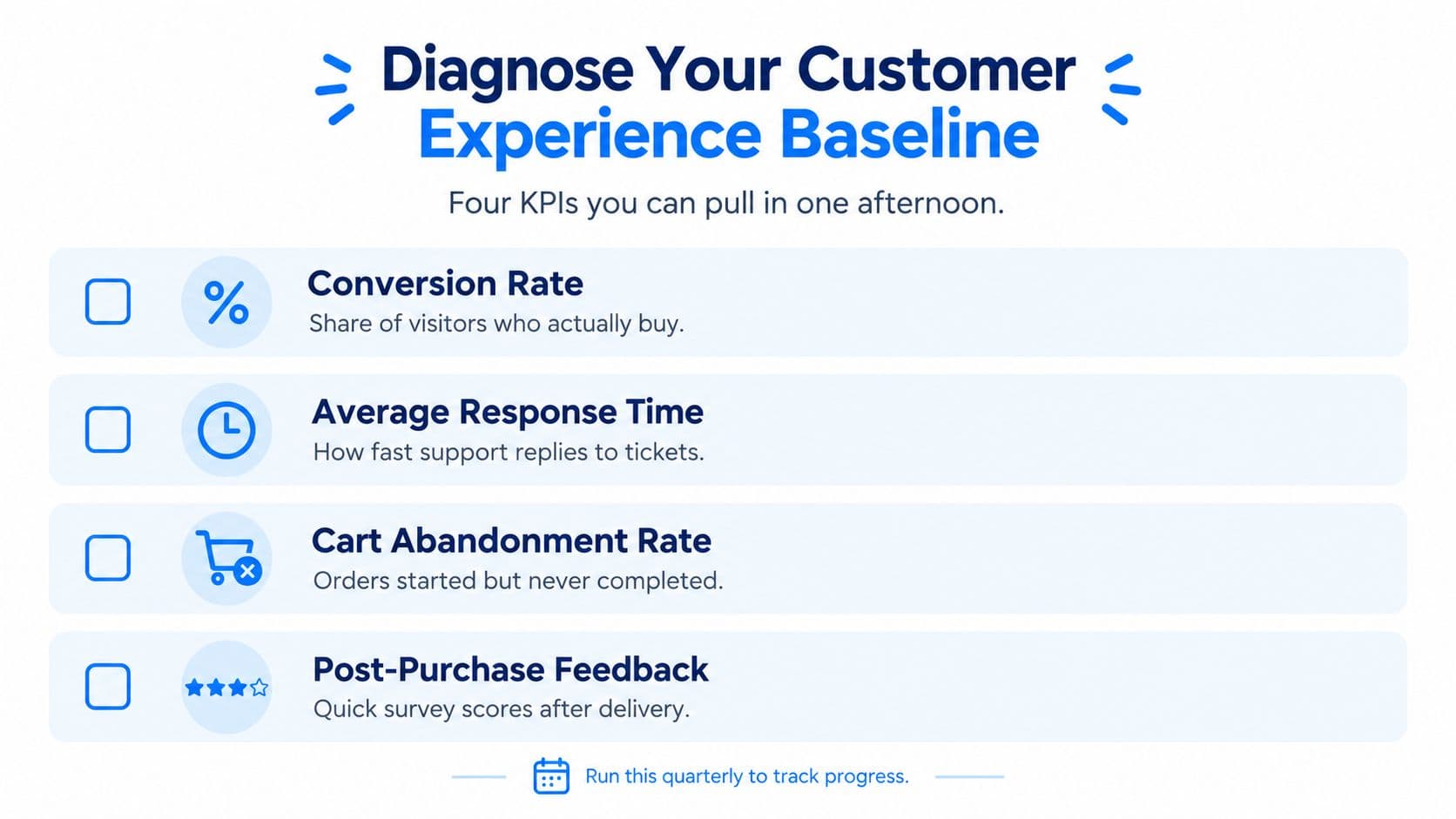
Pull the numbers you already have
Use Shopify Analytics, Shopify Inbox, and your helpdesk to establish a baseline for:
- Conversion rate, the share of visitors who place an order.
- Average response time, measured across live chat and support tickets.
- Cart abandonment rate, with separate views for device, traffic source, geography, and new versus returning shoppers.
- Repeat purchase rate, segmented by product category and first-order cohort.
Add average order value, refund rate, and support-contact rate if your reporting makes them accessible. These metrics show whether a change improves the store commercially, rather than making the support queue look healthier.
Tag the questions behind the metrics
Export the last 50 support conversations and tag each one with a simple intent taxonomy:
- Browse: product discovery, comparison, and availability.
- Product question: materials, dimensions, use cases, or compatibility.
- Sizing: fit, measurements, and exchanges.
- Checkout blocker: payment, shipping cost, discount, or form error.
- Order status: tracking, delivery timing, split shipments, or delays.
- Returns: eligibility, process, refund timing, and damaged goods.
Don't trust the loudest category automatically. A high-volume question from low-value orders may matter less than a quiet checkout failure affecting expensive products. Rank each issue by estimated revenue exposure, frequency, and effort to fix.
Walk the journey as a customer
Open your store on a phone and complete a purchase using a fresh session. Note where information disappears or effort increases.
| Journey stage | Friction to inspect | KPI affected |
|---|---|---|
| Product page | Missing sizing, compatibility, or delivery information | Product conversion, add-to-cart rate |
| Cart | Unclear shipping cost, weak reassurance, lost cart state | Cart-to-checkout rate |
| Checkout | Excess fields, payment errors, poor error recovery | Checkout completion |
| Delivery | Missing tracking or unclear expectations | WISMO contacts, CSAT |
| Returns | Confusing eligibility or manual steps | Refund contacts, repeat purchase rate |
Record the baseline date, segment definitions, and data sources. That snapshot becomes your control group. Without it, a new chatbot conversation count or higher email open rate can look impressive while conversion and retention remain unchanged.
Speed and Accuracy Wins You Can Ship This Week
The fastest CX improvements usually come from answering known questions better, not from adding elaborate automation.
Start with the five questions your team repeats most often. For many stores, those include delivery windows, sizing, returns, compatibility, and payment methods. Put concise answers on the relevant product or cart page, not only in a general help center. A shopper asking about a jacket's fit should see the sizing guidance beside the product, while a shopper hesitating in cart should see delivery and return information without starting a conversation.
Create saved replies for tracking links, return instructions, product specifications, and exchange rules. Give agents approved source text so they stop rewriting the same answer with small inconsistencies. Configure an AI FAQ or chat assistant to retrieve from the catalog and policy data, then display a clear path to a person when confidence is low.
Set a response-time target that your team can meet during staffed hours. Publish the expectation in Shopify Inbox or your helpdesk, then measure first response time and resolution quality together. Microsoft's research found that customers expect social-care responses within 24 hours or less, so silence beyond that window is a meaningful trust problem, not merely a queue-management issue.
The storefront itself also controls perceived speed. Audit mobile loading, image weight, app scripts, and layout shifts before buying another personalization tool. A practical Bruce and Eddy speed fix can help you identify performance work that belongs in the development backlog.
| Tactic | Target response time | Expected impact | Human handoff trigger |
|---|---|---|---|
| Product FAQ on product pages | Immediate | Fewer repetitive questions, stronger product confidence | The answer depends on an unusual use case |
| Saved replies for policies | Immediate for agents | More consistent answers and shorter handling time | Policy exception or disputed interpretation |
| Order-tracking link | Immediate after request | Fewer status contacts | Carrier scan is missing or delivery is late |
| Contextual cart assistance | Immediate when hesitation appears | Better checkout completion | Payment issue, complaint, or emotional interaction |
| AI answer retrieval | Immediate when confidence is high | Faster routine support | Missing source data or uncertain answer |
Use the Carti chatbot response time guide to think through response latency, escalation, and the difference between an instant reply and a useful resolution. Never let automation guess about product safety, delivery commitments, refunds, or legal rights. Speed is valuable only when the answer is accurate.
Personalization and Product Suggestions That Feel Helpful
Maya visits two Shopify stores for a skincare bundle. The first follows her with generic “You may also like” rows, repeats products she has viewed, and ignores the item in her cart. The second asks which concern she wants to address, recommends a compatible cleanser and moisturizer, and explains why the combination fits her selection.
The second store does not feel more personal because it collected more data. It feels useful because the recommendation answers the shopping question Maya already had. That distinction protects trust and gives you a measurable target: raise attach rate and average order value without increasing product-page exits.
Start with behavior, not assumptions
Build recommendations around the shopper's current intent:
- Product-page recommendations: Use the viewed product, category, compatibility, and complementary use case. Show a small set of relevant options, then track recommendation click-through rate and add-to-cart rate.
- Cart recommendations: Suggest an accessory, refill, or bundle that fits the existing cart. Do not push an unrelated high-margin product. Measure attach rate and average order value.
- Visitor-aware messaging: Adapt the message for a returning shopper, someone arriving from a product-specific campaign, or someone who has repeatedly viewed the same item. Compare conversion rate by audience rather than judging every visitor by one average.
- Conversational guidance: Ask one clarifying question before recommending. “Are you shopping for daily use or a special occasion?” gives an assistant useful direction without forcing the shopper through a long list. See this guide to personalized product recommendations for implementation patterns.

Keep bounce rate on pages with recommendation widgets as a guardrail. A widget that earns clicks but increases exits is distracting shoppers, not helping them. Review performance by device, traffic source, and product type so a strong storewide average does not hide a poor mobile experience.
Know when to stay quiet
Suppress recommendations when inventory is too low to support demand, an item has an unusually long lead time, or the catalog relationship is weak. A long-tail product may need explanation before cross-selling. Relevance matters more than the number of recommendation slots.
AI-generated interactions also need disclosure and control. Research summarized by Salesforce's commerce trends reports that 71% of customers want to know when they're talking to AI, while only 42% trust businesses to use AI ethically. The same source reports that 37% are concerned about unethical AI use. Tell shoppers when an assistant is automated, restrict answers to verified product and policy information, and provide a human handoff.
For practical rules without an unmanageable system, review Bazzly practical scaling personalization. Judge each suggestion by completed purchases, attach rate, and post-purchase regret, not interaction volume alone.
Cart Recovery That Rescues Real Revenue
Cart abandonment is normal, but treating every abandoned cart as permission to discount is expensive. Baymard's checkout research reports average cart abandonment of 70.19% and finds that large ecommerce sites may achieve an average 35% conversion increase from checkout UX improvements alone. The important implication is that recovery messages shouldn't compensate for a broken checkout.
Separate browse abandonment from true cart abandonment. A visitor who viewed a product hasn't demonstrated the same purchase intent as someone who added an item, entered an address, and stopped at payment. Use different messages, frequency caps, and success metrics.
Build the sequence around hesitation
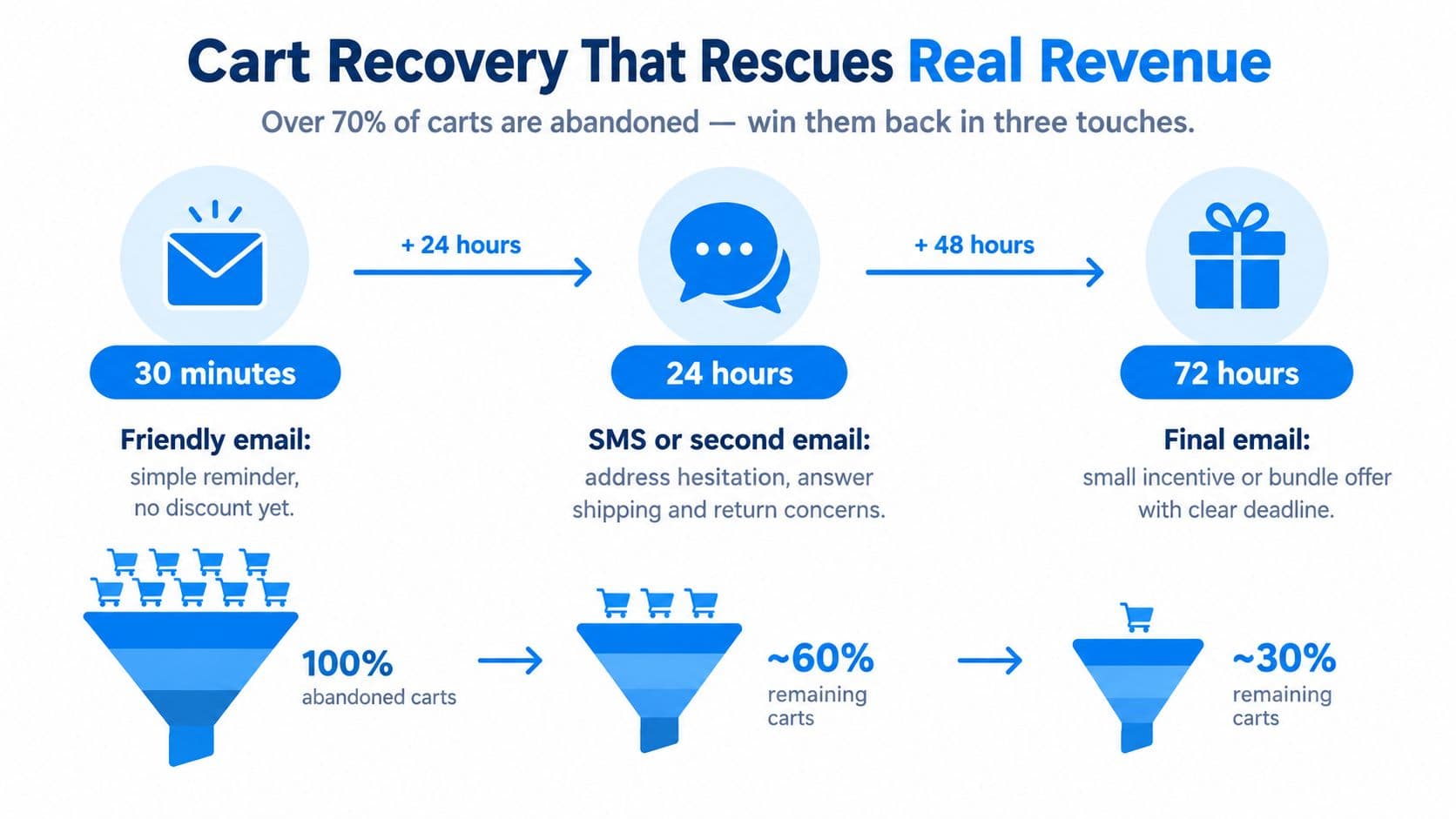
A practical sequence has three stages:
- First reminder: Show the exact cart items and return the shopper to the preserved cart. Don't lead with a discount. Remove uncertainty about delivery, returns, or product fit.
- Second message: Address the likely blocker. Use email, SMS, or push only where the shopper has consented. A shipping-threshold reminder can be useful if it reflects the store's actual offer.
- Final message: Use an incentive selectively. Reserve it for shoppers or carts where the margin can support it, and suppress the message when the customer has already returned or purchased.
Avoid sending the same offer through every channel. Suppress converted shoppers immediately, cap frequency, and measure incremental orders against organic return. A customer who came back without the message shouldn't be counted as recovered revenue.
Baymard's checkout research also identifies a usability problem behind abandonment. Its broader testing indicates that 65% of sites perform at mediocre or worse checkout UX, and that the average site has roughly 32 identifiable improvements. Fixing unnecessary fields, unclear shipping costs, unavailable payment options, and poor validation can outperform a larger recovery campaign.
Use recovered-cart conversion rate, revenue per recovery message, and incremental orders as the primary measures. Monitor discount cost, refund rate, and support contacts as guardrails. The full cart abandonment recovery guide can help structure the sequence, but the first question should always be why shoppers stopped.
Post-Purchase Operations as a CX Asset
Customers don't stop evaluating your store after payment. Delivery visibility, returns, exchanges, and exception handling determine whether the first order becomes a repeat purchase or a support dispute.
Start with a branded order-status experience. Include the carrier link, the latest scan, the promised delivery information, and a plain-language explanation of what happens next. Send proactive notifications when an order ships, changes status, splits into multiple packages, or encounters a delay. A customer shouldn't need to ask “where is my order?” to discover information your systems already have.
Automate policy, escalate judgment
Use automation for predictable cases. A low-risk exchange can follow a defined eligibility rule. A return request can start in a self-service portal. A tracking question can return the current carrier event without an agent copying information from another system.
Human agents should handle damaged items, lost deliveries, repeated delays, disputed eligibility, payment concerns, and customers who are clearly frustrated. Give those cases a visible escalation path and an internal response target. An accurate handoff is better than forcing a customer to restart the conversation.
| Touchpoint | Channel | Automation trigger | Escalation rule |
|---|---|---|---|
| Shipment confirmation | Email and order page | Fulfillment status changes to shipped | Tracking has no usable event or address needs correction |
| Delivery update | Email, SMS, or order page | Carrier status changes | Delivery exception or missed promise |
| Order status | Branded status page | Customer opens tracking link | No current carrier data or repeated contact |
| Return request | Self-service portal | Order meets return rules | Eligibility dispute, damaged item, or high-value order |
| Refund update | Email and helpdesk | Refund status changes | Payment delay, partial refund, or customer complaint |
Measure first-contact resolution, return completion effort, repeat purchase rate after the first order, and CSAT tied specifically to post-purchase interactions. Don't treat a low ticket count as success if customers are waiting without information. The FedEx 2025 ecommerce trends report identifies reliable delivery, proactive updates, proof of delivery, and frictionless returns as important parts of convenience and post-purchase experience.
The same report highlights a consistency gap across customer touchpoints. 75% of shoppers consider consistency across websites, apps, email, social, and stores important, but only 41% of brands deliver it. Keep order status, return rules, and support answers aligned wherever customers encounter them. A promise made in an ad must still make sense on the product page, at checkout, and after delivery.
Phased Plan, KPIs, and a Measurement Template
A CX program fails when the merchant launches five tools and can't identify which one changed behavior. Use a phased rollout, keep the baseline intact, and assign one owner to every metric.
Days 1 to 30
Fix the information and response problems customers encounter most often. Publish product, sizing, shipping, payment, and return answers in context. Create saved replies, define human escalation rules, and instrument checkout errors and session exits.
Review first response time, conversion rate, checkout completion, support-contact rate, and CSAT weekly. Don't optimize for chatbot conversations or FAQ views. Optimize for resolved intent and completed purchases without a rise in refunds or repeat contacts.
Days 31 to 60
Add behavior-based recommendations and a cart recovery sequence. Test product-page and cart suggestions against a holdout group, then compare recommendation click-through rate, attach rate, average order value, and page bounce rate. For recovery, separate browse from cart intent and compare incremental orders with organic return.
Change one major variable at a time. A new recommendation rule, a new message delay, and a new discount in the same test won't tell you what worked.
Days 61 to 90
Connect post-purchase communication to order status, returns, and delivery exceptions. Add a resolution survey after the issue is closed, not immediately after an automated acknowledgement. Review recurring questions and update product copy, policies, merchandising, and fulfillment workflows.
Use the following template as an operating document:
| KPI / action | Definition | Target | Data source | Owner |
|---|---|---|---|---|
| First response time | Time from customer message to first useful reply | Set a target your staffed team can sustain | Shopify Inbox or helpdesk | Support lead |
| Conversion rate | Orders divided by store sessions | Improve against the recorded baseline | Shopify Analytics | Growth owner |
| Checkout completion | Completed checkouts divided by initiated checkouts | Reduce diagnosed step failures | Shopify checkout data | Ecommerce manager |
| Recovery rate | Recovered carts divided by eligible abandoned carts | Measure incremental recovery, not clicks | Shopify, email, SMS platform | Lifecycle marketer |
| CSAT | Customer satisfaction after resolution | Track by intent and channel | Helpdesk or survey tool | CX lead |
| Repeat purchase rate | Customers who order again within the chosen cohort window | Improve by product and first-order cohort | Shopify customer reports | Retention owner |
| AI accuracy | Verified answers divided by reviewed AI answers | Keep incorrect answers below your internal risk threshold | Conversation review | Product or CX owner |
| Escalation quality | Human handoffs resolved without customer repetition | Improve resolution after transfer | Helpdesk and chat transcripts | Support lead |
Review the dashboard monthly with one question: did this change revenue, customer effort, or avoidable support demand? If not, pause it or remove it. Keep AI restricted to approved catalog and policy sources, show when customers are speaking with automation, and route uncertain, emotional, payment-related, or complaint conversations to people. The objective isn't maximum containment. It's a faster, more accurate path to a confident purchase and a healthy repeat relationship.
Carti gives Shopify merchants a 24/7 AI shopping assistant for product, sizing, shipping, return, and policy questions, plus relevant product suggestions and cart-recovery support. Visit Carti to add a no-code conversational layer, connect answers to your store information, and measure which shopper questions are blocking conversion.

Written by
Daniel AndersonFounder of Carti. 10+ years building ecommerce brands in apparel and supplements. Still runs a Shopify store and built Carti to help merchants convert more browsers into buyers.
Ready to boost your store's sales?
Install Carti in 5 minutes and let AI handle customer questions, recommend products, and close sales 24/7.
Start Free Trial14-day free trial