
A shopper lands on your ring collection after dinner, finds the perfect style, and pauses at the same question that stops thousands of jewelry purchases: “What size do I need?” Another visitor wants an anniversary gift, knows only that their partner wears silver, and needs the order to arrive before next week. If your store can't answer immediately, both shoppers have a reason to leave.
A jewelry store chatbot template gives your team a prepared first response for those moments. The useful version doesn't open with a vague “How can I help you today?” It identifies the buying obstacle, asks one sensible question, recommends an action, and knows when a person needs to take over. The ten flows below are built for sizing, gifting, metal sensitivity, care, order concerns, and personalized purchases, with copy you can adapt directly to a Shopify chatbot.
What a Jewelry Store Chatbot Template Actually Solves
A visitor types: “I need something for my sister. She likes silver and small earrings. Her birthday is next week.”
That message contains three buying clues, but it still leaves important gaps. You don't know the budget, whether she prefers studs or drops, or whether “silver” means sterling silver, a silver color, or just a cool-toned style. The first reply has to narrow the decision without turning the shopper into a form-filling exercise.
A useful response might be:
“I can help you narrow that down. What's your budget, and does she usually wear simple everyday earrings or something more noticeable?”
That reply does two jobs. It acknowledges the occasion and asks about the recipient's life, not an irrelevant list of product specifications. The next response should use the answers to present a small, reasoned selection, not send the shopper back into a large collection.
The first message earns the next message
Jewelry buyers repeat the same questions across product pages and support channels. They ask about ring sizing, metal composition, skin sensitivity, care, shipping, returns, engraving, certification, and whether a piece can be resized or remade. A template turns those repeated questions into structured paths, so the customer gets a useful answer even when the boutique team is busy or offline.
That matters because chat has become a mainstream retail interface. One 2026 industry summary reports that about 83% of ecommerce companies use a bot somewhere in the customer journey, while another reports that 76% of online retailers had implemented or planned chatbot integration in their customer experience strategies, as summarized by Venbit's ecommerce chatbot statistics. The same source set places retail and ecommerce at roughly 30% of chatbot market share, reinforcing that conversational support is now a normal retail capability rather than a novelty.
The template also gives you a practical way to focus limited staff time. The bot can answer routine questions immediately and route custom orders, high-value disputes, and ambiguous authenticity concerns to a human. That's especially important in jewelry, where one unresolved trust question can end a session.
Design for purchase friction, not chatbot activity
A chatbot conversation only matters if it helps a shopper decide. Put the strongest flows on product detail pages, carts, and checkout, then use the transcript to identify unanswered objections.
Jewelry has a cited ecommerce conversion baseline of roughly 0.9% to 1.5%, compared with 20% to 40% in-store, and cart abandonment is cited at around 80%, according to this jewelry ecommerce sales guide. Those figures point to a clear priority: answer the question that blocks the purchase before adding more promotional content.
Anatomy of a Jewelry Chatbot Template
Before writing messages, map the logic behind them. A reliable template has four layers: intent, trigger, response path, and handoff. Copy without that structure becomes a collection of disconnected FAQs.
Start with intents
Create an intent for each meaningful customer objective:
- Sizing: “How do I measure a ring?” or “Can I exchange this if it doesn't fit?”
- Materials and sensitivity: “Is this nickel-free?” or “What's the difference between plated and filled?”
- Gifting: “Can you wrap it?” or “Can I add a handwritten note?”
- Delivery: “Will it arrive before Friday?”
- Care: “Can I shower in this?”
- Order support: “Where's my package?”
- Custom work: “Can you engrave this?” or “Can you remake it?”
An intent classifier should recognize natural variations, including “ring measurement,” “size help,” “skin reaction,” “gift packaging,” and “delivery date.” Carti's NLP and chatbot guidance is useful background for thinking about synonyms, context, and conversational intent rather than matching one exact keyword.
Use triggers that reflect buying behavior
A ring product page can display a sizing prompt. A metal-sensitive shopper might receive a help option after opening the materials accordion. A shopper who starts checkout can see a delivery or returns prompt. For a store using Carti, conditions, quick replies, and Smart Suggestion blocks can create these paths without custom code.
Avoid showing the same greeting everywhere. “How can I help you today?” makes the shopper do all the work. Replace it with a page-specific prompt such as:
“Shopping for a ring? I can help with sizing, delivery, or metal details.”
Build fallbacks and handoffs
Every flow needs a recovery line. If the bot doesn't understand, it can say, “I want to make sure I give you the right answer. Are you asking about size, materials, delivery, or returns?” Give the customer buttons instead of requiring another open-ended explanation.
Human routing should be explicit. Send custom CAD requests, high-ticket disputes, unclear gemstone authenticity questions, and unusual warranty cases to an agent with the transcript attached. The bot should explain what happens next, collect the essential details, and preserve the shopper's momentum.
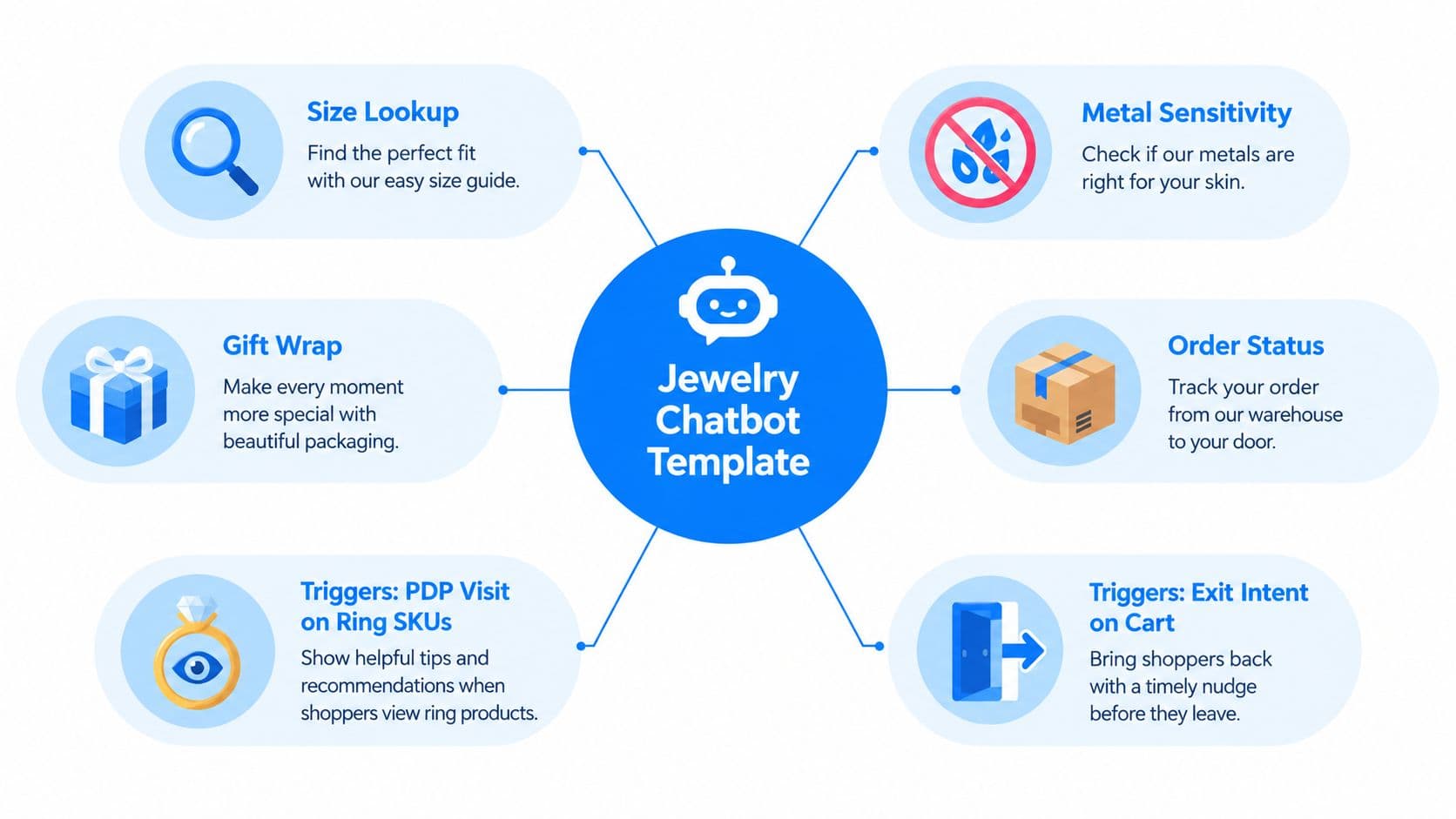
Ready-to-Paste Flows for Sizing, Sensitivity, and Care
Sizing, material, and care questions often decide whether a shopper buys or leaves. These flows keep the first reply short, then reveal one useful question at a time. Use quick replies wherever a customer can choose from known paths, and pass uncertain cases to a person instead of forcing a guess.
Flow 1, ring sizing from an existing ring
Trigger: Shopper clicks “Find my ring size” on a ring product page.
Bot: “Do you have a ring that already fits the intended finger?”
Quick replies: “Yes, I have one” | “No, I need another method”
Bot after “Yes”: “Place the ring over a ruler and measure the inside diameter from edge to edge. Do not measure the outside of the band. What diameter do you get?”
Quick replies: “I have the measurement” | “I'm not sure”
Bot: “Send the measurement in millimeters, and I'll help match it to the available size options. If you prefer a printable reference, open our ring-size chart.”
For bracelets and watch bands, use the ECI Jewelers watch sizing guide for a visual reference on measuring flat and avoiding outer-edge errors.
Fallback: “Measurements can be easy to misread. I can show the printable chart or connect you with a team member.”
A conversion chart should identify the sizing system it uses. Tiffany's official size guide lists US 7 as 54.4 mm circumference and 17.3 mm interior diameter, and US 9 as 59.5 mm circumference and 18.9 mm interior diameter. Show the shopper which country's sizing system applies rather than making them interpret the chart alone.
Flow 2, “I don't know her size”
Trigger: Shopper says the ring is a gift and does not know the recipient's size.
Bot: “That's common with gifts. Does she already wear a ring on the same finger?”
Quick replies: “Yes, I can borrow one” | “No, I can't”
Bot after “Yes”: “Trace the inside of the ring on paper or measure its inside diameter. Keep the ring flat and avoid measuring the band's outer edge.”
Bot after “No”: “I can show styles with an easier exchange process, or you can choose a non-sized gift such as earrings or a necklace. Which would help?”
Quick replies: “Show flexible options” | “Show earrings” | “Show necklaces”
Fallback: “I don't want to recommend a size based on a guess. Choose a flexible gift, or send the recipient's approximate hand measurement to our team.”
The useful upsell here is a lower-risk alternative, not a carousel of unrelated products. Earrings or necklaces solve the sizing problem while keeping the gift conversation active.
Flow 3, metal sensitivity
Trigger: Shopper opens materials information or asks about allergies.
Bot: “Have you reacted to a specific metal before?”
Quick replies: “Nickel” | “Unsure” | “Another metal”
Bot: “For sensitive skin, start by reviewing pieces made from materials commonly selected for hypoallergenic jewelry, such as titanium, platinum, or niobium. I can filter the catalog by material, but please check the product details and consult a medical professional for allergy concerns.”
Quick replies: “Filter the catalog” | “Explain plated metals” | “Talk to a person”
Fallback: “Material labels vary by product. I'll send the exact composition to a team member rather than make an assumption.”
Flow 4, gold-filled versus plated versus sterling
Trigger: Shopper asks about durability or composition.
Bot: “Gold-filled jewelry and gold-plated jewelry are constructed differently. Care requirements and product warranty terms depend on the item. Would you like the product's material details or care guidance?”
Quick replies: “Material details” | “Care guidance” | “Human help”
Keep this answer tied to the product being viewed. General material education is useful, but a shopper deciding between two specific pieces needs the exact composition and care instructions.
Flow 5, care and showering
Trigger: Shopper asks, “Can I shower in this?”
Bot: “For the safest care, remove jewelry before showering, swimming, exercising, or applying lotions and fragrance. Store it dry in a soft pouch, and use the cleaning method listed for that piece.”
Quick replies: “How should I clean it?” | “What does the warranty cover?” | “Show a cleaning kit”
Bot: “I can show the recommended cleaning option for this material. Warranty coverage varies, so I'll open the policy for this product.”
Fallback: “I need the exact material and warranty terms to answer accurately. Which product are you asking about?”
Ready-to-Paste Flows for Gifting and Personalized Pieces
Gift buyers want confidence more than an exhaustive catalog. They need the bot to reduce choices, explain why a product fits, and remove the fear of getting the size, delivery date, or return policy wrong.
Flow 6, anniversary and milestone gift finder
Trigger: Shopper uses “Find a gift” or lands on a gifting collection.
Bot: “What are you celebrating, and what budget should I stay within?”
Quick replies: “Anniversary” | “Birthday” | “Milestone” | “Under $200” | “Another budget”
Bot: “Does the recipient wear jewelry every day, or mainly for special occasions?”
Quick replies: “Everyday wear” | “Special occasions”
Bot: “I'll narrow this to pieces that fit the occasion and budget. Do you know whether they prefer silver-toned or gold-toned jewelry?”
Quick replies: “Silver-toned” | “Gold-toned” | “Not sure”
A complete gift conversation
Shopper: “I need an anniversary gift, under $200. She only wears silver.”
Assistant: “I can narrow that down. Does she wear jewelry every day, or mainly for occasions?”
Shopper: “Every day.”
Assistant: “Two in-stock sterling silver pieces fit that brief: the Minimal Bar Necklace, because it's subtle for daily wear, and the Open Circle Pendant, because it adds a little more shape without looking formal. Which style feels closer to her?”
Shopper: “The circle pendant. What if the size is wrong?”
Assistant: “This piece follows our exchange policy, so you can review the eligible exchange window before completing the order. I can open the policy or add the necklace to your cart.”
Shopper: “Add it.”
Assistant: “Done. Would you like gift wrapping and a gift note? Add your message in the gift-note field at checkout.”
The pattern is deliberate: one question about the recipient's life, two reasoned options, a direct answer to the exchange concern, and a clear next step. Don't make the shopper compare every product attribute alone.
Flow 7, gift wrap and handwritten card
Trigger: Shopper selects a gift product or says “gift.”
Bot: “Would you like gift wrapping, a handwritten card, or both?”
Quick replies: “Gift wrap” | “Handwritten card” | “Both” | “No, thanks”
Bot: “Add your recipient's name and message at checkout. I'll keep the packaging options with this order.”
Fallback: “Gift options vary by product. I'll confirm what's available for the piece you selected.”
Use personalization tokens carefully. A line such as “What would you like included for {{recipient_name}}?” feels more useful than repeating the product name.
Flow 8, estimated arrival
Trigger: Shopper asks about delivery or enters a gifting flow.
Bot: “What date does the gift need to arrive, and what delivery location should I check?”
Quick replies: “Enter a date” | “View shipping options” | “Talk to support”
Bot: “I'll check the product's processing time and available shipping method. Personalized pieces may follow a different timeline, so I won't promise an arrival date until the item details are confirmed.”
Fallback: “I can't confirm that date automatically. I'll collect the product, destination, and required arrival date for the team.”
Flow 9, returns and exchanges for gifts
Trigger: Shopper asks whether a gift can be returned or resized.
Bot: “I can explain the store's exchange and return terms for this product. Is it personalized, engraved, or standard stock?”
Quick replies: “Personalized” | “Engraved” | “Standard stock” | “I'm not sure”
Bot: “Personalized and engraved pieces may follow different eligibility rules. I'll show the relevant policy before you purchase, or connect you with a person for confirmation.”
Custom orders and high-value purchases should route to a human when the order needs an exception, a bespoke timeline, or a deposit discussion. A template should never invent certainty to keep the conversation automated.
Cart Recovery Flows and Context-Matched Complements
A recovery sequence should refer to the actual piece, not send a generic “You left something behind” message. Carti's recovery content can be structured around messages after 30 minutes, 24 hours, and 72 hours, with the final discount shown in the supplied creative as 10% off, using the code LOVE10. If your margins don't support an incentive, remove the discount rather than train shoppers to wait.
Message 1 after 30 minutes
Subject: “Your ring is waiting”
Preview: “Complete your purchase”
In-chat copy: “Still thinking it over? Your [product name] is still in your cart. Would you like help with sizing, materials, or delivery?”
Message 2 after 24 hours
Subject: “We saved your cart”
Preview: “Gift wrap option available”
In-chat copy: “Want to add a personal touch to your [product name]? I can show gift wrap, a note option, or the exchange information before you decide.”
Message 3 after 72 hours
Subject: “Last chance 10% off”
Preview: “Exclusive discount inside”
In-chat copy: “Your [product name] is still available. Use code LOVE10 if the offer applies to your order, or ask me about fit, care, or returns.”
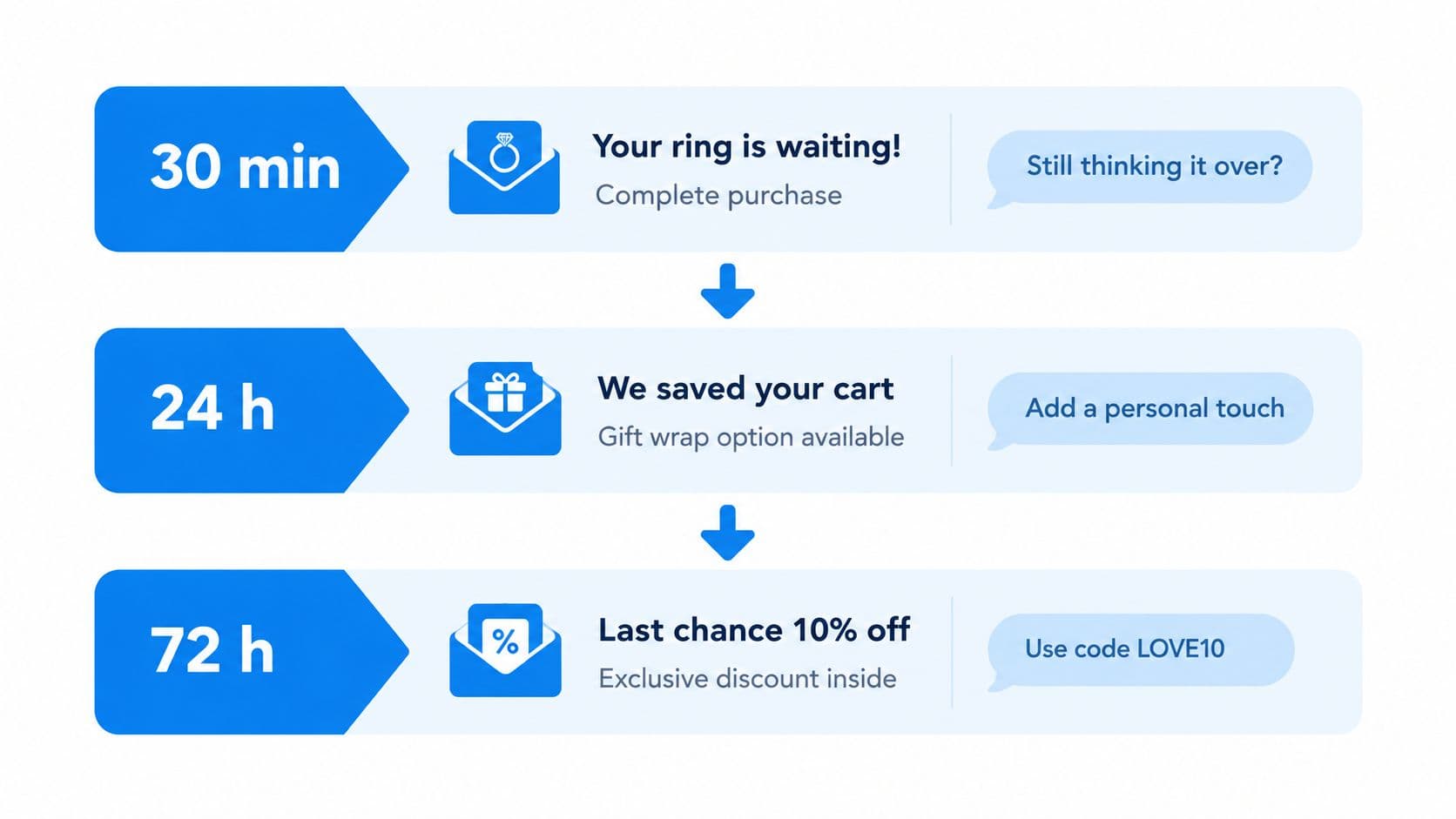
See Carti's cart abandonment recovery guidance for the broader logic behind timed nudges, but keep the jewelry copy tied to the shopper's objection.
Recommend one complement
There isn't a rule-builder in Carti for configuring elaborate upsell trees. That limitation is useful because jewelry complements work better when they follow the conversation naturally.
Use one complement per intent:
- Care question: suggest a cleaning kit or cloth.
- Pendant in cart: ask whether the shopper needs a matching chain.
- Gift flow: ask about a gift pouch or wrapping.
- Sterling silver concern: offer care guidance before offering an accessory.
Phrase the suggestion as a question about the situation. “Would you like the recommended cleaning kit for this finish?” is more relevant than a carousel of unrelated best sellers. Tag the parent product and pull one suitable complement, or at most a small set, based on the shopper's context.
Suppress recovery messages after the shopper engages with live chat. Once a person is actively discussing sizing or delivery, continuing automated reminders feels disconnected and can undermine trust.
KPIs to Track and How to A/B Test the Flows
Track assisted buying behavior, not chat volume. A busy widget can produce many conversations while failing to answer the questions that lead to checkout.
The most useful dashboard views cover five measures:
- Chat-to-cart rate: how often an engaged conversation leads to an item entering the cart.
- Assisted-session order value: whether guided sessions produce larger baskets than comparable unassisted sessions.
- Cart recovery rate: how often recovery conversations bring an abandoned shopper back to purchase.
- Sizing and care deflection: how many routine questions receive a complete answer without staff intervention.
- First-response time: how quickly shoppers receive an answer during staffed hours.
Carti's published outcome figures state that engaged shoppers convert at roughly 3.5 times store baseline and that Carti stores see about 20% higher revenue per visitor, with the stated basis being published Carti outcomes rather than a jewelry-only study. Those figures should be treated as directional context, not a promise for an individual store. Jewelry is a strong candidate for guided conversations because purchases are emotional, gift-driven, and often blocked by sizing uncertainty, especially during evening browsing and gifting periods when a boutique may not have chat staff available.
A practical testing table
| KPI | Benchmark Range | Revision Threshold |
|---|---|---|
| Chat-to-cart rate | Use your store baseline and compare assisted sessions | Revise the opening when shoppers engage but rarely view or add a product |
| Assisted-session order value | Compare assisted and unassisted sessions | Review complements when guided baskets stay flat |
| Cart recovery rate | Compare each timed message | Remove or rewrite a message when it earns attention without recovery |
| Sizing and care deflection | Track resolved conversations and handoffs | Expand product data when the same question repeatedly reaches staff |
| First-response time | Compare staffed and unstaffed periods | Escalate routing when shoppers wait for questions the bot should answer |
Set up the event names before launch. Carti's chatbot analytics resource can help organize the dashboard around conversations, recommendations, recovery, and unresolved questions.
Run one clean experiment
Use a two-week test cycle. Pick one flow and change one variable, such as the opening line, the order of quick replies, or when the product suggestion appears. Split comparable traffic, review the result at 95% confidence, and only then move to the next variable.
Don't test the greeting, product cards, incentive, and handoff together. You won't know which change affected the result, and jewelry traffic often shifts with gifting intent. A smaller, controlled test produces a decision you can reuse.
Launch Checklist and What Templates Cannot Handle Alone
Run the bot through the same buying situations your staff handles every day. A polished demo can still fail when a shopper types an unexpected material name or asks for a custom deadline.
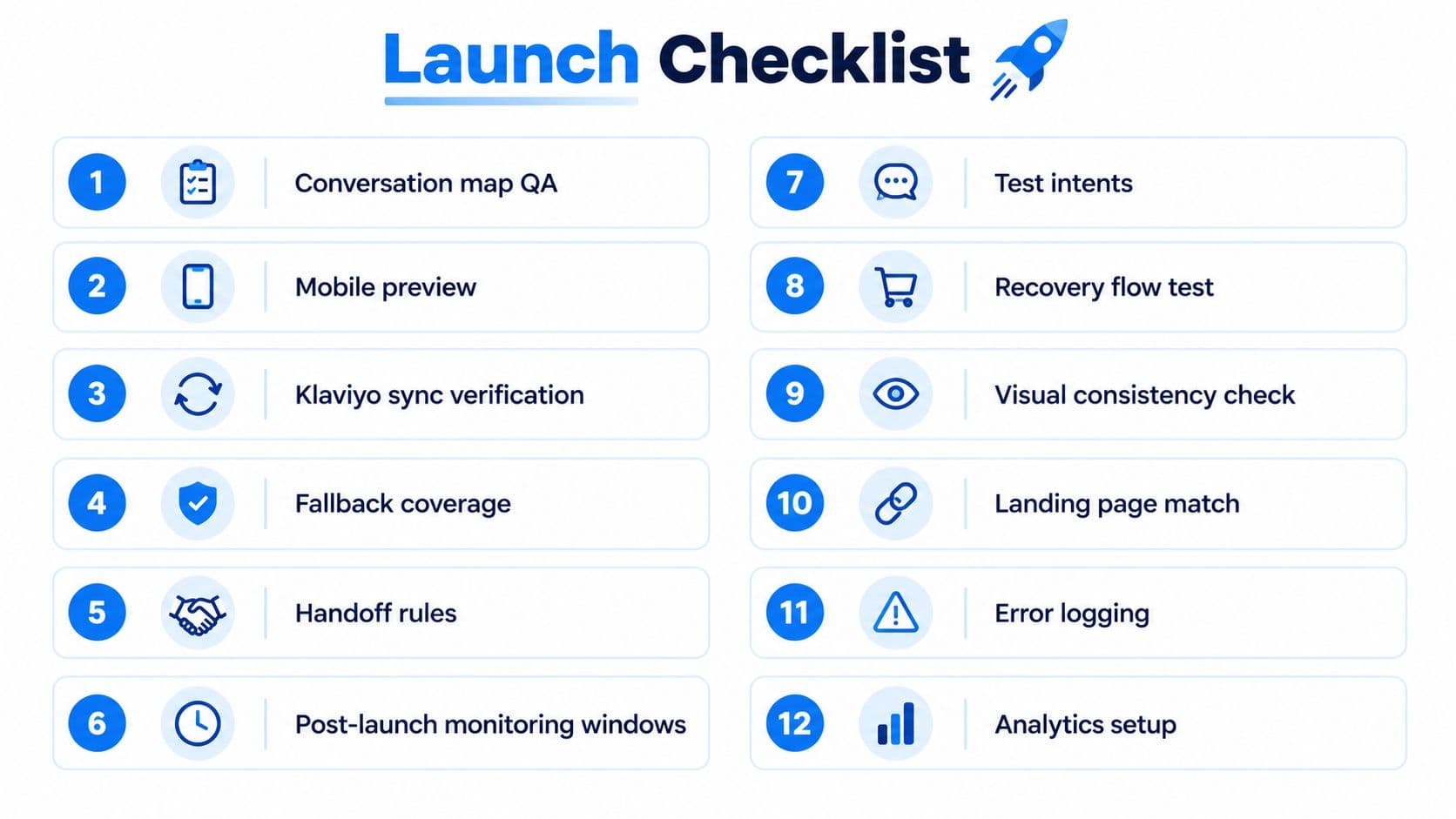
Twelve checks before publishing
- Conversation map QA: Test every intent from the first message to the final action.
- Mobile preview: Check buttons, product cards, and policy links on a small screen.
- Klaviyo sync verification: Confirm that permitted events and customer fields pass correctly.
- Fallback coverage: Try misspellings, vague questions, and mixed intents.
- Handoff rules: Assign owners for custom, high-value, and sensitive cases.
- Post-launch monitoring windows: Schedule reviews for staffed and after-hours traffic.
- Test intents: Ask about size, metals, care, delivery, returns, and engraving.
- Recovery flow test: Abandon a cart and verify each message and suppression rule.
- Visual consistency check: Match the store's tone, colors, and product photography.
- Landing page match: Make sure every recommendation leads to the correct product or collection.
- Error logging: Record failed retrievals, broken links, and unanswered questions.
- Analytics setup: Confirm chat, cart, recommendation, handoff, and purchase events.
Templates consistently need help with four situations. Bespoke CAD timelines require a design review and production confirmation. Live diamond inspection requests need a person who can provide accurate visual or appointment support. In-store appointments outside business hours should collect the preferred date and service, then confirm asynchronously. B2B wholesale inquiries need a dedicated form for quantities, terms, and account details.
Questions the bot should route carefully
How long does engraving take? Show the store's current production window for the exact item, then route exceptions to staff.
Is there a deposit for a custom order? Display the approved policy, but send unusual payment arrangements to a human.
Can I resize it after purchase? Explain the product-specific rule and eligible window. Don't guarantee an outcome without checking the order.
A template earns trust by knowing its limits. Give shoppers a clear next step instead of forcing automation through a question it can't verify.
Carti provides no-code Shopify chatbot tools for instant answers, product suggestions, cart recovery, and insight into recurring customer questions. If you're ready to turn these jewelry flows into an after-hours sales and support layer, visit Carti, connect your catalog and policies, and test the sizing and gifting paths on your highest-intent product pages first.

Written by
Daniel AndersonFounder of Carti. 10+ years building ecommerce brands in apparel and supplements. Still runs a Shopify store and built Carti to help merchants convert more browsers into buyers.
Ready to boost your store's sales?
Install Carti in 5 minutes and let AI handle customer questions, recommend products, and close sales 24/7.
Start Free Trial14-day free trial