
Your best-selling jacket hits zero in medium on a Tuesday. The product page still pulls traffic from the ad set you launched the week before, so shoppers keep landing on a grey line that reads "Sorry, out of stock" and nothing else. Baymard Institute's usability research on handling out-of-stock products found that 30% of shoppers shown a simple out-of-stock message are likely to abandon the site for another retailer.
That grey line is a decision point, not a notice. The shopper has three questions in the space of two seconds. Can I still get this? If not, what else works? When does it come back? A page that answers none of them hands the sale to whoever answers first.
The stores that recover these visits don't write better apologies. They match the message to the stock state, then give one obvious next action, and they measure whether it worked.
Pick the Right Message for Each Stock State
In 2024, 23% of omnichannel grocery shoppers said they would search elsewhere online when items were out of stock, according to 84.51°'s Consumer Digest: Omnichannel Trends report. Roughly one in four leaves before the page finishes loading its apology.
Five stock states exist on a Shopify store, and each one needs a different sentence. Here's the message, the primary action and the fallback for every state.
| Stock state | Message to show | Primary action | Fallback |
|---|---|---|---|
| Low stock, still sellable | Only 3 left in size M | Add to cart | Show the delivery estimate |
| Temporarily out, restock date confirmed | Back on 14 March, order now to reserve | Backorder with availability date | Restock alert for other variants |
| Temporarily out, date uncertain | Out of stock, restock date not yet confirmed | Restock alert with channel choice | Ranked alternatives by size and price |
| Preorder open | Preorder now, ships 14 March | Preorder with availability date | Email when it ships |
| Discontinued | No longer available | Remove the buy button | Closest replacement by use case |
Low stock, still sellable. If three units of a medium remain, print the number. A live count in the variant picker does more work than any urgency badge, and it keeps add to cart exactly where it is. Follow it with the delivery estimate so the shopper knows the item still lands on time.
Temporarily out with a confirmed date. A purchase order with a supplier confirmation gives you a real date, and a real date lets the shopper order against it. State the date in the message and keep the backorder button live. Stores usually bury this option because it feels risky. It is far less risky than sending the shopper to a competitor over a two-week wait.
Temporarily out with an uncertain date. Say the date isn't confirmed. That sentence costs nothing and stops the shopper from assuming the worst. Then offer the restock alert with a channel choice and put two or three ranked alternatives directly under the button.
Where preorder and discontinued copy diverge
A preorder message names the ship date and keeps the purchase path visible, because the shopper is buying a promise with a schedule attached. Discontinued is the opposite. Remove the buy button, say the item is no longer made, and route the visitor to the closest replacement by use case rather than to the bestseller chart.
Write to the state, not the emotion: one fact, one item name, one next action in the same sentence. A shopper who can see the next step doesn't need an apology paragraph above it.
Every row above has a single primary action you can paste into a product template this week. The preorder and backorder rows depend on one Shopify checkbox, which takes a minute to set.
Alternatives, Preorders and Restock Alerts That Keep Intent
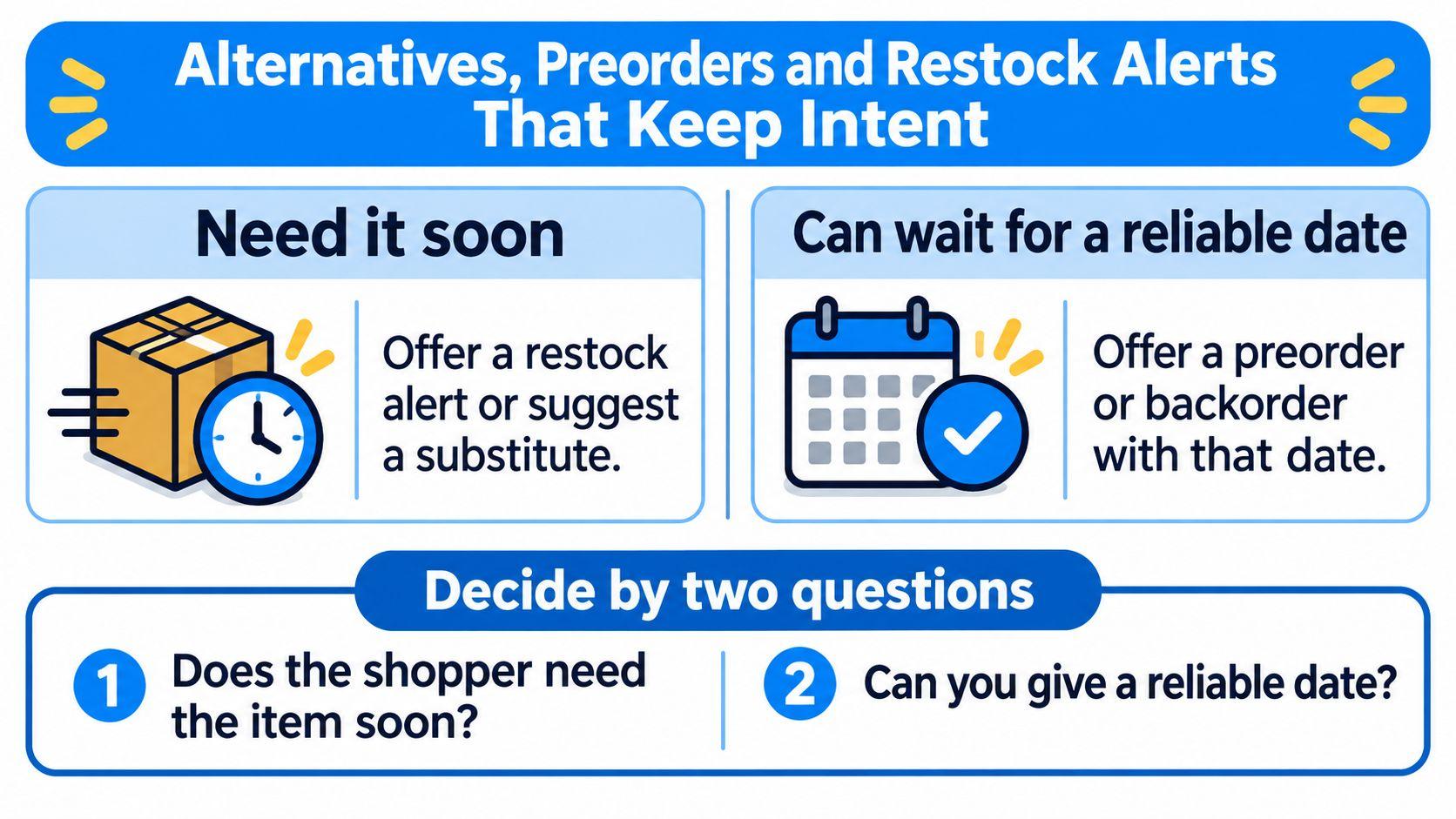
Two questions decide the message. Does the shopper need the item soon? Can you give a reliable date? Answer both and the choice between a preorder, a substitute and an alert stops being a matter of taste.
| Action | Use when | Watch for |
|---|---|---|
| Preorder or backorder | Restock date is reliable and the shopper can wait | Show the availability date, never a guessed one |
| Ranked alternative | Shopper needs the item soon and a close match exists | Rank by size, fit or compatibility before price |
| Restock alert | Nothing comparable and the date is uncertain | Let the shopper pick email or SMS |
| No substitute offered | Fit-critical apparel or a specific compatibility requirement | A wrong substitute creates a return, not a sale |
In 2024, 36% of consumers said they would order an out-of-stock product online from the same retailer, 34% would order it online from a different retailer, and 31% would look for it at another physical retailer, according to AlixPartners. The first group is the one a well-built message keeps, provided you give them a way to buy from you.
Rank alternatives by hard constraints first. Size and fit for apparel. Compatibility for electronics and parts. Ingredients for consumables. Dimensions for furniture. Price and brand break ties, they don't set the order. A bestseller that fails the one constraint the shopper cares about is noise, and noise makes the page look automated.
The decision tree below reduces the section to one branch point.
If you want to see how a recommendation layer can pull genuine substitutes from a live catalog instead of a hand-built list, the guide to product recommendations in ecommerce walks through the ranking logic.
The rule of thumb: if you can't name a reliable date or a close match, offer the restock alert. An alert keeps the shopper on your list. A bad substitute loses the sale and adds a return, which costs more than the sale was worth.
How to Build a Recovery Message in Four Steps
A shopper opens a product page, selects a size, and finds it unavailable. A bare banner ends the visit; a recovery message gives that shopper a clear next move, whether the exact item is returning or a suitable alternative exists.
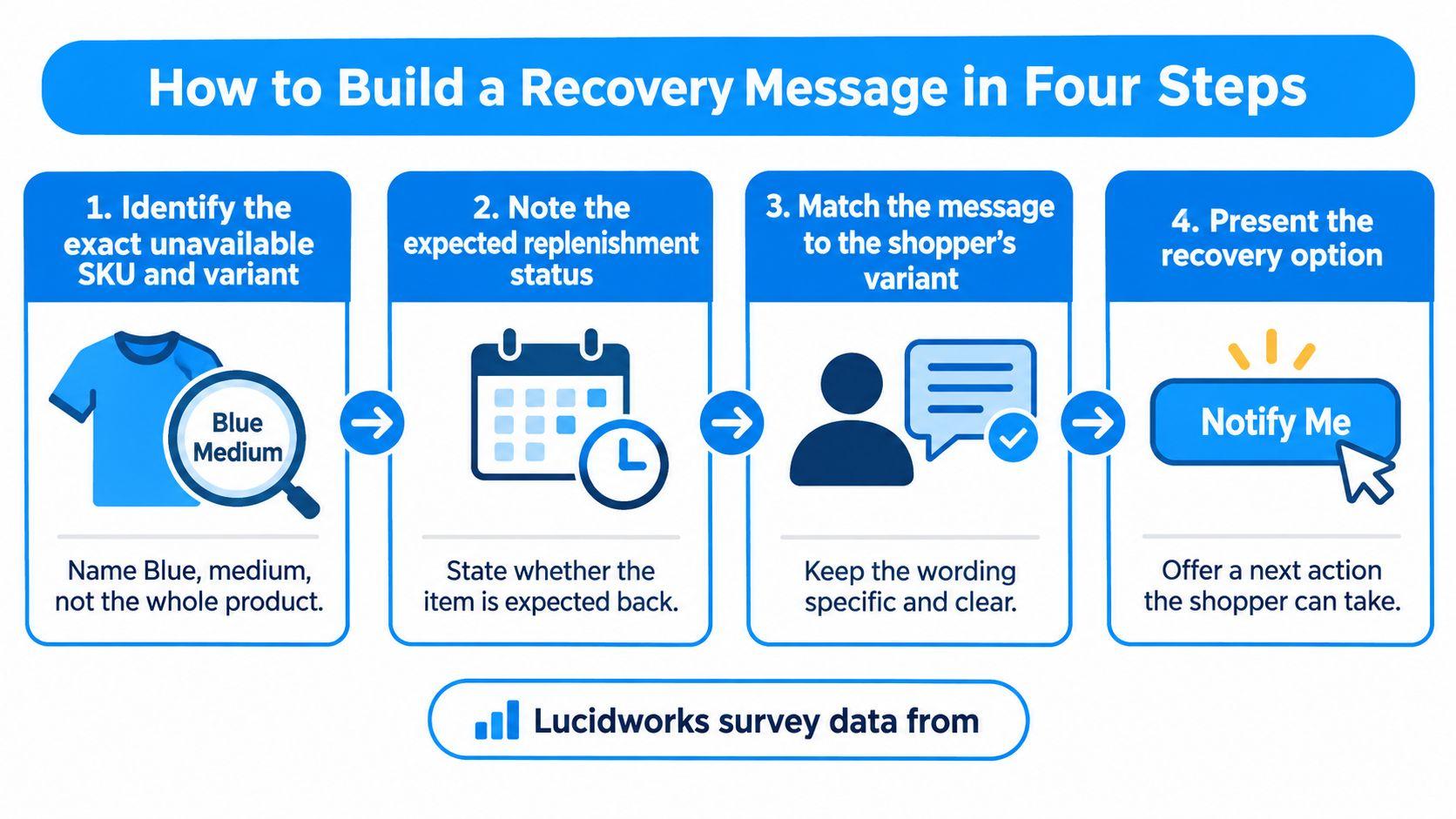
- Name the exact variant. If Blue, medium is unavailable, say so. A precise message confirms which choice is affected and prevents shoppers from checking other colorways to find out.
- State the replenishment status. Say whether the item is expected back on a known date, expected back without a confirmed date, or not returning. Each status calls for a different next step, such as waiting for an alert or choosing an alternative.
- Offer one to three suitable substitutes. Rank them by the constraints that matter for the product, such as fit, compatibility, or use. Use price and brand to break ties. A bestseller that fails a shopper's key requirement is more likely to frustrate than recover the sale.
- Make the follow-up choice clear. Let shoppers opt in to a restock alert by email or SMS, rather than leaving them with a generic notification button. The choice preserves their intent and gives them a direct route back when the item is available.
Lucidworks survey data from 800 U.S. and U.K. online grocery shoppers, reported by Progressive Grocer, found that 58% frequently or almost always encountered an unavailable preferred item. Only 28% said sites consistently recommended alternatives, while 11% rarely saw substitutes and often reached a no-results page. The same research found that fewer than one-third of shoppers stay on the same site or app to find a replacement.
A message should make the next action obvious. Without one, shoppers may leave to solve the same problem elsewhere.
When substituting does more harm than good
Many grocery shoppers name at least one product category where they will not accept a substitute. A fit-critical dress or a part with a compatibility requirement belongs in the alert column, not the alternatives column.
Before you publish: Cover the product name and read the message alone. If it does not explain what happened and what the shopper can do next, it is only a notice.
Track substitute clicks, alert signups, post-restock clicks, and purchases within the same attribution window. Compare those results with a bare notice for the same category. That comparison shows whether the recovery flow is helping shoppers continue toward a purchase.
Where Stock Status Must Appear, Channel by Channel
Shoppers decide whether to keep browsing long before the product page loads. Status on the collection card and in search results does more for conversion than a beautifully written message two clicks later.
Most of those checks happen on a phone, mid-scroll, with one thumb.
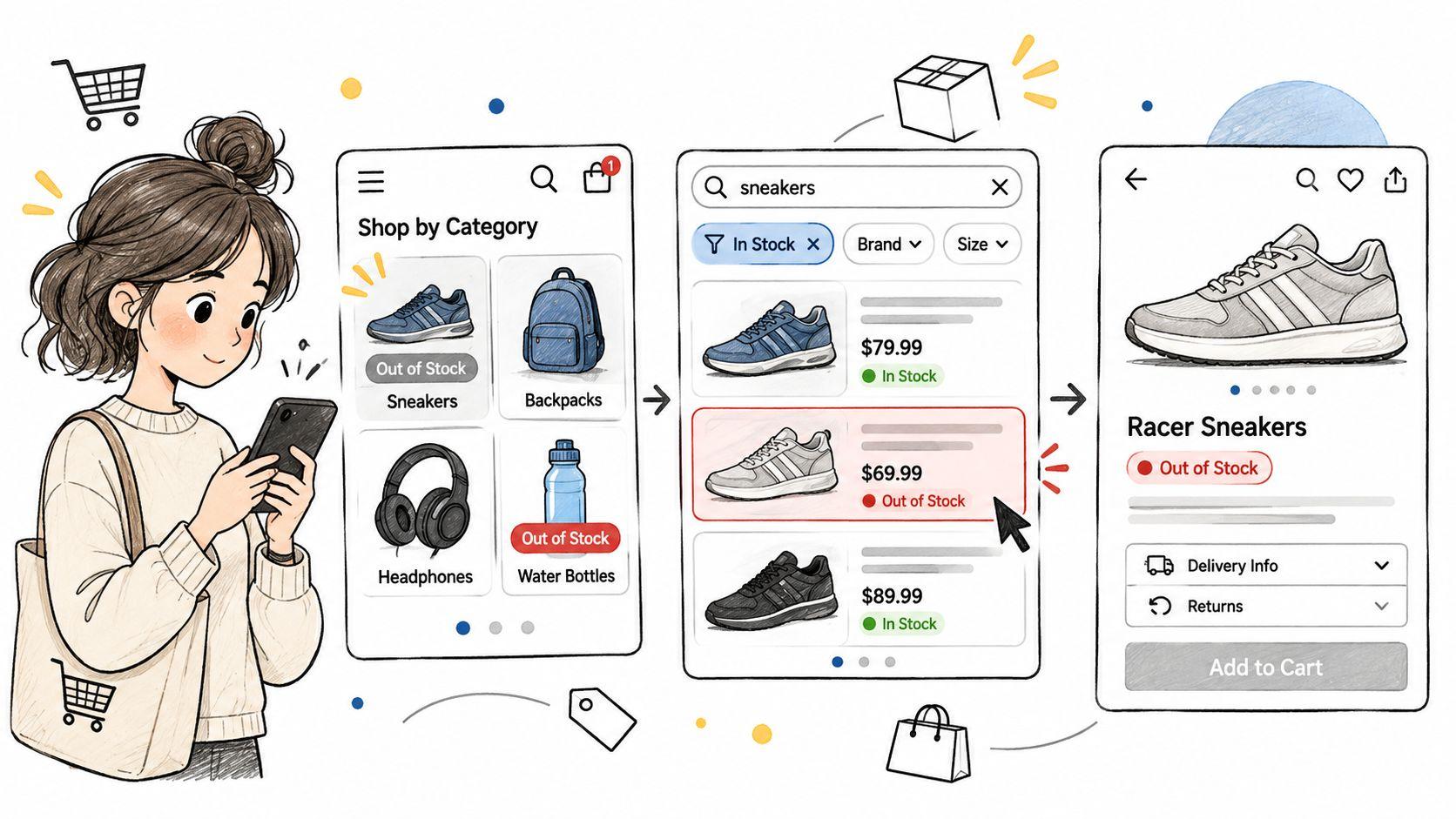
Search and collection listings. Show available, low stock or out of stock on the card itself, and preserve the shopper's filters on the click through. Sending someone who filtered for size M to a page that resets the filter is a second stockout in disguise.
Product page. Name the state, the restock timing and the variant-level count. Add a quantity limit when stock drops below the threshold you set for overselling risk, and keep the message within one screen of the buy button instead of in a collapsed tab.
Cart and checkout. Flag an unavailable line before payment, not at the payment step. A warning that arrives after card entry reads as bait and switch, and it produces chargebacks rather than patience.
Instagram and Messenger. Stale answers do the most damage here. When a shopper asks whether the black is available in a 38, the reply should carry current stock and the time it was checked.
Baymard's guideline on showing that items are out of stock makes the underlying point. Shoppers need inventory and shipping information to judge whether a purchase meets their requirements, and hiding it creates unnecessary delay.
The rule that keeps channels honest
One inventory source feeds every channel. Google Merchant Center requires availability in the feed to match the landing page and the checkout page, as set out in Google's availability requirements, so a page that says in stock while the feed says out of stock breaks the listing. Google also advises using the out of stock status rather than deleting a product that will be unavailable for longer than 14 days, and using backorder or preorder with an availability date when orders are still being accepted, per Google's availability status guidance.
Audit one sold-out product across every surface this week:
- Search and collections: does the card show the state before the click?
- Product page, cart, email and saved alert: do all four agree on the date?
- DM reply: does it include the time the stock was checked?
Automate Restock Follow-Ups in Email, SMS and Chat
Each stock state needs one automated flow, not a menu of them. A restock alert email goes out when the inventory count rises above zero, tied to the specific variant the shopper asked about. An SMS flow goes only to shoppers who opted in to text, because texting a restock notice to someone who handed over an email address is a compliance problem and a bad experience at the same time.
Shopify's inventory setup guidance points merchants to an app that lets shoppers opt in to an email notification once inventory is added, and it notes that the default Stop selling when out of stock setting prevents customers from adding an item to the cart, which helps prevent overselling and disappointment. That default is why the alert matters. The shopper can't buy, so the alert is the only purchase path left open.
Write the opt-in copy as a specific promise rather than a generic one. Text me when the medium Blue jacket is back. Channel and item, nothing else.
Suppression rules come before trust. A shopper who buys the item through another route should stop receiving alerts, and every marketing email needs a working unsubscribe link at the bottom.
A chat assistant that reads live inventory can answer the restock question on the spot. Carti checks stock by size and color before it answers, and when it can't answer confidently it emails the store's team so the question doesn't vanish. It never sends what shoppers type to Klaviyo. For the wider automation map, see this guide to automated customer engagement.
Four checks before you call the flow finished:
- Map the state to one flow, so nothing sends twice.
- Write the opt-in with the channel and the exact variant.
- Set suppression on purchase and on unsubscribe.
- Send a test to yourself, add stock to a test product, and confirm the alert arrives.
Measure Which Message Recovers Sales
| Metric | What it tells you | Read it after |
|---|---|---|
| Substitute click rate | Whether shoppers take the ranked alternative | 14 days |
| Alert opt-in rate | Share of stockout visitors who join a restock channel | 14 days |
| Post-restock click rate | Whether alerts bring shoppers back | 2 days after restock |
| Purchases within attribution window | Sales recovered from the stockout | 14 days |
| Revenue per stockout session | Value of each stockout visit | 30 days |
| Abandonment on out-of-stock pages | Whether shoppers leave for a competitor | 30 days |
Run the comparison on one category at a time. A bare unavailability notice against a notice with ranked alternatives, over the same period, with traffic split evenly. Keep it to that single change, because a redesign and a message rewrite running together tells you nothing about either.
Read each number after its window
Judging a restock alert on day two measures your email deliverability, not the message. An early dip in revenue per stockout session often reverses by week three, once alerts mature and backorders ship.
The one metric that changes decisions fastest is revenue per stockout session. It puts a value on a page most stores treat as a dead end, and it makes the business case for the alternatives block in a single line. Abandonment on those pages is the canary, because a rise there usually means the message promised something the checkout couldn't deliver.
For how these figures roll into a wider stock metric, this explanation of stock out rate shows the formula and where each input comes from.
Set Up Shopify and Test One Message This Week
Shopify treats a product as out of stock when inventory tracking is enabled and the count sits at zero or below, and by default customers can't buy it until the count goes up, per Shopify's guide to selling when out of stock. Ticking Continue selling when out of stock on a product or variant overrides that, which is what makes a preorder or backorder message truthful. The setting applies to online orders. It doesn't apply to Shopify POS orders, where staff can keep selling after inventory hits zero and receive a warning before completing the sale.
The full sequence, from admin setting to measured result, fits in one pass.
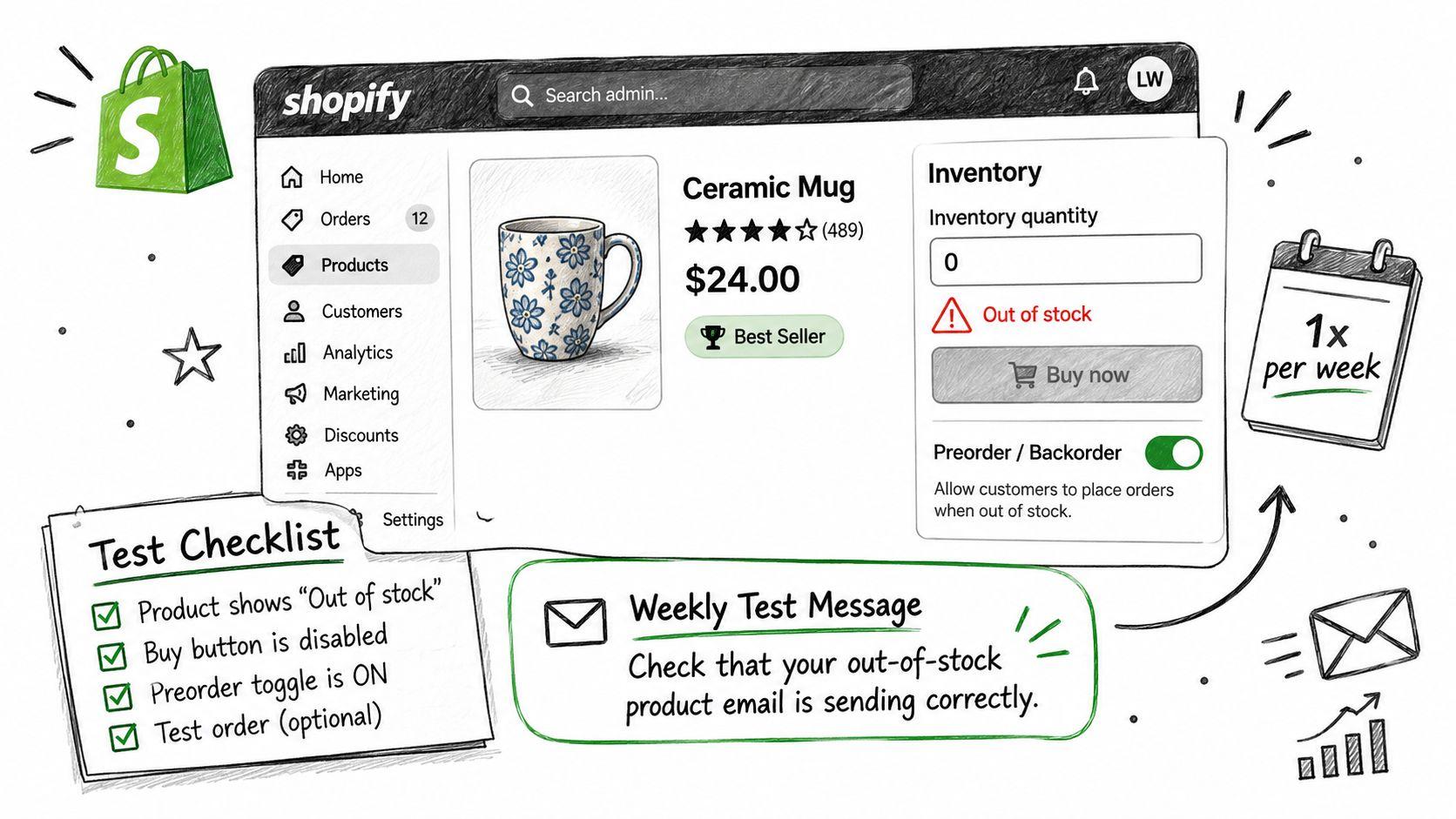
Pick the product with the highest revenue and the most frequent stockouts. Then:
- Set the state. Turn inventory tracking on, set the count, and decide whether this product can oversell.
- Write the message. Take the row from the first table that matches the state and edit the item name into it.
- Wire the recovery. Add the restock alert and two ranked alternatives to that product template.
- Read the numbers. Come back after 14 days and compare against the bare notice you ran before.
One product, one state, one message, measured for two weeks. Change nothing else on that page while the test runs, and record the result before you touch the next section of the store.
Carti handles the question a stockout page can't, using live inventory by size and color so a shopper asking whether the medium is coming back gets a real answer instead of a dead end. It recommends in-stock alternatives inside the same conversation and passes anything it can't answer to your team by email, which keeps the shopper talking to you rather than to a competitor. You can watch it work in a live demo store before you switch it on at Carti.

Written by
Daniel AndersonFounder of Carti. 10+ years building ecommerce brands in apparel and supplements. Still runs a Shopify store and built Carti to help merchants convert more browsers into buyers.